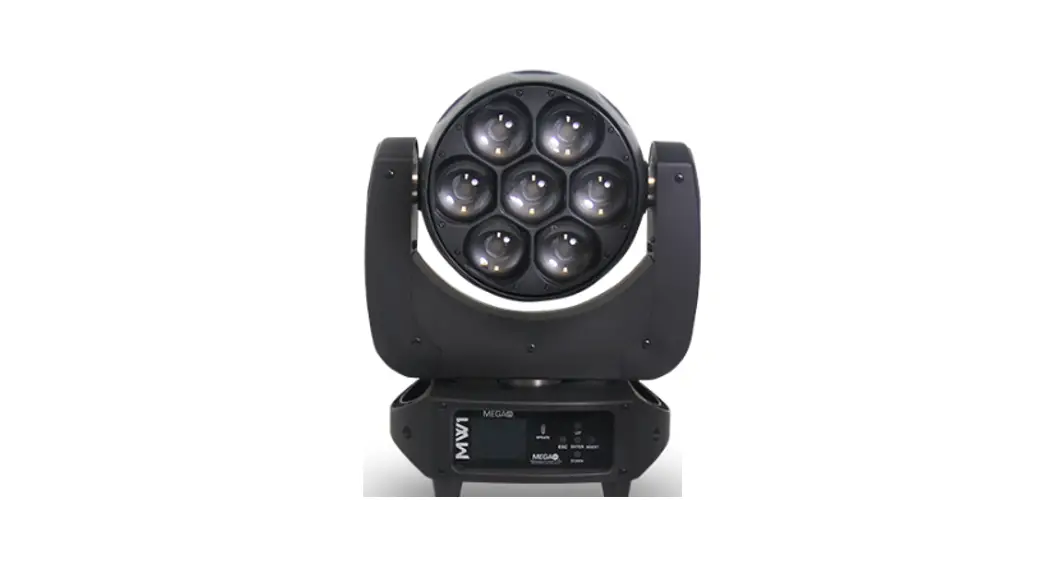
 LITE N-E PIXSTRIP H216 LED Fixture Light
  USER MANUAL
N-E PIXSTRIP H216 LED Fixture Light
Check that the unit has not been damaged during transport Read all cautions and warnings prior to operation of this equipment
Protection Against Fire
- Maintain a minimum of 2 foot distance from any type of flame.
- For indoor use only do not expose unit to rain or moisture.
- Replace fuse only with the specified type and rating.
- Do not install the unit to close to a heat source.
- Make sure cable are properly secured
- Maximum surface operating temperature 120ºF.
Protection Against Electrical Fire
- Disconnect power before servicing.
- For connection to main power supply proceed to page 4.
- This unit must be earthed. (electronically grounded)
- This fixture must not be left on for long periods of time.
- Prolonged exposure to UV light will discolor and damage the diffusion filter.
Protection Against Mechanical Hazards
- Use secondary safety chain when hanging unit.
- Use quality clamps or bolts when positioning unit
- Do not open unit while it is on, risk of electrical shock.
What is Included
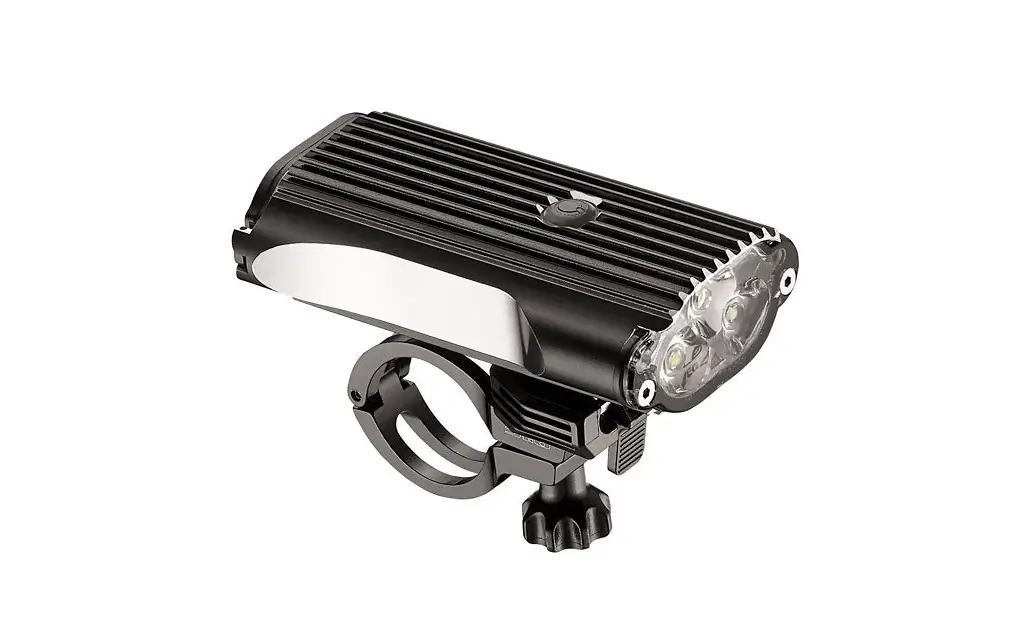
1pc N-E Pixstrip H216 Fixture
1pc Power Conn Type to Nema 5-15 Cable
1pc 10M Eye Bolt for Safety Connection
1pc Diffusion Filter with Mounting Thumb Screws
1pc User Manual
Specifications
Part Numbers
| Fixture 4055-N-E Pixstrip H216 | Road Case CAS-4055-4 Unit Road Case |
Specifications
| LED: | Qty 18 12Watt LED |
| LED Color: | Red, Green, Blue, White, Amber, UV |
| Lumen Output: | 5490lm All Emitters |
| DMX Connectors: | Panel Mounted 3 & 5-pin XLR connectors in/out |
| Power Connections: | Panel Mounted Seetronic Power in/out connection (Nema 5-15 Male to Seetronic power Female cable included) |
| Lens Angle: | 27° |
| Diffusion Angle: | 105° |
| Power Input: | 90 – 264V 50/60 Hz |
| Power Consumption: | Watts: 126W Amps: 1.5A @ 110V |
| Pixel Control: | 18 Pixel Control |
| Thermal: | Maximum ambient temperature 98°f Maximum surface temperature 120°f Thermal Shut Off Protection |
| Display: | LED Display |
Control & Programming
| Protocol: | DMX 512 |
| RDM: | No |
| DMX Channels: | 3 Mode of Operation Mode 6 CH: Red, Green, Blue, White, Amber Mode 17 CH: Dimmer, Strobe, R,G,B,W,A,UV, Macro, Macro Speed, Back-ground Red, Back-ground Green, Back ground Blue, Back-ground White, Back-ground Amber, Back Ground UV, Macro Direction Mode 108 CH: 18 X R,G,B,W,A,UV |
| Operating Mode: | Stand alone 255 step dimmer setting via display Auto preprogram via display |
Main Power Connection
Caution!
- Do not connect fixture to a dimmer system.
- This unit has Auto switching power supply. It will respond to 110V or 240V automatically
- This unit must be earthed. (electronically grounded)
- Power Link 10 units max at 110V and 20 units at 220V
The occupation of the connection-cable is as follows:
This fixture is equipped with an electronic power supply that will let the unit operate from 90V to 264V from 50Hz to 60Hz
| Cable (USA) | Cable (EU) | Pin | 110V | 220V |
| Black | Brown | Live | L | L |
| White | Light Blue | Neutral | N | L |
| Green | Yellow/Green | Ground |  | |
DMX-512 Connection
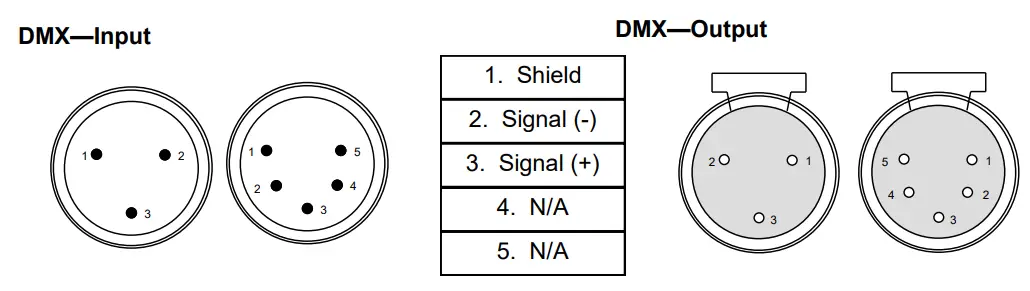
The fixture is equipped with 3 & 5 pin XLR cable mounted sockets for DMX input and output. The sockets are wired in parallel. Only use a shielded twisted pair cable designed for RS-485 and 3 or 5 pin XLR plugs and connectors in order to connect the controller with the fixture or the fixture with another.
Caution!
At the last fixture the DMX signal needs to be terminated with a terminator. Solder a 120 Ohm resistor between the (-) and the (+) signal into a 5 pin XLR plug and plug it in to the last fixture on the signal run. Pre-manufactured terminator plugs are available for purchase from your Mega-Lite dealer (P-DMXT).
Size and Weight
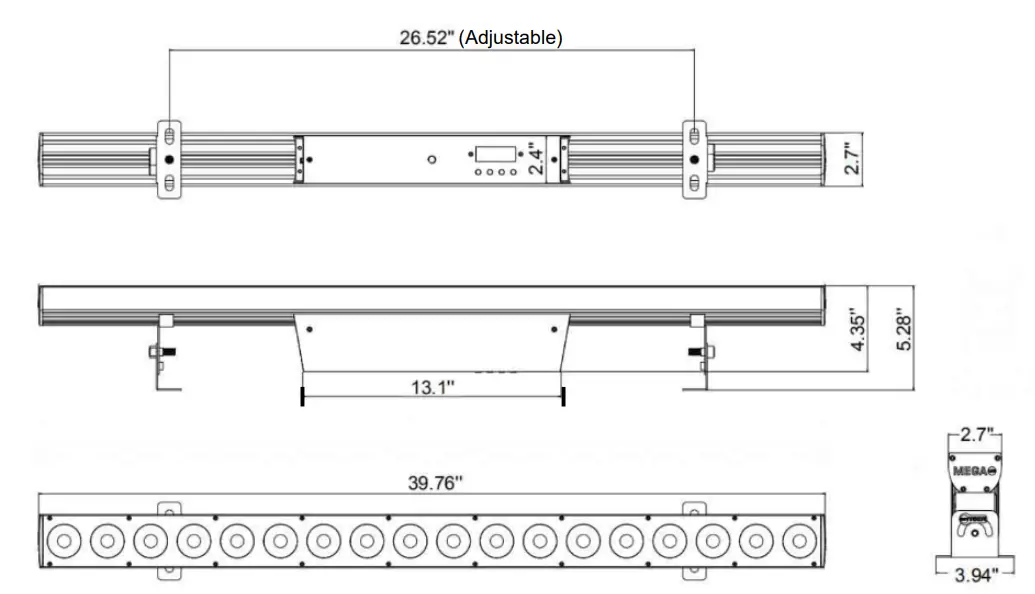
| Size | 39.76″ X 3.94″ X 5.28″ |
| Weight | 10lb |
| Packaged | 41″ X 5.5″ X 7″ 11.5lb |
The control board on the fixture is your interface to access and control all the functions on the unit. Its digital display gives you a code view of the options and functions. The following will explain each function and its options.
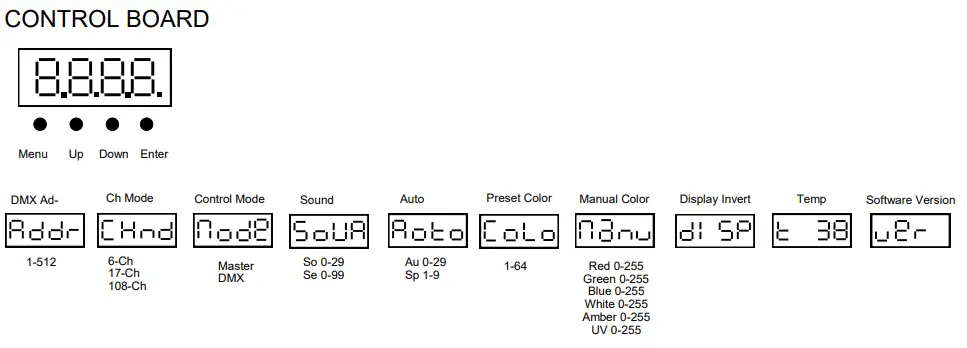
 DMX Address
Press Enter to select the DMX start channel use the up/down keys, display will be flashing once you have selected the desired start channel Press Enter to confirm display will stop flashing. DMX Mode
This function allows you to select the mode in which you want to control the fixture. Press Enter use the up/down keys to select desired DMX mode settings.
Press Enter to confirm the settings.
| 6 CH | Red, Green, Blue, White, Amber, UV |
| 17 CH | Dimmer, Strobe, R,G,B,W,A,UV, Macro, Macro Speed, Back Ground Red, Back Ground Green, Back Ground Blue, Back Ground White, Back Ground Amber, Back Ground UV, Macro Direction |
| 108 CH | Red, Green, Blue, White, Amber, UV X18 |
 Mode
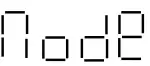
Mode
Master or DMX Mode.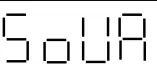 Sound Mode
This function allows the fixture to snap from color to color via it’s internal microphone. Press Enter to confirm the settings. Auto Mode
Select from 0-29 and speed 0-9 . Press Enter to confirm the settings. Color
Color
Select from 64 preset colors . Press Enter to confirm the settings. Manual
Manually adjust variable light output from the 6 color options . Press Enter to confirm the settings. Display
Invert Display. Press Enter to confirm the settings.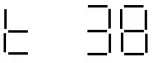 Temperature
Fixture Temperature Unit will reduce brightness once to keep temperature under 140F. Press Enter to confirm the settings. Ver
Ver
Software version. Press Enter to confirm the settings.
Parts List
| Part # | Description |
| 4055-PCB-XLR-IN | 3&5 PIN XLR INPUT PCB |
| 4055-PCB-XLR-OUT | 3&5 PIN XLR OUTPUT PCB |
| 4055-PCB-MAI | DISPLAY & MAIN PCB |
| 4055-POW | POWER SUPPLY |
| 4055-LEN | LENS |
| 4055-LED | 6 COLOR LED |
| 4055-LED-MOD | ENTIRE PCB WITH LED |
| 4055-PCB-MOD | DRIVER PCB WITHOUT LED |
| 4055-HOU-MOU | SLIDING MOUNTS |
| 4055-HOU-COV | REAR HOUSING |
| 4055-DIF | DIFFUSION LENS |
| 4055-DIF-SCR | DIFFUSION SCREWS |
DMX Profile
6 Ch Mode
| DMX Channel | Function | Description | Value |
| 1 | LED Color | Red LED Intensity | 000-255 |
| 2 | LED Color | Green LED Intensity | 000-255 |
| 3 | LED Color | Blue LED Intensity | 000-255 |
| 4 | LED Color | White LED Intensity | 000-255 |
| 5 | LED Color | Amber LED Intensity | 000-255 |
| 6 | LED Color | UV LED Intensity | 000-255 |
17 Ch Mode
| DMX Channel | Function | Description | Value |
| 1 | Dimme | Dimmer (off to full) | 000-255 |
| 2 | Strobe | No Function | 000-000 |
| Strobe (slow to fast) | 001-63 | ||
| Pulse Strobe (slow to fast) | 64-127 | ||
| Random Strobe Entire Bar (slow to fast) | 128-190 | ||
| Random Strobe Each LED (slow to fast) | 191-255 | ||
| 3 | LED Color | Red LED Intensity | 000-255 |
| 4 | LED Color | Green LED Intensity | 000-255 |
| 5 | LED Color | Blue LED Intensity | 000-255 |
| 6 | LED Color | White LED Intensity | 000-255 |
| 7 | LED Color | Amber LED Intensity | 000-255 |
| a | LED Color | UV LED Intensity | 000-255 |
| 9 | Macro | No Function | 000-007 |
| Color chase 1 to 29 | 008-255 | ||
| 10 | Macro Speed | 000- 255 Color chase speed | 000-255 |
| 11 | Background Red | Background Red 000-255 0%-100% | 000-255 |
| 12 | Background Greed | Background Greed 000-255 0%-100% | 000-255 |
| 13 | Background Blue | Background Blue 000-255 0%-100% | 000-255 |
| 14 | Background White | Background White 000-255 0%-100% | 000-255 |
| 15 | Background Amber | Background Amber 000-255 0%-100% | 000-255 |
| 16 | Background UV | Background UV 000-255 0%-100% | 000-255 |
| 17 | Macro Direction | L-R | 000-128 |
| R-L | 129-255 |
108 Ch Mode
| DMX Channel | Function | Description | Value |
| 1 | LED Color | 1 Red LED Intensity | 000-255 |
| 2 | LED Color | 1 Green LED Intensity | 000-255 |
| 3 | LED Color | 1 Blue LED Intensity | 000-255 |
| 4 | LED Color | 1 White LED Intensity | 000-255 |
| 5 | LED Color | 1 Amber LED Intensity | 000-255 |
| 0 | LED Color | 1 LN LED Intensity | 000-255 |
| 7 | LED Color | 2 Red LED Intensity | 000-255 |
| 8 | LED Color | 2 Green LED Intensity | 000-255 |
| 9 | LED Color | 2 Blue LED Intensity | 000-255 |
| 10 | LED Color | 2 White LED Intensity | 000-255 |
| 11 | LED Color | 2 Amber LED Intensity | 000-255 |
| 12 | LED Color | 2 lN LED Intensity | 000-255 |
| 13 | LED Color | 3 Red LED Intensity | 000-255 |
| 14 | LED Color | 3 Green LED Intensity | 000-255 |
| 15 | LED Color | 3 Blue LED Intensity | 000-255 |
| 16 | LED Color | 3 White LED Intensity | 000-255 |
| 17 | LED Color | 3 Amber LED Intensity | 000-255 |
| 18 | LED Color | 3 UV LED Intensity | 000-255 |
| 19 | LED Color | 4 Red LED Intensity | 000-255 |
| 20 | LED Color | 4 Green LED Intensity | 000-255 |
| 21 | LED Color | 4 Blue LED Intensity | 000-255 |
| 22 | LED Color | 4 White LED Intensity | 000-255 |
| 23 | LED Color | 4 Amber LED Intensity | 000-255 |
| 24 | LED Color | 4 IN LED Intensity | 000-255 |
| 25 | LED Color | 5 Red LED Intensity | 000-255 |
| 26 | LED Color | 5 Green LED Intensity | 000-255 |
| 27 | LED Color | 5 Blue LED Intensity | 000-255 |
| 28 | LED Color | 5 White LED Intensity | 000-255 |
| 29 | LED Color | 5 Amber LED Intensity | 000-255 |
| 30 | LED Color | 5 UV LED Intensity | 000-255 |
| 31 | LED Color | 6 Red LED Intensity | 000-255 |
| 32 | LED Color | 6 Green LED Intensity | 000-255 |
| 33 | LED Color | 6 Blue LED Intensity | 000-255 |
| 34 | LED Color | 6 White LED Intensity | 000-255 |
| 35 | LED Color | 6 Amber LED Intensity | 000-255 |
| 36 | LED Color | 6 UV LED Intensity | 000-255 |
| 37 | LED Color | 7 Red LED Intensity | 000-255 |
| 38 | LED Color | 7 Green LED Intensity | 000-255 |
| 39 | LED Color | 7 Blue LED Intensity | 000-255 |
| 40 | LED Color | 7 White LED Intensity | 000-255 |
| 41 | LED Color | 7 Amber LED Intensity | 000-255 |
| 42 | LED Color | 7 UV LED Intensity | 000-255 |
| 43 | LED Color | 8 Red LED Intensity | 000-255 |
| 44 | LED Color | 8 Green LED Intensity | 000-255 |
| 45 | LED Color | 8 Blue LED Intensity | 000-255 |
| 46 | LED Color | 8 White LED Intensity | 000-255 |
| 47 | LED Color | 8 Amber LED Intensity | 000-255 |
| 48 | LED Color | 8 UV LED Intensity | 000-255 |
| 48 | LED Color | 9 Red LED Intensity | 000-255 |
| 50 | LED Color | 9 Green LED Intensity | 000-255 |
| 51 | LED Color | 9 Blue LED Intensity | 000-255 |
| 52 | LED Color | 9 White LED Intensity | 000-255 |
| 53 | LED Cdor | 9 Amber LED Intensity | 000-255 |
| 54 | LED Cdor | 9 UV LED Intensity | 000-255 |
| 55 | LED Cdor | 10 Red LED Intensity | 000-255 |
| 56 | LED Cdor | 10 Green LED Intensity | 000-255 |
| 57 | LED Cdor | 10 Blue LED Intensity | 000-255 |
| 58 | LED Cdor | 10 White LED Intensity | 000-255 |
| 59 | LED Color | 10 Amber LED Intensity | 000-255 |
| 60 | LED Color | 10 UV LED Intensity | 000-255 |
| 61 | LED Color | 11 Red LED Intensity | 000-255 |
| 62 | LED Cdor | 11 Green LED Intensity | 000-255 |
| 63 | LED Cdor | 11 Blue LED Intensity | 000-255 |
| 64 | LED Cdor | 11 White LED Intensity | 000-255 |
| 65 | LED Cdor | 11 Amber LED Intensity | 000-255 |
| 66 | LED Color | 11 UV LED Intensity | 000-255 |
| 67 | LED Color | 12 Red LED Intensity | 000-255 |
| 68 | LED Color | 12 Green LED Intensity | 000-255 |
| 69 | LED Color | 12 Blue LED Intensity | 000-255 |
| 70 | LED Cdor | 12 White LED Intensity | 000-255 |
| 71 | LED Cdor | 12 Amber LED Intensity | 000-255 |
| 72 | LED Color | 12 UV LED Intensity | 000-255 |
| 73 | LED Color | 13 Red LED Intensity | 000-255 |
| 74 | LED Color | 13 Green LED Intensity | 000-255 |
| 75 | LED Color | 13 Blue LED Intensity | 000-255 |
| 76 | LED Cdor | 13 White LED Intensity | 000-255 |
| 77 | LED Cdor | 13 Amber LED Intensity | 000-255 |
| 78 | LED Cdor | 13 UV LED Intensity | 000-255 |
| 79 | LED Cdor | 14 Red LED Intensity | 000-255 |
| 80 | LED Cdor | 14 Green LED Intensity | 000-255 |
| 81 | LED Color | 14 Blue LED Intensity | 000-255 |
| 82 | LED Cdor | 14 White LED Intensity | 000-255 |
| 83 | LED Cdor | 14 Amber LED Intensity | 000-255 |
| 84 | LED Cdor | 14 UV LED Intensity | 000-255 |
| 85 | LED Cdor | 15 Red LED Intensity | 000-255 |
| 86 | LED Cdor | 15 Green LED Intensity | 000-255 |
| 87 | LED Cdor | 15 Blue LED Intensity | 000-255 |
| 88 | LED Color | 15 White LED Intensity | 000-255 |
| 89 | LED Color | 15 Amber LED Intensity | 000-255 |
| 90 | LED Color | 15 UV LED Intensity | 000-255 |
| 91 | LED Cdor | 16 Red LED Intensity | 000-255 |
| 92 | LED Cdor | 16 Green LED Intensity | 000-255 |
| 93 | LED Cdor | 16 Blue LED Intensity | 000-255 |
| 94 | LED Cdor | 16 White LED Intensity | 000-255 |
| 95 | LED Color | 16 Amber LED Intensity | 000-255 |
| 96 | LED Color | 16 UV LED Intensity | 000-255 |
| 97 | LED Color | 17 Red LED Intensity | 000-255 |
| 98 | LED Color | 17 Green LED Intensity | 000-255 |
| 99 | LED Cdor | 17 Blue LED Intensity | 000-255 |
| 100 | LED Cdor | 17 White LED Intensity | 000-255 |
| 101 | LED Cdor | 17 Amber LED Intensity | 000-255 |
| 102 | LED Color | 17 UV LED Intensity | 000-255 |
| 103 | LED Cdor | 18 Red LED Intensity | 000-255 |
| 104 | LED Cdor | 18 Green LED Intensity | 000-255 |
| 105 | LED Cdor | 18 Blue LED Intensity | 000-255 |
| 106 | LED Cdor | 18 White LED Intensity | 000-255 |
| 107 | LED Cdor | 18 Amber LED Intensity | 000-255 |
| 108 | LED Cdor | 18 UV LED Intensity | 000-255 |
Rigging the Fixture
Caution!
- The installations must be carried out by an authorized dealer or trained professional.
- Unit may cause severe injuries if you have doubts concerning the safety do not install.
- Unit is to be 24inches away from flammable materials (decoration material)
- Use high quality installation equipment to hang unit.
When rigging a unit it is very important that you follow common safety procedures. Rigging requires extensive experience including but not limited to calculating working loads, material being used and periodic safety inspections. If you lack these qualifications, do not attempt the installation yourself, instead use a professional structural rigger.
When rigging the unit always be secured with a secondary safety attachment. The installation location of the projector has got to be built in the way that it can hold 10 times the weight for 1 hour. Installation should be checked at least one time a year by a skilled person.
Cleaning and Maintenance
Installation Maintenance: The operator has to make sure that the unit is operating safely and has the installations and electronics checked by an expert every 2 years.
The following points have to be considered during the inspection:
- All screws used for installing the device or part of the device have to be tightly connected and must not be corroded.
- There must not be any deformations on the housing, fixation and installation spots (ceiling, suspension, trussing).
- The electronic power supply cables must not show any damages, material fatigue (e.g. porous cables) or sediments.
Further instructions depending on the installation spot and usage have to be adhered by a skilled installer and any safety problems have to be removed.
Note: There is no serviceable parts inside the device. Maintenance and service operations are to be carried out by authorized dealers.
Replacing the fuse: When possible only replace the fuse with the same type and rating.
Replacing the power cable: If the power cable of this device becomes damaged, it has to be replaced by authorized dealers or trained professional only.
Cleaning: Only clean the fixture using a damp cloth.
Should you have further questions , please contact your dealer.
MEGA Systems, Inc. Warranty
MEGA SYSTEMS INC (“MSI”) hereby warrants to the original purchaser/owner (“Customer”), MSI products to be free of manufacturing defects in material and workmanship, for the warranty periods as defined below from the original purchase invoice date. This warranty applies exclusively to new MS branded and/or distributed products listed below, purchased from an MSI AUTHORIZED dealer/ reseller. This warranty is not transferable and may or may not apply to products sold and/or forwarded outside the United States. Please contact MSI for applicable regional product warranty information.
The purchase of MSI product constitutes the Customer’s acceptance of all warranty terms and conditions as listed in this limited warranty statement. This warranty provides the Customer with legal rights, which may vary from state to state. Please contact MSI regarding warranty questions prior to purchasing.
Product / Series Warranty Period Coverage Battery Powered LED Six month battery, one year all other components 1, 2 Moving LED, Hazers One year 2 Outdoor IP-Rated LED Two years 3
House Light LED, Decorative LED, Compact LED, iCandy Three years 4 LED, Theatrical LED, Strobe Wash LED, Follow Spot LED, Lighting Control, Direct View LED Displays and Video Control
- Battery: 183 days/six months
- Parts and Labor: 365 days/one year
- Parts and Labor: 730 days/two years
- Parts and Labor: 1095 days/three years
This limited warranty excludes any defects caused by, resulting from or relating to the following: Normal wear and tear of lamps, color media, brushes, contact rings, lamp sockets, belts and other parts prone to wear and tear. Misuse, abuse, improper handling, accident, alteration or attempts to repair by or on behalf of the owner or any person not authorized by MSI. Damage to the product resulting from acts of God, including, but not limited to, earthquakes, hurricanes, tornados, lightning and other natural disasters, fire, explosion, flood, riots, civil disorder or any other cause beyond the reasonable control of MSI. Exposure to harsh or excessively corrosive environmental conditions (whether indoors or outdoors), including, but not limited to, extreme temperatures, humidity, atmospheric conditions (including salinity or pressure), radiation (UV, infrared or nuclear), shock and conditions which exceed the product’s Ingress Protection (“IP)” rating. Use of the product in a manner which exceeds the applicable product specification, including, but not limited to, exposure to excessive, insufficient or other voltage conditions. Installation or use of the product not in accordance with the technical documentation, MSI guidelines (as may be posted on its website at www.megasystemsinc.com from time to time or otherwise designated by MSI or its brands) or applicable building and electrical codes, regulations and standards.
Failure to maintain the product in accordance with the technical documentation. Natural degradation and color shift of the LED source over the course of normal product use. Sight deviations in the specified values of intensity and color that do not affect the functionality of the product. Use of the product not for its intended purpose.
All warranty claims are evaluated under the terms of this limited warranty. If a product falls within the warranty period and if, upon examination by MSI it is found to have failed for a covered cause, MSI will, at its sole discretion, repair or replace the defective part or product or reimburse the purchaser a pro-rated portion of the purchase price based on the percentage of the warranty period still remaining as of the date that the returned product was received by MSI. Should a replacement part or product be discontinued or unavailable, MSI reserves the right, in its sole and absolute discretion, to substitute a comparable replacement part or product for the defective part or product. MSI warranty obligation hereunder is limited solely to the repair or replacement of or reimbursement for the particular parts or products determined by MSI to have failed for a covered cause within the warranty period. In no event shall MSI be responsible to replace or reimburse purchaser for any products or portions of a system that MSI determines has not failed for a covered cause within the warranty period, even if such other products or portions of a system are used together with products being repaired or replaced by MSI under this warranty and the repaired product differs in brightness, colors or any other attribute after the repair.
Costs of removal, shipping to MSI or its authorized representative and re installation are solely the responsibility of the purchaser. If MSI determines that the product is covered by this limited warranty, it will only pay for parts and labor as indicated by product type.
If MSI determines that the product is not covered by this limited warranty, the purchaser will have the option of paying for the repair (if the product can be repaired) and the purchaser shall be responsible for the cost of shipping the repaired product back to the purchaser. MSI reserves the right, in its sole and absolute discretion, to decline any repair.
IN NO EVENT SHALL MEGA SYSTEMS, INC. BE LIABLE FOR ANY INCIDENTAL, CONSEQUENTIAL, SPECIAL, INDIRECT OR PUNITIVE LOSS OR DAMAGE OF ANY KIND, INCLUDING, BUT NOT LIMITED TO, LOSS OF PROFITS OR REVENUES, LOSS OF USE OF THE PRODUCT OR ANY OTHER GOODS OR ASSOCIATED EQUIPMENT, DAMAGE TO ANY ASSOCIATED EQUIPMENT COST OF CAPITAL, COST OF SUBSTITUTE PRODUCTS, FACILITIES OR SERVICES, DOWN TIME COST, INSTALLATION OR LABOR COSTS, OR CLAIMS OF THE PURCHASER’S CUSTOMERS, WHETHER BASED ON WARRANTY, CONTRACT OR NEGLIGENCE, ARISING IN CONNECTION WITH THE SALE, USE OR REPAIR OF THE PRODUCT. MEGA SYSTEMS INC’S MAXIMUM LIABILITY SHALL NOT, IN ANY CASE, EXCEED THE PURCHASE PRICE OF THE PRODUCT THAT GIVES RISE TO THE CLAIM.
EXCEPT FOR THE LIMITED WARRANTY SET FORTH HEREIN, ALL PRODUCTS SOLD BY MEGA SYSTEMS, INC. ARE SOLD “AS IS” WITHOUT ANY WARRANTY, EXPRESS OR IMPLIED, STATUTORY OR OTHERWISE, INCLUDING, BUT NOT LIMITED TO, IMPLIED WARRANTIES OF MERCHANTABILITY AND FITNESS FOR A PARTICULAR PURPOSE, ALL OF WHICH ARE EXPRESSLY AND SPECIFICALLY DISCLAIMED BY MEGA SYSTEMS, INC.
Customer Support
Mega Lite has a customer support line to provide set up help and to answer any question should you encounter a problem. Please visit our website for any other related technical documents. For service related issue please contact our service dept.
Monday—Friday 9am to 6pm CST
Voice: 210-684-2600
E-mail: [email protected]
Manual Version
Please Visit www.mega.lighting for the most up to date manual version
| Documen Version | Date | Fixture Software | Notes |
| 1 | 1/6/2022 | V1.0 |
Mega-Lite
18668 Highway 16N
Helotes, Texas 78023
Ph 210-684-2600 Fax 210-855-6279
www.mega.lighting / [email protected]
 HOME - MEGA-LITE