From Eye to Insight
Uninstalling MegaRAID storage manager
on the HP Z840 series
Affected workstations
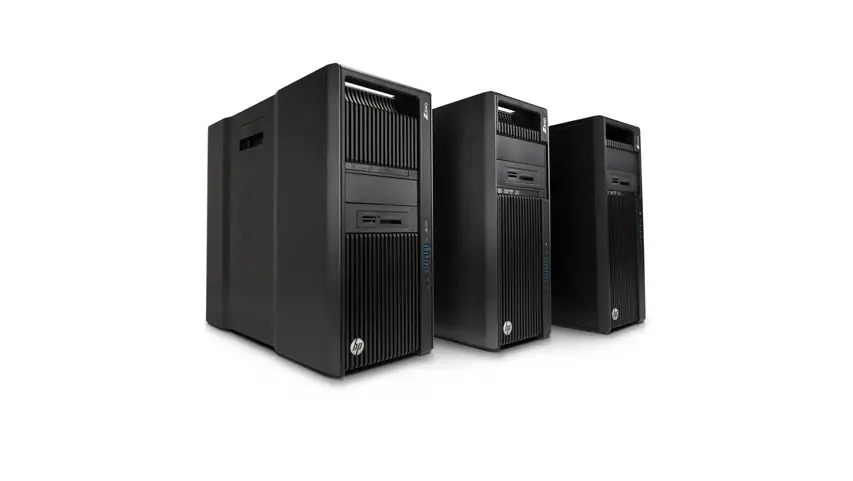
Please note that only SP8 workstations from the HP Z840 series are affected by the Log4j vulnerability. You can find the name of your SP8 workstation at the top right of its frame (see Figure 1).
In case your workstation is NOT from the HP Z840 series, no further action is required, because MegaRAID storage manager (and its dependency Log4j) is not installed on your system.
In case you do have an HP Z840 workstation, please proceed with the step-by-step instructions below to uninstall MegaRAID storage manager. Please note that uninstalling the MegaRAID storage manager also removes Log4j.
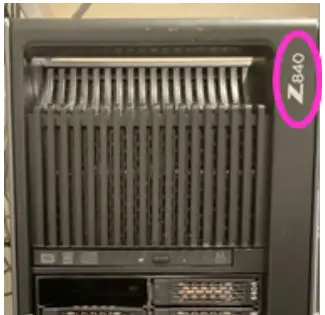
Figure 1: Photo of a workstation from the HP Z840 series. The series name is indicated at the top right (magenta circle).
Instructions for Uninstalling MegaRAID
1. Find the “MegaRAID storage manager” icon on the desktop or in the windows start menu.
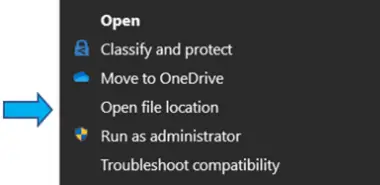
2a. When accessing “MegaRAID storage manager” from the desktop, right-click the icon and select the option “open file location” in the context menu.
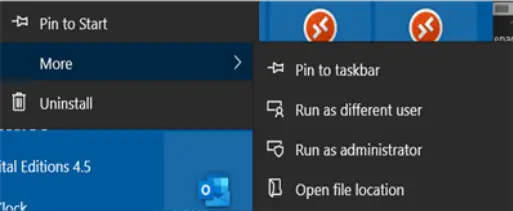
2a. Alternatively, when accessing “MegaRAID storage manager” from the windows start menu, the “open file location” is in the submenu of the “More >” tab.
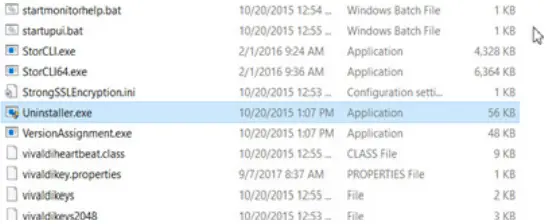
3. In the displayed directory, select the “Uninstaller.exe” application.
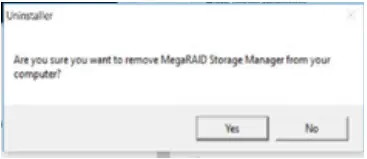
4. Confirm that you want to uninstall “MegaRAID storage manager”.
5. Reboot the system to finish uninstalling “MegaRAID storage manager”.
CONNECT WITH US!

Leica Microsystems CMS GmbH | Ernst-Leitz-Strasse 17-37 | 35578 Wetzlar (Germany)
Tel. +49 (0) 6441 29-0 | F +49 (0) 6441 29-2599