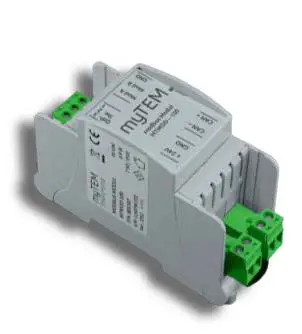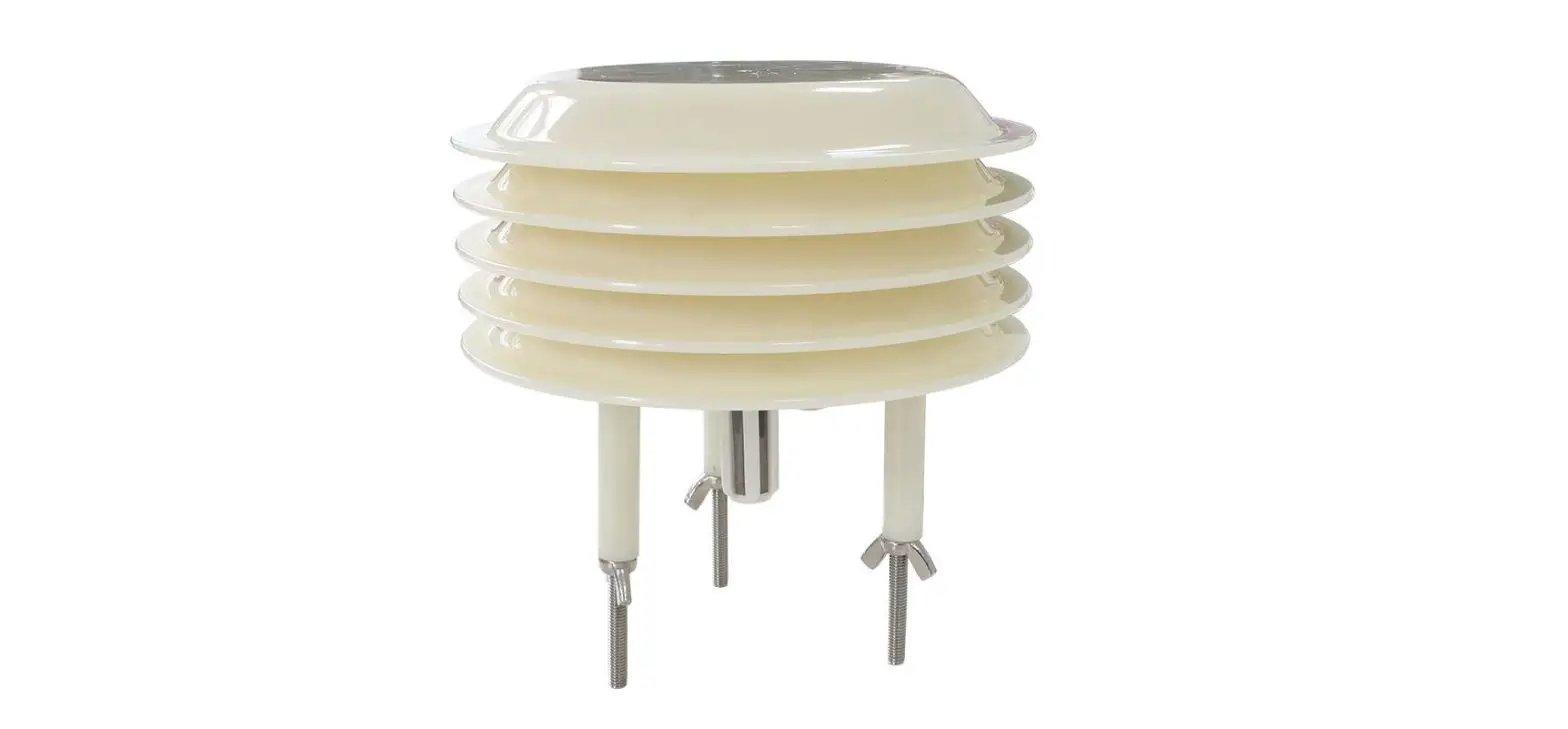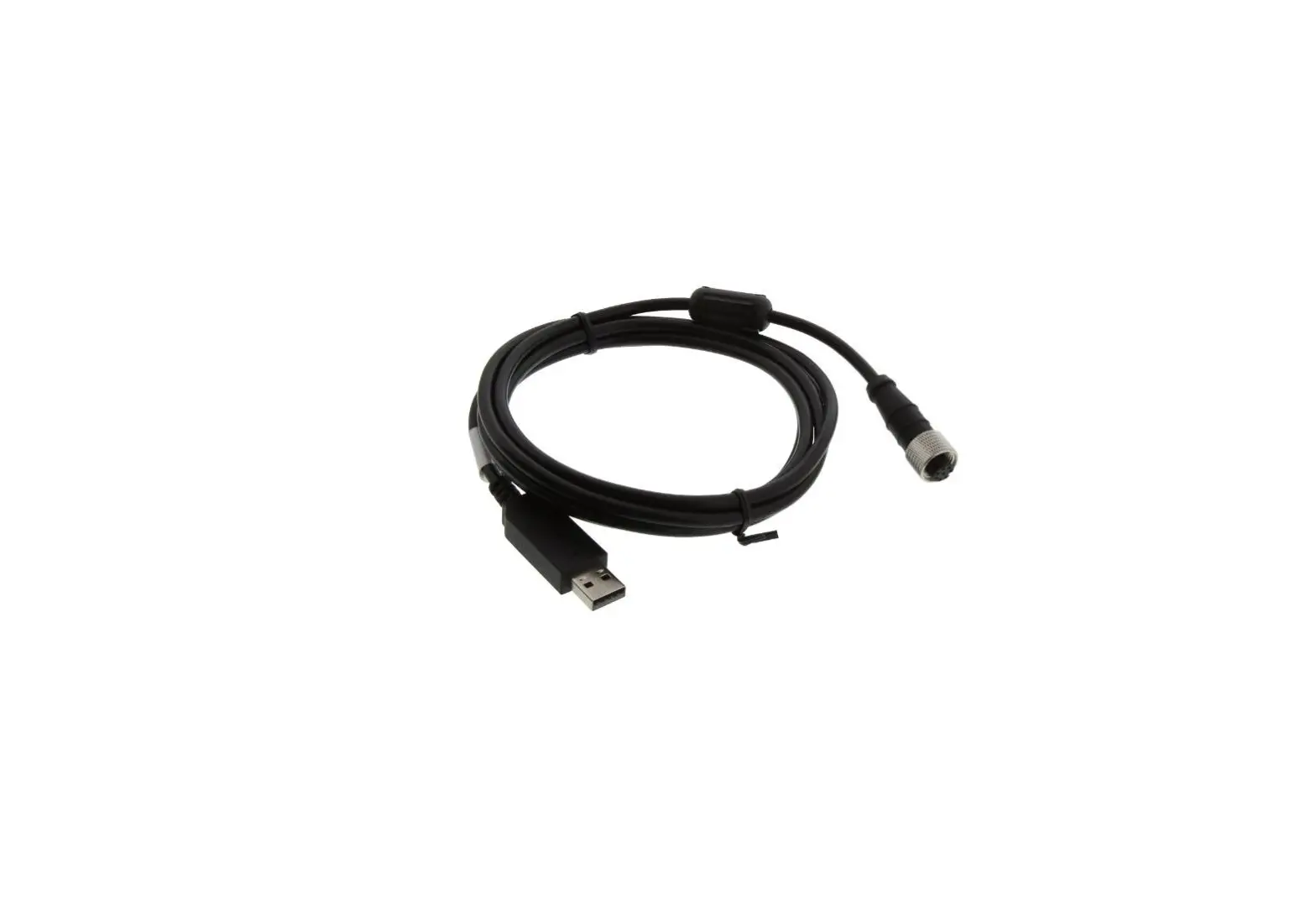

OMEGA IF-001 USB Modbus Smart Probe Interface
Shop online at omega.com
e-mail: [email protected]
For latest product manuals: www.omega.com/enus/pdf-manuals
Notes, Cautions, and Warnings
If the equipment is used in a manner not specified in this manual, the protection by the equipment may be impaired.
Do not operate the equipment in flammable or explosive environments.
It is important to read and follow all precautions and instructions in this manual before operating or commissioning this device as it contains important information relating to safety and EMC. Failure to follow all the safety precautions may result in injury and/or damage to the equipment.
The following labels identify information that is especially important to note:
Note: Provides information that is important to successfully set up and use the Omega Link device.
Caution or Warning: Informs about the risk of electrical shock.
Caution, Warning, or Important: Informs of circumstances that can affect the functionality of the instruments and must refer to accompanying documents.
Omega Link Smart Interface Overview
The Omega Link IF-001 and IF-002 smart interfaces provide an easy way to configure, integrate, and monitor your Omega Link Smart Probes. The IF-001 and IF-002 are both fully compatible with SYNC configuration software, the Omega Link Cloud, the Omega Link family of hardware Gateways, and Omega Enterprise Gateway software. Omega Link Smart Interfaces provide both a simple command line interface, for quick configuration and monitoring, and Modbus RTU support, for integration with industrial networks. The command line interface allows interactive visualization of the connected Omega Link Smart Probe through accessible text strings using any terminal emulator.
The M12 8-pin female connector provides 3.3 VDC power for external Omega Link Smart Probes with an integrated power monitor to protect against short circuits.
Operating Requirements: Windows OS 10 and above
The following LED status indicator table provides descriptions of the different Smart Interface behaviors.
| Color | Status |
| Off | No Activity (no VBus present), waiting for next command |
| YELLOW | Waiting for USB enumeration, Pending Bootstrap mode |
| RED – 1-second flash rate | A short condition has been detected on the sensor power circuitry. Disconnect the device. |
| RED – ¼ second flash | A message to the device was not acknowledged. |
| GREEN | After power-up and USB enumeration, the GREEN LED remains on until the first transaction with the smart sensor device |
| GREEN Flash | The GREEN LED is turned on at the beginning of each transaction with the Smart Sensor and turned off at the end. |
- IF-001
The IF-001 provides an easy way to configure and monitor Omega Link Smart Probes using SYNC or other configuration tools. The IF-001 is a USB CDC / VCP device (serial interface), allowing it to connect to computers that do not have a native serial port. The USB 2.0 compliant device is compatible with Windows. - IF-002
The IF-002 allows Omega Link Smart Probes to connect to existing RS485 Modbus RTU serial networks. An M12 5-pin male connector provides a standard RS485 serial interface. The IF-002 can run off a wide range of power, from 5 to 36 VDC, allowing broad compatibility while providing regulated power to Smart Probes.
Smart Interface Pin Layouts
IF-001: Smart Probe to USB
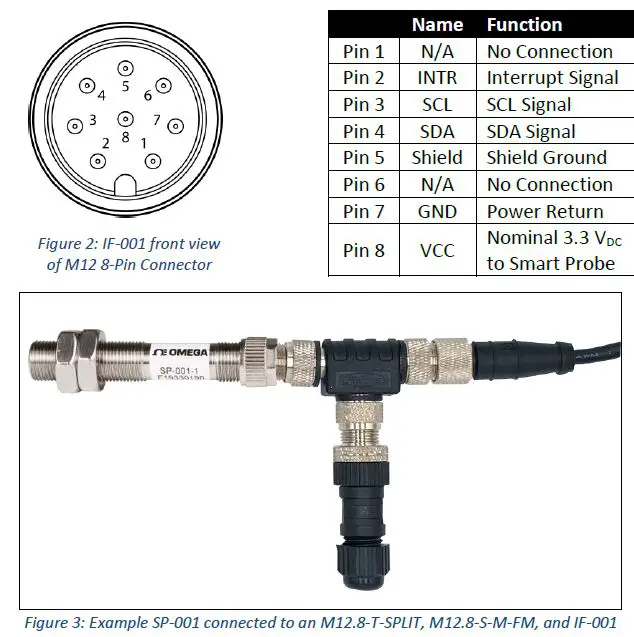
The IF-001 can connect direct to the Omega Link Smart Probe through an M12 8-pin female connector as shown in the example below. The connector supports the required I2C + INTR signal lines and the Smart Probe power signals. The shield connection is coupled to the Serial Connector.

The Smart Probe Discrete I/O signals are not internally connected. An M12.8-S-M-FM and M12.8-T-SPLIT are required to access the Discrete I/O Use the wiring diagram below to connect your Smart Probe and Discrete I/O accessories to the IF-001 cable.
IF-002: Smart Probe to Modbus RTU
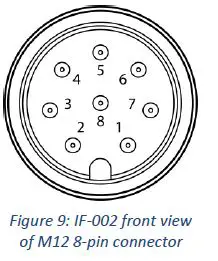
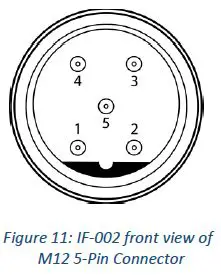
The IF-002 is used to connect to an existing Serial Modbus network through its M12 5-pin connector and directly to M12 Smart Probes through its M12 8-pin connector. The serial 5-pin connector provides the RS485 differential pair signal (A’, B’), power input, and a shield signal. The device will accept external power in the range of 5 – 36 VDC with reverse polarity and overcurrent protection up to 300 mA.
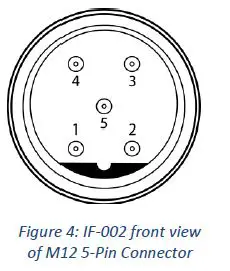
| Name | Function | |
| Pin 1 | VDD | 5-36VDC |
| Pin 2 | A’ | RS485 Data + |
| Pin 3 | GND | Ground |
| Pin 4 | B’ | RS485 Data – |
| Pin 5 | Shield | Shield Ground |
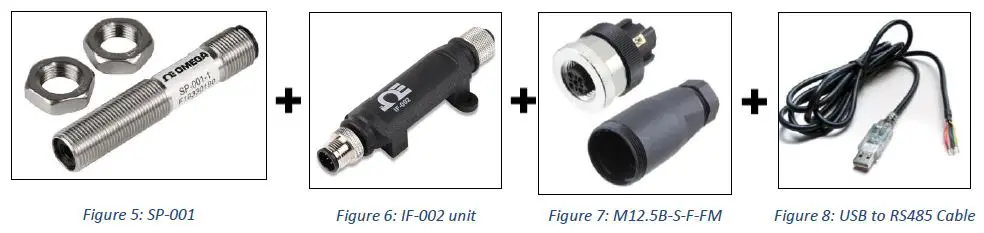
Additionally, a 5-pin M12.5B-S-F-FM connector and a third-party USB to RS485 Serial Converter Cable are required to establish a connection from the IF-002 and the USB COM Port of your PC or Modbus device. Refer to the wiring diagram provided with your USB to RS485 to successfully connect the IF-002 wire leads of the USB to RS485 cable.
An M12.8-S-M-FM and M12.8-T-SPLIT can be attached to the Smart Probe prior to connecting to the IF-002 to access the discrete I/O using the following wiring diagram. Refer to Figure 3 for a setup example.
| Name | Function | |
| Pin 1 | N/A | No Connection |
| Pin 2 | INTR | Interrupt Signal |
| Pin 3 | SCL | SCL Signal |
| Pin 4 | SDA | SDA Signal |
| Pin 5 | Shield | Shield Ground |
| Pin 6 | N/A | No Connection |
| Pin 7 | GND | Power Return |
| Pin 8 | VCC | Nominal 3.3 VDC to Smart Probe |
IF-001 and IF-002 Serial Communication
The serial communication parameters may be configured over the serial channel or SYNC configuration software. The factory default configuration conforms to the required Modbus RTU standard.
The IF-001 is a virtual COM port and will accept any serial port baud rate.
Refer to the table below for the default serial configuration of the IF-002:
| Default Serial Configuration | |
| Modus Address | 1 |
| Address Range | 0 |
| Baudrate | 115200 |
| Parity | Even |
| Stopbits | 1 |
| Databits | 8 |
Serial Packet Format
Communications to the IF-001 and IF-002 are based on serial data frames. For serial terminal sessions, the “transaction” ends on the receipt of a CR (0x0d) character. For Modbus RTU transactions, the entire transaction must adhere to the Modbus serial RTU time specifications.
The IF-002 uses the first byte of the transaction (the start-of-frame character) to determine the type of transaction. For the Command Line Interface, the first character denotes the operation to be performed as indicated in the following table:
| Start of Frame Character | Hex | Interpretation |
| # | 0x23 | Command Line Interface comment line (ignored) |
| : | 0x3a | Start of Frame for Modbus ASCII frame |
| ? | 0x3f | Command Line Interface ‘Help’ command – display command / current state summary |
| C | 0x43 | Command Line Interface ‘Configure’ command – configure Smart Probe device |
| O | 0x4F | Command Line Interface ‘Options’ command – configuration options |
| R | 0x52 | Command Line Interface ‘Read’ command – read any Smart Probe register |
| T | 0x54 | Command Line Interface ‘Trigger’ command – trigger an event on Smart Probe device |
| V | 0x56 | Command Line Interface ‘View’ command – view Smart Probe data and status |
| W | 0x57 | Command Line Interface ‘Write’ command – Write any Smart Probe register |
| Any other character | Any other | Indicates register address for a Modbus RTU frame |
Any other byte value appearing at the start of the frame is interpreted as a Modbus RTU Modbus device address.
Note: This requires excluding several Modbus addresses in the RTU mode, but in most cases, this will have no impact.
Modbus Register Mapping
The IF-001 and IF-002 accept RS485 Modbus RTU packets. The IF-001 / IF-002 maps the Modbus register addresses to internal configuration registers and to external I2C registers.
Modbus Register = ((Smart Probe 12C Register) / 2) + 0xf000
| Modbus Register | Usage |
| 0x0000 – 0xebff | Register address 0x0000 – 0xebff and addresses 0xf800 – 0xffff are not recognized and will result in an INVALID ADDRESS response |
| 0xec00 – 0xefff | Registers 0xec00 – 0xefff are reserved for configuration of the IF-001 / IF-002 |
| 0xf000 – 0xf7ff | Registers 0xf000 – 0xf7ff are mapped to the external I2C device(s) |
| 0xf800 – 0xf800 | Invalid Address |
Configuration Registers
The configuration registers are stored in non-volatile memory. Changes to the serial configuration and Modbus address take effect after the Modbus Transaction.
| MB Register | Type | Access | Description | |
| Reserved | 0xec00 – 0xefcf | u16 | — | Reserved, return Invalid Address |
| I2C_Read Errors | 0xefd0 | u32 | R | Number of Read errors |
| I2C_Write_Errors | 0xefd2 | u32 | R | Number of Write errors |
| I2C_Read Retries | 0xefd4 | u32 | R | Number of Read Retries |
| I2C_Write_Retries | 0xefd6 | u32 | R | Number of Write Retries |
| I2C_Indirect_Retries | 0xefd8 | u32 | R | Number of Read Retries |
| I2C_Read_Request | 0xefda | u32 | R | Number of read requests |
| I2C_Write_Request | 0xefdc | u32 | R | Number of write requests |
| Reserved | 0xecda – 0xefe7 | — | — | Reserved, return Invalid Address |
| DEVICE_ID | 0xefe8-0xefeb | u8[8] | RW* | Read only, but used as part of Bootload access mechanism |
| FW_VERSION | 0xefec-0xefed | u32 | RW* | Read only, used as part of Bootload access mechanism. Formatted as MM.mm.bb.cc |
| HW_VERSION | 0xefee-0xefef | u32 | R | Formatted as MM.mm.bb.cc |
| DEVICE_TYPE | 0xeff0 | u16 | R | 0xff01 == IF-002 |
| SYSTEM CONTROL | 0xeff1 | u16 | R/W | <see below> |
| I2C_BASE_ADDRESS | 0xeff2 | u16 | R/W | Defaults to 0x68. Sets the base address of I2C device(s). |
| I2C_SPEED | 0xeff3 | u16 | R/W | I2C bus speed in kHz, ie 40 == 40 kbit/second |
| SERIAL_CONFIG | 0xeff4 | u16 | R/W | See Serial Configuration Word |
| MODBUS_ADDRESS | 0xeff5 | u16 | R/W | Defaults to 1. Sets the base address for Modbus transactions. Limited to 1 .. 247. |
| ADDRESS_RANGE | 0xeff6 | u16 | R/W | Default to 0, limited to 0..7. Sets number of consecutive Modbus addresses accepted. Each Consecutive Modbus address maps to consecutive I2C device addresses. |
| MANUFACTURED_DATE | 0xeff8 | u16 | R | Bit packed value with format YYYYY.MM.DD |
| USER_HOURS | 0xeff9 | u16 | R/W | User settable counter, increments every 3600 seconds |
| OPERATING_TIME | 0xeffa | u32 | R | Total number of seconds of operation |
| GATEWAY_CONTROL | 0xefff | u16 | R | Reserved |
I2C Status
Modbus registers 0xefd0 – 0xefd9 provide access to statistics indicating the number of I2C errors and retries.
The Retry counts indicate the number of transactions that resulted in an NAK. When an NAK is detected, the IF-001 / IF-002 will automatically generate up to 3 retries. If an NAK is detected on the 3rd attempt the transaction is dropped, an error is reported and the Read or Write Error count is incremented. The Indirect Retry count is incremented if an NAK is generated when writing the Indirect register (0x0030).
System Control Register
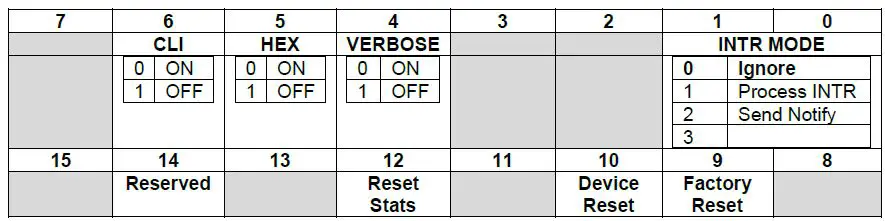
- INTR Mode
The INTR Mode determines how the Smart Probe INTR signal is handled. If it is set to PROCESS, the Command Line Interface activity is processed. If it is set to Notify, the device will send a NOTIFY command through the Command Line Interface. For Modbus applications, the INTR Mode should be set to IGNORE. - Verbose
The Verbose mode offers expanded information when in the Command Line Interface mode. - Hex
The Hex mode causes the data to be displayed as HEX values in the Command Line Interface mode. - Device Reset
Writing a 1 to the device reset bit will force the device to re-initialize using the current configuration information. - Factory Reset
Writing a 1 to the Factory Reset bit will force a factory reset and all configuration parameters will be returned to the initial factory default values. - Reset Stats
Writing a 1 to the reset stats bit will force the I2C Statistic counters to be reset to 0.
Serial Configuration (IF-002)
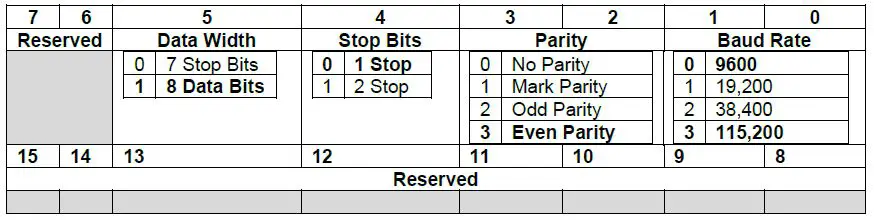
All serial line configuration is done through the serial channel using Modbus or Command Line Interface commands and the configuration information is retained in non-volatile memory. When accessed via Modbus, the serial configuration parameters are accessed at a Modbus register address which is outside of the range mapped to the Smart Sensor registers. When altering the communications parameters, any changes occur after the acknowledgment of the Modbus command.
The device serial configuration word is located at Modbus register address 0xeff4.
Configuration Update
The IF-002 Modbus commands accept changes to the serial configuration (Baudrate, Parity, Stop Bits, Data Bits) but does not apply them until the next power cycle or a Device Reset trigger has been received. This allows all serial configuration parameters to be set using Modbus commands without having to change the host settings as each configuration setting change is made. All other configuration changes are applied immediately.
The sequence to change the communication parameters over the Modbus connection is:
Step 1: Change one or more parameters – each change is acknowledged using the current Serial settings
Step 2: Issue a Write command to the IF-002 System Control Register with the Device Reset bit set.
The command will be acknowledged using the current settings and then the serial channel will be reconfigured to reflect the new settings.
The Command Line Interface includes a Serial command that allows you to set the serial channel. These take immediate effect. In general, the terminal emulator must be reconfigured after the command to match the new configuration.
Serial Configuration Recovery
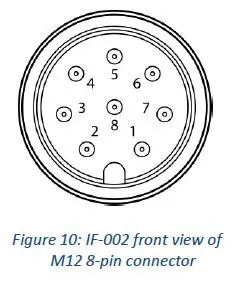
The IF-002 serial configuration may be reset to the factory default values by momentarily connecting the SCL (M12 8-Pin Pin 3) and SDA (M12 8-Pin Pin 4) signal lines together and cycling power. To reset the IF-002 to its factory default settings, follow these steps:
Step 1: Disconnect power from the IF-002 by disconnecting it from your Modbus Network.
Step 2: Unplug any smart probe connected to your IF-002.
Step 3: Short pins 3 and 4 on the 8-Pin connector on the IF-002.
| Name | Function | |
| Pin 1 | N/A | No Connection |
| Pin 2 | INTR | Interrupt Signal |
| Pin 3 | SCL | SCL Signal |
| Pin 4 | SDA | SDA Signal |
| Pin 5 | Shield | Shield Ground |
| Pin 6 | N/A | No Connection |
| Pin 7 | GND | Power Return |
| Pin 8 | VCC | Nominal 3.3 VDC to Smart Probe |
Step 4: Apply power to the IF-002 for 3 seconds from the 5-pin connector.
| Name | Function | |
| Pin 1 | VDD | 5-36VDC |
| Pin 2 | A’ | RS485 Data + |
| Pin 3 | GND | Ground |
| Pin 4 | B’ | RS485 Data – |
| Pin 5 | Shield | Shield Ground |
Step 5: Reconnect your Omega Link Smart Probe and apply power.
Command Line Interface
Note: The following Command Line Interface section can be applied to both the IF-001 and the IF-002.
The command line interpreter allows human-readable commands to be sent to the smart sensor device through a terminal emulator which are widely available and may be easily installed on a PC or Linux systems. The COM channel enumerated by the device must be selected and must be configured to match the serial configuration parameters.
(Refer to Appendix A).
- Help Command
The Help command uses the ‘?’ character and will display a brief summary of the available commands and options.
It is useful to determine if the IF-001 / IF-002 is successfully communicating and does not require a smart probe device to be connected.
?
IF-002, Version 1.11.0.0
O(ptions) <V/v(erbose)> <H/h(ex)/D(ecimal)> <I(gnore) | P(rocess) | N(otify) INTR handling>
<A/a(ddr for I2C) =?> <S(peed) =?> <M(odbus Addr) =?> <R(ange) = ?>
R(ead) <@><#n></d><{Add}> Reg [Len <format> …]
W(rite) <@><#n></d><{Add}> Reg [data <format>…]
V(iew) <@><#n></d><{Add}> <I(nfo) | D(ata) | L(og) | N(ext)
T(rigger) <@><#n></d><{Add}> <R(eset) | F(actory reset) | P(ower reset) | C(lear log) | S(ample) | L(og)
S(erial) <B(audrate) = 9600 | 19200 | 38400 | 115200> <P(arity) = E(ven) | O(dd) | M(ark) | N(one)>
<S(top) = 1 | 2> <D(ata) = 7 | 8> <R(eset)>
C(onfig) <@><#n></d><{Add}><R(ate) | I(nterrupt) | D(evice) | S(ensor nn) | O(utput nn)
@ – Continuous/no delay, #n – number cycles, /d – delay time, <..> – are optional
formats: I/i(nteger), L/l(ong), F/f(loat).precision, S/s(string)
Verbose, Hex, internal INTR use, I2C Addr: 0x68 @ 50 kbp, Modbus Addr: 0x01, Modbus Range: 0x00- Alternate Address {Add}
The I2C address used to access the Smart Sensor device defaults to 0x68, unless overwritten by the Options command. The address may be further overwritten in each command by enclosing the address in { } bracket. - Numeric Formats
Data may be entered or displayed as hexadecimal, decimal or float values. The standard output shows data in decimal or hex format depending on the Verbose H/h/D mode setting, which may be overwritten using formatting characters. The following formatting characters are accepted:Data Type Suffix Example (Assume Hex Option Selected) Byte <none, default> R 0x68 -> display single byte value 16-bit integers
i R 0x68 20 2 i -> result displayed as 0x1234 32-bit integers
l (lower case ‘L’) R 0x68 20 2 l -> result displayed as 0x12345678 Floats f.n (n == precision) R 0x68 0x3c 4 f.3 → result displayed as 12.345, precision is optional and defaults to 1 digit.
Strings
S/s
R 0xe0 s → result displays the user-defined device name located at 0xe0 W 0xe0 “My Name” → will write a new device name to the string. Be
cautious not to exceed the maximum string lengths.
- Invalid Commands
Since the first character of the serial record is used to determine the Command Line Interface command and all other characters are treated as Modbus Start of Frame (‘:’) or address values, no interpretation is made of characters other than those shown in the Help summary and no error reporting will be generated.
- Invalid Commands
- Command Repetition @, #, /
The Read, Write, View, Configure and Trigger commands may be set up to repeat a specific number of times with an optional repetition rate. Repeated commands are terminated if an error occurs or any keyboard entry is made.- The ‘@’ symbol causes the command to be repeated indefinitely, at the fastest possible rate. If the @ symbol is specified, the # and / may not be used.
- The ‘#’ symbol, followed by a numeric value, causes the command to be repeated the specified number of times.
- The ‘/’ symbol, followed by a numeric value, allows specifying a delay in seconds between each command repetition when using the ‘#’ option.
If no repetition information is provided the command will be executed once.
- Alternate Address {Add}
- Read Command
The Read command accepts the repetition information, the starting register number, the number of elements to be read and the format of the data. The starting register location must be provided while all other fields are optional. If the number of elements is omitted, it is assumed to be one. If the data format is omitted, it is assumed to be BYTES. There may be multiple elements and related format information contained within a read. Commas or spaces may be used to separate the individual values.
R(ead) <repetition options> register [<number> <format <.precision>> …]
The simplest form is R 0x????, where 0x???? represents a value between 0x0000 and 0x0fff. The command will return a single byte from the specified location. A more complex example would be Read 0x38 1l 4f.2 to read the current time, and the 4 sensor readings. The Time information is stored in register 0x38 as a 32-bit long value and is then immediately followed by the four sensor results stored as floating-point values at locations 0x003c ..0x004b.
// Location 0x3c represents the sensor readings, stored as floating point values.
// Read a single byte from the start of the sensor values (default count is 1, type byte)
R 0x3c
[Dev: 0x68 Reg: 0x3c Cnt: 0x01 -> 0x41 ]
// Read 2 bytes (the format defaults to BYTE)
R 0x3c 2
[Dev: 0x68 Reg: 0x3c Cnt: 0x02 -> 0x41, 0xb7 ]
// Read 3 ‘long ‘ (4 byte) values, representing 12 (0x0c) bytes
R 0x3c 3l
[Dev: 0x68 Reg: 0x3c Cnt: 0x0c -> 0x41b73333, 0x42483d71, 0x447605c3 ]
// Read 3 ‘float’ ( 4 byte ) values, representing 12 ( 0x0c ) bytes, default precision is 2
R 0x3c 3f
[Dev: 0x68 Reg: 0x3c Cnt: 0x0c -> 22.8, 50.1, 984.0 ]
// Read 3 float values and display with 4 digit precision
R 0x3c 3f.4
[Dev: 0x68 Reg: 0x3c Cnt: 0x0c -> 22.8899, 50.1899, 984.1099 ]
O v d
verbose, Decimal mode, Ignore INTR, I2C Addr: 0x68 @ 50 kbp, Modbus Addr: 0x01
Read 0x38 1l 4f.2
0000367195 23.22, 28.27, 1013.40, 0.00 - View Command
The View command accepts an option that specifies what is to be displayed. If no option is provided the command assumes the View Information option.
V(iew) <repetition options> <I(nformation) | (D(ata) | L(og) | N(ext)>
| Information Group | Attributes (registers) | Usage |
| I(nformation) | Device Name (0xe0), Device ID (0x00) Number of Sensors (0x00) Number of Outputs (0x00) | Provides summary of the device status and health used to take the measurements. |
| D(ata) | Current Time, Sensor Readings, Sensor Units | Provides summary of current time, reading values and units of measure. |
| L(og) | Extract Start, Extract End, Number Records | Provides information on information contained in Log file |
| N(ext) | Extract Time Extract Data | Extracts and displays the next log file record |
View Information
- Device: Device Name, ID: 00000001
- Type: BTH-SP, Version: 1.25.4.0
- Manufactured: 2017/08/25, Operating Hours: 11-13:33:48
- Calibrated: 2017/08/25, Calibration Hours: 11-13:33:48
- Oper Volt: 3.3 Vdc,Oper Temp: 21 oC, Fault Code: 0
- Sensors: 3, Outputs: 2
View L
Start Time: 11-13:06:41, End Time: 11-13:33:59, Records Available: 820
V Data
11-13:34:03 21.0 .C 28.0 %RH 1017.0 mbar
V N
11-13:34:01 21.0 .C 28.0 %RH 1017.0 mbar
Trigger Command
The Trigger command allows users to initiate an action on the smart sensor. The Trigger commands makes use of the options provided by the Trigger register at register location 0x26. If no option is provided, a Trigger Log sequence will be performed, forcing a reading to be taken and saved to the event memory.
T(rigger) <repletion options> <R(eset) | F(actory reset) | P(ower reset) | C(lear) | S(ample) | L(og)>
| Action | Trigger Register, Value | Usage |
| R(eset) | Trigger Register = Trigger Value 0x0004 | Reset device forcing re-enumeration of sensor mix |
| F(actory reset) | Trigger Register = Trigger Value 0x0005 | Forces a factory reset which clears all user set up and logged information |
| P(ower reset) | Trigger Register = Trigger Value 0x0006 | Performs a user reset that is treated as a power on reset which includes logging the event in the event log. |
| C(lear) | Trigger Register = Trigger Value 0x0003 | Clears the event log |
| S(ample) | Trigger Register = Trigger Value 0x0100 | Forces a sampling of the sensor data. The data is not written to the event log. The display will show the current values. |
| L(og) | Trigger Register (0x26), Trigger Value 0x0300 | Forces a sampling of the sensor data and the information is saved to the event log. The display will show the current values. |
Serial Command
The Serial command allows setting specific operating characteristics of the Serial interface. If no option is provided the current settings for the selected characteristics are provided.
S(erial) <B(audrate) = 9600 | 19200 | 38400 | 115200> <P(arity) = E(ven) | O(dd) | M(ark) | N(one)> <S(top) = 0 | 1> <D(ata) = 7 | 8> <R(eset)>
S
Baudrate = 115200, Parity = Even, Data = 8, Stop = 1
Multiple options may be set on the same command line in any order. The updated configuration will be shown using the current serial configuration and then all changes are applied at once.
Serial BR=38400, Stop = 1, Data=7 Parity = Odd
Baudrate = 38400, Parity = Odd, Data = 7, Stop = 1
<changes are applied, terminal configuration must be changed to match new configuration>
| Characteristic | Options | Usage |
| Baudrate) | 9600, 19200, 38400, 115200 | Serial Baudrate = 38400 |
| Parity | Even, Odd, Mark, None | S P=None |
| Stop | 1, 2 | S S=2 |
| Data | 7, 8 | Serial Databits = 8 |
| Reset | — | Resets serial configuration to 115200, Even,8, 1 |
Configure Command
The Configure command sets specific operating characteristics of the device. If an option is not provided, the current settings for the selected characteristic are provided. If no characteristic is provided, a summary of the Configure command is provided.
C(onfig) <repetition options> <R(ate) | D(evice) | S(ensors) | O(utputs)> < option >
| Characteristic | Attributes (registers) | Usage |
|
R(ate) |
Event 1 Time Base | C R Displays current Rate C R = xx Sets the Event 1 sample time, which is the default timer, used to trigger reading and logging activity. |
|
D(evice) |
IO_DEVICE_NAME IO_LIST_SELECT | C D Displays the I/O mix available on the device with an indication of how to select different configurations. C D = nn Allows selecting device configuration from available options shown in the C D command. |
|
S(ensors) | C S Displays the list of all available sensors on the device and available configuration options. C S n Displays the configuration options available on sensor ‘n’. C S n = x Allows selecting a sensor configuration option from available options shown in the C S n command | |
|
O(utputs) |
0x?? | C O Displays the list of all available outputs on the device and available configuration options. C O n Displays the configuration options available on output ‘n’. C O n = x Allows selecting a output configuration option from available options shown in the C O n command |
Configure Device
The Configure Device command displays a list of different device configurations as shown below. In this example, there are 2 configurations available (0 to 1) and currently option #6 is selected.
To change the device configuration, enter C D = n, where n is one of the displayed options. The device will be reconfigured, a ‘Reset’ will be generated to force the new input selections to be enumerated and a revised list will be displayed.
C D
- SP-003-1 Options
- T / OUT (option: 0)
- H / OUT (option: 1)
- T,H / OUT (option: 2)
- B / OUT (option: 3)
- T,B / OUT (option: 4)
- H,B / OUT (option: 5)
- >> T,H,B / OUT (option: 6)
C D = 1
- SP-003-1 Options
- T / OUT (option: 0)
- H / OUT (option: 1)
- T,H / OUT (option: 2)
- B / OUT (option: 3)
- >> T,B / OUT (option: 4)
- H,B / OUT (option: 5)
- T,H,B / OUT (option: 6)
Configure Sensors and Outputs
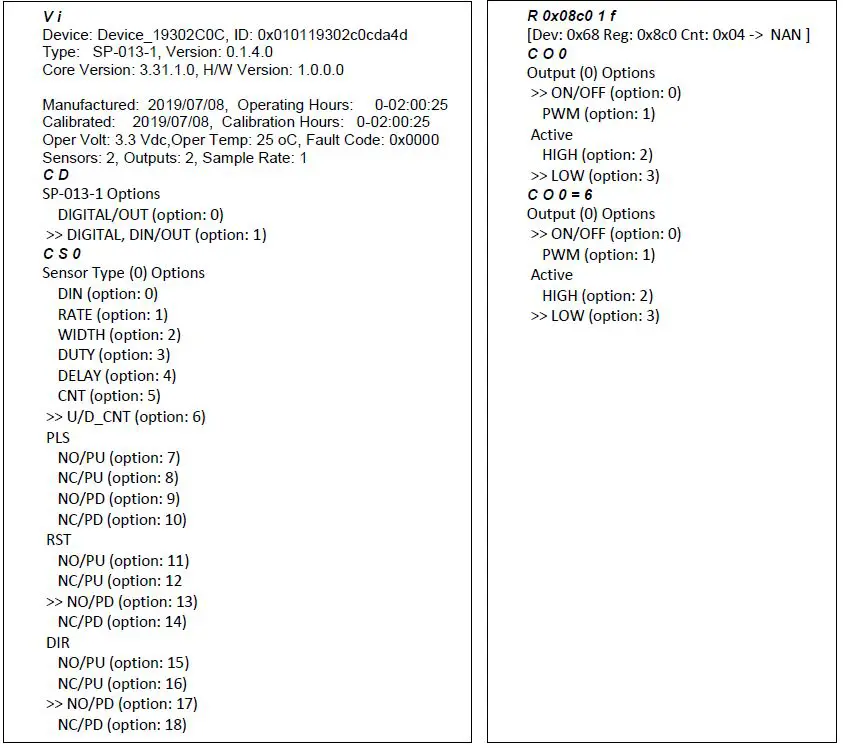
When configuring sensors and outputs, multiple Sensor or Output Types may be presented. If any of the ‘options’ related to the Sensor or Output Type are selected the device will be reset to ensure enumeration of the selected type and the remaining options (CLK A, RST etc.) may change.
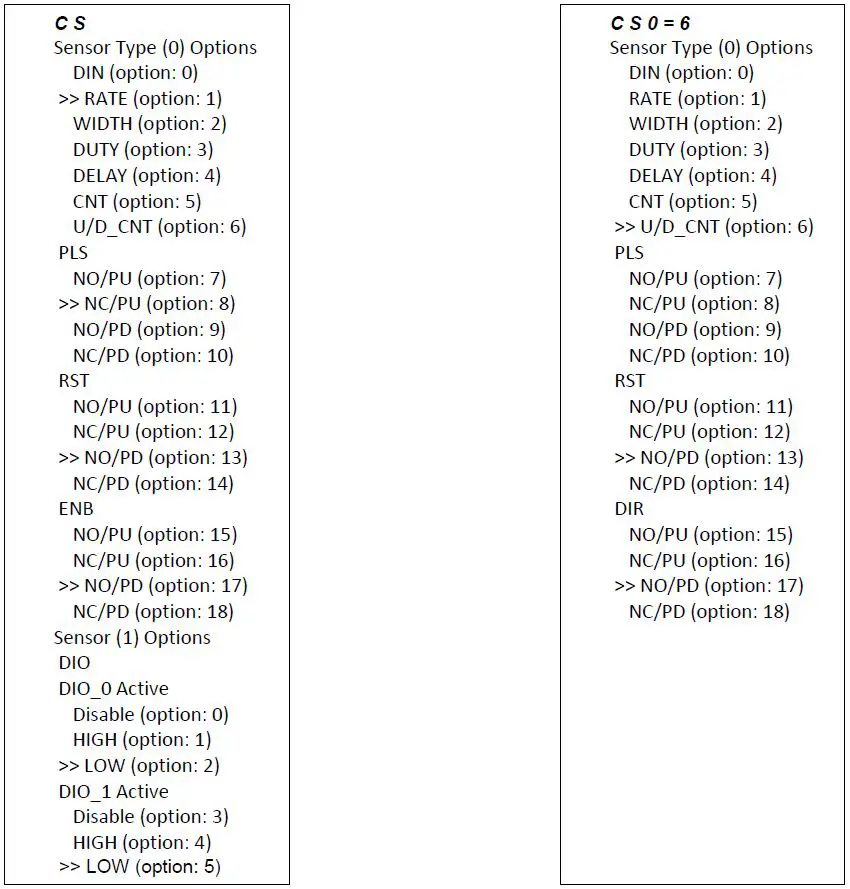
In addition to selectable options, sensors may also contain Sensor Parameters, whose floating-point values are maintained in a fixed memory space allocated for each sensor. Sensor Parameters are displayed showing the corresponding allocated space. The corresponding Sensor Parameter may be read or written using the Read and Write commands.
Option Command
The Option command allows configuring the IF-001 / IF-002 device to use default values to simplify the user interface by providing extended formatting options. Changes to the Options settings are retained in the internal Flash memory.
O(ptions) <V/v(erbose)> <H/h(ex)/D(ecimal)> <I(gnore) | P(rocess) | N(otify) INTR handling> <A/a(ddr for I2C) =?> <S(peed) =?> <M(odbus Addr) =?>
Characters shown in parenthesis (..) are optional. To Enable an option, specify the name with an upper-case character. Multiple options may be specified in the same command line in any order. To disable the option, specify the name with a lower-case character.
| Action | Usage |
| V(erbose) | Turn on Verbose mode |
| v(erbose) | Turn off Verbose mode |
| H(ex) | Data values are output in hexadecimal Upper case ie: 0x1AC7 |
| h(ex) | Data values are output in hexadecimal Lower case ie: 0x1ac7 |
| D(ecimal) | Data values are output in decimal format ie: 6855 |
| I(nterrupt) | Ignore (and disable) the Smart Sensor device INTR device interrupt |
| P(rocess) | Process the Smart Sensor INTR device interrupt |
| N(otify) | Notify via notification message on interrupt occurrence |
| A(ddress) = nnn | Set the address to be used when accessing the smart sensor device |
| a(ddress) | Set the default I2C address (0x68) |
| S(peed) = nnn | Set the I2C bus clock speed to be used |
| M(odbusAddr) = nnn | Set the Modbus address to be used |
The serial port settings can be changed using the command line interface. To set the Modbus Address on your IF-001 / IF-002, use the following command:
O(ptions) M(odbusAddr) = X
Note: For Modbus RTU operation the Modbus Address must be unique, Databits must equal 8, and Stopbits must be set to 1.
Serial commands should be entered in the same line and can be separated by a comma. Use the following table and example to set your serial configuration:
| Serial | Configuration Options |
| B(audrate) | 9600 | 19200 | 38400 | 115200 |
| P(arity) | Even | Odd | Mark | None |
| D(atabits) | 7 | 8 |
| S(top) | 1 | 2 |
To Set the Serial Configuration options on your IF-001 / IF-002, use the following command:
S(erial) B(audrate) = X, P(arity) =X, D(atabits) = X, S(top) = X
To reset the IF-001 / IF-002 serial configuration to default, type the following command:
S R
Multiple Options may be combined into a single command line.
Example:
| Option V h | Set to verbose mode, lower case hexadecimal output |
The response from the Options command is a summary of the current settings. Entering the O command with no parameters returns the current settings.
Option
Verbose, Hex, Ignore INTR, I2C Addr: 0x68 @ 50 kbp, Modbus Addr: 0x01
Verbose Mode
The Verbose mode adds formatting characters to command responses. Commas are inserted between each field and each record is enclosed in [ ] brackets.
Hex/hex / Decimal Option
The Hex/hex and Decimal option determines how numeric data is displayed if not specifically designated as a float or string value. When entering data, a ‘0x’ indicates a hex value.
- Option Verbose
Verbose, Hex mode, i(ignore INTR), I2C Address: 0x68 @ 50 kbp, Modbus Address: 0x01
// Read current sensor readings, display as 4 floats - R 0x3c 4f
[Dev: 104 Reg: 060 Cnt: 016 -> 23.1, 50.1, 984.0, 0.0 ]
// Force failure by disconnecting device - R 0x3c 4f
[Dev: 104 Reg: 060 E_NAK (009) - O v
verbose, Decimal mode, n(INTR ignored), I2C Address: 0x68 @ 50 kbp, Modbus Address: 0x01 - R 0x3c 4f
23.1, 49.8, 983.9, 0.0 - R 0x3c 4f
E_NAK (009)
INTR Processing
Smart sensor devices use I2C in a request/response configuration, where the IF-001 / IF-002 is always the ‘master’that initiates requests to the attached smart sensor device. If the attached device wishes to initiate a transaction, a separate active low interrupt signal (INTR) is provided.
Ignore INTR
If the IF-001 / IF-002 is configured to ignore the INTR signal (I) the corresponding hardware interrupt signal is disabled. No changes are made to the attached device.
Process INTR
Note: The processing of the INTR signal generates data whenever an interrupt is generated by the device. This behavior is not compatible with Modbus RTU and the I(nterrupt) processing mode MUST be set to Ignore if Modbus is to be used.
If the IF-001 / IF-002 is configured to process the INTR signal (P) the attached device is preconfigured,enabling the interrupts indicated below and the hardware interrupt is enabled. A handler is enabled to process the INTR signals. Upon receipt of an interrupt from the smart sensor device, the IF-001 / IF-002 adaptor will perform the following actions based on the INTERRUPT STATUS bits register read from the device.
| Interrupt Status Bits | Enabled | Handler Action |
| SENSOR CHANGE | Y | Executes a ‘View Info’ command |
| POWER CHANGE | Y | Executes a ‘View Info’ command |
| HEALTH CHANGE | Y | Executes a ‘View Info’ command |
| EVENT 0 | N | Display ‘EVENT 0 INTERRUPT’ |
| EVENT 1 | N | Display ‘EVENT 1 INTERRUPT’ |
| DATA READY | Y | Executes a ‘View Data’ command (precede with ‘!’) |
| FUNCTION BLOCK | N | Display ‘FUNCTION BLOCK INTERRUPT’ |
| LOG DATA READY | N | Executes a ‘View Log’ command |
O P
Verbose, Hex mode, Process INTR, I2C Addr: 0x68 @ 50 kbp, Modbus Addr: 0x01
- 10-19:48:47 23.0 .C 16.0 %RH 1014.0 mbar
- 10-19:48:53 23.0 .C 16.0 %RH 1014.0 mbar
If the INTR is configured to notify (N), an alternate handler is loaded which will generate a Notify message consisting of the Interrupt Status read from the device. No change is made to the INTERRUPT CONTROL register.
O N
Verbose, Hex mode, Notify on INTR, I2C Addr: 0x68 @ 50 kbp, Modbus Addr: 0x01
- N 0x68 0x02 0x0020
- N 0x68 0x02 0x0020
- N 0x68 0x02 0x0020
The Notify information consists of the device address (0x68), Register Index (0x?? = Interrupt Status),number of bytes (0x02), and the value.
Writing to the integer INTERRUPT CONTROL register at location 0x16 allows changing the enabled interrupts.
I2C Address
The IF-001 / IF-002 defaults to using I2C address 0x68. The default may be overwritten by setting the Address = ??. If a lower case ‘a’ is entered it resets the address back to the default 0x68 value.
Bus Speed
The I2C bus speed defaults to 40 kb/second, suitable for up to 5-meter cable lengths. This may be changed from values 20 to 100 kbits/second. Note that changing this value will have a minimal impact on overall performance.
Modbus Address
The IF-001 / IF-002 defaults to Modbus address 0x01, which may be overwritten with the M(odbus) option.
Smart Sensor Register Summary
The following is a summary of commonly used smart sensor registers.
| Name | Type | SS Register | Modbus Register | Usage / Comments |
| DEVICE_ID | u32 | 0x0000 | 0xf000 | Unique identifier for this device |
| F/W Version | u32 | 0x0004 | 0xf002 | Formatted as Major.Minor.Bug.Build |
| Hardware Version | u32 | 0x0008 | 0xf004 | Formatted as Major.Minor.Bug.Build |
| Device I/O List selection | u8 | 0x000c | 0xf006 | Selects Mix of Sensor / Outputs |
| User Operating Hours | u16 | 0x000e | 0xf007 | User settable (Hours) |
| Event 1 Timer Base | u16 | 0x0010 | 0xf008 | Used to set internal sampling rate |
| Event 2 Timer Base | u16 | 0x0012 | 0xf008 | Aux timer for application specific use |
| System Control | u16 | 0x0014 | 0xf009 | Determines how device behaves |
| Interrupt Control | u16 | 0x0018 | 0xf00c | Determines what generated INTR signal |
| Number Sensors | u8 | 0x001a | 0xf00d | Number of enumerated sensors |
| Number Outputs | u8 | 0x001b | Number of enumerated outputs | |
| Operating Temperature | u8 | 0x001c | 0xf00e | Operating temperature of device |
| Operating Voltage | u8 | 0x001d | Operating voltage of device | |
| Fault Process | u8 | 0x001e | 0xf00f | Where last fault was detected |
| Fault Code | u8 | 0x001f | Type of last fault | |
| Event 1 Timer | u16 | 0x0020 | 0xf010 | Time remaining on Event Timer 1 |
| Event 2 Timer | u16 | 0x0022 | 0xf011 | Time remaining on Event Timer 2 |
| System Status | u16 | 0x0024 | 0xf012 | Overall system status / health |
| Trigger Request | u16 | 0x0026 | 0xf013 | Initiates action on device |
| Extract Start Time | u32 | 0x0028 | 0xf014 | Used for searching Event Log |
| Extract End Time | u32 | 0x002c | 0xf016 | Used for searching Event Log |
| Number of Records | u16 | 0x0036 | 0xf01b | Number of records found |
| Current Time | u32 | 0x0038 | 0xf01c | Current time (offset for 2000) |
| Sensor Readings (4) | float | 0x003c | 0xf01e | Four values (consecutive Address) |
| Log Record Time | u32 | 0x004c | 0xf026 | Current time (offset for 2000) |
| Extracted Values (4) | float / u32[4] | 0x0050 | 0xf028 | Four values (consecutive Address). May be float or u32 values based on record type |
| Sensor Range/Type (4) | u8 | 0x0062 | 0xf031 | Determine overall sensor type/range. The values are offset by 0x08 (0x04 Modbus) |
| Sensor Device (4) | u8 | 0x0063 | Determine overall specific signal configurations. The values are offset by 0x08 (0x04 Modbus) | |
| Sensor Units (4) | u8[4] | 0x0064 | 0xf032 | 4 byte string describing units of measure. The values are offset by 0x08 (0x04 Modbus) |
| User Parameters (16) | float | 0x0080 | 0xf040 | Application specific user registers (setpoints etc.) |
| Sensor (16) | float | 0x0080 | 0xf040 | Application specific user registers (setpoints etc.) |
| User Parameters (16) | float | 0x0080 | 0xf040 | Application specific user registers (setpoints etc.) |
| Sensor Offset (4) | float | 0x00c0 | 0xf060 | Offset value for V = R * Gain + Offset applied to Sensor 0, 4 values |
| Sensor Gain (4) | float | 0x00c4 | 0xf062 | Gain value for V = R * Gain + Offset applied to Sensor 0, 4 values |
| Device Name | u8[16] | 0x00e0 | 0xf070 | 16 character user assigned device name |
| Output Values (4) | float | 0x00f0 | 0xf078 | 4 values represent output values |
| Manufactured Date | u16 | 0x0128 | 0xf094 | Bit formatted as, year offset by 2000 YYYYYYYMMMMDDDDD |
| Calibration Date | u16 | 0x012a | 0xf095 | Bit formatted as, year offset by 2000 YYYYYYYMMMMDDDDD |
| Operating Time | u32 | 0x012c | 0xf096 | Seconds since manufactured |
| Time since Calibration | u32 | 0x012c | 0xf096 | Seconds since calibrated |
| Output Range/Type (4) | u8 | 0x0134 | 0xf09a | Determine overall Output type/range. The values are offset by 0x02 (0x01 Modbus) |
| Output Device (4) | u8[4] | 0x0135 | Determine overall specific signal configurations. The values are offset by 0x02 (0x01 Modbus) | |
| Sensor Names | u8[8] | 0xe00 | 0xf700 | 4 X sensor name string |
| Output Names | u8[8] | 0xe20 | 0xf710 | 4 X output name string |
| Parameter Names | u8[8] | 0xe40 | 0xf720 | 16 X parameter name string |
| Function Block Names | u8[8] | 0xec0 | 0xf760 | 32 X parameter name string |
| FB Parameter Names | u8[8] | 0xfc0 | 0xf7e0 | 4 X Function Block parameter names |
Specifications
RS485 Serial Port
- Baudrate: 9600, 19200, 34800, 115200
- Parity: Even, Odd, None
- Data Bits: 7, 8
- Stop Bits: 1, 2
- Protocol: Modbus RTU or Command Line Interpreter
Input Power
- Voltage: 5 VDC – 36 VDC
Output to Smart Probe
- 100 mA max @ 3.0V ±5%
Environmental
- Operating Temperature: -40 to 85°C (-40 to 185°F)
- Rating: IP67 when mated
Mechanical
- Dimensions: 22.1 mm W x 96.7 mm L (0.87” x 3.80”) not including mounting tabs
General
- Agency Approvals: CE
Compatibility: Windows OS 10 and above. Compatible with OEG, SYNC configuration software,and Modbus networks
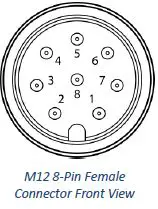
| Name | Function | |
| Pin 1 | N/A | No Connection |
| Pin 2 | INTR | Interrupt Signal |
| Pin 3 | SCL | SCL Signal |
| Pin 4 | SDA | SDA Signal |
| Pin 5 | Shield | Shield Ground |
| Pin 6 | N/A | No Connection |
| Pin 7 | GND | Power Return |
| Pin 8 | VCC | Nominal 3.3 VDC to Smart Probe |
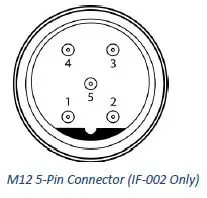
| Name | Function | |
| Pin 1 | VDD | 5-36VDC |
| Pin 2 | A’ | RS485 Data + |
| Pin 3 | GND | Ground |
| Pin 4 | B’ | RS485 Data – |
| Pin 5 | Shield | Shield Ground |
Texas Instrument License Statement
Some elements of Texas Instruments developed software are used in this product. As such, we are required to provide the following:
–COPYRIGHT, BSD
Copyright (c) 2015, Texas Instruments Incorporated
All rights reserved.
- Redistribution and use in source and binary forms, with or without modification, are permitted provided that the following conditions are met:
- Redistributions of source code must retain the above copyright notice, this list of conditions and the following disclaimer.
- Redistributions in binary form must reproduce the above copyright notice, this list of conditions and the following disclaimer in the documentation and/or other materials provided with the distribution.
- Neither the name of Texas Instruments Incorporated nor the names of its contributors may be used to endorse or promote products derived
from this software without specific prior written permission.
THIS SOFTWARE IS PROVIDED BY THE COPYRIGHT HOLDERS AND CONTRIBUTORS “AS IS” AND ANY EXPRESS OR IMPLIED WARRANTIES, INCLUDING, BUT NOT LIMITED TO, THE IMPLIED WARRANTIES OF MERCHANTABILITY AND FITNESS FOR A PARTICULAR PURPOSE ARE DISCLAIMED. IN NO EVENT SHALL THE COPYRIGHT OWNER OR CONTRIBUTORS BE LIABLE FOR ANY DIRECT, INDIRECT, INCIDENTAL, SPECIAL, EXEMPLARY, OR CONSEQUENTIAL DAMAGES (INCLUDING, BUT NOT LIMITED TO, PROCUREMENT OF SUBSTITUTE GOODS OR SERVICES; LOSS OF USE, DATA, OR PROFITS; OR BUSINESS INTERRUPTION) HOWEVER CAUSED AND ON ANY THEORY OF LIABILITY, WHETHER IN CONTRACT, STRICT LIABILITY, OR TORT (INCLUDING NEGLIGENCE OR OTHERWISE) ARISING IN ANY WAY OUT OF THE USE OF THIS SOFTWARE, EVEN IF ADVISED OF THE POSSIBILITY OF SUCH DAMAGE.
–COPYRIGHT–
WARRANTY/DISCLAIMER
OMEGA ENGINEERING, INC. warrants this unit to be free of defects in materials and workmanship for a period of 13 months from date of purchase. OMEGA’s WARRANTY adds an additional one (1) month grace period to the normal one (1) year product warranty to cover handling and shipping time. This ensures that OMEGA’s customers receive maximum coverage on each product.
If the unit malfunctions, it must be returned to the factory for evaluation. OMEGA’s Customer Service
Department will issue an Authorized Return (AR) number immediately upon phone or written request.
Upon examination by OMEGA, if the unit is found to be defective, it will be repaired or replaced at no charge. OMEGA’s WARRANTY does not apply to defects resulting from any action of the purchaser, including but not limited to mishandling, improper interfacing, operation outside of design limits, improper repair, or unauthorized modification. This WARRANTY is VOID if the unit shows evidence of having been tampered with or shows evidence of having been damaged as a result of excessive corrosion; or current, heat, moisture or vibration; improper specification; misapplication; misuse or other operating conditions outside of OMEGA’s control. Components in which wear is not warranted, include but are not limited to contact points, fuses, and triacs
OMEGA is pleased to offer suggestions on the use of its various products. However, OMEGA neither assumes responsibility for any omissions or errors nor assumes liability for any damages that result from the use of its products in accordance with information provided by OMEGA, either verbal or written. OMEGA warrants only that the parts manufactured by the company will be as specified and free of defects. OMEGA MAKES NO OTHER WARRANTIES OR REPRESENTATIONS OF ANY KIND WHATSOEVER, EXPRESSED OR IMPLIED, EXCEPT THAT OF TITLE, AND ALL IMPLIED WARRANTIES INCLUDING ANY WARRANTY OF MERCHANTABILITY AND FITNESS FOR A PARTICULAR PURPOSE ARE HEREBY DISCLAIMED. LIMITATION OF LIABILITY: The remedies of purchaser set forth herein are exclusive, and the total liability of OMEGA with respect to this order, whether based on contract, warranty, negligence,indemnification, strict liability or otherwise, shall not exceed the purchase price of the component upon which liability is based. In no event shall OMEGA be liable for consequential, incidental or special damages.
CONDITIONS: Equipment sold by OMEGA is not intended to be used, nor shall it be used: (1) as a “Basic Component” under 10 CFR 21 (NRC), used in or with any nuclear installation or activity; or (2) in medical applications or used on humans. Should any Product(s) be used in or with any nuclear installation or activity, medical application, used on humans, or misused in any way, OMEGA assumes no responsibility as set forth in our basic WARRANTY/DISCLAIMER language, and, additionally, purchaser will indemnify OMEGA and hold OMEGA harmless from any liability or damage whatsoever arising out of the use of the Product(s) in such a manner.
RETURN REQUESTS/INQUIRIES
Direct all warranty and repair requests/inquiries to the OMEGA Customer Service Department.
BEFORE RETURNING ANY PRODUCT(S) TO OMEGA, PURCHASER MUST OBTAIN AN AUTHORIZED RETURN (AR) NUMBER FROM OMEGA’S CUSTOMER SERVICE DEPARTMENT (IN ORDER TO AVOID PROCESSING DELAYS). The assigned AR number should then be marked on the outside of the return package and on any correspondence.
The purchaser is responsible for shipping charges, freight, insurance and proper packaging to prevent breakage in transit.
FOR WARRANTY RETURNS, please have the following information available BEFORE contacting OMEGA:
- Purchase Order number under which the product was PURCHASED,
- Model and serial number of the product under warranty, and
- Repair instructions and/or specific problems relative to the product.
FOR NON-WARRANTY REPAIRS, consult OMEGA for current repair charges. Have the following information available BEFORE contacting OMEGA:
- Purchase Order number to cover the COST of the repair,
- Model and serial number of the product, and
- Repair instructions and/or specific problems relative to the product.
Where Do I Find Everything I Need for Process Measurement and Control?
OMEGA…Of Course!
Shop online at omega.com
TEMPERATURE
- Thermocouple, RTD & Thermistor Probes, Connectors, Panels & Assemblies
- Wire: Thermocouple, RTD & Thermistor
- Calibrators & Ice Point References
- Recorders, Controllers & Process Monitors
- Infrared Pyrometers
PRESSURE, STRAIN AND FORCE
- Transducers & Strain Gages
- Load Cells & Pressure Gages
- Displacement Transducers
- Instrumentation & Accessories
FLOW/LEVEL
- Rotameters, Gas Mass Flowmeters & Flow Computers
- Air Velocity Indicators
- Turbine/Paddlewheel Systems
- Totalizers & Batch Controllers
pH/CONDUCTIVITY
- pH Electrodes, Testers & Accessories
- Benchtop/Laboratory Meters
- Controllers, Calibrators, Simulators & Pumps
- Industrial pH & Conductivity Equipment
DATA ACQUISITION
- Communications-Based Acquisition Systems
- Data Logging Systems
- Wireless Sensors, Transmitters, & Receivers
- Signal Conditioners
- Data Acquisition Software
HEATERS
- Heating Cable
- Cartridge & Strip Heaters
- Immersion & Band Heaters
- Flexible Heaters
- Laboratory Heaters
ENVIRONMENTAL MONITORING AND CONTROL
- Metering & Control Instrumentation
- Refractometers
- Pumps & Tubing
- Air, Soil & Water Monitors
- Industrial Water & Wastewater Treatment
- pH, Conductivity & Dissolved Oxygen Instruments
omega.com
[email protected]
Omega Engineering, Inc:
800 Connecticut Ave. Suite 5N01, Norwalk, CT 06854, USA
Toll-Free: 1-800-826-6342 (USA & Canada only)
Customer Service: 1-800-622-2378 (USA & Canada only)
Engineering Service: 1-800-872-9436 (USA & Canada only)
Tel: (203) 359-1660
e-mail: [email protected]
Fax: (203) 359-7700
Omega Engineering, Limited:
1 Omega Drive, Northbank,Irlam Manchester M44 5BD United Kingdom
Omega Engineering,GmbH:
Daimlerstrasse 26 75392
Deckenpfronn Germany
The information contained in this document is believed to be correct, but OMEGA accepts no liability for any errors it contains and reserves the right to
alter specifications without notice.
 Omega Engineering | Sensing, Monitoring and Control Solutions