 Quick 4 Scooter
User Guide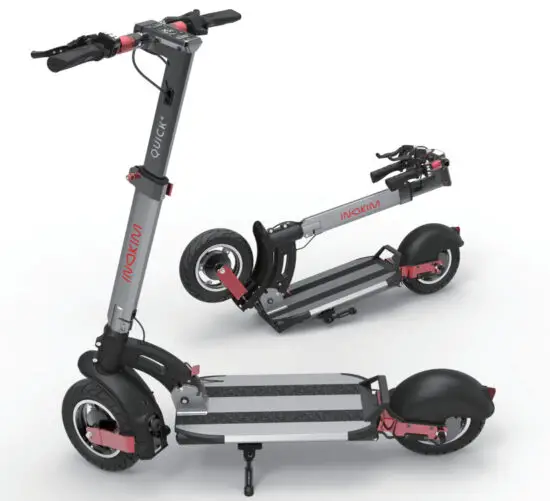
A note from the designer:
When we started designing our first electric scooter in 200g. we envisioned a world where cars are used for long-range distances only. while micro-mobility will become the primary form of transportation in urban environments.
Over the years. the popularity of electric scooters expanded. We observed users had differing needs. Some integrate their scooter with public transport. meaning they need a light. portable e-scooter. Others use their scooters to cover long distances. often over challenging terrain.
We created QUICK` to provide comfort and long-range while still being light and foldable.
The suspension handles urban landscapes. rough or smooth. and the fast-folding mechanism (hence the source of the name “QUICK’) allows for easy storage and carrying.
All that whilst still maintaining a clean and iconic design. excellent riding performance. and a digital panel offering technological control and information.
We hope QUICK` will be integrated into people’s lives mainly as a means of daily commuting.
Do not forget to wear a helmet :1
Enjoy. ride carefully and return home safely
 Write down the serial number of your INOKIM Keep this information separately and in a safe place!
WHY READ THIS MANUAL?
Understanding your new INOKIM’s features, performance, proper use & maintenance will help you:
ENJOY
Get the most out of your first and every ride.  RIDE SMART
For the safety of yourself and your surroundings.  MAINTAIN YOUR ELOKIM
For many years of safe and fun riding.
DISCLAIMER
MYWAY Ningbo Intelligent Technology will not be held responsible for any special, consequential or incidental damages caused by the use or misuse of our products. The user agrees to accept full responsibility for all such risks and to not hold MYWAY Ningbo, its distributors or retailers, responsible for any incident, injury to persons, or damage to property caused by misuse of the product.
SAFETY REGULATIONS
 WARNING
Always wear a helmet. Most serious injuries that occur while riding are head injuries. This can be prevented if a helmet is worn. You must wear a helmet while riding your QUICK⁴. The helmet must be worn according to its instructions.
Follow the local laws and regulations. Certain countries or regions require safety devices or gear.
It is your responsibility to know the state laws and follow them.
Do not carry passengers.
BATTERY SAFETY REGULATIONS
ONLY USE INOKIM QUICK⁴ CHARGER.
Keep the battery away from children & pets.
Exposure to the battery voltage can cause death or serious injury.
Unplug the battery from the outlet before performing any maintenance.
It is forbidden to operate INOKIM products when plugged into an electrical outlet.
Do NOT use the QUICK⁴ if the battery:
- Is damaged
- Emits an unusual odor or excessive heat
- Presents any leakage
SPECIFICATIONS
| MODEL | QUICK4 |
| Lithium Battery | Hero 52V | 13Ah Super 52V | 16Ah (Samsung cells) |
| Weight | 21.5 kg | 66.5 lb |
| Range (Full speed Mode 25km/h 75kg, 25°C) | Hero 50km | Super 55km |
| Range (Eco Mode 15km/h 75kg, 25°C) | Hero 58km | Super 70km |
| Charging Time (H) | 7 hours |
| Motor (Rated power) | 600W gearless |
| Motor (Peak power) | 1100W gearless |
| Max Speed | 25 km/h | 16 mph |
| Brakes | Front and rear drum brakes |
| Tire Size | 10”/2.5 pneumatic tires |
| Tire Air Pressure | 40 PSI to 50 PSI |
| Folded Size (L x W x H) | 110 x 55 x 25 cm | 43 x 21.5 x 10 inches |
| Open Size (L x W x H) | 113 x 57 x 120 cm |44.5 x 22.5 x 47 inches |
| Load Limit | 120 kg | 265 pounds |
| Lights | Integral LED front light, rear light |
| Throttle | Electric thumb throttle |
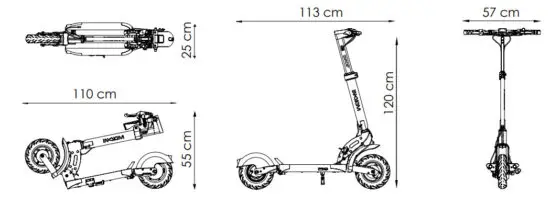
SPECIFICATIONS
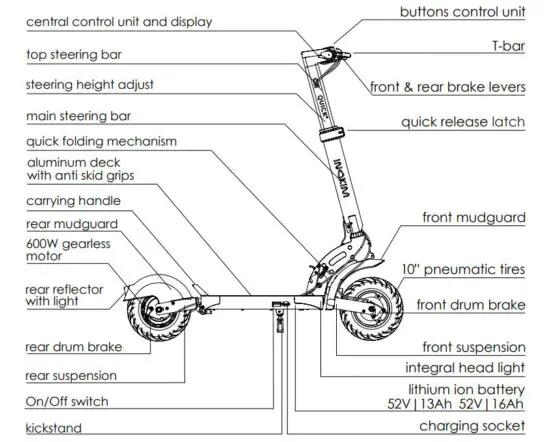
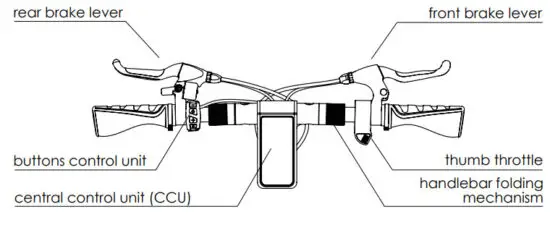
T-BAR RIDER INTERFACE
UNFOLDING
- Press down the RED Pedal in the folding mechanism using your hand, and unfold the steering bar.

- Pull up and push out the steering rod until you hear the click of the locking mechanism.

- Use the RED SAFETY LOCK to secure the folding mechanism.
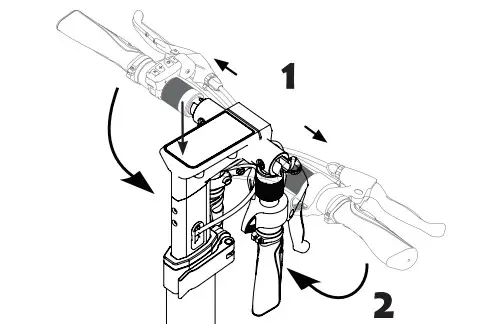
- Unfold handlebars untill they click into place.

- On the steering bar, open the RED quick-release latch, slide the steering bar to your preferred height and lock the latch.

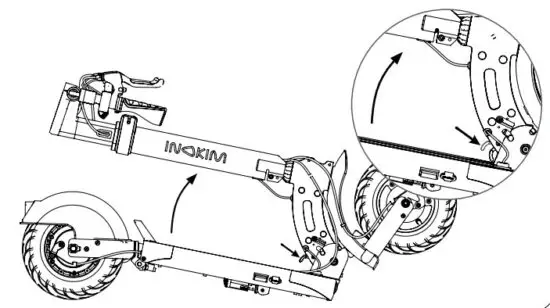
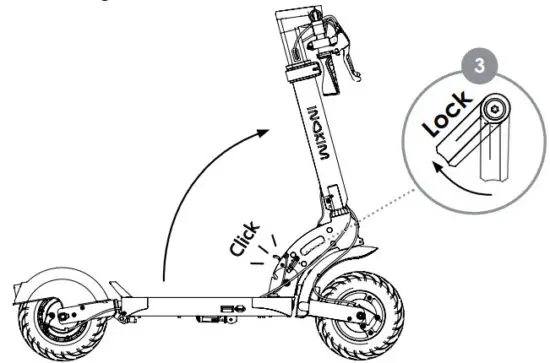
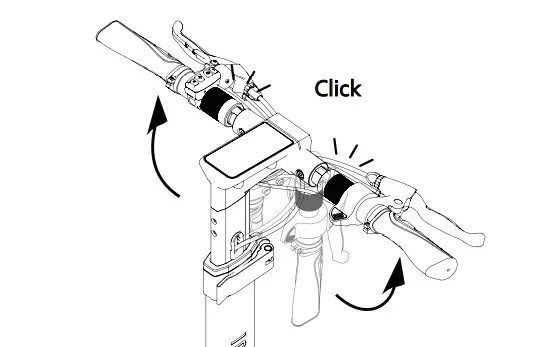
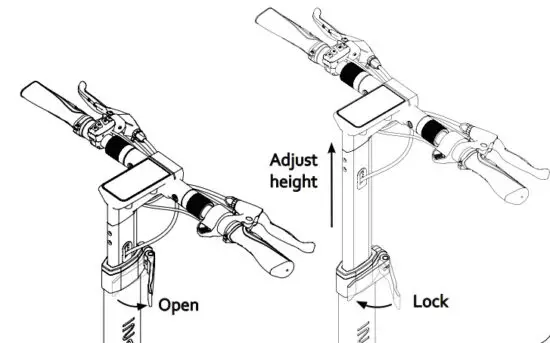
FOLDING
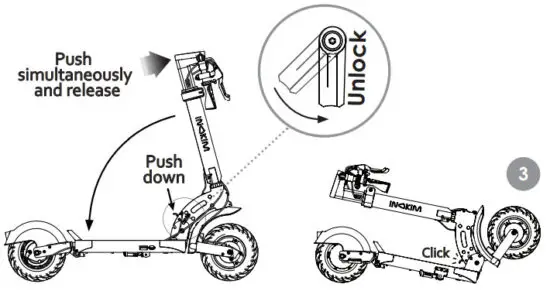
To fold QUICK4, repeat unfolding actions in reverse order:
- To fold the handlebars, push the RED secure sleeves aside

- To fold QUICK⁴, release the RED SAFETY LOCK push the steering bar firmly forward while at the same time using your foot to push the RED pedal down to release the FOLDING MECHANISM

CHARGING
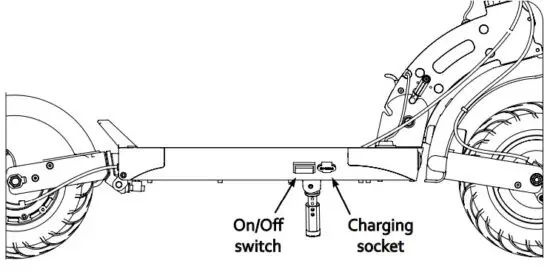
- Open the rubber cover under the frame and connect the charger to the socket.

Charging Indication:
RED light – Battery charging
GREEN light – Charging complete - Attention! Read battery safety and maintenance sections carefully before charging and mounting the battery.
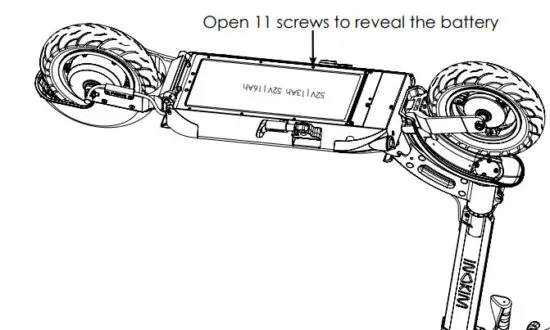
 Battery:
• Do not operate the motor while charging!
• Do not store INOKIM for long terms (more than two months) with a fully charged battery
• From time to time discharge and fully charge the battery
 Battery:
OPERATION
LCD DISPLAY⁴ The QUICK scooter contains a Central Control Unit (CCU) at the center of the T – Bar.
The CCU is displayed by an LCD and the functions are applied by the control buttons on the left-hand side of the T – Bar.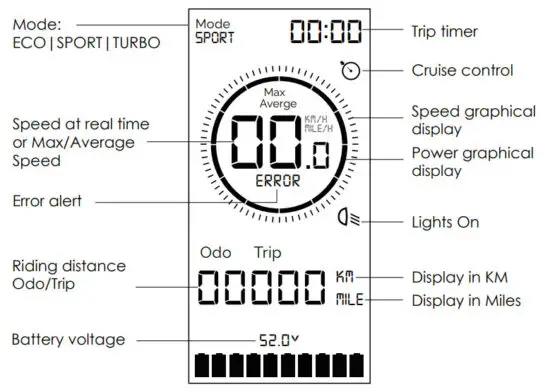
BUTTONS AND FUNCTIONS ON THE CONTROL UNIT
 Up/Increase
 Select/Switching menu/Quit menu
 Down/Decrease
 Light
Light
HOW TO RIDE
To turn on: Turn the battery On, and use the On/Off switch under the deck on the right side of the scooter.Press on the buttons control unit to turn the system On.
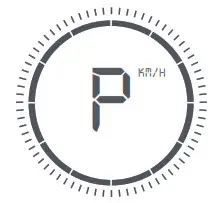
Once the system is turned On, it is in Parking Mode.
To start riding you can do any of the following:
- A short press on the either brake handle
- Fast double-press the throttle
- Press
 or
or or
or

To turn off:
Shut down for short periods:
Press for 3 seconds to turn the system Off
Shut down for long periods:Turn the battery Off, and use the On/Off switch under the deck on the right side of the scooter.
After 30 seconds of no use, the system will enter Parking mode.
After 3 minutes of no use, the system will automatically shut down.
FUNCTIONS
MODE
When the system is ON, press for TURBO Mode, and press ECO Mode.
LIGHTS
When Power is ON, long press to turn the lights on. When Power is ON at night, the light sensor will automatically turn the lights on. This function can be adjusted for different sensitivity in darkness. 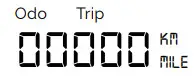 Each press will change the display information will change the display information
- ODO (the total distance of QUICK4 )
- Single trip distance
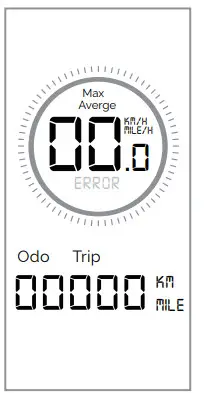
- Average speed in a single trip
- Maximum speed in a single trip
Average speed and Max speed will be displayed for 2 seconds only.
SINGLE TRIP RESET
When the trip is displayed press 2 seconds.
SETTINGS
To enter SETTINGS: while the system is On, press+ simultaneously for 2 seconds. will appear.
– LCD BRIGHTNESSto increase to decrease (5 levels of LCD brightness)
 – SPEED LIMIT
While in SETTINGS press once to enter – Speed limit
The default and maximum motor speed is 25 KM/H.
You can decrease the maximum speed by pressing.
You can increase the maximum speed up to 25 KM/H, by pressing.
SETTINGS
 – CRUISE CONTROL FUNCTION
While in SETTINGS press X 2 times to enter – The cruise control function.
By default, the cruise control is Off.
Press or to turn cruise control On.
The display will show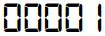 cruise control On.
The display will show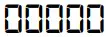 cruise control Off.
 – KM / MILES SETTING
While in SETTINGS press X 3 times to enter– KM/Miles Setting.
By default the setting units is metric.
Press or change from metric to mileage.
The display will show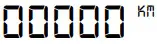 or
or 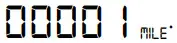 MILE.
MILE.
SETTINGS
 – AUTOMATIC LIGHTING SENSITIVITY IN DARKNESS
While in SETTINGS press X 4 times to enter – Automatic lighting sensitivity in darkness.
Press to increase the sensitivity of automatic lights turning on in darkness.
Press to decrease the sensitivity of automatic lights turning on in darkness.
ERRORS
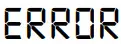 will flash when there is a fault in the electric system
Error 21 Brake sensors fault
Error 22 Thumb throttle fault
Error 24 Motor hall signal fault
Error 40 Controller fault
MAINTENANCE
In order to maintain the product in the best possible way, we recommend that you:
 ONCE A DAY
Check tire air pressure (45 PSI), brakes & battery state before the ride
 ONCE A WEEK
Check tire condition & brakes quality Check for loose screws
 EVERY 6 MONTHS
Get serviced at a local service center Open battery cover to check sealings General store maintenance
BATTERY MAINTENANCE
MAXIMIZE YOUR BATTERY’S PERFORMANCE:
- For its initial charge, FULLY charge your QUICK⁴.
This conditions the battery for future life span. - Do NOT leave a fully charged battery connected to a charger, since overcharging may shorten its lifetime.
- Avoid extreme temperatures. Always try to keep the battery between 15°C and 25°C (59°F and 77°F). Extreme temperatures reduce the capacity and lifetime of the battery. A device with a hot or cold battery may not work temporarily.
- At least once a month fully charge the battery.
5. From time to time discharge the battery by riding.
Use all stored energy in the battery. - Before storing it for a long period, charge the battery halfway.
USE QUICK⁴ INOKIM CHARGER ONLY!
Your QUICK⁴ has a Lithium Battery with an external charger. When charging, connect the charging cable in this order: Plug in the charger to INOKIM’s charging socket first, then plug it into the electric outlet socket.
DO NOT USE THE BATTERY IF THE BOARD:
- Is damaged
- Emits an unusual odor or excessive heat
- Presents any leakage
Avoid contact with substances leaking from the battery. Keep the battery away from children and pets.
Exposure to the battery voltage can cause death or serious injury.
The use, storage, or charging of the INOKIM battery outside specified limits may result in the annulment of the warranty, battery damage, and ineffective battery charging.
 http://inokim.com/
OPERATION & MANAGEMENT
NINGBO MYWAY Intelligent Technology Co., Ltd
#18 Nanhai Road, Beilun, Ningbo.
ZHEJIANG PROVINCE, CHINA 315800.
www.inokim.com | [email protected]
INOKIMOFFICIAL WWW.INOKIM.COM
 One moment, please...