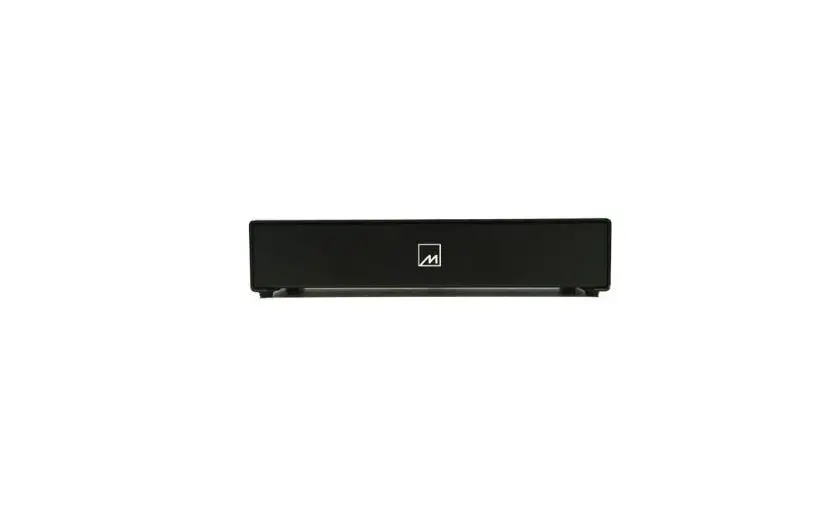

MERIDIAN AC12 Audio Processor
Introduction
The AC12 allows you to connect up a system consisting of both the latest Meridian SpeakerLink products, and earlier Meridian products using Meridian Comms over either 5-pin DIN connectors or BNC connectors. The AC12 is a passive component and so is completely self-contained; it does not need a power supply or mains connection.
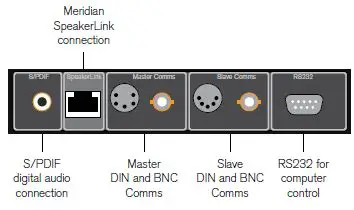
Back panel connections
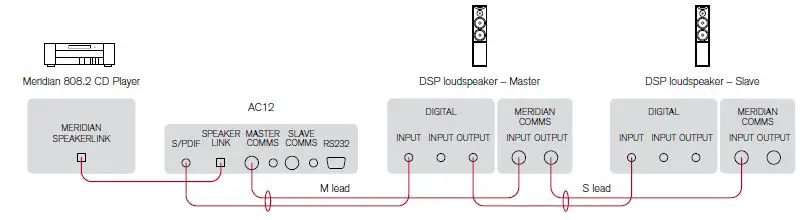
2-channel SpeakerLink to non-SpeakerLink loudspeakers
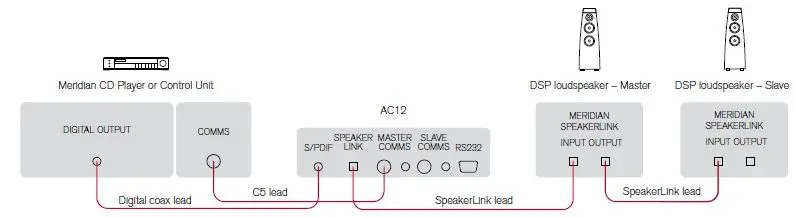
2-channel non-SpeakerLink to SpeakerLink loudspeakers
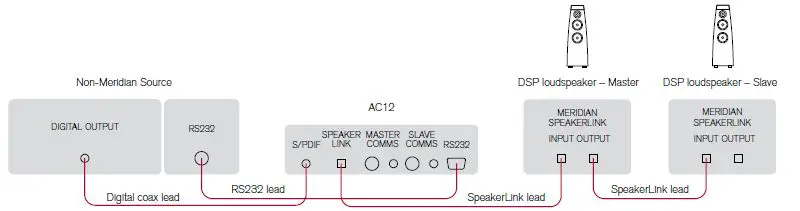
2-channel non-Meridian source (eg PC) to SpeakerLink loudspeakers
Use this application to connect a recent Meridian source with a SpeakerLink output to a pair of Meridian Digital loudspeakers that do not have SpeakerLink.
- Connect the SpeakerLink output from the source to the SpeakerLink input on the AC12.
- Connect the Master Comms and S/PDIF connections on the AC12 to the master loudspeaker using a Meridian M lead.
- Use the DIN Comms or BNC Comms as appropriate. Connect the loudspeakers together using a Meridian S lead
Use this application to connect a Meridian source that does not have a SpeakerLink output to a pair of Meridian Digital loudspeakers with SpeakerLink.
- Connect the digital output from the source to the S/PDIF input on the AC12, using a digital coax cable.
- Connect the Comms connection from the source to the Master Comms connection on the AC12, using a Meridian C5 (master to master) lead
Alternatively, if the product has BNC comms you can connect it to the AC12 Master Comms BNC socket.
- Connect the SpeakerLink connector on the AC12 to the loudspeaker you have configured as master using a SpeakerLink lead.
- Connect the loudspeakers together using SpeakerLink leads.
Use this application to connect a non-Meridian source, such as a PC, to a pair of Meridian Digital loudspeakers with SpeakerLink.
- Connect the SpeakerLink connector on the AC12 to the loudspeaker you have configured as master using a SpeakerLink lead.
- Connect the loudspeakers together using SpeakerLink leads.
- Connect the digital output from the source to the S/PDIF input on the Connect the digital output from the source to the S/PDIF input on the
You can connect an RS232 null-modem cable between the PC and the AC12 to provide PC control of the DSP loudspeakers using the Meridian Control Window program; for more information see the Meridian Configuration Program Guide.
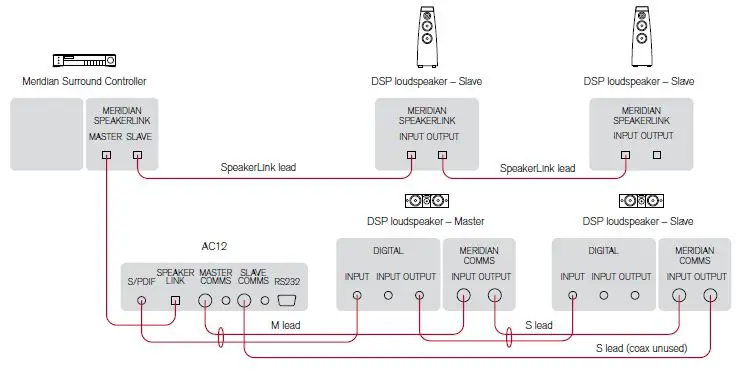
Multichannel SpeakerLink to SpeakerLink slave loudspeakers and non-SpeakerLink master
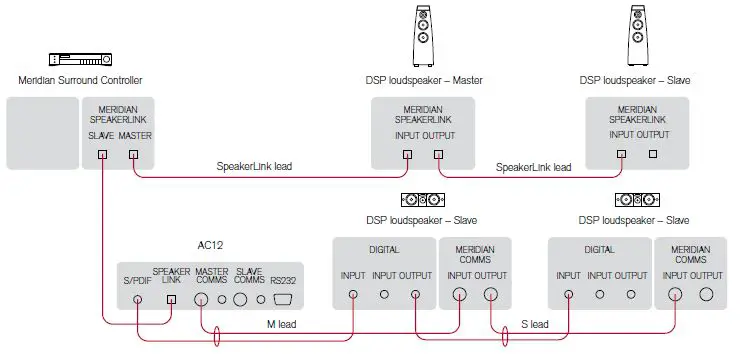
Multichannel SpeakerLink to non-SpeakerLink slave loudspeakers and SpeakerLink master
Use this application to connect up a multichannel system that includes both SpeakerLink and non-SpeakerLink loudspeakers, where the speaker you have chosen as the master does not have SpeakerLink.
- Connect the Master SpeakerLink output from the source to the SpeakerLink input on the AC12.
- Connect the Master Comms and S/PDIF connections on the AC12 to the loudspeaker you have configured as master, using a Meridian M lead.
- Use the DIN Comms or BNC Comms as appropriate.
- Connect the non-SpeakerLink loudspeakers together using a Meridian S lead.
- Take a return from the last non-SpeakerLink slave loudspeaker back to the AC12 Slave Comms connection, using the Comms part of a Meridian S lead.
- Connect the Slave SpeakerLink output from the source to the first SpeakerLink loudspeaker, using a SpeakerLink lead.
- Connect the remaining SpeakerLink loudspeakers together using SpeakerLink leads
Use this application to connect up a multichannel system that includes both SpeakerLink and non-SpeakerLink loudspeakers, where the speaker you have chosen as the master does have SpeakerLink.
- Connect the Master SpeakerLink output from the source to the master SpeakerLink loudspeaker, using a SpeakerLink lead.
- Connect the SpeakerLink loudspeakers together using SpeakerLink leads.
- Connect the Slave SpeakerLink output from the source to the SpeakerLink input on the AC12.
- Connect the Master Comms and S/PDIF connections on the AC12 to the first non-SpeakerLink slave loudspeaker, using a Meridian M lead.
- Use the DIN Comms or BNC Comms as appropriate.
- Connect the non-SpeakerLink loudspeakers together using a Meridian S lead.