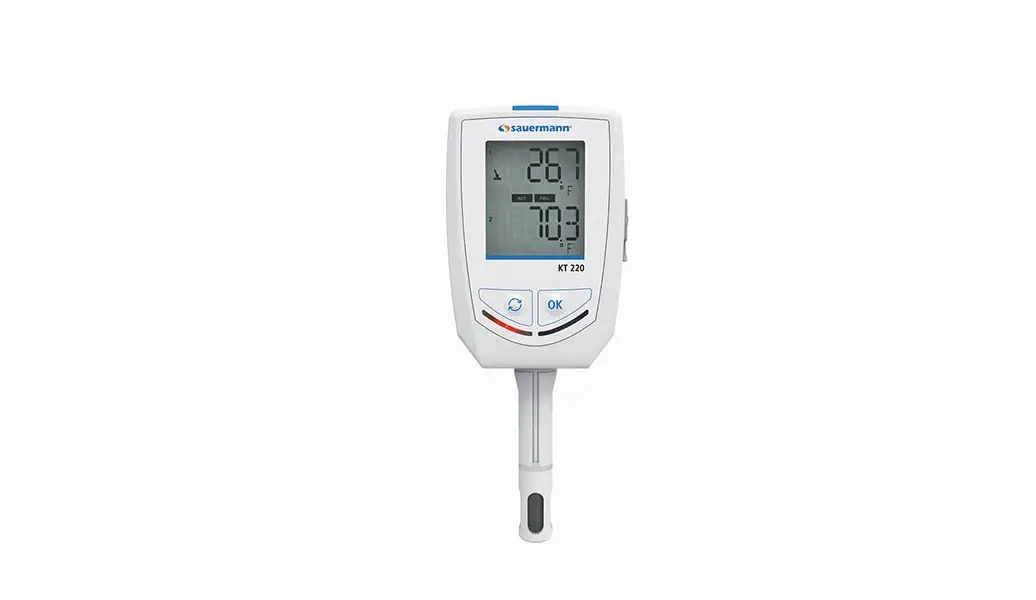

 USER MANUAL CLASS 320 KISTOCK
KT 320 / KCC 320 / KP 320-321
KPA 320 / KTT 320
Safety instructions
1.1 Precautions for use
Please always use the device in accordance with its intended use and within parameters described in the technical features
in order not to compromise the protection ensured by the device.
1.2 Symbols used
For your safety and in order to avoid any damage to the device, please follow the procedure described in this user manual and read carefully the notes preceded by the following symbol:
The following symbol will also be used in this user manual:
Please read carefully the information notes indicated after this symbol.
1.3 Directive 2014/53/EU
Hereby, Sauermann Industrie SAS declares that the radio equipment type Kistock 320 is in compliance with Directive 2014/53/EU. The full text of the EU declaration of conformity is available at the following internet address: www.sauermanngroup.com
Presentation of the device
2.1 Use
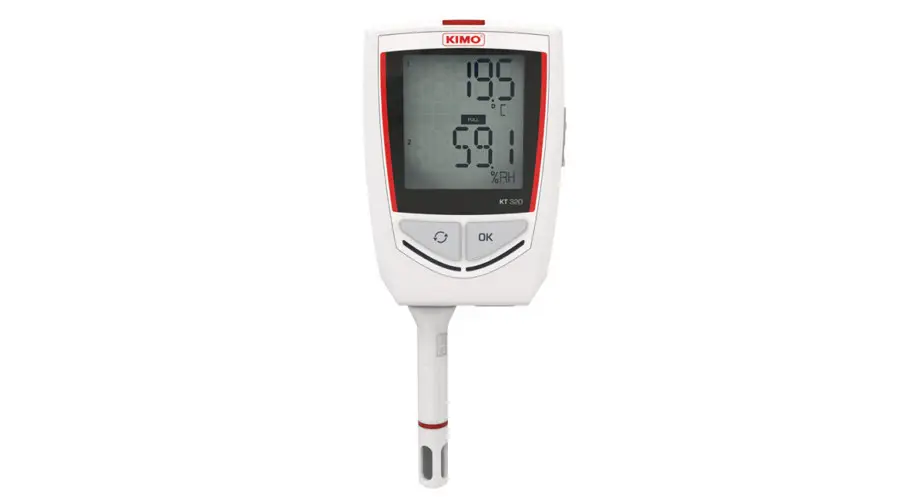
The KISTOCK class 320 dataloggers allow the measurement of several parameters:
- KT 320: internal measurement of temperature with two universal inputs for probe
- KCC 320: internal measurement of temperature, humidity, atmospheric pressure, and CO2
- KP 320 – KP 321: internal measurement of differential pressure with two measuring ranges
- KPA 320: internal measurement of temperature, hygrometry, and atmospheric pressure
- KTT 320: model with four thermocouple inputs
Communication between device and PC is carried out with a USB cable with a micro-USB female connector.
The low-energy wireless connection (possibility to deactivate this function) allows communicating with smartphones and tablets, working with Android and IOS.
2.2 Applications
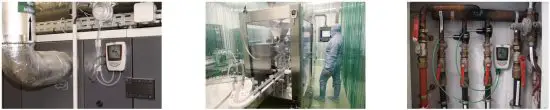
The KISTOCK data loggers are ideal for different parameters surveillance (temperature, hygrometry, light, current, voltage, impulsion, relative pressure…). They ensure traceability in the food industry environment as well as validate the proper functioning of industrial installations.
2.3 References
| Device reference | . Display | Internal sensors | External sensors | Parameters | Number of recording points | ||
| Number | Type | Number | Type | ||||
| KT 320 | Yes | 1 | Temperature | 2 | Inputs for SMART PLUG* probes | Temperature, hygrometry, current, voltage, impulsion | 2 000 000 |
| KCC 320 | 4 | Temperature, hygrometry, atmospheric pressure, CO2 | – | Temperature, hygrometry, atmospheric pressure, CO2 | |||
| KP 320 KP 321 | 1 | Differential pressure | Differential pressure | ||||
| KPA 320 | 3 | Temperature, hygrometry, atmospheric pressure | Temperature, hygrometry, atmospheric pressure | ||||
| KTT 320 | – | 4 | Inputs for thermocouple probes | Temperature | |||
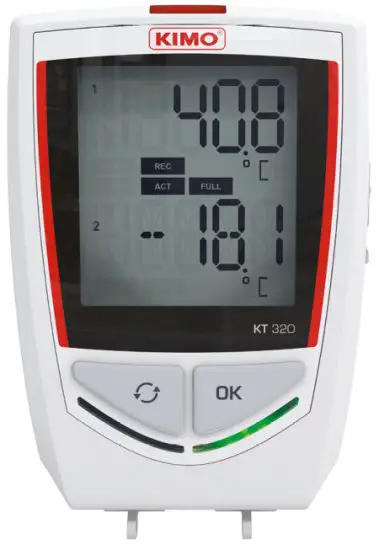
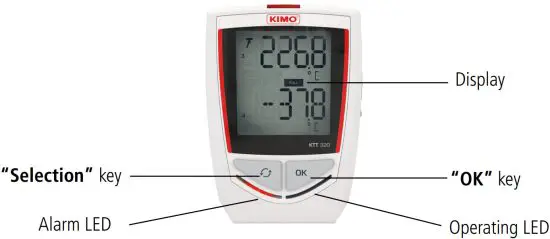
2.4 Description of the device
2.5 Description of keys
OK key: allows to start or stop the dataset or change of scrolling group, see page 13. Selection key: allows the functions to scroll, see page 13.
2.6 Description of LEDs

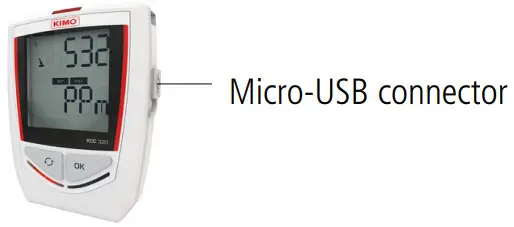
2.7 Connections
The communication between the device and the computer is carried out via a USB cable and with the female micro-USB connector.
| KT 320: 2 mini-DIN connections | KP 320 and KP 321: 2 pressure connections | KCC 320 and KPA 320 | KTT 320: 4 mini-thermocouple connections |
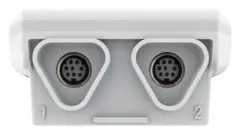 | 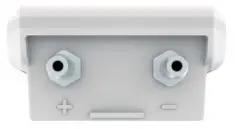 | 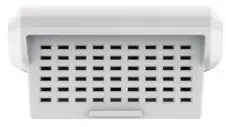 | 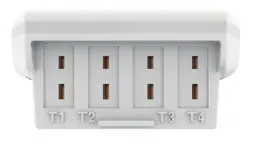 |
2.8 Mounting
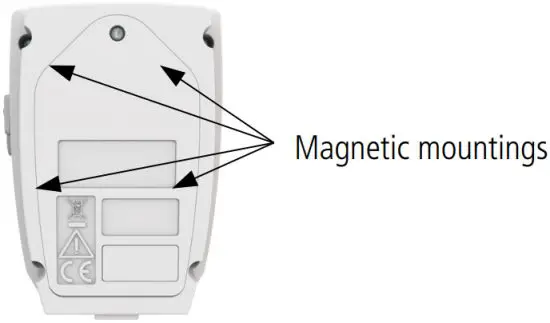
The class 320 KISTOCK has magnetic mountings, so you can fix it easily.
Technical features
3.1 Technical features of the devices
| KT320 | KT 320 | |
| Unitsdisplayed | °C,°F,°Ctd,°Ftd,%RH,mV,V,mA,A Programmedandfreunitsarealso available1(setablepage9) | °C,°F |
| Resolution | 0.1°C,0.1°F,0.1%RH,1mV,0.01V, 0.01mA,0.1A | 0.1°C,0.1°F |
| External input | Femalemicro-USBconector | |
| Inputforprobe | 2SMARTPLUG2inputs | 4inputsforthermocoupleprobes (K,J,T,N,S) |
| Internalsensor | Temperature | – |
| Type of sensor | CTN | Thermocouple |
| Measuring range | Measuringrangeoftheinternalsensor3: From-40to+70°C | K:from-20 to+130°C J:from-10 to+750°C T:from-20 to+40°C N:from-20 to+130°C S:from0to1760°C |
| Acuracy4 | ±0.4°Cfrom-20to70°C ±0.8°Cbelow-20°C | K,J,T, N:±0.4°Cfrom0to130°C ±(0.3%ofthereading+0.4°C)below0°C S:±0.6°C |
| Setpointsalarm | 2setpointalarmsoneachchanel | |
| Frequency of measurements | From1secondto24hours | |
| Operating temperature | From-40to+70°C | From-20to70°C |
| Storage temperature | From-40to+85°C | |
| Battery life | 7years5 | |
| European directives | 201/65EURoHSI;2012/19/EUWEE;2014/30/EUEMC;2014/35/EU | |
1 Some units are available only with optional probes.
2 Input which allows plugging different SMART PLUG compatible probes: see optional probes and cables page 10.
3 Other measuring ranges are available according to the connected probe: see optional probes and cables page 10.
4 All accuracies indicated in this document were stated in laboratory conditions and can be guaranteed for measurement carried out in the same conditions, or carried out with
calibration compensation.
5 On the basis of 1 measurement every 15 minutes at 25°C.
| KC 320 | KPA320 | |
| Unitsdisplayed | °C,°F,%RH,hPa,pm | °C,°F,%RH,hPa |
| Resolution | 0.1°C,1pm,0.1%RH,1hPa | 0.1°C,0.1%RH,1hPa |
| Externalinput | Micro-USBfemaleconector | |
| Inputforprobe | – | – |
| Internalsensor | Hygrometry,temperature,atmosphericpresure, CO2 | Hygrometry,temperature,atmosphericpresure |
| Tolerated overpressure | – | 1260hPa |
| Typeofsensor | Temperatureandhygrometry:capacitive Atmosphericpresure:piezo-resistive CO2:NDIR | Temperatureandhygrometry:cpacitive Atmosphericpresure:piezo-resistive |
| Measuringrange | Temperature:from-20to70°C Hygrometry:from0to10%RH Atmosphericpresure:from80 to10 hPa CO2:from0to500pm | Temperature:from-20to70°C Hygrometry:from0to10%RH Atmosphericpresure:from80 to10 hPa |
| Acuracy* | Temperature:±0.4°Cfrom0to50°C ±0.8°Cbelow0°Corabove50°C Humidity*:±2%RH from5to95%,15to25°C Atm.presure:±3hPa CO2:±50pm±3%ofthereading | Temperature:±0.4°Cfrom0to50°C ±0.8°Cbelow0°Corabove50°C Humidity*:±2%RH from5to95%,15to25°C Atm.presure:±3hPa |
| Setpointsalarm | 2setpointalarmsoneachchanel | |
| Frequencyof measurements | From1minuteto24hours (15secinon-linemode) | From1secondto24hours |
| Operating temperature | From0to+50°C | |
| Storage temperature | From-40to+85°C | |
| Baterylife | 3years** | 7years** |
| European directives | 201/65EURoHSI;2012/19/EUWEE;2014/30/EUEMC;2014/35/EU | |
* All accuracies indicated in this document were stated in laboratory conditions and can be guaranteed for measurement carried out in the same conditions, or carried out with
calibration compensation.
** Factory calibration uncertainty: ±0.88%RH. Temperature dependence: ±0.04 x (T-20) %RH (if T<15°C or T>25°C)
*** On the basis of 1 measurement every 15 minutes at 25°C.
| KP320 | KP321 | |
| Unitsdisplayed | Pa | |
| Measuringrange | ±100Pa | ±100 Pa |
| Resolution | 1Pa | |
| Acuracy* | ±0.5%ofthereading±3Pa | ±0.5%ofthereading±30Pa |
| Toleratedoverpressure | 2100Pa | 6900Pa |
| Externalinput | Micro-USBfemaleconector | |
| Inputforprobe | 2presureconections | |
| Internalsensor | Diferentialpresure | |
| Setpointsalarm | 2setpointalarmsoneachchanel | |
| Frequencyofmeasurement | From1secondto24hours | |
| Operatingtemperature | From5to+50°C | |
| Storagetemperature | From-40to85°C | |
| Baterylife | 7years* | |
| European directives | 201/65EURoHSI;2012/19/EUWEE;2014/30/EUEMC;2014/35/EU | |
* All accuracies indicated in this document were stated in laboratory conditions and can be guaranteed for measurement carried out in the same conditions, or carried out with
calibration compensation.
** On the basis of 1 measurement every 15 minutes at 25°C.
3.2 Programmed units
The available programmed units for the KT 320 and KTT 320 KISTOCK are the following:
| • m/s • fpm • m³/s | • °C • °F • %HR • K | • PSI • Pa • mmH2O • inWg • kPa | • mmHg • mbar • g/Kg • bar • hPa • daPa | • °Ctd • °Ftd • °Ctw • °Ftw • kj/kg | • mA • A • mV • V • Hz | • tr/ min • rpm | • ppm |
3.3 Free units
For the creation of the free unit, please see the KILOG software user manual.
3.4 Features of the housing
| Dimensions | 110.2x79x35.4mm |
| Weight | KT320,KC 320,KP320,KP321:206g.KT320andKPA320:200g. |
| Display | 2linesLCDscren.Scrensize:49.5x45mm 2indicationLEDS(redandgren) |
| Control | 1OKkey 1Selectionkey |
| Material | Compatiblewithfodindustryenvironment ABShousing |
| Protection | IP65:KT320,KP320andKP321* IP54:KT320** IP40:KC 320andKPA320 |
| PCcommunication | Micro-USBfemaleconector USBcable |
| Baterypowersuply | 2doubleA lithium3.6Vbateries |
| Environmentalconditionsofuse | Airandneutralgases Hygrometry:enconditionsdenon-condensation Altitude:2000m |
* With the pressure connectors plugged for KP 320 and KP 321.
** With all the thermocouple probes connected.
Technical features
3.5 Features of optional probes All the probes for the KT 320 KISTOCK have the SMART PLUG technology. Automatic recognition and adjustment make them 100% interchangeable.
| Reference | Description | Measuringrange |
| Externalorambienthermo–hygrometricprobes | ||
| KITHA | Interchangeablehygrometryandambientemperatureprobe | Hygrometry:from0to10%HR Temperature:from-20to+70°C |
| KITHP-130 | Remoteinterchangeablehygrometryandtemperatureprobe | |
| KITHI-150 | Remoteinterchangeablehygrometryandtemperatureprobe | Hygrometry:from0to10%HR Temperature:from-40to+180°C |
| GeneraluseorinsertionPt10 temperatureprobes | ||
| KIRGA-50/KIRGA-150 | IP65immersionprobe(50or150mm) | From-40to+120°C |
| KIRAM-150 | Ambientprobe150mm | |
| KIRPA-150 | PenetrationprobeIP65 | From-50to+250°C |
| KIPI3-150-E | IP68penetrationprobewithhandle | |
| KITI3-10-E | IP68penetrationprobewithT-handle | |
| KITBI3-10-E | IP68penetrationprobewithcorkscrewhandle | |
| KIRV-320 | Velcroprobe | From-20to+90°C |
| KICA-320 | SmartadapterforPt10 probe | From-20 to+60°Cacordingto theprobe |
| Inputcurent,voltageandimpulsioncables | ||
| KICT | Voltageinputcable | 0-5Vor0-10V |
| KIC | Curentinputcable | 0-20mAor4-20mA |
| KICI | Pulseinputcable | Maximalvoltage:5V Typeofinput:TLfrequencycounting Maximalfrequency:10kHz Maximumnumberofrecordable points:2000points |
| Clamp–onammeters | ||
| KIPID-50 | Ammeterclampfrom0to50A,frequencyrangefrom40to 500Hz | From0to50AAC |
| KIPID-10 | Ammeterclampfrom0to10 A,frequencyrangefrom40to 500Hz | From1to10 AAC |
| KIPID-20 | Ammeterclampfrom0to20 A,frequencyrangefrom40to 500Hz | From1to20 AAC |
| KIPID-60 | Ammeterclampfrom0to60 A,frequencyrangefrom40to 500Hz | From1to60 AAC |
| Thermocoupleprobes | ||
| AlthethermocoupletemperatureprobesfortheKT320KISTOCKhaveaclas1sensitiveelementasperIEC584-1,2 and3standards. Formoredetailsaboutheavailablethermocoupleprobes,pleasesethe‘Thermocoupleprobes‘datashet. | ||
For more details, please see the “Measuring probes for KT 320 KISTOCK” and “Thermocouple probes” datasheets.
Connect a probe:
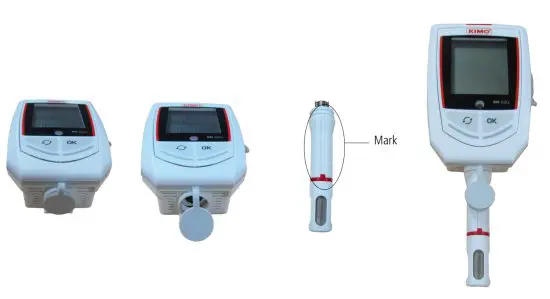
➢ Open the mini-DIN connection cap on the bottom of the STOCK.
➢ Connect the probe in such a way the mark on the probe is in front of the user.
 3.6 Dimensions (in mm)
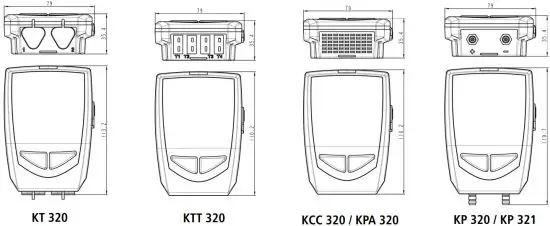
3.6.1 Devices
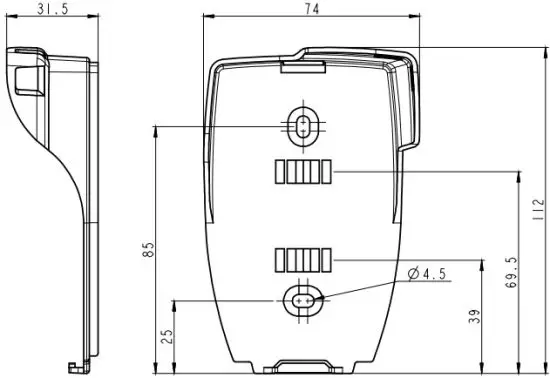
3.6.2 Wall mount (in option)
3.7 Guarantee period
STOCK dataloggers have a 1-year guarantee for any manufacturing defect (return to our After-sales service required).
4.1 Display
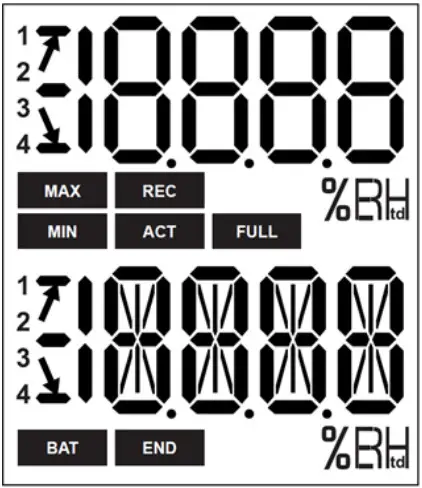
END DATASET is finished.
REC Indicates that one value is being recorded.
It flashes: the DATASET did not start already.
FULL Flashing slowly: DATASET is between 80 and 90% of the storage capacity.
Flashing quickly: DATASET is between 90 and 100% of the storage capacity.
Constant: storage capacity full.
BAT Constant: indicates that the batteries have to be replaced.
ACT Screen actualization of measured values.
The displayed values are the maximum/minimum values recorded for the channels displayed.
MIN
MAX
 Indication of the direction of exceeding the threshold in the recorded measurement
Temperature in °Celsius.
Temperature in °Fahrenheit .
Relative humidity
Indicates the channel number which is measured.
 The selected values to display during the configuration with the KILOG software will scroll on the screen every 3 seconds. The display can be activated or deactivated via the KILOG software. At extreme temperatures, the display can become hardly readable and its display speed can slow down at temperatures below 0°C. This has no incidence on the measurement accuracy.
4.2 Function of LEDs
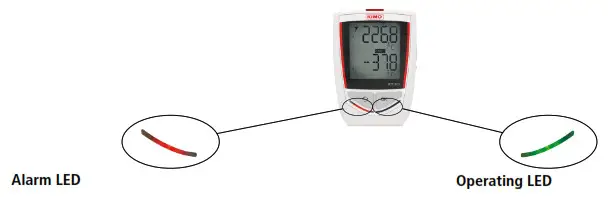 | |
| If the red “Alarm” LED has been activated, it has 3 states: – Always OFF: no setpoint alarms has been exceeded – Flashing quickly (5 seconds): a threshold is currently exceeded on one channel at least – Flashing slowly (15 seconds): at least one threshold has been exceeded during the dataset | If the green “ON” LED has been activated, it flashes every 10 seconds during the recording period. |
4.3 Function of keys
OK key: allows to start, stop the dataset, or change of scrolling group like described in the following tables.
Selection key: allows the scroll values in the scrolling group like described in the following tables.
| Device state | Type start/stop selected | Key used | Action generated | Illustration |
| Waiting forstart flashes | Start:bybuton Stop:indifferent | During5 seconds | Startofdataset Inactive | 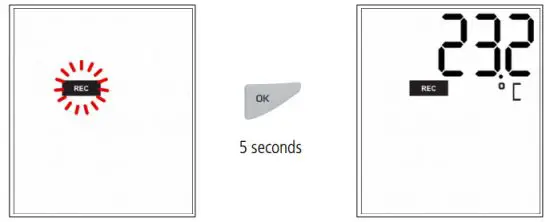 |
| Start:byPC, date/time Stop:indifferent | Inactive | 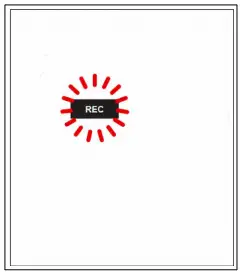 | ||
| Start:indifferent Stop:indifferent | Measurements scrol (group1)* | 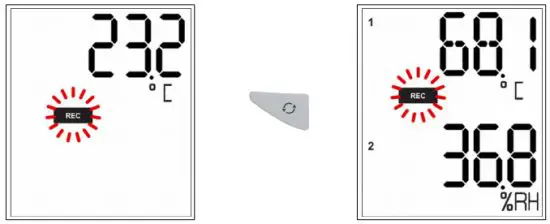 | ||
| Datasetin progres REC | Start:indiffere Stop:bybuton | During5 seconds | Stopofthe dataset | 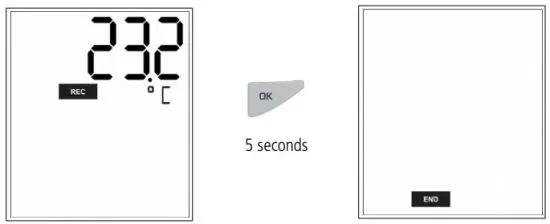 |
| Start:indifferent Stop:indifferent | Groupchange (groups2and 3)* | 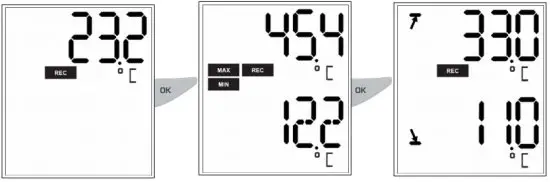 |
* Please see the summary table of the groups organisation page 15.
| Device state | Type of start/stop selected | Key used | Action generated | Illustration |
| Start: indifferent Stop: indifferent | Group scrolling (groups 1, 2 and 3)* | 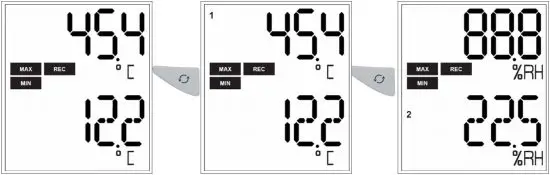 | ||
| Dataset finished END | Indifferent | Inactive |  | |
| Indifferent | Measurements scroll* | 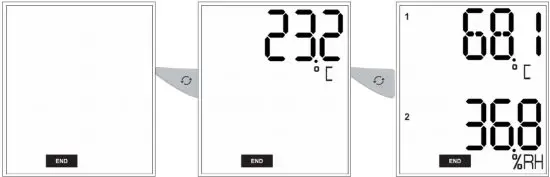 |
* Please see the summary table of the group’s organization on the following page.
4.3.1 Groups organization
The table below summarises the group’s organization and measured values available during a measurement dataset.

Press key to change of group.
Press the key to scroll values in the group.
4.3.2 Measurements scroll
According to the selected parameters during the configuration and according to the type of device, the measurement scroll is carried out like following: Temperature*
Hygrometry* CO2* Differential pressure* Atmospheric pressure* Parameter 1 probe 1*
Parameter 2 probe 1* Parameter 1 probe 2* Parameter 2 probe 2*
Examples:
• KT 320 KISTOCK with a thermo-hygrometric probe (channel 1) and a temperature probe (channel 2):
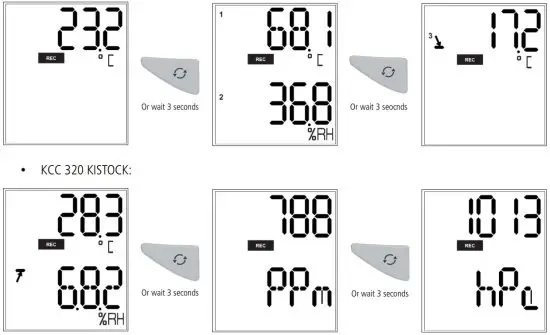
The measurements scroll can be carried out by pressing the “Select” button of the datalogger or waiting about 3 seconds and the display scrolls automatically.
4.4 PC communication
➢ Insert the CD-ROM in the reader and follow the installation procedure of the KILOG software.
- Plug the male USB connector of the cable to a USB connection on your computer*.
- Open the USB cap on the right side of the datalogger.
- Connect the male micro-USB connector of the cable to the female micro-USB connector of the device.
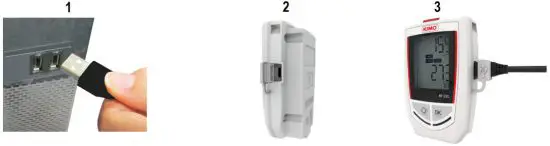
4.5 Configuration, datalogger download and data processing with the KILOG software
Please see the KILOG software user manual: “KILOG-classes-50-120-220-320”.
The date and time update automatically when a new configuration is loaded.
Wireless connection function
Kistocks of the class 320 has the wireless connection function allowing to communicate with a smartphone or a tablet (Android or iOS) via the Kilog Mobile application.
The Kistock is named “Kistock 320” in the list of available devices of the tablet or smartphone.
By default, the wireless connection is disabled on class 320 Kistocks. Please see the Kilog software applications user manuals to enable it.
Maintenance
6.1 Replace the batteries 
With a 3 to 7 years battery life*, the KISTOCK guarantees long-term measurement.
To replace batteries:
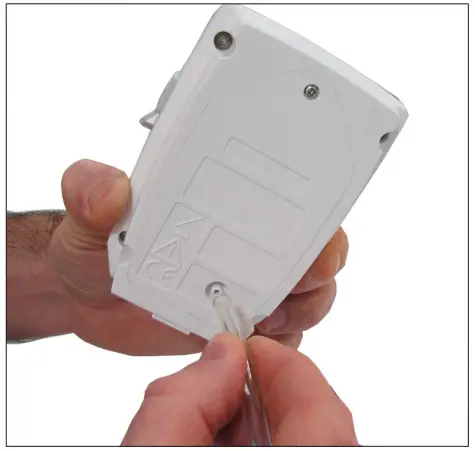
- Unscrew the unlosable screw on the battery hatch on the backside of the STOCK with a cross-head screwdriver.
- The battery hatch opens. Remove the old batteries.
- Insert the new batteries and check the polarity.
- Replace the battery hatch and screw it.
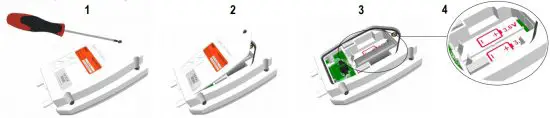
Only use a trademark or high-quality battery in order to guarantee the announced autonomy. After the battery replacement, the device must be reconfigured.
6.2 Device cleaning
Please avoid any aggressive solvent.
Please protect the device and probes from any cleaning produce containing formalin, that may be used for cleaning rooms and ducts.
6.3 Safety lock wall mount with padlock
➢ Mount the safety lock support on the required place.
- Present the KISTOCK datalogger on the support starting with the inferior part
- Clip the KISTOCK on the support by falling back the superior part
- Insert the padlock to ensure the safety lock function
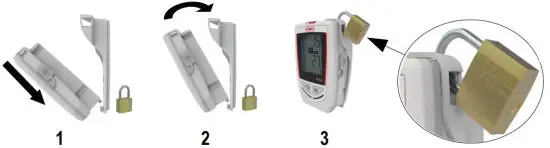
➢ To remove the datalogger from the support, proceed on reverse order.
The padlock can be replaced by a fail-safe sealed
The datalogger can be placed on the screw-mount without the safety lock function
* On the basis of 1 measurement each 15 minutes at 25°C.
Calibration
A calibration certificate is available as option under paper format.
We recommend to carry out a yearly checking.
7.1 KCC 320: perform a CO2 measurement verification
To avoid potential drifts, it is recommended to perform regularly a CO2 measurement verification.
➢ Before checking the CO2 measurement, verify the atmospheric pressure values measured by the device: launch a dataset, or press the “Selection” button to scroll the measurements.
➢ If the atmospheric pressure values are not compliant, it is possible to carry out a measurement correction with the KILOG software (please see the KILOG software user manual, “Measurement correction” chapter).
➢ Once the atmospheric pressure checked, verify the CO2 measurement: launch a dataset , or press the “Selection” button to scroll the measurements.
➢ Connect a bottle of CO2 standard gas on the gas connection on the back of the KCC 320 device with the supplied Tygon tube.
➢ Generate a gas flow of 30 l/h.
➢ Wait for the measurement stabilisation (about 2 minutes).
➢ Check the CO2 values measured by the KCC 320.
➢ If these values are not compliant, it is possible to carry out a measurement correction with the KILOG software (please see the KILOG software user manual, “Measurement correction” chapter). ®
7.2 KP 320 – KP 321: perform an auto-zero
It is possible to reset the device during a recording dataset:
➢ Unplug the pressure tubes of the device.
➢ Press the “Selection” button during 5 seconds to carry out the auto-zero.
The instrument resets. The screen displays “…”
➢ Plug the pressure tubes.
The device continues the measurements and the dataset recording.
It is possible to reset the device when values are measured but not recorded:
➢ Unplug the pressure tubes of the device.
➢ Press the “Selection” button to display the measurement.
➢ Press the “Selection” button during 5 seconds to carry out the auto-zero.
The instrument resets. The screen displays “…”
➢ Plug the pressure tubes.
The device continues the measurements.
Accessories
| Accessories | References | Illustrations |
| 1doubleA lithium3.6Vbatery 2bateriesarerequiredforclass320datalogers | KBL-A | 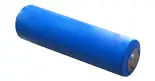 |
| Safetylockwalmountwithpadlock | KAV-320 | 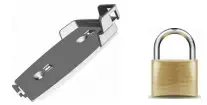 |
| Wiredextensionforclass320KISTOCKprobes Inpolyurethane,5mlengthwithmaleandfemalemini-DIN conectors Note:severalextensionscanbewiredinordertoobtainupto 25mcablelength | KRB-320 | 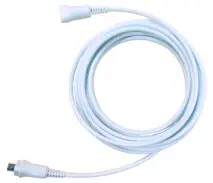 |
| Configurationanddataprocessingsoftware KILOGsoftwarealowstoconfigure,saveandprocesyourdata inaverysimpleway. | Softwareonly:KILOG-3-N Completeset(software+1 USBcable):KIC-3-N |  |
| Data collector Colectsupto200000pointsfromoneorseveralKISTOCK directlyon-site.ResultsrestitutiononPCofrealiseddatasets | KNT-320 | 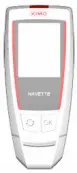 |
| USB micro-USBcablewhichalowstoplugyourKISTOCK datalogertoyourPC | CK-50 | 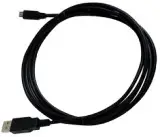 |
Only the accessories supplied with the device must be used.
Troubleshooting
| Problem | Probablecauseandpossiblesolution |
| Novalueisdisplayed,onlytheiconsarepresent. | Thedisplayisconfiguredon“OFF”.Configureiton“ON”withthe KILOGsoftware(sepage16). |
| Thedisplayiscompletelyof*andthereisno communicationwiththecomputer. | Thebateryhastobereplaced.(sepage17). |
| Thedisplayindicates“– –”insteadofthe measuredvalue. | Theprobeisdisconected.Plugitagaintothedataloger. |
| Thereisnowirelesconectionwiththedataloger. | ThewirelesconectionactivationisonOFF.Reconfigurethe wirelesconectiononONwiththeKILOGsoftware(sepage16). |
* Only with the KT 320 and KTT 320 KISTOCK.
BE CAREFUL! Material damages can happen, so please apply the precautionary measures indicated. Once returned to Sauermann, required waste collection will be assured in the respect of the environment in accordance to guidelines relating to WEEE.
 sauermanngroup.co
 Manufacturer of Condensate Pumps and Measuring Instruments | Sauermann group