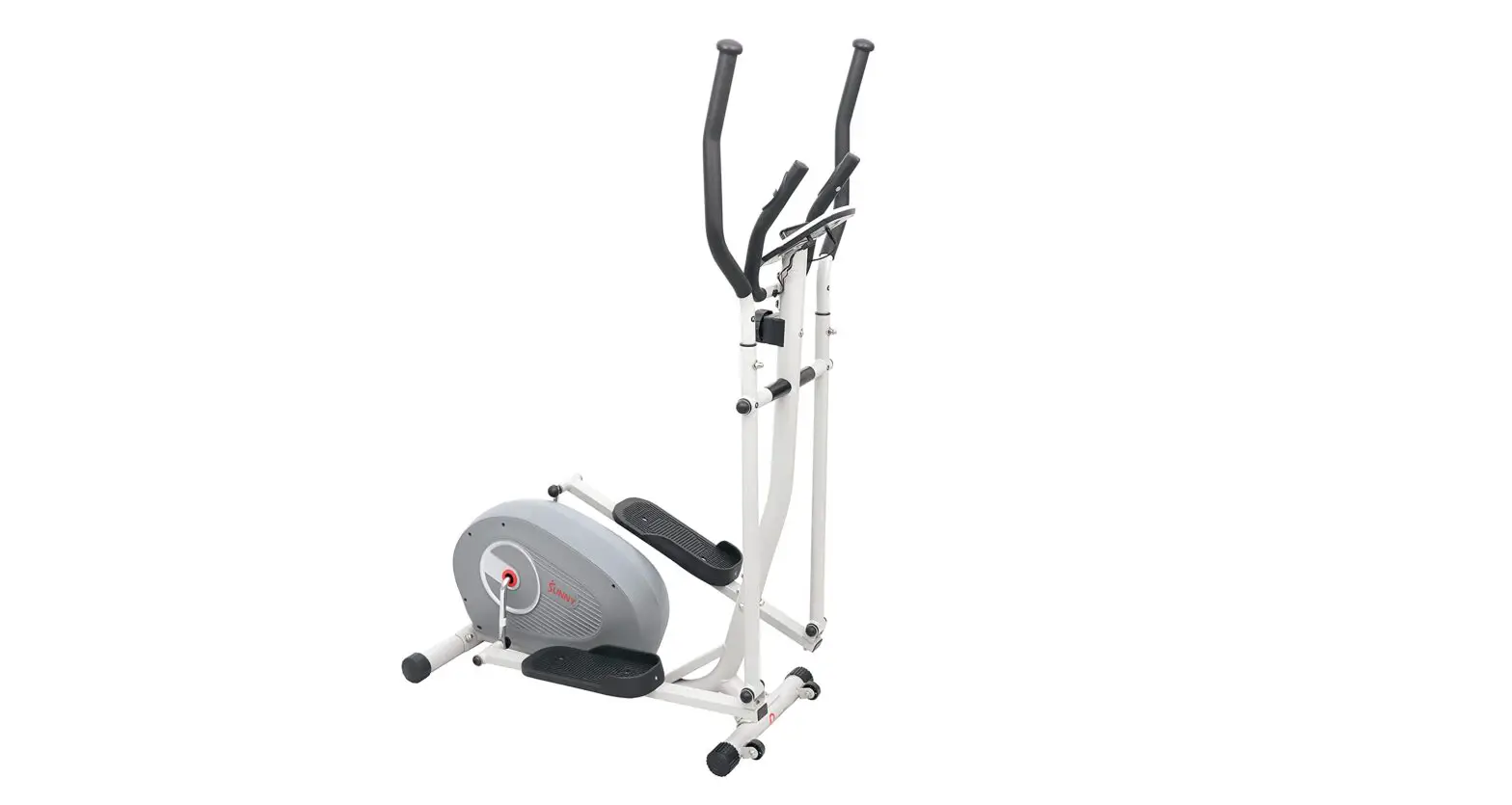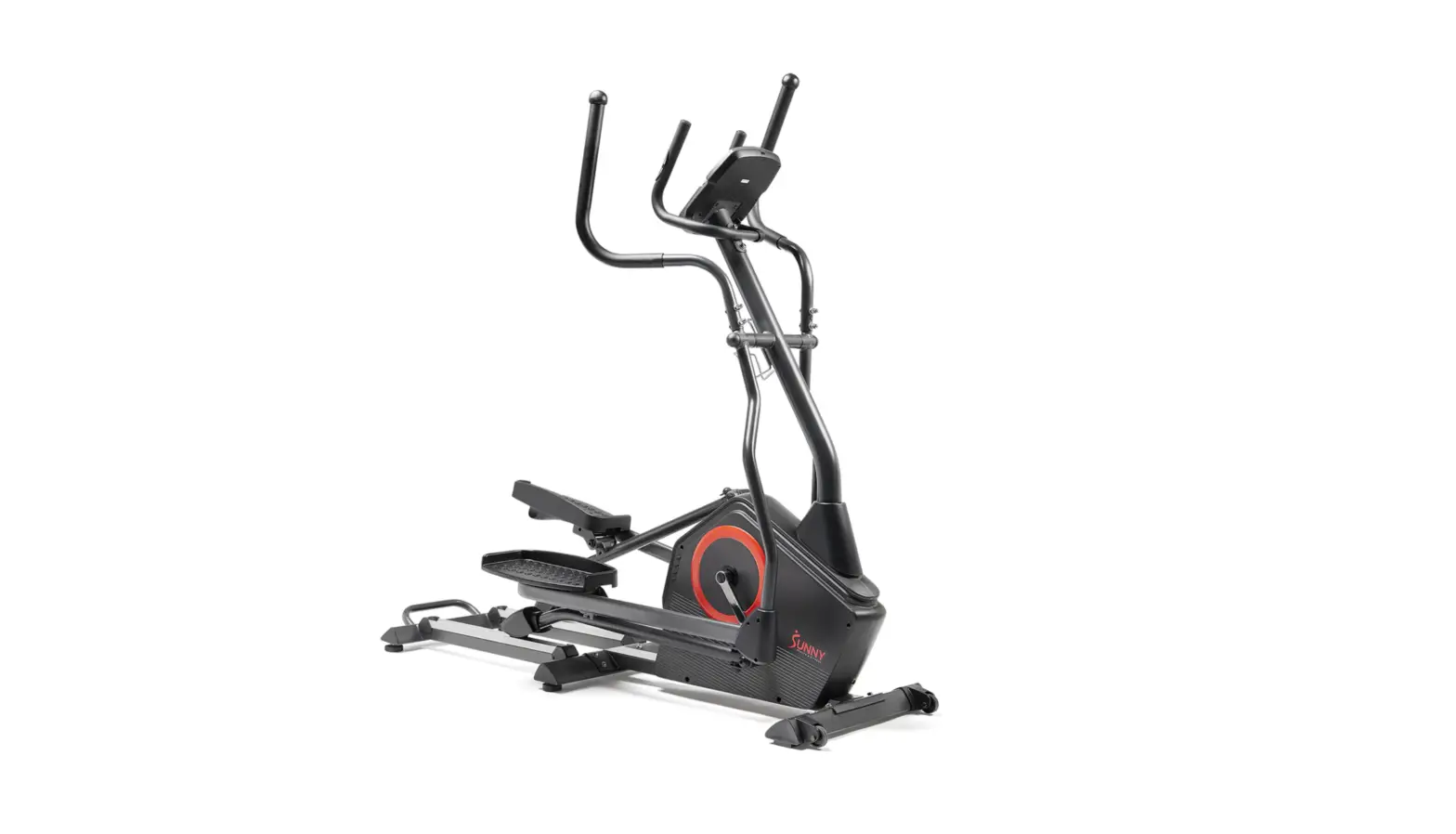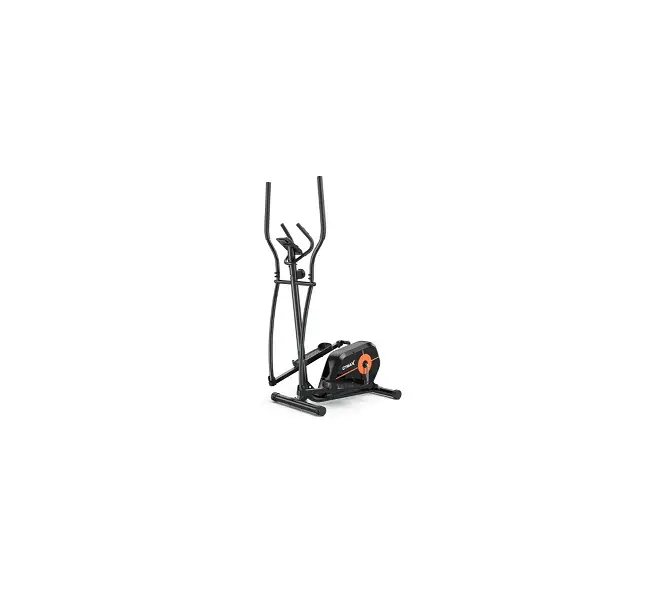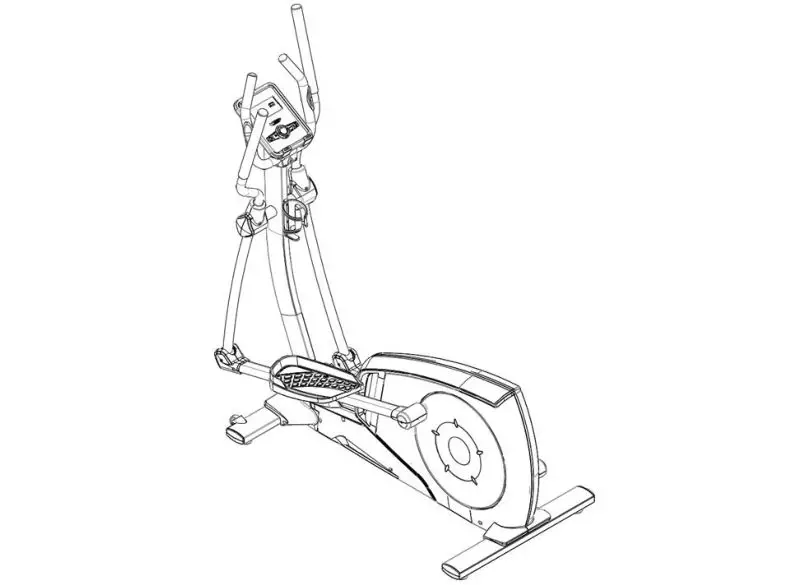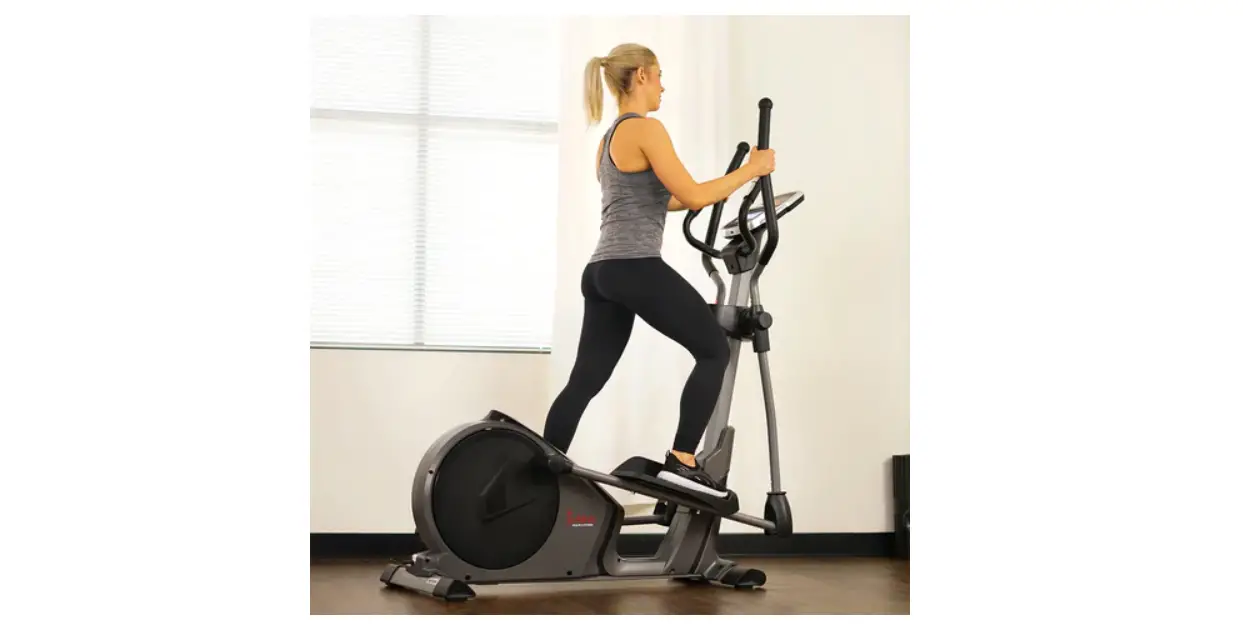

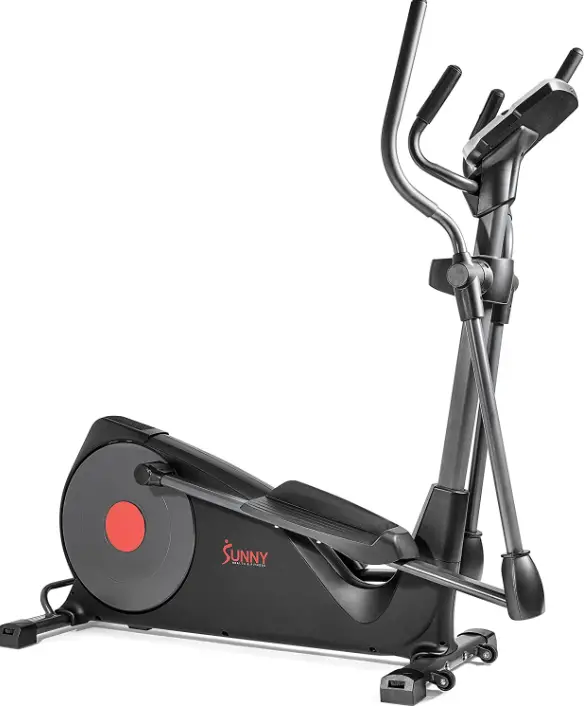
SUNNY SF-E320001 Pre-Programmed Elliptical Trainer
IMPORTANT! Please retain owner’s manual for maintenance and adjustment instructions. Your satisfaction is very important to us, PLEASE DO NOT RETURN UNTIL YOU HAVE CONTACTED US: [email protected] or 1- 877 – 90SUNNY (877-907-8669).
IMPORTANT SAFETY INFORMATION
We thank you for choosing our product. To ensure your safety and health, please use this equipment correctly. It is important to read this entire manual before assembling and using the equipment. Safe and effective use can only be achieved if the equipment is assembled, maintained, and used properly. It is your responsibility to ensure that all users of the equipment are informed of all warnings and precautions.
- Before starting any exercise program, you should consult your physician to determine if you have any medical or physical conditions that could put your health and safety at risk or prevent you from using the equipment properly. Your physician’s advice is essential if you are taking medication that affects your heart rate, blood pressure or cholesterol level.
- Be aware of your body’s signals. Incorrect or excessive exercise can damage your health. Stop exercising if you experience any of the following symptoms: pain, tightness in your chest, irregular heartbeat, shortness of breath, lightheadedness, dizziness, or feelings of nausea. If you do experience any of these conditions, you should consult your physician before continuing with your exercise program.
- Keep children and pets away from the equipment. The equipment is designed for adult use only.
- Use the equipment on a solid, flat level surface with a protective cover for your floor or carpet. To ensure safety, the equipment should have at least 2 feet (60CM) of free space all around it.
- Ensure that all nuts and bolts are securely tightened before using the equipment. The safety of the equipment can only be maintained if it is regularly examined for damage and/or wear and tear.
- Always use the equipment as indicated. If you find any defective components while assembling or checking the equipment, or if you hear any unusual noises coming from the equipment during exercise, discontinue use of the equipment immediately and do not use until the problem has been rectified.
- Wear suitable clothing while using the equipment. Avoid wearing loose clothing that may become entangled in the equipment.
- Do not place fingers or objects into the moving parts of the equipment.
- The maximum weight capacity of this unit is 330 pounds (150 KG).
- The equipment is not suitable for therapeutic use.
- To avoid bodily injury and/or damage to the product or property, proper lifting and moving are required.
- Your product is intended for use in cool and dry conditions. You should avoid storage in extreme cold, hot, or damp areas as this may lead to corrosion and other related problems.
- This equipment is designed for indoor and home use only; it is not intended for commercial use.
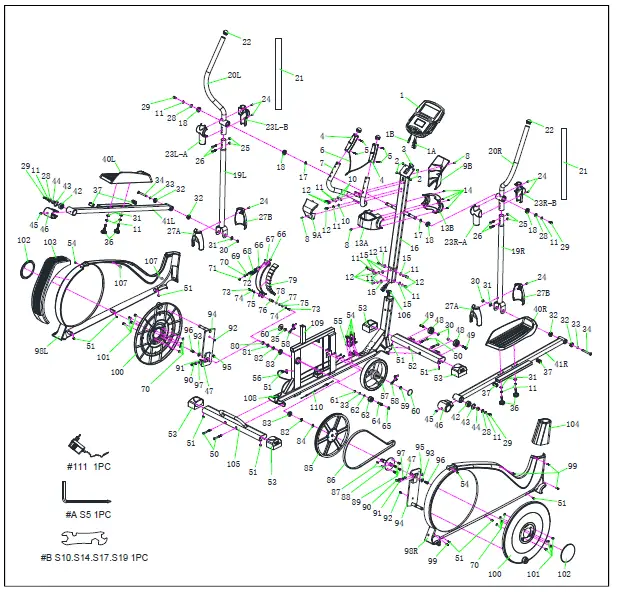
EXPLODED DIAGRAM
HARDWARE PACKAGE 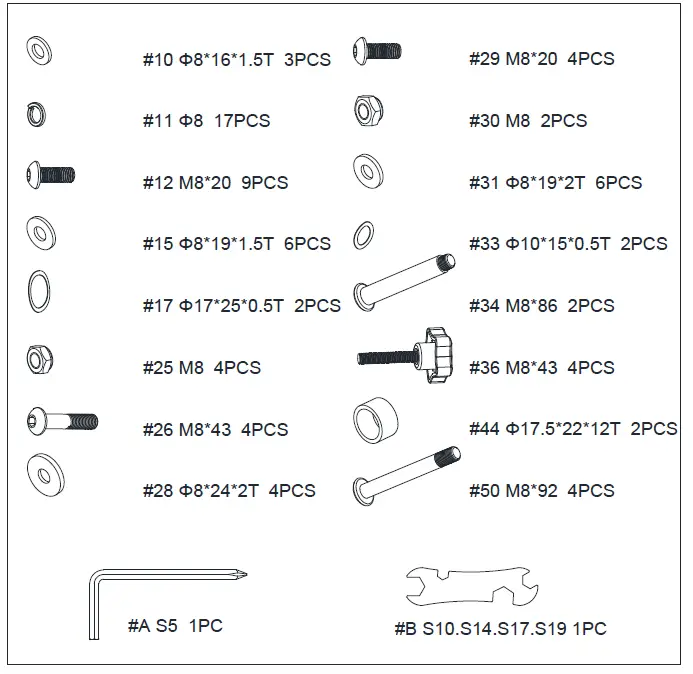
Ordering Replacement Parts (U.S. and Canadian Customers only)
Please provide the following information in order for us to accurately identify the part(s) needed:
- The model number (found on cover of manual)
- The product name (found on cover of manual)
- The part number found on the “EXPLODED DIAGRAM” and “PARTS LIST” (found near the front of the manual)
Please contact us at [email protected] or 1- 877 – 90SUNNY (877-907-8669)
PARTS LIST
| No. | Description | Spec. | Qty. |
| 1 | Computer | TZ-4113P | 1 |
| 1A | Computer Cable A | Attach 6 | 1 |
| 1B | Computer Cable B | Attach 3 | 1 |
| 2 | Screw | M5*12 | 4 |
| 3 | Upper Computer Cable | 1050MM | 1 |
| 4 | Hand Pulse Sensor | 2 | |
| 5 | Screw | M2.5*33 | 4 |
| 6 | Hand Pulse Cable | 650MM | 1 |
| 7 | Handlebar | Φ32*1.5T | 1 |
| 8 | Screw | M5*15 | 3 |
| 9A | Rear Handlebar Post Cover | 1 | |
| 9B | Front Handlebar Post Cover | 1 | |
| 10 | Washer | Φ8*16*1.5T | 3 |
| 11 | Spring Washer | Φ8 | 17 |
| 12 | Bolt | M8*20 | 9 |
| 13A | Central Shaft Plastic Cover-Rear | 1 | |
| 13B | Central Shaft Plastic Cover-Front | 1 | |
| 14 | Self-Tapping Screw | M4*20 | 4 |
| 15 | Washer | Φ8*19*1.5T | 6 |
| 16 | Handlebar Post | 55*61*1.5*950MM | 1 |
| 17 | Wave Washer | Φ17*25*0.5T | 2 |
| 18 | Bearing | 6203-2RS | 4 |
| 19L | Left Lower Swing Bar | Φ38*1.5T | 1 |
| 19R | Right Lower Swing Bar | Φ38*1.5T | 1 |
| 20L | Left Upper Swing Bar | Φ32*1.8T | 1 |
| 20R | Right Upper Swing Bar | Φ32*1.8T | 1 |
| 21 | Foam | Φ32*3T | 2 |
| 22 | End Cap | Φ32*36 | 2 |
| 23L- A | Left Upper Central Shaft Plastic Cover -A | 1 | |
| 23L- B | Left Upper Central Shaft Plastic Cover -B | 1 |
| No. | Description | Spec. | Qty. |
| 23R- A | Right Upper Central Shaft Plastic Cover -A | 1 | |
| 23R- B | Right Upper Central Shaft Plastic Cover -B | 1 | |
| 24 | Screw | M4*20 | 6 |
| 25 | Lock Nut | M8 | 4 |
| 26 | Bolt | M8*43 | 4 |
| 27A | Lower Swing Plastic Cover-Rear | 2 | |
| 27B | Lower Swing Plastic Cover-Front | 2 | |
| 28 | Washer | Φ8*24*2T | 4 |
| 29 | Bolt | M8*20 | 4 |
| 30 | Nylon Nut | M8 | 4 |
| 31 | Washer | Φ8*19*2T | 6 |
| 32 | Bearing | 6200-2RS | 4 |
| 33 | Wave Washer | Φ10*15*0.5T | 3 |
| 34 | Bolt | M8*86 | 2 |
| 35 | Nut | M10*1.25 | 1 |
| 36 | Knob | M8*43 | 4 |
| 37 | Square Pipe Plug | 20*40 | 4 |
| 40L | Left Pedal | 1 | |
| 40R | Right Pedal | 1 | |
| 41L | Left Pedal Support Bar | 30*60*1.8T | 1 |
| 41R | Right Pedal Support Bar | 30*60*1.8T | 1 |
| 42 | Bearing | 2203-2RS | 2 |
| 43 | C Clip | Φ40 | 2 |
| 44 | Crank Tube | Φ17.5*22*12T | 2 |
| 45 | Screw | M5*7.5 | 2 |
| 46 | M Plastic Cover | Φ46 | 2 |
| 47 | Spring Washer | Φ8 | 2 |
| 48 | Transportation Wheel | Φ48*21 | 2 |
| 49 | Bolt | M8*38 | 2 |
| 50 | Bolt | M8*92 | 4 |
| No. | Description | Spec. | Qty. |
| 51 | Screw | M5*15 | 11 |
| 52 | Front Stabilizer | 40*80*1.8T | 1 |
| 53 | Stabilizer End Cap | 40*80 | 4 |
| 54 | Screw | M5*20 | 6 |
| 55 | Motor | 1 | |
| 56 | Sensor | 1000MM | 1 |
| 57 | Flywheel | Φ250*34 8KG | 1 |
| 58 | Chain Adjust Set | 2 | |
| 59 | Nut | M10*1.25 | 1 |
| 60 | Axis Cover | 2 | |
| 61 | C Clip | Φ8 | 1 |
| 62 | Washer | Φ10*15*1T | 1 |
| 63 | Idler Wheel | Φ37*20.5L | 1 |
| 64 | Idler Wheel Axis | Φ10*42MM | 1 |
| 65 | Nylon Nut | M10 | 1 |
| 66 | Nut | M6/10MM | 2 |
| 67 | Magnetic Welding | 4T | 1 |
| 68 | Screw Stem | Φ6*80 | 1 |
| 69 | Washer | Φ6*19*1.5T | 1 |
| 70 | Silica Gel Washer | Φ8*16*2T | 9 |
| 71 | Lock Nut | M6/10MM | 1 |
| 72 | Spring | Φ1*12 | 1 |
| 73 | Bolt | M6*15 | 2 |
| 74 | Spring Washer | Φ6 | 2 |
| 75 | Washer | Φ6*14*1.5 | 2 |
| 76 | Spin Axis | Φ12*33.2 | 1 |
| 77 | Wave Washer | Φ12*17*0.5 | 1 |
| 78 | C Clip | Φ11 | 1 |
| 79 | Magnet | 29.5*20*12MM | 11 |
| 80 | C Clip | Φ20 | 1 |
| 81 | Washer | Φ20*25*2 | 1 |
| 82 | Washer | Φ20*25*1 | 2 |
| No. | Description | Spec. | Qty. |
| 83 | Bearing | 6004-2RS | 2 |
| 84 | Wave Washer | Φ20*25*0.5 | 1 |
| 85 | Belt Wheel | Φ350*20.2 | 1 |
| 86 | Belt | 550 J6 | 1 |
| 87 | Cotter Pin | 2 | |
| 88 | Round Metal Welding | Φ20*111MM | 1 |
| 89 | Screw Stem | M8*12 | 4 |
| 90 | Screw Stem | M8*50 | 2 |
| 91 | Bolt | M6*15 | 2 |
| 92 | Self-tapping Screw | M4.5*15 | 2 |
| 93 | Washer | 8*24*2T | 2 |
| 94 | Cross Welding | 8T | 2 |
| 95 | Nut | M8/14MM | 2 |
| 96 | Screw Stem | M8*20 | 2 |
| 97 | Washer | Φ8*16*2 | 2 |
| 98L | Left Belt Cover | ABS | 1 |
| 98R | Right Belt Cover | ABS | 1 |
| 99 | Self-tapping Screw | M4.5*25 | 4 |
| 100 | Cycle Plate | ABS | 2 |
| 101 | Bolt | M6*15 | 8 |
| 102 | Crank Cover | 2 | |
| 103 | Back Plastic Cover | 1 | |
| 104 | Front Plastic Cover | 1 | |
| 105 | Rear Stabilizer | 40*80*1.8T | 1 |
| 106 | Lower Computer Cable | 850MM | 1 |
| 107 | Plastic Screw | 2 | |
| 108 | DC Cable | 1000MM | 1 |
| 109 | Main Frame | 1 | |
| 110 | Conduction Wire | 850MM | 1 |
| 111 | Adapter | 9V/1.0A | 1 |
| A | Allen Wrench | S5 | 1 |
| B | Spanner | S10, S14, S17, S19 | 1 |
ASSEMBLY INSTRUCTIONS
We value your experience using Sunny Health and Fitness products. For assistance with parts or troubleshooting, please contact us at [email protected] or 1-877-90SUNNY (877-907-8669).
 STEP 1:
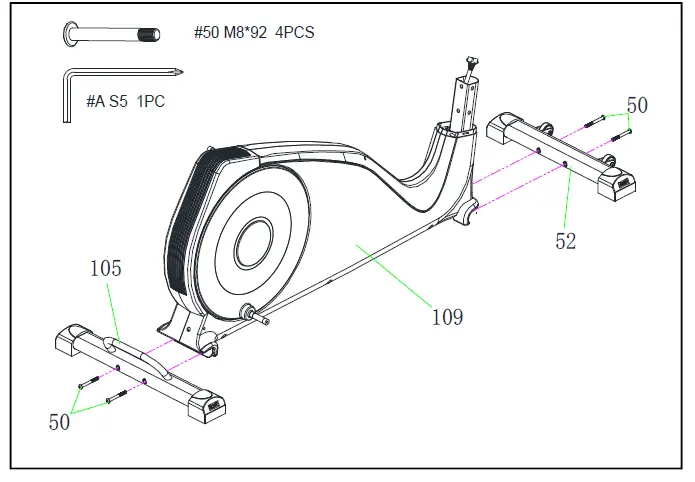
Attach the Front Stabilizer (No. 52) to the Main Frame (No. 109) with 2 Bolts (No. 50). Tighten and secure with Allen Wrench (No. A).
Attach the Rear Stabilizer (No. 105) to the Main Frame (No. 109) with 2 Bolts (No. 50). Tighten and secure with Allen Wrench (No. A). 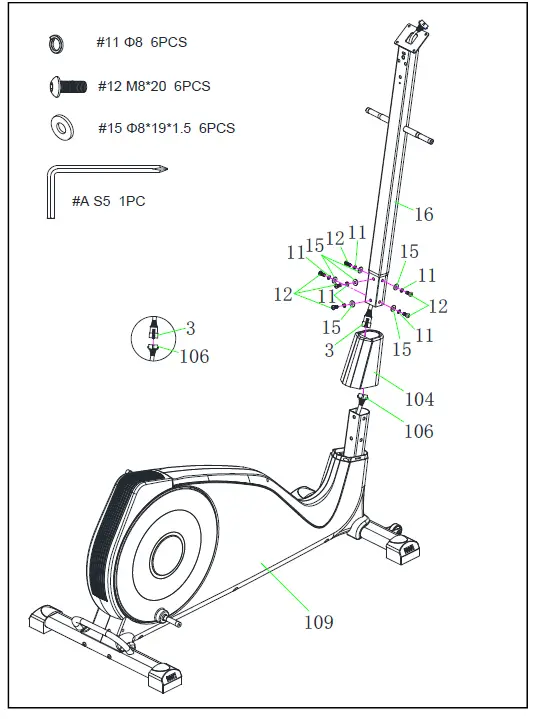 STEP 2:
Put the Front Plastic Cover (No. 104) through the Handlebar Post (No. 16).
Connect the Lower Computer Cable (No. 106) with the Upper Computer Cable (No. 3).
Attach the Handlebar Post (No. 16) to the Main Frame (No. 109) with 6 Spring Washers (No. 11), 6 Washers (No. 15), and 6 Bolts (No. 12). Tighten and secure with Allen Wrench (No. A). Then, place the Front Plastic Cover (No. 104) into position.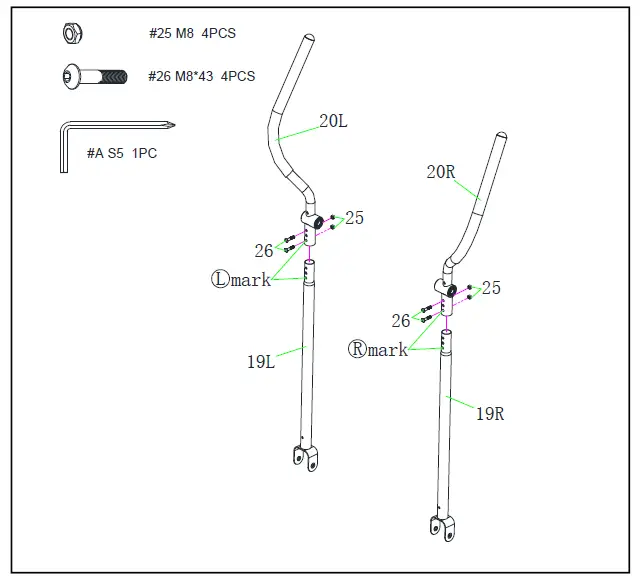
STEP 3:
Attach the Left Upper Swing Bar (No. 20L) to Left Lower Swing Bar (No. 19L) with 2 Bolts (No. 26) and 2 Nuts (No. 25). Tighten and secure with Allen Wrench (No. A).
Note: The L/R mark on Left & Right Upper Swing Bars (No. 20L & No. 20R) and Left & Right Lower Swing Bars (No. 19L & No. 19R) should always be assembled facing front direction.
Please repeat this assembly step to the Right side. 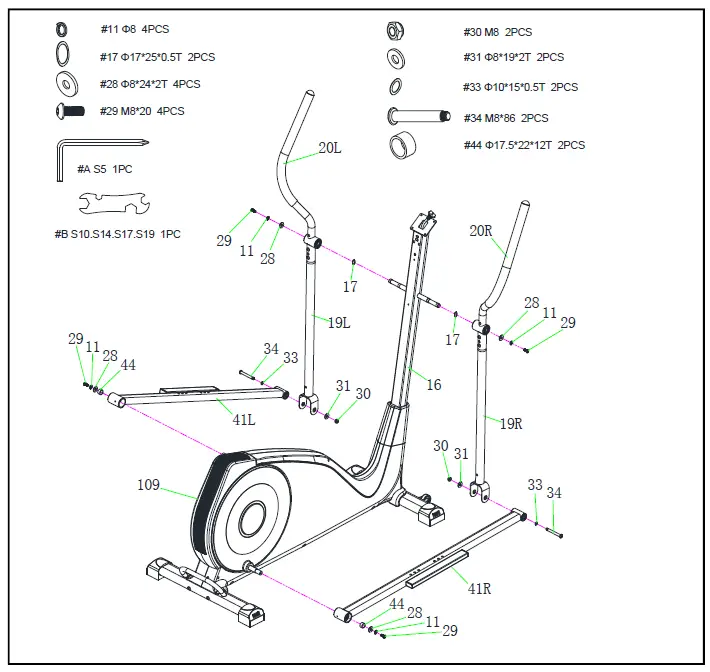
STEP 4:
Attach the Left & Right Lower Swing Bars (No. 19L/R) to the Handlebar Post (No. 16) with 2 Wave Washers (No. 17), 2 Washers (No. 28), 2 Spring Washers (No. 11), and 2 Bolts (No. 29). Tighten and secure with Allen Wrench (No. A).
Attach the Left & Right Lower Swing Bars (No. 19L/R) to the Left & Right Pedal Support Bars (No. 41L/R) with 2 Nylon Nuts (No. 30), 2 Washers (No. 31), 2 Wave Washers (No. 33), and 2 Bolts (No. 34). Tighten and secure with Allen Wrench (No. A) and Spanner (No. B).
Note: For the Left & Right Pedal Support Bars (No. 41L/R), the side with more holes needs to face up to attach Left & Right Lower Swing Bars (No. 19L/R).
Attach the Left & Right Pedal Support Bars (No. 41L/R) to the Main Frame (No. 109) with 2 Washers (No. 28), 2 Spring Washers (No. 11), 2 Bolts (No. 29) and 2 Crank Tubes (No. 44). Tighten and secure with Allen Wrench (No. A).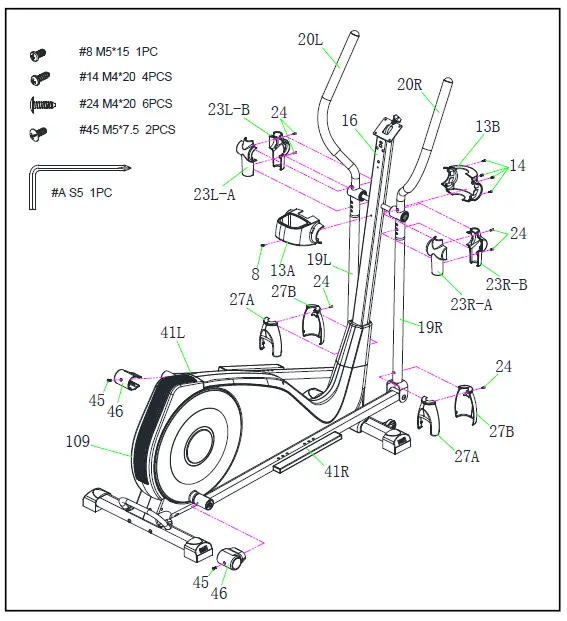 STEP 5:
Remove 2 Screws (No. 45) from the Left & Right Pedal Support Bars (No. 41L/R).
Attach the M Plastic Covers (No. 46) to the Left & Right Pedal Support Bars (No. 41L/R) with 2 Screws (No. 45) that were removed. Tighten and secure with Allen Wrench (No. A).
Remove 2 Screws (No. 24) from the Lower Swing Plastic Covers (No. 27A/B).
Attach the Lower Swing Plastic Covers (No. 27A/B) to the Left & Right Lower Swing Bars (No. 19L/R) with 2 Screws (No. 24) that were removed. Tighten and secure with Allen Wrench (No. A).
Remove 4 Screws (No. 24) from the Left & Right Upper Central Shaft Plastic Covers (No. 23L-A/B & No. 23R-A/B).
Attach the Left & Right Upper Central Shaft Plastic Covers (No.23L-A/B & No. 23R-A/B) to the Left & Right Upper Swing Bars (No. 20L/R) with 4 Screws (No. 24) that were removed. Tighten and secure with Allen Wrench (No. A).
Remove 4 Self-tapping Screws (No. 14) from the Central Shaft Plastic Covers (No. 13A/B). Remove 1 Screw (No. 8) from the Handlebar Post (No. 16).
Attach the Central Shaft Plastic Covers (No. 13A /B) to the Handlebar Post (No. 16) using 4 Self-tapping Screws (No. 14) and 1 Screw (No. 8) that were removed. Tighten and secure with Allen Wrench (No. A). 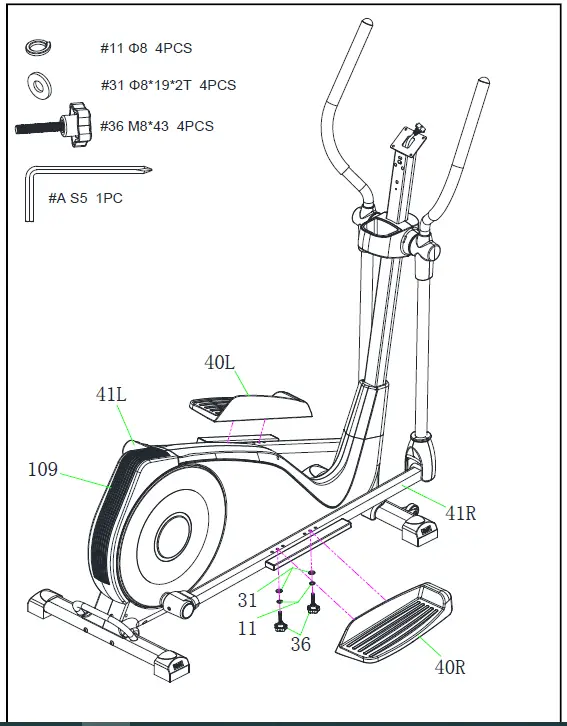
STEP 6:
Attach the Right Pedal (No. 40R) to Right Pedal Support Bar (No. 41R) using 2 Washers (No. 31), 2 Spring Washers (No. 11), and 2 Knobs (No. 36). Tighten and secure with Allen Wrench (No. A).
Please repeat this assembly step to the Left side.
STEP 7:
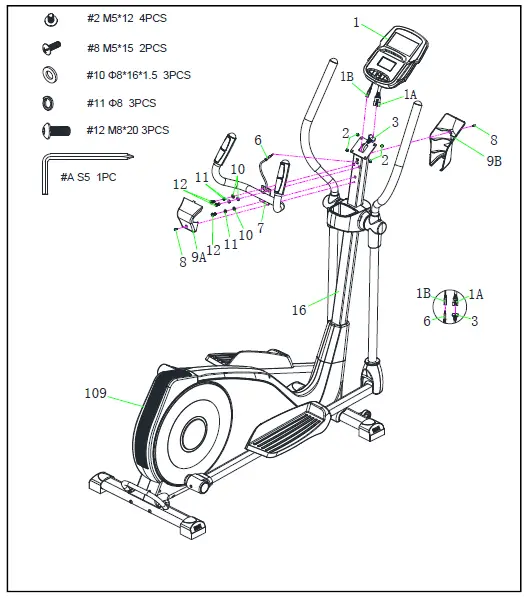
Attach Handlebar (No. 7) to the Handlebar Post (No. 16) with 3 Spring Washers (No. 11), 3 Washers (No. 10), and 3 Bolts (No. 12). Tighten and secure with Allen Wrench (No. A).
Insert the Hand Pulse Cable (No. 6) into the front hole of Handlebar Post (No. 16) and pull up the Hand Pulse Cable (No. 6) from the top hole the Handlebar Post (No. 16).
Remove 4 Screws (No. 2) from the back of the Computer (No. 1).
Connect the Upper Computer Cable (No. 3) to the Computer Cable A (No. 1A). Connect the Hand Pulse Cable (No. 6) to the Computer Cable B (No. 1B).
Attach the Computer (No. 1) onto the top end of Handlebar Post (No. 16) using 4 Screws (No. 2) that were removed. Tighten and secure with Allen Wrench (No. A).
Remove 2 Screws (No. 8) from the Handlebar Post (No. 16).
Attach the Front & Rear Handlebar Post Covers (No. 9A/B) to the Handlebar Post (No. 16) using 2 Screws (No. 8) that were removed. Tighten and secure with Allen Wrench (No. A). 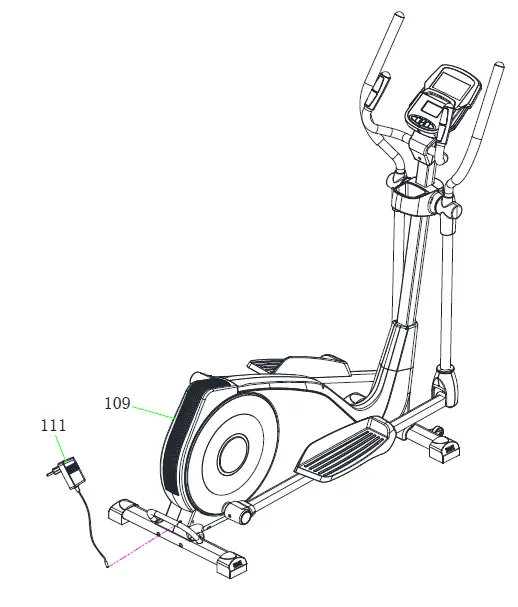 STEP 8:
Before plugging in the elliptical, make sure to check the Adapter (No. 111) specifications carefully.
Plug one end of the Adapter (No. 111) into the power plug at the end of Main Frame (No. 109).
The assembly is complete!
ADJUSTMENTS & USAGE GUIDE
HOW TO MOVE THE ELLIPTICAL
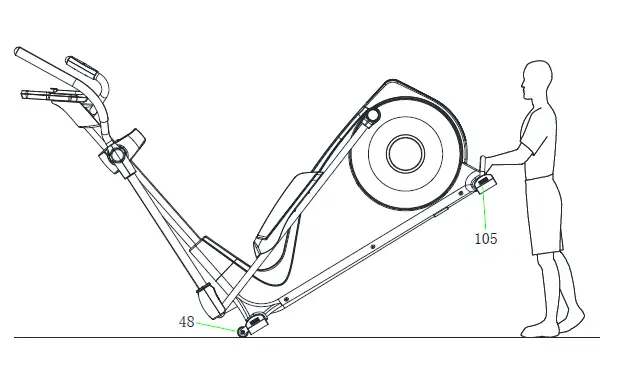
The Transportation Wheels (No. 48) in front of the Front Stabilizer (No. 52) are movable. Hold the Rear Stabilizer (No. 105) and pull forward to lift the rear end of the elliptical off the floor. Once the Transportation Wheels (No. 48) touch the ground, you could move the elliptical now. 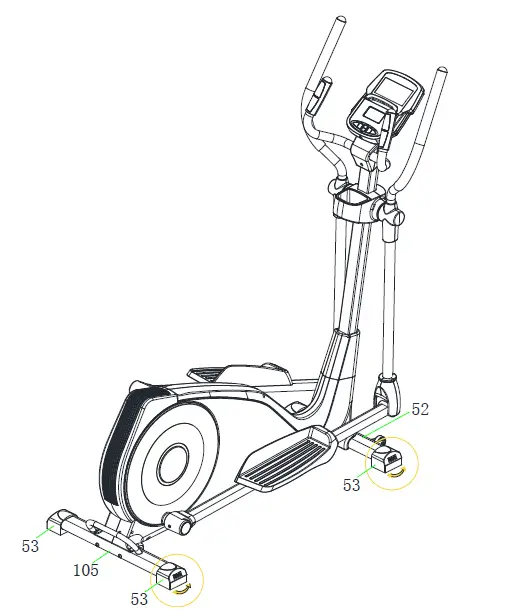
ADJUSTING THE BALANCE
In order to achieve a smooth and comfortable ride, you must ensure that the elliptical is stable. If you notice that the elliptical is unbalanced during use, you should adjust the Stabilizer End Caps (No. 53) located beneath the Front Stabilizer (No. 52) and Rear Stabilizer (No. 105).
CLEANING AND MAINTENANCE:
The elliptical can be cleaned with a soft cloth and mild detergent. Do not use abrasives or solvents on plastic parts. Please wipe your perspiration off the elliptical after each use. Be careful not get
excessive moisture on the computer display panel, as this may cause electrical hazards or cause electronics to fail. Please keep the elliptical and the console out of direct sunlight to prevent screen
damage. Please inspect all assembly bolts and pedals on the elliptical for proper tightness every week.
STORAGE:
Store the elliptical in a clean and dry environment away from children.
IMPORTANT ELECTRICAL INFORMATION
WARNING: This elliptical trainer requires a power source of 1 amp (100-240V) in order to properly operate. For your safety, as well as the safety of others, please verify that the power source is correct before plugging in the equipment. Any power source above or below this level could cause significant damage to the equipment and/or user.
OPERATING INSTRUCTIONS
Plug the adapter into the elliptical trainer and into the outlet.
The computer will turn on.
The computer will turn off if there is no activity for 4 minutes. Press any button on the computer to turn it on again.
NOTE: You can still use the elliptical trainer when it is not plugged in. However, the computer will not be working and you cannot adjust the resistance level or use any of the functions.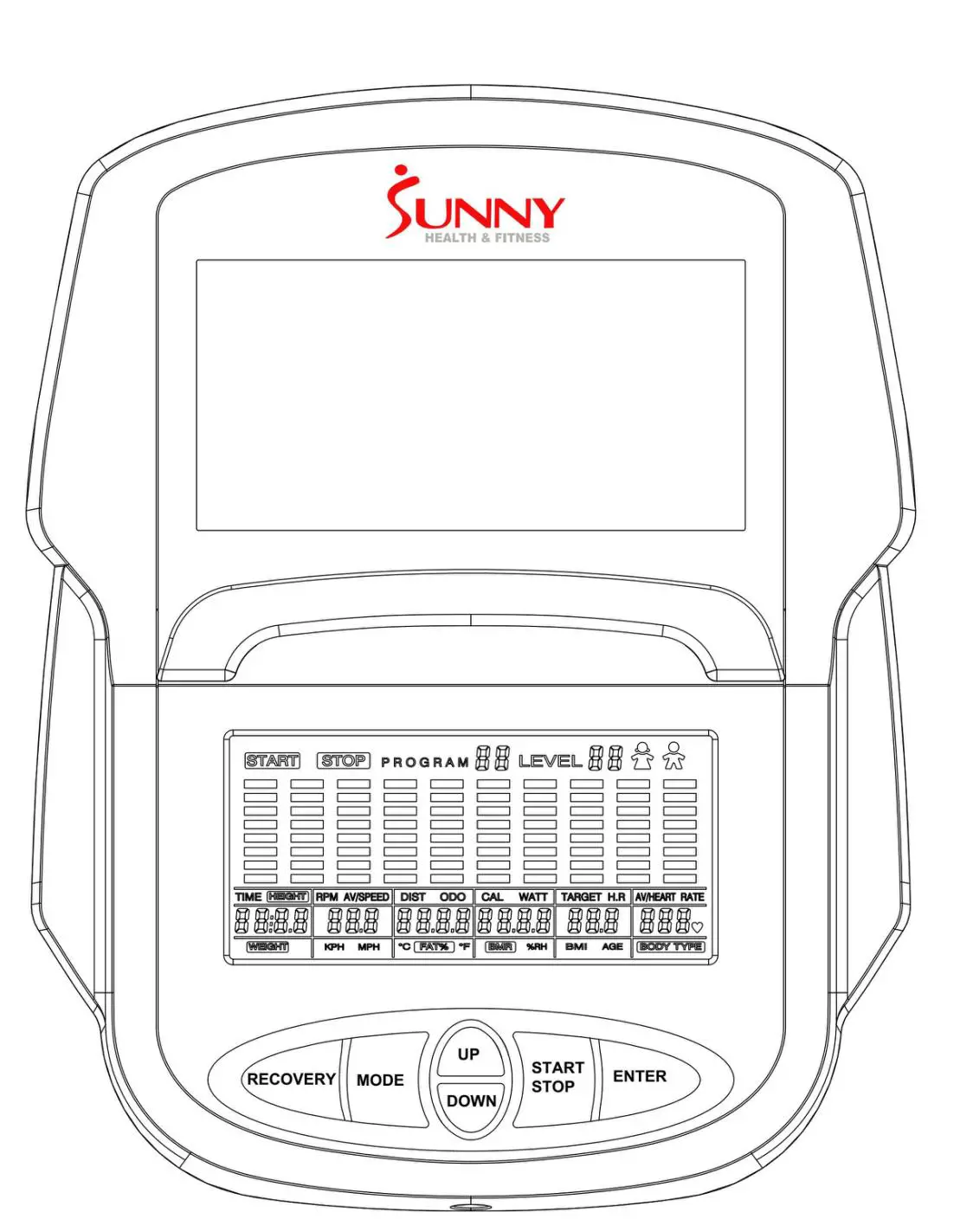
EXERCISE COMPUTER
KEY FUNCTIONS
| KEY | FUNCTION |
| START/STOP | Start and pause workouts. Start body fat measurement. |
| DOWN | Lower the resistance level during workout. Decrease value of selected parameter. |
| UP | Increase the resistance level during workout. Increase value of selected parameter. |
| ENTER | To input the value or mode. |
| RECOVERY | Enter Recovery function when computer displays the heart rate value. Recovery displays F1-F6. F1 is excellent recovery heart rate. F6 is poor recovery heart rate. |
| MODE | During workout, switch display from RPM to SPEED, ODO to DIST and WATT to CALORIES. Hold for 3 seconds to reset all function values to zero, except ODO. |
WORKOUT SELECTION:
After turning the computer on by plugging in the adapter or if already plugged in, pressing any button on the computer, use the UP or DOWN button to make a selection. Then press ENTER button to choose the desired mode.
There are 7 basic workout modes:
Manual, Pre-set Program, Watt Program, Body Fat Program, Target Heart Rate Program, Heart Rate Control Program, and User Program.
FUNCTIONS
- SPEED: Displays current training speed. Maximum speed is 99.9 MPH.
- RPM: Displays current rotation per minute.
- TIME: Accumulates the workout time from 00:00 to 99:59. Users can preset the target time they want.
- DIST (DISTANCE): Accumulates the workout distance from 0.00 to 999.9 miles. Users can preset the target distance they want to reach.
- ODO (ODOMETER): Displays the total accumulated distance from 0 to 9999 miles.
- CAL (CALORIES): Accumulates the calories burned from 0 to 9999 calories. Users can preset the target Calories they want to burn.
- WATT: Displays current watt.
- HEART RATE: Displays the current heart rate in beats per minute.
- TARGET HR (TARGET HEART RATE): Users can preset their Target Heart Rate.
- PROGRAM: There are 24 different programs to choose for training.
- LEVEL: The program has 10 columns of bars and 8 bars in each column. Each column represents a 1-minute workout and each bar represents 2 resistance levels.
WORKOUT PARAMETERS:
- TIME / DISTANCE / CALORIES / AGE / WATT / TARGET HEART RATE
Setting Workout Parameters
- After selecting the desired workout mode: Manual Program, Pre-set Program, Watt Control Program, Body Fat Program, Target Heart Rate Program, Heart Rate Control Program, and User Program. You may pre-set several workout parameters for desired results.
- Note: Some parameters are not adjustable in certain programs. Time and Distance cannot be set up at the same time.
- Once a program has been selected, press ENTER and TIME will flash.
- Using the UP or DOWN button, you may select the desired time value. Press ENTER to input the values. The flashing prompt will move to the next parameter. Continue using the UP or DOWN button. Press the
- START/STOP button to begin the workout.
More About Workout Parameters
| Field | Setting Range | Default Value | Increment/ Decrement | Description |
| Time | 0:00~99:00 | 00:00 | ±1:00 |
|
| Distance | 0.00~999.0 | 0.00 | ±1.0 |
|
| Calories | 0~9995 | 0 | ±5 |
|
| Watt | 50~250 | 100 | ±5 | User can set watt value only in the Watt Control Program. |
| Age | 10~99 | 30 | ±1 | Target HR will be based on Age. When Heart Rate exceeds Target HR, the Heart Rate number will flash. |
| Pulse | 60~220 | 90 | ±1 | Setting Parameters for Target heart rate. |
PROGRAM OPERATION
Manual (P1)
Program profile
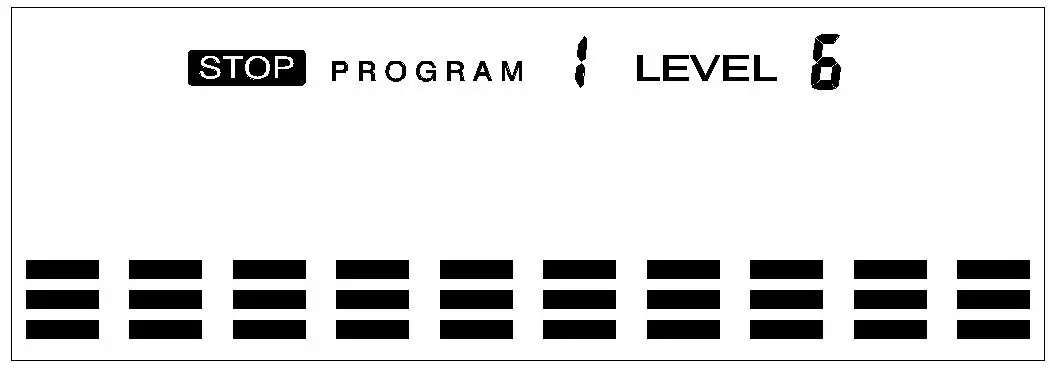
SETTING PARAMETERS FOR MANUAL PROGRAM
- Select Manual Program (P1) using the UP or DOWN button, then press ENTER.
- TIME will flash so the value can be adjusted using the UP or DOWN button.
- Press the ENTER button to save the value and move to the next parameter to be adjusted. Note: If you set up the target time for workout, then the next parameter of Distance cannot be adjusted.
- Continue through all desired parameters and press the START/STOP button to begin the workout.
Note: Once the workout parameter counts down to zero, it will beep and stop the workout automatically. Press the START button to continue the workout to reach the unfinished workout parameter.
Pre-set programs (P2~P13)
Program profile
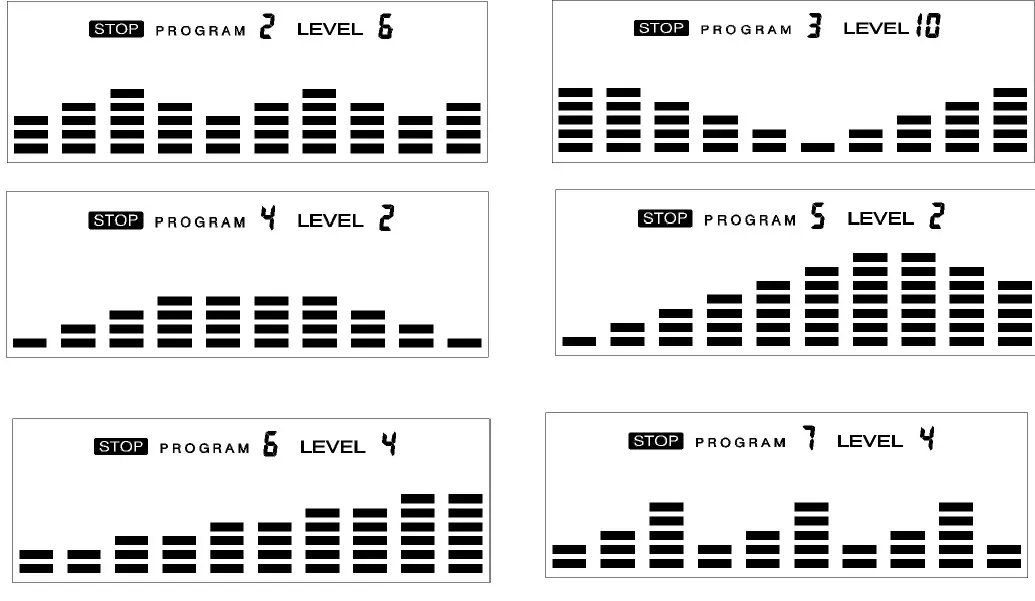
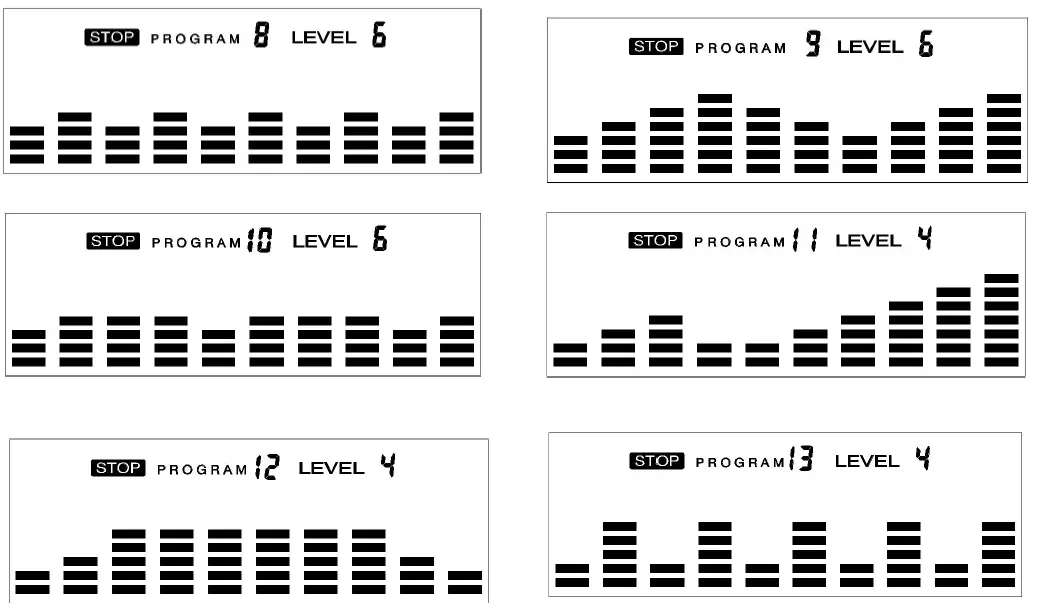 There are 12 pre-set programs ready for use. All program profiles have 16 levels of resistance.
SETTING PARAMETERS FOR PRE- SET PROGRAMS
- Select one of the Pre-set Programs using the UP or DOWN button, then press ENTER. TIME will flash so the value can be adjusted using the UP or DOWN key.
- Press the ENTER button to save value and move to the next parameter to be adjusted. Continue through all desired parameters, pressing the START/STOP button to begin the workout.
Workout in any pre-set program
You can adjust the level of resistance by pressing the UP or DOWN button during the workout.
Note: If you set up the target time for workout, then the next parameter of Distance cannot be adjusted. Once the workout parameter counts down to zero, it will beep and stop the workout automatically. Press the START button to continue the unfinished parameter.
Watt Control Program (P14)
Program profile
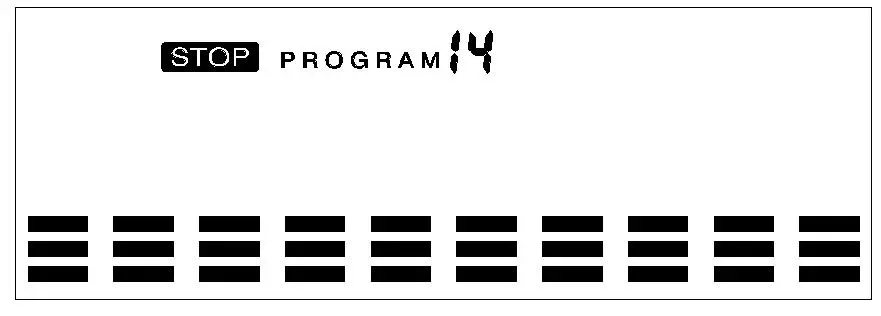
SETTING PARAMETERS FOR THE WATT CONTROL PROGRAM
- Select Watt Control Program (P14) using the UP or DOWN button, then press ENTER.
- TIME will flash so the value can be adjusted using the UP or DOWN button.
- Press ENTER button to save the value and move to the next parameter to be adjusted.
Note: If you set up the target time for workout, then the next parameter of Distance cannot be adjusted. - Continue through all desired parameters, pressing the START/STOP button to start the workout. Note: Once the workout parameters count down to zero, it will beep and stop the workout automatically.
- Press the START button to continue the workout to reach the unfinished workout parameter. The computer will adjust the resistance load automatically depending on the speed to maintain the constant watt value. You can use the UP or DOWN button to adjust the watt value during the workout.
BODY FAT Program (P15)
Program profile 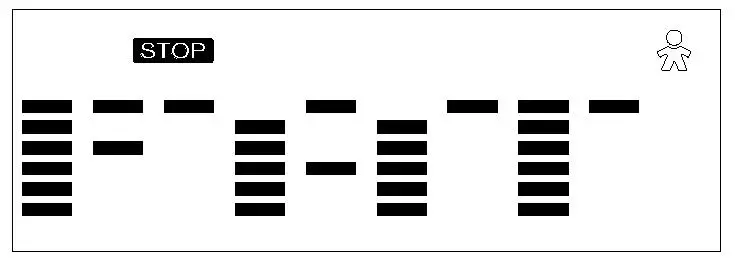
SETTING DATA FOR BODY FAT
Select BODY FAT Program (P15) using the UP or DOWN button, then press ENTER. “MALE” will flash so Gender can be adjusted using the UP or DOWN button. Press the ENTER button to save gender and move to the next data.
“5’8 (inches)” of Height will flash so Height can be adjusted using the UP or DOWN button. Press ENTER to save the value and move to the next data.
“154 (lbs)” of Weight will flash so Weight can be adjusted using the UP or DOWN button. Press ENTER to save the value and move to the next data.
“30” of Age will flash so Age can be adjusted using the UP or DOWN button. Press ENTER to save the value.
Press the START/STOP button to start the measurement. Please also remember to grasp the hand pulse sensors. After 15 seconds the display will show Body Fat %, BMR, BMI, & BODY TYPE.
Body Types:
There are 9 body types divided according to the FAT % calculated.
| Body Type | FAT % | Body Type | FAT % | Body Type | FAT % |
| Type 1 | 5% – 9% | Type 4 | 20% – 24% | Type 7 | 35% – 39% |
| Type 2 | 10% – 14% | Type 5 | 25% – 29% | Type 8 | 40% – 44% |
| Type 3 | 15% – 19% | Type 6 | 30% – 34% | Type 9 | 45% – 50% |
BMR: Basal Metabolism Ratio
BMI: Body Mass Index
Press START/STOP button to return the main display.
TARGET HEART RATE Program (P16)
Program profile
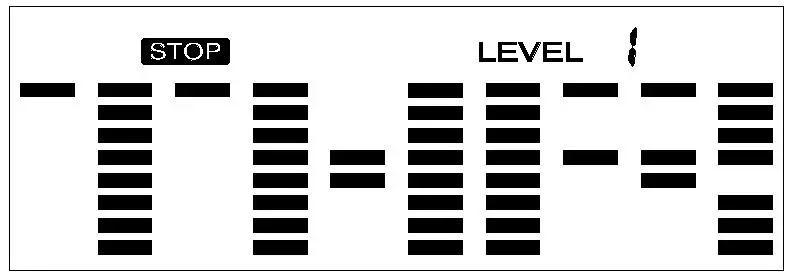 SETTING PARAMETERS FOR TARGET HEART RATE PROGRAM
- Select TARGET HEART RATE program (P16) using the UP or DOWN button, then press ENTER.
- TIME will flash. The value can be adjusted using the UP or DOWN button.
- Press the ENTER button to save the value and move to the next parameter to be adjusted. Note: If you set up the target time to workout, then the next parameter of Distance cannot be adjusted.
- Continue through all desired parameters, pressing START/STOP button to start workout. Note: If Pulse is above the set TARGET HR, the Pulse value will flash to remind the user.
HEART RATE CONTROL Program (P17-P20)
Program profile 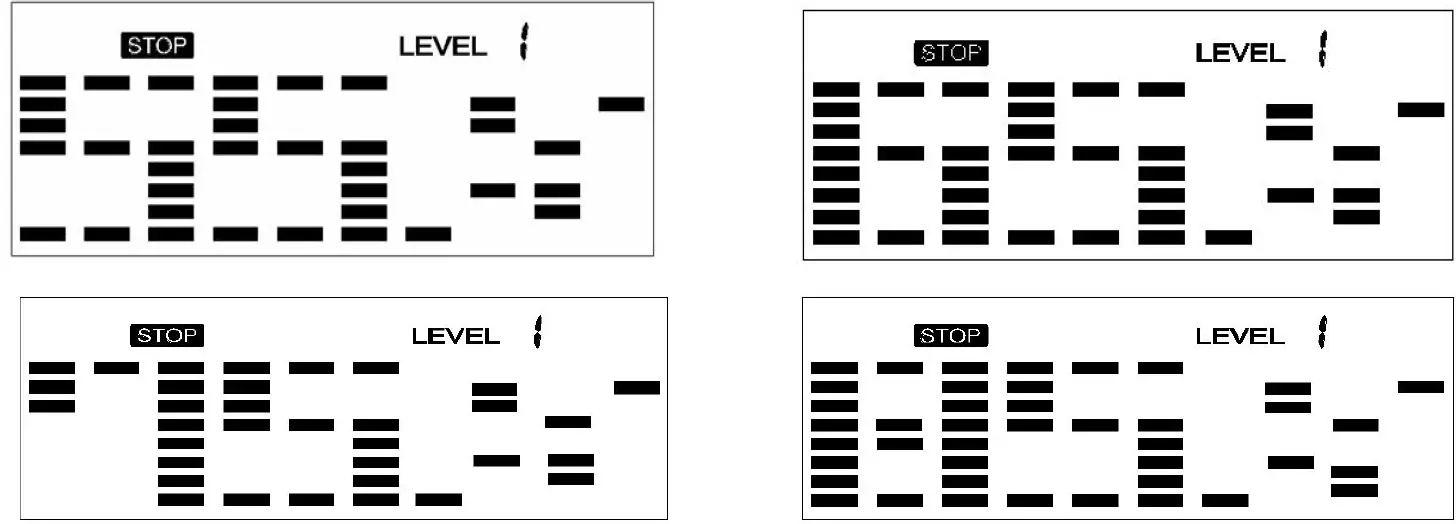 There are 4 selections for target pulse (HR):
- HRC – 55% TARGET HR= 55% of (220-AGE)
- HRC – 65% TARGET HR= 65% of (220-AGE)
- HRC – 75% TARGET HR= 75% of (220-AGE)
- HRC – 85% TARGET HR= 85% of (220-AGE)
SETTING PARAMETERS FOR HEART RATE CONTROL
- Select one of the Heart Rate Control Programs using the UP or DOWN button, then press ENTER.
- TIME will flash. The value can be adjusted using the UP or DOWN button.
- Press the ENTER button to save the value and move to the next parameter to be adjusted. Note: If you set up the target time to work out, then the next parameter of Distance cannot be adjusted.
- Continue through all desired parameters, pressing the START/STOP button to start the workout.
Note: If Pulse is above or below (± 5) the TARGET HR, the computer will adjust the resistance load automatically. It will check every 20 seconds approx. 1 resistance load will increase or decrease (Note: each resistance load represents 2 levels of loading).
If one of the workout parameters counts down to be zero, it will beep and stop the workout automatically. Press the START/STOP button to continue the workout to reach unfinished workout parameter.
User Program
Program profile (P21-P24)
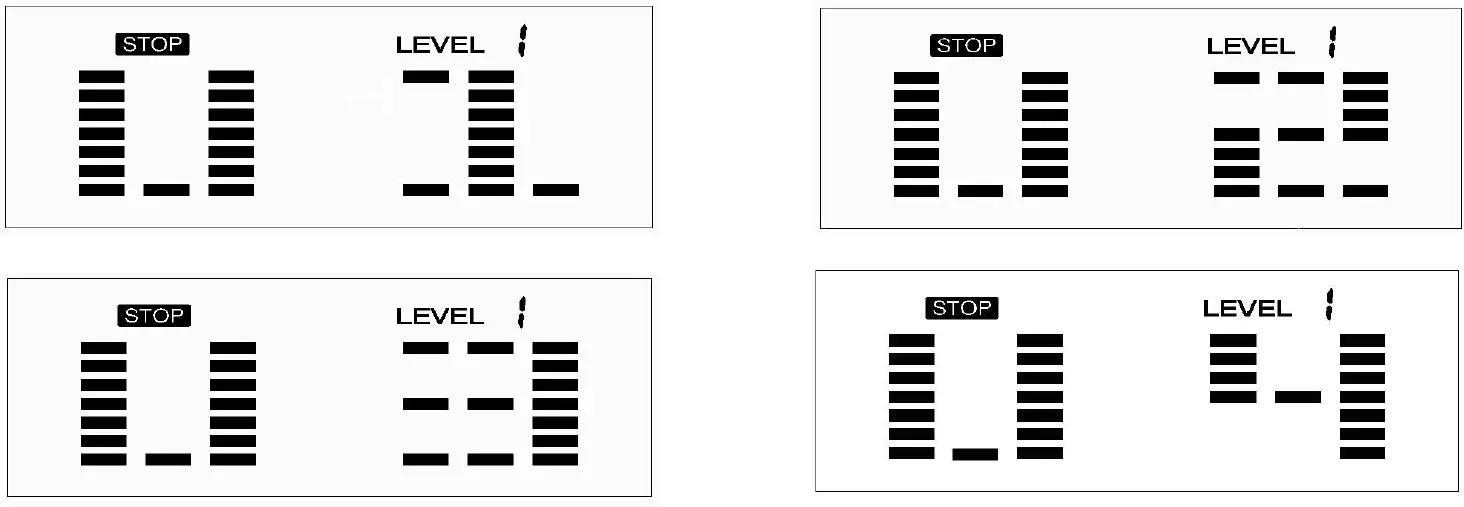
The 4 user programs allow the user to set their own program that can be used immediately. SETTING PARAMETERS FOR USER PROGRAM
- Select the User Program using the UP or DOWN button then press ENTER.
- TIME will flash so the value can be adjusted using the UP or DOWN button.
- Press the ENTER button to save the values and move to the next parameter to be adjusted. Note: If you set up the target time to work out, then the next parameter of Distance cannot be adjusted.
- Continue through all desired parameters.
- After finishing the setup of the desired parameters, level 1 will flash. Use the UP or DOWN button to adjust, then press the ENTER button until finished. (There are 10 times total). Press the START/STOP button to begin the workout.
Note: Once the workout parameter counts down to zero, it will beep and stop the workout automatically. Press the START/STOP button to continue the workout to reach the unfinished workout parameter.
TROUBLESHOOTING
| PROBLEM | POSSIBLE CAUSE | CHECK | SOLUTION |
| E1-1 | The motor couldn’t find its start point. | Check if all the cables are well plugged in, or check if the pins on the cables are improperly inserted, or check if the motor is well connected. | Plug in the cables again and power on, then press MODE and ENTER buttons at the same time to enter the correction mode to correct errors. |
| E1-2 | The motor signal has no induction. | Check if all the cables are well plugged in, or check if the pins on the cables are improperly inserted, or check if the motor is stuck. | Plug in the cables again or change a new motor. |
| E1-3 | The motor has exceeded the maximum resistance level. | Check if all the cables are well plugged in, or check if the pins on the cables are improperly inserted. | Plug in the cables again and power on, 1 second later disconnect the cables then re-plug in the cables and power on again, wait about 6 seconds, let the motor come back to its start point then press MODE and ENTER buttons at the same time to enter the correction mode to correct errors. |
| E2 | No EEPROM data was read. | Re-connect the computer. | |
| The EEPROM data reading error. | Power on the computer again to re-read the data. | ||
| E4 | Hands aren’t put on the two handle pulses immediately after pressing START. | Put hands on the two handle pulses immediately after pressing START. | |
| Body Fat Function cannot receive the signal for pulse. | Check if the handle pulse wires are well connected. | Plug in the handle pulse wires again or change the handle pulse wires. | |
| Check if the pulse is working when not in Body Fat program. | Change the computer. |
CONNECT WITH US
FOR FITNESS ARTICLES, VIDEOS & WORKOUTS