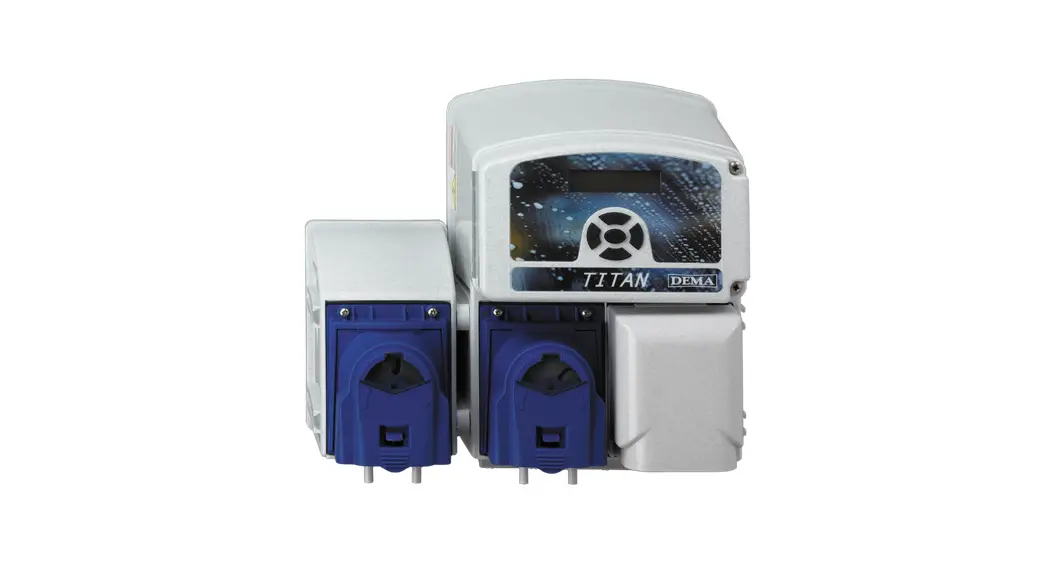

 Pax Economical Probe less Ware wash Dispenser
User Guide
Px Economical Probe less Ware wash Dispenser
General Settings/Programming
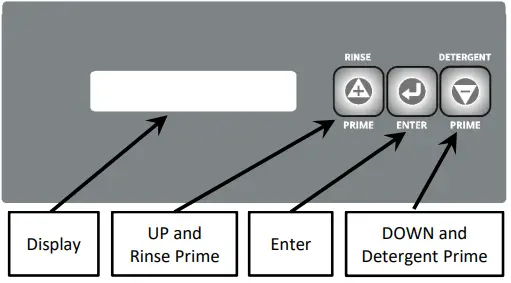
– Press & hold Enter for 3 seconds to access General Settings
– Use the UP and DOWN to scroll and press Enter to access a menu item
For programming and setup, go to System Access and press Enter, scroll with Up and Down
– Press Enter again to modify a setting
– Use the Up an Down to change the setting
– Press Enter to save the new setting
General Settings and Information
| Language | Choose English, Spanish, Portuguese, or French |
| Triggers | Shows Trigger Activity |
| Rack Count | Displays rack counts |
| System Access | Programming Access |
| Software Version | Displays software version |
Priming Pumps – While on idle screen (not general settings/programming) Press and hold the prime button the pump will start, release button, press again to stop
Pressing Enter will bring up the password screen, enter each digit using the up and down and press enter. The factory default pass code is “0000”.
Note: Programming guide has two sections based on machine type, Conveyor or Door. The menu flow is different depending on the machine type.
Programming (Conveyor Mode)
| Machine Type | Conveyor or Door | Set to the type of machine door or conveyor. |
| Trigger Mode | Wash/Rinse, Rinse Only, Wash Only, No Trigger | Wash/Rinse = Wash trigger for detergent, Rinse Trigger for rinse (most common) Rinse Only or Wash Only = the single trigger will call for both detergent and rinse No Trigger = Anytime the system is powered on, all pumps run based on their settings |
| Re-Charge | Range: 15-5min | Top off charges of detergent to maintain proper titration, probe less function |
| Dwell Time | Range: 1s – 10min | Sets the amount of time between detergent charges, conveyor machine mode only |
| Initial Charge | Range: 1s – 10min | Initial Charge – Probe less -first charge of detergent |
| Charge Clock | Range: 5min – 16Hrs | System goes without a trigger signal for the amount of time set, initial charge will occur |
| Rinse Speed | Range: 5-100% | Adjust the output of the rinse pump |
| Rinse Delay | Range: 0-15s | Delays rinse pump operation when rinse trigger is received |
| Rinse Length | Range: 5-75s | Set to the actual time it takes to run a rack through the rinse cycle, used to count racks, conveyor machine only. |
| Enter New Code | 4 numeric digits | Set a unique passcode to access programming. |
| Reset Rack Count | Reset Count or Cancel | Resets the rack count to zero |
| Factory Default | Set Default or Cancel | Resets the Pax programming to the factory default settings |
| End Programming | Press Enter | Will exit programming |
Programming (Door Mode)
| Machine Type | Conveyor or Door | Set to the type of machine door or conveyor |
| Trigger Mode | Wash/Rinse, Rinse Only, Wash Only No Trigger | Wash/Rinse = Wash trigger for detergent, Rinse Trigger for rinse (most common) Rinse Only or Wash Only = the single trigger will call for both detergent and rinse No Trigger = Anytime the system is powered on, all pumps run based on their settings |
| Re-Charge | Range: 1s-5min | Top off charges of detergent to maintain proper titration, proboles function |
| Dead Cycle | Range: 0-10 | The number set represents how many dish machine operations that does not get any detergent. 0= a detergent charge every door operation, 1-10 is how may door operations without a detergent charge before the next detergent charge, door machine mode only |
| Initial Charge | Range: 1s – 10min | Initial Charge – Proboles -first charge of detergent |
| Initial Charge Act | On or Off | If rinse trigger signal is active longer than rinse limit setting, initial charge will occur |
| Charge Clock | Range: 5min – 16Hrs | System goes without a trigger signal for the amount of time set, initial charge will occur |
| Rinse Speed | Range: 5-100% | Adjust the output of the rinse pump |
| Rinse Delay | Range: 0-15s | Delays rinse pump operation when rinse trigger is received |
| Rinse Limit | Range: 0, 10-70s | Sets the maximum run time for the rinse pump, 0 = off, for door machine mode only |
| Enter New Code | 4 numeric digits | Set a unique passcode to access programming |
| Reset Rack Count | Reset Count or Cancel | Resets the rack count to zero |
| Factory Default | Set Default or Cancel | Resets the Px programming to the factory default settings |
| End Programming | Press Enter | Will exit programming |
I1407 Rev.– 48140