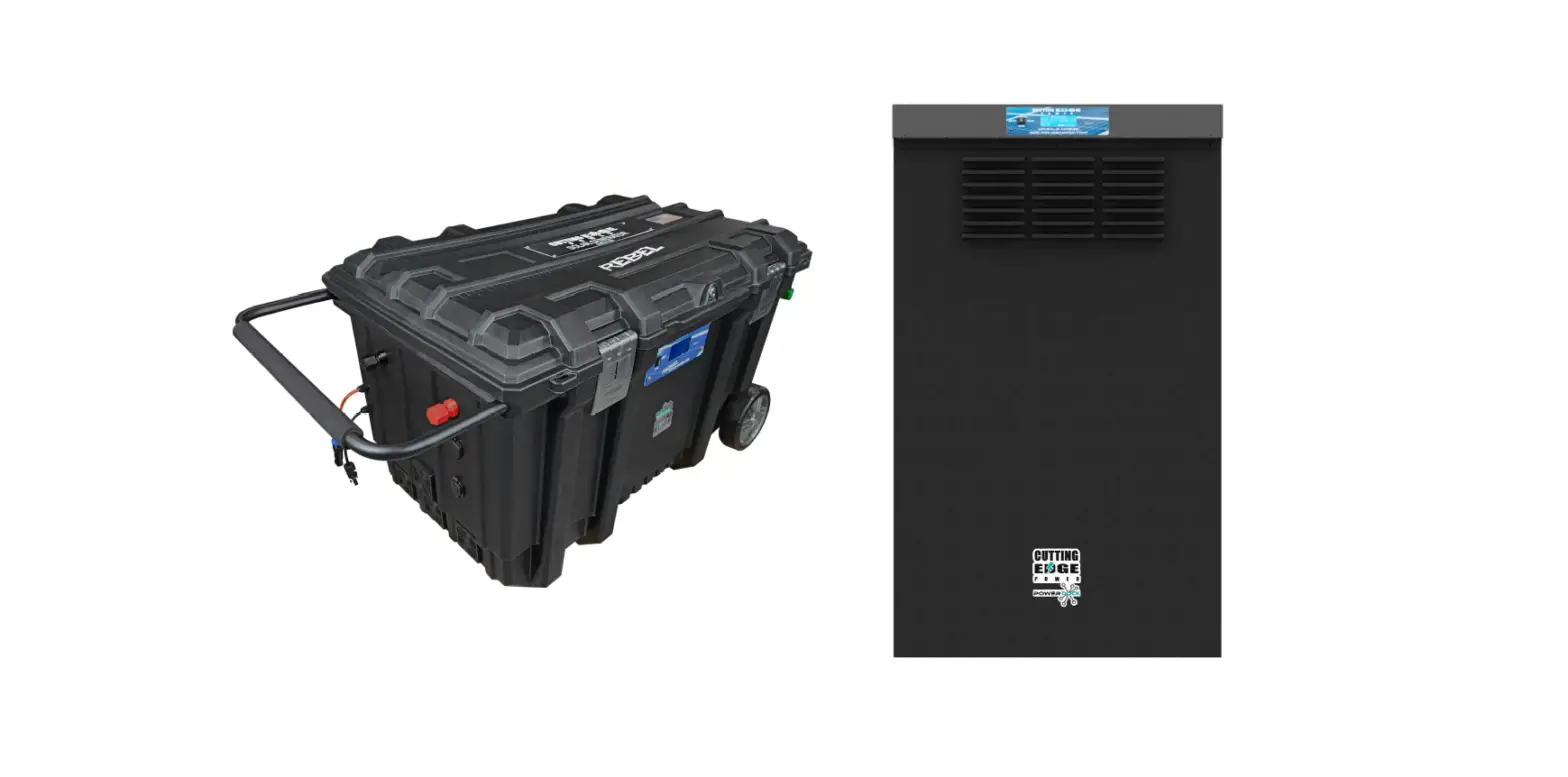

CUTTING EDGE POWER 8K-12KW Rebel and PowerDock Inverter
ABOUT THIS MANUAL
Purpose
The purpose of this manual is to provide explanations and procedures for installing, operating and troubleshooting for the unit. This manual should be read carefully before installations and operations. Please retain this manual for future reference.
Scope
This document defines the functional requirements of the unit, intended for worldwide use in electronic processing equipment. All manuals are applicable under all operating conditions when installed in the End Use system, unless otherwise stated.
IMPORTANT SAFETY INSTRUCTIONS
WARNING: This chapter contains important safety and operating instructions. Read and keep this User Guide for future reference.
General Precautions
- Before using the unit, read all instructions and cautionary markings on:
- The unit (2) the batteries (3) all appropriate sections of this manual.
- CAUTION –To reduce risk of injury, charge only deep-cycle lead acid type rechargeable batteries lithium or LiFePO4 batteries. Other types of batteries may burst, causing personal injury and damage.
- Do not expose the unit to rain, snow or liquids of any type. The unit is designed for indoor use only. Protect the unit from splashing if used in vehicle applications.
- Do not disassemble the unit. Take it to a qualified service center when service or repair is required. Incorrect re-assembly may result in a risk of electric shock or fire.
- To reduce risk of electric shock, disconnect all wiring before attempting any maintenance or cleaning. Turning off the unit will not reduce this risk.
- CAUTION –Battery are not already installed by the supplier only a qualified professional (e.g. service person) may install the Inverter.
- WARNING: WORKING IN VICINITY OF A LEAD ACID BATTERY IS DANGEROUS.
BATTERIES GENERATE EXPLOSIVE GASES DURING NORMAL OPERATION. Provide ventilation to outdoors from the battery compartment. The battery enclosure should be designed to prevent accumulation and concentration of hydrogen gas in “pockets†at the top of the compartment. Vent the battery compartment from the highest point. A sloped lid can also be used to direct the flow to the vent opening location. - NEVER charge a frozen battery.
- No terminals or lugs are required for hook-up of the AC wiring. AC wiring must be no less than 10 AWG gauge copper wire details refer to table 2. Battery cables must be rated for 35mm or higher and should be no less than table 1. Crimped and sealed copper ring terminal lugs with a HRNB38-8 hole should be used to connect the battery cables to the DC terminals of the unit. Soldered cable lugs are also acceptable.
- Be extra cautious when working with metal tools on, or around batteries. The potential exists to drop a tool and short-circuit the batteries or other electrical parts resulting in sparks that could cause an explosion.
- No AC or DC disconnects are provided as an integral part of this unit. Both AC and DC disconnects must be provided as part of the system installation. See INSTALLATION section of this manual.
- Fuses are provided as the over current protection of the battery supply.
- When PV module or panel is exposed to light, it starts to supply high DC voltage, be sure to turn off DC switch before commencing the maintenance, and make sure the cables from PV panel are properly sealed after disconnection.
- GROUNDING INSTRUCTIONS -This battery charger should be connected to a grounded permanent wiring system. For most installations, the Ground Lug should be bonded to the grounding system at one (and only one point) in the system. All installations should comply with all national and local codes and ordinances.
- AVOID AC output short-circuit; avoid DC input short-circuit and do not connect the mains while DC input short-circuit
- Warning: The maintenance information is only for service persons, if the product is used in a manner which is not covered by the scope of warranty, the protection provided by the product may be impaired.
Personal Precautions
- Someone should be within range of your voice to come to your aid when you work near batteries.
- If working with lead acid batteries, have plenty of fresh water and soap nearby in case battery acid contacts skin, clothing, or eyes.
- If working with lead acid batteries, wear complete eye protection and clothing protection. Avoid touching eyes while working near batteries. Wash your hands when done.
- If battery acid contacts skin or clothing, wash immediately with soap and water. If acid enters eyes, immediately flood eyes with running cool water for at least 15 minutes and get medical attention immediately.
- Baking soda neutralizes lead acid battery electrolyte. Keep a supply on hand in the area of the batteries.
- NEVER smoke or allow a spark or flame in vicinity of a battery or generator.
- Be extra cautious when working with metal tools on, and around batteries. Potential exists to short-circuit the batteries or other electrical parts which may result in a spark which could cause an explosion.
- Remove personal metal items such as rings, bracelets, necklaces, and watches when working with battery. Battery can produce short-circuit current high enough to weld a ring, or the like, to metal causing severe burns.
- If a remote or automatic generator start system is used, disable the automatic starting circuit and/or disconnect the generator from its starting battery while servicing to prevent accidental starting during servicing.
- The inverter does not provide a neutral/ ground bond internally. This inverter contains an isolation transformer. If required, a neutral / ground bond must be created externally by a licensed professional.
WARNING: Because this inverter is non-isolated, only three types of PV modules are acceptable: single crystalline, poly crystalline with class A-rated and CIGS modules.
To avoid any malfunction, do not connect any PV modules with possible current leakage to the inverter. For example, grounded PV modules will cause current leakage to the inverter. When using CIGS modules, please be sure NO grounding.
CAUTION: It’s requested to use PV junction box with surge protection. Otherwise, it will cause damage on inverter when lightning occurs on PV modules.
PV Module Selection:
When selecting proper PV modules, please be sure to consider below parameters:
- Open circuit Voltage (Voc) of PV modules not exceeds max. PV array open circuit voltage of inverter.
- Open circuit Voltage (Voc) of PV modules should be higher than min. battery voltage.
Table 4. MPPT input voltage range
| INVERTER MODEL | LFPV8KW / LFPV10KW / LFPV12KW |
| Max. PV Array Open Circuit Voltage | 155Vdc |
| PV Array MPPT Voltage Range | 60Vdc~145Vdc |
Refer to Appendix A for configuration information of PV panel.
Generator start signal 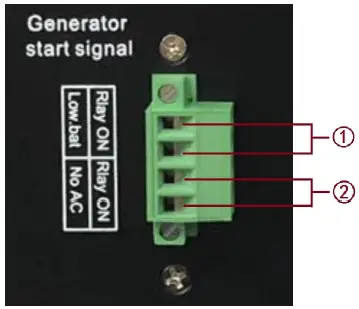
Two schemes can send signal to start the generator. Either scheme is selectable by users to start the generator.
- Start the generator while battery low.
- Start the generator while mains power unavailable.
Machine panel introduction
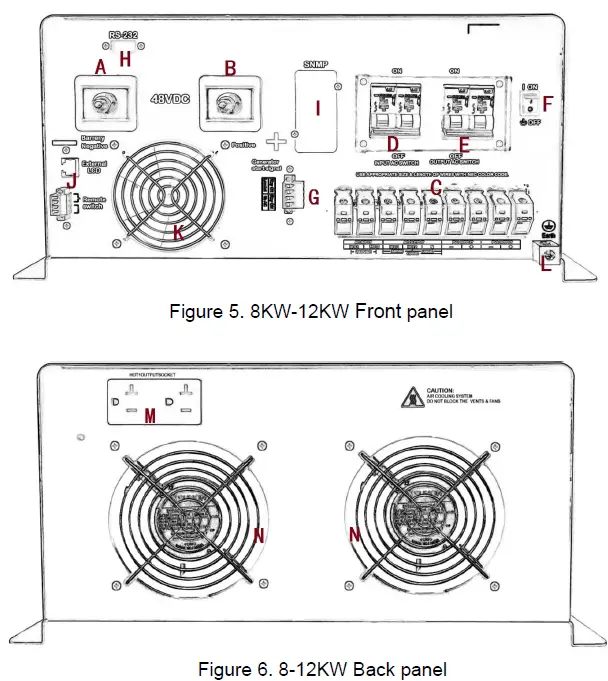
Explain:
- A. Battery Positive
- B. Battery Negative
- C. Terminal block
- D. AC input switch
- E. AC output switch
- F. On / off switch
- G. Generator start signal
- H. RS-232(Optional)
- I. SNMP interface(Optional)
- J. Remote switch and remote LCD(Optional)
- K. DC FAN
- L. Grounding terminal
- M. HOT1 Output socket
- N. AC FAN
OPERATION
LCD Panel and Configuration Switch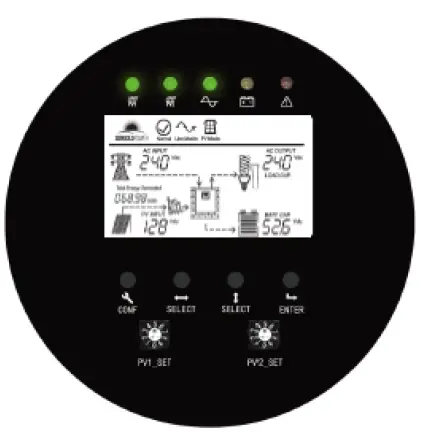
Table 5: configuration button function
| Switch | Description |
| CONF | long press “1S” button to enter the setting interface |
| Left – Right SELECT | Left-right SELECT button can be used for selecting different contents( Voltage, frequency, charging current…) |
| Up – Down SELECT | Up – down SELECT button can be used for selecting parameter on the function setting mode |
| ENTER | Confirm, data save function |
| MPPT charging voltage selection switch | |
| PV1_SET | Set the charging voltage of MPPT1 through the selector switch |
| PV2_SET | Set the charging voltage of MPPT2 through the selector switch |
| LED Indicator | |
| LED | Description |
| PV1-LED | GREEN LED Lighting on PV1 normal |
| PV2-LED | GREEN LED Lighting on PV2 normal |
| AC-LED | GREEN LED lighting on AC Mode |
| Battery-LED | YELLOW LED lighting on Battery Inverter Mode |
| Alarm-LED | RED LED lighting on Fault |
Setting Indicators
Table 6: MPPT configuration option(PV1_SET and PV2_SET)
| Selector switch gear | Boost Voltage | Float Voltage | Battery type recommended |
| 0 | 56.4V | 54.8V | AGM1 |
| 1 | 56.8V | 55.2V | AGM2 |
| 2 | 58.8V | 58.0V | Cutting Edge Power 14S (48V) Lithium |
| 3 | 58.0V | 57.6V | 16 string LiFePO4 battery pack |
| 4 | 57.2V | 56.4V | 16 string LiFePO4 battery pack |
| 5 | 55.2V | 54.4V | 15 string LiFePO4 battery pack |
| 6 | 54.4V | 54.0V | 15 string LiFePO4 battery pack |
| 7 | 53.6V | 52.8V | 15 string LiFePO4 battery pack |
| 8 | 62.0V | 60.4V | other |
| 9 | 58.4V | 56.8V | other |
Table 7: Inverter configuration option
| NO. | Description | Selectable option |
| 1 | Input voltage range Setting | Wide/Normal |
| 2 | Output voltage Setting | 220/230/240Vac |
| 3 | Output frequency Setting | 50/60Hz/Automatic |
| 4 | AC charging voltage setting | AC charge off, b1, b2, b3, b4, b5, b6, b7, b8 |
| 5 | AC Charger current Setting | 16A/32A/48A/64A/80A |
| 6 | DC priority / AC priority / intelligent mode selection setting | DC mode priority / AC mode priority, Intelligent mode |
| 7 | DC conversion voltage point setting (Switch from battery mode to AC mode) | 42.0V/44.0V/46.0V/48.0V/50.0V/51.2Vdc |
| 8 | Battery low voltage shutdown point setting | 38.0V/40.0V/42.0V/44.0V/46.0V/47.2Vdc |
| 9 | Battery capacity setting | 65/80A/00/150/200/250/300/400/500/600/800AH |
Input voltage range Setting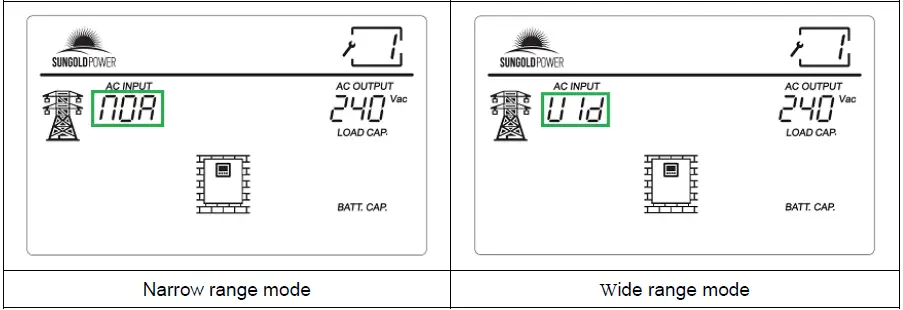
Output voltage Setting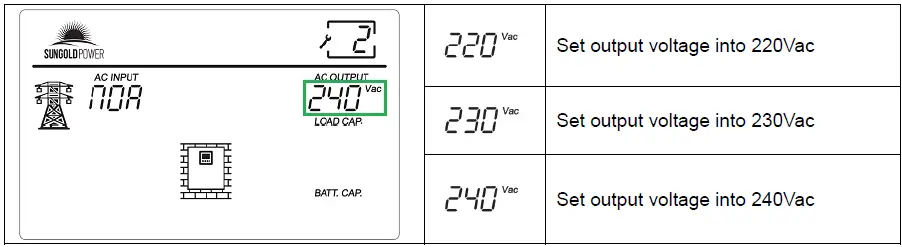
Output frequency Setting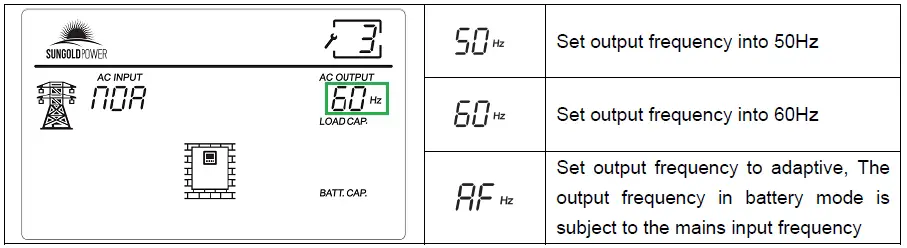 AC charging voltage setting
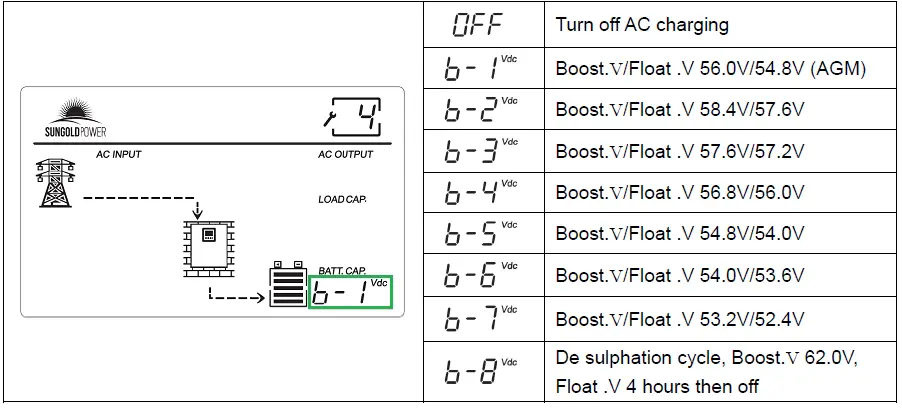
AC Charger current Setting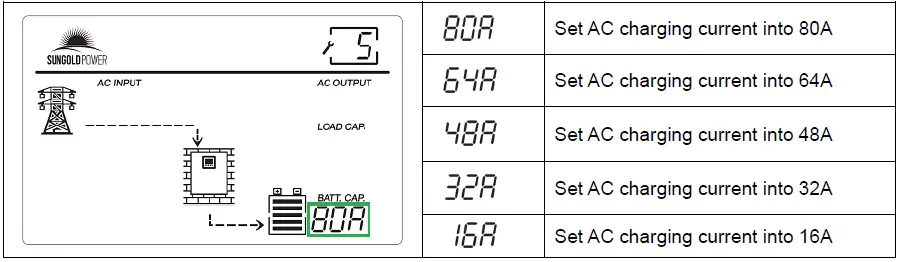
Maximum rated charge current can be divided into 5 different stall for adjusting.
DC priority / AC priority / intelligent mode selection setting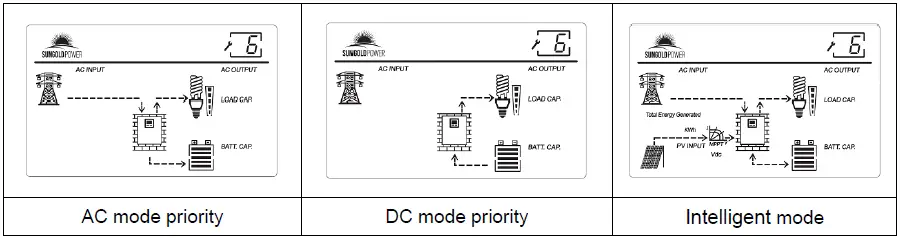
DC conversion voltage point setting(Switch from battery mode to AC mode)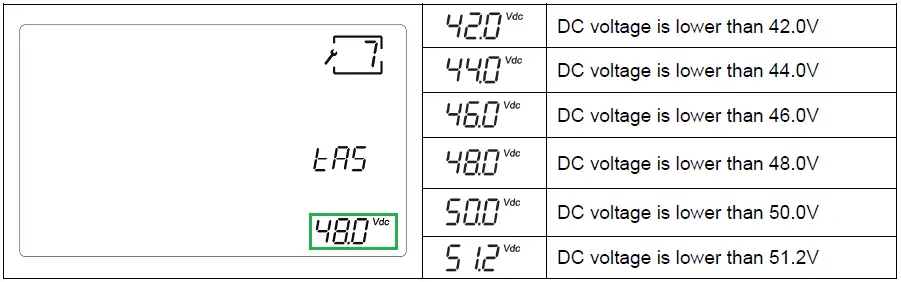 Note: This function is only effective in DC priority and intelligent mode.
Battery low voltage shutdown point setting
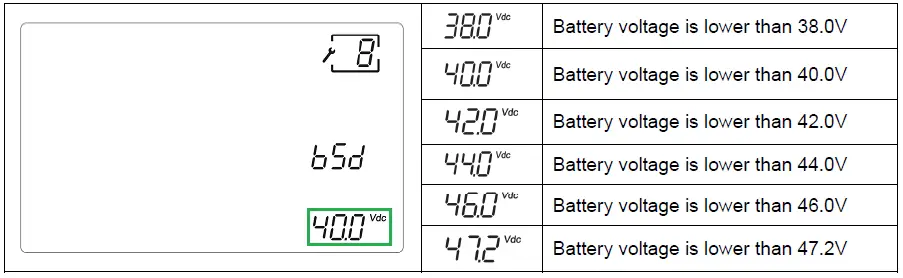
Battery capacity setting
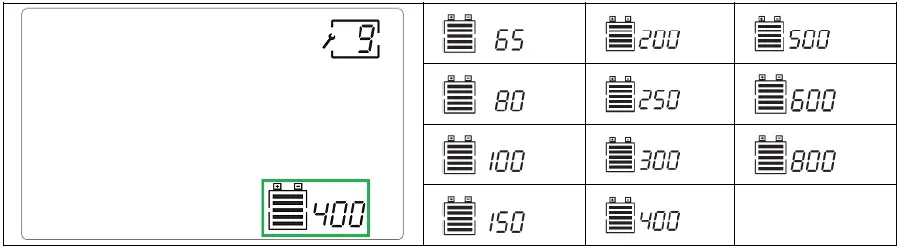
Setting the correct user access battery capacity is conducive to the inverter to display the battery capacity more accurately.
LCD display meaning
Table 8: display meaning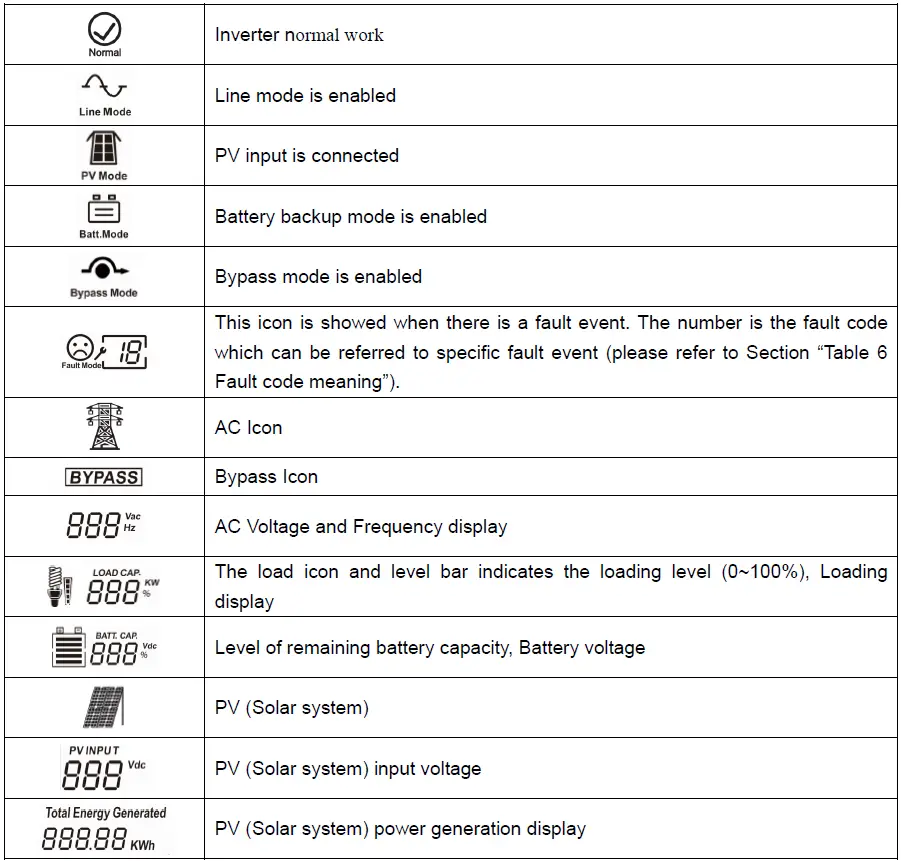

Operating Indicators
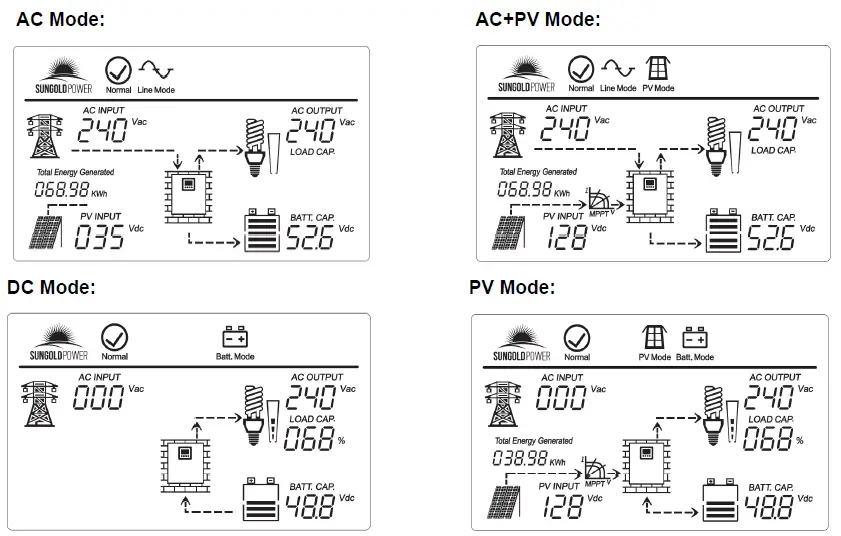
Alternating display of AC voltage and frequency, battery voltage and battery capacity every 5 seconds
Fault Mode:
The upper left corner of the LCD shows the fault code and buzzer ringing.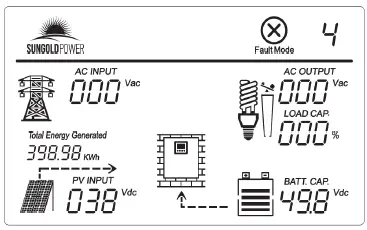
Table 9: Fault code meaning
| Fault code | Fault | Reason and Solution |
|
1 | Over temperature, fan fault (alarm light on) | Inverter operate environment is very bad, insufficient ventilation and indoor temperature is very high. Close the inverter and wait for 10 minutes, after inverter cool, start again, if fan fault, please replace with a new fan. |
| 2 | Overload (alarm light on) | Connecting load power is over than inverter’s rated power, if reduce the load equipments quantity, inverter will work again. |
|
3 | Output short circuit (alarm light on) | Close the inverter and disconnect all load equipment, inspect load equipments if any of them had fault or internal short circuit, then start the inverter again. If still fault, please consult with manufacture. |
| 4 | Over temperature (alarm light on) | Inverter operate environment is very bad, insufficient ventilation and indoor temperature is very high. Close the inverter and wait for 10 minutes, after inverter cool, start again. |
| 5 | Low battery voltage (alarm light on) | Battery damage; Battery deeply discharged, so need to charge again; battery problem, please replaces the battery. Inverter charger no work, please consult manufacture. |
| 6 | Reverse input (alarm light on) | Connect input and output again in correct way. |
| 7 | Semi-wave short circuit (unusual load) | The connecting load power is over than inverter’s rated power, after reduce load equipments quantity, inverter will work again. |
| 8 | Over charge (alarm light on) | Battery type selection incorrect; Charger damage, please consult manufacture for help. |
| 9 | Battery over voltage (alarm light on) | Check if battery bank dc voltage is corresponding to this inverter requested dc voltage. |
SPECIFICATIONS
Table 10: Line Mode Specifications
| MODEL | LFPV8~12KW | |
| Rated power | 8~ 12KW(Split-phase) | |
| Input Voltage Waveform | Sine wave(Utility or Generator) | |
| Nominal Input Voltage | 240Vac(HOT1+HOT2) | |
| Low Line Disconnect | 180Vac±4%(NOR) | |
| 140Vac±4%(WID) | ||
|
Low Line Re-connect | 190Vac±4%(NOR) | |
| 150Vac±4%(WID) | ||
| Note: 1.NOR setting can be used for general electrical appliance 2. WID setting can be used only for some special load, Such as lamp, fan. | ||
| High Line Disconnect | 270Vac±4%(NOR) | |
| 270Vac±4%(WID) | ||
| High Line Re-connect | 260Vac±4%(NOR) | |
| 260Vac±4%(WID) | ||
| Max AC Input Voltage | 270VAC | |
| Nominal Input Frequency | 50Hz/60Hz (Auto detection) | |
| Low Line Frequency Disconnect | 40±0.3Hz for 50Hz, | 50±0.3Hz for 60Hz |
| Low Line Frequency Re-connect | 41±0.3Hz for 50Hz, | 51±0.3Hz for 60Hz |
| High Line Frequency Disconnect | 55±0.3Hz for 50Hz, | 65±0.3Hz for 60Hz |
| High Line Frequency Re-connect | 54±0.3Hz for 50Hz, | 64±0.3Hz for 60Hz |
| Output Voltage Waveform | Same as Input Waveform | |
| Output Short Circuit Protection | Air switch | |
| Efficiency (Line Mode) | >98% | |
| Transfer Time | 15ms (typical) 20ms max(WID) | |
Note: NOR – Normal range; WID-Wide range
Table 11: Invert Mode Specifications
| MODEL | LFPV8K-48-120A-SP | LFPV10K-48-120A-SP | LFPV12K-48-120A-SP |
| Output Voltage Waveform | Pure Sine Wave | ||
| Rated Output Power | 8000W | 10000W | 12000W |
|
Rated Output Power (Split phase model) | HOT1-N:4000W | HOT1-N:5000W | HOT1-N:6000W |
| HOT2-N:4000W | HOT2-N:5000W | HOT2-N:6000W | |
| HOT1-HOT2:8000W | HOT1-HOT2:10KW | HOT1-HOT2:12KW | |
| HOT1 load> HOT2 load, HOT1-N must be used preferentially for single load, The total load connected shall not be greater than the rated power of the inverter | |||
| Power Factor | 0.9 – 1.0 | ||
| Nominal Output voltage | 120V/240V | ||
| Minimum Peak Output Voltage at Rated Power | >200Vac | ||
| Output Frequency(Hz) | 50Hz / 60Hz ± 0.3Hz | ||
| Output Voltage Regulation | ±10% | ||
| Nominal Efficiency | >87% (@Normal DC Input; >60% R load) | ||
| Over-Load Protection | 105% <load<125%, beeps 0.5s every 1s, and Fault after 60s. Load>125%, beeps 0.5s every 1s, and Fault after 20s. | ||
| Capable of starting electric motor | YES | ||
| Output Short Circuit Protection | Current limit (Fault after 10s), Air switch | ||
| DC voltage | |||
| Nominal DC Input Voltage | 48.0Vdc | ||
| Min DC start voltage | 44.0Vdc | ||
| Low DC Alarm | 42.0 ± 0.6Vdc | ||
| Low DC Shut-down | 40.0 ± 0.6Vdc(Can set) | ||
| Low DC Shut-down Recovery | 44.0 ± 0.6Vdc | ||
| High DC Shut-down | 64.0 ± 0.6Vdc | ||
| High DC Shut-down Recovery | 62.0 ± 0.6Vdc | ||
Table 12: AC Charger Mode Specifications
| Nominal Input Voltage | 240Vac(HOT1+HOT2) |
| Input Voltage Range | 194 ~258Vac(NOR) |
| 160 ~265Vac(WID) | |
| High Voltage Disconnect | 265Vac±4%(NOR) |
| 265Vac±4%(WID) | |
| High Line Re-connect | 258Vac±4%(NOR) |
| 258Vac±4%(WID) | |
| Low Voltage Disconnect | 194Vac±4%(NOR) |
| 160Vac±4%(WID) | |
| Low Line Re-connect | 199Vac±4%(NOR) |
| 165Vac±4%(WID) | |
| Nominal Output Voltage | According to the battery type |
| Nominal Charge Current | Max 80A |
| Charge current tolerance | ±5A |
| Over Charge Protection | Bat. V ≥61.0Vdc, Fault, Buzzer alarm for 48Vdc (beeps 0.5s every 1s & fault after 60s) |
| Charge Algorithm | Three stage: Boost CC (constant current stage) → Boost CV (constant voltage stage) → Float (constant voltage stage) |
Note: NOR – Normal range; WID-Wide range
Table 13: Solar Charger Mode Specifications
| Rated Battery voltage | 48VDC |
| Rated charge current | 60A |
| Input voltage range | 60-145Vdc |
| PV charging starting voltage | PV.V>Bat.V+3.0V |
| Max. PV open circuit array voltage | 155Vdc |
| Max. recommended input power (W) | 3500W |
| Dual MPPT charger | YES |
| Dual MPPT charging current | 120A (60A+60A) |
| Dual MPPT Max. recommended input power (W) | 7000W (3500W+3500W) |
Table 14: General Specifications
| MODEL | LFPV8K-120A-SP | LFPV10K-120A-SP | LFPV12K-120A-SP |
| Indicators | LED+LCD Display | ||
| Protections | Low battery, over charging, over load, over temp. | ||
| Remote control | YES | ||
| Operating Temperature Range | 0°C ~ 50°C | ||
| Storage temperature | -15ºC ~ 60ºC | ||
| Operation humidity | 5% ~ 95% (non-condensing) | ||
| Earthing ABYC standard (Optional) | Follow customer requirement Inverter mode: the neutral and the earth joined ; Line mode: the neutral and the earth separated. Use a Relay to realize the function. | ||
| Audible Noise | 65dB max | ||
| Cooling | Forced air, variable speed fan | ||
| Size (L*W*H mm) | 650*449*223.5mm | 650*449*223.5mm | 650*449*223.5mm |
| Net weight (Kg) | 57.0kg | 64.5kg | 70.5kg |
Product specifications are subject to change without further notice.
APPENDIX A
How to Select and Configure PV Panels
The following parameters can be found in each PV panel’s specification:
- Pmax: Max output power (W)
- Voc: open-circuit voltage (V)
- Isc: short-circuit current (A)
- Vmp: max power voltage (V)
- Imp: max power current (A)
PV panels can be connected in series or parallel in order to obtain the desired output voltage and current which meets the inverter’s allowed range.
Example 1 – How to connect 48V 8000W model to PV panels with the following parameters?
- Pmax: 260W
- Voc: 37.7V
- Isc: 8.89A
- Vmp: 30.9V
- Imp: 8.42A
- The max. PV input power for 48V 8000W model is 3500W, 3500W / 260W = 13.46Þmin. 13 PV panels shall be connected.
- Best Operating Voltage Range is 60~145V, 145V/30.9V = 4.69 Þ max. Number of PV panel in series is 4.
- Max. input charging current is 60A,60A/8.42A = 7.13 Þ max. Number of PV panel in parallel is 7.
- Taking (1)~(3) into consideration, the optimized configuration is 3 PV panels in series as a string, and 5 strings in parallel (as shown below).

Considering the parameters of solar panels, the total power of practical application is about 3500W - Check again the Voc and Isc of PV string,
- Voc of string is 4 x 37.7V = 150.8V < 155V (Max. PV Input Voltage)
 OK
OK - Isc of string is 3 x 8.89A =26.67A < 60A (Max. PV Input Current) OK
- Isc of string is 4 x 8.89A =35.56A < 60A (Max. PV Input Current) OK
- Voc of string is 4 x 37.7V = 150.8V < 155V (Max. PV Input Voltage)
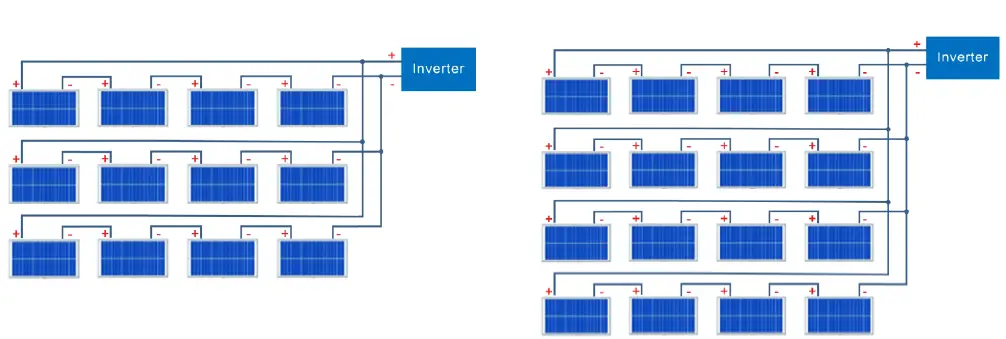
 OK
OKDISPOSAL
In the event the product reaches the end of its service life, please contact the local dealer for disposal instructions.The product must not be disposed of with the household waste. Disposal of the product at the end of its service life shall be done in accordance with applicable disposal regulations for electronic waste.