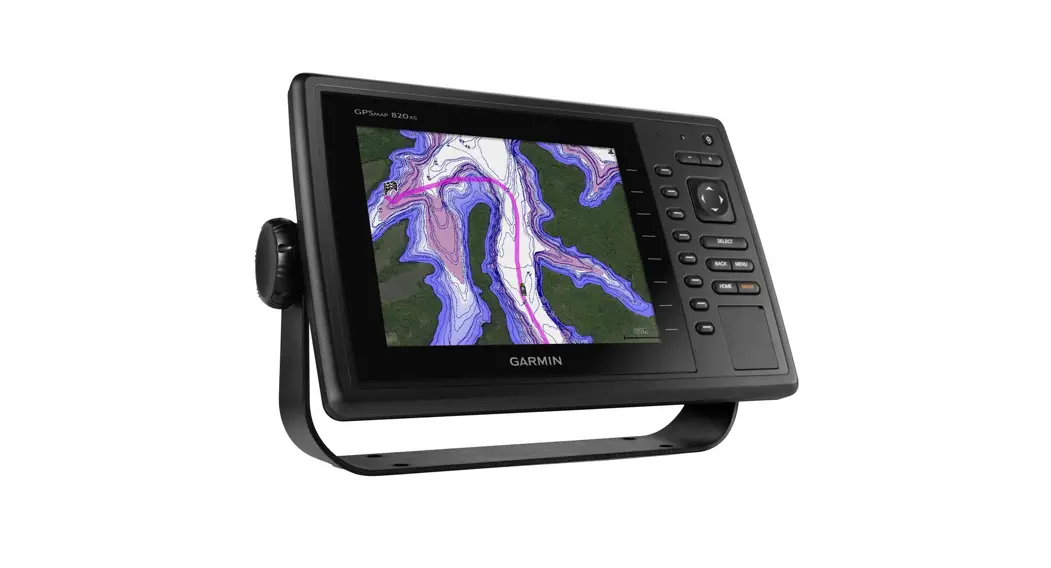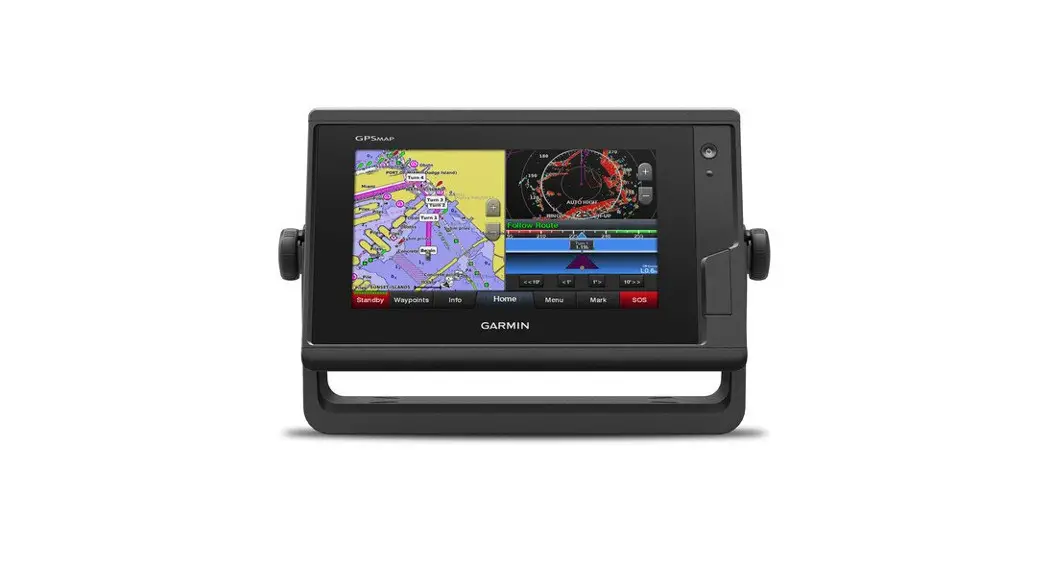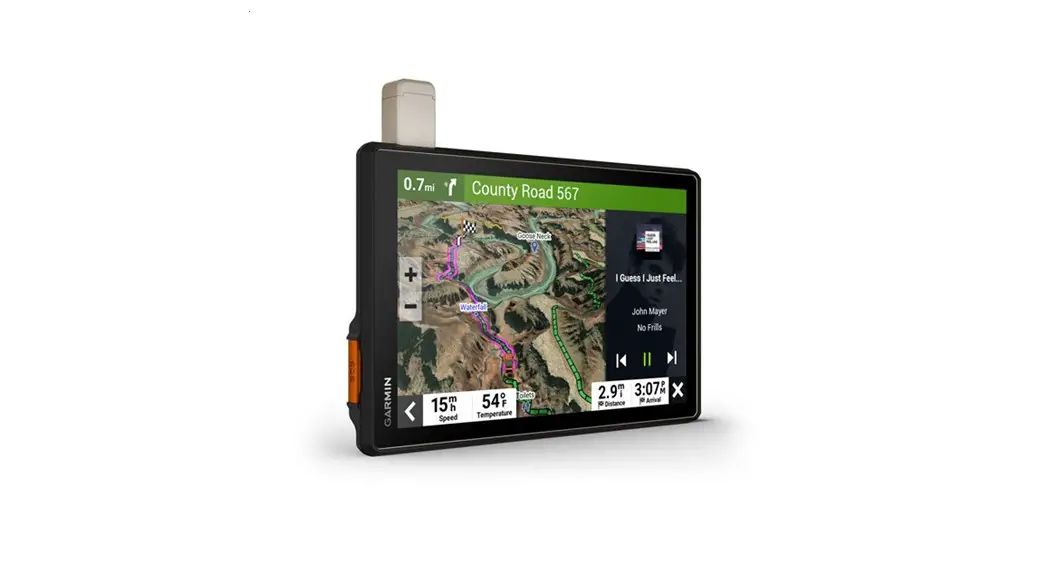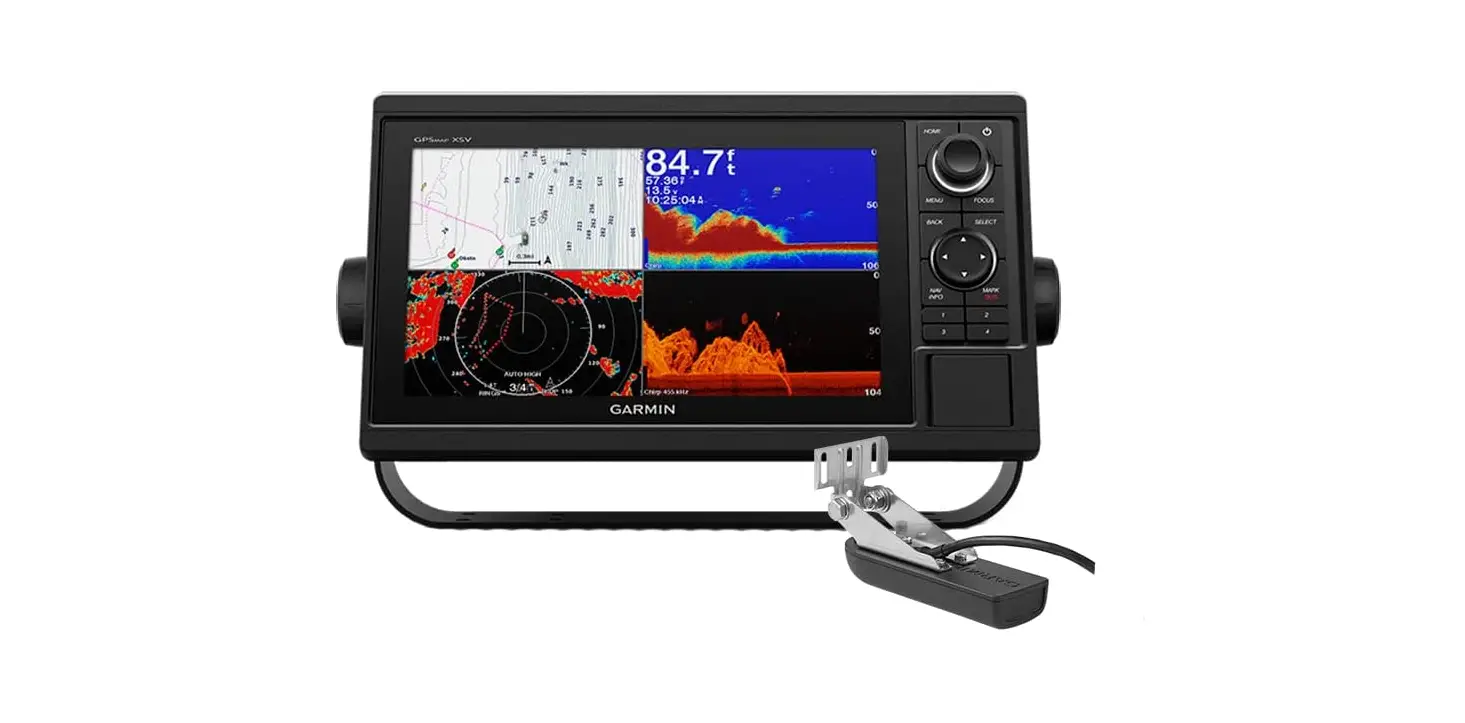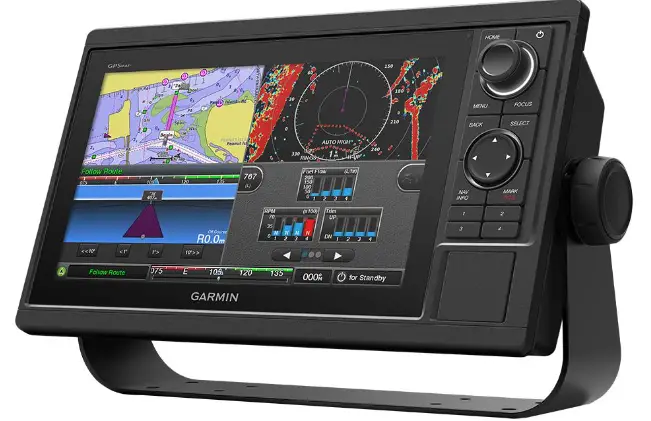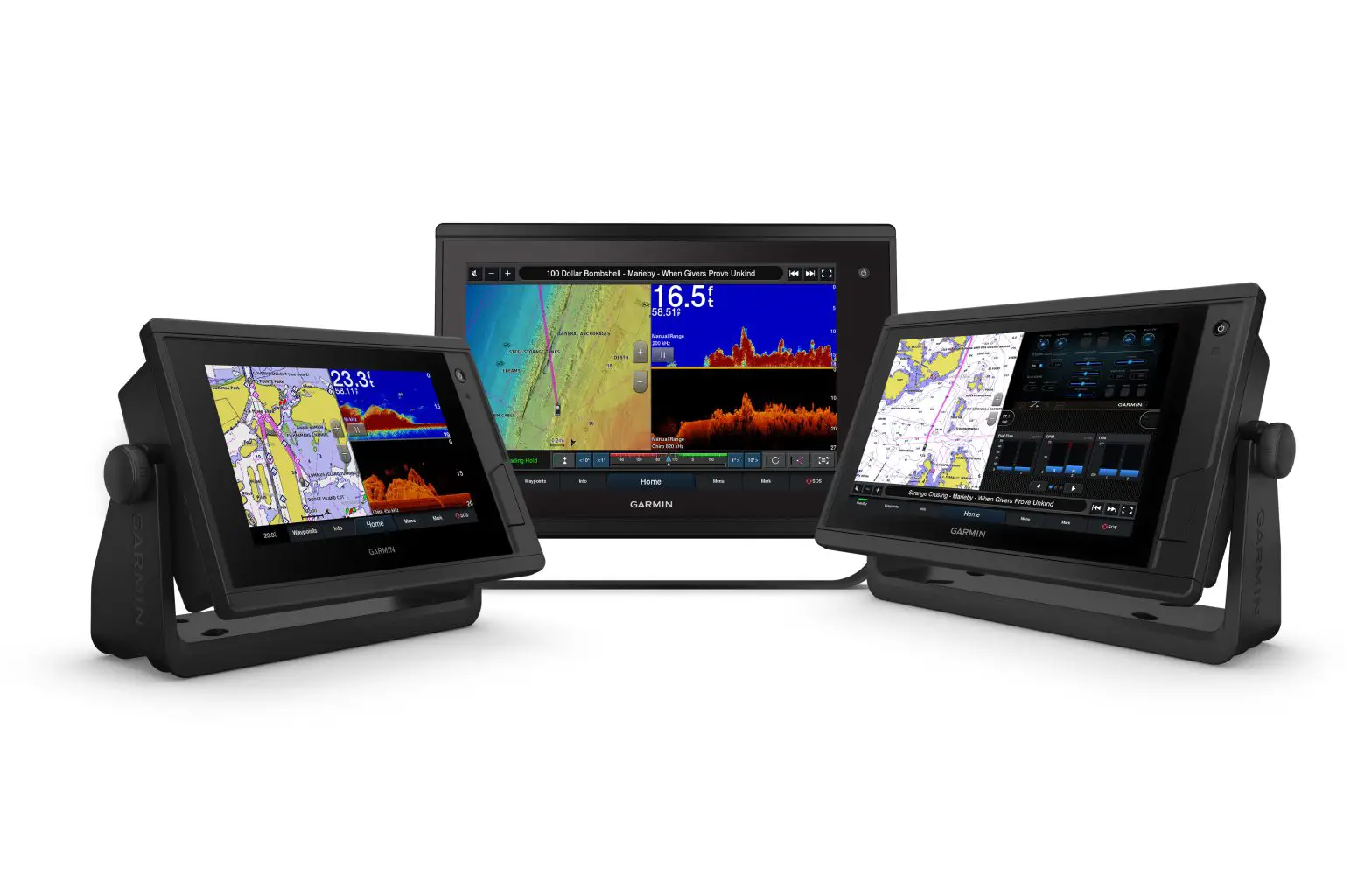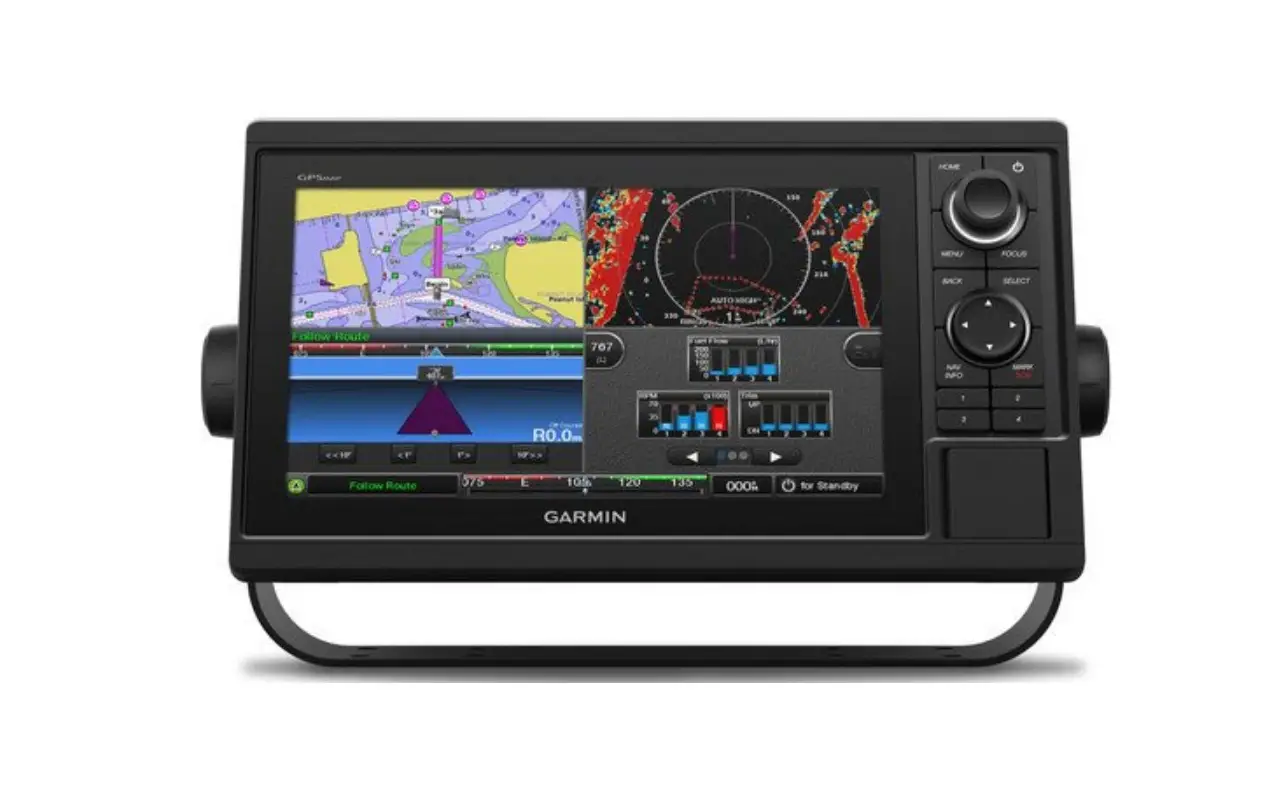
GARMIN GPSMAP 10X2/12X2 Series Instruction Manual
Important Safety Information
 WARNING
Failure to follow these warnings cautions, and notices could result in personal injury, damage to the vessel or device, or poor product performance.
See the Important Safety and Product Information guide in the product box for product warnings and other important information.
When connecting the power cable, do not remove the in-line fuse holder. To prevent the possibility of injury or product damage caused by fire or overheating, the appropriate fuse must be in place as indicated in the product specifications. In addition, connecting the power cable without the appropriate fuse in place voids the product warranty. CAUTION
Always wear safety goggles, ear protection, and a dust mask when drilling, cutting, or sanding.
To avoid possible personal injury or damage to the device and vessel, disconnect the vessel’s power supply before beginning to install the device.
To avoid possible personal injury or damage to the device or vessel, before applying power to the device, make sure that it has been properly grounded, following the instructions in the guide.
NOTICE
For the best possible performance, the device must be installed according to these instructions.
When drilling or cutting, always check what is on the opposite side of the surface to avoid damaging the vessel.
Read all installation instructions before proceeding with the installation. If you experience difficulty during the installation, contact Garmin® Product Support.
Contacting Garmin Support
- Go to support.garmin.com for help and information, such as product manuals, frequently asked questions, videos, and customer support.
• In the USA, call 913-397-8200 or 1-800-800-1020.
• In the UK, call 0808 238 0000.
• In Europe, call +44 (0) 870 850 1241.
Software Update
You may need to update the Chartplotter software after installation. For the instructions on how to update the software, see the owner’s manual at www.garmin.com/manuals/GPSMAP10x2-12×2.
Connector View
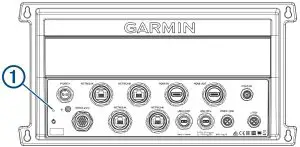
POWER | Power cable connection |
NETWORK | Garmin Marine Network |
HDMI IN | HDMI® in |
HDMI OUT | HDMI out to connect the chartplotter to a monitor. Required for device functionality. |
CVBS IN | Composite video in |
| Status LED |
| Power ground |
| Power button |
NMEA 0183 | NMEA® 0183 and audio out |
USB HOST | Micro-USB output for connecting a touchscreen monitor |
USB OTG | Micro-USB input from compatible Garmin card reader1 , computer, or other supported USB accessory |
NMEA 2000 | NMEA 2000® network |
J1939 | J1939 network |


Tools Needed
- Drill
- Drill bits appropriate for the surface and hardware (3.2 mm (1/8 in.) drill bit for included screws)
- Phillips screwdriver
- Pencil
Mounting Considerations
NOTICE
This device should be mounted in a location that is not exposed to extreme temperatures or conditions. The temperature range for this device is listed in the product pecifications. Extended exposure to temperatures exceeding the specified temperature range, in storage or operating conditions, may cause device failure. Extreme-temperature-induced damage and related consequences are not covered by the warranty.
- You must mount the device in a location where it will not be submerged.
- You must mount the device in a location with adequate ventilation where it will not be exposed to extreme temperatures.
- You must mount the device at least 2.54 cm (1 in.) from cables and other potential sources of interference.
- You must mount the device in a location that allows room for the routing and connection of all cables.
Mounting the GPSMAP 8700 Black Box Device
NOTICE
If you are mounting the bracket on fiberglass with screws, it is recommended to use a countersink bit to drill a clearance counterbore through only the top gel-coat layer. This will help to avoid cracking in the gel-coat layer when the screws are tightened.
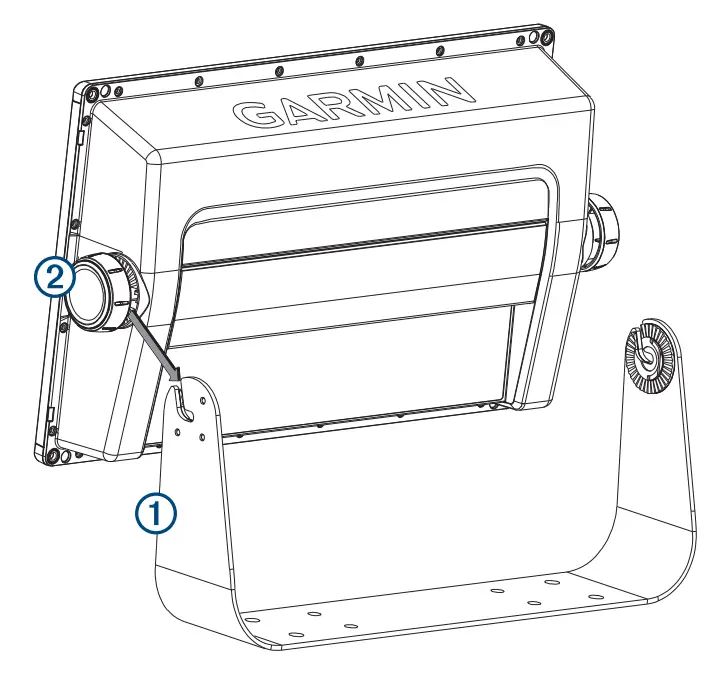
- Using the bail-mount bracket 1 as a template, mark the pilot holes

- Drill the pilot holes.
- Using appropriate mounting screws (not included), secure the bail-mount bracket to the mounting surface.
- Install the bail-mount knobs 2 on the sides of the device.
- Place the device in the bail-mount bracket and tighten the bail-mount knobs.
Flush Mounting the Device
NOTICE
Be careful when cutting the hole to flush mount the device.
There is only a small amount of clearance between the case and the mounting holes, and cutting the hole too large could compromise the stability of the device after it is mounted.
The included template and hardware can be used to flush mount the device in your dashboard.
- Trim the template, and make sure it fits in the location where you want to mount the device.
- Secure the template to the mounting location.
- Using a 14 mm (9/16 in.) drill bit, drill one or more of the holes inside the corners of the solid line on the template to prepare the mounting surface for cutting.
- Using a jigsaw or a rotary tool, cut the mounting surface along the inside line on the template.
- Place the device in the cutout to test the fit.
- If necessary, use a file and sandpaper to refine the size of the cutout.
- Use a pry tool, such as a flat piece of plastic or a screwdriver, to carefully pry up the corners of the trim caps, slide the pry tool to the center, and remove the trim caps.
NOTICE
Use a plastic pry tool when possible. Using a metal pry tool such as a screwdriver can damage the trim caps and the device. - After the device fits correctly in the cutout, ensure the mounting holes on the device line up with the larger 6 mm (1/4 in.) holes on the template.
- If the mounting holes on the device do not line up, mark the new hole locations.
- Select an option:
• If you are using a nut plate, drill a 6 mm (1/4 in.) hole in the larger hole location.
• If you are not using a nut plate, drill 3.2 mm (1/8 in.) holes in the larger hole locations. - Starting in one corner of the template, place a nut plate 1 over the larger hole 2 drilled in the previous step.
 If you are using a nut plate, the smaller hole3on the nut plate should line up with the smaller hole on the template.
 - If the smaller hole on the nut plate does not line up with the smaller hole on the template, mark the new hole location.
- If you are using a nut plate, drill a 3.6 mm (9/64 in.) hole in the smaller hole location.
- Repeat to verify placement of the remaining nut plates and holes on the template.
- Remove the template from the mounting surface.
- Starting in one corner of the mounting location, place a nut plate 4 on the back of the mounting surface, lining up the large and small holes.
The raised portion of the nut plate should fit into the larger hole.
- Secure the nut plates to the mounting surface by fastening the included M3 screws5through the smaller 3.6 mm(9/64 in.) holes.
- Install the foam gasket6on the back of the device.
The pieces of the foam gasket have adhesive on the back. Make sure you remove the protective liner before installing them on the device. - If you will not have access to the back of the device after you mount it, connect all necessary cables to the device before placing it into the cutout.
NOTICE
To prevent corrosion of the metal contacts, cover unused connectors with the attached weather caps. - Apply marine sealant between the mounting surface and the device to properly seal and prevent leakage behind the dashboard.
- If you will have access to the back of the device, apply marine sealant around the cutout.
- Place the device into the cutout.
- Secure the device to the mounting surface using the included M4 screws7.
- Wipe away all excess marine sealant.
- Install the trim caps by snapping them in place around the edges of the device.
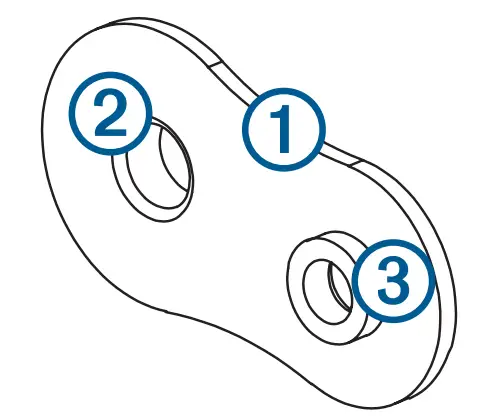 If you are using a nut plate, the smaller hole3on the nut plate should line up with the smaller hole on the template.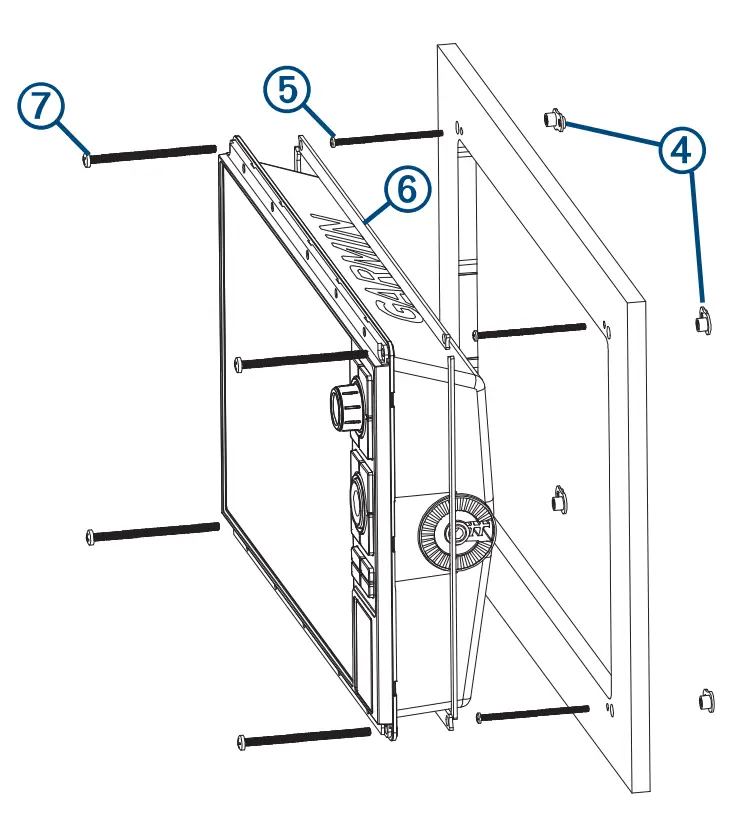
Connection Considerations
After connecting the cables to the device, tighten the locking rings to secure each cable.
Power/NMEA®0183 Cable
- The wiring harness connects the device to power, NMEA 0183 devices, and a lamp or a horn for visible or audible alerts.
- If it is necessary to extend the NMEA 0183 or alarm wires, you must use 22 AWG (.33 mm²) wire.
- This cable provides one differential NMEA 0183 input and output port.
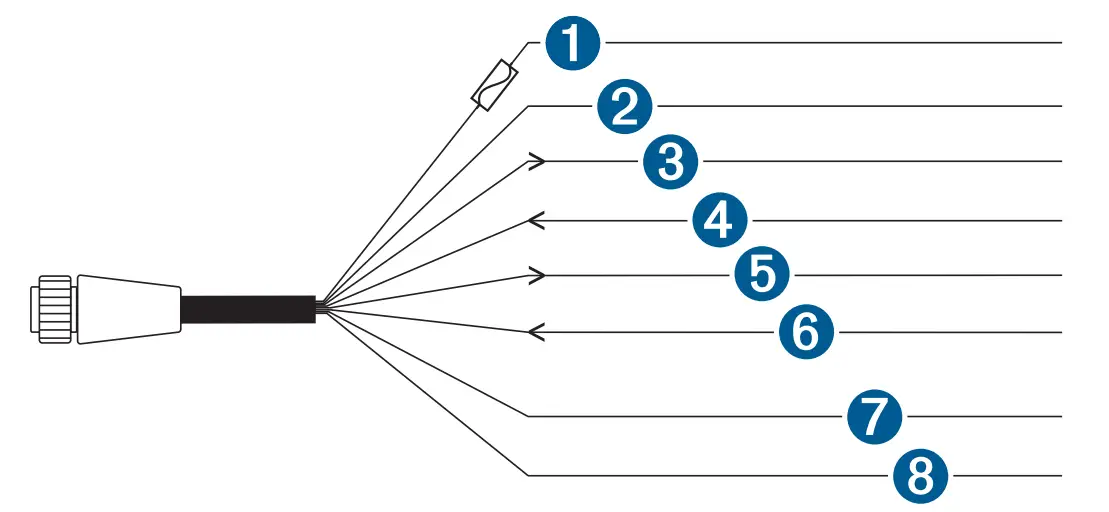
| Item | Wire Color | Wire Function |
1 | Red | Power |
2 | Black | Ground (power and NMEA 0183) |
3 | Blue | NMEA 0183 TxA (Out +) |
4 | Gray | NMEA 0183 TxB (Out -) |
5 | Brown | NMEA 0183 RxA (In +) |
6 | Violet | NMEA 0183 RxB (In -) |
7 | Orange | Accessory on |
8 | Yellow | Alarm low |
Connecting the Wiring Harness to PowerWARNING
When connecting the power cable, do not remove the in-line fuse holder. To prevent the possibility of injury or product damage caused by fire or overheating, the appropriate fuse must be in place as indicated in the product specifications. In addition, connecting the power cable without the appropriate fuse in place voids the product warranty.
- Route the wiring harness to the power source and to the device.
- Connect the red wire to the positive (+) battery terminal, and connect the black wire to the negative (-) battery terminal.
- If necessary, install the locking ring and O-ring on the end of the wiring harness.
- Insert the cable into the POWER connector on the back of the device, pushing firmly.
- Turn the locking ring clockwise to attach the cable to the device.
Additional Grounding Consideration
This device should not need additional chassis grounding in most installation situations. If you experience interference, the grounding screw on the housing can be used to connect the device to the water ground of the boat to help avoid the interference.
Garmin Marine Network Considerations
NOTICE
A Garmin Marine Network PoE Isolation Coupler (010-10580-10) must be used when connecting any third-party device, such as a FLIR® camera, to a Garmin Marine Network. Connecting a Power over Ethernet (PoE) device directly to a Garmin Marine Network chartplotter damages the Garmin chartplotter and may damage the PoE device. Connecting any third-party device directly to a Garmin Marine Network chartplotter will cause abnormal behavior on the Garmin devices, including the devices not properly turning off or the software becoming inoperable.
This device can connect to additional Garmin Marine Network devices to share data such as radar, sonar, and detailed mapping. When connecting Garmin Marine Network devices to this device, observe these considerations.
- All devices connected to the Garmin Marine Network must be connected to the same ground. If multiple power sources are used for Garmin Marine Network devices, you must tie all ground connections from all power supplies together using a low resistance connection or tie them to a common ground bus bar, if available.
- A Garmin Marine Network cable must be used for all Garmin Marine Network connections.
• Third-party CAT5 cable and RJ45 connectors must not be used for Garmin Marine Network connections.
• Additional Garmin Marine Network cables and connectors are available from your Garmin dealer. - The ETHERNET ports on the device each act as a network switch. Any compatible device can be connected to any ETHERNET port to share data with all devices on the boat connected by a Garmin Marine Network cable.
NMEA 2000® Considerations
NOTICE
If you are connecting to an existing NMEA 2000 network, identify the NMEA 2000 power cable. Only one NMEA 2000 power cable is required for the NMEA 2000 network to operate properly.
A NMEA 2000 Power Isolator (010-11580-00) should be used in installations where the existing NMEA 2000 network manufacturer is unknown.
If you are installing a NMEA 2000 power cable, you must connect it to the boat ignition switch or through another in-line switch. NMEA 2000 devices will drain your battery if the NMEA 2000 power cable is connected to the battery directly.
This device can connect to a NMEA 2000 network on your boat to share data from NMEA 2000 compatible devices such as a GPS antenna or a VHF radio. The included NMEA 2000 cables and connectors allow you to connect the device to your existing NMEA 2000 network. If you do not have an existing NMEA 2000 network you can create a basic one using cables from Garmin.
If you are unfamiliar with NMEA 2000, you should read the Technical Reference for NMEA 2000 Products at garmin.com/manuals/nmea_2000.
The port labeled NMEA 2000 is used to connect the device to a standard NMEA 2000 network.
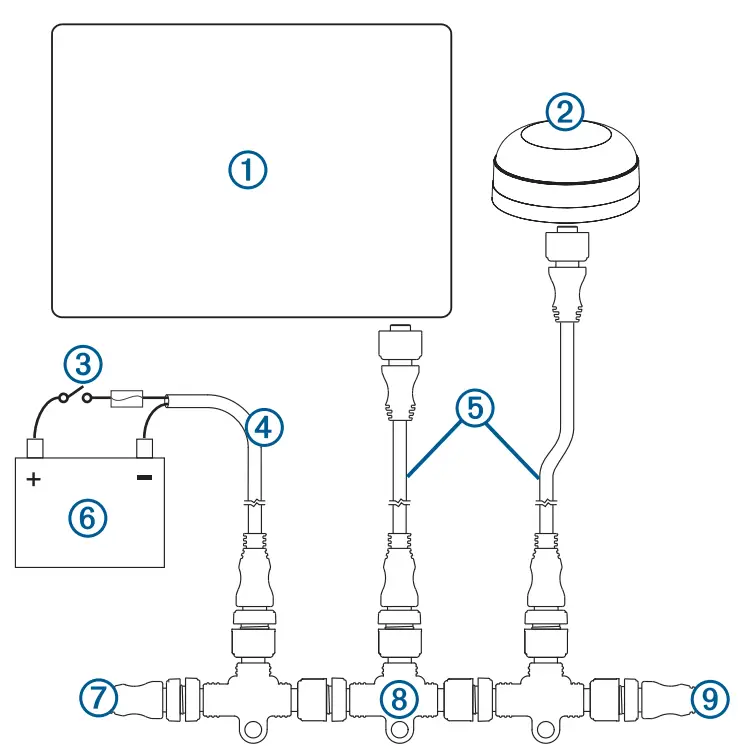
Item | Description |
| 1 | NMEA 2000 compatible Garmin device |
| 2 | GPS antenna |
| 3 | Ignition or in-line switch |
| 4 | NMEA 2000 power cable |
| 5 | NMEA 2000 drop cable |
| 6 | 12 Vdc power source |
| 7 | NMEA 2000 terminator or backbone cable |
| 8 | NMEA 2000 T-connector |
| 9 | NMEA 2000 terminator or backbone cable |
NMEA 0183 Connection Considerations
- The chartplotter provides one Tx (transmit) port and one Rx (receive) port.
- Each port has 2 wires, labeled A and B according to the NMEA 0183 convention. The corresponding A and B wires of each internal port should be connected to the A (+) and B (-) wires of the NMEA 0183 device.
- You can connect one NMEA 0183 device to the Rx port to input data to this chartplotter, and you can connect up to three NMEA 0183 devices in parallel to the Tx port to receive data output by this chartplotter.
- See the NMEA 0183 device installation instructions to identify the transmit (Tx) and receive (Rx) wires.
- You must use 28 AWG, shielded, twisted-pair wiring for extended runs of wire. Solder all connections and seal them with heat-shrink tubing.
- Do not connect the NMEA 0183 data wires from this device to power ground.
- The power cable from the chartplotter and the NMEA 0183 devices must be connected to a common power ground.
- The internal NMEA 0183 ports and communication protocols are configured on the chartplotter. See the NMEA 0183 section of the chartplotter owner’s manual for more information.
- See the chartplotter owner’s manual for a list of the approved NMEA 0183 sentences that the chartplotter supports.
NMEA 0183 Device Connections
This diagram illustrates two-way connections for both sending and receiving data. You can also use this diagram for one-way communication. To receive information from a NMEA 0183 device, refer to items1,2,3,4, and 5 when connecting the Garmin device. To transmit information to a NMEA 0183 device, refer to items1,2,3,6 and 7 when connecting the Garmin device.
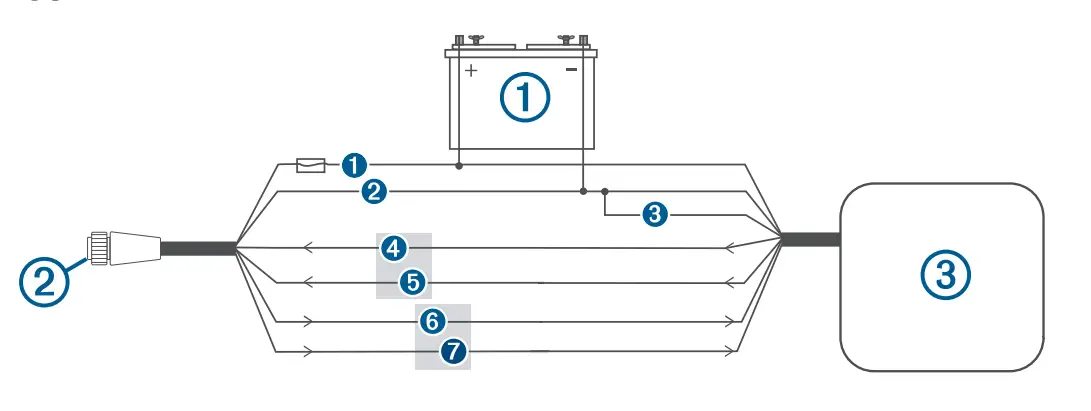
| Item | Description |
| 1 | Power source |
| 2 | Power/NMEA 0183 cable |
| 3 | NMEA 0183 device |
| Item | Garmin Wire Function | Garmin Wire Color | NMEA 0183 Device Wire Function |
| 1 | Power | Red | Power |
| 2 | Power ground | Black | Power ground |
| 3 | Data ground | Black | Data ground |
| 4 | Rx/A (In +) | Brown | Tx/A (Out +) |
| 5 | Rx/B (In -) | Violet | Tx/B (Out -) |
| 6 | Tx/A (Out +) | Blue | Rx/A (In +) |
| 7 | Tx/B (Out -) | Gray | Rx/B (In -) |
If the NMEA 0183 device has only one input (receive, Rx) wire (no A, B, +, or -), you must leave the gray wire unconnected.
If the NMEA 0183 device has only one output (transmit, Tx) wire 0(no A, B, +, or -), you must connect the violet wire to ground.
NMEA 0183 and Power Cable Pinout
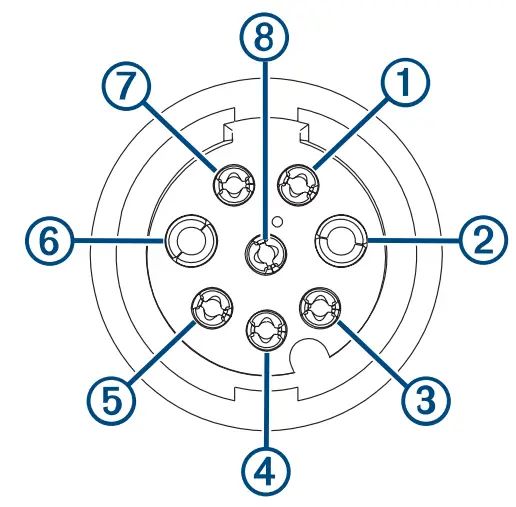
Pin Number | Wire Function | Wire Color |
| 1 | NMEA 0183 Tx/A (Out+) | Blue |
| 2 | NMEA 0183 Rx/A (In+) | Brown |
| 3 | NMEA 0183 Tx/B (Out-) | Gray |
| 4 | NMEA 0183 Rx/B (In-) | Violet |
| 5 | Alarm | Yellow |
| 6 | Accessory on | Orange |
| 7 | Ground (shield) | Black |
| 8 | VIN | Red |
Lamp and Horn Connections
The device can be used with a lamp, a horn, or both, to sound or flash an alert when the chartplotter displays a message. This is optional, and the alarm wire is not necessary for the device to function normally. When connecting the device to a lamp or horn, observe these considerations.
- The alarm circuit switches to a low-voltage state when the alarm sounds.
- The maximum current is 1 A, and a relay is needed to limit the current from the chartplotter to 1 A.
- To manually toggle visual and audible alerts, you can install single-pole, single-throw switches.
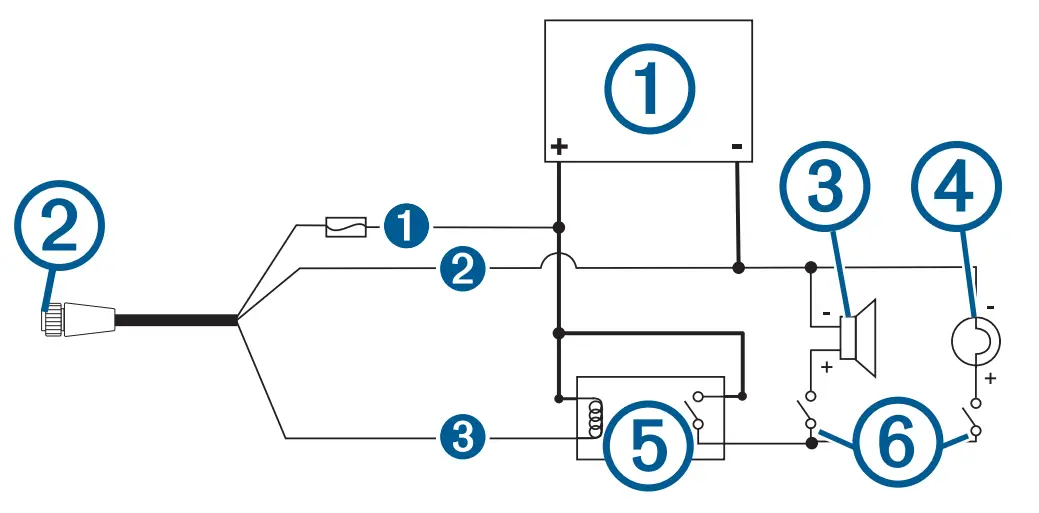
| Item | Description |
| 1 | Power source |
| 2 | Power cable |
| 3 | Horn |
| 4 | Lamp |
| 5 | Relay (1 A coil current) |
| 6 | Toggle switches to enable and disable lamp or horn alerts |
| Item | Wire Color | Wire Function |
| 1 | Red | Power |
| 2 | Black | Ground |
| 3 | Yellow | Alarm |
Composite Video Considerations
This chartplotter allows video input from composite video sources using the port labeled CVBS IN. When connecting composite video, you should observe these considerations.
- The CVBS IN port uses a BNC connector. You can use a BNC to RCA adapter to connect a composite-video source with RCA connectors to the CVBS IN port.
- Video is shared across the Garmin Marine Network, but it is not shared across the NMEA 2000 network.
Specifications
All Models
| Temperature range | From -15° to 50°C (from 5° to 122°F) |
| Material | Polycarbonate plastic and die-cast aluminum |
| Water rating | IEC 60529 IPX71 |
| Input voltage | From 10 to 32 Vdc |
| Fuse | 6 A, 125 V fast-acting |
| NMEA 2000 LEN @ 9 Vdc | 2 |
| NMEA 2000 draw | 75 mA max. |
| Compass-safe distance | 65 cm (25.5 in.) |
| Memory card | 2 SD® card slots; 32 GB max. card size |
| Wireless frequency, transmit power | 2.4 GHz @ 15.26 dBm maximum |
10×2 Models
| Dimensions (W x H x D) | 31.8 x 18.5 x 6.9 cm (12.5 x 7.3 x 2.7 in.) |
| Display size (W x H) | 22.4 x 12.5 cm (8.8 x 4.9 in.) 10.1 in. diagonal |
| Weight | 1.85 kg (4.1 lb.) |
| Max. power usage at 10 Vdc | 32.4 W |
| Typical current draw at 12 Vdc | 1.9 A |
| Max. current draw at 12 Vdc | 2.7 A |
12×2 Models
| Dimensions (W x H x D) | 35.8 x 22.6 x 6.9 cm (14.1 x 8.9 x 2.7 in.) |
| Display size (W x H) | 26.2 × 16.3 cm (10.3 × 6.4 in.)12.1 in. diagonal |
| Weight | 2.34 kg (5.15 lb.) |
| Max. power usage at 10 Vdc | 34.8 W |
| Typical current draw at 12 Vdc | 2.2 A |
| Max. current draw at 12 Vdc | 2.9 A |
1The device withstands incidental exposure to water of up to 1 m for up to 30 min.
For more information, go to www.garmin.com/waterrating.
NMEA 2000 PGN Information
Transmit and Receive
PGN | Description |
| 059392 | ISO acknowledgment |
| 059904 | ISO request |
| 060160 | ISO transport protocol: Data transfer |
| 060416 | ISO transport protocol: Connection management |
| 060928 | ISO address claimed |
| 065240 | Commanded address |
| 126208 | Request group function |
| 126996 | Product information |
| 126998 | Configuration information |
| 127237 | Heading/track control |
| 127245 | Rudder |
| 127250 | Vessel heading |
| 127258 | Magnetic variance |
| 127488 | Engine parameters: Rapid update |
| 127489 | Engine parameters: Dynamic |
| 127493 | Transmission parameters: Dynamic |
| 127505 | Fluid level |
| 127508 | Battery status |
| 128259 | Speed: Water referenced |
| 128267 | Water depth |
| 129025 | Position: Rapid update |
| 129026 | COG and SOG: Rapid update |
| 129029 | GNSS position data |
| 129283 | Cross track error |
| 129284 | Navigation data |
| 129539 | GNSS DOPs |
| 129540 | GNSS satellites in view |
| 130060 | Label |
| 130306 | Wind data |
| 130310 | Environmental parameters (obsolete) |
| 130311 | Environmental parameters (obsolete) |
| 130312 | Temperature (obsolete) |
Transmit
PGN | Description |
| 126464 | Transmit and receive PGN list group function |
| 126984 | Alert Response |
| 127497 | Trip parameters: Engine |
Receive
PGN | Description |
| 065030 | Generator average basic AC quantities (GAAC) |
| 126983 | Alert |
| 126985 | Alert text |
| 126987 | Alert threshold |
| 126988 | Alert value |
| 126992 | System time |
| 127251 | Rate of turn |
| 127257 | Attitude |
| 127498 | Engine parameters: Static |
| 127503 | AC input status (obsolete) |
| 127504 | AC output status (obsolete) |
| 127506 | DC detailed status |
| 127507 | Charger status |
| 127509 | Inverter status |
| 128000 | Nautical leeway angle |
| 128275 | Distance log |
| 129038 | AIS class A position report |
| 129039 | AIS class B position report |
| 129040 | AIS class B extended position report |
| 129044 | Datum |
| 129285 | Navigation: Route, waypoint information |
| 129794 | AIS class A static and voyage related data |
| 129798 | AIS SAR aircraft position report |
| 129799 | Radio frequency/mode/power |
| 129802 | AIS safety-related broadcast message |
| 129808 | DSC call Information |
| 129809 | AIS class B “CS” static data report, part A |
| 129810 | AIS class B “CS” static data report, part B |
| 130313 | Humidity |
| 130314 | Actual pressure |
| 130316 | Temperature: Extended range |
| 130576 | Trim tab status |
| 130577 | Direction data |
NMEA 0183 Information
Transmit
Sentence | Description |
| GPAPB | APB: Heading or track controller (autopilot) sentence “B” |
| GPBOD | BOD: Bearing (origin to destination) |
| GPBWC | BWC: Bearing and distance to waypoint |
| GPGGA | GGA: Global positioning system fix data |
| GPGLL | GLL: Geographic position (latitude and longitude) |
| GPGSA | GSA: GNSS DOP and active satellites |
| GPGSV | GSV: GNSS satellites in view |
| GPRMB | RMB: Recommended minimum navigation information |
| GPRMC | RMC: Recommended minimum specific GNSS data |
| GPRTE | RTE: Routes |
| GPVTG | VTG: Course over ground and ground speed |
| GPWPL | WPL: Waypoint location |
| GPXTE | XTE: Cross track error |
| PGRME | E: Estimated error |
| PGRMM | M: Map datum |
| PGRMZ | Z: Altitude |
| SDDBT | DBT: Depth below transducer |
| SDDPT | DPT: Depth |
| SDMTW | MTW: Water temperature |
| SDVHW | VHW: Water speed and heading |
Receive
Sentence | Description |
| DPT | Depth |
| DBT | Depth below transducer |
| MTW | Water temperature |
| VHW | Water speed and heading |
| WPL | Waypoint location |
| DSC | Digital selective calling information |
| DSE | Expanded digital selective calling |
| HDG | Heading, deviation, and variation |
| HDM | Heading, magnetic |
| MWD | Wind direction and speed |
| MDA | Meteorological composite |
| MWV | Wind speed and angle |
| VDM | AIS VHF data-link message |
You can purchase complete information about National Marine Electronics Association (NMEA) format and sentences from
www.nmea.org.
© 2020 Garmin Ltd. or its subsidiaries Garmin® , the Garmin logo, and GPSMAP® are trademarks of Garmin Ltd. or its subsidiaries, registered in the USA and other ountries. These trademarks may not be used without the express permission of Garmin.
NMEA® , NMEA 2000® , and the NMEA 2000 logo are registered trademarks of the National Marine Electronics Association. FLIR® is a registered trademark of FLIR Systems, Inc. SD® and the SDHC logo are trademarks of SD-3C, LLC.
 © 2020 Garmin Ltd. or its subsidiaries
support.garmin.com
 October 2020
GUID-BF1B0D74-52BF-4F5B-938B-9A7556F36E8C v3
 Garmin International | Home
 Garmin Customer Support
 Garmin Customer Support
 National Marine Electronics Association - Org Name