ever focus eNVP-JNX-AI-D0000 AI Box Based on NVIDIA Jetson Xavier NX User Manual
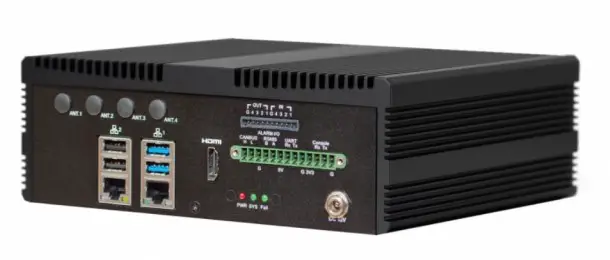
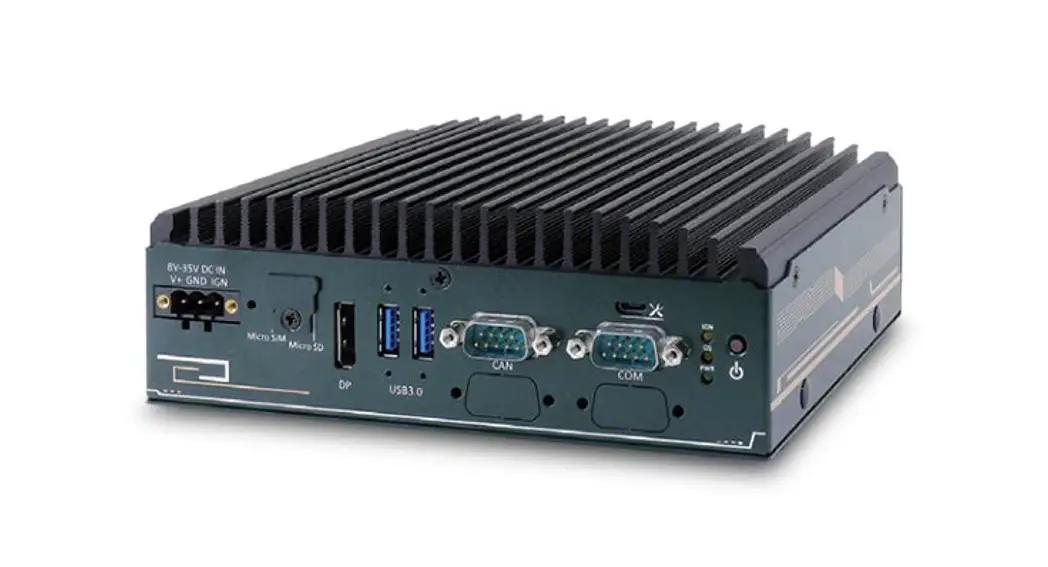
eNVP-JNX-AI-D0000 AI Box Based on NVIDIA Jetson Xavier NX
Disclaimer
All the images including product pictures or screen shots in this document are for example only. The images may vary depending on the product and software version. Information contained in this document is subject to change without notice.
Copyright
All rights reserved. No part of the contents of this manual may be reproduced or transmitted in any form or by any means without written permission of the EverFocus Electronics Corporation.
Acknowledgements
– NVIDIA is a trademark of the NVIDIA Corporation.
– All other product names or trademarks are properties of their respective owners.
Safety Precautions
Please read the following safety instructions carefully. It is advised that you keep this manual for future references.
- All cautions and warnings on the device should be noted.
- All cables and adapters supplied by EverFocus are certified and in accordance with the material safety laws and regulations of the country of sale. Do not use any cables or adapters not supplied by EverFocus to prevent system malfunction or fires.
- Make sure the power source matches the power rating of the device.
- Position the power cord so that people cannot step on it. Do not place anything over the power cord.
- Always completely disconnect the power before working on the system’s hardware.
- No connections should be made when the system is powered as a sudden rush of power may damage sensitive electronic components.
- If the device is not to be used for a long time, disconnect it from the power supply to avoid damage by transient over-voltage.
- Always disconnect this device from any AC supply before cleaning.
- While cleaning, use a damp cloth instead of liquid or spray detergents.
- Make sure the device is installed near a power outlet and is easily accessible.
- Keep this device away from humidity.
- Place the device on a solid surface during installation to prevent falls.
- Do not cover the openings on the device to ensure optimal heat dissipation.
- Watch out for high temperatures when the system is running.
- Do not touch the heat sink or heat spreader when the system is running.
- Never pour any liquid into the openings. This could cause fire or electric shock.
- As most electronic components are sensitive to static electrical charge, be sure to ground yourself to prevent static charge when installing the internal components. Use a grounding wrist strap and contain all electronic components in any static-shielded containers.
- If any of the following situations arises, please contact our service personnel ([email protected]):
– Damaged power cord or plug
– Liquid intrusion to the device
– Exposure to moisture
– Device is not working as expected or in a manner as described in this manual
– The device is dropped or damaged
– Any obvious signs of damage displayed on the device - DO NOT LEAVE THIS DEVICE IN AN UNCONTROLLED ENVIRONMENT WITH TEMPERATURES BEYOND THE DEVICE’S PERMITTED STORAGE TEMPERATURES (SEE SPECIFICATION) TO PREVENT DAMAGE.
Warning

This device complies with Part 15 FCC Rules. Operation is subject to the following two conditions: (1) this device may not cause harmful interference, and (2) this device must accept any interference received including
interference that may cause undesired operation.
Caution:
There is a danger of explosion if the battery is incorrectly replaced. Replace only with the same or equivalent type recommended by the manufacturer. Dispose of used batteries according to the manufacturer’s instructions and your local government’s recycling or disposal directives.
Attention:
Il y a un risque d’explosion si la batterie est remplacée de façon incorrecte.
Ne la remplacer qu’avec le même modèle ou équivalent recommandé par le constructeur. Recycler les batteries usées en accord avec les instructions du fabricant et les directives gouvernementales de recyclage.
1.Introduction
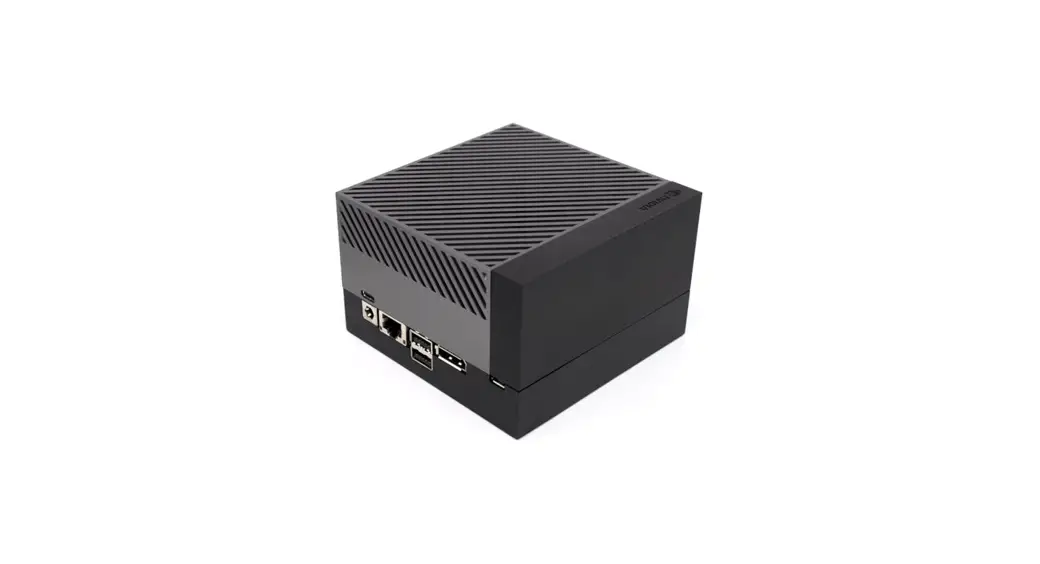
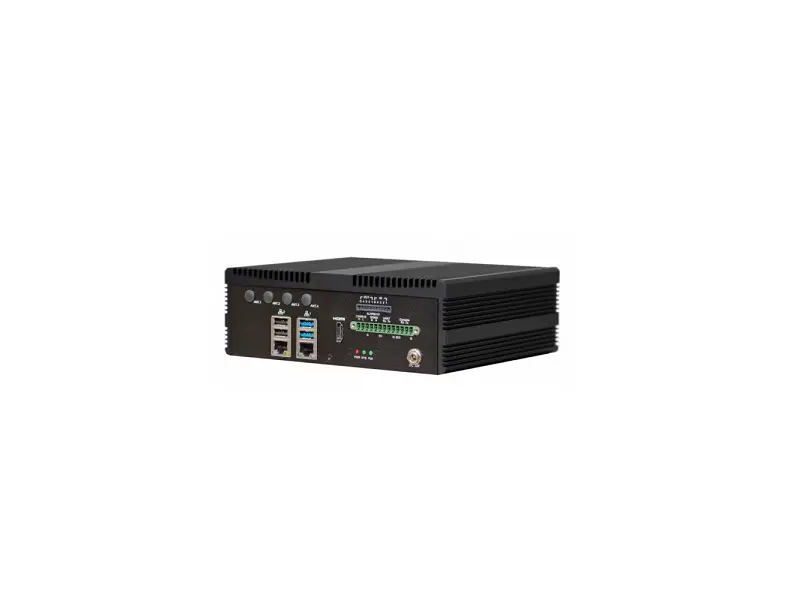
EverFocus eNVP-JNX-AI-D0000 is an AI box based on NVIDIA® Jetson™ Xavier NX designed for the AIoT industry including 5G network and AI-based applications. The model can be installed with EverFocus in-house designed AI models such as Face Recognition, People Counting and Loitering Detection, along with NVR software, providing basic NVR functions like real-time live view, video recording, video playback, alarm notification and etc.
1.1 Features
- Fanless AI edge embedded box PC
- 6-core NVIDIA Carmel ARM®v8.2 64-bit CPU 6MB L2 + 4MB L3 processor
- NVIDIA Volta™ architecture with 384 NVIDIA CUDA® cores
- Onboard 8 GB 128-bit LPDDR4x @ 1600 MHz51.2GB/s
- Supports one HDMI display output
- Supports 2 Ethernet network ports
- Supports AI functions
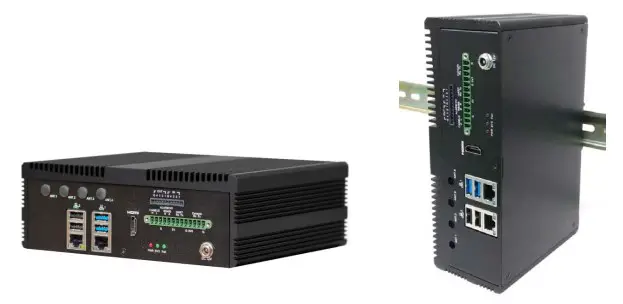
- Support DIN-rail mounting
- CE, FCC certified
1.2 Dimensions
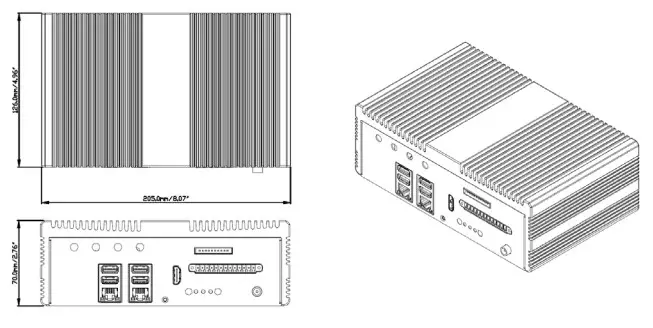
1.3 Packing List
| · AI Box x 1 |
| Note: 1. Equipment configurations and supplied accessories vary by country. Please consult your local EverFocus office or agents for more information. Please also keep the shipping carton for possible future use. 2. Contact the shipper if any items appear to have been damaged in the shipping process. |
1.4 Optional Accessories
Part Number / Item | |
4B01XUD12060AS1 | Adaptor IN:100-240V OUT:DC12V 5A 60W |
21PLS8EUA00001R | Gemalto 4G Module PLS8-E,EU |
| TBD | WiFi module kit |
1.5 Front Panel
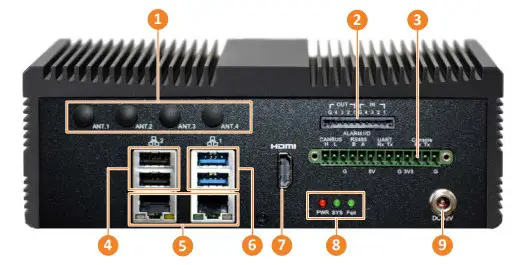
| No. | Name | Description |
| 1 | Antenna Ports | Antenna ports for connecting to the antenna. |
| 2 | Alarm I/O | Connecting to the alarm input or alarm output devices. Up to 4 alarm inputs and 4 alarm outputs are provided. |
| 3 | Terminal Block | 13-pin terminal block for RS485, UART, CANBus, Console, 5V and 3.3V. |
| 4 | USB2.0 | Two USB2.0 ports. |
| 5 | Ethernet | Two GbE ports. |
| 6 | USB3.0 | Two USB3.0 ports. |
| 7 | HDMI | HDMI port. |
| 8 | LED Indicator | PWR: Turns on continuously when system power is supplied. SYS: For customer define. Fail: For customer define. |
| 9 | Power Input | DC 12V power input. |
1.6 Rear Panel
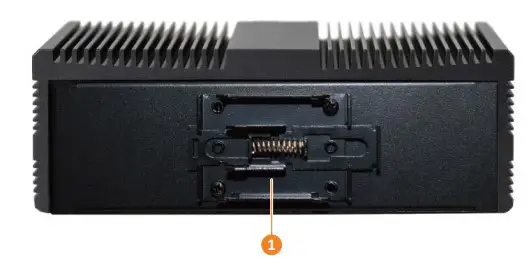
| No. | Name | Description |
| 1 | DIN Rail Mounting Bracket | Use the mounting bracket to mount the system on the DIN Rail. Please refer to 2.2 DIN Rail Mounting for more details. |
2. Installation and Mounting
2.1 Expansion Module Installation
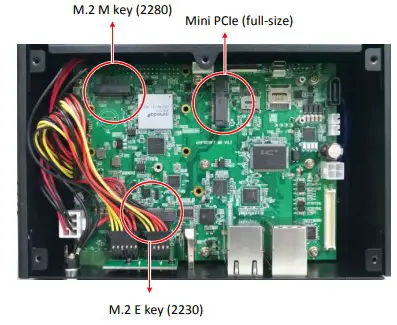
The system supports one Mini PCIe (full-size) slot, one M.2 E key (2230) slot and one M.2 M key (2280) slot. Find the slots on the main board for expansion module installation.
- Unscrew the 6 screws to remove the bottom cover
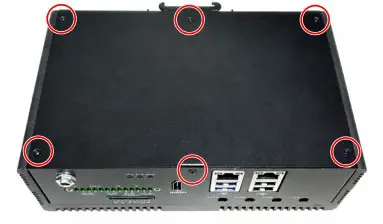
- Find the slots to install the modules.
2.2 DIN Rail Mounting
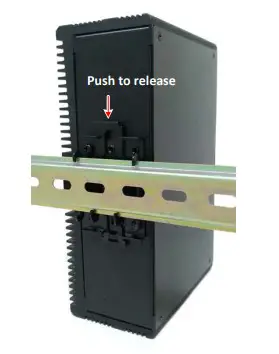
can use the DIN Rail mounting bracket located on the rear panel to mount the system on the DIN Rail.
3. Specification
| System | |
| CPU | 6-core NVIDIA Carmel ARM®v8.2 64-bit CPU 6MB L2 + 4MB L3 processor |
| GPU | NVIDIA Volta™ architecture with 384 NVIDIA CUDA® cores (21 TOPS [ INT8 ] ) |
| Main Memory | Onboard 8 GB 128-bit LPDDR4x @ 1600 MHz 51.2GB/s |
| OS | 16 GB eMMC 5.1 |
| Video | |
| Format | H.265 / H.264 |
| Video Input | Based on the installed software. EverFocus AiO NVR: up to 8ch. |
| Video Output | HDMI x 1 (2.0 a/b maximum 3840 x 2160) |
| Resolution | 4K @ 60fps x 2| 4K @ 30fps x 4 |1080p @ 30fps x 16 |
| Recording | |
| Format | H.265 / H.264 |
| Resolution | 4K @ 60fps x 2| 4K @ 30fps x 4 |1080p @ 30fps x 16 |
| Storage | |
| M.2 | M.2 Key M 2280 x 1 |
| Network | |
| Ethernet | GbE port x 2 |
| 3G / 4G / 5G | Support (optional); 5G (by Project) |
| Wi-Fi | Support (optional) |
| Alarm | |
| Alarm In/Out | Alarm Input x 4; Alarm Output x 4 |
| Interface | |
|
Front I/O Panel | LED indicator x 3 Power button x 1 USB 2.0 x 2 USB 3.0 x 2 GbE port x 2 Antenna port x 4 Terminal block 13 Pin (RS485, UART, CAN BUS, Console) Power Input x 1 (DC JACK) |
| Expansion Slot | Mini PCIe (full-size) x 1 M.2 E Key (2230) x 1 M.2 M Key (2280) x 1 |
| General | |
| Power Supply | DC 12V |
| Dimensions (W x D X H) | 205 x 126 x 70mm (8” x 4.9” x 2.7”) |
| Operating Temp. | 32°F ~104°F (0°C ~+40°C) |
| Storage Temp. | -4°F ~185°F (-20°C ~+85°C) |
| Storage Humidity | 95% @ 40 °C (non-condensing) |
| Certification | CE, FCC |
Note: All specifications are subject to change without notice.
EverFocus Electronics Corp.
EverFocus Taiwan: 2F., No.12, Ln. 270, Sec. 3, Beishen Rd., Shenkeng Dist., New Taipei City 222, Taiwan TEL: +886 2 2662 2338 FAX: +886 2 2662 3632 www.everfocus.com.tw
[email protected]
 Your EverFocus product is designed and manufactured with high quality materials and components which can be recycled and reused. This symbol means that electrical and electronic equipment, at their end-of-life, should be disposed of separately from your household waste. Please, dispose of this equipment at your local community waste collection/recycling centre. In the European Union there are separate collection systems for used electrical and electronic product. Please, help us to conserve the environment we live in!
 EverFocusエレクトロニクス株式会社、AIのリーダー、ビデオ分析
 EverFocus Electronics Corp. USA
 具备20年安防经验的边缘计算解决方案商-慧友安控电子(深圳)有限公司
 EverFocus, the expert of smart image analytics