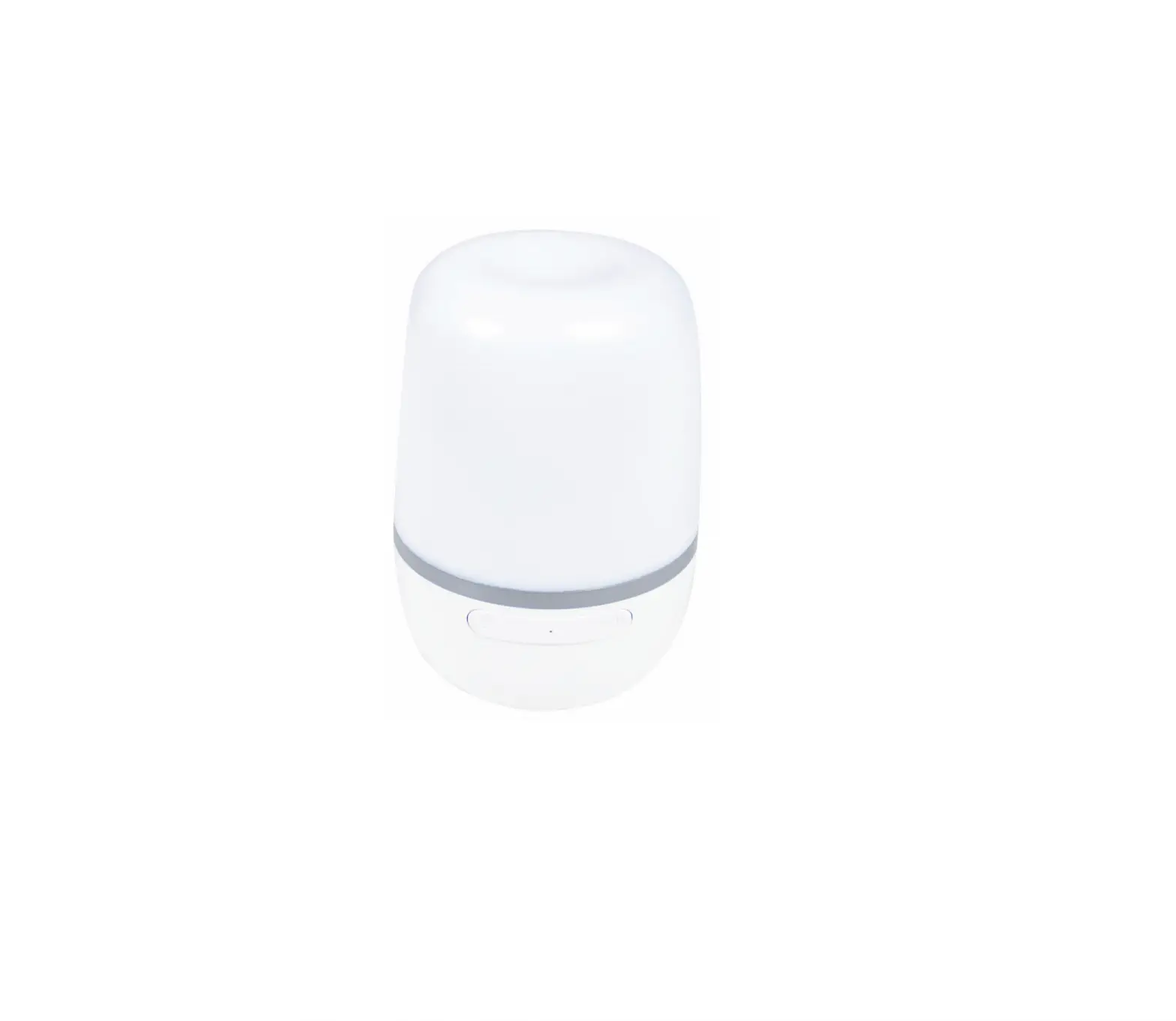

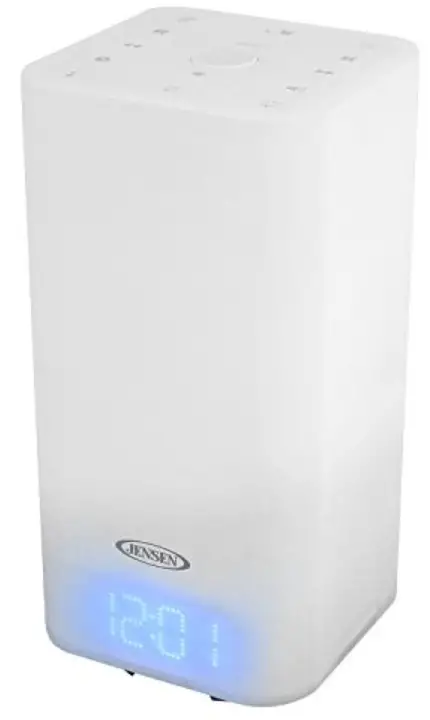
JENSEN JCR-370 Color Changing Mood Lamp 
IMPORTANT SAFETY INSTRUCTIONS
- Read these instructions.
- Keep these instructions.
- Heed all warnings.
- Follow all instructions.
- Do not use this apparatus near water.
- Clean only with dry cloth.
- Do not block any ventilation openings. Install in accordance with the manufacturer’s instructions.
- Do not install near any heat sources such as radiators, heat registers, stoves, or other apparatus (including amplifiers) that product heat.
- AC adaptor is used as disconnect device and it should remain readily operable during intended use. In order to disconnect the apparatus from the mains completely, the AC adaptor should be disconnected form the mains socket outlet completely.
- Only use attachments/accessories specified by the manufacturer.
- Use only with a cart, stand, tripod, bracket, or table recommended by the manufacturer, or sold with the product. When a cart is used, use caution when moving the cart/apparatus combination to avoid injury from tip-over.
- Unplug this apparatus during lightning storms or when unused for a long periods of time.
- Refer all servicing to qualified service personnel. Servicing is required when the apparatus has been damaged in any way, such as power-supply cord or plug is damaged, liquid has been spilled or objects have fallen into the apparatus, the apparatus has been exposed to rain or moisture, does not operate normally, or has been dropped.
- This appliance shall not be exposed to dripping or splashing water and that no object filled with liquids such as vases shall be placed on the apparatus.
- Do not overload wall outlet. Use only power source as indicated.
- Use replacement part as specified by the manufacturer.
- Upon completion of any service or repairs to this product, ask the service technician to perform safety checks.
- Power Sources – This product should be operated only from the type of power source indicated on the marking label. If you are not sure of the type of power supply to your home, consult your product dealer or local power company. For products intended to operate from battery power, or other sources, refer to the operating instruction.
- Object and Liquid Entry – Never push objects of any kind into this product through openings as they may touch dangerous voltage points or short-out parts that could result in a fire or electric shock. Never spill liquid of any kind on the product.
- Damage Requiring Service – Unplug this product from the wall outlet and refer servicing to qualified service personnel under the following conditions:
- When the power-supply cord or plug is damaged,
- If liquid has been spilled, or objects have fallen into the product,
- If the product has been exposed to rain or water,
- If the product does not operate normally by following the operating instructions. Adjust only those controls that are covered by the operating instructions as an improper adjustment of other controls may result in damage and will often require extensive work by a qualified technician to restore the product to its normal operation.
- If the product has been dropped or damaged in any way, and
- When the product exhibits a distinct change in performance – this indicates a need for service.
- Battery shall not be exposed to excessive heat such as sunshine, fire or the like.
- Minimum distances of 10 cm around the apparatus for sufficient ventilation.
- The ventilation should not be impeded by covering the ventilation openings with items, such as newspapers, table-cloths, curtains, etc.
- No naked flame sources, such as lighted candles, should be placed on the apparatus.
- The use of apparatus in moderate climates.
- Attention should be drawn to the environmental aspects of battery disposal
WARNING
- TO PREVENT FIRE OR SHOCK HAZARD, DO NOT USE THIS PLUG WITH AN EXTENSION CORD, RECEPTACLE OR OTHER OUTLET UNLESS THE BLADES CAN BE FULLY INSERTED TO
- PREVENT BLADE EXPOSURE. TO PREVENT FIRE OR SHOCK HAZARD, DO NOT EXPOSE THIS APPLIANCE TO RAIN OR MOISTURE
- The lightning flash with arrowhead symbol, within an equilateral triangle is intended to alert the user to the presence of uninsulated dangerous voltage within the product is enclosure that may be of sufficient magnitude to constitute a risk of electric shock to persons.
- TO REDUCE THE RISK OF ELECTRIC SHOCK, DO NOT REMOVE COVER (OR BACK), NO U S E R – S E R V I C E A B L E PARTS INSIDE. REFER SERVICING TO QUALIFIED SERVICE PERSONNEL.
- The exclamation point within an equilateral triangle is intended to alert the user to the presence of important operating and maintenance (servicing) instructions in the literature accompanying the appliance.
PROTECT YOUR FURNITURE!!
This product is equipped with non-skid rubber ‘feet’ to prevent the product from moving when you operate the controls. These ‘feet’ are made from non-migrating rubber material specially formulated to avoid leaving any marks or stains on your furniture. However certain types of oil based furniture polishes, wood preservatives, or cleaning sprays may cause the rubber ‘feet’ to soften, and leave marks or a rubber residue on the furniture. To prevent any damage to your furniture we strongly recommend that you purchase small self-adhesive felt pads, available at hardware stores and home improvement centers everywhere, and apply these pads to the bottom of the rubber ‘feet’ before you place the product on fine wooden furniture.
INTRODUCTION
DEAR JENSEN® CUSTOMER
Selecting fine audio equipment such as the unit you’ve just purchased is only the start of your musical enjoyment. Now it’s time to consider how you can maximize the fun and excitement your equipment offers. This manufacturer and the Electronic Industries Association’s Consumer Electronics Group want you to get the most out of your equipment by playing it at a safe level. One that lets the sound come through loud and clear without annoying blaring or distortion and, most importantly, without affecting your sensitive hearing. Sound can be deceiving. Over time your hearing “comfort level” adapts to higher volumes of sound. So what sounds “normal” can actually be loud and harmful to your hearing. Guard against this by setting your equipment at a safe level BEFORE your hearing adapts.
To establish a safe level:
- Start your volume control at a low setting.
- Slowly increase the sound until you can hear it comfortably and clearly, and without distortion.
Once you have established a comfortable sound level:
- Set the dial and leave it there.
- Take a minute to do this now will help to prevent hearing damage or loss in the future. After all, we want you listening for a lifetime.
We Want You Listening For a Lifetime
Used wisely, your new sound equipment will provide a lifetime of fun and enjoyment. Since hearing damage from loud noise is often undetectable until it is too late, this manufacturer and the Electronic Industries Association’s Consumer Electronics Group recommend you avoid prolonged exposure to excessive noise.
Customer’s Record:
The serial number of this product is found on its bottom cover. You should note the serial number of this unit in the space provided as a permanent record of your purchase to aid in identification in the event of theft of loss
ACCESSORIES INCLUDED
Carefully remove the unit and all accessories from the display carton. Please verify that you have all the following accessories before recycling the gift box.
- User Manual
- AC Adaptor
POWER SOURCE
This unit is designed to operate on an external AC adaptor rated at 5V 2100mA (included). Operating this unit on any other power source may cause damage to the unit, and such damage is not covered by your warranty. It’s also equipped with a battery back-up system for the clock that is powered by 1 x 3V type CR2032 Lithium battery (not included).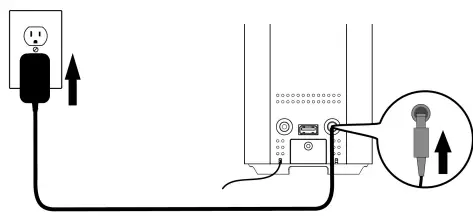
AC-DC Adaptor Connection
An AC-DC Adaptor with the output 5V 2100mA (Included) is required for operating the main unit. To connect the AC-DC Adaptor to the unit and 120V~ 60Hz
AC Outlet:
- Firmly and securely insert the DC plug of the adaptor into the DC IN Jack at the back of the unit.
- Plug the adaptor’s AC plugs into a power outlet rated at 120V~ 60Hz
Battery Backup for Clock
The radio is equipped with a clock backup system. It requires a 3 V lithium battery (type: CR2032). The backup battery compartment is located at rear of the unit.
- Use a screw driver to loose the battery compartment lid screw.
- Carefully to open the battery compartment lid by pull it out.
- Install a DC 3V CR2032 type Lithium battery (with the polarity plus “+” side facing up) the battery into the battery compartment and make sure the positive and negative (+ or -) sides of the battery are in contact with the corresponding terminals in the battery compartment
- Put the battery compartment lid back into battery compartment
- Tighten the screw of battery compartment lid.
Note:
- If power outage occurs, the unit automatically switches to the battery power supply and keeps the clock and alarm settings.
- When replacing the battery, do not disconnect the power adapter. Otherwise, all clock and alarm settings will be lost.
- Only use a well-known brand of battery to ensure the longest life and best performance.
Battery Precautions
- Replacement of batteries must be done by an adult.
- The supply terminals are not to be short-circuited.
- Non-rechargeable batteries are not to be recharged.
- Exhausted batteries are to be removed.
- Only batteries of the equivalent type are to be used.
- Batteries are to be inserted with the correct polarity.
- Dispose of batteries properly. Do not dispose of batteries in fire. The batteries may explode or leak.
WARNING
- DO NOT INGEST BATTERY, CHEMICAL BURN HAZARD
- The battery compartment supplied with this product contains a coin/button cell battery. If the coin/button cell battery is swallowed, it can cause severe internal burns in just 2 hours and can lead to death.
- Keep new and used batteries away from children. If the battery compartment does not close securely, stop using the product and keep it away from children.
- If you think batteries might have been swallowed or placed inside any part of thebody, seek immediate medical attention
NOTE ON NON-MAGNETICALLY SHIELDED SPEAKERS
This unit is not magnetically shielded and may cause color distortion on the screen of some TVs or video monitors. To avoid this, you may need to move the unit further away from the TV or monitor if unnatural color shifts or image distortion occurs
LOCATION OF CONTROLS
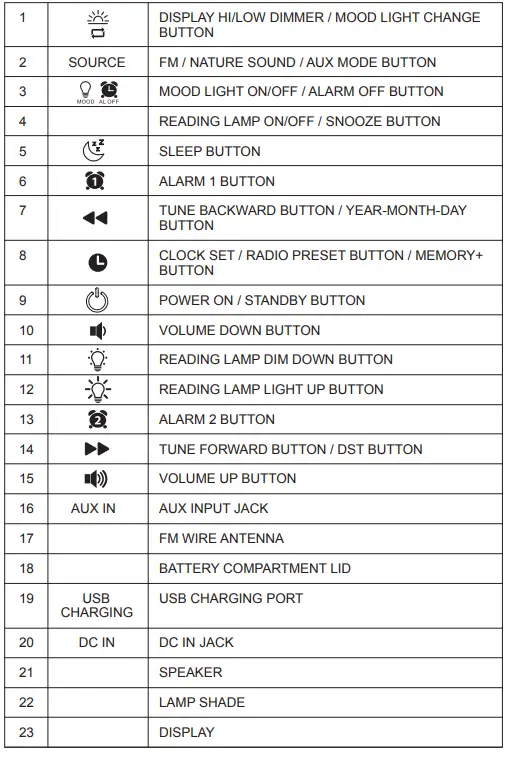
TOP VIEW/BACK VIEW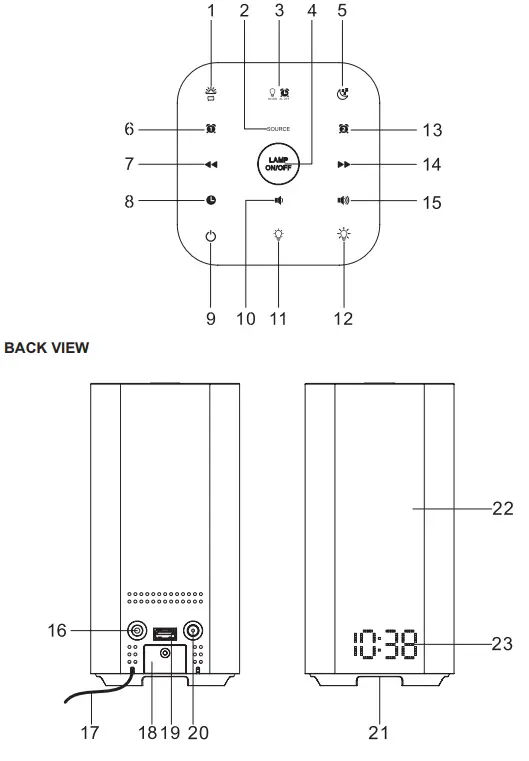
DISPLAY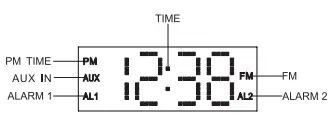
GETTING STARTED
TURNING THE UNIT POWER ON/OFF
- In Off (standby) mode, tap the POWER
 button on main unit to turn the unit ON.
 - The last selected input mode icon will show on LED display.
- To turn the unit OFF (standby), tap the POWER button on main unit again.
 button on main unit to turn the unit ON.
SETTING THE CLOCK
CLOCK SETTING
- After plugging in the AC adaptor, “12:00” will appear on the LED display.
- In Power Off (Standby) mode, press and hold the CLOCK
 button on the top panel. The year digits will show in display and keep blinking to prompt for input.
 - Tap the BACKWARD
 or FORWARD
  button to select the year. Tap the button to confirm, Month digit will be flashing.
 - Tap the or button to adjust the Month, tap the button to confirm. Date digit will be flashing.
- Tap the
 button to adjust the date, tap the button to confirm. 12 hour clock format “ 12 Hr” will be flashing.
 - Tap the button to select 24 hour format if necessary. Otherwise, tap the button to confirm.
- Hour digits will be flashing, tap the or button to adjust the hour. Press and hold the button for fast advance / reverse setting.
- Note: Make sure the hour is set so that the PM indicator is displayed correctly.
- Tap the button to confirm the hour setting, the minute digits will flash Tap the or button to adjust the minute. Press and hold the button for fast advance / reverse setting.
- Tap the button again to complete the setting.
 button to adjust the date, tap the
Daylight saving time (DST)
Press and hold the button to activate daylight saving time when it is in force in your area. Press and hold the button to deactivate this function.
Display Information
In unit standby mode, tap the button repeatedly to check the date, year and return to clock display.
ALARM OPERATION
SETTING THE ALARM CLOCK
- This function allows the system to turn on automatically and wake you using a beeping alarm, FM radio or the Nature Sound.
- In standby mode, tap the ALARM 1
 button on top panel of the main, default alarm time AM 7:00 will appear in display. Press and hold the button again until Hour digit of alarm clock start flashing to prompt for input.
 - Tap the BACKWARD or FORWARD button to set the hour and then press the Button again to confirm, Minute digits will be flashing.
- Note: Make sure the hour is set so that the PM indicator is displayed correctly.
- Tap thebutton to set the minute and then press the button again to confirm, default weekdays 1 – 5 repeat alarm setting will show and flash.
- Tap the button to select weekdays (1-5), every day (1-7), weekend (6-7)or single weekday alarm. Tap the button again to confirm, alarm wake up source will appear in display.
- Tap the button to select wake to Beeping Alarm (bu), Nature Sound
- Alarm (nS) or FM radio and then press the button again to confirm, Alarm sounding volume level will appear in display.
- Note: When select wake to Nature Sound, display will show N 1 of Nature Sound and flashing. You can use or to select one of three Nature Sound by N1 – N3 you preferred.
- Tap the button to preset the wake up alarm volume level and then tap the button to confirm, Lamp light level will be flashing.
- Note: No alarm volume level setting for Beeping alarm.
- Tap the button to preset the wake up alarm lamp lighting level and then tap the button to finish alarm setup.
 button on top panel of the main, default alarm time AM 7:00 will appear in display. Press and hold the
NOTE:
- The system provides dual alarm settings so you can preset another wake up time individually by using the ALARM 2
 button.
 - For ‘Wake to Radio”, the system will default to the last radio station listened to before switching off.
- The wake-up reading lamp can be set at a light intensity level from L01 to L20 or off. If a light intensity level from L01 to L20 is set, the reading lamp will switch on at its lowest intensity 30 minutes before the set alarm time.
- The light will then gradually increase to the set brightness level until the alarm goes off. For example, if the alarm is set for 8:30 with a light intensity of L10, the reading lamp will switch on at 8:00 at the lowest level (L01) and gradually increase to the light level L10 at 8:30.
- The light will not turn on if the alarm is set less than 30 minutes before the set time.
 button.
ACTIVE / DE-ACTIVE THE ALARM FUNCTION
- To active ALARM 1, press and hold the “ ” button until the alarm indicator “AL1” is shown on LED display.
- To cancel ALARM 1 function by press and hold the button again until the alarm indicator “AL1” goes off.
- Follow the same operation by pressing button to active / de-active ALARM 2 “AL2” function.
Wake to FM Radio, Nature Sound or Beeping Alarm
- When the alarm time is reached, the FM radio, Nature Sound or beeping alarm will sound for 30 minutes then shut off and reset itself for the following day (without pressing the snooze button). You may activate the snooze function manually after the alarm sounds by pressing the SNOOZE (LAMP ON/OFF) button. The alarm stops for the snooze time (9 minutes) then comes again. The snooze operation can be repeated again within the remaining 30 minutes from the set alarm time.
- To stop the alarm immediately after it sounds, tap the ALARM OFF
 button on the top panel once. It resets itself for the following day.
 button on the top panel once. It resets itself for the following day.
Note:
- VOLUME UP/DOWN buttons no function when alarm sounding.
- To cancel the following day alarm, press and hold the or button until corresponding ALARM indicator AL1 or AL2 goes off from display.
SNOOZE FUNCTION
- Press the SNOOZE (LAMP ON/OFF) button on the main unit to terminate the alarm mode temporarily, and the alarm will re-start again after 9 minutes on each press.
- Note: Wake up light will be turned off and will not light again when snooze time expired.
- To cancel the SNOOZE mode, press the or button once. The corresponding alarm icon “” or “
 ” stops flashing.
 ” stops flashing.
RADIO OPERATION
- Tap the POWER button on main unit to turn on the unit.
- Tap the SOURCE button on main to select Radio mode, the “FM” mode and radio frequency appear in display.
- To manually tune to a specific radio station, tap the button on either the main unit repeatedly.
- Use the manual tuning method to tune in weaker stations that are bypassed during Automatic Tuning.
- To automatically tune to the next available radio station, press and hold the button for 1-2 seconds until frequency readout on the display begins to scan and then release the button.
- The tuner will stop scanning when it receives the next broadcasting station of adequate signal strength.
- Press the volume control
 button on main unit to adjust the volume control to the desired volume level.
 button on main unit to adjust the volume control to the desired volume level.
HINTS FOR BEST RECEPTION:
The receiver has a build-in FM wire antenna hanging from the back of the cabinet. This wire should be totally unwrapped and fully extended for the best reception.
NOTE: Automatic tuning depends on the signal strength of the broadcasting station, so weak stations may be skipped. You can manually tune to find the weak stations if a station gets skipped. With strong signals, the tuner may stop before it reaches the actual broadcast frequency, so you may need to manually tune for the best reception.
PRESET RADIO STATIONS
- Press the button on main unit to turn on the unit.
- Tap the SOURCE button to select Radio mode.
- Tune to the desired radio station either by “manually” or “automatically” tuning method.
- Press and hold the PRESET button on main unit; the next available preset memory number flash in the LED display. (Note:”P01” will blink in the display if you are programming preset for first time)
- Tap the button to select the preset number you want to assign the station to.
- Tap the button to confirm the setting.
- Repeat step #3 thru # 6 to preset up to 10 stations.
RECALLING PRESET MEMORY CHANNELS
In radio mode, recall the pre-set channels by tapping the button repeatedly.
NOTE:
The clock and radio station presets will need to be reset if the power is interrupted or in the event of a power outage. Please follow above steps 1-7 above to resave the preset stations.
SLEEP OPERATION
- The sleep timer allows you to turn the unit off after a designated time is reached.
- To activate the sleep timer, turn the unit on and tap the SOURCE button to select
- FM radio, nature sound or listening to music via AUX IN.
- Tap the SLEEP
 button, the sleep time will appear on the display.
 - Repeatedly tap the SLEEP button to select a sleep time. The unit will turn off after 15, 30, 60 or 90 minutes. Wait for 10 seconds after your selection for the unit to confirm the selection, the unit will play for the selected length of time then automatically turn off.
- To cancel the sleep timer, tap the button repeatedly until timer shows “OFF”.
- To turn the unit off before the selected length of time, press the POWER button at any time.
 button, the sleep time will appear on the display.
Notes:
- To check the remaining sleep time, tap the button once.
- If you are falling asleep to music from an external device connected to the AUX input, the sleep timer will shut off the power to this system but it will not turn off the external device.
AUXILIARY INPUT OPERATION
This unit features an auxiliary audio signal input jack for connecting external audio devices like MP3 players, Digital Audio Device and listen to them through the speakers of this unit.
- Use an audio cable (not included) with one 3.5 mm stereo plug on each end of the cable.
- Plug one end into the AUX IN jack on the main unit and the other end of the cable into the Line-out Jack or Headphone Jack of your external audio device.
- Turn on the unit and external audio device.
- Tap the SOURCE button on main to select AUX mode, “AUX” indicator will show in display.
- The volume level can now be controlled through the main unit. Operate all other functions on the auxiliary device as usual.
Note:
- If you connect this unit to the Line-Out Jack of your external device then you only need to adjust the volume control of this unit. If you connect the Headphone
- Jack of your external device then you may need to adjust both the volume controls of your external device and this unit to obtain the desirable volume setting.
- Press the POWER button on main unit to turn off the unit when you have finished listening. Don’t forget to switch off the power of your external device as well.
LISTENING TO NATURE SOUNDS
- Press the Power button to turn on the unit.
- Tap the SOURCE button to select Nature sound mode. Nature sound “n-1, n-2 or n-3” will show in display for a few seconds before show normal clock.
- Tap the button to select different Nature Sound.
- Tape the SOURCE button to change to other operation mode or tap the button to turn off the unit.
DISPLAY BRIGHTNESS
- Press the DISPLAY Hi/LOW DIM
 button to change the brightness level of the display (2 levels).
 - Note: Display brightness will set to Hi automatically if you turn on reading lamp or mood light.
 button to change the brightness level of the display (2 levels).
READING LAMP OPERATION
- Press the LAMP ON/OFF button on main unit to turn on the reading lamp.
- Tap the brightness button
 button to control the brightness of the lamp.
 - There are total 20 levels of lamp brightness control.
- Press the LAMP ON/OFF button on main unit to turn on the lamp.
 button to control the brightness of the lamp.
NOTE: Brightness control is not function to multi color MOOD lamp.
MOOD LIGHT OPERATION
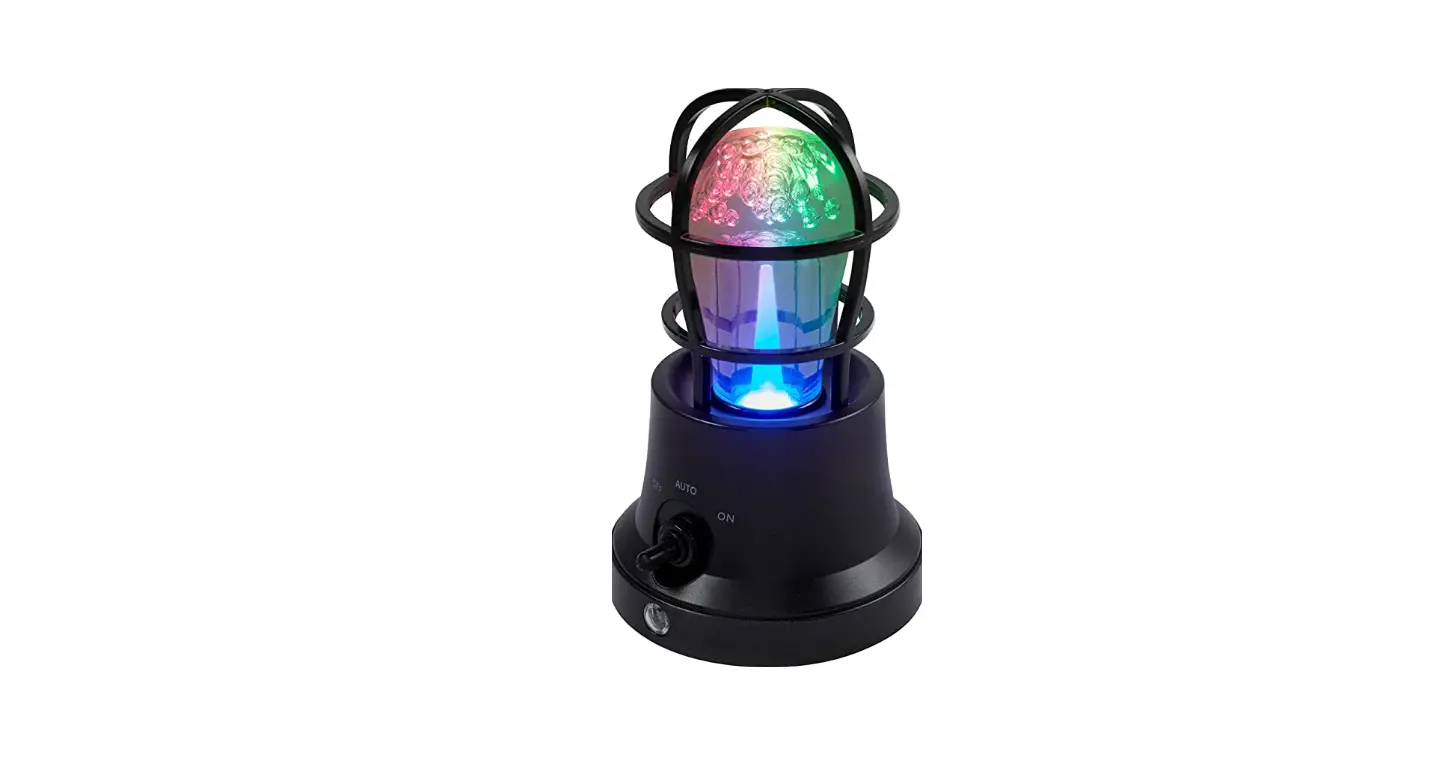
- Press the MOOD LIGHT ON/OFF button to turn on or off the mood light. The light will alternate in different colors.
- Press the MOOD LIGHT CHANGE button to stop the light from alternating in colors. Repeat this step to cancel this function.
CHARGING YOUR SMART PHONE OR PORTABLE DEVICE
- This unit features a 1 AMP USB port on the top of the unit for charging your portable device (iPod, iPhone, Android phone, etc.) when used with the USB charging cord that came with your device.
- Plug one end of the USB cable (not included) into the USB Charging Port located on the back of the unit. Plug the other end of the cord into the device you wish to charge.
- Observe the battery charge indicator on your device to make sure the charging process starts normally.
- Unplug the cable when your device is fully charged.
CAUTION:
- Before charging, please refer to the user manual of the device you wish to charge to make sure the charging current requested does not exceed 1A (1000mA).
- Overloading the charging circuit may damage the unit permanently and void the warranty.
- The USB charging port of this unit supplies a DC 5V output at 1000 mA maximum current to charge your smart phone or portable device battery and it cannot support any other voltage range.
- Make sure the device you want to charge has a battery charge rating of DC 5V only.
- The USB port of this unit is designed for smart phone or portable device battery charging only and it cannot support data transfer or connect to computer.
- Do not connect the USB port of this unit to other external power charger USB ports, it may damage both units and void the warranty.
Note:
- Some smart phones and portable devices use proprietary USB connections and circuitry, so they may not charge when plugged into the USB port. Please refer to your device user manual before you attempt to charge them.
- It is normal if the unit gets warm while the USB port is in use and charging your smart phone or portable device.
- Do not charge your smart phone over 12 hours continuously. Disconnect your smart phone or other portable device from the USB cord once it is fully charged.
CARE AND MAINTENANCE
- If the cabinet becomes dusty, wipe the exterior with a soft dust cloth only. Never use dusting sprays or polishes on the cabinet.
- If the cabinet becomes dirty or smudged with fingerprints it may be wiped with a soft cloth that has been slightly dampened with a mild soap and water solution.
- To prevent fire or shock hazard, always disconnect the power cord from the AC outlet before cleaning.
CAUTION: Never allow any water or other liquids to get inside the unit while cleaning.
Note:
If there is no battery in the back-up battery compartment, the Time and Alarm settings will be lost when the AC adaptor is disconnected for cleaning. Reset the clock and wake up time after reconnecting the AC adaptor power
TROUBLESHOOTING
| Symptom | Possible Cause | Solution |
| The unit does not respond (no power) | The unit is disconnected
from the AC outlet. | Reconnect to the AC
outlet. |
| The AC outlet has not
power. | Try the unit on another
outlet. | |
| Unit is ON but there is low or no volume | Volume set too low. | Press the button on main unit to turn the
sound level up. |
| Noise or sound distorted on FM broadcast | Station not tuned properly.
FM wire antenna is not fully extended. | Fine tune the FM broad- cast station.
Fully extend the FM wire antenna. |
| Sound is distorted | Volume level is set too
high. | Decrease the volume. |
| Sound source is distorted. | Try a different sound source.
If you are using an ex- ternal sound source like older generation of iPod, try reducing the output volume on the device it- self. Also try turning bass boost OFF or change the EQ setting. | |
| Unit gets warm after extended play at high
volume | This is normal. | Turn the unit off for a period of time or lower
volume |
SPECIFICATIONS
- Power requirement:
- AC adaptor for main unit: AC input: 120V ~ 60Hz
- DC output: 5V 2100 mA
- Battery Backup for Clock: 1 x 3V CR2032 Lithium Battery
- Frequency Range
- Radio Band: FM 87.5 ~ 108 MHz
- USB Charging: DC 5V , 1A
Spectra
At Spectra, environmental and social responsibility is a core value of our business. We are dedicated to continuous implementation of responsible initiatives with an aim to conserve and maintain the environment through responsible recycling. Please visit us at http://www.spectraintl.com/green.htm for more information on Spectra’s green initiatives or to find a recycler in your area.
90-DAY LIMITED WARRANTY AND SERVICE VALID IN THE U.S.A. ONLY
SPECTRA MERCHANDISING INTERNATIONAL, INC. warrants this unit to be free from defective materials or factory workmanship for a period of 90 days from the date of original customer purchase and provided the product is utilized within the U.S.A. This warranty is not assignable or transferable. Our obligation under this warranty is the repair or replacement of the defective unit or any part thereof, except batteries, when it is returned to the SPECTRA Service Department, accompanied by proof of the date of original consumer purchase, such as a duplicate copy of a sales receipt. You must pay all shipping charges required to ship the product to SPECTRA for warranty service. If the product is repaired or replaced under warranty, the return charges will be at SPECTRA’s expense. There are no other express warranties other than those stated herein.
This warranty is valid only in accordance with the conditions set forth below:
- The warranty applies to the SPECTRA product only while:
- It remains in the possession of the original purchaser and proof of purchase is demonstrated.
- It has not been subjected to accident, misuse, abuse, improper service, usage outside the descriptions and warnings covered within the user manual or non-SPECTRA approved modifications.
- Claims are made within the warranty period.
- This warranty does not cover damage or equipment failure caused by electrical wiring not in compliance with electrical codes or SPECTRA user manual specifications, or failure to provide reasonable care and necessary maintenance as outlined in the user manual.
- Warranty of all SPECTRA products applies to residential use only and is void when products are used in a nonresidential environment or installed outside the united States.
This warranty gives you specific legal rights, and you may also have other rights which vary from state to state. TO OBTAIN SERVICE please remove all batteries (if any) and pack the unit carefully and send it freight prepaid to SPECTRA at the address shown below. IF THE UNIT IS RETURNED WITHIN THE WARRANTY PERIOD shown above, please include a proof of purchase (dated cash register receipt) so that we may establish your eligibility for warranty service and repair of the unit without cost. Also include a note with a description explaining how the unit is defective. A customer service representative may need to contact you regarding the status of your repair, so please include your name, address, phone number and email address to expedite the process. IF THE UNIT IS OUTSIDE THE WARRANTY PERIOD, please include a check for $12.00 to cover the cost of repair, handling and return postage. All out of warranty returns must be sent prepaid. It is recommended that you contact SPECTRA first at 1-800-777-5331 or by email at custserv@ spectraintl.com for updated information on the unit requiring service. In some cases the model you have may be discontinued, and SPECTRA reserves the right to offer alternative options for repair or replacement.
SPECTRA MERCHANDISING INTERNATIONAL, INC.
- 4230 North Normandy Avenue,
- Chicago, IL 60634, USA.
- 1-800-777-5331
To register your product, visit the link on the website below to enter your information. http://www.spectraintl.com/wform.htm
FCC
COMPLIANCE WITH FCC REGULATIONS
This device complies with Part 15 of the FCC Rules. Operation is subject to the following two conditions:
- this device may not cause harmful interference, and
- this device must accept any interference received, including interference that may cause undesired operation.
NOTE: This equipment has been tested and found to comply with the limits for a Class B digital device, pursuant to Part 15 of the FCC Rules. These limits are designed to provide reasonable protection against harmful interference in a residential installation. This equipment generates, uses and can radiate radio frequency energy and, if not installed and used in accordance with the instructions, may cause harmful interference to radio communications. However, there is no guarantee that interference will not occur in a particular installation. If this equipment does cause harmful interference to radio or television reception, which can be determined by turning the equipment off and on, the user is encouraged to try to correct the interference by one or more of the following measures:
- Reorient or relocate the receiving antenna.
- Increase the separation between the equipment and receiver.
- Connect the equipment into an outlet on a circuit different from that to which the receiver is connected.
- Consult the dealer or an experienced radio / TV technician for help.
CAUTION: Changes or modifications not expressly approved by the party responsible for compliance could void the user’s authority to operate the equipment.
FAQS
RGB lighting combines red, blue, and green colors — the “RGB” in “RGB lights” — to create wondrous lighting hues that shift your perspective.
A tiny computer can create different colour combinations using coloured LEDs which correspond with the colour-sensitive cells in the eye. Colour-changing light bulbs use red, green and blue LEDs to create their range of colours, switching them on in different combinations using a tiny computer (‘microcontroller’).
All LED color changing light bulbs work in traditional light fixtures but require some form of control (remote, Wifi, Bluetooth, or app) to make their color changing magic happen. They come with a variety of functions and prices to meet your lighting needs and budget.
A tip you should keep in mind is that a bulb that is brighter, with a cooler white to natural daylight range is best for reading and study. This is the equivalent of 4000K to 6500K. You will find yourself feeling more awake and ready to take in information.
Blue light has the strongest impact. Exposure to blue light (and white light, which contains blue light) during the sensitive period can make it difficult for you to fall asleep and stay asleep. Exposure to white light during the day can have positive effects, including boosting alertness and mood.
Symptoms of eyestrain include sore or irritated eyes and difficulty focusing. Retina damage: Studies suggest that continued exposure to blue light over time could lead to damaged retinal cells. This can cause vision problems like age-related macular degeneration.
Legendary is a soft, gray, millennial beige with a silvery undertone. It is a perfect paint color for a living room or exterior home.
Blue is the hardest color to see as more light energy is required for a full response from blue-violet cones, compared to green or red.
Red-green and yellow-blue are the so-called “forbidden colors.” Composed of pairs of hues whose light frequencies automatically cancel each other out in the human eye, they’re supposed to be impossible to see simultaneously.
Exposure to light has a dramatic effect on this – too light in the evening and we risk disrupted sleep, too dark in the morning and we can’t get out of bed. With mood lighting, you can automate the lights in your home to work with your daily schedule
Research indicates that blue light is superior to other lights in the spectrum for treating depression. Studies show that blue light can be used at a specific wavelength and frequency at less intensity than full spectrum bright light to achieve the same kind of effect
Set the mood with three levels of lighting: high, medium, and low. Use table lamps and floor lamps for form and function. Create a central focal point with a sculptural pendant lamp or chandelier. Take control with dimmers
What is mood lighting? Mood lighting is all about using your lights to give a room or space the right atmospheric feel. Traditionally we’ve done it by playing with the layout of our lights and lamps, and the colour, brightness and tone of our bulbs
Exposure to light has a dramatic effect on this – too light in the evening and we risk disrupted sleep, too dark in the morning and we can’t get out of bed. With mood lighting, you can automate the lights in your home to work with your daily schedule
Mood Lighting is using lighting to create a desired atmosphere in any room. It is layering your lighting by having multiple sources of light such as lamps, wall lights and ceiling lights, so that you can change the light levels easily. It’s all about being in control of the mood you want to create in your home.