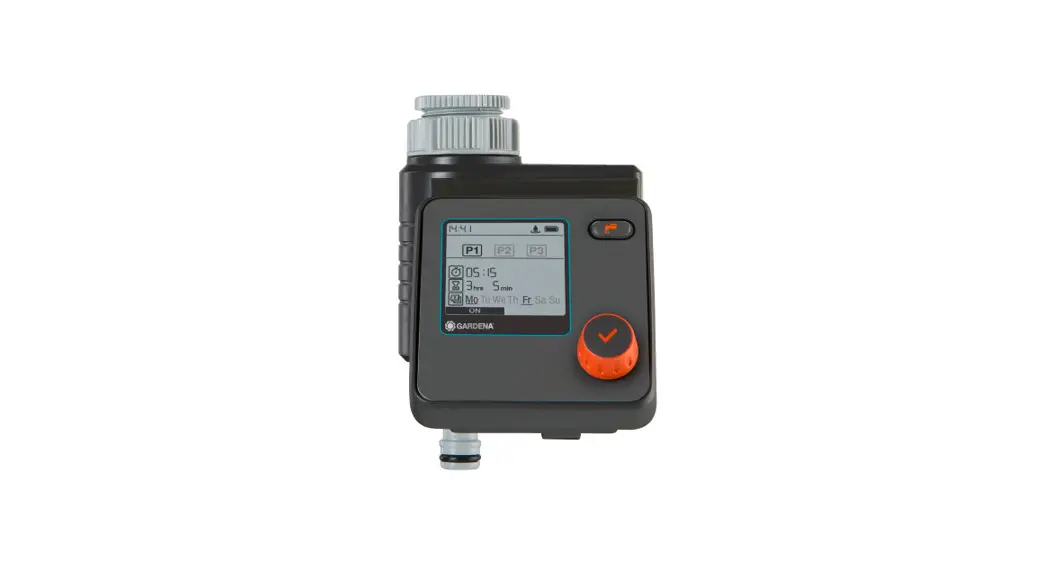
WFC01 Smart Sprinkler Timer
Product Overview
The WFC01 is a product that provides intelligent irrigation and
needs to be connected to the Ecowitt Cloud System via the WIFI Hub
GW2000 to achieve smart irrigation. It can be set up in the Ecowitt
APP and can be linked with Ecowitt Soil Moisture Sensors to enable
automatic irrigation. It can also be linked with Ecowitt Rain
Sensors to automatically terminate irrigation plans, avoiding water
waste and overwatering. Even in case of network issues, the pre-set
plans can still operate normally. The Smart Water Timer utilizes
radio frequency transmission technology and a gateway for data
transmission, ensuring stable and reliable communication between
the timer and the gateway within a range of 100 meters in an open
area. Remote control is possible through the Ecowitt APP, allowing
you to control your water timer anytime and anywhere. With a design
featuring all-copper pipelines and connectors, the Smart Water
Timer can withstand water pressure of up to 0.9 MPa. It is IP66
waterproof and dustproof, durable, corrosion-resistant, with a long
service life.
Product Specifications
- Size: L159 * W82 * H45mm
- Weight: 520g
- Shell Material: ABS+PC
- Inlet Interface Material: Brass (CU)
- Outlet Interface Material: Brass with Chrome Plating
- Waterproof / Dustproof Level: IP66
- Power Supply: 1.5V AA*2
- Power: 1.5mW (Average power of opening and closing once a
day) - Battery Runtime: Over 6 months (Average runtime of opening and
closing once a day) - Inlet and Outlet Interface: G1/2inch thread
- Maximum Flow Rate: 30L/min
- Working Pressure: 0.03 ~ 0.9MPa
- Working Temperature: 1 ~ 60°C (The equipment can still transfer
data during -40 ~ 0°C, but water freezing may cause DAMAGE to the
product)
Product Usage Instructions
To use the WFC01 Smart Water Timer, follow the below
instructions:
- Connect the WFC01 to the Ecowitt Cloud System via the WIFI Hub
GW2000 to achieve smart irrigation. - Set up the WFC01 in the Ecowitt APP and link it with Ecowitt
Soil Moisture Sensors to enable automatic irrigation. - Link the WFC01 with Ecowitt Rain Sensors to automatically
terminate irrigation plans, avoiding water waste and
overwatering. - Even in case of network issues, the pre-set plans can still
operate normally. - The Smart Water Timer utilizes radio frequency transmission
technology and a gateway for data transmission, ensuring stable and
reliable communication between the timer and the gateway within a
range of 100 meters in an open area. - Remote control is possible through the Ecowitt APP, allowing
you to control your water timer anytime and anywhere. - The Smart Water Timer can withstand water pressure of up to 0.9
MPa. It is IP66 waterproof and dustproof, durable,
corrosion-resistant, with a long service life. - The inlet/outlet interface is G1/2inch thread.
- The working temperature of the WFC01 is 1 ~ 60°C (The equipment
can still transfer data during -40 ~ 0°C, but water freezing may
cause DAMAGE to the product).
WFC01 User Manual
Content
Product Overview ………………………………………….1 Product Specifications ……………………………………….2
1. Size …………………………………………………2 2. Weight ……………………………………………….2 3. Material and Protection Level……………………………….2 4. Power Supply and Power ………………………………….3 5. Inlet and Outlet Interface ………………………………….3 6. Flow and Pressure ……………………………………….3 7. Working Temperature and Humidity ………………………….3 8. Accessory List………………………………………….3 9. Specifications ………………………………………….3 Product Structure …………………………………………..4 Installation ……………………………………………….5 1. Power on ……………………………………………..5 2. Test …………………………………………………5 3. Pair with hub …………………………………………..6
3.1 Configuration of GW2000……………………………6
3.2 Configuration of WFC01…………………………….6
4. Mount ……………………………………………….9 Software Functions ………………………………………..10
1. Watering Methods ……………………………………… 10 2. Operation Modes……………………………………….10
2.1 Timer Button Mode………………………………..10
2.2 Manual Watering Mode……………………………..11
2.3 Plan mode……………………………………….13 3. Alerts……………………………………………….16 Note …………………………………………………..17 1. Installation……………………………………………17 2. Usage environment ……………………………………..18 3. Maintenance ………………………………………….18 4. Precautions during use …………………………………..18 Help …………………………………………………..18 Warranty Information……………………………………….18 Product Certification ……………………………………….19
Product Overview
1. Welcome to use WFC01, a product that enables intelligent irrigation. This product needs to be connected to the Ecowitt Cloud System via the WIFI Hub GW2000 to achieve smart irrigation.
2. The Smart Water Timer is equipped with a flow meter and a built-in temperature sensor, which not only functions as a water timer but also allows real-time monitoring of water flow and temperature, providing you with a better understanding of water usage in your home. WFC01 supports cloud-based control, and all water usage log is stored in the cloud. Users can check their water usage anytime and manage and optimize it for more convenient control and achieve more scientific and rational water usage.
3. This product can be set up in the Ecowitt APP and can be linked with Ecowitt Soil Moisture Sensors to enable automatic irrigation. It can also be linked with Ecowitt Rain Sensors to automatically terminate irrigation plans, avoiding water waste and overwatering. Even in case of network issues, the pre-set plans can still operate normally.
4. The Smart Water Timer utilizes radio frequency transmission technology and a gateway for data transmission, ensuring stable and reliable communication between the timer and the gateway within a range of 100 meters in an open area. Remote control is possible through the Ecowitt APP, allowing you to control your water timer anytime and anywhere.
5. With a design featuring all-copper pipelines and connectors, the Smart Water Timer can withstand water pressure of up to 0.9 MPa. It is IP66 waterproof and dustproof, durable, corrosion-resistant, with a long service life.
1 / 19
Product Specifications
1. Size
L159 * W82 * H45mm
2. Weight
520g.
3. Material and Protection Level
Shell Material: ABS+PC. Inlet Interface Material: Brass (CU). Outlet Interface Material: Brass with Chrome Plating. Waterproof / Dustproof Level: IP66.
2 / 19
4. Power Supply and Power
Power Supply: 1.5V AA*2. Power: 1.5mW (Average power of opening and closing once a day). Battery Runtime: Over 6 months (Average runtime of opening and closing once a day).
5. Inlet and Outlet Interface
The inlet/outlet interface is G1/2inch thread.
6. Flow and Pressure
Maximum flow rate: 30L/min. Working pressure: 0.03 ~ 0.9MPa. Flow rate error: ±10%.
7. Working Temperature and Humidity
Working Temperature: 1~ 60 (The equipment can still transfer data during -40 ~ 0, but water freezing may cause damage to the product). Working Humidity: 1% ~ 99%.
8. Accessory List
1 x Hexagon nut; 1 x 3/4″ to 1/2″Adapter; 1 x Retaining bracket; 2 x Nylon cable ties; 3 x Screws.
9. Specifications
Product Name Product Model Product Size
Weight Shell Material Inlet Material
Smart Water Timer WFC01 159×82×45(mm) | L×W×H 520g ABS+PC Brass
3 / 19
Outlet Material
Brass + Chrome Plating
Waterproof Level IP66
Power Supply
1.5V AA Battery × 2
Power
1.5mW (Average power of opening and closing once a day)
Battery Runtime Over 6 months (Average runtime of opening and closing once a day).
Interface Type
G1/2inch thread
Maximum Flow Rate 30L/min
Working Pressure 0.03 ~ 0.9MPa
Flow Rate Error ±10%
Working Temperature
1 ~ 60 (The equipment can still transfer data during -40 ~ 0, but water freezing may cause DAMAGE to the product)
Working Humidity 1 ~ 99%
RF Communication Distance
100 meters
Product Structure
4 / 19
Installation
1. Power on
Unscrew the 4 screws on the battery door on the back, and put in 2 AA batteries. The blue light on the front indicates that the device is powered on normally, and screw on the screws.
2. Test
Short press the button to test whether the function of the water timer button is normal.
5 / 19
3. Pair with hub
3.1 Configuration of GW2000
You have to finish the configuration of GW2000 as the video instructs. Please scan the QR code to the video.
https://s.ecowitt.com/43PBGA
If you’ve already got a GW2000 configured, go to 3.2.
3.2 Configuration of WFC01
3.2.1 Long press the button for more than 5s, the LED will flash quickly and enter the network configuration mode. 3.2.2 Click as the following pictures indicate to enter the network configuration mode.
6 / 19
3.2.3 There will be a countdown icon showing on the interface. Click Device is in pairing mode.
3.2.4 Wait for about 20 seconds and the pair will be success.
3.2.5 Click Confirm and you will see the operation interface of WFC01.
7 / 19
8 / 19
4. Mount
Connect the water inlet and outlet pipes according to the direction of the arrow on the back of the product and fix them.
9 / 19
Software Functions
1. Watering Methods
1.1 By duration
Set a duration. Open the timer and it will automatically be closed after running for the set opening duration.
1.2 By quantity
Set the amount of water. Open the timer and it will automatically be closed when the set quantity is reached.
1.3 Always on
Keep the timer always on.
1.4 Off
Keep the timer off.
2. Operation Modes
The operation modes include Timer Button mode, Manual Watering mode, Plan mode and Smart mode (not in Beta test period). Each mode trigger will interrupt the others, and the operation mode generated by the most recent trigger will take effect. For example, if the watering is currently in progress based on a scheduled plan and a certain condition is met to close the timer, the timer will be immediately closed. When the next scheduled time arrives, the watering will resume and the timer will be opened again.
2.1 Timer Button Mode
2.1.1 Short Press Execute Manual Watering or terminate the current program. 2.1.2 Long Press for 5s Enter the network configuration mode. 2.1.3 Long Press for 10s Restore factory settings. 2.1.4 Anti-misoperation state The app supports disabling the short press function of the button.
10 / 19
2.2 Manual Watering Mode
2.2.1 Timer open state Click the RUN button to directly close the timer. 2.2.2 Timer closed state Will execute immediately after setting the watering method on the APP. Click the RUN button. Dialog box will pop up: By duration/volume/Always on. 2.2.2.1 By duration
Duration Range:10 ~ 43200 seconds or 1 ~ 720 minutes. Cycle Mode Can be set as on/off; On/off time range:5 ~ 3600 seconds. Click Confirm to execute current setting.
11 / 19
2.2.2.2 By quantity 2.2.3.3 Always On
Volume Range: 1 ~ 6500 L. Cycle Mode Can be set as on/off; On/off time range:5 ~ 3600 seconds. Click Confirm to execute current setting.
Click Confirm to execute Always On setting.
12 / 19
2.3 Plan mode
You can set a plan to start, and the plan can be set up to 24 start times. 2.3.1 Click plan to enter the Plan mode.
2.3.2 Click the right button to activate or deactivate a plan.
13 / 19
2.3.3 Click the left icon to enter the plan editing interface.
2.3.4 Adjust the details of the plan on the editing interface. 2.3.4.1 Add or delete a beginning time.
14 / 19
2.3.4.2 Set the method of watering. By Duration or by volume.
2.3.4.3 Select the Cycle Mode. Cycle Mode Can be set as on/off; On/off time range:5 ~ 3600 seconds.
15 / 19
2.3.4.4 Set the repeat mode of watering. By weekly or by daily.
3. Alerts
There are 5 kinds of alerts. The details of the alerts can be inquired below.
16 / 19
3.1 No Water!
No water detected a while after the Water Timer has been open. Please check if the water sour ce is sufficient.
3.2 Water Leakage!
Water detected a while after the Water Timer has been closed. Please check the equipment im mediately for leaks.
3.3 Ice Alert!
Current temperature below 5. Ice formation may be caused.
3.4 Overheating!
Current temperature above 60. Safety threat may be caused.
3.5 Communication Unstable!
Communication is unstable. Plan skip function will be disabled. Please adjust the position of t he Water Timer or WiFi hub.
Note
1. Installation
The smart water timer should be installed in a dry and well-ventilated location, avoiding prolonged exposure to humid, high or low temperature, or harmful gas environments. The installation position should be as close as possible to the water source or the water pipe that needs to be controlled, and avoid excessive bending or twisting of the water pipe.
17 / 19
2. Usage environment
The smart water timer is suitable for both residential and commercial use. Do not install the smart water timer in areas prone to moisture or high temperatures. Additionally, it is prohibited to use chemical or corrosive substances to clean the smart water timer.
3. Maintenance
To ensure the normal operation of the smart water timer, regular maintenance is required. During daily use, please pay attention to cleaning the water timer and its surrounding area to prevent the accumulation of dust and dirt. Also, remember to replace the batteries promptly.
4. Precautions during use
When using the smart water timer, do not use it for substances other than liquids. Avoid hitting, impacting, or forcefully pulling the smart water timer during use to prevent damage to its mechanical components. Additionally, keep children and pets away from the smart water timer to prevent accidents. Please read this user manual carefully and install and use the smart water timer correctly according to the instructions. If you have any questions, please contact our customer service team, we will be happy to assist you.
Help
Our product is continuously changing and improving, particularly online services and associated applications. To download the latest manual and additional help, please contact our technical support team:
[email protected]
Warranty Information
We disclaim any responsibility for any technical error or printing error, or the consequences thereof.
18 / 19
All trademarks and patents are recognized. We provide a 1-year limited warranty on this product against manufacturing defects, or defects in materials and workmanship. This limited warranty begins on the original date of purchase, is valid only on products purchased, and only to the original purchaser of this product. To receive warranty service, the purchaser must contact us for problem determination and service procedures. This limited warranty covers only actual defects within the product itself and does not cover the cost of installation or removal from a fixed installation, normal set-up or adjustments, or claims based on misrepresentation by the seller, or performance variations resulting from installation-related circumstances.
Product Certification
TBA
19 / 19
 Ecowitt Weather Quick Start