XC3752 DIY Game Console
Product Information
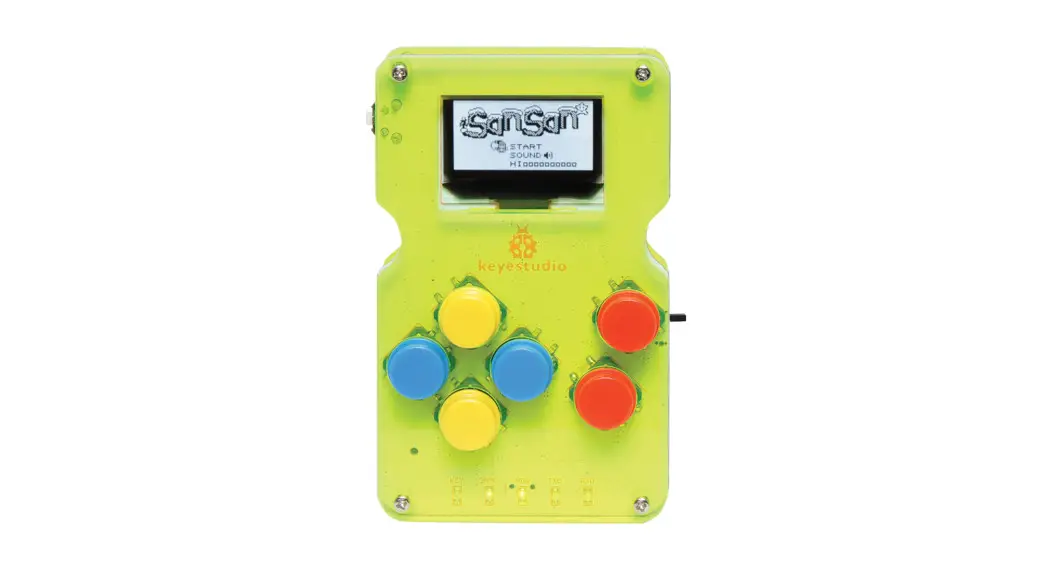
The Maycar DIY Game Console is an Arduino-based 8-bit handheld
game console that allows you to create your own games or play games
developed by the ArduboyTM community. The kit includes various
components to assemble the console, including a console circuit
board, button caps, screws, copper pillars, insulating columns, a
screwdriver, an acrylic case, and a USB cable.
Components List:
- 1 x Console Circuit Board
- 6 x White/Blue caps
- 4 x M2*6mm round-headed screws
- 4 x M2*10mm round-headed screws
- 4 x M2.0*11mm dual-pass copper pillars
- 4 x White insulating column ABS
- 1 x 3*83mm black screwdriver
- 1 x Arduino game console acrylic case
- 1 x USB cable
Product Usage Instructions
Installation:
- Take out all the parts and lay them out on your desk.
- Install the 6 button caps onto the console circuit board.
- Fix the bottom acrylic board and the 4 M2.0*11mm dual-pass
copper pillars together using the 4 M2*6mm round-headed
screws. - Fix the console circuit board and acrylic top board together
using the 4 M2*10mm round-headed screws, 4 white insulating
columns, and 4 M2.0*11mm dual-pass copper pillars. - Make sure to align the holes of the acrylic bottom board with
the potentiometer on the console while installing it.
Please Note: For any further assistance or inquiries, please
contact Electus Distribution Pty. Ltd. at PO Box 3577 Rhodes NSW
2138, Australia or visit their website at www.electusdistribution.com.au.
DIY Game Console
Compatible with Arduboy Games
About the Kit
The maycar DIY game console is an Arduino-based 8-bit handheld game console that you can use to create your very own games or enjoy the creations of others via the ArduboyTM community.
Components List
1. 1 x Console Circuit Board 2. 6 x White/Blue caps 3. 4 x M2*6mm round-headed screws 4. 4 x M2*10mm round-headed screws 5. 4 x M2.0*11mm dual-pass copper pillars 6. 4 x White insulating column ABS 7. 1 x 3*83mm black screw driver 8. 1 x Arduino game console acrylic case 9. 1 x USB cable
Installation
1. Take out all the parts and lay them out on your desk.
3. Install 6 button caps
4. Fix the bottom acrylic board and the 4 M2.0*11mm dual-pass copper pillars together with 4 M2*6mm round-head screws.
2. Fix the board and acrylic top board together with 4 M2*10mm roundhead screws, 4 white insulating columns, and 4 M2.0*11mm dual-pass copper pillars.
Please Note: The holes of acrylic bottom board should be aligned with the potentiometer on the console when installing it.
Distributed by: Electus Distribution Pty. Ltd.
PO Box 3577 Rhodes NSW 2138 Australia www.electusdistribution.com.au
DIY Game Console
Compatible with Arduboy Games
 Electus Distribution - Home