
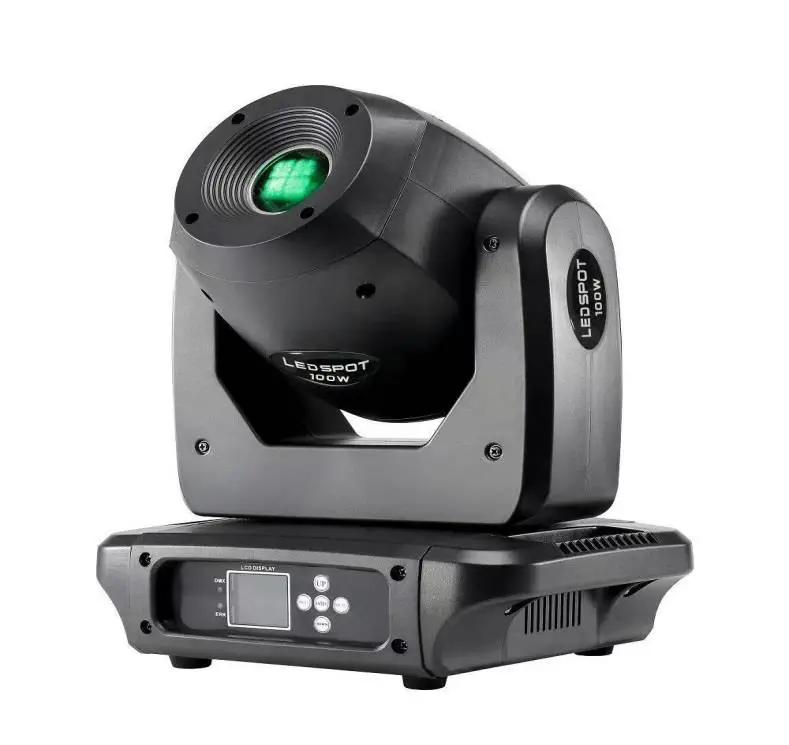
MAC MAH MACSPOT100 Lights and Lasers Spotlights Lamps
General Information
Thank you very much for choosing our product. For safety purpose, please read this manual carefully before your operation. This manual included installation and using information. Please install and operate it according to this manual.
Unpacking :Once receive it, please handle it carefully and check if there is some shatter because of transportation and the following fittings are OK.
In the carton ,there are four things available:
Moving head light: 1PC
Power cable: 1PC
Fast Lock: 1PC
User manual: 1 PC
Warning! To prevent or reduce the risk of electrical shock or fire, do not expose this unit to rain or moisture.
Caution! There are no user serviceable parts inside this unit. Do not attempt any repairs yourself. Doing so will void your manufactures warranty. In the unlikely event your unit may require service please contact us.
Safety Instructions
- Please keep this User Guide for future consultation. If you sell the unit to another user, be sure that they also receive this instruction booklet.
- Unpack and check carefully there is no transportation damage before using the unit.
- Before operating, ensure that the voltage and frequency of power supply match the power requirements of the unit.
- It’s important to ground the yellow/green conductor to earth in order to avoid electric shock.
- The unit is for indoor use only. Use only in a dry location.
- The unit must be installed in a location with adequate ventilation, at least 50cm from adjacent surfaces. Be sure that no ventilation slots are blocked.
- Disconnect main power before replacement or servicing.
- Make sure there are no flammable materials close to the unit while operating as it is fire hazard.
- Use safety cable when fixes this unit. DO NOT handle the unit by taking its head only, but always by taking its base.
- Maximum ambient temperature is Ta: 40℃. DO NOT operate it where the temperature is higher than this.
- Unit surface temperature may reach up to 85℃. DO NOT touch the housing bare-hand during its operation. Turn off the power and allow about 15 minutes for the unit to cool down before replacing or serving.
- In the event of serious operating problem, stop using the unit immediately. Never try to repair the unit by yourself. Repairs carried out by unskilled people can lead to damage or malfunction. Please contact the nearest authorized technical assistance center. Always use the same type spare parts.
- DO NOT touch any wire during operation as high voltage might be causing electric shock.
Warning:
- To prevent or reduce the risk of electrical shock or fire, do not expose the unit to rain or moisture.
- DO NOT open the unit within five minutes after switching off.
- The housing, the lenses, or the ultraviolet filter must be replaced if they are visibly damaged.
Caution:
There are no user serviceable parts inside the unit. DO NOT open the housing or attempt any repairs yourself. In the unlikely event your unit may require service, please contact your nearest dealer.
Installation:
The unit should be mounted via its screw holes on the bracket. Always ensure that the unit is firmly fixed to avoid vibration and slipping while operating. And make sure that the structure to which you are attaching the unit is secure and is able to support a weight of 10 times of the unit’s weight. Also always use a safety cable that can hold 12 times of the weight of the unit when installing the fixture.
The equipment must be fixed by professionals. And it must be fixed at a place where is out of the touch of people and has no one pass by or under it.
Technical Specifications
- Voltage: AC100-240V,50-60Hz
- Power Consumption: 150W
- DMX Channel: 14 CH
- LED Source: 100W white LED / 9500K
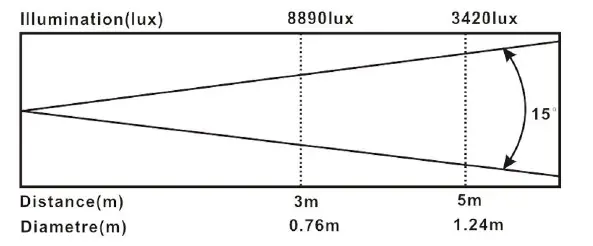
- Beam Angle: 15°
- Control Mode: DMX512, Master/Slave, Auto, Sound.
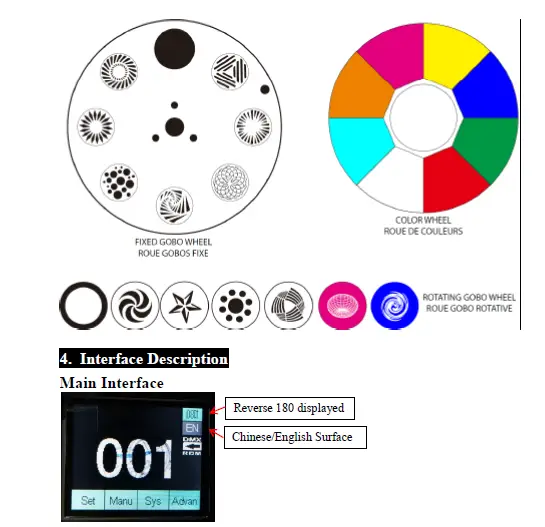
- Color Wheel: 7 colors + white, spilt colors , rainbow effect.
- Fixed Gobo Wheel: 7 gobos + blank, rainbow effect, gobo shake. Rotation Gobo Wheel: 6 gobos + blank , Rainbow effect, gobo shake. Prism: 6-
- facet prism, can adjustable rotating speed and direction. Movement: Pan: 540° Tilt: 270°,Pan/Tilt speed adjustable.
- Strobe: 1-20t/s
- Dimmer: 0-100% linear dimming
- Focus: motorized focus
- Size: 28*21.5*37 cm
- N.W.: 5.9 kg
- G.W.: 7.0 kg
Sub interface
Setting
| Option | Description | |
| Run Mode | DMX | Slave status: Receive DMX signals from the console or Master |
| Sound | Auto run ; | |
| Random | Master status: Auto run and send DMX signal to slave | |
| Auto | ||
| DMX Address | 001-512 | Press “OK” key enter into edit status, then press “UP” “DOWN” to change DMX address. press “OK” key save and exit edit status. |
| Channel Mode | Std.14CH | Standard 14 Channel Mode |
| Top Lamp Temp | 001-110 | |
| Sound Regulator | -006 — +006 | |
| Invert Pan | OFF | ON for starting and ending , the default is OFF. |
| ON | ||
| Invert Tilt | OFF | ON for starting and ending , the default is OFF. |
| ON | ||
| Pan-Tilt Swap | OFF | |
| ON | Exchange Pan/Tilt channel (include Pan/Tilt Fine) | |
| Pan-Tilt Encoder | ON | Use encoder (optocoupler) to determine out of step and automatically correct position |
| OFF | Correct positionwithout encoder (optocoupler) | |
| RDM | ON | Support RDM function |
| OFF | ||
| No DMX Signal | KEEP | Continue running as it is |
| CLEAR | All motors return to the position and stop running. | |
| Display | ON | |
| OFF | ||
| Lamp On@Startup | OFF | |
| ON | ||
| Load Default | Press the “OK” button to see the confirmation dialog, press “OK” again The key restores the default settings |
Manual Control
This interface is used to control the current fixture and automatically enters the master state (does not receive the DMX signal and sends a DMX signal to the slave).
| Option | Description | |
| 1. Pan | 0-255 | Orange indicates selected, Press “OK” key enter into Edit status, then press “UP” “DOWN” to select, press “OK” save and Exit edit status. |
| 2. Pan Fine | 0-255 | |
| 3. Tilt | 0-255 | |
| 4. Tilt Fine | 0-255 | |
| 5. Pan-Tilt Speed | 0-255 | |
| 6. Dimmer | 0-255 | |
| 7. Shutter/Strobe | 0-255 | |
| 8. Color | 0-255 | |
| 9. Gobo | 0-255 | |
| 10. Gobo 1 | 0-255 | |
| 11. Gobo1 RT | 0-255 | |
| 12. Prism | 0-255 | |
| 13. Focus | 0-255 | |
| 14. Reset | Press “OK” to see the confirmation dialog box, press “OK” again to enter the reset interface, all motor reset | |
System
| Option | Description | |
| Lamp Temp | ||
| DMX Monitor | Enters to sub-interface and displays the channel values as values for viewing. | |
|
System Errors | (See common mistakes Rear) | If the red ERR indicator is lit, the Fixture is running. An error can be made by going to the sub-interface for details. After viewing, you can press the “Clear” button to clear the error record. |
| DIS: J017-J11D-LSPOT-A01 | Version No. | |
| N: J017-J11D-LSPOT-A01 | Version No. | |
| DATE: | ||
| TIME: | ||
| Error | Description |
| MT board connection failed | The driver board did not respond. Serial communication line connecting display panel and driver board There is a problem, or there is a problem with the driver board. |
| Pan Reset failed | X-axis photoelectric switch, or problem with X-axis motor |
| Tilt Reset failed | Y-axis photoelectric switch, or problem with Y-axis motor |
| Pan Hall failed | Pan Hall have problem |
| Tilt Hall failed | Tilt Hall have problem |
| Color Wheel Reset failed | Color Wheel Hall , or Color Wheel motor have problem |
| Gobo Wheel Reset failed | Gobo Wheel Hall , or Gobo Wheel motor have problem |
| Focus Reset failed | Focus Hall , or Focus motor have problem |
Advanced
Password is “Up Up Up Down Down Down”, then press the OK key enter into the Advanced Interface.
| Option | Description | |
| Sensor Monitor | Hall 1-6 State | |
| Hall XY State | ||
| Pan Tilt Codewheel State | ||
| Pan Codewheel Step | ||
| Tilt Codewheel Step | ||
| Reset Calibration | Pan Calibration | After entering the sub- interface, you can adjust the motor such as X-axis and Y-axis. Reset position to compensate for errors in hardware installation, Adjustment range – 128~+127, +0 means no adjustment. |
| Tilt Calibration | ||
| Color Calibration | ||
| Gobo Calibration | ||
| Focus Calibration | ||
| Prism Calibration | ||
| Rt Gobo Calibration | ||
| Zero Point Correction | ON | |
DMX Channel Table
| CH | 14 Channel Mode |
| 1 | Pan |
| 2 | Pan Fine |
| 3 | Tilt |
| 4 | Tilt Fine |
| 5 | Pan/Tilt Speed |
| 6 | Dimmer |
| 7 | Shutter/Strobe |
| 8 | Color |
| 9 | Fixed Gobo Wheel |
| 10 | Rotation Gobo Wheel |
| 11 | Gobo rotate |
| 12 | Prism |
| 13 | Focus |
| 14 | Reset |
- PAN – channel 1
- PAN FINE – channel 2
- TILT – channel 3
- TILT FINE – channel 4
- PAN-TILT TIME – channel 5
| Timing Channel | Channel function | Remark | |
| 0-255 | Pan-Tilt time | Pan-Tilt-(Pan fine-Tilt fine) | 255 SLOW SPEED …… …… 0 FAST SPEED |
DIMMER – channel 6
| BIT | EFFECT | Note |
| 255 | Brightness 100% | |
| …… | …… | |
| 0 | Brightness 0% |
STOP/STROBE – channel 7
| BIT | EFFECT | Note |
| 252-255 | UNUSED | Controlled by Dimmer CH |
| 251 | FAST STROBE | |
| …… | …… | |
| 4 | SLOW STROBE | |
| 0-3 | UNUSED | Controlled by Dimmer CH |
COLOUR WHEEL – channel 8
| BIT | EFFECT | Note |
| 255 | FAST ROTATION | |
| …… | …… | |
| 80 | SLOW ROTATION | |
| 75-79 | ORANGE + WHITE | |
| 70 | CYAN + ORANGE | |
| 65 | PINK+ CYAN | |
| 60 | YELLOW+ PINK | |
| 55 | BLUE+ YELLOW | |
| 50 | GREEN+ BLUE | |
| 45 | RED+ GREEN | |
| 40 | WHITE+ RED | |
| 35-39 | ORANGE | |
| 30 | CYAN | |
| 25 | PINK | |
| 20 | YELLOW | |
| 15 | BLUE | |
| 10 | GREEN | |
| 5 | RED | |
| 0 | WHITE |
FIXED GOBO WHEEL – channel 9
| BIT | EFFECT | Note |
| 251-255 | GOBO 7 SHAKE, SLOW to FAST | |
| …… | …… | |
| 221-225 | GOBO 1 SHAKE, SLOW to FAST |
| 220 | FAST ROTATION (Clockwise) | |
| …… | …… | |
| 135 | SLOW ROTATION (Clockwise) | |
| 130 | WHITE | |
| 129 | SLOW ROTATION (Counterclockwise) | |
| …… | …… | |
| 80 | FAST ROTATION (Counterclockwise) | |
| 70 | GOBO 7 | |
| 60 | GOBO 6 | |
| 50 | GOBO 5 | |
| 40 | GOBO 4 | |
| 30 | GOBO 3 | |
| 20 | GOBO 2 | |
| 10 | GOBO 1 | |
| 0 | WHITE |
ROTATION GOBO WHEEL – channel 10
| BIT | EFFECT | Note |
| 251-255 | GOBO 6 SHAKE, SLOW to FAST | |
| …… | …… | |
| 226-230 | GOBO 1 SHAKE, SLOW to FAST | |
| 225 | FAST ROTATION (Clockwise) | |
| …… | …… | |
| 135 | SLOW ROTATION (Clockwise) | |
| 130 | WHITE | |
| 129 | SLOW ROTATION (Counterclockwise) | |
| …… | …… | |
| 70 | FAST ROTATION (Counterclockwise) | |
| 60 | GOBO 6 | |
| 50 | GOBO 5 | |
| 40 | GOBO 4 | |
| 30 | GOBO 3 | |
| 20 | GOBO 2 |
| 10 | GOBO 1 | |
| 0 | WHITE |
GOBO ROTATE – channel 11
| BIT | EFFECT | Note |
| 255 | FAST ROTATION (Counterclockwise) | |
| …… | …… | |
| 193 | SLOW ROTATION (Counterclockwise) | |
| 191-192 | STOP | |
| 190 | SLOW ROTATION (Clockwise) | |
| …… | …… | |
| 128 | FAST ROTATION (Clockwise) | |
| 127 | FAST ROTATION (Clockwise) | |
| …… | …… | |
| 64 | SLOW ROTATION (Clockwise) | |
| 0-63 | POSITION |
PRISM – channel 12
| BIT | EFFECT | Note |
| 255 | PRISM FAST ROTATION | |
| …… | …… | |
| 15 | PRISM SLOW ROTATION | |
| 10-14 | PRISM INSERTED | |
| 0-9 | PRISM EXCLUDED |
FOCUS – channel 13
| BIT | EFFECT | Note |
| 255 | Focus 100% | |
| …… | …… | |
| 0 | Focus 0% |
RESET – channel 14
| BIT | EFFECT | Note |
| 250-255 | COMPLETE RESET | Reset is activated passing through the unused range and staying 5 seconds. |
| 0-249 | UNUSED RANGE | |
CLEANING
To make sure the stable run of the moving head, you should keep it clean. All fans, lens and color filters, do not use any soluble detergent when cleaning the color filter avoiding the damage to LED.
 distribution.com