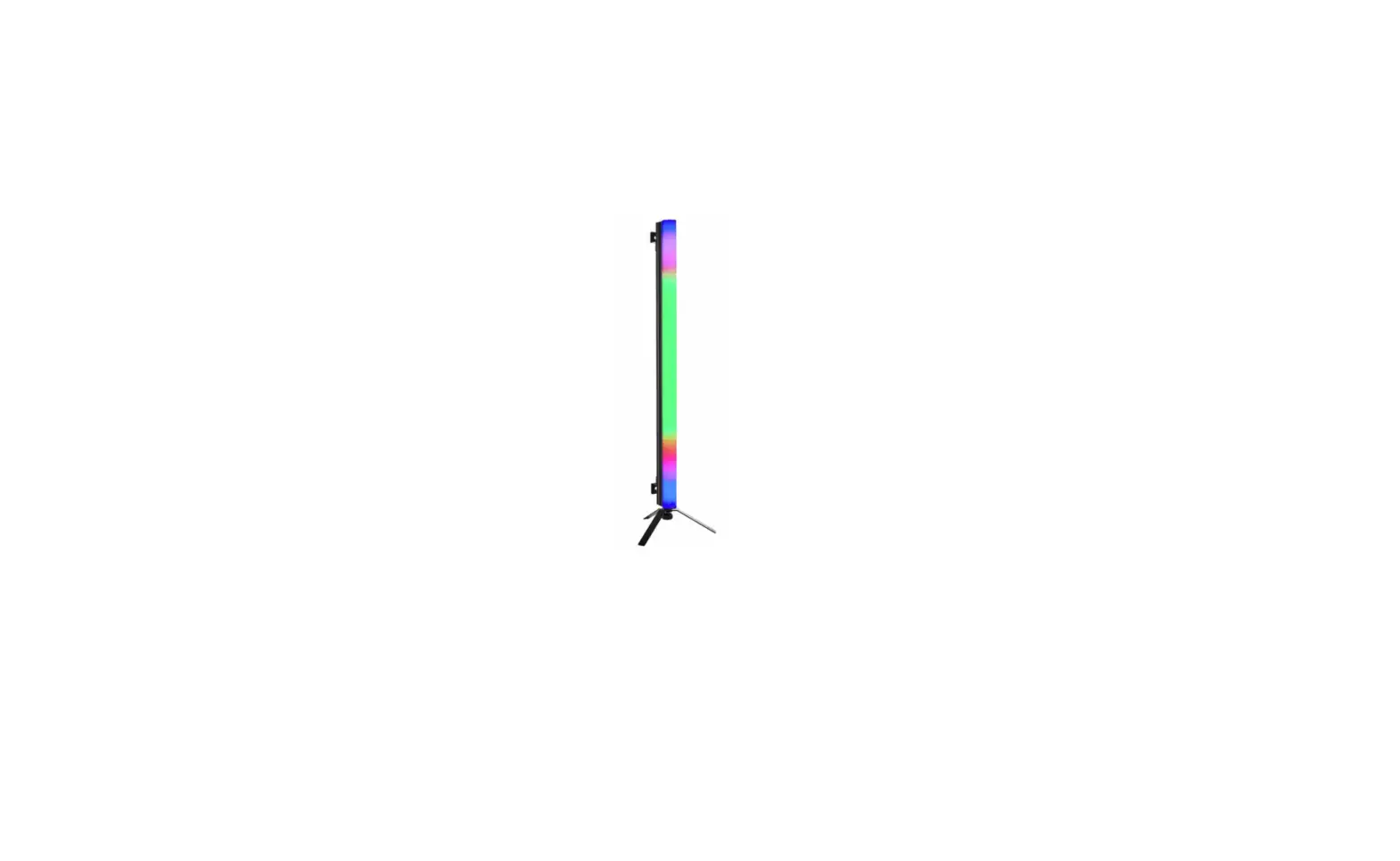

eurolite AKKU PT-100-32 Pixel DMX Tube
DANGER! Electric shock caused by short-circuit
Be careful with your operations. With a dangerous voltage you can suffer a dangerous electric shock when touching the wires. Never open the housing.
Please read these instructions carefully before using the product. They contain important information for the correct use of the product.
Every person involved with the installation, operation and maintenance of this device has to
- be qualified
- follow the instructions of this manual
- consider this manual to be part of the total product
- keep this manual for the entire service life of the product
- pass this manual on to every further owner or user of the product
- download the latest version of the user manual from the Internet
INTRODUCTION
Thank you for having chosen one of our products. If you follow the instructions given in this manual, we are sure that you will enjoy this device for a long period of time.
Product features
Battery-powered and DMX-controllable pixel tube with RGB color mixing
- Tube with 96 powerful SMD 5050 RGB LEDs TCL (3in1) for wide mood lighting
- Subdivided into 32 pixels (illumination units à 3 LEDs) which can be controlled individually by DMX
- Operation via mains connection or built-in lithium-ion battery with up to 9 hours of operating time (depending on the programme used)
- Recharging time 1.5 hours
- Auto, music, master/slave and DMX mode
- Direct color selection for 17 preset colors
- Functions: static colors, automatic color change, internal programs with variable speed, dimmer settings
- Built-in auto and music show programs
- Direct color selection for 17 preset colors
- 3, 5, 8, 48 or 96 DMX channels selectable
- Supports QuickDMX – the wireless DMX system from EUROLITE
- Built-in phantom-powered USB port for QuickDMX receivers (accessories)
- Sound control via built-in microphone with adjustable microphone sensitivity
- Addressing and setting via control panel with 4-digit LED display
- Switch-mode power supply for operation between 100 and 240 volts
- Charger included in delivery
- Metal housing with brackets for hanging as well as standing installation indoors
- Swivel mounting bracket
- Suited for installation on a floor stand (in delivery included)
- Flicker-free projection
SAFETY INSTRUCTIONS
WARNING!
Please read the safety warnings carefully and only use the product as described in this manual to avoid accidental injury or damage.
Intended use
- This product is designed to light indoor areas. It can be mounted and operated in indoor areas and is not dimmable. This device is designed for professional use in the field of event technology, e.g. on stage. It is not suitable for household lighting.
- The product is supplied with power via the built-in rechargeable battery that can be charged via the charging adapter. The charging adapter is suitable for indoor use only. Do not use it outdoors. Never expose it to rain or moisture.
- Only use the device according to the instructions given herein. Damages due to failure to follow these operating instructions will void the warranty! We do not assume any liability for any resulting damage.
- We do not assume any liability for material and personal damage caused by improper use or non-compliance with the safety instructions. In such cases, the warranty will be null and void.
- Unauthorized rebuilds or modifications of the device are not permitted for reasons of safety and render the warranty invalid.
Danger due to electricity
- The device is suitable for indoor use only. Do not use it outdoors. Never expose it to rain or moisture. Do not store it in rooms exposed to moisture.
- To reduce the risk of electric shock, do not open any part of the device. There are no serviceable parts inside the device.
- Only connect the product to a grounded wall socket that complies with the product specification voltage.
- The mains outlet must be easily accessible so that you can unplug the power adapter quickly if need be.
- Do not touch the power adapter with wet hands as it may cause electric shock.
- The mains cable must not be bent or squeezed. Keep it away from hot surfaces or sharp edges.
- Unplug the device during lightning storms, when unused for long periods of time or before cleaning.
- Do not expose the device to any high temperatures, direct sunlight, dripping or splashing water, strong vibrations or heavy mechanical stress.
- Do not place any objects filled with liquids on the device.
- Do not place any open sources of fire, such as burning candles, on or directly next to the device.
- Make sure that objects cannot fall into the device, in particular metal parts.
- Only have repairs to the device carried out by qualified service personnel. Repairs are required when the device is visibly damaged, liquid has been spilled or objects have fallen into the device; when the device has been exposed to rain or moisture, has been dropped or malfunctions occur.
Cleaning of the device is limited to the surface. Make sure that moisture does not come into contact with any areas of the terminal connections or mains voltage control parts. Only wipe off the product with a soft lint-free and moistened cloth. Never use solvents or aggressive detergents. Before cleaning, disconnect the product from the mains.
Danger to children and people with restricted abilities
- This product is not a toy. Keep it out of the reach of children and pets. Do not leave packaging material lying around carelessly. Never leave this device running unattended.
- This device may be used only by persons with sufficient physical, sensorial, and intellectual abilities and having corresponding knowledge and experience. Other persons may use this device only if they are supervised or instructed by a person who is responsible for their safety.
Warning – risk of burns and fire - The admissible ambient temperature range (Ta) is -5 to +45°C. Do not operate the device outside of this temperature range.
- The housing temperature (Tc) can be up to 55°C during use. Avoid contact by persons and materials.
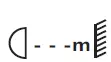
- Do not illuminate surfaces within 10 cm of the device. This value is indicated on the device by the symbol
 .
. - Do not use the device near highly flammable materials. Always place the device at a location where sufficient air circulation is ensured. Leave 50 cm of free space around the device. Never cover the air vents of the housing.
- Warning – risk of injuries
- Do not look directly at the light source. Persons with light-sensitive epilepsy may suffer from epileptic seizures or fall unconscious.
- Make sure that the product is set up or installed safely and expertly and prevented from falling down. Comply with the standards and rules that apply in your country, in particular EN 60598-2-17.
- If you lack the qualification, do not attempt the installation yourself, but instead use a professional installer. Improper installation can result in bodily injury and or damage to property.
- The manufacturer cannot be made liable for damages caused by incorrect installations or insufficient safety precautions.
- For overhead use, always secure the device with a secondary safety attachment such as a safety bond or safety net.
- Make sure that the area below the installation place is blocked when rigging, derigging or servicing the device.
- For commercial use the country-specific accident prevention regulations of the government safety organization for electrical facilities must be complied with at all times.
 .
.Caution – material damage
- This device must not be connected to the mains voltage by means of a dimmer.
- Lighting effects are not designed for permanent operation. Consistent operation breaks will ensure that the device will serve you for a long time without defects.
- Never switch the device on and off at short intervals. This will considerably reduce the service life of the device.
- If the device has been exposed to drastic temperature fluctuation, do not switch it on immediately. The resulting condensation may destroy the device. Allow the device to reach room temperature before connecting it. Wait until the condensation has evaporated.
- Please use the original packaging to protect the device against vibration, dust and moisture during transportation or storage.
- If a serial number label is affixed to the device, do not remove the label as this would make the warranty void.
Recharable batteries/batteries
- The given battery operating time depends largely on the operating mode and ambient temperature. Low temperatures will reduce the operating time considerably. Before using the device for the first time, completely charge the battery.
- The contained lithium-ion battery is subject to the Dangerous Goods Legislation requirements. The user can transport the battery by road without further requirements. When being transported by third parties (e.g.: air transport or forwarding agency), special requirements on packaging and labelling must be observed. For preparation of the item being shipped, consulting an expert for hazardous material is required. Dispatch battery only when the housing is undamaged. Tape or mask off open contacts and pack up the battery in such a manner that it cannot move around in the packaging. Please also observe possibly more detailed national regulations.
- Make sure that the poles are correct when inserting the remote control batteries. Never let batteries lie around openly as there is the danger that these can be swallowed by children or domestic animals. Immediately consult a doctor when batteries are swallowed! Leaking or damaged batteries can cause irritations when getting into contact with the skin. In this case use appropriate protective gloves. Make sure that the batteries cannot be short-circuited, thrown into the fire and be charged. There is a danger of explosion.
DESCRIPTION OF THE DEVICE
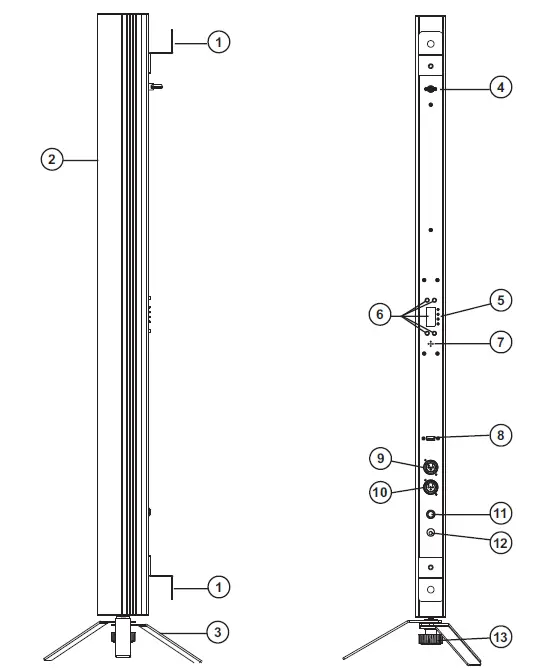
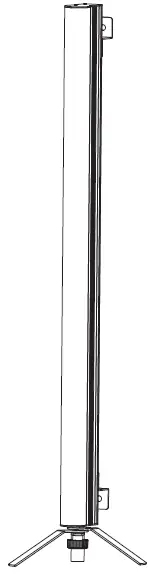
- Mounting bracket
- LED-Pixel tube, RGB
- Floorstand
- Safety eyelet
- Charge level indicator
- LED display with operating buttons
- Microphon
- USB port for QuickDMX wireless receiver
- DMX input
- DMX output
- ON/OFF switch
- Charger input
- Fixations screw stand floor
INSTALLATION
WARNING! Risk of injury caused by falling objects
Devices in overhead installations may cause severe injuries when crashing down. Make sure that the device is installed securely and cannot fall down. The installation must be carried out by a specialist who is familiar with the hazards and the relevant regulations.
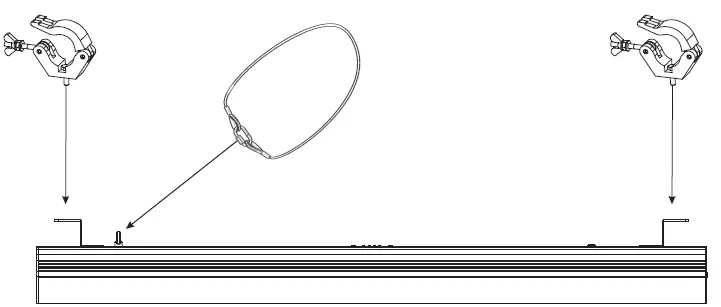
The device can be placed on the floor with a floor stand (included in delivery) or fastened to a truss or similar rigging structure. The device must never be fixed swinging freely in the room.
- The rigging structure must support at least 10 times the weight of all fixtures to be installed on it.
- Block access below the work area and work from a stable platform when installing the device.
- Use rigging hardware that is compatible with the structure and capable of bearing the weight of the device. Please refer to the “Accessories” section for a list of suitable rigging hardware.
- Secure the device with a safety bond or other secondary attachment. This secondary safety attachment must be sufficiently dimensioned in accordance with the latest industrial safety regulations and constructed in a way that no part of the installation can fall down if the main attachment fails. An appropriate eyelet is mounted on the device for fixation of the safety bond. Fasten the safety bond in such a way that, in the event of a fall, the maximum drop distance of the device will not exceed 20 cm.
- After installation, the device requires inspections periodically to prevent the possibility of corrosion, deformation and looseness.
DMX512 CONTROL
Via DMX cable
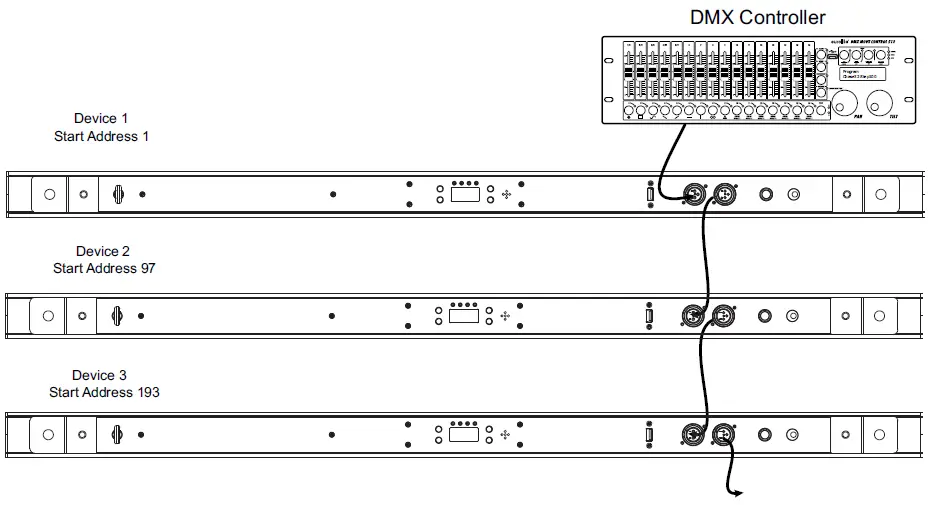
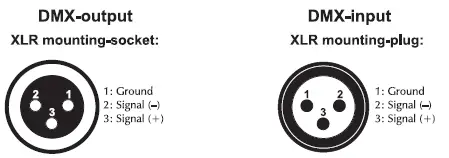
A DMX512 data link is required in order to control the device via DMX. The device provides 3-pin XLR connectors for DMX connection.
- Connect the output of your DMX controller to the DMX input DMX IN of the device with a DMX cable.
- Connect the DMX output DMX OUT of the device to the DMX input of the next unit in the chain. Always connect one output to the input of the next unit until all units are connected.
- At the last unit, the DMX cable has to be terminated. Plug the terminator with a 120 Ω resistor between Signal (–) and Signal (+) in the DMX output of the last unit.
- If the cable length exceeds 300 m or the number of DMX devices is greater than 32, it is recommended to insert a DMX level amplifier to ensure proper data transmission.
XLR connection:
Wireless DMX transmission with QuickDMX
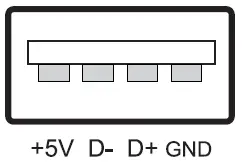
The device features an alternative DMX input for a QuickDMX receiver (sold separately). This connector allows for wireless transmission of DMX control signals to the device. The connector is designed as a USB port which provides the required 5 V operating voltage for the receiver. With QuickDMX devices, extensive cabling between the DMX controller and the device is not required.
Occupation of the USB port:
Charging the battery pack
Prior to operating the device off mains for the first time, the rechargeable battery must be fully charged. You can charge the product using the power cable.
- Switch on the device with the power button. The operating time of the battery depends on the operating mode and the ambient temperature (max. 9 hours). After the operation, switch the device off.
- For charging the battery, connect the device to a power outlet via the power adapter provided. Charging time is 1.5 hours. The device may be operated during the charging procedure.
- The device features a protective circuit for charging which prevents overload of the rechargeable battery.
However, disconnect the device from the mains after charging. Otherwise there will be a low current consumption even if the device is switched off. - The device will heat up during charging; this is normal.
- To prevent damage to the battery by deep discharge, recharge a completely discharged battery as soon as possible. Do not store the unit with the battery completely discharged and regularly recharge the battery in case of long storage.
| Maximum battery run time | Recharge time |
| 9 hours | 1.5 hours |
Battery status
The battery charge status is indicated via the battery charge indicator above the display. The battery charge status is indicated by four levels. The first light (25%) is always red. If three levels light up green and the first level red, the battery is fully charged. If only one is still green, the battery will be going flat soon. The device can be operated in this state for several minutes. Afterward a protection circuit against deep discharge automatically switches off the device.
OPERATION
Turn on the device. The display indicates the last operating mode. The operating modes can be selected by means of the display and the control buttons. All settings remain stored even if the device is disconnected from the mains. The device can be operated in stand-alone mode via the control board and the EUROLITE IR-7 remote control or in DMX-controlled mode via any commercial DMX controller, or QuickDMX per USB.
Menu structure
Press the MENU button so many times until the desired function is indicated on the display. Use the ENTER button to select the function. With the buttons UP and DOWN you can select the mode or change values. Confirm with ENTER.
| Mode | Display Function | |||
|
DMX mode |
Addr | 96CH | d001-512 | 96-channel mode and start address |
| 48CH | d001-512 | 48-channel mode and start address | ||
| 8CH | d001-512 | 8-channel mode and start address | ||
| 5CH | d001-512 | 5-channel mode and start address | ||
| 3CH | d001-512 | 3-channel mode and start address | ||
| Preset colors | Stat | S 01-17 | Constant lighting in one of 17 colors | |
| Automatic mode | Auto | Au 01-12 | Auto program | |
| Sound control | Soun | So 01-12 | Sound program | |
| Running speed in automatic mode and sound control | SPEE | SP 1-9 | Program running speed slow > fast | |
| Microphone sensitivity for sound control | SEnS | SE 1-9 | Microphone sensitivity low > high | |
| Individual color mix | Colo | r000-255 | Red 0-100% | |
| g000-255 | Green 0-100% | |||
| b000-255 | Blue 0-100% | |||
| Dimmer | diMM | dI 1-dI 9 | Total brightness dark > bright | |
|
Silent scene |
SILE | on | LEDs off during periods without music or bass-beat | |
| oFF | Program continues automatically during periods without music or bass-beat | |||
|
Behaviour in case of missing DMX signal |
Lost | blaC | LEDs go off | |
| hold | Spot holds the last received signal | |||
| FuLL | All LEDs 100% on | |||
| Stat | Pre-selected static color 01-17 | |||
| Auto | Pre-selected auto program 01-12 | |||
| Slave mode | SLAV | SLAU | Slave mode | |
| ECO PRO | ECo | on | Energy saving mode | |
| oFF | Regular mode | |||
| IR remote control | InFr | on | IR remote control on | |
| oFF | IR remote control off | |||
| Version | V1.0 | V1.0 | Current software version 1.0 | |
Stand-alone mode
Preset colors
In the Stat mode the device will constantly emit one of 17 preset colors.
- Press the MENU button so many times until Stat is indicated in the display. Confirm with the ENTER button.
- Use the buttons UP and DOWN to adjust the desired color. Confirm with the ENTER button.
Automatic mode
In automatic mode, 12 show programs are available that run at an adjustable speed.
- Press the MENU button so many times until Auto is indicated in the display. Confirm with the ENTER button. Use the buttons UP and DOWN to select the desired show program (Au01-12). Confirm with the ENTER button.
- Press the MENU button so many times until SPEE is indicated in the display. Confirm with the ENTER button. Use the buttons UP and DOWN to adjust the running speed of the program from SP 1 (slow) to SP 9 (fast). Confirm with the ENTER button.
Sound control
Via the integrated microphone the unit can perfectly reproduce the show programs to the rhythm of the music (sufficient bass provided).
- Press the MENU button so many times until Soun is indicated in the display. Confirm with the ENTER button. Use the buttons UP and DOWN to select the desired show program (So01-12). Confirm with the ENTER button.
- Press the MENU button so many times until SPEE is indicated in the display. Confirm with the ENTER button. Use the buttons UP and DOWN to adjust the running speed of the program from SP 1 (slow) to SP 9 (fast). Confirm with the ENTER button.
- Press the MENU button so many times until SEnS is indicated in the display. Confirm with the ENTER button. Use the buttons UP and DOWN to Adjust the microphone sensitivity to the volume of the music (SE 1 = low, SE 9 = high).
- If you enable the silent scene mode (on setting) in menu item SILE, the LEDs will be switched off if the volume is too low or if there is no sufficient bass beat. If you disable this mode (off setting) the LEDs remain on during periods without music.
Individual color mix
In the color mode Colo each of the 3in1 LEDs can be individually adjusted for brightness. The device will constantly emit the adjusted color.
- Press the MENU so many times until Colo is indicated in the display. Confirm with the ENTER button.
- Now the display indicates the letter R for the color and the corresponding brightness value. Use the buttons UP and DOWN to adjust the desired brightness.
- Confirm with the ENTER button. Now the color green can be set and then blue until the desired color intensity is achieved.
Total brightness
Menu diMM allows adjusting the total brightness for all stand-alone operating modes: Stat, Auto, Soun and Colo.
- Press the MENU button so many times until diMM is indicated in the display. Confirm with the ENTER button.
- Use the buttons UP and DOWN to adjust the desired brightness (dI 1 = dark, dI 9 = bright). Confirm with the ENTER button.
Behavior at missing DMX-signal
In DMX lost mode the program offers different options when no DMX signal is received.
- Press the MENU button repeatedly until the display shows the DMX lost menu. Press ENTER to confirm.
- Select the desired program with the UP and DOWN buttons (see Menu structure). Confirm with ENTER.
Interconnecting several devices (master/slave operation)
Several devices may be interconnected (max. 32). Then all slave units can be synchronized and controlled with the master unit without the need for a DMX controller. The devices must be set to the corresponding operating modes.
- Configure all slave units before connecting the master unit: Press the MENU button so many times until SLAV is indicated on the display. Confirm with the ENTER button.
- Connect the DMX output of the master unit to the DMX input of the first slave unit. Then connect the DMX output of the first slave unit to the DMX input of the second slave unit, etc. until all units have been connected in a chain. Make sure the master unit is the first in the chain. Do not connect a DMX controller to the DMX input of the master unit.
- Set the master unit to the desired operating mode. The interconnected devices will now operate in sync.
Energy-saving mode
The ECo mode offers the possibility to adjust the battery life.
- Press the MENU button so many times until ECo is indicated in the display. Confirm with the ENTER button.
- Use the buttons UP and DOWN to choose energy saving mode on or oFF. Confirm with the ENTER button
Remote control IR-7
The device must be activated for remote control. For this, set menu item INFRARED to ON. When actuating a button, always direct the remote control towards the sensor. There must be no obstacles between remote control and the sensor.
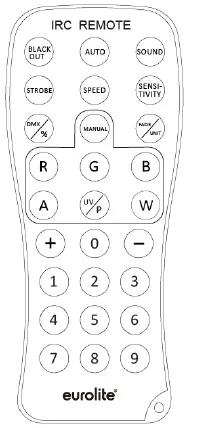
| Button | Function |
| BLACKOUT | LEDs off |
| AUTO | Automatic mode; program selection with (+)/(‒) |
| SOUND | Sound control; program selection with (+)/(‒) |
| STROBE | Strobe effect for automatic mode and sound control; flash rate setting with (+)/(‒) |
| SPEED | Running speed in automatic mode and sound control; setting with (+)/(‒) |
| SENSITIVITY | Microphone sensitivity, setting with (+)/(‒) |
| DMX | DMX mode |
| MANUAL | Color mode; select colors with R/G/B setting with (+)/(‒) |
| FADE | Color fade mode, press the FADE key again to turn off the FADE function, use (+)/(‒) to set the FADE program speed |
| 1-9 | Total brightness; 1 = dark, 9 = bright |
Notes:
- The remote control is supplied with a battery inserted. An insulating foil between the battery and the battery contacts prevents the battery from being discharged during storage. Prior to the first operation remove the foil from the battery support on the rear side of the remote control. Otherwise operation of the remote control is not possible.
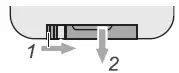
- If the range of the remote control decreases, replace the battery. For this purpose, on the rear side of the remote control press the small bar with the groove to the right and at the same time remove the battery support. For operation, one 3 V button cell type CR 2025 is required. When inserting, pay attention that the positive pole of the button cell shows upwards in the support.

- Remove the battery from the remote control as a precaution if the device is not used for a longer period of time.DMX operation
DMX operation
Setting the number of DMX channels and the DMX starting address
For operation with a controller with DMX512 protocol, the device is equipped with 96 control channels.
However, it can also be switched to a mode with 3, 5, 8, or 48 channels if different functions are required. To be able to operate the device with a DMX controller, the DMX starting address must be set. The starting address depends upon which DMX controller is being used. Please refer to the controller’s documentation.
- Press the MENU button so many times until Addr is indicated in the display. Confirm with the ENTER button.
- The display indicates 3 CH (3 DMX channels), 5 CH (5 DMX channels), 8 CH (8 DMX channels), 48 CH (48 DMX channels), or 96 CH (96 DMX channels). Use the buttons UP and DOWN to select the desired number of DMX channels. Confirm with the ENTER button.
- Now the display indicates the menu item for the DMX start address d***. Use the buttons UP and DOWN to set the address. Confirm with the ENTER button.
- The display will not flash when DMX signals are being received. If no control signals are available, the display will flash.
Note: Please make sure that you do not have any overlapping channels in order to control each device correctly and independently from any other fixture on the DMX chain. If several devices are addressed similarly, they will work synchronically.
Functions in DMX mode
3-channel mode
| Channel | Value | Function |
| CH1 | 000 – 255 | Red 0-100% |
| CH2 | 000 – 255 | Green 0-100% |
| CH3 | 000 – 255 | Blue 0-100% |
5-channel mode
| Channel | Value | Function |
| CH1 | 000 – 255 | Red 0-100% |
| CH2 | 000 – 255 | Green 0-100% |
| CH3 | 000 – 255 | Blue 0-100% |
| CH4 Master dimmer | 000 – 255 | Increasing brightness 0-100% |
| CH5 Internal programs | 000 – 000 | No function |
| 001 – 005 | Sound control (15 colors) | |
| 006 – 010 | No function | |
| 011 – 255 | Strobe with increasing speed |
8-channel mode
| Channel | Value | Function |
| CH1 Master dimmer | 000 – 255 | Total brightness 0-100 % |
| CH2 Strobe effect | 000 – 009 | No function |
| 010 – 255 | Strobe effect with increasing speed 0-100% | |
| CH3 | 000 – 255 | Red 0-100% |
| CH4 | 000 – 255 | Green 0-100% |
| CH5 | 000 – 255 | Blue 0-100% |
|
CH6 Preset colors | 000 – 009 | No function |
| 010 – 019 | Red | |
| 020 – 029 | Green | |
| 030 – 039 | Blue | |
| 040 – 049 | Yellow | |
| 050 – 059 | Magenta | |
| 060 – 069 | Cyan | |
| 070 – 079 | Dark orange | |
| 080 – 089 | Green yellow | |
| 090 – 099 | Salmon | |
| 100 – 109 | Turquoise | |
| 110 – 119 | Light Green | |
| 120 – 129 | Orange | |
| 130 – 139 | Lavender | |
| 140 – 149 | Light blue | |
| 150 – 159 | Dark blue | |
| 160 – 169 | Pink | |
| 170 – 255 | Full on | |
|
CH7 Auto- and sound programs | 000 – 009 | No function |
| 010 – 019 | Auto program 1 | |
| 020 – 029 | Auto program 2 | |
| 030 – 039 | Auto program 3 | |
| 040 – 049 | Auto program 4 | |
| 050 – 059 | Auto program 5 | |
| 060 – 069 | Auto program 6 | |
| 070 – 079 | Auto program 7 | |
| 080 – 089 | Auto program 8 | |
| 090 – 099 | Auto program 9 | |
| 100 – 109 | Auto program 10 | |
| 110 – 119 | Auto program 11 | |
| 120 – 129 | Auto program 12 | |
| 130 – 139 | Sound program 1 | |
| 140 – 149 | Sound program 2 | |
| 150 – 159 | Sound program 3 | |
| 160 – 169 | Sound program 4 | |
| 170 – 179 | Sound program 5 | |
| 180 – 189 | Sound program 6 | |
| 190 – 199 | Sound program 7 | |
| 200 – 209 | Sound program 8 | |
| 210 – 219 | Sound program 9 | |
| 220 – 229 | Sound program 10 | |
| 230 – 239 | Sound program 11 | |
| 240 – 255 | Sound program 12 | |
| CH8 Running speed for Auto- and sound program | 000 – 255 | Auto and Sound program speed, slow > fast |
48-channel mode
| Channel | Value | Function | |
| CH1 | 000 – 255 | Red 0-100% | Pixel 1-2 |
| CH2 | 000 – 255 | Green 0-100% | |
| CH3 | 000 – 255 | Blue 0-100% | |
| 000 – 255 | |||
| CH46 | 000 – 255 | Red 0-100% | Pixel 31-32 |
| CH47 | 000 – 255 | Green 0-100% | |
| CH48 | 000 – 255 | Blue 0-100% | |
96-channel mode
| Channel | Value | Function | |
| CH1 | 000 – 255 | Red 0-100% | Pixel 1 |
| CH2 | 000 – 255 | Green 0-100% | |
| CH3 | 000 – 255 | Blue 0-100% | |
| 000 – 255 | |||
| CH94 | 000 – 255 | Red 0-100% | Pixel 32 |
| CH95 | 000 – 255 | Green 0-100% | |
| CH96 | 000 – 255 | Blue 0-100% | |
CLEANING AND MAINTENANCE
The outside of the device should be cleaned periodically to remove contaminants such as dust etc. The lens, in particular, should be clean to ensure that light will be emitted at maximum brightness.
- Disconnect the device from power and allow it to cool before cleaning.
- Clean the surface with a soft lint-free and moistened cloth. Never use alcohol or solvents as these may damage the surface. Make sure that no liquids can enter the device.
- The device must be dry before reapplying power.
There are no serviceable parts inside. Do not open the housing. Do not try to repair the device by yourself as this may result in damage. Maintenance and service operations are only to be carried out by authorized dealers. Should you need any spare parts, please use genuine parts. Should you have further questions,please contact your dealer.
PROTECTING THE ENVIRONMENT
Disposal of old equipment
When to be definitively put out of operation, take the product to a local recycling plant for a disposal which is not harmful to the environment. Devices marked with this symbol must not be disposed of as household waste. Contact your retailer or local authorities for more information.
Remove any inserted batteries and dispose of them separately from the product.
You as the end user are required by law (Battery Ordinance) to return all used batteries/ rechargeable batteries. Disposing of them in the household waste is prohibited. You may return your used batteries free of charge to collection points in your municipality and anywhere where batteries/rechargeable batteries are sold. By disposing of used devices and batteries correctly,you contribute to the protection of the environment.
TECHNICAL SPECIFICATIONS
| Power supply: | 100-240 V AC, 50/60 Hz |
| 13 V | |
| IP classification: | IP20 |
| Protection class: | Class III |
| Power connection: | Mains input Coaxial power connector (M) Power supply cord with AC adapter (provided) |
| Battery/battery pack | |
| Battery pack type: | 1 x lithium ion 11.1 V, 4400 mAh, 48.84 Wh |
| Battery pack: | Battery operation up to 9h depending on program used |
| Recharging time 1.5h | |
| LED: | 96 x SMD 5050 3in1 TCL RGB (homogenous color mix) |
| Flash rate: | 0 – 20 Hz |
| DMX channels: | 3; 5; 8; 48; 96 |
| DMX input: | 3-pin XLR (M) mounting version |
| DMX output: | 3-pin XLR (F) mounting version |
| Cooling: | Passive convection |
|
Control: | Stand-alone IR remote control DMX Master/slave function Sound to light via Microphone QuickDMX via USB |
| Display type: | 4 digits 7-segment LED display |
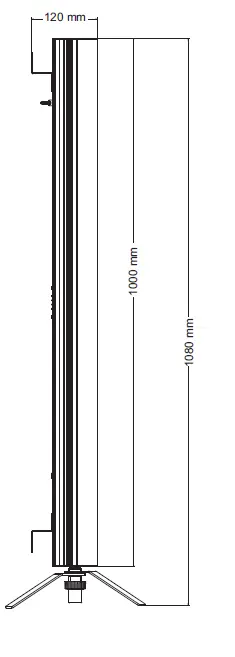
| Dimensions: | Width: 5 cm |
| Depth: 12 cm | |
| Height: 1.08 m | |
| Weight: | 2.50 kg |
| Remote control | |
| Battery: | 1 x Button cell 3.0 V CR2025 lithium manganese (provided) |
Accessories
| EUROLITE QuickDMX USB Wireless Transmitter/Receiver | No. 70064704 |
| Power supply 13V/2500mA Akku PT-100/32 Pixel DMX Tube DC | No. E6519665 |
| EUROLITE FS-4 Floorstand, Steel, black | No. 59006992 |
| EUROLITE TPC-10 Coupler, silver | No. 59006856 |
| EUROLITE Safety Bond A 3x600mm up to 5kg, silver | No. 58010310 |
| EUROLITE DMX cable XLR 3pin 3m black | No. 3022785H |
| PSSO DMX cable XLR 3pin 3m black Neutrik | No. 30227810 |
All information is subject to change without prior notice. © 28.07.2022
Eurolite is a brand of Steinigke Showtechnic GmbH · Andreas-Bauer-Str. 5 · 97297 Waldbüttelbrunn Germany
D00133036 Version 1.1 Publ. 28/07/2022
 Eurolite: Ihre Experten für Licht - Hersteller von Lichteffekten