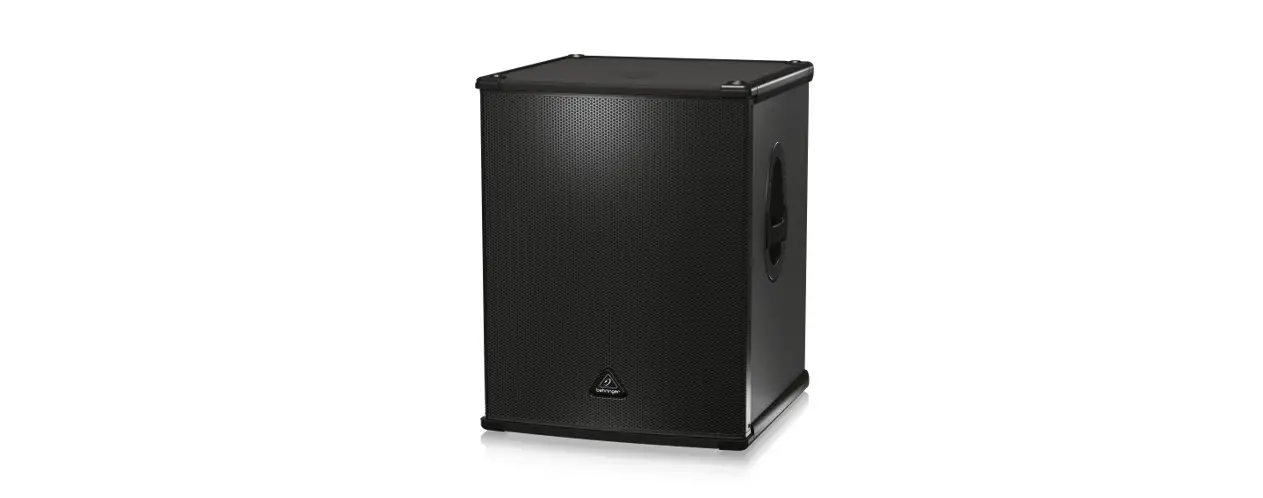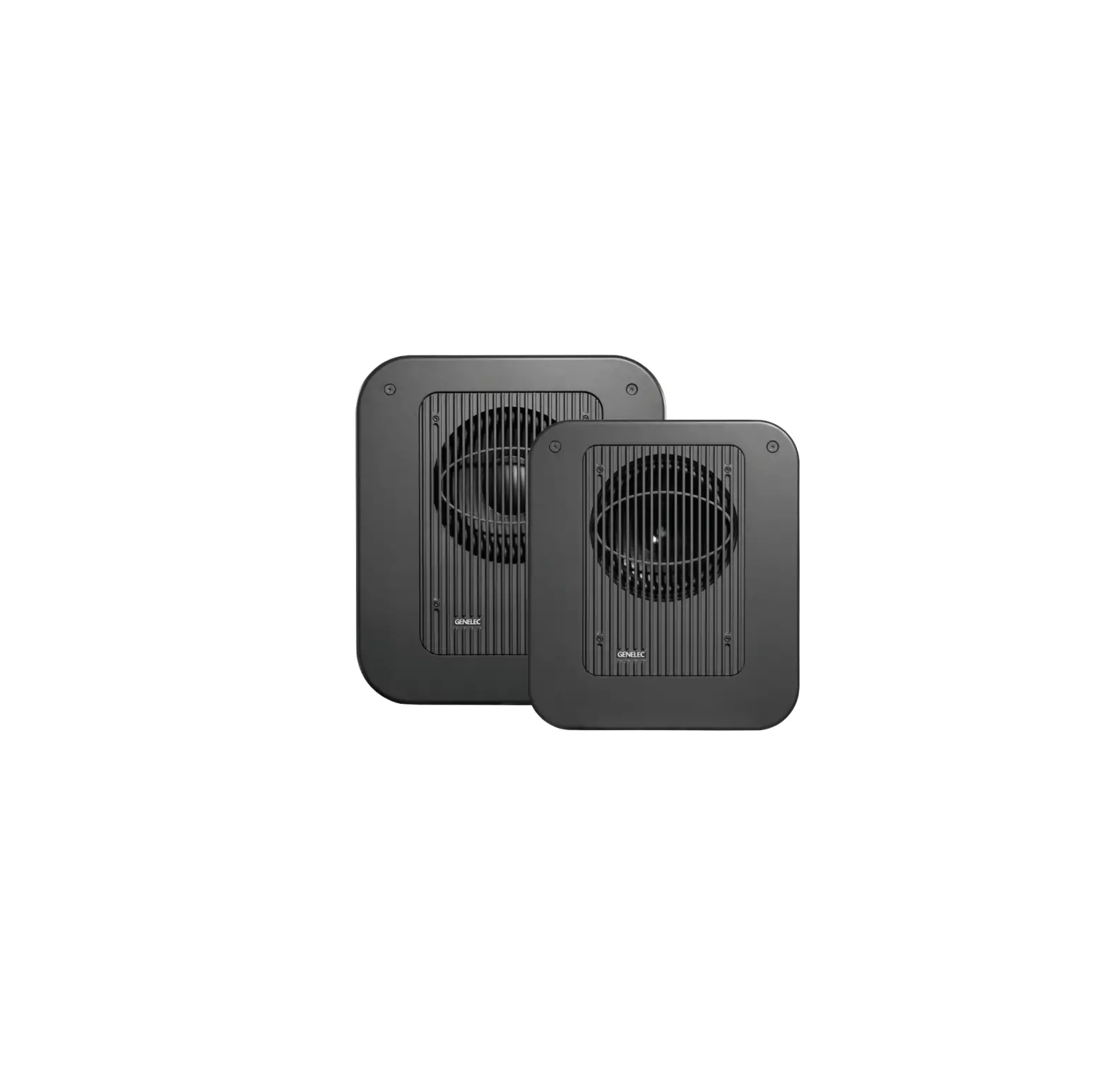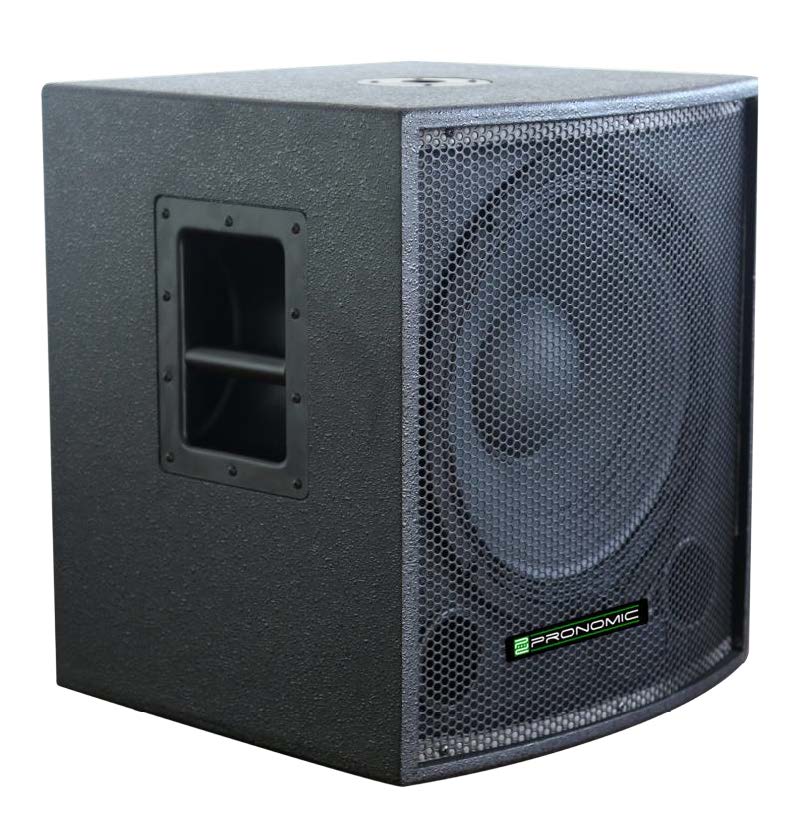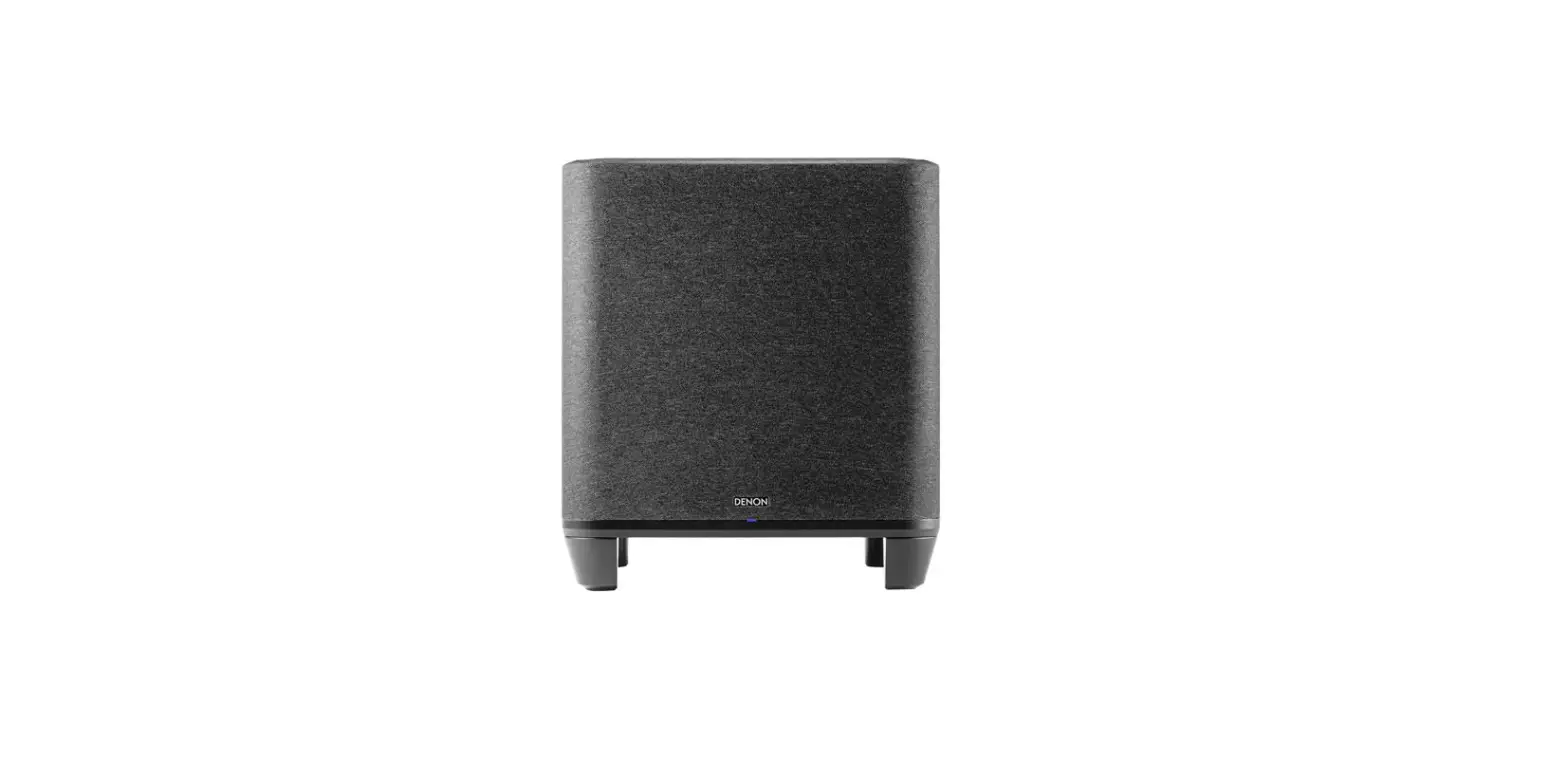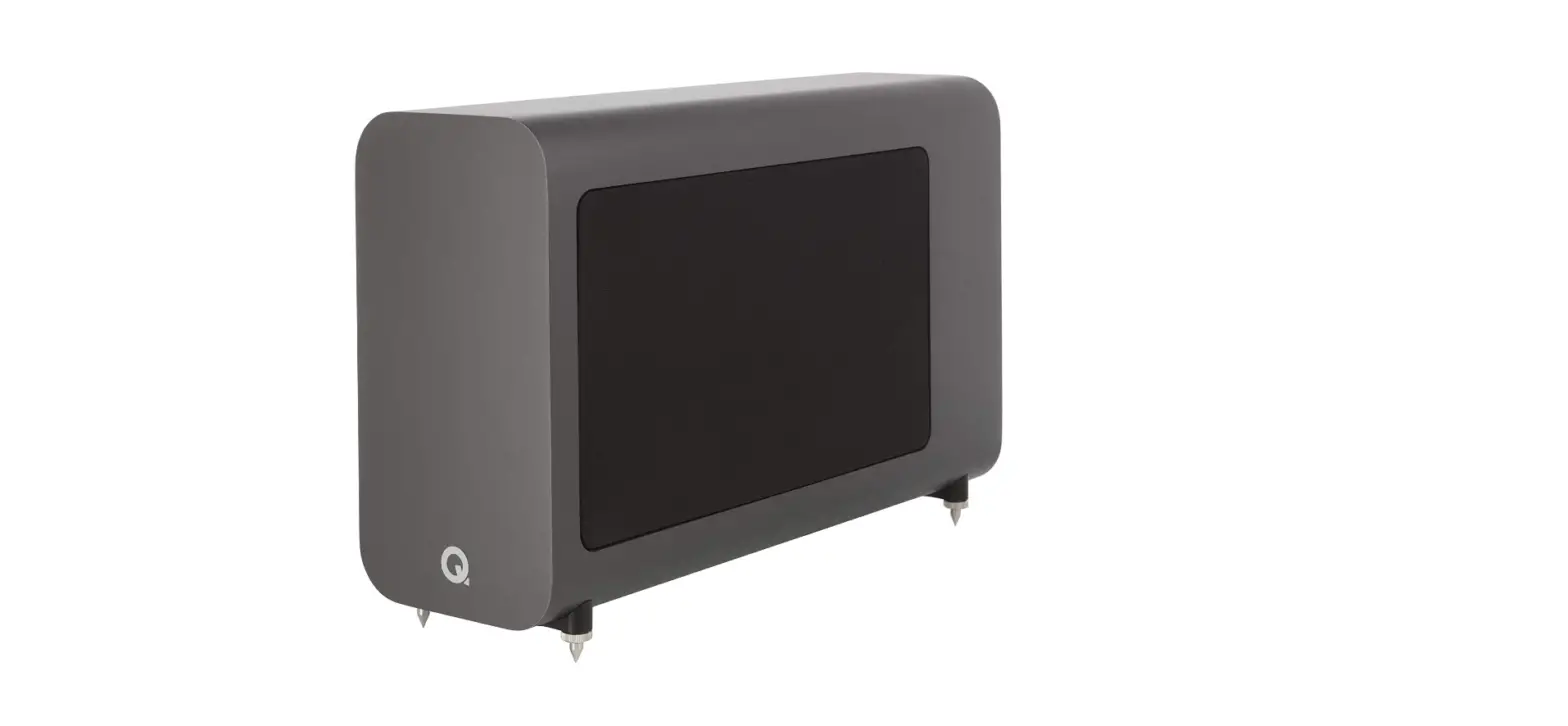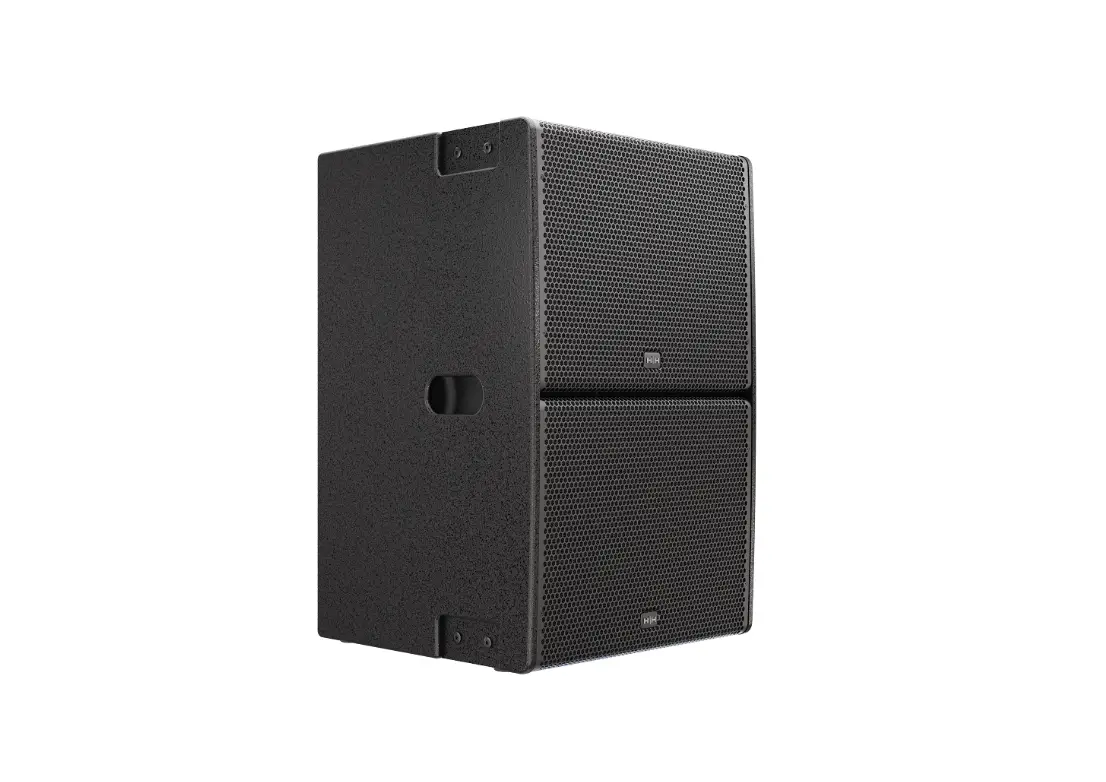

Q Acoustics 3070 Active Subwoofer

Specifications
- ENCLOSURE TYPE: Ported
- BASS UNIT (mm): 2 x 165 mm long throw
- AMPLIFIER POWER: 140W rms
- CROSSOVER FREQUENCY: 50 Hz – 150 Hz (var.)
- CABINET DIMENSIONS (W x H x D mm): 200 x 400 x 425
- WEIGHT:6 kg
Overview
All stereo and center channel speakers from the Q Acoustics 3000 and 2000i range pair well with the 3070S subwoofer. Furthermore, because it is a Q Acoustics product, the 3070S subwoofer can replicate the quick ‘twang’ of a double bass superbly, just like thrilling movie soundtracks, thanks to its twin, long-throw, 612 inch drive units and strong 140watts rms amplifier.
IMPORTANT INFORMATION – PLEASE READ CAREFULLY
- Read these instructions.
- Keep these instructions.
- Heed all warnings.
- Follow all instructions.
- Do not use this apparatus near water.
- Clean only with dry cloth.
- Do not block any ventilation openings.
Install in accordance with the manufacturer’s instructions.
- Do not install near any heat sources such as radiators, heat registers, stoves, or other apparatus (including amplifiers) that produce heat.
- Do not defeat the safety purpose of the polarized or grounding type plug. A polarized plug has two blades with one wider than the other. A grounding type plug has two blades and a third grounding prong. The wider blade or the third prong are provided for your safety. If the provided plug does not fit into your outlet, consult an electrician for replacement of the obsolete outlet.
Protect the power cord from being walked on or pinched, particularly at plugs, convenience receptacles, and the point where they exit from the apparatus.
Use only attachments/accessories specified by the manufacturer. Use only with a cart, stand, tripod, bracket, or table specified by the manufacturer, or sold with the apparatus.
When a cart is used, use caution when moving the cart/ apparatus combination to avoid injury from tip-over.
Unplug this apparatus during lightning storms or when unused for long periods of time.
Refer all servicing to qualified service personnel. Servicing is required when the apparatus has been damaged in any way, such as power supply cord or plug is damaged, liquid has been spilled or objects have fallen into the apparatus, the apparatus has been exposed to rain or moisture, does not operate normally, or has been dropped.
Warning: To reduce the risk of fire or electrical shock, do not expose this product to rain or moisture. The product must not be exposed to dripping and splashing and no object filled with liquids such as a vase of flowers should be placed on the product.
No naked flame sources such as candles should be placed on the product.
Warning: The mains power switch for the subwoofer is the device used to disconnect the unit from the mains supply. This switch is located on the rear panel. To permit free access to this switch, the apparatus must be located in an open area without any obstructions, and the switch must be freely operable.
Caution: Changes or modifications not expressly approved by the manufacturer could void the user’s authority to operate this device.
Service: Equipment for servicing should be returned to the supplying dealer, or to the service agent for your area. The addresses of the main Service Agents for the UK are listed in this manual.
Third parties: In the unlikely event that you pass this product on to a third party, include these operating instructions with the product.
Important notice to UK users
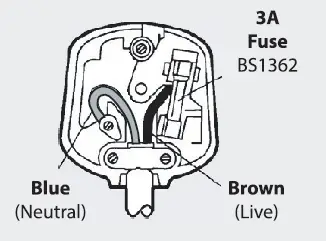
The appliance cord is terminated with a UK approved mains plug fitted with a 3A fuse. If the fuse needs to be replaced, an ASTA or BSI approved BS1362 fuse rated at 3A must be used. If you need to change the mains plug, remove the fuse and dispose of this plug safely immediately after cutting it from the cord.
Connecting a mains plug
The wires in the mains lead are colored in accordance with the code: Blue: NEUTRAL; Brown: LIVE.
As these colors may not correspond to the colored markings identifying the terminals in your plug, proceed as follows:
The BLUE wire must be connected to the terminal marked with the letter N or colored BLUE or BLACK. The BROWN wire must be connected to the terminal marked with the letter L or colored BROWN or RED.
To completely disconnect this apparatus from the AC Mains, disconnect the power supply cord plug from the AC receptacle. Where the MAINS plug or an appliance coupler is used as the disconnect device, the disconnect device shall remain readily operable.
Introduction
Thank you for purchasing Q Acoustics.
This manual is intended to take you through setup and installation and will help provide optimum performance from the product.
Please read the instructions, important safety information and warnings carefully before installation and use, to ensure the safe and satisfactory operation of this product.
We hope you enjoy the Q Acoustics experience.
The Q Acoustics 3000 series is a range of loudspeakers designed to meet the highest expectations of dedicated 2-channel audiophiles and discerning movie enthusiasts.
The range comprises:
3010: Compact bookshelf speaker with a 100 mm bass driver.
3020: Bookshelf speaker with a 125 mm bass driver.
3050: Floorstander with two 165 mm bass drivers
3070S: 140 Watt active subwoofer with 2 x 165 mm drivers.
3090C: Centre channel with 2 x 100 mm bass drivers.
3050 speakers are bi-wireable. All the loudspeakers may be operated close to TV monitors with no ill-effects with the exception of the 3070S which should not be operated within 500mm of TV screens monitors or other magnetically sensitive equipment. Plasma and LCD screens are unaffected.
Before making any connections to your loudspeakers make sure that all active units in your system are switched off at the mains.
When switching on your sound system or changing input sources, set the main volume control at a low level. Turn up the level gradually.
Never play your sound system at full volume. The position of the volume control is deceptive and does not indicate the power level of the system. Using very high volume settings may damage your hearing. Do not connect your loudspeaker terminals to the mains supply.
Do not expose your loudspeakers to excessive cold, heat, humidity or sunlight.
If you play your loudspeakers without their grilles on, be careful to protect the drive units from damage. Do not use makeshift stands. Fit the Q Acoustics dedicated stand according to the instructions and using any fixings provided. Your dealer will advise you.
Do not dismantle the loudspeaker. You will invalidate the warranty.
Unpacking your loudspeakers
Unpack the speakers fully. Lift the speakers from the cartons by holding the cabinets. Do not touch the driver units or use the protective bags to lift them. The 3050 and 3070S are heavy – get assistance to lift them if necessary.
When maneuvering loudspeakers, do not drag them across the floor as this may cause damage – lift them before moving them.
In the carton you will find: The loudspeaker/s and this product manual.
In addition the packing for the following models contains:
3050: Rear stabilizer and spike covers for each speaker. An Allen key to adjust the spikes once fitted.
3070S: A mains power cord or cords, spikes and spike covers.
Check the product carefully. If any items are damaged or missing, report this to your dealer as soon as possible.
Retain the packing for future transport. If you dispose of the packing, please do so following all recycling regulations in your area.
Preliminaries
Unpack the subwoofer following the guidelines given earlier. Before connecting the subwoofer please make sure that all the electronics in your system are switched off at the mains.
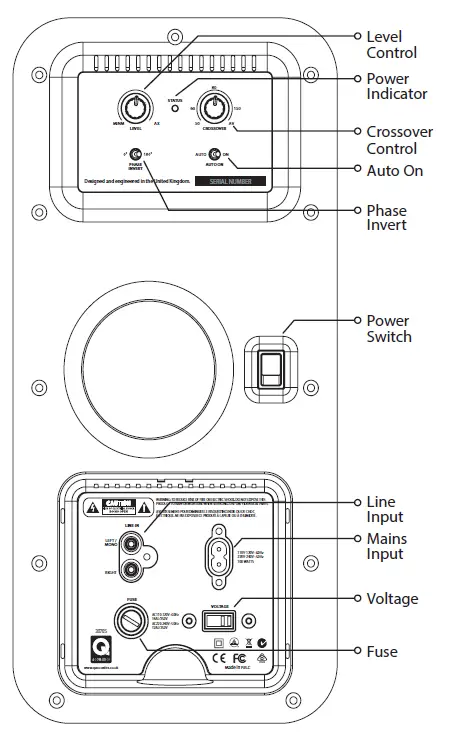
The subwoofer should be set to the voltage in your area. Please check before connecting to the mains supply. If you move to an area with a different voltage, be sure to set the voltage selector to the right setting before connection to the mains supply!
Positioning the Subwoofer
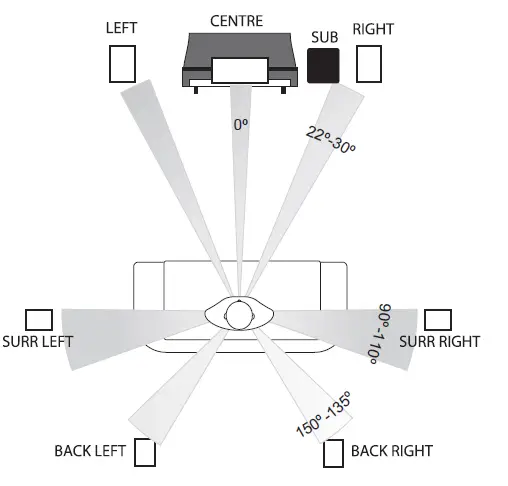
Bass frequencies are substantially omni directional. Although this means that you can position the subwoofer almost anywhere, the stereo image will still benefit by positioning the subwoofer level with the front loudspeakers and as central to the listening position as possible. This may not be feasible in a multichannel system. If you place the subwoofer close to a wall the bass will be re-enforced therefore in some locations the bass may be boomy and indistinct.
The subwoofer should be positioned close to a mains power source. Do not use extension cables. Purchase a longer power cord if necessary.
The Power Switch is the means of disconnecting this apparatus from the mains and is mounted on the rear panel. There should be ample free space between the rear of the cabinet and any wall or other object to allow free unrestricted access to this switch.
When positioning the subwoofer ensure the floor is sound with no loose floorboards etc. The air movement from the subwoofer at high volumes is substantial – do not place it close to soft furnishings or objects that may rattle. Do not place objects of any kind on the unit.
Operation
Setting Up and Use
Auto On: This feature enables you to switch the main system on and off without having to remember to switch the subwoofer on and off as well.
If there is no signal input, after a few minutes the subwoofer will automatically power down into Standby mode. This is indicated by the POWER light on the rear panel changing to red. As soon as the subwoofer senses an input it will automatically switch into operational mode and the power light will again glow green. Some types of music and some TV channels have very little low frequency information in the audio signal in which case the subwoofer may not automatically switch out of standby even though sound is coming from the other speakers in the system. If this happens then the Auto On switch can be switched to ON making the sub-woofer stay on at all times.
Although the subwoofer can be safely left in standby mode indefinitely, if you are going to be absent from home for a long period we advise that the unit is switched off at the Power Switch.
The 3070S Subwoofer also has a fail safe heat protection system. If the amplifier overheats it will shut down momentarily and then resume operation. If this occurs check that the ventilation holes on the control panel are not covered and that the subwoofer is not placed too close to a source of heat such as a radiator.
Multi-Channel AV System
For Stereo System connection, see next section.
Connections
Standard Connection is via the Line level RCA phono Inputs. For a typical AV system set-up you will need a single RCA phono interconnect. As this cable is likely to be quite long, make sure you get a good quality fully screened cable. Your Q Acoustics dealer will be happy to supply you with a suitable interconnect.
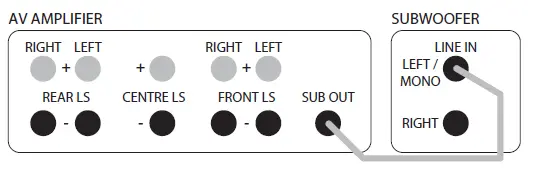
Connect the SUBWOOFER OUTPUT on the AV amplifier to the L/Mono Line input on the subwoofer, pushing the plugs firmly home to ensure a good contact.
Setting Up
Check that all system connections are properly and securely made. Ensure that the subwoofer is switched off.
Set the controls to the following default settings:
Level: Approximately half
Crossover: Fully clockwise (AV setting)
Phase invert: 0°
Auto on: AUTO or ON
Plug the supplied power cord into the subwoofer and then into the AC supply socket. Switch on the power at the supply socket and then switch the power switch on the subwoofer to ‘ON’. The POWER light on the subwoofer amplifier panel will glow and the subwoofer is operational.
Check the settings on your AV amplifier to make sure that the sub-woofer is set to ‘ON ‘or YES. The subwoofer level on the AV amplifier should be set at its default position or 0dB. You should already have set the speaker sizes and positions for all the other speakers in your system. If you have the option to set the crossover frequency on the other channels make sure this is set appropriately to your speakers. Set the distance (or delay) setting that is correct for the subwoofer position you have chosen.
Play some stereo music you are familiar with and experiment with the Phase invert setting and level control until you hear a seamless blend between the front speakers and the subwoofer. If you can hear the subwoofer standing out it’s too loud!
Always bear in mind that the human ear sensitivity to bass varies enormously with the volume level, hence the need for a wide range of programme material and sound levels.
Multi-Channel AV System
Many Home Theatre amplifiers have distance settings which build in a time delay depending on the distance of the speaker from the optimum listening position; the sweet spot. The location of the subwoofer is one of the most important aspects of any Home Theatre system therefore getting these settings correct will give a significant improvement to the system’s overall performance.
Do not adjust to more than +/-0.5m from the original measured distance. If it has not been possible to discern any improvement in the tone, try swapping the phase invert switch position on the 3070S Subwoofer and repeat the exercise. Then re-check the sound with some stereo music again to make sure an improvement has been noticed.
If the 3070S Subwoofer is subsequently moved relative to the other speakers reset the amplifier subwoofer distance setting to the new value and repeat the exercise. Once you are happy the optimum setting has been achieved. The sound should be full and warm and integrated with no individual speaker being dominant.
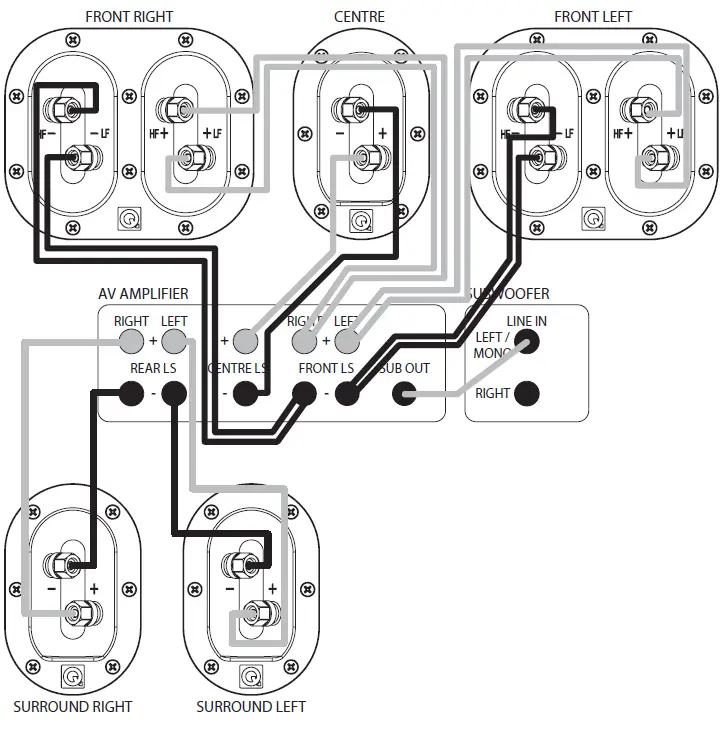
The Front Speakers can be bi-wired. This is the preferred mode of connection provided the crossover network supports bi-wiring. The Centre and Surround channel speakers are conventionally wired. 6.1 and 7.1 connections are the same as 5.1 connections with the addition of the extra effects channel/s.
When running loudspeaker cables be especially careful not to run them across open floor areas where they could be a source of danger. Run loudspeaker cables around room boundaries whenever possible. Line level signal cables should be run away from mains cables. Never run line level signal cables parallel to power cables especially on long runs.
If the subwoofer is triggered on by appliances switching on and off, re-route the input signal cable before taking further measures.
Placement: The Front and Centre speakers should be in line. If this is not possible, consult your processor manual for guidance on adjusting relative center / front delay times. If you have a 5.1 system, the listening seat can be closer to the rear wall. As always, be prepared to experiment.
Bass Management
AV processors offer the choice of ‘Large’ or ‘Small’ for the speakers. If you choose ‘Large’ the speaker receives the full frequency. Choose ‘Small’ and the bass is sent to the Subwoofer. We recommend you choose ’Small’ for the 3090C and the 3010 and 3020 wherever they are used in the system. The 3050 should be set to ‘Large’. The subwoofer option should be enabled (set to ‘ON’ or ‘YES’)
Levels: When the basic system parameters have been established, put your processor into the ‘setup’ routine. Set up each individual speaker so that the level is the same at the listening position as all the others. If your processor enables you to adjust the delay times, follow the instructions closely as this will profoundly affect the final result. When you play a movie you may think the rear channels are too soft – they aren’t! You may however have to adjust the subwoofer level both at the processor and at the subwoofer. Once set, do not re-adjust these levels.
LFE: The LFE channel sends all the bass sound effects to the subwoofer. If speakers are set to ‘Small’ , system bass from those channels is also sent to the subwoofer. If you play the system at extreme levels and / or have the subwoofer level set too high you may overdrive the subwoofer with unpleasant sonic results. If this occurs, reduce the level immediately.
Phase: If your speakers are incorrectly wired the bass will be blurred and thin. In this case, check the wiring carefully. If your speaker wire has a tracer along one core, consistently use the striped core to connect all the positive (RED) terminals. In this way the system will always be in phase.
Always follow the instructions in your AV processor manual!
Connections
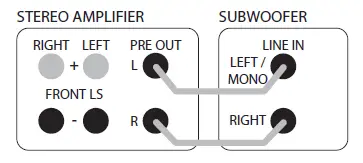
Connect a good quality stereo RCA phono lead to the L and R inputs on the 3070S and connect the other end to the PRE OUT sockets on the rear of the amplifier.
The subwoofer will automatically add the L and R signals together so that no information is missed. If you wish to use two subwoofers then you can run a single RCA phono cable to each subwoofer and thus have a stereo subwoofer system.
Ensure that the L output on the amplifier goes to the left hand side subwoofer and R to the right hand side to preserve the stereo image of the main speakers. The subwoofers will need to be placed close to their respective main speakers and the set-up will need to be done separately for each subwoofer.
Setting Up
Check that all system connections are properly and securely made. Ensure that the subwoofer is switched off. Set the controls to the following default settings:
Level: Approximately half
Crossover: Minimum (50Hz) for large floor standers and halfway (100Hz) for bookshelf or small speakers
Phase invert 0o
Auto on AUTO or ON
Plug the supplied power cord into the subwoofer and then into the AC supply socket. Switch on the power at the supply socket and then switch the power switch on the subwoofer to ‘ON’. The POWER light on the subwoofer amplifier panel will glow and the subwoofer is operational.
Play some music you are familiar with and experiment with the Phase invert setting and level control until you hear a good blend between the front speakers and the subwoofer. If you can hear the subwoofer standing out it’s too loud!
Always bear in mind that the human ear’s sensitivity to bass varies enormously with the volume level, hence the need for a wide range of programme material and sound levels. Once you are happy with the sound you can then fine tune the performance by using the remaining controls.
Crossover: The crossover control determines at what frequency your subwoofer output begins to rapidly diminish. This should be set so that it corresponds with the frequency your main speakers begin to produce a strong output by themselves. The adjustment allows for a smooth handing over between subwoofer and main speaker output. If this setting is too low there will be a ‘hole’ in the sound where certain frequencies are weak, conversely if it is too high there will be an exaggeration of certain frequencies producing an overpowering bass. You can get an idea of the correct setting from your main speakers specification sheet, look for the lowest frequency that the speaker produces (the “-3dB point”) under the “Frequency response” heading. Room positioning has a dramatic effect on low frequency reproduction of both the subwoofer and your main speakers so don’t be worried if you find you require a setting which does not correlate with the specified low frequency point of your main speakers.
Care and Cleaning
Cabinet Care
Clean cabinets with a dry cloth. Do not use solvent based cleaning materials. If the cabinets become stained, remove the stain with a cloth lightly moistened with water, white spirit or isopropyl alcohol depending on the stain. Then lightly buff with a cloth to remove any residue of the cleaning agent. Never use abrasives of any kind.
Grilles
Lightly brush out grilles with a soft brush.
Drive Units.
Drive units are best left untouched as they are easily damaged when exposed.
Warranty
Q Acoustics loudspeakers are warranted free of defects in materials and workmanship as follows:
Passive Loudspeakers: 5 years from the date of purchase
Active Loudspeakers & Subwoofers: 2 years from the date of purchase
During the warranty period Q Acoustics will, at its option, repair or replace any product found to be faulty after inspection by the company or its appointed distributor or agent.
Misuse and fair wear and tear are not covered by warranty.
Within the warranty period faulty units should be returned to the supplying dealer. Q Acoustics does not support an International Warranty and if it is not possible to return to the supplying dealer please contact Q Acoustics for advice.
Items that cannot be taken in for repair must be sent carriage paid, preferably in the original packing, and with the proof of purchase. Damage sustained by goods in transit to the repair center is not covered by warranty. Return carriage for items covered by the warranty will be paid by Q Acoustics or their distributor or agent as appropriate.
This warranty does not in any way affect your legal rights.
For service information In other countries contact: [email protected]
Q ACOUSTICS
Armour Home Electronics Ltd.
Stortford Hall Industrial Park
Bishops Stortford, Herts, UK
CM23 5GZ
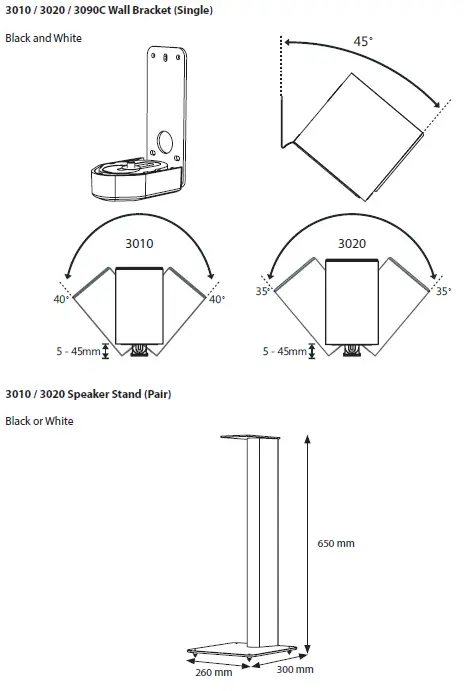
Q Acoustics 3000 Series Accessories
FREQUENTLY ASKED QUESTIONS
Yes, it works with 220V.
Particularly well-known for producing high-quality speakers at affordable prices is British Q Acoustics.
The British Hi-Fi audio brand’s single focus from the beginning was to create incredibly popular best-in-class loudspeakers that provide exceptional audio performance.
Q refers to a speaker’s “quality factor.” It is a phrase used by speaker designers to describe a speaker’s level of damping; it is not a measurement of damping. The damping ratio’s inverse is known as Q.
The better the filter, the higher the Q; the closer to perfection the filter is, the smaller the losses.
Yes, the Q factor changes with frequency.
A self-contained speaker and amplifier make up this kind of subwoofer. Both the speaker and amplifier are contained in the same enclosure for optimum performance.
Despite all of the benefits of passive subwoofers, active subwoofers are still more frequently used.
The fundamental distinction between a powered and passive subwoofer is that the former doesn’t require an amplifier to play low-frequency music.
Yes, as long as your subwoofer includes an auto standby mode, you can leave it on constantly.
A subwoofer can last anywhere from 5 to 14 years.
An 8″ subwoofer will deliver clear, precise bass. Some 8-inch subwoofers have excellent sound quality; some people could even compare them to budget 10″ or 12″ subwoofers.
Yes! Although break-in usually sounds different from how your speakers will sound once they are broken in, if you take care of them and pay attention during this process, you can get excellent results.
They require a significant break in time of 20–24 hours. Overnight, you can set it up with a strong, clear signal. You are now prepared to install and continue your journey.