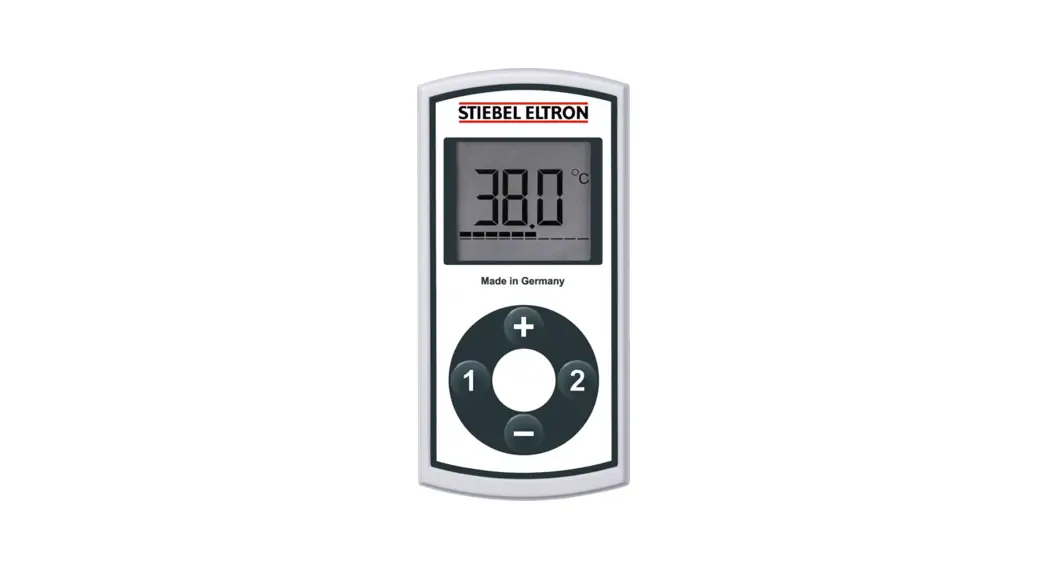
 FFB 4 EU Wireless Remote Control
Installation Guide OPERATION AND INSTALLATION
Wireless remote control
» FFB 4 EU » FFB 4 Set EU
» FFB 4 AP » FFB 4 Set AP
General information
OPERATION
The chapters “Operation” and “Installation” are intended for both users and qualified contractors.
The chapter “Installation” is intended for qualified contractors. Note
Note
Read these instructions carefully before using the appli-ance and retain them for future reference.
Pass on the instructions to a new user if required.
1.1 Relevant documents Observe the operating and installation instructions of the instantaneous water heater.
Safety
2.1 Intended use
The wireless remote control is intended for domestic use. It can be used safely by untrained persons. The appliance can also be used in non-domestic environments, e.g. in small businesses, as long as it is used in the same way.
The wireless remote control allows the relevant instantaneous water heater to be operated remotely.
Any other use beyond that described shall be deemed inappro-priate. Observation of these instructions and of the instructions for any accessories used is also part of the correct use of this appliance.
2.2 General safety instructions
We guarantee trouble-free function and operational reliability only if original accessories and spare parts intended for the appliance are used.
Appliance description WARNING Injury
The appliance may be used by children over 3 years of age and persons with reduced physical, sensory or men-tal capabilities or a lack of experience and expertise, provided that they are supervised or they have been instructed on how to use the appliance safely and have understood the potential risks. Children must never play with the appliance. Children must never clean the ap-pliance or perform user maintenance unless they are supervised.Note
The wireless remote control is powered by a lithium but-ton cell. Remove spent batteries. Leaking batteries cause damage which is excluded from any warranty. Non-rechargeable batteries must not be recharged. Never use rechargeable batteries. If the appliance is not used for a prolonged period, re-move the battery (see chapter “Troubleshooting / Replac-ing the battery in the wireless remote control”).
2.3 Test symbols
See type plate on the appliance. Information for Australia/New Zealand: Installation complies with standard AS/NZS 3500.4
2.4 EU Declaration of Conformity Note
FFB 4 EU I FFB 4 Set EU: STIEBEL ELTRON hereby declares that the radio equipment type complies with Directive 2014/53/EU. The full text of the EU Declaration of Con-formity can be found at the following internet address: www.stiebel-eltron.de/downloads
Appliance description
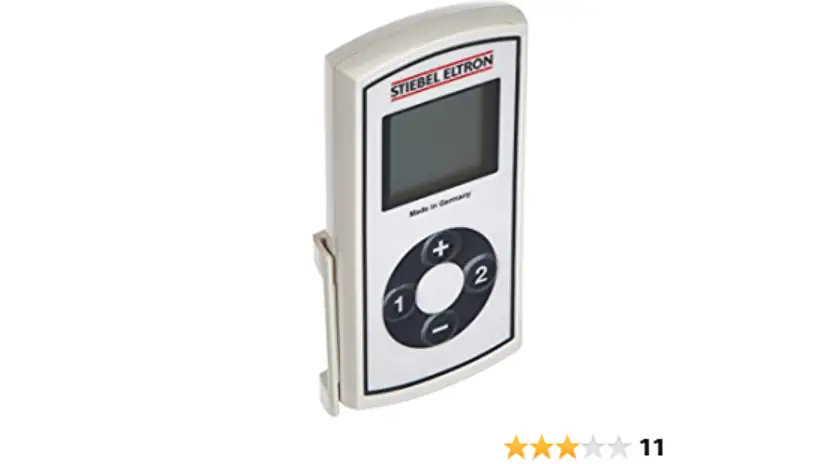
The wireless remote control allows the relevant instantaneous water heater to be operated remotely. The instantaneous water heater can be operated via either the wireless remote control or the appliance programming unit. Programming units, mini wireless remote controls and several wireless remote controls can be operated simultaneously. The wireless remote control can be sited anywhere using a wall mounting bracket.
3.1 Operation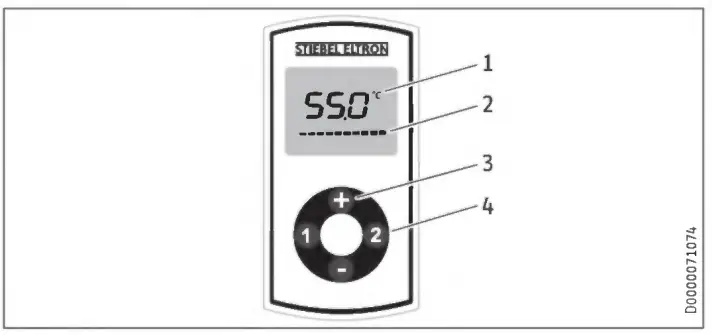
- Display
- Progress bar displayed during data transmission
- Temperature setting OFF, 20 °C – 60 °C (if the instantaneous water heater is used to supply a shower) in 0.5 °C increments using the “+” and “-” keys
- Memory keys “1” and “2”Shortly after the last setting has been made, the wireless remote control goes into energy saving mode and the display is switched off.
The most recently transmitted temperature is still retained in en-ergy saving mode.
Function of memory keys “1” and “2”
When either of the memory keys are pressed, the temperature saved for them is briefly displayed. If no other key is pressed within the next second, the temperature displayed is directly transmitted.
Function keys “+” and “s”
When the “+” or “-” keys are pressed, the most recently transmitted temperature is briefly displayed. If no other key is pressed within the next second, the temperature displayed is directly transmitted.
You can change this temperature in 0.5 °C steps by pressing any other key.
The temperature can be adjusted between OFF, 20 °C and 60 °C, although if a temperature limit is set in the appliance, this remains effective.
Holding down “+” or “-” changes the temperature display in 0.5 °C steps until the key is released again.
When the key is released, the required temperature is transmitted.
The required temperature is transmitted approx. 0.5 seconds after the last key is pressed. The progress bar on the display indicates that data is being transmitted.
► To shut down the heating system, set a temperature of 20 °C. Then press “-” again.
Saving temperature to memory keys
► Set the required temperature using the “+” and “-D keys on the wireless remote control.
► Press memory key “1” or “2” for 2 seconds. The temperature display flashes once to confirm. You can assign the memory keys individually for each wireless remote control / program-ming unit.Note
When activating the anti-scalding protection in the in-stantaneous water heater, you can only set the DHW tem-perature to the set anti-scalding protection temperature. Higher temperature settings are not implemented.
3.2 Dynamic anti-scalding protection
Dynamic anti-scalding protection automatically assigns prior-ity for setting the maximum temperature to the first wireless remote control or programming unit at which a temperature is set. This priority is available for 2 minutes or until 2 minutes after the end of the current draw-off. After this, the priority is automatically disabled.
Whilst the priority is enabled, the temperature can be reduced or increased to a maximum of 43 °C by other programming units. CAUTION Burns
SCC For operation with a shower, please observe the infor-mation in the instantaneous water heater description (chapter “Installation / Safety / Shower operation”).
3.3 Changing the battery Material losses
► Remove the old battery. Any damage caused by a leaking battery is excluded from the warranty.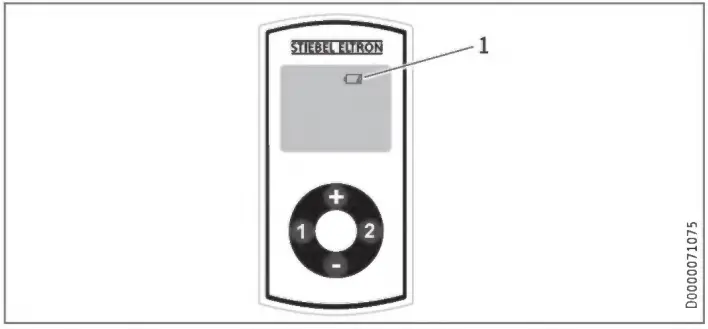 1 Battery change symbol
When the battery symbol illuminates, change the battery in the wireless remote control. It may also be necessary to change the battery if the range of the wireless remote control is reduced.
Cleaning, care and maintenance
► Open the wireless remote control enclosure by unscrewing the 4 screws on the underside.
► Change the battery; for battery type, see chapter “Specifica-tion / Data table”.Note
The battery positive pole must point away from the board.
► Put the enclosure back together and re-insert the screws; maximum torque 40 Ncm. When reassembling the casing, do not damage the all-round gasket.
The saved values for keys “1” and “2” are retained during the battery change.
Battery disposal Never dispose of batteries with domestic waste. Spent batteries may contain noxious substances that can be det-rimental to the environment and human health. Dispose of batteries through your dealer or via a central recycling point for special waste.
Cleaning, care and maintenance
► Never use abrasive or corrosive cleaning agents. A damp cloth is sufficient for cleaning the appliance.
Troubleshooting
| Problem | Cause | Remedy |
| The required tern- perature is not being reached. | Internal anti-scalding protection is enabled in the instantaneous water heater. | Ask a qualified contracfor to deactivate the an-ti-scalding protection. |
| “Con” occasionally ap- pears on the display. | The wireless remote con- trol is outside its range. | Reduce the distance between the wireless remote control and the appliance. Resend the temperature request. |
| “Con” frequently appears on the display. | The battery is at the end of its capacity. | Change the battery (see chapter “Appliance description / Changing the battery”). |
If you cannot remedy the fault. notify your a ualified contractor.
To facilitate and speed up your request, provide the number from the type plate (000000-0000).
The type plate is located at the back of the wireless remote control.
Safety
6.1 General safety instructions
We guarantee trouble-free functional and operational reliability only if original accessories and spare parts intended for the ap-pliance are used.
6.2 Instructions, standards and regulationsNote
Observe all applicable national and regional regulations and instructions.
Appliance description
Standard delivery Standard delivery of the wireless remote control includes:
– Battery (inside device)
– Wall mounting bracket with adhesive pad
– For FFB 4 Set EU and FFB 4 Set AP only: Wireless module
Installat ion
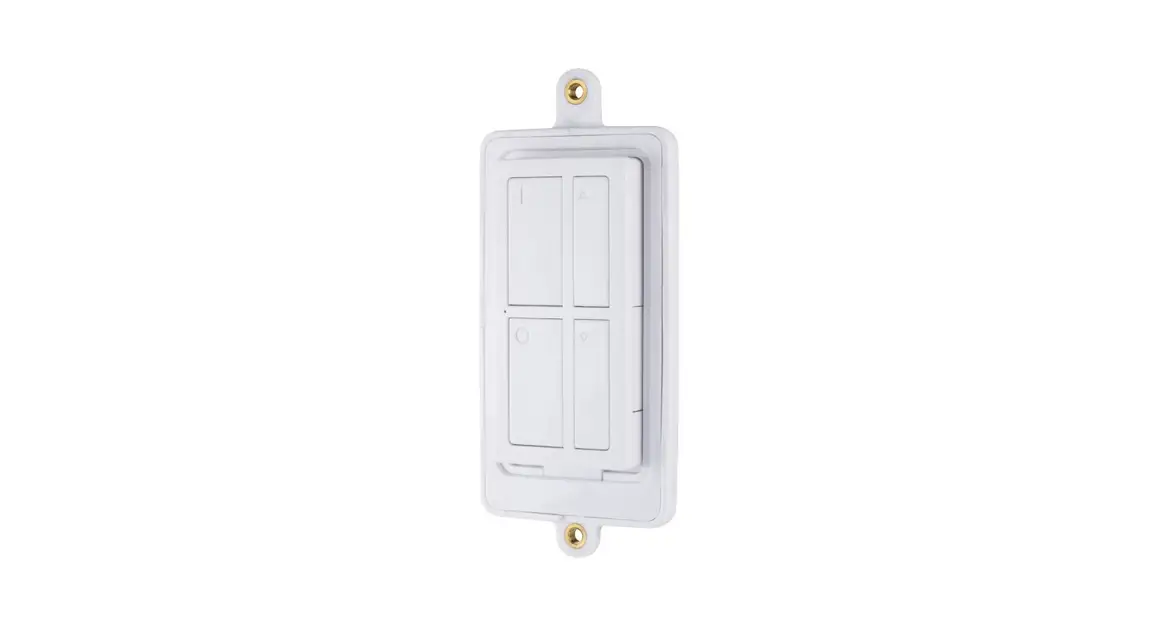
The wireless remote control with wall mounting bracket is suitable for installation on even walls (for the range within a building, see chapter “Specification / Data table”). The wall mounting bracket can be fixed to smooth walls with the adhesive pad. Alternatively, it is possible to attach the wall mounting bracket with screws.
8.1 Installing the wireless module in the instantaneous water heater WARNING Electrocution
Only qualified contractors are permitted to open the ap-pliance and work on the open appliance. Material losses
Electrostatically sensitive components
Observe the generally applicable guidelines for handling electrostatically sensitive corn ponents and take suitable protective measures.
► Isolate the instantaneous water heater from the power supply.
► For details on opening and closing the instantaneous water heater, see the operating and installation instructions of the instantaneous water heater.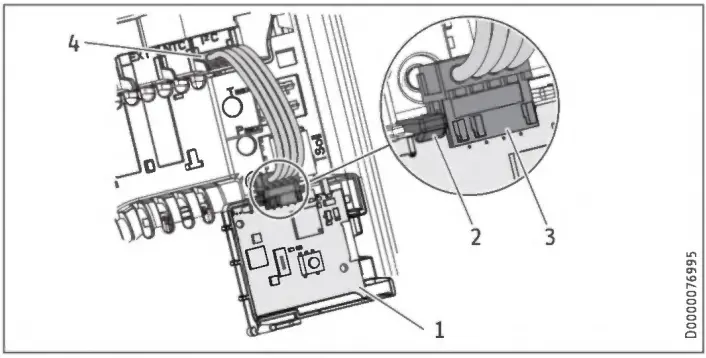
- Wireless module PCB
- Locking tabs
- Wireless module plug position
- Appliance PCB plug position
► Mount the wireless module PCB in the retainer provided. Insert the wireless module PCB into the groove and pivot downwards. The locking tab must audibly click into place.
► Attach the connecting cable (plugs as shown).
► Please see chapter “Pairing the wireless remote control” for further information on how to proceed. Depending on the type of pairing with the instantaneous water heater, the ap-pliance cover may need to be fitted in the next step.
Pairing the wireless remote control
In order to use the wireless remote control, it needs to be paired with the appliance.
To do this, it is necessary to initiate a pairing process at the ap-pliance programming unit or wireless module and atthe wireless remote control within 30 seconds.Note The appliance power supply must not be switched off during this time.
9.1 Pairing the wireless remote control via the programming unit of the instantaneous water heater when the appliance cover is closed
► Initiate the pairing process at the instantaneous water heater using the programming unit. The procedure is described in the operating and installation instructions of the instantane-ous water heater.
► Press buttons “1” and “2” simultaneously on the wireless remote control for 3 seconds. A flashing “1” indicates that pairing is in progress.
An “12′ displayed for approx. 5 seconds indicates that the pairing process has completed successfully.
9.2 Pairing the wireless remote control via the wireless module
With some appliances, the pairing process has to be initiated di-rectly on the wireless module. WARNING Electrocution
Only qualified contractors are permitted to open the ap-pliance and work on the open appliance.
► Open the appliance. For details on opening and closing the instantaneous water heater, see the operating and installa-tion instructions of the instantaneous water heater.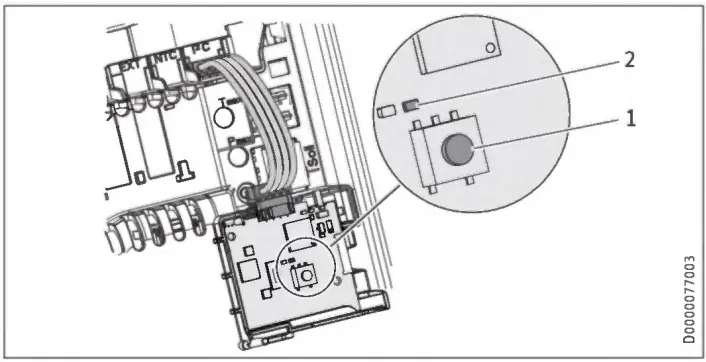 1 Button for pairing and unpairing
2 Yellow LED indicator illuminates when wireless remote con-trol is activated
► To initiate the pairing process, press the button on the wire-less module. The yellow LED starts to flash.
► Press buttons “1” and “2” simultaneously on the wireless remote control for 3 seconds. A flashing “L” indicates that pairing is in progress. An LED flashing several times in quick succession indicates that the pairing process has completed successfully.
Unpairing all wireless remote controls when the appliance is open
► To unpair all wireless remote controls, press the button for 5 seconds. The yellow LED lights up briefly at the end.
Appliance handover
Explain the functions of the appliance to the user. Show the user how to operate the appliance.
► Make the user aware of potential dangers, especially the risk of scalding.
► Hand over these instructions.
Specification
| FFB 4 EU | FFB 4 Set EU | FFB 4 AP | FFB 4 Set AP | ||
| 234478 | 238930 | 234479 | 238931 | ||
| Application limits | |||||
| Temperature setting range | °C | Off, 20-60 | Oft 20-60 | Oft 20-60 | Off, 20-60 |
| Transmission frequency | MHz | 868. | 868. | 920. | 920. |
| Wireless range inside the building approx. | In | 25* | 25* | 25* | 25* |
| Versions | |||||
| IP rating | IP X7 | IP X7 | IP X7 | IP X7 | |
| Battery type | 1 x CR2032-3V | 1 x CR2032-3V | 1 x CR2032-3V | 1 x CR2032-3V | |
| Dimensons | |||||
| Height | mm | 132 | 132 | 132 | 132 |
| Width | mm | 65 | 65 | 65 | 65 |
| Depth | mm | 19. | 19. | 19. | 19. |
| Weights | |||||
| Weight | kg | 0.12 | 0.12 | 0.12 | 0.12 |
* The wireless range is dependent on the building characteris-tics. Function through a separating ceiling cannot always be guaranteed.
Guarantee
The guarantee conditions of our German companies do not apply to appliances acquired outside of Germany. In countries where our subsidiaries sell our products a guarantee can only be issued by those subsidiaries. Such guarantee is only grant-ed if the subsidiary has issued its own terms of guarantee. No other guarantee will be granted.
We shall not provide any guarantee for appliances acquired in countries where we have no subsidiary to sell our products. This will not affect warranties issued by any importers.
Environment and recycling
We would ask you to help protect the environment. After use, dispose of the various materials in accordance with national regulations.
Who gives the warranty
- The warranty is given by Stiebel Eltron (Aust) Pty Ltd (A.B.N. 82 066 271 083) of 294 Salmon Street, Port Melbourne, Victoria, 3207 (“we”, “us” or “our”).
The warranty - This warranty applies to the Stiebel Eltron Water Heaters – Wa-terMark Approved (the “unit”) listed within this operating and in-stallation guide manufactured after 1 May 2015.
- Subject to the warranty exclusions we will repair or replace, at our absolute discretion, a faulty component in your unit free of charge if it fails to operate in accordance with its specifications during the warranty period.
- If we repair or replace a faulty component to your unit under this warranty, the warranty period is not extended from the time of the repair or replacement.
- The warranty period commences on the date of completion of the installation of the unit. Where the date of completion of in-stallation is not known, then the warranty period will commence 2 months after the date of manufacture.
- The warranty period for a unit used for domestic purposes is shown in the table below. Domestic purposes means that the unit is used in a domestic dwelling.
Component Warranty period All components 5 years from the date of completion of the installation of the unit. - The warranty period for a unit used for commercial purposes is shown in the table below. Commercial purposes means that the unit is used for a non-domestic purpose and includes but not lim-ited to being used in a motel, hotel, mining camp or nursing home.
Component Warranty period All components 1 year from the date of completion of the installation of the unit. Your entitlement to make a warranty claim
- You are entitled to make a warranty claim if:
8.1. you own the unit or if you have the owner’s consent to represent the owner of the unit;
8.2. you contact us within a reasonable time of discovering the prob-lem with the unit;
How you make a warranty claim - To make a warranty claim you must provide us with the following information:
9.1. The model number of the unit;
9.2. A description of the problem with the unit;
9.3. The name, address and contact details (such as phone number and e-mail address) of the owner;
9.4. The address where the unit is installed and the location (e.g. in laundry);
9.5. The serial number of the unit;
9.6. The date of purchase of the unit and the name of the seller of the unit;
9.7. The date of installation of the unit;
9.8. A copy of the certificate of compliance when the unit was in-stalled. - The contact details for you to make your warranty claim are:
Name: Stiebel Eltron (Aust) Pty Ltd
Address: 294 Salmon Street, Port Melbourne, Victoria, 3207
Telephone:1800 153 351 (8.00 am to 5.00 pm AEST Monday to Friday)
Contact person:Customer Service Representative
E-mail: [email protected] - We will arrange a unitsuitable time with you to inspect and test the unit.
Warranty exclusions - We may reject your warranty claim if:
12.1. The unit was not installed by registered and qualified tradespeo-ple.
12.2. The unit was not installed and commissioned:
(a) in Australia;
(b) in accordance with the Operating and Installation Guide; and
(c) in accordance with the relevant statutory and local require-ments of the State or Territory in which the unit is installed.
12.3. The unit has not been operated or maintained in accordance with the Operating and Installation Guide.
12.4. The unit does not bear its original Serial Number for Rating Label.
12.5. The unit was damaged by any or any combination of the follow-ing:
(a) normal fair wear and tear;
(b) connection to an incorrect water supply;
(c) connection to water from a bore, dam or swimming pool;
(d) connection to an incorrect power supply;
(e) connection to faulty equipment, such as damaged valves;
(f) foreign matter in the water supply, such as sludge or sedi-ment;
(g) corrosive elements in the water supply;
(h) accidental damage;
(i) act of God, including damage by flood, storm, fire, lightning strike and the like;
(j) excessive water pressure, negative water pressure (partial vacuum) or water pressure pulsation.
12.6. The unit was damaged before it was installed e.g. it was dam-aged in transit.
12.7. An unauthorised person has modified, serviced, repaired or attempted to repair the unit without our consent.
12.8. Non genuine parts other than those manufactured or approved by us have been used on the unit. - We may charge you:
13.1. for any additional transport costs if the unit is installed more than 30 kilometres from our closest authorised service technician.
13.2. for the extra time it takes our authorised service technician to access the unit for inspection and testing if it is not sited in ac-cordance with the Operating and Installation Guide and not readily accessible for inspection.
13.3. for any extra costs of our authorised service technician to make the unit safe for inspection. - You must ensure that access to the unit by our authorised service technician is safe and free from obstruction.
- Our authorised service technician may refuse to inspect and test the unit until you provide safe and free access to it, at your cost.
- If we reject your warranty claim in accordance with clause 12, we may charge you for our authorised service technician’s labour costs to inspect and test the unit.
- In order to properly test the unit we may remove it to another location for testing.
Australian Consumer Law - Our goods come with guarantees that cannot be excluded under the Australian Consumer Law. You are entitled to a replacement or refund for a major failure and compensation for any other rea-sonably foreseeable loss or damage. You are also entitled to have the goods repaired or replaced if the goods fail to be of accepta-ble quality and the failure does not amount to a major failure.
- The Stiebe I Eltron warranty for the unit is in addition to any rights and remedies you may have under the Australian Consumer Law.Australia STIEBEL ELTRON
| Australia Pty. Ltd. 294 Salmon Street Port Melbourne VIC 3207 Tel. 03 9645-1833 Fax 03 9644-5091 [email protected] www.stiebel-eltron.com.au Austria STIEBEL ELTRON Ges.m.b.H. Gewerbegebiet Neubau-Nord MargaritenstraBe 4 AI 4063 Hdrsching Tel. 07221 74600-01 Fax 07221 74600-42 [email protected] www.stiebel-eltron.at Belgium STIEBEL ELTRON bvba/sprl ‘t Hofveld 6 – Dl I 1702 Groot-Bijgaarden Tel. 02 42322-221 Fax 02 42322-12 [email protected] www.stiebel-eltron.be China STIEBEL ELTRON (Tianjin) Electric Appliance Co., Ltd. Plant C3, XEDA International Industry City Xiqing Economic Development Area 300085 Tianjin Tel. 022 8396 2077 Fax 022 8396 2075 [email protected] www.stiebeleltron.cn | Czech Republic STIEBEL ELTRON spot. s r.o. Dopravaku 749/3 1 184 00 Praha 8 Tel. 251116-1111 Fax 235512-122 [email protected] www.stiebel-eltron.cz Finland STIEBEL ELTRON OY Kapinakuja 1 104600 Mantsala Tel. 020 720-9988 [email protected] www.stiebel-eltron.fi France STIEBEL ELTRON SAS 7-9, rue des Selliers B.P 85107 I 57073 Metz-Cedex 3 Tel. 0387 7438-88 Fax 0387 7468-26 [email protected] www.stiebel-eltron.fr Hungary STIEBEL ELTRON Kft. Gyer u. 21 2040 Budaors Tel. 01 250-6055 Fax 01 368-8097 [email protected] www.stiebel-eltron.hu | Japan NIHON STIEBEL Co. Ltd. Kowa Kawasaki Nishiguchi Building 8F 66-2 Horikawa-Cho Saiwai-Ku 1 212-0013 Kawasaki Tel. 044 540-32001 Fax 044 540-3210 [email protected] www.nihonstiebel.co.jp Netherlands STIEBEL ELTRON Nederland B.V. Daviottenweg 36 5222 BH ‘s-Hertogenbosch Tel. 073 623-0000 Fax 073 623-1141 [email protected] www.stiebel-eltron.nl Poland STIEBEL ELTRON Polska Sp. z 0.0. ul. Dziafkowa 2 02-234 Warszawa Tel. 022 60920-30 Fax 022 60920-29 [email protected] www.stiebel-eltron.pl Russia STIEBEL ELTRON LLC RUSSIA Urzhumskaya street 4, building 2 129343 Moscow Tel. 0495 77538891 Fax 0495 7753887 [email protected] www.stiebel-eltron.ru | Slovakia STIEBEL ELTRON Slovakia, s.r.o. Hlavna 1 1 058 01 Poprad Tel. 052 7127-125 Fax 052 7127-148 [email protected] www.stiebel-eltron.sk Switzerland STIEBEL ELTRON AG Industrie West Gass 8 15242 Lupfig Tel. 056 4640-5001 Fax 056 4640-501 [email protected] www.stiebel-eltron.ch Thailand STIEBEL ELTRON Asia Ltd. 469 Moo 2 Tambol Klong-Jik Amphur Bangpa-In 1 13160 Ayutthaya Tel. 035 220088 I Fax 035 221188 [email protected] www.stiebeleltronasia.com United Kingdom and Ireland STIEBEL ELTRON UK Ltd. Unit 12 Stadium Court Stadium Road I CH62 3RP Bromborough Tel. 0151 346-2300 Fax 0151 334-2913 [email protected] www.stiebel-eltron.co.uk United States of America STIEBEL ELTRON, Inc. 17 West Street I 01088 West Hatfield MA Tel. 0413 247-3380 Fax 0413 247-3369 [email protected] www.stiebel-eltron-usa.com |
Subject to errors and technical changes!