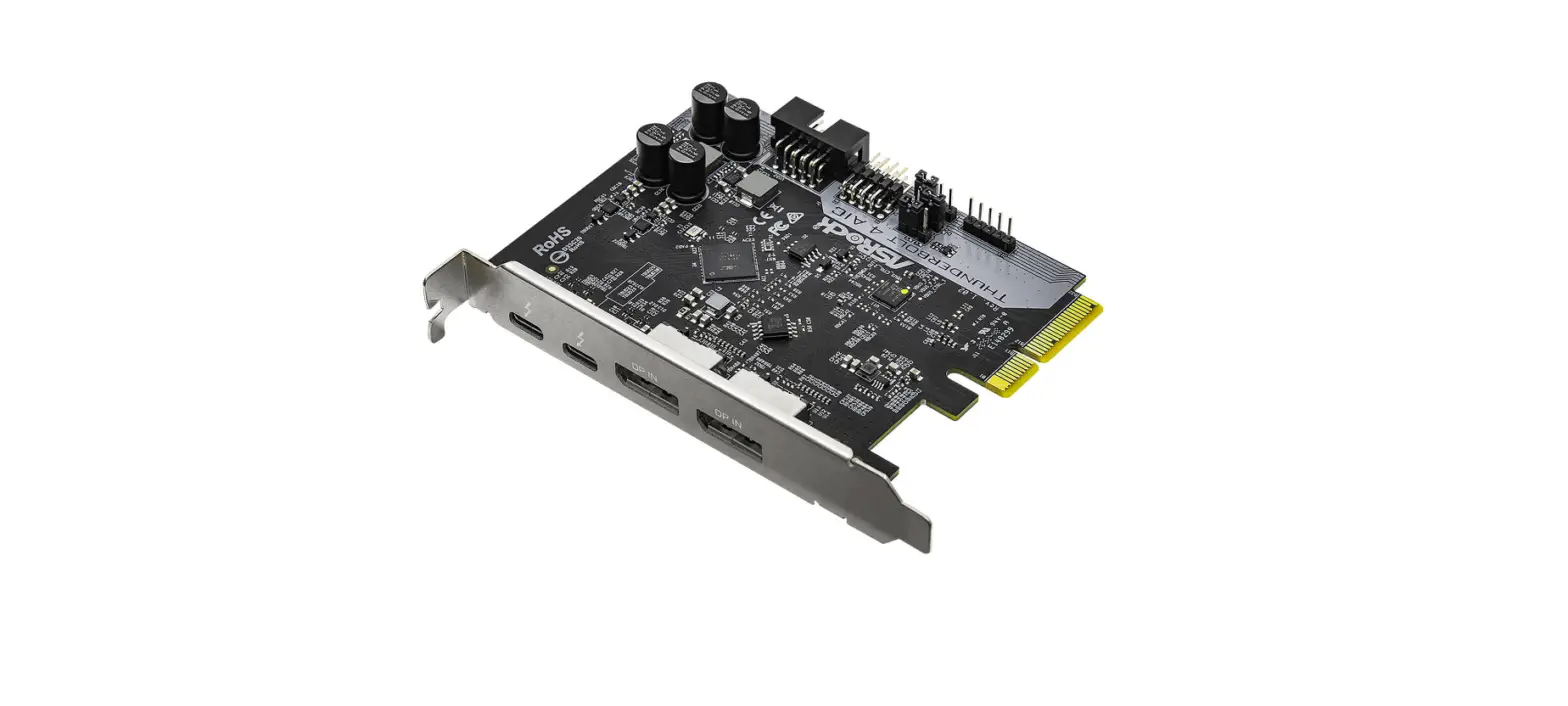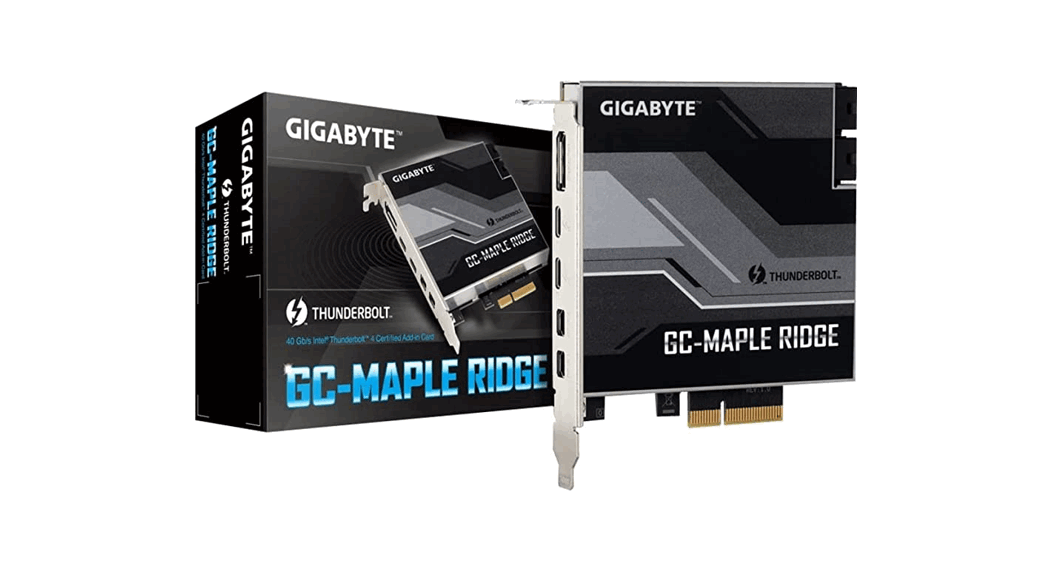
 GC-MAPLE RIDGE Motherboard
Installation Guide
GC-MAPLE RIDGE Motherboard
 https://www.gigabyte.com/Motherboard/GC-MAPLE-RIDGE-rev-10?m=ma#kf
For more product details, please visit GIGABYTE’s website. To reduce the impacts on global warming, the packaging materials of this product are recyclable and reusable. GIGABYTE works with you to protect the environment.
Product Specification
| Chip | Intel® JHL8540 Thunderbolt™ 4 Controller |
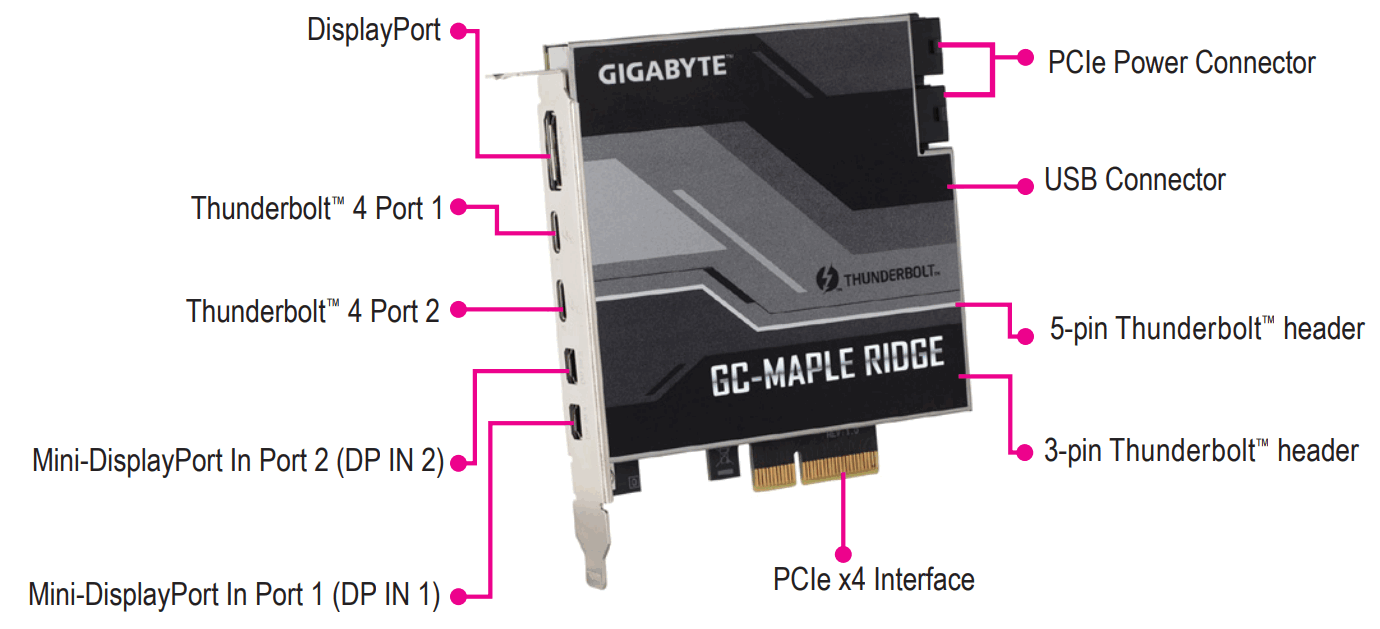
| Back Panel Connectors | 1 x DisplayPort, supporting a maximum resolution of 8K (7680×3840)@60 Hz (Note 1) (Note 2) * Support for DisplayPort 1.4 version, HDCP 2.2, and HDR. 2 x Thunderbolt ™ 4 out ports (Thunderbolt™ 4 Port 1/Thunderbolt™ 4 Port 2), supporting up to 40 Gbps bandwidth and a maximum display resolution of 8K (7680×3840)@60 Hz (Note 1) (Note 2) 2 x Mini-DisplayPort In ports (DP_IN1/DP_IN2) |
| Internal Connectors | 2 x 6-pin PCIe power connectors 1 x USB 2.0/1.1 header 1 x 5-pin Thunderbolt™ header 1 x 3-pin Thunderbolt™ header |
| Interface | PCIe 3.0 interface (PCIe x4) |
| Data Transfer Rate | 40 Gbps Bi-directional per port |
| Supported Operating Systems | Support for Windows 10 (64-bit) with RS3 or later |
| Compatible Motherboards | Go to GIGABYTE’s website for the latest motherboard support list. |
(Note 1) Actual resolutions supported are dependent on the graphics card being used.
(Note 2) Due to hardware limitations, the DisplayPort connector, Thunderbolt™ 4 connector 1, and Thunderbolt™ 4 connector 2 require signal input from external devices and support up to two display outputs at a time.
Installing the GC-MAPLE RIDGE Add-in Card
Step 1:
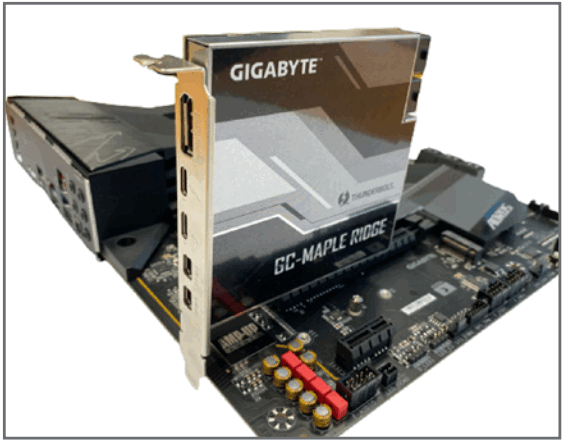
Install the GC-MAPLE RIDGE add-in card in the PCIEX4 slot.
Step 2:
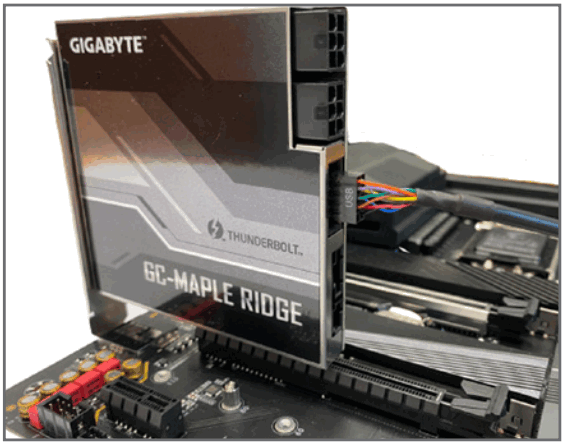
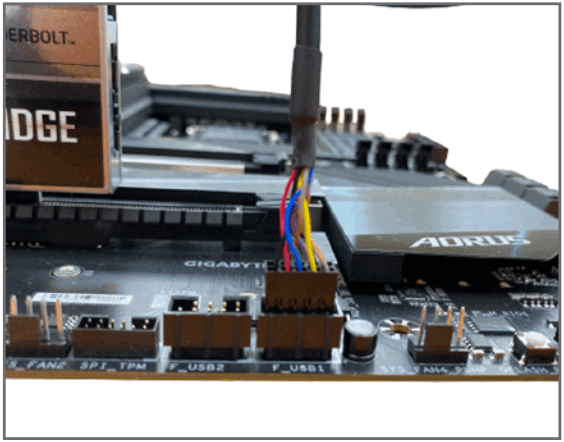
Connect one end of the USB cable to the USB connector on the GC-MAPLE RIDGE card.
Step 3:
Connect the other end of the USB cable to the F_USB connector on the motherboard.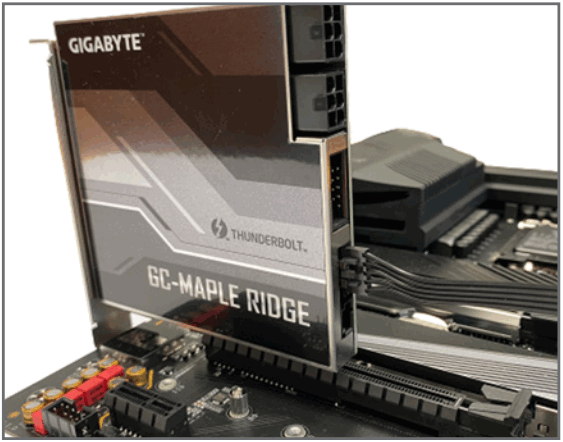
Step 4:
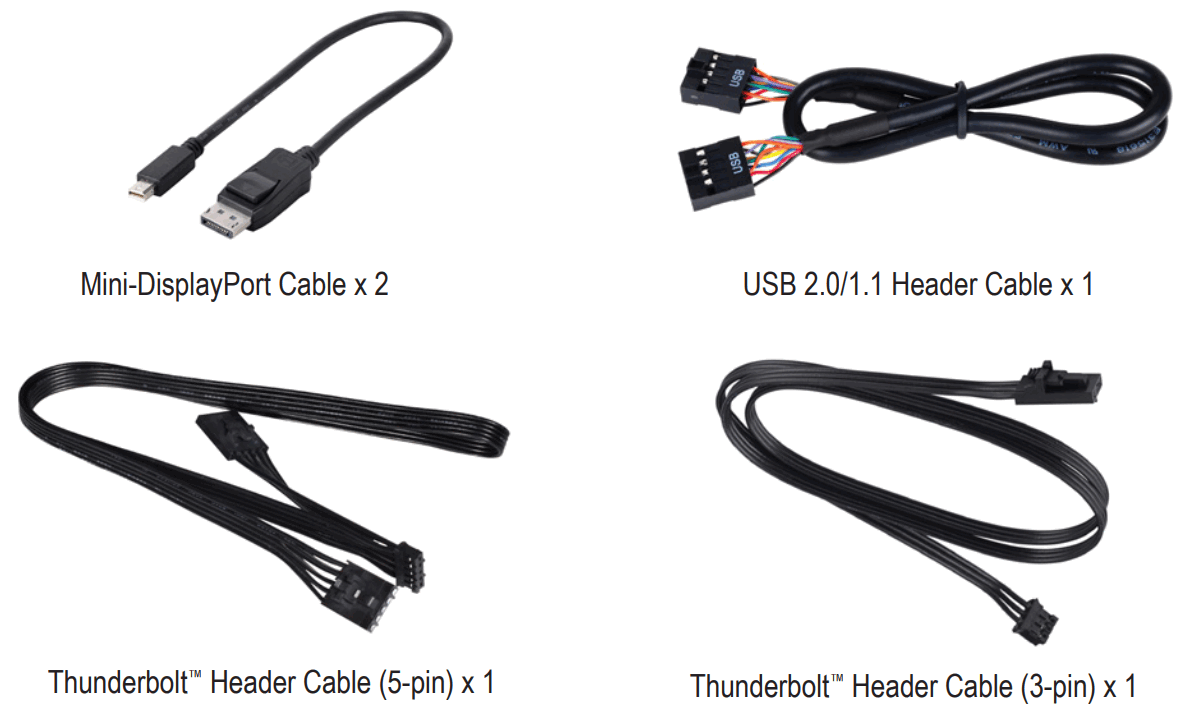
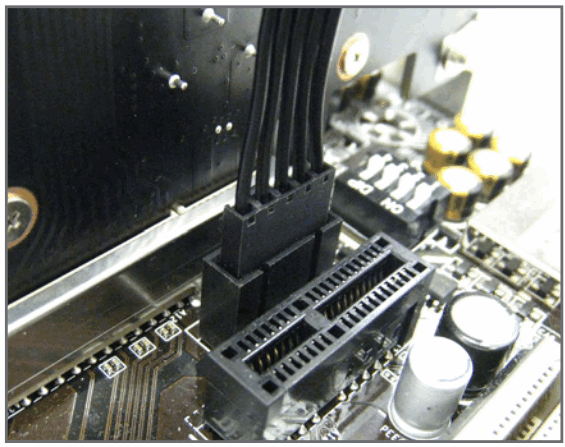
Connect one end of the Thunderbolt™ header cable (5-pin) to the 5-pin Thunderbolt™ header on the GC-MAPLE RIDGE add-in card.
Step 5:
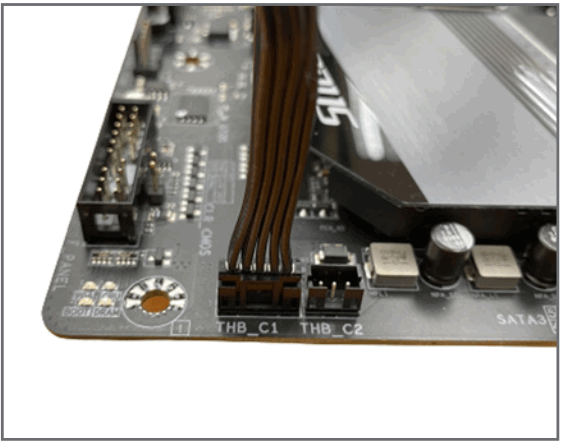
Connect the other end of the cable to the Thunderbolt™ add-in card header (Note 1) on the motherboard.
(Note 1)
The Thunderbolt™ header cable (5-pin) provided has two connectors. Choose the correct connector according to the Thunderbolt™ add-in card header on your motherboard.
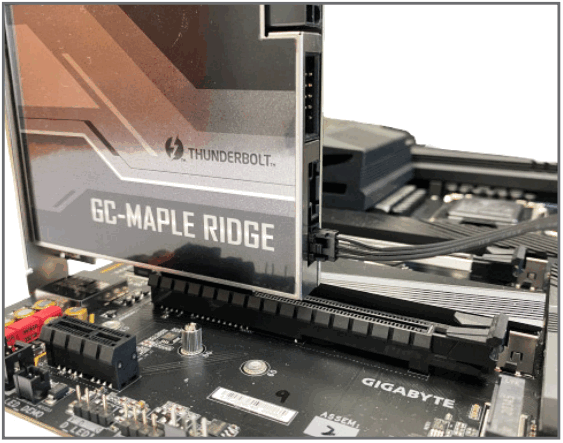
Step 6:
Connect one end of the Thunderbolt™ header cable (3-pin) to the 3-pin Thunderbolt™ header on the GC-MAPLE RIDGE add-in card.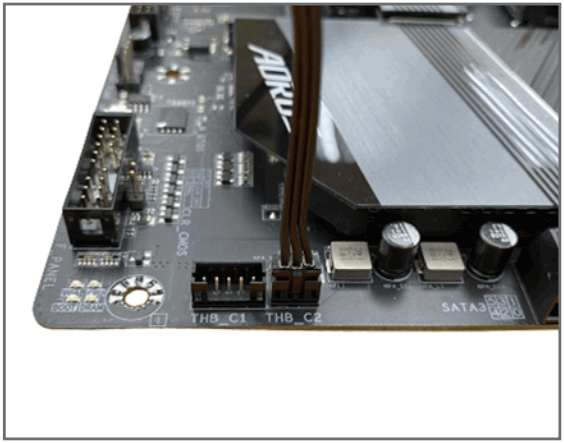
Step 7:
Connect the other end of the cable to the Thunderbolt™ add-in card header(Note 2) on the motherboard.
(Note 2) Whether the connector is supported depends on the motherboard models.
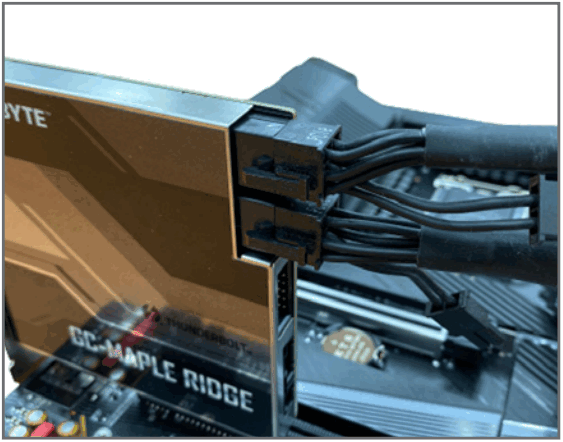
Step 8:
Connect the power cables from the power supply to the two PCIe connectors.
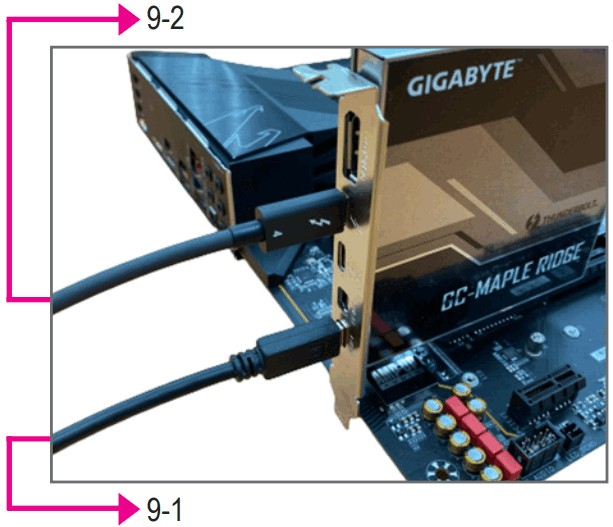
Step 9:
Follow the steps below to use the included Mini Display Port cable to connect your graphics card to the GC-MAPLE RIDGE add-in card.
- When connecting one DisplayPort monitor, please connect the Mini-DisplayPort cable to the DP IN 1 connector, then connect the monitor’s cable to the DisplayPort connector or Thunderbolt™ 4 connector 1.
- When connecting two DisplayPort monitors, please connect one of the Mini-DisplayPort cables to the DP IN 1 connector and connect the monitor’s cable to the DisplayPort connector or Thunderbolt™ 4 connector 1. Then connect the other Mini-DisplayPort cable to the DP IN 2 connector and the monitor’s cable to Thunderbolt™ 4 connector 2.
Daisy-chaining Thunderbolt™ Enabled Devices
Refer to the following for connecting Thunderbolt™ -enabled devices in a daisy-chaining configuration. The following are single-port configurations. (Make sure the Thunderbolt™ -enabled devices to be daisy-chained have both Thunderbolt™ in and out ports.)
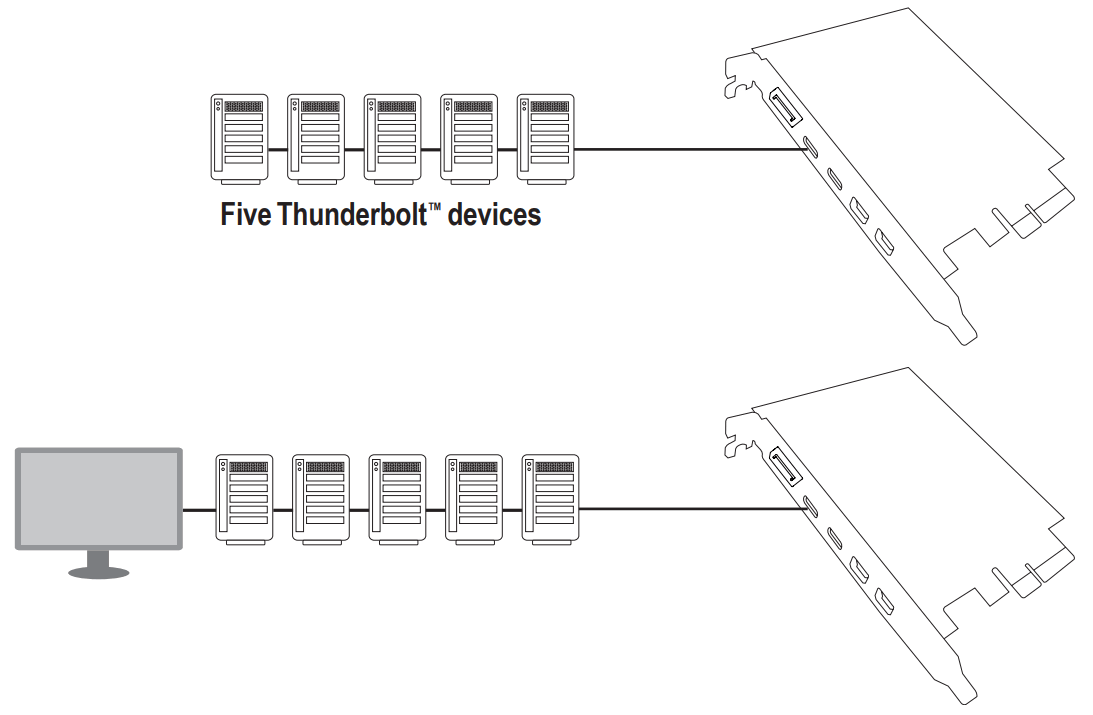 Five Thunderbolt™ devices and one native DisplayPort monitor (A graphics card with DisplayPort is required)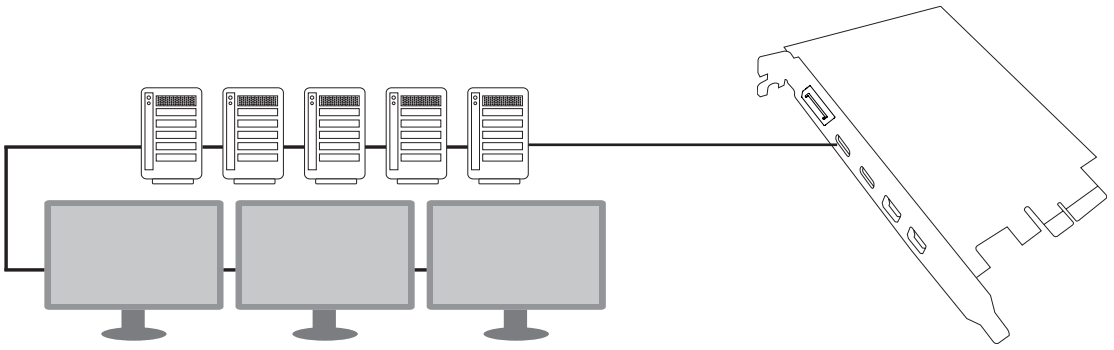
Five Thunderbolt™ devices and three DisplayPort monitors (A graphics card with DisplayPort support is required)
Installing the Driver
After the computer starts, install the driver for the GC-MAPLE RIDGE add-in card. Insert the included driver disc and follow the on-screen instructions to install the driver.
Please visit GIGABYTE’s global website (http://www.gigabyte.com) and click on Support & Downloads for the latest software driver.
Regulatory Notices
United States of America, Federal Communications Commission Statement
Supplier’s Declaration of Conformity
47 CFR § 2.1077 Compliance Information
Product Name: PCI Express add-on Card
Trade Name: GIGABYTE
Model Number: GC-MAPLE RIDGE
Responsible Party – U.S. Contact Information: G.B.T. Inc.
Address: 17358 Railroad street, City Of Industry, CA91748 Tel.: 1-626-854-9338
Internet contact information: https://www.gigabyte.com
FCC Compliance Statement:
This device complies with Part 15 of the FCC Rules, Subpart B, Unintentional Radiators.
Operation is subject to the following two conditions: (1) This device may not cause harmful interference, and (2) this device must accept any interference received, including interference that may cause undesired operation.
This equipment has been tested and found to comply with the limits for a Class B digital device, pursuant to Part 15 of the FCC Rules. These limits are designed to provide reasonable protection against harmful interference in a residential installation. This equipment generates, uses and can radiate radio frequency energy and, if not installed and used in accordance with manufacturer’s instructions, may cause harmful interference to radio communications. However, there is no guarantee that interference will not occur in a particular installation. If this equipment does cause harmful interference to radio or television reception, which can be determined by turning the equipment off and on, the user is encouraged to try to correct the interference by one or more of the following measures:
- Reorient or relocate the receiving antenna.
- Increase the separation between the equipment and receiver.
- Connect the equipment to an outlet on a circuit different from that to which the receiver is connected.
- Consult the dealer or an experienced radio/TV technician for help.
Canadian Department of Communications Statement
This digital apparatus does not exceed the Class B limits for radio noise emissions from digital apparatus set out in the Radio Interference Regulations of the Canadian Department of Communications. This class B digital apparatus complies with Canadian ICES-003.
European Union (EU) CE Declaration of Conformity
This device complies with the following directives: Electromagnetic Compatibility Directive 2014/30/EU, Low-voltage Directive 2014/35/EU, RoHS directive (recast) 2011/65/EU & the 2015/863 Statement. This product has been tested and found to comply with all essential requirements of the Directives.
European Union (EU) RoHS (recast) Directive 2011/65/EU & the European Commission Delegated Directive (EU) 2015/863 Statement
GIGABYTE products have not intended to add and safe from hazardous substances (Cd, Pb, Hg, Cr+6, PBDE, PBB, DEHP, BBP, DBP and DIBP).
The parts and components have been carefully selected to meet RoHS requirement. Moreover, we at GIGABYTE are continuing our efforts to develop products that do not use internationally banned toxic chemicals.
European Union (EU) Community Waste Electrical & Electronic Equipment (WEEE) Directive Statement
GIGABYTE will fulfill the national laws as interpreted from the 2012/19/EU WEEE (Waste Electrical and Electronic Equipment) (recast) directive.
The WEEE Directive specifies the treatment, collection, recycling and disposal of electric and electronic devices and their components. Under the Directive, used equipment must be marked, collected separately, and disposed of properly.
WEEE Symbol Statement
The symbol shown below is on the product or on its packaging, which indicates that this product must not be disposed of with other waste. Instead, the device should be taken to the waste collection centers for activation of the treatment, collection, recycling and disposal procedure.
For more information about where you can drop off your waste equipment for recycling, please contact your local government office, your household waste disposal service or where you purchased the product for details of environmentally safe recycling.
End of Life Directives-Recycling
The symbol shown below is on the product or on its packaging, which indicates that this product must not be disposed of with other waste. Instead, the device should be taken to the waste collection centers for activation of the treatment, collection, recycling and disposal procedure.
BSMI CNS15663
Declaration of the Presence Condition of the Restricted Substances Marking
| PCI Express add-on Card Equipment name GC-MAPLE RIDGE Type designation (Type) | ||||||
| Unit | Restricted substances and its chemical symbols | |||||
| Lead (Pb) | Mercury (Hg) | Cadmium (Cd) | Hexavalent chromium (Cr+6) | Polybrominated biphenyls (PBB) | Polybrominated diphenyl ethers (PBDE) | |
| PCB Assembly | 0 | 0 | 0 | 0 | 0 | |
| Shell | 0 | 0 | 0 | 0 | 0 | 0 |
| Chip and other Active components | 0 | 0 | 0 | 0 | 0 | |
| Passive Components | – | 0 | 0 | 0 | 0 | 0 |
| Connectors | 0 | 0 | 0 | 0 | 0 | |
| Soldering metal | 0 | 0 | 0 | 0 | 0 | 0 |
| Cables | 0 | 0 | 0 | 0 | 0 | 0 |
| Note 1: “Exceeding 0.1 wt %” and “exceeding 0.01 wt %” indicate that the percentage content of the restricted substance exceeds the reference percentage value of presence condition. Note 2: “0” indicates that the percentage content of the restricted substance does not exceed the percentage of reference value of presence. Note 3: The ” – ” indicates that the restricted substance corresponds to the exemption. | ||||||
China RoHS Compliance Statement
Environment-friendly use period
Hazardous Substances Table
| (Parts) | 15J15(Hazardous Substances) | |||||
| (Pb) | (Hg) | (Cd) | (Cr.) | (PBB) | g7-15TZ (PBDE) | |
| PCB Assembly | ✕ | O | O | o | o | O |
| Shell | O | O | O | o | 0 | O |
| Chip and other Active components | ✕ | O | O | o | o | O |
| Passive Components | ✕ | O | O | O | O | O |
| Connectors | ✕ | O | O | O | O | O |
| Soldering metal | O | O | O | O | O | O |
| Cables | O | O | O | O | O | O |
These tables are prepared in accordance with the provisions of SJT 11364
○ : The content of such hazardous substance in all homogeneous materials of such component is below the limit required by GB/T 26572.
× : The content of such hazardous substance in a certain homogeneous material of such component is beyond the limit required by GB/T 26572.
 Contact Us
 Contact Us
GIGA-BYTE TECHNOLOGY CO., LTD.
Address: No.6, Baoqiang Rd., Xindian Dist., New Taipei City 231, Taiwan
TEL: +886-2-8912-4000, FAX: +886-2-8912-4005
Tech. and Non-Tech. Support (Sales/Marketing) : https://esupport.gigabyte.com
WEB address (English): https://www.gigabyte.com
WEB address (Chinese): https://www.gigabyte.com/tw
Copyright
© 2021 GIGA-BYTE TECHNOLOGY CO., LTD. All rights reserved.
The trademarks mentioned in this manual are legally registered to their respective owners.
Disclaimer
Information in this manual is protected by copyright laws and is the property of GIGABYTE.
Changes to the specifications and features in this manual may be made by GIGABYTE without prior notice.
No part of this manual may be reproduced, copied, translated, transmitted, or published in any form or by any means without GIGABYTE’s prior written permission.
For product-related information, check on our website at: https://www.gigabyte.com
 GIGABYTE Global
 GIGABYTE 技嘉科技
 GIGABYTE - eSupport