AS 1K5 ASYM Series Power Amplifiers
Product Information:
The AS 1K5 and AS 2K3 are module assemblies designed for the
installation of the ASYM module in an acoustic enclosure. The
module is fixed to the enclosure using M4 or M5 screws and should
be sealed with foam to prevent vibrations. The module can also be
supplied with an optional rear metal case for added
convenience.
The AS 1K5 and AS 2K3 feature various connectors including
female XLR connector for signal input, male XLR connector for
signal link, RJ45 Ethernet connectors, USB connector, and powerCON
True1 connection. The front panel includes LED indicators for power
supply, input signal presence, DSP limiters, and maximum
input/output levels. The modules also support quick preset
functionality for easy output and input preset changes.
Technical specifications of the AS 1K5 and AS 2K3 include
different output power configurations depending on the selected
channel, total harmonic distortion of 90%, damping factor of over
400, voltage gain between 26dB and 38dB, operational mains voltage
range of 85-265V AC/50-60Hz, and high efficiency of over 90%. The
modules have compact dimensions and a weight of 1.5 kg.
Product Usage Instructions:
- Installation Requirements:
- Ensure that the acoustic enclosure has an internal chamber
separate from the speaker chamber. - If desired, use the optional rear metal case provided with the
ASYM module to create an airtight space. - Fix the module to the enclosure using 8 M4 or M5 screws.
- Place sealing foam in the joint between the module and the box
to avoid vibrations. Do not put foam in the joint between the
module and the optional rear metal case.
- Ensure that the acoustic enclosure has an internal chamber
- Speakers Connection:
- Connect the speakers to the module using the provided JST
VHR-2N connectors. - Crimp a cable with a maximum section of 1.25mm2 to the speaker
terminals. - Place the crimped cable on the connector box, ensuring that the
metallic tab fits into place.
- Connect the speakers to the module using the provided JST
- Front Panel Description:
- Signal Input: Connect the signal source using the female XLR
connector. - Signal Link: Connect another device using the male XLR
connector for signal link. - Ethernet Connectors: Use the RJ45 ports for Ethernet switch
connections. - USB Connector: Connect a B type USB device using the USB
connector. - LED Indicators: Monitor power supply, input signal presence,
DSP limiters, and maximum input/output levels using the LED
indicators. - Quick Preset: Use the button to change the desired output
preset or double click for the input preset. Press SET1 button for
2 seconds to turn on the module (in StandBy mode). Push SET 3-4
buttons simultaneously to enter LEVEL mode, then use buttons 3 and
4 to change the level. - Mains Connection: Use the powerCON True1 connection for inlet
and outlet power. It also functions as a main switch with breaking
capacity.
- Signal Input: Connect the signal source using the female XLR
Note: For detailed technical specifications and additional
connections, refer to the user manual provided.
DSP_PowerPackTM · ASYM Series
AS 1K5 AS 2K3
OPERATION MANUAL BEDIENUNGSANLEITUNG
MANUAL DE USUARIO
© 2018 by C.E. Studio-2 s.l. http://ramaudio.com
e-mail: [email protected]
P-8654969 QXPDQXDoc
5/18
Module Assembly
Modul Zusammenbau
Montaje del Módulo
Installation Requirements
For the installation of the ASYM module you need an internal chamber inside the acoustic enclosure, separate from the chamber where the speaker is mounted. If preferred, the ASYM module can be supplied with a rear metal case for this purpose, avoiding having to make this space airtight.
The module is fixed to the enclosure with 8 M4 or M5 screws, sealing foam should be placed in the joint between the module and the box to avoid vibrations (it is not advisable to put foam in the joint between the module and the optional rear metal case).
In the drawings below you can see: (1) the external dimensions of the module (front/profile), (2) the optional rear metal case, and also (3) the recommended machining of the acoustic enclosure.
Installationsvoraussetzungen
Für die Installation des ASYM Moduls wird ein eigenes Volumen im Lautsprechergehäuse benötigt, welches separat von dem des Lautsprechers ist. Wenn gewünscht kann das ASYM Modul mit einer metallenen Schale versehen werden, um diesen Bereich nicht extra luftdicht machen zu müssen. Das Modul wird mit 8 M4 oder M5 Schrauben am Gehäuse befestigt, in den Spalt zwischen Modul und Gehäuse sollte Dichtschaum gegeben werden, um Vibrationen zu vermeiden (Es ist nicht ratsam zwischen dem Modul und dem optionalen metallenen rückwärtigen Gehäuse ebenfalls Dichtschaum zu geben). In den Zeichnungen weiter unten kann man folgendes sehen: (1) Die äußeren Abmessungen des Moduls (von Vorne, von der Seite), (2) das optionale rückwärtige Gehäuse und (3) auch die benötigte Aussparung des Lautsprechergehäuses.
(1) Profile-Front Dimensions
(2) Optional Aluminium Case
Requisitos de Instalación
Para la instalación del módulo ASYM es necesario tener una cámara interna en el recinto acústico, separada de la cámara donde está montado el altavoz. Opcionalmente, el módulo ASYM puede ser suministrado con un cajón metálico trasero para este propósito, y así evitar tener que hacer este alojamiento hermético en el recinto. La sujeción del módulo al recinto se realiza mediante 8 tornillos M4 o M5, y debe colocarse una junta de espuma entre el módulo y la caja para evitar vibraciones (no es recomendable poner esta junta entre el modulo y el cajón metálico opcional). En los planos bajo estas líneas se muestran: (1) las dimensiones externas del módulo (frontal/perfil), (2) las del cajón opcional, así como (3) el mecanizado recomendado a realizar en el recinto acústico.
(3) Cabinet Mechanization
Connection and Description
Verbindung und Beschreibung
Conexión y Descripción
Speakers Connection
The connection of the speakers to the module is done using two JST VHR-2N connectors provided. A cable should be crimped to the terminals (1.25mm2 section maximum) and placed on the connector box, so that the metallic tab fits into place.
The connection is as follows:
Lautsprecher Anschluss
Der Anschluss der Lautsprecher am Modul erfolgt durch zwei JST VHR-2N Stecker. Ein Kabel wird auf die Anschlussstifte gecrimpt (maximal 1,25mm²) und ins Steckergehäuse gesteckt, so dass der metallene Stift einrastet.
Der Anschluss erfolgt wie folgt:
Conexión de Altavoces
La conexión de los altavoces al módulo se realiza a través de 2 conectores JST VHR-2N suministrados. Debe de crimparse un cable a los terminales (sección máxima de 1.25mm2) e introducir los mismos sobre la caja del conector, de forma que la pestaña metálica se aloje en su hueco. El conexionado es el siguiente:
(Optional case suggested connection)
Front Panel Description
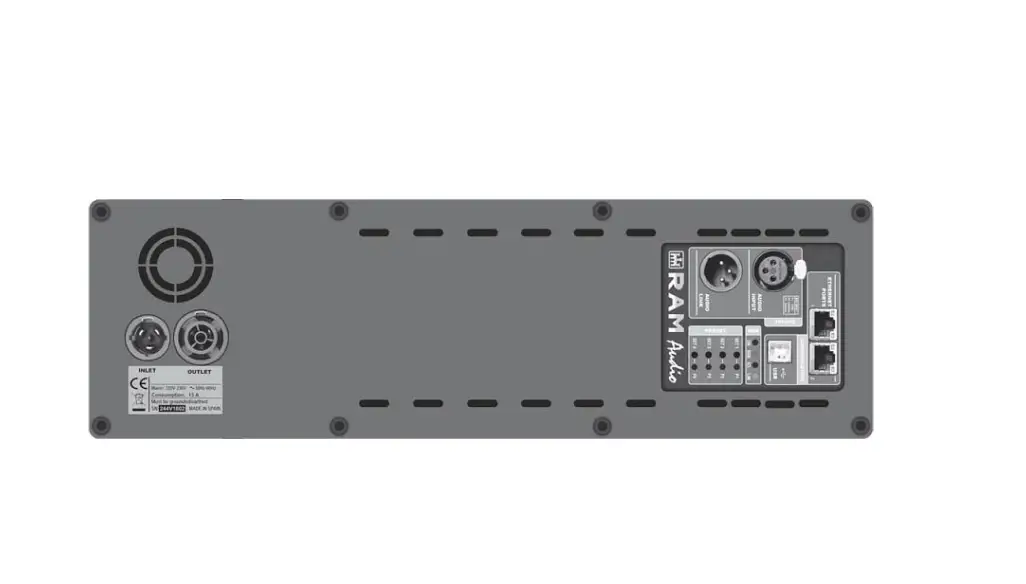
1 Signal Input: Female XLR Connector for signal input.
2 Signal Link: Male XLR Connector for signal link.
3 Ethernet Connectors: RJ45, two ports Ethernet switch.
4 USB Connector: B type USB connection.
1
5 LED ON:power supply ON. Blinking indicates StandBy mode. LED SIGNAL: input signal presence indication. LED LIMIT: lights when the DSP limiters are working. LED CLIP: the maximum input or output has been reached.
6 Quick Preset: press the button for 3 seconds to change the
2
desired output preset, or double click for the input preset.
ON: press SET1 button for 2s to turn on (in StandBy mode).
LEVEL: push SET 3-4 buttons simultaneously to enter LEVEL
mode (both LEDs light up). Then use 3 and 4 to change level.
7 Mains connection: inlet and outlet powerCON True1 connection. It works also as a main switch, as it is a connector with breaking capacity.
3
7
4 5
6
Technical Specifications
Technische Daten
Datos Técnicos
DSP Specifications
Overall: · High performance 96kHz 120dB 32 bits AD/DA converters · 64 bit double-precision 96kHz DSP process · 0.6ms minimum process latency time · Up to 2000 taps custom FIR process
Input Section: · 2 independent inputs sections for user and advanced levels · Gain, Mute and Phase inversion · Input Delay: up to 40 meters · Input EQ: 10+10 PEQ (Parametric, Shelving, LP, HP, BP, SB, AP) · 1 or 2 inputs in SB 6K Tri model
Output Section: · Crossover Filters: FIR and IIR (up to 48dB/oct, Butterworth / Linkwitz-Riley / Bessel) · Output Delay: up to 40 meters (116ms) per channel · Output IIR EQ: 12 filters per channel (Parametric, Shelving, LP, HP, BP, SB, AP) · Output FIR EQ: 20 filters per channel (Parametric, Shelving, LP, HP, BP, SB, AP), or Custom up to 2000 taps · RMS and Peak limiter per channel · Optional virtual gain/delay control in user level
RAM_OCS Control
Control & Monitor: · Standby mode for remote turn-on · Real time impedance monitor · Stby., Signal, Lim, Clip, Temp and Prot monitor · Input, Output, Temperature and Current meters
Communications: · Two ports Ethernet switch for daisy chain connection · USB 2.0, Type B connector
Overall: · 20 Manufacturer preset memories library · 5 User preset memories library · 4 Quick Preset selection · Manufacturer/Installer/User passwords · Independent selectable output power per channel (Z dependant) · User control groups for virtual Eq (20 filters), Gain and Delay · Zone management for library, stand-by and alerts information · Smaart® analysis software integration
Amplifier Specifications
Output Power Configuration
AS 2K3
AS 1K5
(Selectable by channel)
CH-A CH-B
CH-A CH-B
8 ohm
1500W 400W
400W 400W
4 ohm
1500W 750W
750W 750W
2 ohm
750W 750W
750W 750W
Bridge 8 ohm
–
1500W
Bridge 4 ohm
–
1500W
Total Harmonic Distortion
<0.05%
<0.05%
Efficiency
>90%
>90%
Damping Factor (20-500Hz @8)
>400
>400
Voltage Gain
26dB-38dB
26dB-38dB
Operational Mains voltage
85-265V AC/50-60Hz
85-265V AC/50-60Hz
Consum. @4, 1/8 r.p., 230V AC
1.7 A
1.2 A
Power Factor
>0.95
>0.95
Efficiency
>90%
>90%
Dimensions
External Plate WxH
130×443 mm
130×443 mm
Internal Enclosure WxHxD
100x423x55 mm
100x423x55 mm
Occupied Volume (optional case)
2 l
2 l
Weight
1.5 kg
1.5 kg
Connections: XLR Input, XLR Link, powerCON True1 in-out, USB, 2x RJ45, barrier strip (in optional case)
Protections: Turn-on transients, Over-heating, DC, RF, Short-circuit, mismatched loads, ICLTM, PMSTM
The exclamation point inside an equilateral triangle indicates the existence of internal components whose substitution may affect safety.
The lightning and arrowhead symbol warns about the presence of uninsulated dangerous voltage.
CAUTION
RISK OF ELECTRIC SHOCK DO NOT OPEN
To avoid fire or electrocution risk do not expose the unit to rain or moisture. To avoid electric shock, do not open the unit. No user serviciable parts inside. In the case of disfunction, have the unit checked by qualified agents. Class I device.
©2018 by C.E. Studio-2 s.l. – Pol.Ind. La Figuera – C/Rosa Luxemburgo nº34 – 46970 Alaquas – Valencia – SPAIN Phone:+34 96 127 30 54 Fax:+34 96 127 30 56 – http://ramaudio.com – e-mail: [email protected]
RAM Audio®, ICLTM, PMSTM and PowerPackTM are registered trademarks of C.E. Studio-2 s.l. All other names are trademarks of their respective companies.
 RAM Audio - Professional Power Amplifiers