
tempmate M2 Multi Use USB Temperature
Introduction
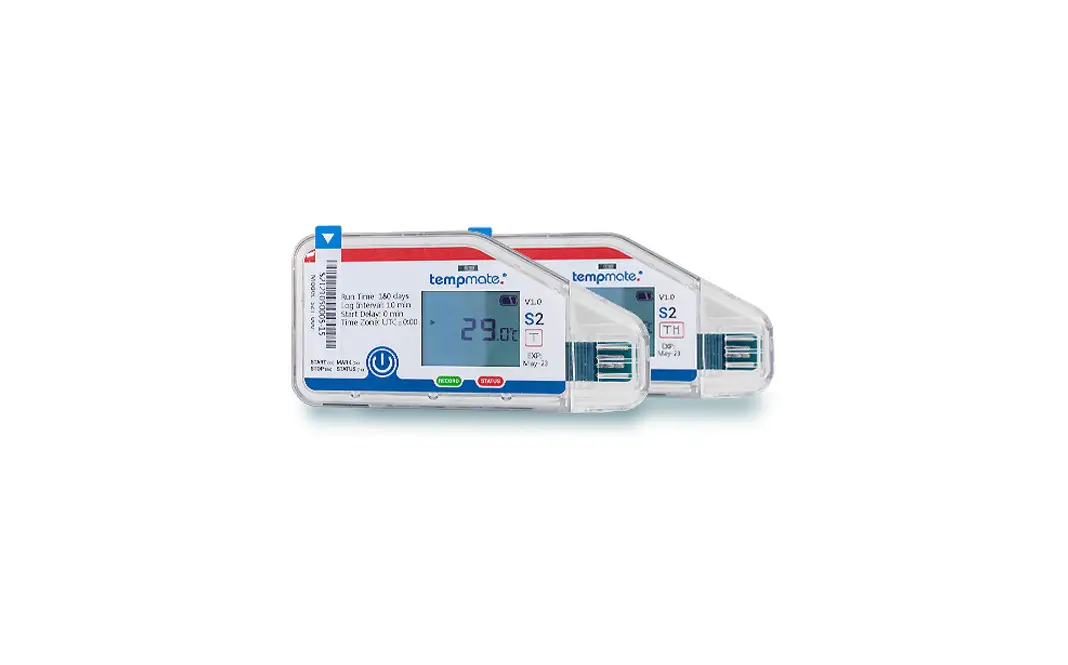
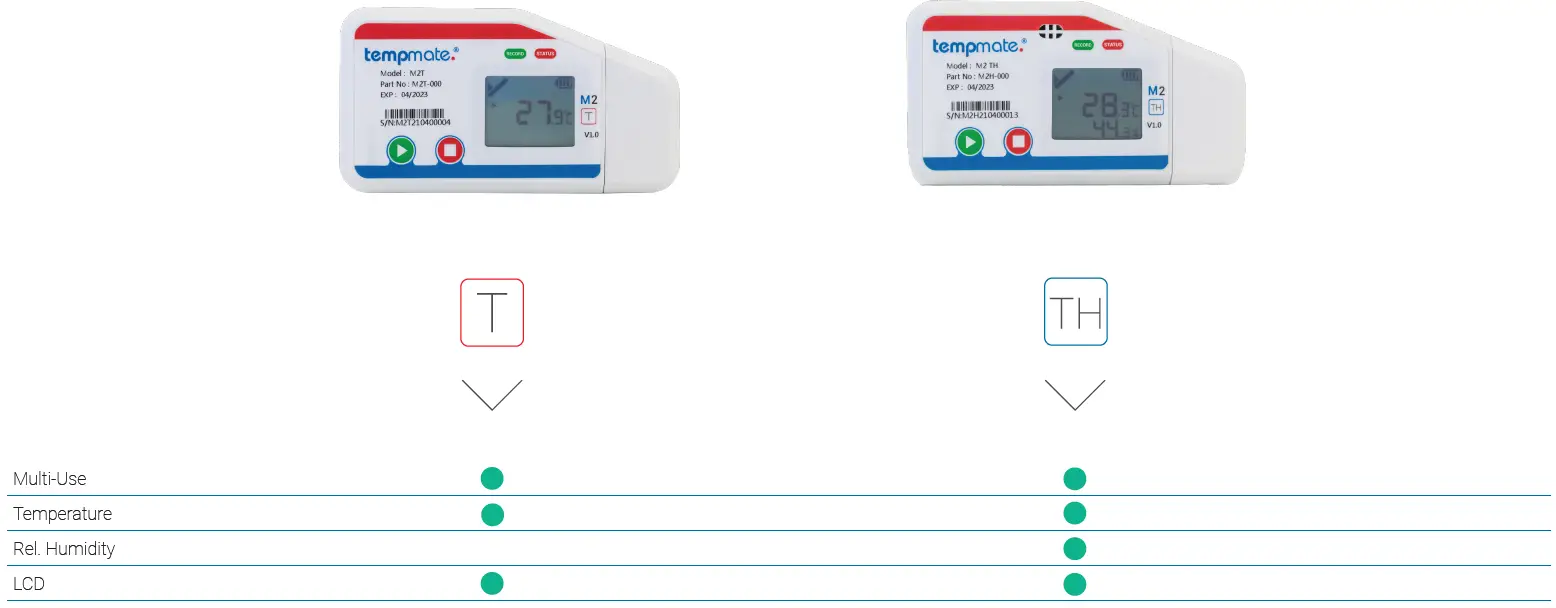
The tempmate.®-M2 is designed to be mounted on a shipment or stationary and measure relevant para-meters such as temperature and optionally relative humidity. The device records data and stores it on an internal memory.
Intended Use
The tempmate.®-M2 is designed to be mounted on shipments or stationary and to record relevant parame-ters as mentioned in the data sheet. Any use or opera-tion requiring specific requirements and standards not explicitly mentioned in the data sheet must be validated and tested at the customer‘s own responsibility.
Device Description
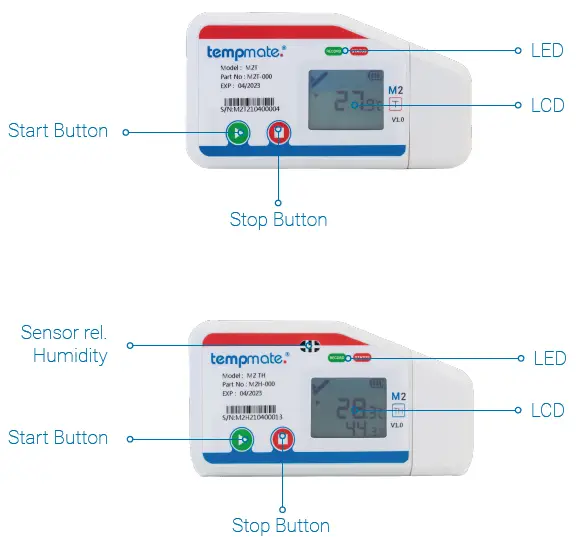
Display
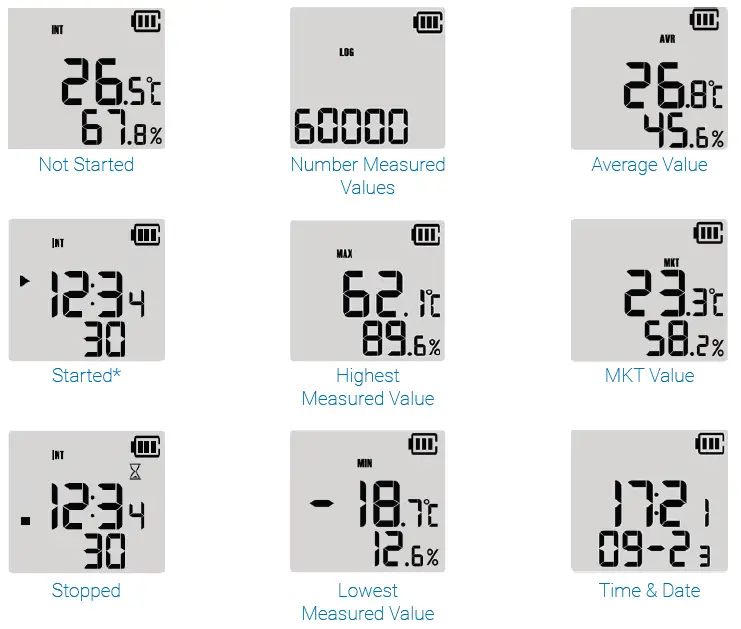
Operation and Usage
- STEP 1 Configuration *optional
This step is only necessary if you want to adapt the pre-installed configuration to your application.- Download the free tempbase 2 software – https://www.tempmate.com/de/download/
- Install the tempbase 2 software on your PC.
- Remove the cap and connect the not started logger to your PC.
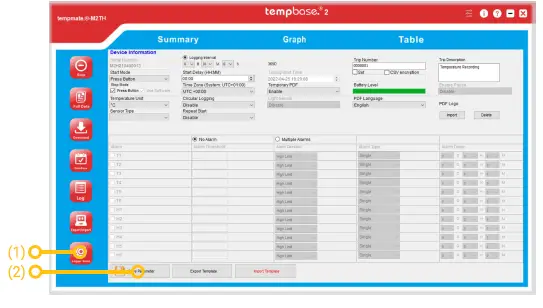
- Open the tempbase 2 software and select the „Logger Setup“ button“ (1).
- Make the desired settings and save them via the „Save Parameter“ button (2).
- Remove the logger from your PC and replace the cap securely.

- STEP 2 Start Logger
- Press and hold the green start button
 for 5 seconds.
 - A successful start is indicated by the green LED on your device flashing 10 times.
- Note: If another or no flashing signal appears, do not use the logger and contact support.
- Press and hold the green start button
- STEP 3 Set Mark
- Briefly press the green start button twice in succession to set a mark.
- A successfully set mark is indicated by the word „MARK“ and the number of marks set so far in your display.
- Note: Up to 10 marks can be set per operation.
- Briefly press the green start button
- STEP 4 Stop Logger
- Press and hold the red stop button
 for 5 seconds.
 - A successful stop is indicated by the red LED on your device flashing 10 times.
Alternative stop modes
Automatic Stop (default setting)- The device will stop automatically when the maximum number of measured values in the data memory is reached and no manual stop is performed beforehand.
- This stop mode works in addition to the manual stop. Software Stop (optional)
- This setting can be made in the tempbase 2 software. (see STEP 1)
- The stop is triggered automatically by connecting the logger to the PC and opening the software.
- A manual stop is not possible in this configuration.
STEP 5 Manual Readout of Data
- Remove the cap and connect the logger to your PC.
- A successful connection is indicated by both LEDs flashing. The abbreviations CSV and PDF appear one after the other in the display.
- The logger automatically opens as an external drive on your PC. This process may take a few minutes depending on the amount of data.
- Press and hold the red stop button
- Open the drive and copy the PDF and CSV report stored on it for your filing.
 for 5 seconds.
 for 5 seconds.
Note: A report is automatically generated as PDF and/or CSV when the device is stopped. The device can still be read out during a running measurement and an intermediate report can be downloaded.
Note: Already generated reports are automatically overwritten and deleted when the device is restarted.
Readout with the tempbase 2 software (optional)
- Remove the cap and connect the logger to your PC.
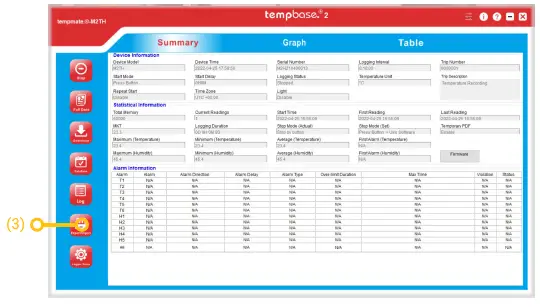
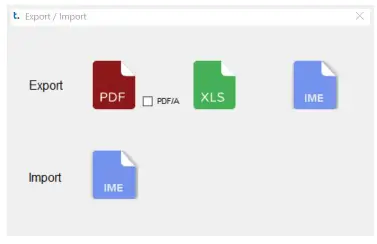
- Open the tempbase 2 software and select the „Export/Import“ button (3).

- Select the desired file format (PDF/XLS/IME) for export and the file location and confirm the download.
External Sensors
- Remove the cap and connect the not started logger to your PC.
- Open the tempbase 2 software and select the „Logger Setup“ button.
- In the „Sensor Type“ area, select the sensor type you want to work with.
- Confirm your configuration by clicking on „Save Parameter“ and remove the device from your PC.
- To record with an external sensor, use a screwdriver to loosen the screw on the bottom of the device and remove the standard cap.
- Replace it with the external sensor of your choice and screw it again.
Replace Battery
- Open the cover on the back of the device by turning it counterclockwise.
- Remove the old battery and dispose of it according to national regulations.
- Insert the new battery and replace the cover, closing it clockwise.
- Remove the cap and connect the logger to your PC.
- Open the tempbase 2 software to synchronize date & time again. This process is automatically trigge red when the logger is connected to PC and software.
- Caution: Back up your data and download your last report before removing the battery from the instrument.
Important Notes
- Configuration cannot be changed during recording.
- We recommend recalibration after 1 year.
- Always dispose of batteries according to your country‘s regulations.
- Do not place the device in corrosive liquids and do not expose it to direct heat.
SPECIFICATIONS
| Main Technical Specifications tempmate.®-M2 | |
| Temperature Sensor | HQ Digital Temperature sensor (internal and external optional) |
| Temperature Range | -30°C to +70°C (–40°C to +90°C with ext. T Sensor) (-80°C to +200°C with ext. PT100 Sensor) |
| Temperature Accuracy | ±0.3°C (at –20°C to + 40°C, other 0.5°C) |
| Temperature Resolution | 0.1°C |
| Humidity Sensor | n/a |
| Humidity Range | n/a |
| Humidity Accuracy | n/a |
| Humidity Resolution | n/a |
| Data Storage | 60,000 values |
| Display | Big Multifunction LCD |
| Start Setting | Manually by pressing button, by software or timed |
| Recording Time | Up to 6 months |
| Interval | 10sec. up to 11h 59min. (default 10 min.) |
| Alarm Settings | Up to 6 points customizable |
| Alarm Type | Single alarm or cumulative |
| Battery | CR2450 / replaceable by customer |
| Dimensions | 100 x 53 x 12 mm |
| Weight | 54g |
| Protection Class | IP65 |
| Connection Interface | USB 2.0, A-Type |
| Conformity | EN 12830, CE, RoHS |
| Software | PDF or CSV reader or tempbase 2 software / free download |
| Interface to PC | Integrated USB port |
| Reprogrammable | Yes, with internal HTML tool* or optional tempbase 2 Software |
| Automatic Reporting | PDF & CSV |
| Main Technical Specifications tempmate.®-M2 | |
| Temperature Sensor | HQ Digital Temperature sensor (internal and external optional) |
| Temperature Range | -30°C to +70°C (–40°C to +90°C with ext. T Sensor) (-80°C to +200°C with ext. PT100 Sensor) |
| Temperature Accuracy | ±0.3°C (at –20°C to + 40°C, other 0.5°C) |
| Temperature Resolution | 0.1°C |
| Humidity Sensor | HQ Digital Temperature/rel. Humidity sensor (internal and external optional) |
| Humidity Range | 0%rH to 100%rH |
| Humidity Accuracy | ±3%rH (20 to 80%rH), 5% others (at 25°C) |
| Humidity Resolution | 0.1%rH |
| Data Storage | 60,000 values |
| Display | Big Multifunction LCD |
| Start Setting | Manually by pressing button, by software or timed |
| Recording Time | Up to 6 months |
| Interval | 10sec. up to 11h 59min. (default 10 min.) |
| Alarm Settings | up to 6 points temperature and 2 points humidity customizable |
| Alarm Type | Single alarm or cumulative |
| Battery | CR2450 / replaceable by customer |
| Dimensions | 100 x 53 x 12 mm |
| Weight | 54g |
| Protection Class | IP65 |
| Connection Interface | USB 2.0, A-Type |
| Conformity | EN 12830, CE, RoHS |
| Software | PDF or CSV reader or tempbase 2 software / free download |
| Interface to PC | integrated USB port |
| Reprogrammable | Yes, with internal HTML tool* or optional tempbase 2 Software |
| Automatic Reporting | PDF & CSV |
Main Technical Specifications tempmate.®-M2 Accessory
| tempmate.®-M2 External T-Sensor | |
| Sensor | HQ Digital Temperature Sensor |
| Temperature Range | –40°C to +90°C |
| Temperature Accuracy | 0.3°C (at –20 ° C to + 40 ° C, other 0.5°C) |
| Temperature Resolution | 0.1°C |
| Sensor Tip | Stainless Steel (30 x 5 mm) |
| Sensor Connetion | M2-USB Connection |
| Cable length | 1.2 m |
| Cable Diameter | 3 mm |
| Cable Material | PVC |
| tempmate.®-M2 External High/Low T-Sensor | |
| Temperature Sensor | PT100 Sensor |
| Temperature Range | -80°C to +200°C |
| Temperature Accuracy | ±1°C |
| Temperature Resolution | 0,1°C |
| Sensor Tip | Stainless Steel (30 x 5 mm) |
| Sensor Connetion | M2-USB Connection |
| Cable Diameter | 3 mm |
| Cable length | 1.2 m |
| Cable Material | PTFE |
| tempmate.®-M2 External T/rH-Sensor | |
| Sensor | HQ Digital Temperature/rel. Humidity Sensor |
| Temperature Range | –40°C to +90°C |
| Temperature Accuracy | 0.3°C (at –20 ° C to + 40 ° C, other 0.5°C) |
| Temperature Resolution | 0,1°C |
| Humidity Range | 0 – 100 %rH |
| Humidity Accuracy | ±3%rH (10% to 70%), 5% others (at +25°C) |
| Humidity Resolution | 0.1 %rH |
| Sensor Tip | Stainless Steel (30 x 5 mm) |
| Sensor Connetion | M2-USB Connection |
| Cable length | 1.2 m |
| Cable Diameter | 3 mm |
| Cable Material | PVC |
Contact
Do you have any questions? Please contact us – our experienced team will be happy to support you. [email protected] +49 7131 6354 0
tempmate GmbH Wannenäckerstr. 41 74078 Heilbronn, Germany
- Tel. +49-7131-6354-0
- [email protected]
- www.tempmate.com
 tempmate.® - data logger & supply chain monitoring