PARADOX K38 Headquarters User Guide

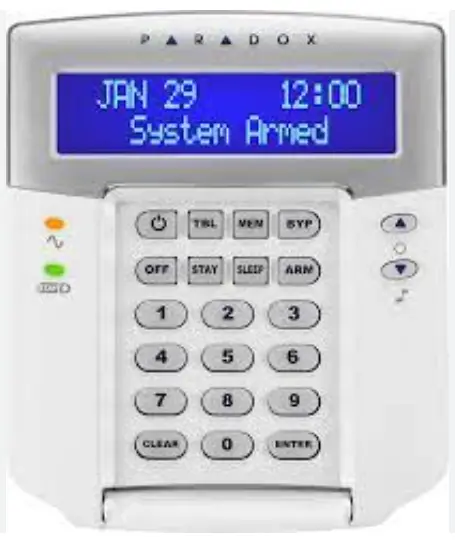
KEYPAD OVERVIEW
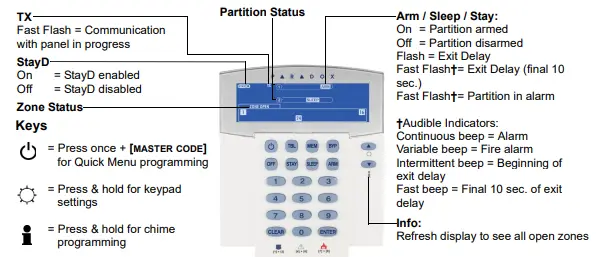
Zone Display:
Numbers [1] to [32] correspond to zones 1 to 32 respectively. Open or entry delay zones are illuminated, and flash in alarm.
[MEM] Alarm memory display
On = Alarm(s) occurred
[BYP] Bypass programming
On = Zone(s) bypassed
ARMING AND DISARMING
TO ARM WHEN LEAVING…
To Regular Arm:
- Close all zones in the desired
- Enter your [ACCESS CODE]‡ or [ARM] + [ACCESS CODE]


TO ARM WHEN STAYING
To Stay Arm:
- Press the [STAY] key.
- Enter your [ACCESS CODE]‡.
To Sleep Arm:

- Press the [SLEEP] key.
- Enter your [ACCESS CODE]‡.
PANIC ALARMS
To send a silent or audible alarm to your monitoring station, press and hold one of the following
combinations for 3 seconds.
Police Press [1] & [3]
Medical Press [4] & [6]
Fire Press [7] & [9]
ALARM MEMORY DISPLAY
To view the alarms that occurred during the last armed period:
- Disarm the
- Press the [MEM]
- The corresponding zone numbers that were in alarm the last time the system was armed will appear on the screen.
- To exit, press [CLEAR].
TROUBLE DISPLAY
- Press the [TBL] The word ‘Trouble’ and the number(s) corresponding to the trouble(s) are displayed on the screen.
- Read the corresponding explanation of the trouble from the trouble list in the MG/SP User If no repair instructions are given, call your security company for repairs.
- To exit, press [CLEAR].
KEYPAD SETTINGS
To mute the keypad:
Press and hold the [CLEAR] key for 10 seconds to enable or disable Keypad Muting.
To adjust the backlight level:
- Press and hold the [▲] key for 4
- Keys [1] and [2]
- Press [1], then use the [▲] and [▼] to
- To save and exit, press [CLEAR] or [ENTER].
To adjust the backlight delay:
- Press and hold the [▲] key for 4
- Keys [1] and [2] will
- Press [2], then use the [▲] and [▼] to
- To save and exit, press [ENTER].
BYPASS PROGRAMMING
Bypassed zones remained unarmed when the partition is armed.
- Press the [BYP]
- Enter your [ACCESS CODE]‡.
- The corresponding zone number will be displayed on the screen when Select the zone(s) you want to bypass by entering the two-digit zone number. For example, to enter zone 3, enter [0] then [3]. The corresponding zone indicator will flash.
- To save and exit, press [ENTER].
CHIME PROGRAMMING
A Chime Enabled zone will advise you every time it is opened by causing your keypad to beep.
- Press & hold the [ ] The word ‘Chime’ appears on the screen.
- Select the zones you want to Chime by entering the two-digit zone number. The corresponding zone number flashes. For example, to chime zone 2 enter [0] then [2]. The keypad automatically saves once the 2-digit zone number is entered.
- To save and exit, press [ENTER].
Warranty
For complete warranty information on this product please refer to the Limited Warranty Statement found on www.paradox.com/terms. Your use of the Paradox product signifies your acceptance of all warranty terms and conditions.
Patents
US, Canadian and international patents may apply. Paradox is a trademark or registered trademark of Paradox Security Systems (Bahamas) Ltd.
© 2022 Paradox Security Systems Ltd.
 Paradox - Headquarters
 Paradox - Headquarters