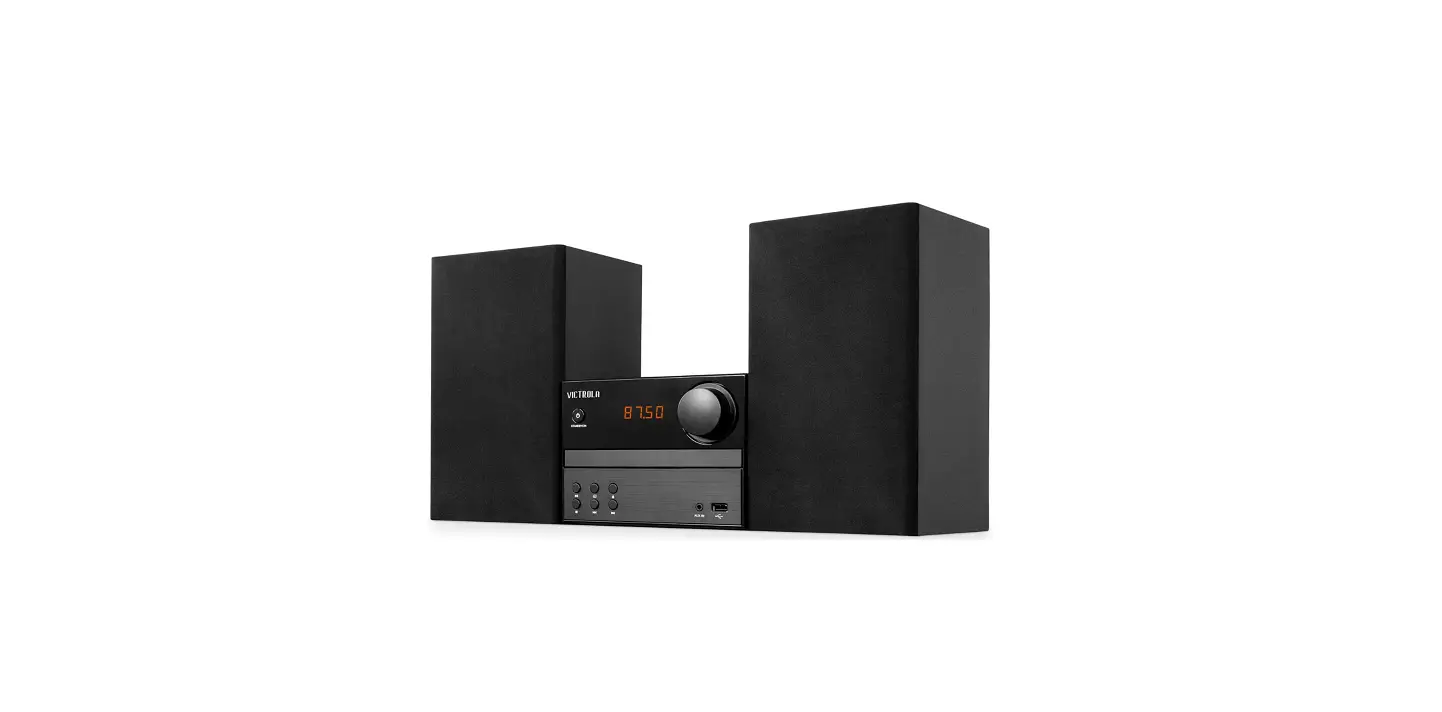
 Victrola VS-115 Bluetooth CD Stereo System
 Victrola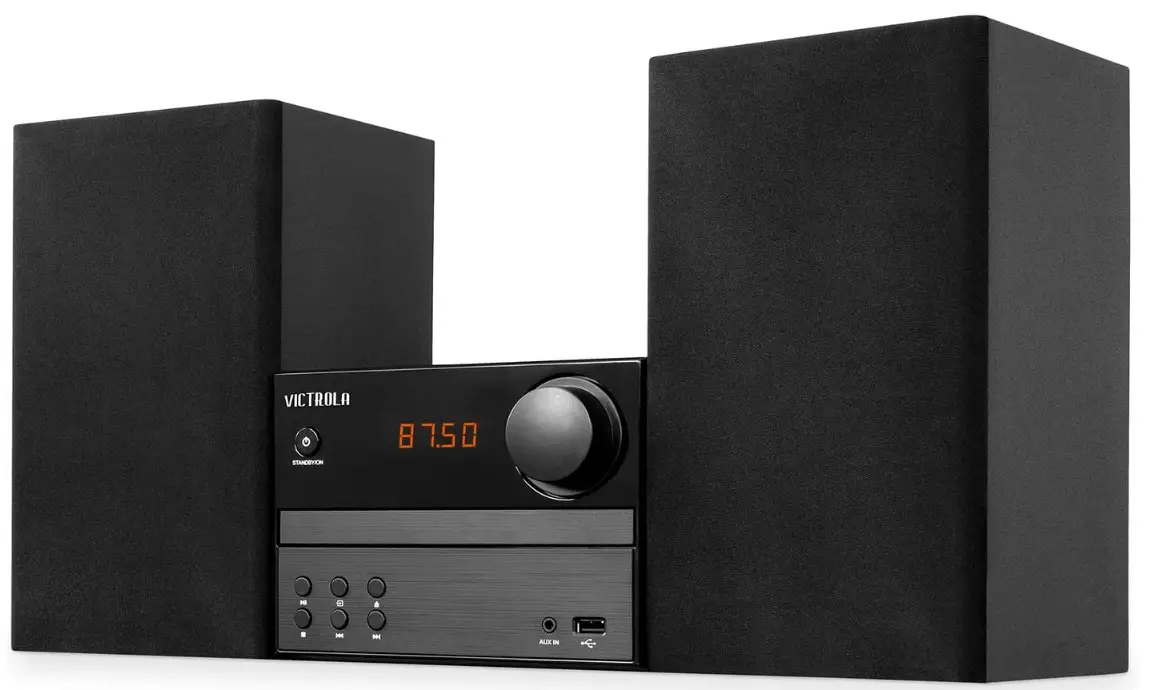
IMPORTANT SAFETY INSTRUCTIONS
Safety precautions
The information you need to prevent danger to the user and other people as well as property damage is described below. Description of signs shows different levels of danger or damage that may occur due to wrong handling.
Important notes
This book is only a guide for user’s operation, not a criterion for configuration. Only use attachments/accessories specified by the manufacturer.
Danger: The lightning flash is intended to alert the user to the presence of dangerous voltage within the product’s enclosure, and touching the internal components may result in a risk of electric shock to persons.
Warning: The exclamatory mark is intended to alert the user to the presence of important operating instructions. To reduce the risk of electric shock or fire, do not open the cover. Refer servicing to qualified service personnel.
This mark indicates this unit belongs to class 1 laser product. The laser beam may produce radiation ham, to the directly touching human body.
- Read these instructions.
- Keep these instructions.
- Heed all warnings.
- Follow all instructions.
- Do not use this apparatus near water.
- Clean only with dry cloth.
- Do not block any ventilation openings. Install in accordance with the manufacturer’s instructions.
- Do not install near any heat sources such as radiators, heat registers, stoves, or other apparatus (including amplifiers) that produce heat.
- Do not defeat the safety purpose of the polarized or grounding-type plug. A polarized plug has two blades with one wider than the other. A grounding type plug has two blades and a third grounding prong. The wide blade or the third prong are provided for your safety. If the provided plug does not fit into your outlet, consult an electrician for the replacement of the obsolete outlet.
- Protect the power cord from being walked on or pinched particularly at plugs, convenience receptacles, and the point where they exit from the apparatus.
- Only use attachments/accessories specified by the manufacturer.
- Use only with the cart, stand, tripod, bracket, or table specified by the
- manufacturer, or sold with the apparatus. When a cart is used, use caution when moving the cart/apparatus combination to avoid injury from tip-over.
- Unplug this apparatus during lightning storms or when unused for long periods of time.
- Refer all servicing to qualified service personnel. Servicing is required when the apparatus has been damaged in any way, such as the power-supply cord or plug is damaged, liquid has been spilled or objects have fallen into the apparatus, the apparatus has been exposed to rain or moisture, does not operate normally, or has been dropped.
- This equipment is a Class II or double insulated electrical appliance. It has been designed in such a way that it does not require a safety connection to the electrical earth.
- No naked flame sources, such as lighted candles, should be placed on the apparatus.
- Attention should be drawn to environmental aspects of battery disposal.
- The product is designed to use in moderate climates.
- The mains plug or an appliance coupler is used as a disconnecting device, the disconnecting device shall remain readily operable.
- Do not expose the device to rain, or moisture. dripping, or splashing.
- Do not place objects filled with liquids, such as vases, on the device.
SPECIFICATIONS
Design and specification are subject to change without notice. Bluetooth is a registered trademark of Bluetooth SIG, Inc. Other trademarks and trade names are those of their respective owners.
PRODUCT OVERVIEW
FRONT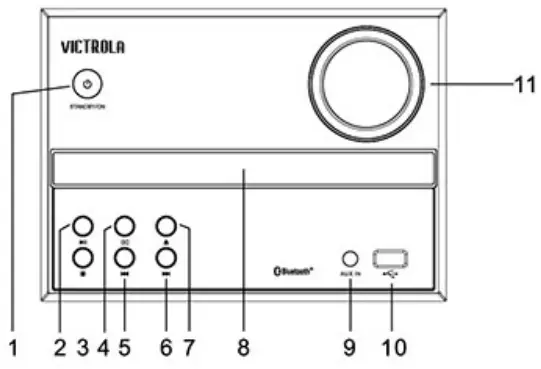
BACK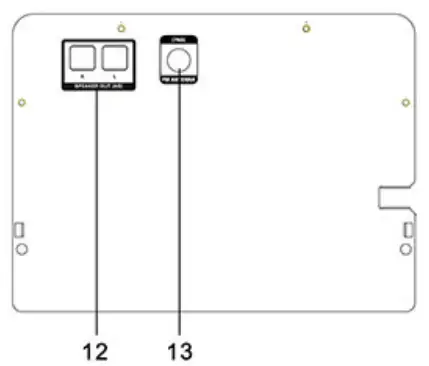
- STANDBY/ON
- PLAY/PAUSE
- STOP SOURCE
- PREVIOUS NEXT
- OPEN/CLOSE
- DISC TRAY
- AUX IN
- USB SLOT
- MASTER VOLUME ADJUSTER
- SPEAKER OUTPUT
- FM ANTENNA JACK
NOTE:
In FM Mode:
Press and hold the previous or next buttons to scan through frequencies. Press the previous and next buttons to switch through preset stations.
In BT/USB/CD Modes:
Press the previous and next buttons to switch between tracks.
In CD Mode:
Press and hold the previous and next buttons to fast forward and rewind.
REMOTE CONTROL
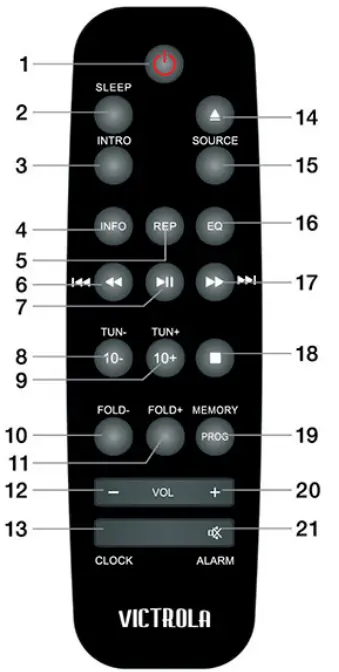
- STANDBY (ON/OFF)
- SLEEP
- INTRO
- INFO
- REPEAT
- REWIND/PREVIOUS
- PLAY/PAUSE
- TUNE-/10-
- TUNE+/1 O+
- FOLD-
- FOLD+
- VOLUME-
- CLOCK
- OPEN/CLOSE
- SOURCE
- EQ
- FAST FORWARD TO/NEXT
- AUTO/STOP
- MEMORY/PROG
- VOLUME+
- MUTE/ALARM
‘Please note: Some buttons only work in certain SOURCE modes.
REMOTE CONTROL OPERATION
Insert the batteries into the remote control. Point the remote control at the remote sensor on the front panel. The remote control works within a distance of about 8 meters (26′) from the sensor and within an angle of about 30 degrees from the left and right side.
Battery Installation
- Remove the battery compartment cover on the back of the remote control.
- Load one AAA/1.5V battery into the battery compartment making sure that the battery has been inserted with the correct polarity matching the symbols+/- as indicated inside the battery compartment.
- Replace the cover.

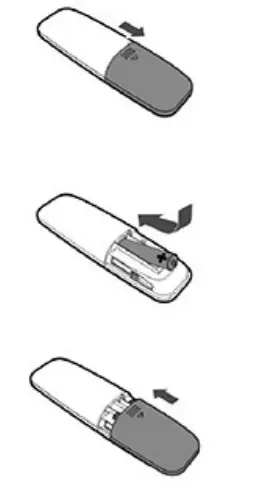
Note:
- Remove the battery when you do not intend to use the remote control for a long time.
- Do not mix new and used batteries or different types of batteries.
- Weak battery can leak and severely damage the remote control.
- The battery must not be exposed to excessive heat sources, such as sunshine, fire or any other things like that.
- Be environmentally friendly and dispose of battery according to your government regulations.
- Battery NOT included.
OPERATION AND CONTROLS
- Press to switch on the unit. Press it again to put the unit in standby mode.
- Press to open or close the disc tray.
- Press repeatedly to select a sleep time or choose option S-OFF to disable the sleep function, after which the unit will go into standby mode automatically. Then press [STANDBY] to wake it up.
- Press to introduce the track of the disc in order, it takes approximately ten seconds for each track.
- In standby mode, press and hold this button to set the clock. Press
 the button to select 12H or 24H clock display, press clock button to confirm, then use the
  button to set the clock time, and press it again to confirm it.
Note: only available in standby mode.
- Press once to show track information on display.
- Press again to remove track information from display.
- Press repeatedly to switch among CD, AUX IN, BLUETOOTH, USB and FM mode.
- Press to stop playback.
- Press to temporarily pause a playback. Press it again to resume the playback.
- Hold down this button for 3 seconds to disconnect Bluetooth.

- Press to skip to the next track.
- Hold down to fast-forward playback.
- Press to return to the previous track.
- Hold down to rewind playback.
- Press [VOLUME+] to turn up the volume.
- Press [VOLUME-] to turn down the volume.
- In stop mode, place a CD and press [PROGRAM] to access the program mode. Press the arrows to select the desired track and press once again [PROGRAM) to confirm your selection. Press
 to start program playback.
Note: Up to 20 tracks can be stored in the playlist. - Press to temporarily switch off the sound. Press it again to switch it on.
In standby mode, press and hold to enter into alarm timer setting mode, then make sure that you have set the clock correctly by pressing keys, press it again to confirm and set the volume value by the same method.
- Press repeatedly to switch the repeat modes.
- Press this button for each time to increase ten tracks.
- Press this button for each time to decrease ten tracks.
- Press to skip the next folder.
- Press to return to the previous folder.
- Press to switch the equalizer modes: flat, rock, pop, jazz or classic.

 the button to select 12H or 24H clock display, press clock button to confirm, then use the
  button to set the clock time, and press it again to confirm it.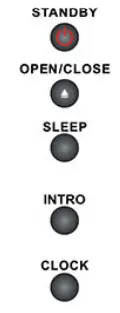

 to start program playback.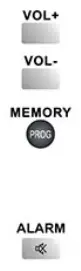
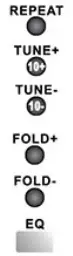
FM RADIO OPERATION
Press SOURCE to select FM mode. For optimal connection, attach the provided FM Antenna.
- TUNE+: press to fine tune (increase) the frequency;
- TUNE-: press to fine tune (decrease) the frequency.
- Hold down [TUNE+/-] to increase/decrease the frequency continuously.
- After tuning in a new frequency, press [MEMORY], then select a preferred station by pressing button, press it again to save it as a preset station.
- Hold down to auto scan for the broadcasting radio channels, press it again to stop auto scanning.
- Press to skip to the next preset station.
- Press to skip to the previous preset station.
NOTE: In Tuner mode, [VOLUME+/-], [MUTE] buttons are also active.
CONNECTING TO BLUETOOTH
An external device with Bluetooth Connectivity can be wirelessly connected to this unit using the Bluetooth function.
- Power ON the unit by pressing the Standby Button.
- Press the source button until “BT” displays on the LED Screen.
- Turn your external device’s Bluetooth Setting ON. Wait a moment, then look for the Bluetooth pairing name “VS-115”.
- Select the Bluetooth pairing name, to connect the unit. Once connected, there will be an audible tone indicating device has been successfully paired.
- Rotate the VOLUME CONTROL KNOB to adjust the sound level. Use all Play/Pause/Next/Previous functions as usual.
SPEAKER OUTPUT
Connect the speakers to the speaker output ports with their attached speaker cables.
AUX IN OPERATION
An external (auxiliary) audio source (i.e. personal CD/MP3 Player/Mobile phone or computer) can be connected to this unit via AUX IN.
- Plug a detachable Audio Cable (not provided) into the AUX IN socket on the front of the unit.
- Press the source button until the LED Screen displays “AUX IN”.
- Plug the other end of the Audio Cable into the Headphone or Line Out socket of your External Source.
- Rotate the VOLUME CONTROL KNOB to adjust the sound level.
USB OPERATION
- For USB playback, insert a USB (not provided) into the USB Port on the front of the unit.
- Press the Source Button until the LED Display shows “USB”.
- Playback will start automatically.
- Use FOLD+ and FOLD- Buttons to switch between folders (if applicable).
TROUBLESHOOTING
Before contacting customer service, please check the following chart for simple troubleshooting solutions.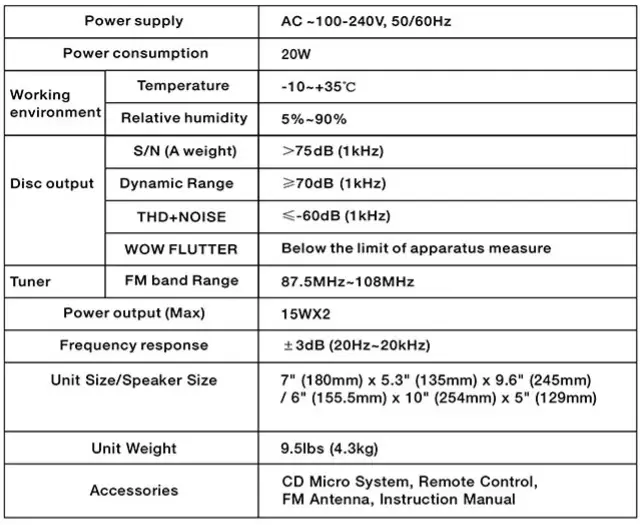
WARRANTY
Victrola is a registered trademark of Innovative Technology Electronics LLC.
Innovative Technology Electronics LLC.
Limited Warranty: 90 Days Labor, One Year Parts
Innovative Technology Electronics LLC. (IT) warrants the product to be free from “Defects” in materials under normal use for a period of “One Year” from the date of the original purchase. The Warranty is “Not” transferable. IT agrees, within the initial “90 Day” period, to repair or replace the product if it is determined to be defective at “No Charge”. It is further agreed that IT will cover the cost to repair or replace damaged “Parts” only for a total period of “One Year” from the date of the original purchase. The warranty does not cover cosmetic damage, antennas, AC cords, cabinets, headbands, ear-pads, or damage due to line power surges, connection to improper voltage supply or settings, misuse, mishandling, accident, acts of God or attempted repair by an unauthorized service agent.
To obtain service, the purchaser MUST present an original sales receipt/ proof of purchase. Please contact us at www.victrola.com to request an RMA (Return Material Authorization) number to return products for service or replacement. Returns without an RMA number on the package will be refused and returned to sender. Upon receipt of the returning item and our full inspection (IT) may issue a replacement to customer for the same item or of one that has equivalent value and features. To return an item, supply full name, return address, phone number, item purchased, receipt of purchase and reason for return to obtain RMA number.
All returns must be in the original packaging or reasonable substitute to prevent damage. Customer “Must” include full name, shipping address and telephone number inside of package. No return will be shipped back to a PO Box or APO address.
Please include your check or money order in the amount of:
- USO $5.00 for items $10.00 to $39.99. (Price Paid Per Unit)
- USO $10.00 for items $40.00 to $99.99. (Price Paid Per Unit)
- USO $16.00 for items $100.00 and up. (Price Paid Per Unit)
- Shipping fees are non-refundable.
To be payable to Innovative Technology Electronics LLC. (for handling and return shipping charges) (IT) will not be responsible for delays or unprocessed claims resulting from a purchaser’s failure to provide any/ all of the necessary information. Send all inquiries or RMA request via our website www.victrola.com/pages/technical-support. Innovative Technology Electronics LLC. 1 Channel Drive Port Washington, NY 11050
Toll free: 1-877-483-2497
Website for support: www.victrola.com/pages/technical-support
There are no express warranties except as listed above.
REPAIR OR REPLACEMENT AS PROVIDED UNDER THIS WARRANTY IS THE EXCLUSIVE REMEDY OF THE CUSTOMER, (IT) SHALL NOT BE LIABLE FOR ANY INCIDENTAL OR CONSEQUENTIAL DAMAGES FOR BREACH OF ANY EXPRESS OR IMPLIED WARRANTY ON THIS PRODUCT EXCEPT TO THE EXTENT PROHIBITED BY APPLICABLE LAW. ANY IMPLIED WARRANTY OF MERCHANTABILITY OR FITNESS FOR A PARTICULAR PURPOSE ON THIS PRODUCT IS LIMITED IN DURATION TO THE DURATION OF THIS WARRANTY.
Some states do not allow the exclusion or limitation of incidental or consequential damages, or limitations on how long an implied warranty lasts, so the above exclusions or limitations may not apply to you. This warranty gives you specific legal rights and you may also have other rights, which vary from state to state.
FCC STATMENT
Caution: The user is cautioned that changes or modifications not expressly approved by the party responsible for compliance could void the user’s authority to operate the equipment.
This device complies with Part 15 of the FCC Rules and Industry Canada license-exempt RSS standard(s). Operation is subject to the following two conditions:
- this device may not cause harmful interference, and
- this device must accept any interference received, including interference that may cause undesired operation.
NOTE: This equipment has been tested and found to comply with the limits for a Class B digital device, pursuant to Part 15 of the FCC Rules. These limits are designed to provide reasonable protection against harmful interference in a residential installation. This equipment generates, uses and can radiate radio frequency energy and, if not installed and used in accordance with the instructions, may cause harmful interference to radio communications. However, there is no guarantee that interference will not occur in a particular installation. If this equipment does cause harmful interference to radio or television reception, which can be determined by turning the equipment off and on, the user is encouraged to try to correct the interference by one or more of the following measures:
- Reorient or relocate the receiving antenna.
- Increase the separation between the equipment and receiver.
- Connect the equipment into an outlet on a circuit different from that to which the receiver is connected.
- Consult the dealer or an experienced radio/TV technician for help.
FCC & IC Radiation Exposure Statement:
This equipment complies with FCC and Canada radiation exposure limits set forth for an uncontrolled environment. This equipment should be installed and operated with a minimum distance of 20cm between the radiator and your body.
This transmitter must not be co-located or operating in conjunction with any other antenna or transmitter radiations:
CALIFORNIA PROP 65 WARNING
WARNING: This product can expose you to chemicals including lead, which is known to the State of California to cause cancer and birth defects or other reproductive harm. For more information go to www.P65Warnings.ca.gov.
FAQs
Can you play CDs on a Victrola record player?
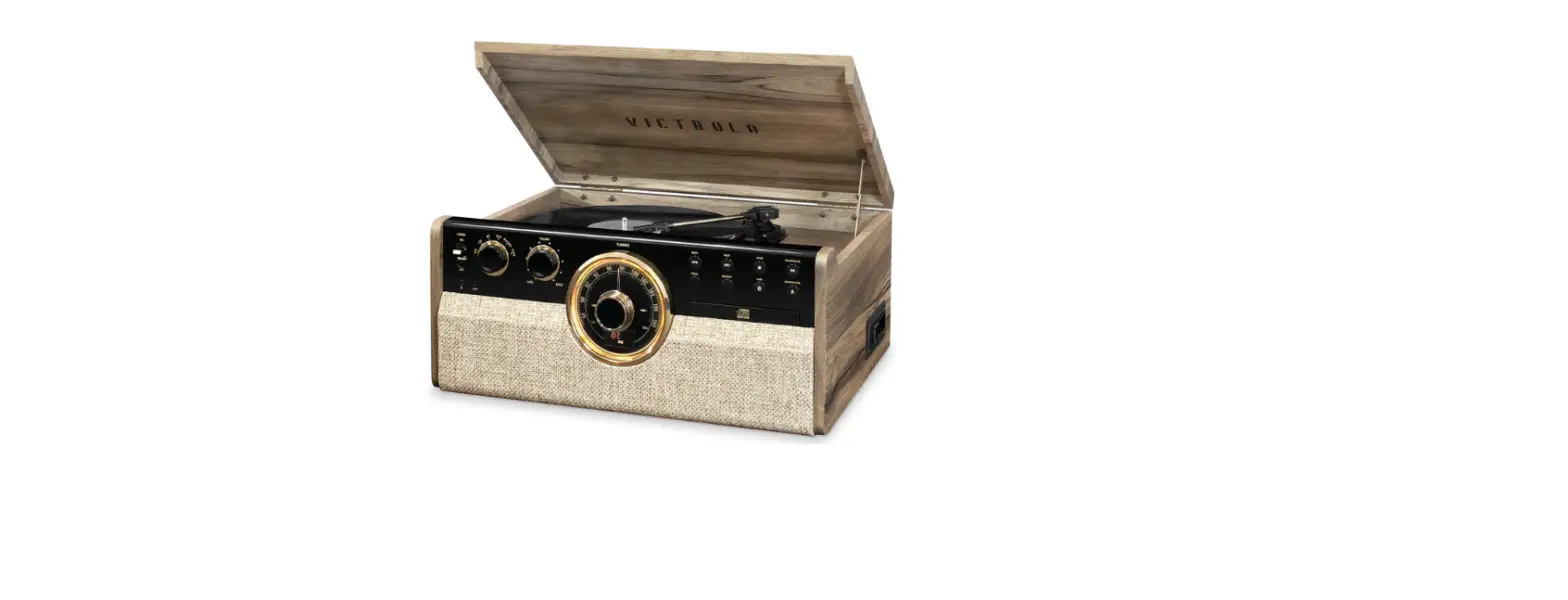
Victrola 6-in-1 Wood Bluetooth Mid Century Record Player with CD, Cassette Player, and Radio, and 3-Speed Turntable.
Can you make a Victrola VS-115 CD player Bluetooth?
With a Bluetooth adapter, it is simple to turn any conventional CD player, tuner, tape recorder, or another sort of music source Bluetooth-capable. The RCA female cable that comes with the adapter is used to simply connect it to the analog signal output of the music source.
How does a Victrola VS-115 wireless stereo system work?
A transmitter attached to the stereo system sends alternating current through an antenna to convert electrical signals to radio waves. The antenna emits radio waves into the air. On the wireless speaker, an antenna and receiver pick up the radio signal, which the receiver then transforms into an electrical signal.
What do you need for Victrola VS-115 stereo system?
Most stereos have these three components: a stereo amplifier or receiver. speakers that are matched. a minimum of one musical source.
What does a Victrola VS-115 Bluetooth CD player do?
Listeners are able to take in music without having to deal with a mess of wires or adapters by installing a Bluetooth transmitter inside a CD player. In general, the ability to send the signal wirelessly will result in a high-quality listening experience.
How far will Victrola VS-115 wireless speakers work?
The ranges at which Bluetooth speakers connect vary. Depending on the size and type you select, the majority may reach distances of approximately 30 feet (9 meters) all the way up to 100 feet (30 meters).
What is the Victrola VS-115 stereo system used for?
A device that uses electronics to play sounds over speakers. It consists of speakers, an amplifier, and source components like a CD player or FM tuner. The preamplifier (preamp) in the amp allows it to switch between several input sources while boosting the signal to drive the speakers.
What is the most important component in a Victrola VS-115 stereo system?
The source components in your stereo are the most crucial audio components (i.e. cd player, tuner or record player). The superiority of any stereo system is determined by the calibre of the musical signal it produces, which is the first component.
How do I connect my Victrola VS-115 CD player to my receiver?
Therefore, you should plug your audio cables into the “CD” input on your receiver if you’re connecting a CD player. The audio wire should be plugged into the CD player’s audio output (top image), and then the stereo receiver’s CD audio input (bottom picture).
Can I connect Victrola VS-115 CD player to active speakers?
You just need the proper connections and to verify the outputs on the back of the CD player to connect a CD player to active speakers. Either a 1/4-inch jack or an RCA red and white wire will likely be required.
Do I need an amplifier for a Victrola VS-115 CD player?
This CD player needs to be connected to an amplifier, either a stereo receiver or a home theatre receiver. It is unable to power additional speakers. The CD player has optical digital output in addition to stereo analog left and right audio outputs. Therefore, for it to work with the amplifier, it would need to accept one of those.
Can a Victrola VS-115 CD player be connected to a soundbar?
There are three possible input types for the soundbar. The optical input is the first input type. Yes, it will work if your CD player has an Optical output (Fiber Optic).
How do I connect my Victrola VS-115 CD player to my TV?
The RCA cable typically comes in three colors: yellow, white, and red. You must use the white and red jacks to connect audio. So, connect these to the CD player’s white and red output ports. On your LCD TV, locate the appropriate audio inputs, and attach the RCA cable there.
![Victrola 8-in-1 Turnable Bluetooth Record Player [vta-754b] Instruction Manual](https://static-data1.manualsee.com/1/img/152/17285/2020/12/Victrola-8-in-1-Turnable-Bluetooth-Record-Player.png "Victrola 8-in-1 Turnable Bluetooth Record Player [vta-754b] Instruction Manual")
![Victrola 8-in-1 Turnable Bluetooth Record Player [vta-754b] Instruction Manual](https://static-data1.manualsee.com/1/img/379/30050/2020/12/Victrola-8-in-1-Turnable-Bluetooth-Record-Player_1-1.png "Victrola 8-in-1 Turnable Bluetooth Record Player [vta-754b] Instruction Manual")