 The original version of this document is in English. In case of discrepancy between a translation of this document and the English version, the English version must be used as a reference
| Modification | Ae 0 | Ae 1 | Ae 2 | Ae 3 | Ae 4 | Ae 5 | Ae 6 | Prepared | 2021-02-22 | tamburwi | ||||||
| KA No. | 120390 | 120436 | xxxxx | Reviewed | 2021-02-22 | carriest | ||||||||||
| KA Date | 2021-05-29 | 2021-09-25 | xx-xx-xx | Norms chkd | 2021-02-22 | albertfl | ||||||||||
| Released | xx-xx-xx | hugenema | ||||||||||||||
| iSPECI BLE Adapter Technical Information | Remark | |||||||||||||||
| Replaces / Mod. | Basis Drawing | No Pg. 14 | Format A4 | |||||||||||||
| INVENTIO AG, CH-6052 Hergiswil | Classification 11950 | Lead Office EU1 | Q 50000606 | Page 1 | Lang. EN | |||||||||||
Introduction
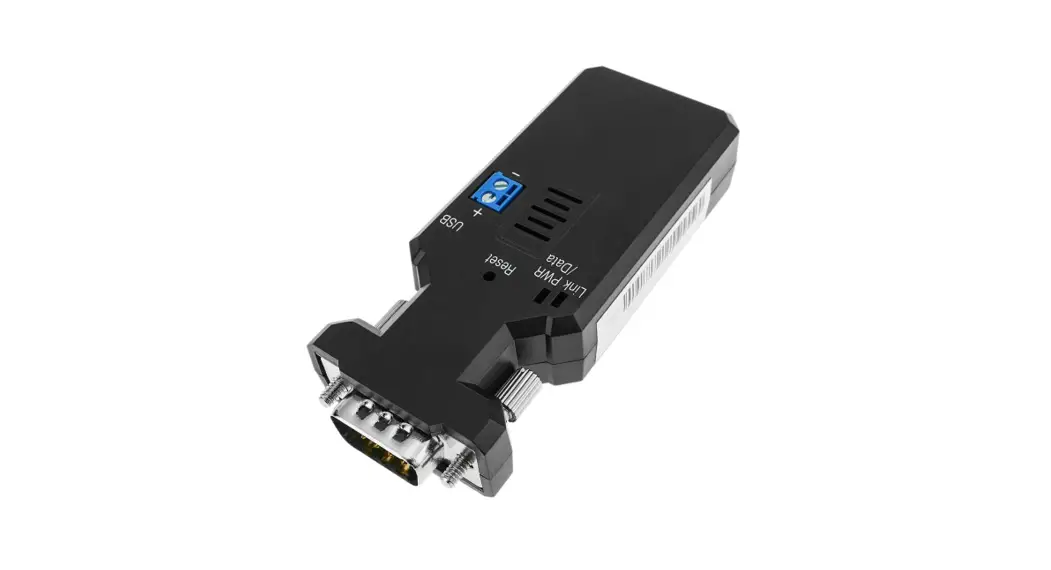
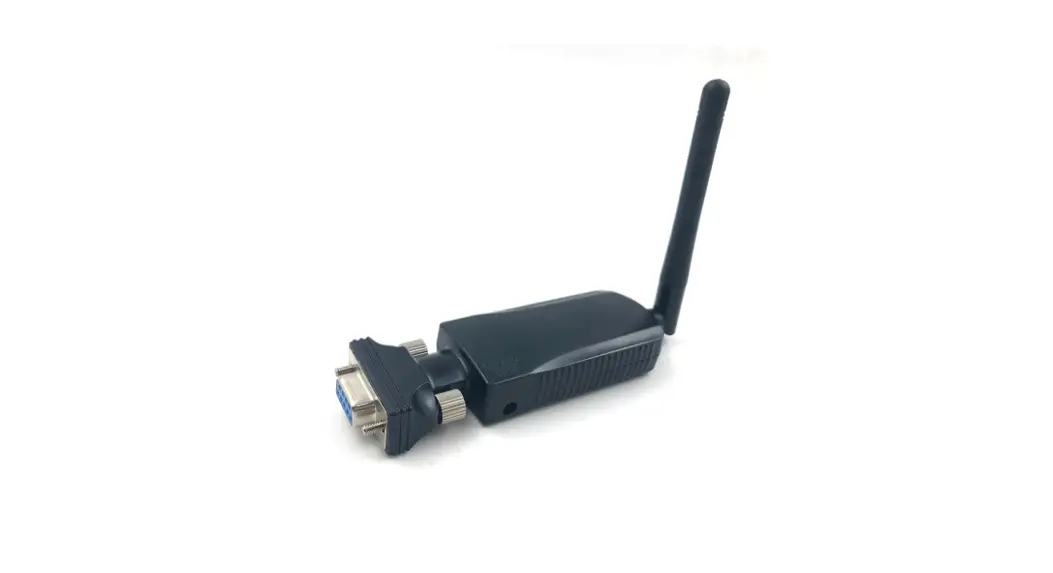
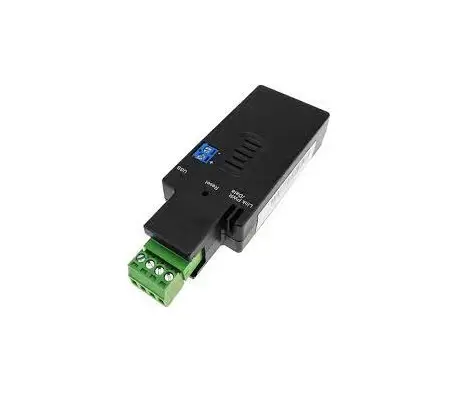
iSPECI BLE adapter is a device that allows you to connect the elevator controllers, by the means of a “RS232/RS422 – Bluetooth Low Energy (BLE) interface” to the mobile device / iSPECI of the field technicians.
The iSPECI BLE adapter has been developed to radically simplify connecting to elevator controllers using the iSPECI application. No more cables that can break, no additional adapters to turn communication pins, it is a plug & play device. It is a Bluetooth BLE device with an approximate range of 10 meters.
Overview
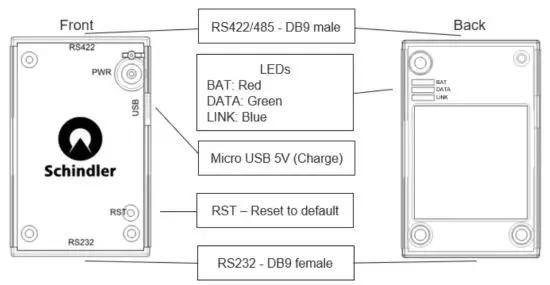 The adapter contains the following:
- Bluetooth (BLE) interface 5.2 (see EFR32BG22 from Silicon Labs)
- RS232 interface with connector DB9 female
- RS422/485 interface with connector DB9 male
- Micro USB connector (5VDC) for battery charging
- RST button (reset button to be pressed in case the Bluetooth is not working)
- PWR button (ON/OFF)
- LEDs
| LED | Flashing | ON |
| BAT | Battery Charge Level <20% | Battery Charging |
| DATA | Data Transmission | |
| LINK | NOT CONNECTED iSPECI | Connected to iSPECI |
How to use the Adapter
- Click on the PWR button to switch on the device (blue LINK LED will flash)
- Plug iSPECI BLE Adapter into the diagnostic serial interface on control PCB
- Activate Bluetooth on your mobile device
- Open iSPECI app on your mobile device, tap “Connect”, choose “Wireless connection” and select “iSPECI BLE Adapter” from the list
- When done, click on the PWR button for 5 seconds to switch it off manually and unplug the adapter (in case the iSPECI BLE Adapter is unplugged from control without switching it off, then it will switch off automatically after 15 min. It is recommended to turn it off manually to save battery time)
Charge the Battery
The iSPECI BLE Adapter can be charged with the included (or any other) MicroUSB cable. A full battery charge will last for 8 hours of usage. A full recharge will take around 45 minutes. The battery has a rated capacity of 300mAh (minimal capacity > 280mAh) and after 300 charging cycles the capacity will have at least 70% of its initial capacity. Remarks: Once the battery is defect, the complete adapter has to be replaced; no possibility to replace the battery.
Mechanical Dimensions
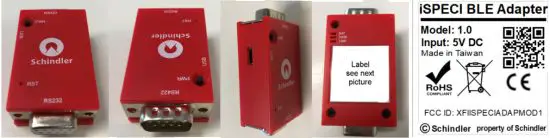
Remarks: The label shown above is valid for the first released version, in case of modification on this adapter, then the Model version will change (at the moment the version is 1.0)
Important: The label has to be put on the adapter and also on the package.
| Length: | 58mm (48mm without the connectors) |
| Width: | 31mm |
| Depth: | 8.5mm |
| Weight: | 62g |
The housing has to be at least UL94 HB.
The adapter has to be at least IP20.
BLE App. Programming Interface User`s Commands
| iSPECI BLE Adapter | |
| Peripheral Id | 5C6DE224-55D3-8629-7F9E-7A2E173DE61D |
| Services | |
| Battery Service | 180F |
| Device Information | 180A |
| Schindler Service | BC407FA3-4B83-432A-ABDD-A845B4AFA772 |
| Generic Attribute | 1801 |
| Generic Access | 1800 |
| OTA Service | 1D14D6EE-FD63-4FA1-BFA4-8F47B42119F0 |
| OTA Slot Manager Service | 4EC89223-718A-4D0A-BBBD-6173357E6650 |
| Service – Battery Service 180F | |||
| Characteristics | UUID | Description | Properties |
| Battery level state | 2A1B | 0x0000 (0%) – 0x6400 (100%) | read only |
| Service – Device Information 180A | |||
| Characteristics | UUID | Description | Properties |
| Manufacturer Name String | 2A29 | uConnect | read only |
| Model Number String | 2A24 | 1.0 read | read only |
| Serial Number String | 2A25 | Unique BD-Address in HEX format XX-XX-XX-XX-XX-XX | read only |
| Firmware Revision String | 2A26 | 2.1.9 | read only |
| Service – Schindler Service BC407FA3-4B83-432A-ABDD-A845B4AFA772 | |||
| Characteristics | UUID | Description | Properties |
| RX (Received Bytes) | 64B872C8-DC45-11E89F8B-F2801F1B9FD1 | notify only | |
| Client Characteristic Configuration | 2902 | notify only | |
| TX (Byte to Write) | 64B86F08-DC45-11E89F8B-F2801F1B9FD1 | max. 20 Bytes | Write |
| COM Setting Configuration | 64B87444-DC45-11E89F8B-F2801F1B9FD1 | 8 Bytes (see paragraph 6.1/6.2) | read, write |
| Device Name | 64B877DC-DC45-11E89F8B-F2801F1B9FD1 | 15 Bytes for ASCII Code | Read, Write |
| PIN | 64B877DD-DC45-11E89F8B-F2801F1B9FD1 | max. 6 Bytes in ASCII (“000000” or 0x303030303030 for disable) | Read, Write |
| MacID | 64B87584-DC45-11E89F8B-F2801F1B9FD1 | Not used yet Read, | Read,Write |
| Device Control Parameters | 64B877EE-DC45-11E89F8B-F2801F1B9FD1 | 2 Bytes | Write |
| Service – Generic Attribute 1801 | |||
| Characteristics | UUID | Description | Properties |
| Service Changed | 2A05 | Notify only | |
| Client Characteristic Configuration | 2902 | ||
| Database Hash | 2B2A | Read | |
| Client Supported Features | 2B29 | Read/Write | |
| Service – Generic Access 1800 | |||
| Characteristics | UUID | Description | Properties |
| Device Name 2A00 | 2A00 | Read/Write | |
| Appearance 2A01 | 2A01 | Read | |
| Service – OTA Service 1D14D6EE-FD63-4FA1-BFA4-8F47B42119F0 | |||
| Characteristics | UUID | Description | Properties |
| OTA Control | F7BF3564-FB6d-4E5388A4-5E37E0326063 | Write | |
| OTA Data | 984227F3-34FC-4045A5D0-2C581F81A153 | Write | |
| Service – OTA Slot Manager 4EC89223-718A-4D0A-BBBD-6173357E6650 | |||
| Characteristics | UUID | Description | Properties |
| Upload slot | 2E31606B-C6B6-469EB9C1-39335A530ADA | Read/Write | |
| Bootloader Slot | 4FAB0BF0-4C27-48C8807F-D0D094CD1DB3 | Write | |
Com Setting Config
| B0 (binary) | B0 (hex) | Port Selection |
| 0b0000 0000 | 0x00 | RS232 normal |
| 0b0000 0001 | 0x01 | RS232 normal |
| 0b0000 0010 | 0x02 | RS422 |
| 0b0001 0001 | 0x11 | RS232 reversed |
| 0b0001 0010 | 0x12 | RS422 |
| B1 (binary) | B1 (hex) | Flow Control |
| 0b0000 0000 | 0x00 | None |
| 0b0000 0001 | 0x01 | CTS/RTS |
| B2 (binary) | B2(hex) | Stop delay [ms] |
| 0b000 00000 | 0x00 | 5 |
| 0b0000 0001 | 0x01 | 7 |
| 0b0000 0010 | 0x02 | 10 |
| 0b0000 0011 | 0x03 | 15 |
| 0b0000 0100 | 0x04 | 30 |
| 0b0000 0101 | 0x05 | 50 |
| 0b0000 0110 | 0x06 | 100 |
| 0b0000 0111 | 0x07 | 200 |
| B3 (binary) | B3 (hex) | Parity |
| 0b0000 0000 | 0x00 | None |
| 0b0000 0001 | 0x01 | Even |
| 0b0000 0010 | 0x02 | Odd |
| B4 (binary) | B4 (hex) | Baud rate |
| 0b0000 0000 | 0x00 | 2400 |
| 0b0000 0001 | 0x01 | 4800 |
| 0b0000 0010 | 0x02 | 9600 |
| 0b0000 0011 | 0x03 | 14400 |
| 0b0000 0100 | 0x04 | 19200 |
| 0b0000 0101 | 0x05 | 38400 |
| 0b0000 0110 | 0x06 | 57600 |
| 0b0000 0111 | 0x07 | 115200 |
| 0b0000 1111 | 0x08 | 230400 |
| B5 (binary) | B5 (hex) | Stop bits |
| 0b0000 0000 | 0x00 | 1 |
| 0b0000 0001 | 0x01 | 1,5 |
| 0b0000 0010 | 0x02 | 2 |
| B6 (binary) | B6 (hex) | Data bits |
| 0b0000 0000 | 0x00 | 8 (fixed) |
| B7 (binary) | B7 (hex) | BreakTime (ms)* |
| 0b0000 0000 | 0x00 | disabled |
| 0b0000 0001 | 0x01 | 1 |
| 0b0111 0000 | 0x70 | 112 |
| 0b1111 1111 | 0xFF | 255 |
*After break time (break state duration) there will be a delay of around 1ms before sending a message via Tx. When break time is enabled there will be always a break state before message is sent. (available only with RS232 interface)
Device Control Parameters
| Function | Bytes to write | Remarks |
| Reboot device | 0xAA01 | |
| Restore Default Setting | 0xAA04 | |
| Enable OTA | 0xAA08 | Not used |
| Put Device into Sleep | 0xAA10 | Not used |
Connectors on the Adapter
Following connectors are on the Adapter:
RS 232
Connector type: DSUB9 Female
| Pin Number | Signal description |
| 1 | Not Connected |
| 2 | TXD (Transmitted Data) |
| 3 | RXD (Received Data) |
| 4 | Not Connected |
| 5 | GND |
| 6 | Not Connected |
| 7 | CTS (Clear to Send) |
| 8 | RTS (Request to Send) |
| 9 | Not Connected |
RS 422
Connector type: DSUB9 Male
| Pin Number | Signal description |
| 1 | Not Connected |
| 2 | Not Connected |
| 3 | B (differential received data) |
| 4 | Y (differential transmitted data) |
| 5 | GND |
| 6 | Not Connected |
| 7 | A (differential received data) |
| 8 | Z (differential transmitted data) |
| 9 | Not Connected |
Battery charging
Connector type: MicroUSB 5 poles
| Pin Number | Signal description |
| 1 | 1 5V DC |
| 2 | Not Connected |
| 3 | Not Connected |
| 4 | Not Connected |
| 5 | GND |
Paper to be delivered with the adapter
One paper, with following information, has to be delivered together with the adapter
iSPECI BLE Adapter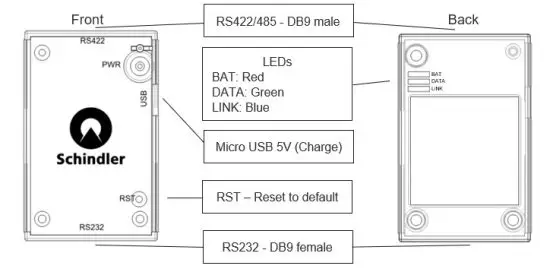
| LED | Flashing | Solid |
 | Battery level < 20% | Charging |
 | Data transmission | |
 | Not connected to iSPECI | Connected to iSPECI |
First time charge the module fully (8 hours) as soon as you receive it.
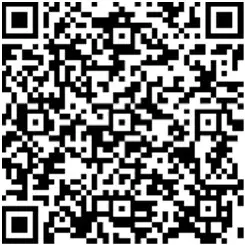
If more information is required, please scan the following QR Code
There is a QR code available directly on the adapter. In case you have any problems to read it, please use the zoom function of the mobile phone camera.
Shorted URL link has been used to generate the QR code on the adapter because of space problems.
If you can not scan QR code that contains shorted URL link, please scan the above QR code on paper.
| Address of EU Importer: Schindler Supply Chain Europe Ltd. Via della Pace 22 6600 Locarno Switzerland | Address of the China Importer: Schindler (China) Elevator Co. Ltd. No. 555 Xingshun Road Jiading District 201815 Shanghai |
Environmental Conditions
| Ambient temperature range Max Humidity Application altitude Chemically active substances | -10 to +50 °C 95%, non-condensing up to 4000 m above sea level 3C2, according IEC 721-3-3 |
Environmental Protection Requirements
The supplier shall ensure the fulfillment of the following ecological requirements
Prohibited Substances:
The product shall not contain any hazardous substances restricted by REACH Regulation 1907/2006/EC and RoHS Directive 2011/65/EC.
Substances to be avoided:
The use of hazardous substances as listed below shall be avoided
- Substances listed on the ECHA candidate list of Substances of Very High Concern (SVHC) above 0.1% w/w
- Chromium VI for metallic surface coatings, zinc layers and pigmented plastics
Declaration
A supplier declaration of hazardous substances shall be provided declaring any substance still existing in the product and confirming legal compliance.
Supplier / Manufacturer obligations
The iSPECI BLE adapter shall be provided with manufacturer part number and Schindler logo, engraved or with a label (for part number please refer to the doc E 50000606). The supplier/manufacturer shall assure the traceability of every supplied material, at the level required by ISO 9000 family standard. In case of claim/failure the supplier shall be able to trace all the units supplied with the same order lot of the failed unit.
The battery FT702025P from Manufacturer Helix Co Ltd has to be used because this battery was tested according to the following standards and passed the tests
Requested by the CE:
- IEC62133 Secondary cell and battery containing alkaline or other non-acid electrolytes: safety requirements for portable sealed secondary ithium cells
- IEC 62368-1 Audio/video, information and communication technology equipment – Part 1: Safety requirements
Requested for global shipping:
- IEC62281 Safety of primary and secondary lithium cells and battery during transport: Drop Test
- UN38.3 Test Summary and Supplier Inquiry Form Lithium Battery Service in English for batteries
- UN38.3 Test Summary and Supplier Inquiry Form Lithium Battery Service in English for cells
- United Nations “Recommendation on the TRANSPORT OF DANGEROUS GOODS” Manual of Test sand Criteria (ST/SG/AC.10/11/Rev.7 Section 38.3) for cell –
- United Nations “Recommendation on the TRANSPORT OF DANGEROUS GOODS” Manual of Test sand Criteria (ST/SG/AC.10/11/Rev.7 Section 38.3) for pack
No other battery can be used.
A label, with following informations, has to be put directly on the battery:
– Type of battery
– Manufacturer and part number
– Rated capacity
– Nominal voltage
– Certifications
– Polarity (+ and -)
– Date of manufacture
Polymer Li-ion Rechargeable Battery
Model : FT702025P
– Voltage: 3.7VDC
Capacity: 300mAh_1.11Wh
IEC 62133, UN38.3 Certified
Caution: 1ICP8/21/27
+ Do not incinerate, disassemble, or used in high temp.
Do not charge except on the specified charging condition.
Do not crash or modify.
Date Code: 20A15
Manufactured by HELIX CO.,LTD.
Example of the label:
Remarks: Data Code: 20A15 means:
20 is the year
A is the month
15 is the day
Considering that the Polymer Li-on rechargeable battery pack (Polymer Li Cells) belongs to the dangerous goods, it is important that a label is placed outside the packaging indicating that contains dangerous goods.
Compliances
This iSPECI BLE adapter has been designed to be compliant to the following directives:
- For Europe: RED (2014/53/EU) and Electromagnetic Compatibility Directive (2014/30/EU)
- For America: FCC Part 2 Section 2, see also paragraph 11.2
- No SRRC certification required because this device is NOT sold to the Chinese open market
- RoHS : 2011/65/EU and 2015/863/EU
The iSPECI BLE Adapter shall report CE marking and all required indications.
At the moment this component has the CE certification and SRRC certification is not required
FCC certification is on going, not yet finished.
Note: The manufacturer shall ensure the compliance with the Bluetooth 5.2 specification released by the Bluetooth SIG.
In particular, it shall be ensured that each device has a unique BD-Address as described in the specifications.
Federal Communications Commission Interference Statement
This equipment has been tested and found to comply with the limits for a Class B digital device, pursuant to part 15 of the FCC Rules. These limits are designed to provide reasonable protection against harmful interference in a residential installation. This equipment generates, uses and can radiate radio frequency energy and, if not installed and used in accordance with the instructions, may cause harmful interference to radio communications. However, there is no guarantee that interference will not occur in a particular installation. If this equipment does cause harmful interference to radio or television reception, which can be determined by turning the equipment off and on, the user is encouraged to try to correct the interference by one or more of the following measures:
- Reorient or relocate the receiving antenna.
- Increase the separation between the equipment and receiver.
CAUTION:
Any changes or modifications not expressly approved by the grantee of this device could void the user’s authority to operate the equipment.
This device complies with Part 15 of the FCC Rules. Operation is subject to the following two conditions:
(1) this device may not cause harmful interference, and
(2) this device must accept any interference received, including interference that may cause undesired operation.
RF exposure warning
The equipment complies with FCC RF exposure limits set forth for an uncontrolled environment.
The equipment must not be co-located or operating in conjunction with any other antenna or transmitter
Testing and Final Setup
The adapter has to be tested before being shipped to Schindler, following functions have to be tested:
-Bluetooth interface
-RS232 interface
-RS422 interface
-Connection / Disconnection
-Data transfer
-FW version
-Battery charge
The FW version has to be the 2.1.9
Before shipping the adapter, the battery charge has to be between 20% and 30%, the charge can NOT be more than 30% before shipping.
Unique BD-Address in HEX format XX-XX-XX-XX-XX-XX has to be stored into the UUID 2A25