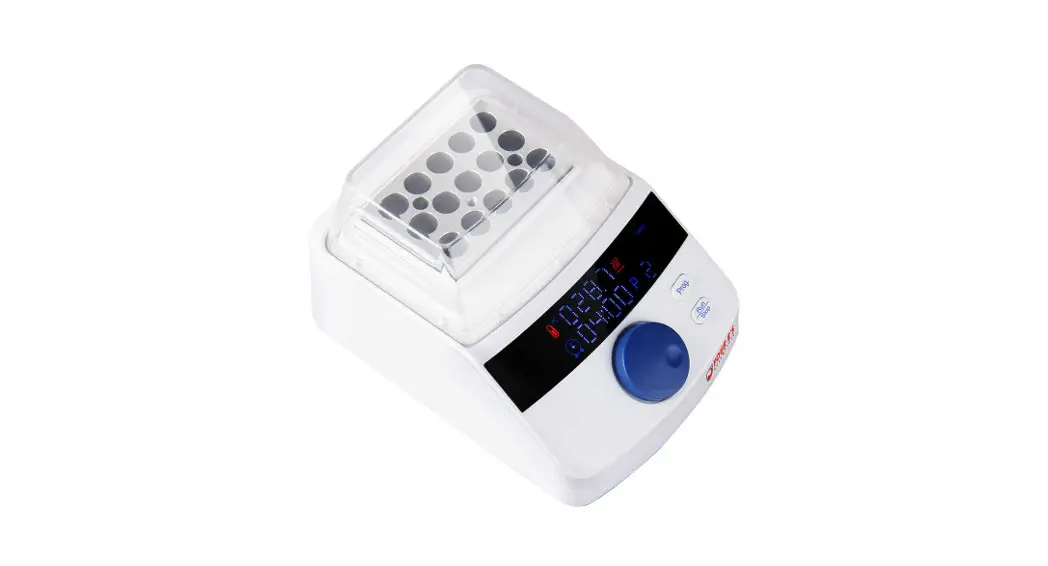
G100 Thermostatic Dry Bath Incubator Temperature Control
Dry Bath Incubator G100 Manual
General Information
Thank you for purchasing our Product. This Manual for users
contains function and operation of the Instrument. In order to use
the instrument properly, please read this manual carefully before
operation.
Please check the instrument and Appendix with the packing list
at the first time you open the instrument packing case.
Appendix: G100 Wiring Diagram
Only for reference, no further notification in case of
change
Contents
| No. | Item | Model/Type | Quantity | Remarks |
|---|---|---|---|---|
| 1 | Dry Bath Incubator | G100 | 1 | |
| 2 | Screw | 3 | ||
| 3 | Allen Wrench | M3X10 M3 | 2 | With washer |
| 4 | Handle | M4 | 1 | |
| 5 | Fuse | 3A | 2 | |
| 6 | QC PASS Card | 1 | ||
| 7 | Manual | 1 | Date: |
Performance Test
| Item | Dry Bath Incubator | |
|---|---|---|
| Model | G100 | |
| Date | ||
| No. | Content | Methods |
| 1 | Heating up Rate Calculagraph Temperature | |
| 2 | Fluctuation Multipoint Detector Temperature | |
| 3 | Range Thermometer Standards | 15min (20 to 100) |
| R.T.+5~105 | ||
| Results | Qualified | Qualified |
| 4 | Basic Function Visual check | Valid |
| Results | Qualified | |
| 5 | Appearance Visual check | Pass |
| Results | Qualified | |
| 6 | Withstand Voltage Withstand 50Hz,1500V | |
| Results | Qualified | |
| 7 | Earth Leakage Leakage Current Tester | 0.75mA |
| Results | Qualified | |
| 8 | Resistance Ground Resistance Tester | 100m |
| Results | Qualified | |
| 9 | Running Test Visual check | 48H without problem |
| Results | Qualified |
Important Instruction
Safety Instruction
Read this Manual carefully before using it. Read the guidelines
and directions below to prevent injury and carry out countermeasure
accordingly when necessary.
Safety
The operation, maintenance and repair of the instrument should
comply with the basic guidelines and the remarked warning below. If
users don’t comply with them, it will have an effect on the
instrument.
The general device is CE conformity, only use it indoors where
ventilated well. Only trained person can operate this instrument.
Users or person who are not permitted are not allowed to open the
device, which will lead to electric shock or other danger. Please
contact the factory for maintenance.
For safety use, ensure the power supply with earth/ grounding
socket. Make sure the voltage supplied is compliant with the
indication on the label. Exchange the power cable once it is
damaged.
Usage Instructions
1. Don’t place any stuff on the power cable, hold the plug head
properly when pulling the cable off from the socket.
2. The metal heated block can reach a high temperature during
heating, probably leading to sample/liquid boiling out of tubes,
which may cause injury, so it is forbidden to touch the metal block
by any part of your body during the heating procedure.
3. Power off when you finish your work. Pull off the connector
plug when there’s a long time no use of the Instrument and cover it
with a cloth or plastic paper to prevent dust.
4. Pull the connector plug from the jack at once in the
following cases, and contact the vendor:
- There is some liquid flowing into the Instrument
- Drenched or fire burned
- Abnormal operation: such as abnormal sound or smell
- Instrument dropping or outer shell damaged
- The function has obviously changed
Dry Bath Incubator G100 Manual
Hangzhou Yooning Instrument Co., Ltd. Address 4 floor, #6 Building, No.3 Shengang Road,
Yuhang District, Hangzhou, China Customer Service+86-571-86907383 / 87613616 Website: www.yooning.com
Hangzhou Yooning Instrument Co., Ltd.
General Information
Thank you for purchasing our Product. This Manual for users contains function and operation of the Instrument. In order to use the instrument properly, please read this manual carefully before operation.
Please check the instrument and Appendix with the packing list at the first time you open the instrument packing case.
Appendix: G100 Wiring Diagram
Only for reference, no further notification in case of change
Contents
1. Important Instruction······················································································1 1.1 Safety Instruction······················································································· 1 1.2 Safety··········································································································1 1.3 Maintenance······························································································2
2. Brief Introduction····························································································3 3. Product Features·····························································································4
3.1 Working Condition·····················································································4 3.2 Basic Parameter· ························································································4 3.3 Optional Blocks···························································································4 4.Operating Instructions······················································································5 4.1 Structure·····································································································5 4.2 Face Panel··································································································6 4.3 The Buttons································································································ 6 5.Operation Guide·······························································································7 5.1 Temperature or Timer Setting ··································································7 5.2 Start and Stop····························································································8 5.3 Temperature Calibration···········································································9 6. Replacement of Blocks··················································································· 11 7.Troubles and Shootings···················································································12 Performance Test·······························································································13 Packing List·········································································································14 Appendix:G100 Wiring Diagram········································································15
15
1. Important Instruction
1.1 Safety Instruction Read this Manual carefully before using it.
Read the guidelines and directions below to prevent injury and carry out countermeasure accordingly when necessary.
1.2 Safety
The operation, maintenance and repair of the instrument should comply with the basic guidelines and the remarked warning below. If users don’t comply with them, it will have an effect on the instrument.
The general device is CE conformity, only use it in door where ventilated well. Only trained person can operate this instrument. Users or person who are not permitted are not allowed to open device, which will lead electricity shock or other danger. Please contact factory for maintenance.
For safety use, ensure the power supply with earth/ grounding socket. Make sure the voltage supplied is complied with indication on label. Exchange the power cable once it is damaged.
Packing List
No.
Item
Model/Type Quantity Remarks
1 Dry Bath Incubator
G100
1
2
Screw
3
Allen Wrench
M3X10 M3
2
With washer
1
4
Handle
M4
1
5
Fuse
3A
2
6
QC PASS Card
1
7 QC:
Manual
1 Date:
1
14
Performance Test
Item
Dry Bath Incubator
Model
G100
Date
Serial No.
No.
Content
Methods
1 Heating up Rate Calculagraph
Temperature
2
Fluctuation Multipoint Detector
Temperature
3
Range
Thermometer
Standards 15min (20
to 100)
±0.3
R.T.+5~105
Results Qualified Qualified Qualified
4 Basic Function
Visual check
Valid
Qualified
5
Appearance
Visual check
Pass
Qualified
6
Withstand
Voltage
Withstand 50Hz,1500V Withstand 50Hz,1500V
Qualified
7
Earth Leakage Leakage Current
Current
Tester
0.75mA
Qualified
8
Resistance Ground Resistance Tester
100m
Qualified
Continuous 9 Running Test
Visual check 48H without problem Qualified
Result Remarks QC
Confirmer
13
Don’t place any stuff on the power cable, hold the plug head properly when pulling the cable off from the socket. The metal heated block can reach a high temperature during heating, probably leads to sample/liquid boiled out of tubes, which may cause injury, so it is forbidden to touch metal block by any part of your body during heating procedure.
Power off when you finish your work. Pull off the connector plug when there’s long time no use of the Instrument and cover it with a cloth or plastic paper to prevent from dust.
Pull the connector plug from the jack at once in the following case, and contact the vendor: There is some liquid flowing into the Instrument Drenched or fire burned Abnormal operation: such as abnormal sound or smell Instrument dropping or outer shell damaged The function has obviously changed
1.3 Maintenance
The wells in the block should be cleaned by the dust-free cloth with alcohol to assure no pollution and good thermal conductivity between the wells and the tubes. Please clean the stained instrument with a dust-free cloth.
Switch off and unplug power cord when cleaning/ disinfecting. Don’t allow any liquids or or detergent penetrate to the well. Don’t use any corrosive detergent to clean outside of equipment.
2
2. Brief Introduction
G100 dry bath incubator is a microcomputer-controlled device, which can be widely used in sample preservation and reaction, DNA amplification and electrophoresis pre-denaturation, serum coagulation, etc.
Features: 1 LED display with timer and temperature 2 Display real-time temperature and thermostatic countdown time 3 The Blocks protect the samples from contamination 4 Blocks are easy to replace for cleaning and sterilization 5 Built-in over-temperature protection device for more reliable use 6 Temperature deviation calibration 7 Buzzer will alarm after the operation is over
7.Troubles and Shooting
No.
Troubles
Causes
Shootings
No power supply
1 No signals on the display after powers on
Broken fuse Broken switch
Others
2
The actual and displayed
Broken sensor or bad block
temperatures are quite different
contact
Check the connection of power
Replace the fuse 250V 3A 5×20 Replace the switch
Contact supplier
Contact supplier
3
Temperature displayed “”with a beeping alarm
Broken sensor or
ambient temperature below 0
Broken sensor
4
Block is not heated
Broken thyristor
Broken heater
5
The buttons don’t work
Broken buttons
6
“ERR1″is displayed
Sensor open circuit
7
“ERR2″is displayed
Sensor short circuit
8
“ERR3″is displayed
Over-temperature
alarm
Contact supplier
Contact supplier
Contact supplier Contact supplier Contact supplier Contact supplier
3
12
6. Replacement of Blocks
6.1 Screw out the two screws that fixing the block counterclockwise with an Allen wrench .
6.2 Screw the thread of M4 handle clockwise into the hole of the block to be replaced.
6.3 Pull up the handle and take out the block. 6.4 Screw out the handle and fix it on the another model to be replaced , then place it on the corresponding position of the instrument and fix the newly replaced block clockwise with wrench.
11
3. Product features
3.1 Working Condition
Ambient temperature: 5~35 The relative humidity: 70% VoltageAC100-120V/200-240V50/60Hz
3.2 Basic Parameter
Model
Temperature Range Heating up rate
Temperature Control Accuracy Temperature Control Discrepancy@40 Temperature Control Discrepancy@100 Timer
Temperature Display Accuracy Max. Power
Max. Temperature Dimensions Net Weight
3.3 Optional Blocks
G100
R.T.+5~105 10min (20 to 105)
±0.3 ±0.3
±0.3
0-99h59m 0.1 150W 105
160 x 176 x 121 mm 1.5Kg
Type
C1 C2 C3 C4 C5 C6
C7
Diameter
0.2ml centrifuge tubes
0.5ml centrifuge tubes 1.5ml centrifuge tubes 2.0ml centrifuge tubes 5ml centrifuge tubes 0.5ml+1.5ml centrifuge
tubes 6mm
Capacity
96×0.2ml 58×0.5ml 39×1.5ml 39×2.0ml 18×5.0ml 24×0.5ml+30×1.5ml
58×6mm
Dimension(mm)
104.5×32 104.5×32 104.5×32 104.5×32 104.5×32 104.5×32
104.5×32
4
4. Operating Instructions
This chapter introduces mechanical structure of G100 Dry Bath Incubator, the face panel and each button’s functions and some preparations before power-on. Users should be familiar with the chapter before the thermal Shaker Incubator first use.
4.1 Structure
Transparent Lid
Block
LED Display Face Panel
3) Press
and
simultaneously to enter the Calibration interface. Then
is
displayed(as shown in the below figure), indicating that the temperature calibration has been
started. The displayed temperature is instant temperature, and the device will automatically heat up to 40.
Note: To ensure the accuracy of temperature calibration, users are advised to read the measured temperature at constant temperature for 20 minutes!
4) If the value of thermometer is 39.9 , press
or
to modify the displayed
temperature to 39.9 , and press
to confirm the value.
5) Then the program will automatically heat up to the second calibration point, and repeat the above steps at the second calibration points (80 ) to complete the data input.
After the calibration of the second point (80 ) is completed, press the button
to
Power Socket
confirm the input value. Then the calibration is over, the instrument can work normally after restarting.
Switch
Notes: If you want to exit temperature calibration during operation, just turn off the power switch.
5
10
2 ) After operation, press
or
can reset the temperature
or time. Press
to run with last setting values directly.
During operation, press
to stop. Press it again to restart running.
5.3 Temperature Calibration
The instrument is calibrated before leaving the factory. But due to some reasons, there is a deviation between the actual temperature and display temperature, and the temperature error can be corrected as follows: Note: 1. To ensure the accuracy of the temperature, two-point (40, 80) temperature synchronous linear calibration method was used in this instrument. 2. The temperature accuracy is ± 0.5 after two-point temperature calibration Notes: The temperature of the environment and block must be below 35 ° C to be calibrated.
The operation is as follows 1) Turn on the instrument, please wait and make sure the displayed temperature below 35. 2) Inject paraffin oil into one of the conical well, and then put one thermometer into this well (Make sure the precision of the thermometer should be within 0.1 and the temperature sensing part should be absolutely immerged into the conical well).
High-Precision Thermometer
Insulation cotton Paraffin oil
9
4.2 Face Panel
4.3 The Buttons
The buttons to set running time. The maximum time is 99 hours and 59 minutes. The buttons to set temperature. The maximum temperature is 105. Start/Stop buttons. After setting the temperature and time, press the button to run. Press the button again to stop running during operation.
6
5.Operation Guide
5.1 Temperature or Timer Setting
1 ) Turn on the power, the instrument is initialized with the sound of beep;
2 ) About 1S later, the displayed “28.5” is the instant temperature (the temperature of the block is 28.5 ). The displayed “00:35” is the last setting time (the running time is 35 minutes).
3 ) Press the buttons or
to set temperature. As shown in the right figure , 40 is
the last setting value, and the decimal digit flashing at the same time.
If the temperature needs to be set to 55.5, the operation is as follows
Press
or
to change the decimal value from “0” to “5”. Next press and
hold
, the flashing position will move to units digits, change the value from “0” to
“5”. Press and hold
again, the flashing position will move to tens digits, then
change the value from “4” to “5”. The temperature is set to be 55.5 .
If the time needs to be set to 01:20, the operation is as follows:
Press
or
to set. As shown in the right figure, 00:35 is the last setting time,
and the rightmost digit flashing at the same time. Press
to change the rightmost
digit from “5” to “0”.
7
Next Press and hold
, the flashing position will move to third position,
change the value from “3” to “2”. Press and hold
again, the flashing
position will move to second digit, then change the value from “0” to “1”. The
time is set to be 01:20. ( 1 hour and 20 minutes).
4 ) Press , the newly setting values will be saved automatically and the instrument starts to run.
Notes: (1) Time is set to 00:00 means that the running time is not limited. (2) The newly setting values will successfully confirm and save when the cursor stops flashing.
5.2 Start and Stop
1 ) Press
to start up directly. Or after setting the temperature and time
setting, press
to run, the instrument starts heating up with the beep sound.
The displayed value is instant temperature, the decimal digit flashing regularly
during heating up. When the temperature is reached, it stops flashing, “:” of the
time screen starts flashing and the countdown starts.
When the countdown is over, the instrument stops running, the buzzer sounds an alarm, the displayed temperature is instant temperature of the block, and the displayed time is the setting value.
8
 æ州佑å®ä»ªå™¨æœ‰é™å…¬å¸