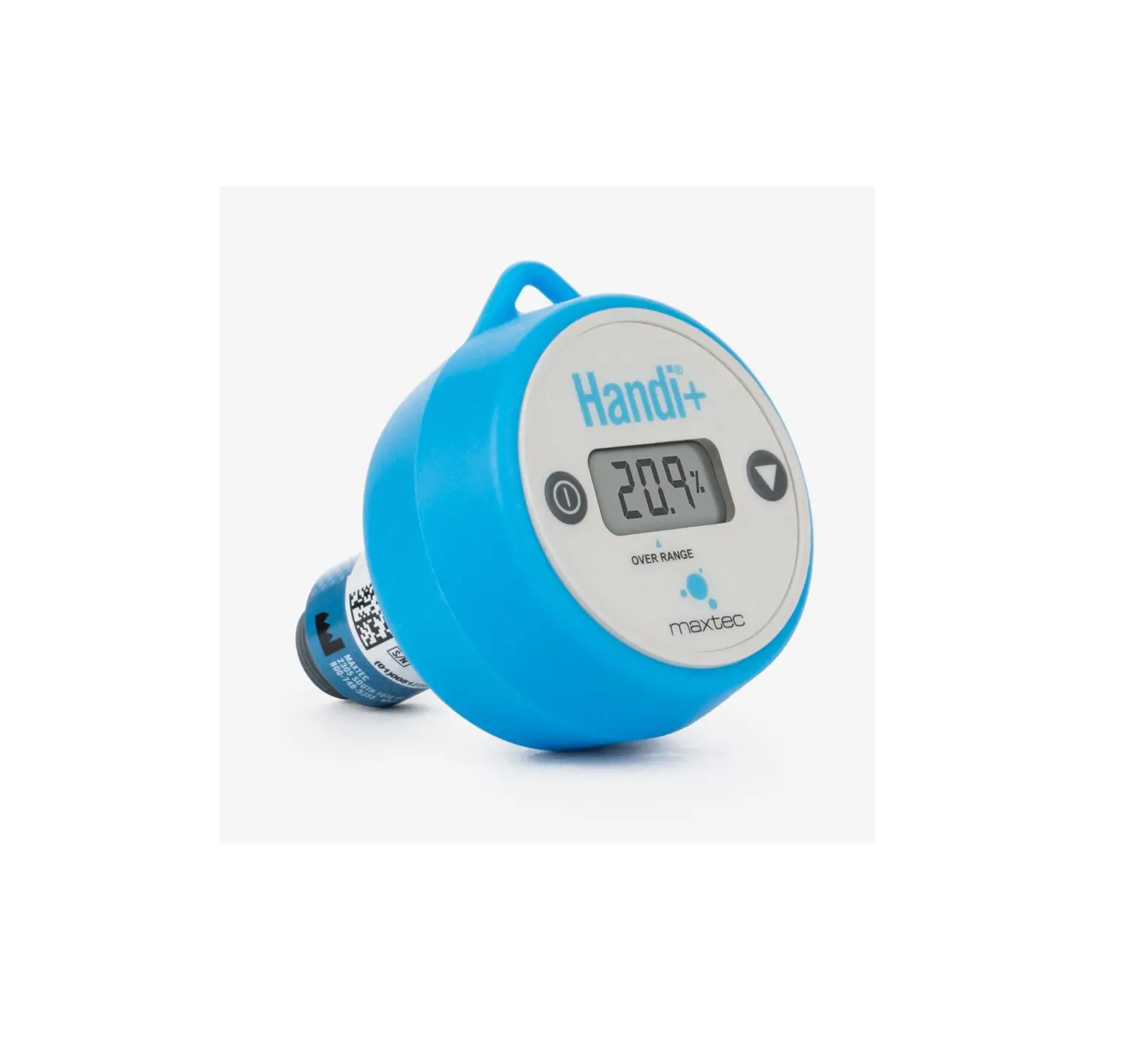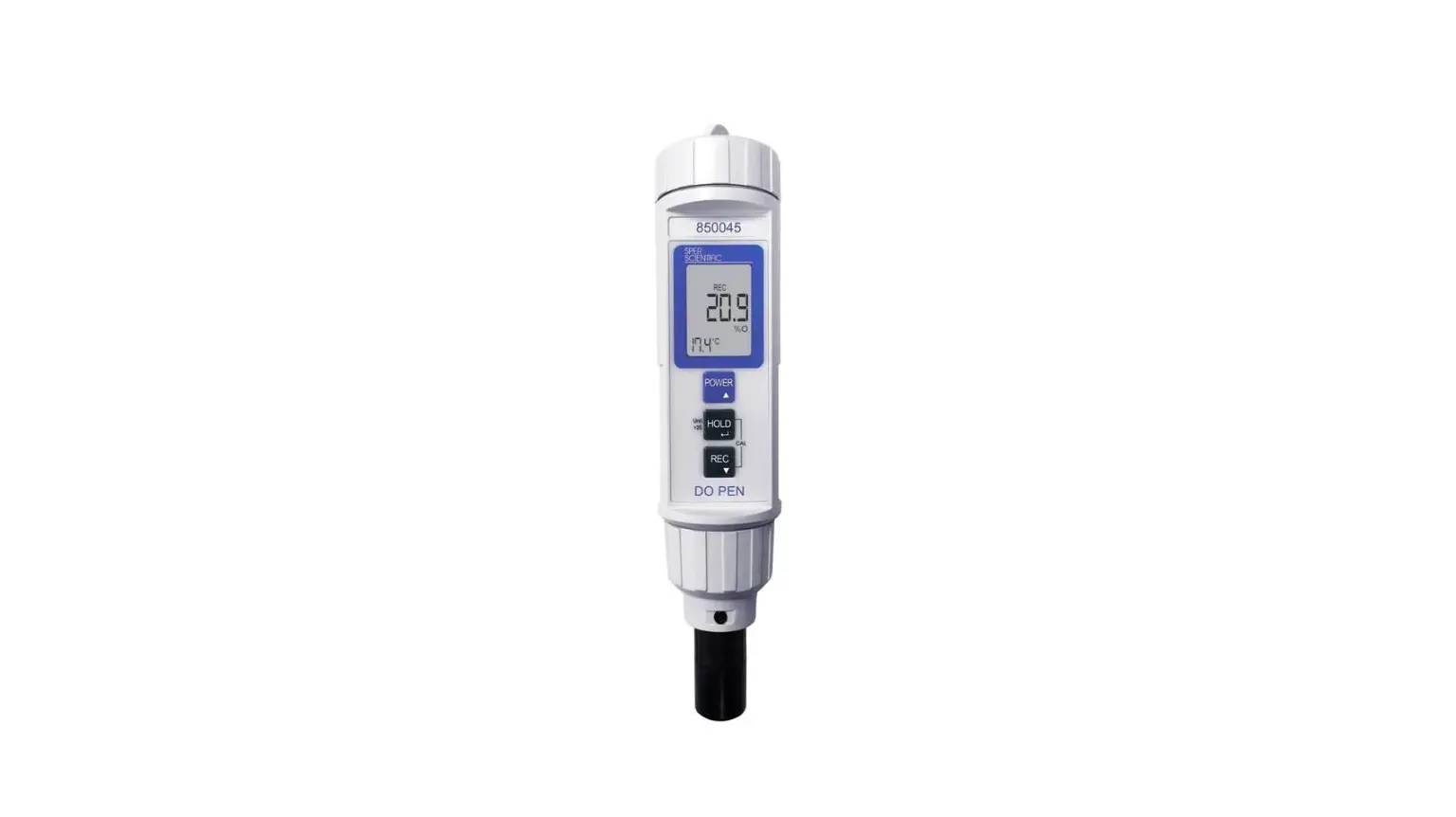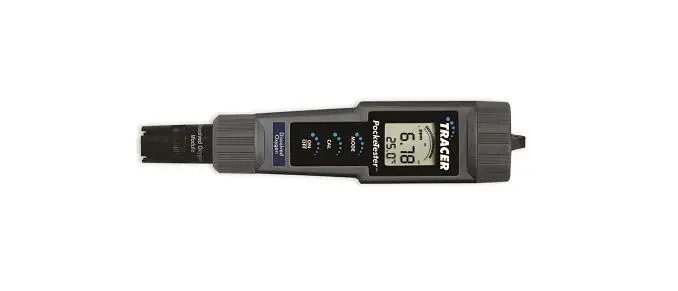

LaMotte 1761 Dissolved Oxygen Tracer Hand-Held PockeTester
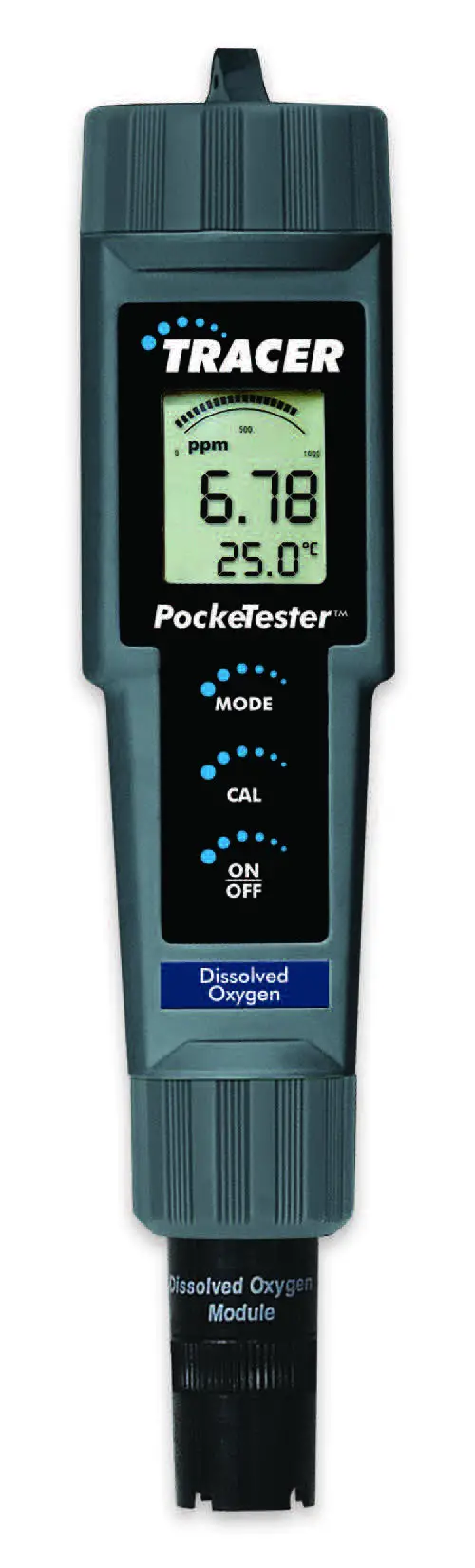 Code 1761
FILL – Before first use
POLARIZE – Weekly
CALIBRATE – Daily
Short Form Instructions
Fill the membrane cap assembly before the first use. Follow Set Up instructions before the first use. Read the entire manual before the first use. Calibrate daily. Polarize weekly.
Dissolved Oxygen Measurement Procedure
- Press ON/OFF button to turn meter ON.
- Place TRACER in sample. Stir.
- Wait for reading to stabilize.
- Record result.
- Press ON/OFF to turn meter off.
- Rinse electrode.
- Replace electrode cap.
WARNING! This set contains chemicals that may be harmful if misused. Read cautions on individual containers care-fully. Not to be used by children except under adult supervision.
| Display | 2000 count, Dual function 3 ½ digit LCD with Bar graph |
| Display size | 24 mm x 20 mm |
| Sensor | Polarographic type |
| Membrane | Bonded membrane cap with threaded fitting |
| Operating Temp. | Range 0 to 50°C (32 to 122°F) |
| ATC Range | 0 to 50°C (32 to 122°F) |
| Salinity Compensation | 0 to 50 ppt in 1 ppt (part per thousand) increments |
| Altitude compensation | 6000 m (0 to 20,000 ft) in 300m (1000 ft) increments |
| Measurement Storage | 25 tagged (numbered) data sets with recall |
| Battery Power | Four (4) CR2032 button batteries |
| Low Battery Indication | ‘BAT’ appears on the LCD |
| Auto Power Off | After 10 minutes of inactivity (APO override available) |
| Dimensions/Weight | 36 x 173 x 41mm (1.4 x 6.8 x 1.6”); 110g (3.8 oz) |
| Measurement | Range | Resolution | Accuracy |
| % Saturation | 0 to 200.0% | 0.1% | ±2.0% FS (full scale) |
| Dissolved Oxygen | 0 to 20.00 mg/l | 0.01 mg/l | ±2% FS |
| Concentration | 0 to 20.00 ppm | 0.01 ppm | ±2% FS |
| Temperature | 0 to 50 °C | 0.1 °C | ±1.0 °C |
| 32 to 122°F | 0.1 °F (0 to 99ºF); 1.0 °F (>100°F) | ±1.8°F |
CONTENTS
Dissolved Oxygen TRACER Kit, Code 1761
Includes: DO TRACER Body, DO Bonded Membrane Cap Assembly Electrolyte Solution, Sample cup and Lanyard
PARTS & ACCESSORIES
DO Replacement Sensor Kit (sensor module, membrane cap assembly, electrolyte solution) Code 1762
DO Membrane Cap Kit (6 membrane cap assemblies, electrolyte solution, Polishing Strips) Code 1761M
DO Extension Cable, 1 meter (with probe guard and weight) Code 1763 DO Extension Cable, 5 meter (with probe guard and weight) Code 1764
METER DESCRIPTION
Front Panel Description
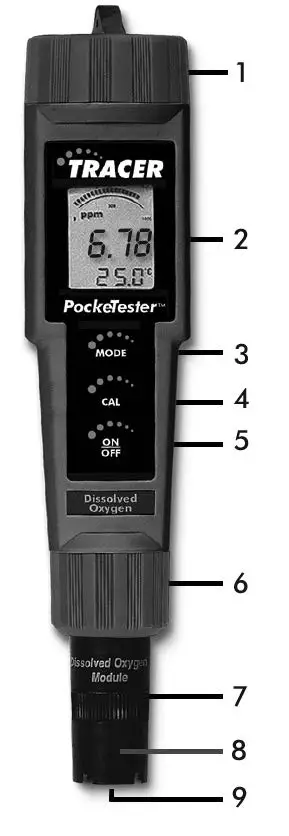
- Battery compartment cover
- LCD Display
- MODE button
- CAL button
- ON/OFF button
- Electrode Retaining Collar
- Dissolved Oxygen Sensor
- Bonded membrane cap assembly
- Membrane & cathode (Note: The Electrode storage cap is not shown)


Display
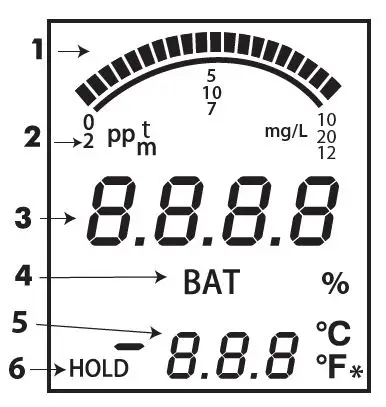
- Bar graph display
- Measurement units
- Main display
- Low Battery indicator
- Temperature display
- Reading Hold indicator
- Polarization indicator (meter off)
OPERATION
Filling the Electrode
The electrode is shipped dry and requires filling with the supplied electrolyte solution before the first use. The membrane should be in place and does not need to be replaced. Follow the procedure on page 6 for filling the membrane cap.
Powering the Tracer
The Tracer uses four (4) CR2032 Lithium Ion Batteries. Press the ON/OFF button to turn the meter on or off. If the batteries are weak, the ‘BAT’ indicator will appear on the display. The auto power off feature shuts the Tracer off automatically after approximately 10 minutes of inactivity. The auto power off feature may be temporarily disabled for convenience or for extended polarization time.
Startup Polarization Period
When the DO Tracer is powered up for the first time, the electrode requires polarization. In order for this to occur a polarization period of approximately three minutes must elapse before measurements can be made. After the meter has been turned on, a special circuit in the meter will maintain a
very small biasing current to the electrode for a period of seven days. This will keep the electrode polarized and enables the user to make immediate measurements within a 7 day period without waiting for the electrode to re-polarize. Each time the Tracer is turned on, the polarization timer is reset and the 7 day polarization period is initiated. A small asterisk at the bottom right corner of the display will indicate that the polarization timer circuit is active only when the meter is off. If the Tracer is not used for more than seven days, a 3 minute waiting period is required before a measurement can be made.
Turn-On Diagnostics
- When the meter is turned on ‘SELF’ and ‘CAL’ will be displayed while the meter runs a diagnostic routine.
- During this time the meter is recalling the User Calibration data, performing self diagnostics & initializing the circuitry.
- After this function is complete, the meter proceeds to the normal measurement mode.
Changing the Temperature Units
To change the displayed temperature units between °F and °C
- With the unit OFF, press and hold CAL.
- With CAL depressed, momentarily press ON/OFF to turn the Tracer ON.
- Release CAL. ‘SELF CAL’ will be displayed.
- Repeat Steps 1 – 3 to change to the other temperature unit.
Changing the Salinity Compensation
- With the Tracer ON, momentarily press CAL twice in quick succession. ‘SAL’ will be shown on the lower part of the display.
- Momentary press MODE. Each press of MODE increases the salinity compensation by 1ppt (part per thousand); the available range is 0 to 50ppt.
- Momentarily press CAL to save the compensation setting and return to the normal measurement mode.
Changing the Altitude Compensation
- With the Tracer ON, momentarily press CAL twice in quick succession. ‘SAL’ will be shown in the lower part of the display.
- Press and hold CAL again for 2 seconds to enter the Altitude Mode. ‘Ald’ will be shown in the lower part of the display.
- The factory default value is sea level. Each press of MODE increases the altitude compensation by 1000ft. The maximum value is 20 presses (20,000ft above sea level).
- Momentarily press CAL to save the compensation setting and return to the normal measurement mode.
Changing the Measurement Units
The meter can be set to measure % saturation, dissolved oxygen in mg/l, and dissolved oxygen in parts per million (ppm). To change the mode:
- Press and hold MODE for 2 seconds and the display will begin to scroll through the available units of measure :
- % saturation
- dissolved oxygen, mg/L (milligrams per liter)
- dissolved oxygen, ppm (parts per million)
- When the desired units are displayed, release MODE and the unit will return to normal operating mode.
Note: The ‘HOLD’ function cannot be on when changing the measurement function. If ‘HOLD’ is displayed in the lower left corner of the display, briefly press the MODE button to turn it off.
Auto-Power Off Feature
The auto power off feature automatically shuts the meter off 10 minutes after the most recent button press. To disable this feature, refer to the Disable Auto-Power Off section.
Disable Auto-Power Off Feature
With the meter ON, momentarily press CAL, then quickly press and hold both MODE and ON/OFF until ‘oFF’ is displayed. To restore the Auto Power Off Feature turn the meter off and on again using ON/OFF.
Low Battery Indicator
When the battery voltage falls below the operating threshold, ‘BAT’ will appear on the display. Refer to the Maintenance section for battery replacement information.
Storing Readings
- Press MODE to store a reading. The storage location number will be shown on the lower display and the main display will show the stored reading. The meter will enter the HOLD mode and ‘HOLD’ will appear on the display.
- Press MODE again to exit the HOLD mode and return to normal operation. The next time MODE is momentarily pressed another reading will be stored and so on.
- If more than 25 readings are stored, previously stored readings, starting with reading number 1, will be overwritten.
Recalling Stored Readings
- Momentarily press the CAL and then, within 4 seconds, momentarily press MODE. The last stored data point location will be displayed (1 to 25). Each time MODE is momentarily pressed the next most recently stored data point will be displayed.
- After the last data point stored is displayed, press MODE again to return the display to the beginning of the list.
- Press CAL at any time to stop the data retrieval process and return the meter to the normal measurement mode.
Clearing Stored Readings
- With the meter ON press and hold ON/OFF for 4 seconds.
- When ‘clr’ is shown on the display the memory is cleared.
SET UP
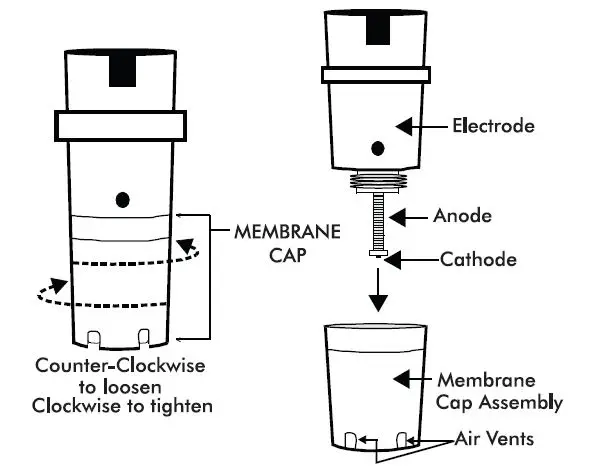
Membrane Cap Assembly – Filling and Replacement
The electrode is shipped dry and requires filling with the supplied electrolyte solution before the first use. The membrane should be in place and does not need to be replaced. Important Note: Do not touch the membrane as skin oils will interfere with the oxygen permeability rate of the membrane.
- The electrode should remain attached to the meter during the process.
- Carefully remove the membrane cap assembly from the electrode by firmly unscrewing it in a counter-clockwise direction.
- Discard the used membrane cap assembly. NOTE: When a membrane
cap is installed the membrane must tightly stretch over the cathode. If a membrane cap is removed, it can not be reinstalled because the membrane will no longer stretch properly over the cathode. - Rinse the cathode and anode with deionized water.
- Set the membrane cap assembly on a flat surface.
- Fill the membrane cap assembly with Electrolyte Solution (DO600-EL) to the bottom of the threads on the inside of the cap. To remove air bubbles hold the cap steady with one hand and tap the side of the assembly sharply with a pen.

- Do not move the membrane cap assembly. Dip the electrode into the assembly and remove it. Repeat this step several times. With each dip, progressively push the electrode deeper into the electrode solution in the assembly. This dipping technique will minimize the introduction of air bubbles into the electrolyte solution. Air bubbles can compromise dissolved oxygen measurements.
- Carefully pick up the membrane cap assembly and slowly screw it onto the electrode in a counter-clockwise direction until it is fully tightened. While tightening the cap, excess electrolyte solution will leak out. This is normal and desirable since it will minimize air pockets in the solution. Air pockets can compromise dissolved oxygen measurements. If the electrode solution does not overflow, an insufficient amount was added. Repeat the process with a new membrance cap assembly if air bubbles or air pockets are visible when the meter is inverted. Membrane cap assemblies can not be reused.
NOTE: Air bubbles outside the cathode (6 mm in diameter in the center of the probe) will not interfere. - Rinse excess electrolyte from the outside of the membrane cap assembly 9. Rinse excess electrolyte from the outside of the membrane cap assembly and the electrode. The pH of the electrode filling solution in polargraphic dissolved oxygen meters changes with time resulting in less accurate results. It is recommended that the membrane and electrode filling solution be changed every 2 – 4 weeks depending on usage. Because of the configuration of the membrane and electrode, the membrane is stretched by the cathode and cannot be reused. It must be replaced.
Polarization
If the meter has not been used for seven days or longer the electrode will not be fully polarized. A fully polarized electrode is indicated by a small, flashing, asterisk in the lower right corner of the display when the meter is OFF. If the asterisk is absent, turn the meter ON and allow the electrode to fully polarize. This may take 2-3 minutes. The asterisk will appear to indicate full polarization.
Calibration
Calibration should be performed daily. (Be sure the electrode is filled and fully polarized before calibrating)
- Turn the meter ON.
- Press and hold MODE until ‘%’ is displayed.
- Remove the electrode cap. The electrode membrane must be clean and dry or the calibration will be incorrect. Do not touch the membrane. Skin oil will affect the electrode response.
- Moisten the sponge in the electrode cap with distilled water or tap water. Do not soak the sponge.
- Replace the electrode cap on the electrode. There must be an air gap between the membrane and the sponge.
- Wait until the reading stabilizes. Press and hold CAL until ‘CAL’ is shown on the display. The readings will blink ‘101.7’ and ‘SA’ will appear. ‘SA’ will not appear if the calibration fails.
- When the calibration is complete ‘End’ will appear and the meter will return to the measurement mode.
Optional Zero Oxygen Calibration
The zero oxygen calibration will improve the measurement accuracy for very low or very high dissolved oxygen samples.
- Place the electrode in a zero dissolved oxygen calibration solution, such as 5% sodium sulfite.
- Slowly stir the sample with the electrode and wait for the reading to stabilize. This may take a while, depending on the electrode history.
- Press CAL until ‘CAL’ is shown on the display. The readings will blink ‘101.7’ and ‘SA’ will appear. ‘SA’ will not appear if the calibration fails.
- When the calibration is complete ‘End’ will appear and the meter will return to the measurement mode. NOTE: Sodium Sulfite can become deposited on the electrode and on the coined surface of the electrode retaining collar. The presence of the Sodium Sulfite will negatively affect dissolved oxygen measurements unless it is removed completelyfrom the electrode.
DISSOLVED OXYGEN MEASUREMENT
(Be sure the electrode is filled and fully polarized. Calibrate daily.)
- Cover the electrode with the electrode cap. The sponge in the electrode cap should be moistened (not soaked) with distilled water or tap water.
- Press ON/OFF to turn the meter ON. The meter will self calibrate.
- Press and hold MODE to select the desired unit of measure.
- Remove the electrode cap.
- Place the electrode in the sample to be measured. Stir the sample with the electrode.
- Wait for the reading to stabilize.
- Press ON/OFF to turn the meter OFF. Rinse the electrode with distilled water or tap water. Replace the electrode cap.
NOTE: The unit of measure selected when the meter was last turned OFF will be retained. Stir the sample with the electrode to remove any air bubbles that may be trapped on the membrane surface and to obtain accurate results. Do not submerse the electrode above the bottom edge of the electrode collar. For maximum accuracy, allow sufficient time for the temperature of the probe to reach the temperature of the sample before taking a reading. The larger the difference in temperature between the electrode and the sample the longer it will take for the reading to stabilize. Stabilization will be indicated by a stable temperature reading on the display. Stabilization time can vary from 10 seconds to 5 minutes. The DO Tracer uses a polarographic sensor, which consumes oxygen at the sensing surface. This requires a constant movement of the sample across the membrane to maintain a constant dissolved oxygen level. It is recommended that the sample be stirred gently with the electrode as the measurement is made, or if in a laboratory environment, the sample should be stirred using a stir plate.
OPERATIONAL MATRIX
| OPERATIONAL MA Function / Resulting Action | TRIX Power Status | Mode Setting | Required Button Press Sequence |
| ON/OFF | Any | Any | Momentary press of the ON/OFF button |
| Water Saturated Air Calibration | On | Any | Place electrode in electrode cap. Press & hold CAL button for 2 seconds. |
| Zero Calibration | On | Any | Place electrode in zero DO solution. Wait for stability. Press & hold CAL button for 2 seconds. Also works with probe removed. (Cal at zero current). |
| Store Reading | On | Any | Momentary press of MODE button. Stores and holds reading. ‘HOLD’ displayed. |
| Hold Release | On | While In Hold Mode | Momentary press of the MODE button. |
| Enter Memory Retrieval | On | Any | Momentary press of CAL button followed by a momentary press of the MODE button within 4 seconds. If no data is stored in memory, ‘End’ is displayed briefly, and then returns to last mode. |
| Scroll Stored Readings | On | Memory Recall | Momentary press of MODE button. |
| Exit Memory Retrieval | On | Memory Recall | Momentary press of CAL button. |
| Clear Stored Memory | On | Any Measure- ment Mode | Press and hold ON/OFF button for 4 seconds, ‘clr’ is displayed. |
| Change Measurement Mode | On | Any | Press and hold MODE button for at least two seconds. Modes will scroll until button is released. |
| Enter Salinity Compensation | On | Any | Press and release the CAL button twice quickly in succession. ‘SAL’ is displayed. |
| Changing Salinity Compensation | On | SAL | Momentary press of MODE button. Each button press increases the ratio by 1 ppt (part per thousand). The value cycles from 0 to 50 ppt. |
| Exit Salinity Compensation | On | SAL | Press and release CAL button for 2 seconds to enter Altitude Compensation. Or press and release CAL button one more time to enter measurement mode. It is necessary to press CAL button to save changes. If the unit times out, no changes are saved. |
| Enter Altitude Compensation | On | Any or SAL | Press CAL button twice quickly. Unit enters Salinity Mode. Press CAL button for 2 seconds to enter Altitude Compensation Mode. ‘Ald” is displayed. Unit times out in 5 seconds if no button is pressed, reverts to previous mode. |
| Changing Altitude Compensation | On | Ald | Momentary press of the MODE button. Each button-press increases altitude by 1,000 ft. The value cycles from 0 to 20,000 ft. |
| Exit Altitude Compensation | On | Ald | Momentary press CAL button to exit and save changes. |
| Change Temperature Units | Off | OFF mode | Press and hold the CAL button then momentarily press the ON/OFF button. Release the CAL button after ‘SELF CAL’ appears. It is necessary to press the CAL button to save changes. If the unit times out, no changes are saved. |
| Override Auto Power Off | On | Any | Press CAL button momentarily then simultaneously press and hold MODE and ON/OFF buttons for 2 seconds. |
| Default Reset | Off | OFF mode | Simultaneously press ON/OFF, CAL and MODE buttons momentarily. ‘dFLt’ will be displayed. |
TROUBLESHOOTING
If the display appears to be frozen, it is possible that the Data Hold mode hasbeen inadvertently activated. This is indicated by ‘HOLD’ in the bottom left of the display. To exit the Data Hold mode press MODE or turn the meter off and back on again.
If the meter locks up and pressing any buttons fails to revive it, remove the batteries and then reinsert the batteries.
| Symptom | Possible Cause | Action |
| Unit will not power on | Batteries not in place Dead batteries Batteries polarity incorrect | Insert, replace, or reorient batteries |
| “BAT” indicator shown on display | Batteries are weak | Replace batteries |
| Unstable readings | Insufficient electrolyte in probe. Air bubbles visible when probe inverted. Electrolyte is depleted | Replace electrolyte, and membrane cap assembly |
| Readings drift down | Insufficient stirring | Stir sample with meter or move probe in sample |
| Slow response | Dirty or damaged membrane | Replace electrolyte and membrane cap |
| Electrode can not be calibrated | Depleted electrolyte Dirty or damaged membrane | Replace electrolyte and membrane cap |
| Electrode can not be calibrated after replacing electrolyte and membrane cap | Dirty probe. Cathode is not a shiny gold color. | Clean cathode with cleaning cloth or cleaning paper. Do not over polish. |
| Sample reading is frozen | Meter is in HOLD mode Meter is locked | Release HOLD by momentarilly pressing MODE button. Remove batteries. Press ON/ OFF button. Replace batteries and press ON/OFF button. Stored readings will be lost. |
MAINTENANCE
Battery Replacement
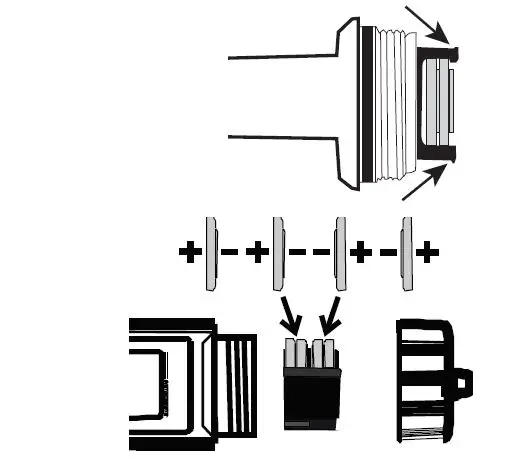
- Twist off the battery compartment cover.
- Holding the battery housing in place with a finger, pull out the battery carrier using the two small tabs.
- Replace the four (4) CR2032 batteries observing proper polarity.
- Replace the battery carrier, reattach the battery compartment cap and tighten securely.

Battery Safety
- Dispose of batteries responsibly; observe local, state, and federal regulations.
- Never dispose of batteries in a fire; batteries may explode or leak.
- Never mix battery types; install new batteries of the same type.
Electrode Replacement
- Turn the meter OFF. Turn the electrode retaining collar clock-wise and remove it.
- Gently rock the electrode from side to side, pulling it away from the meter until it disconnects.
- Align the positioning “keys” of the replacement electrode and the main body housing. Carefully push the electrode into the meter socket until it is fully seated. CAUTION: Take care to align pins carefully. Bent or broken pins will cause the meter to malfunction.
- Tighten the electrode retaining collar until the electrode is firmly sealed to the meter.
Replacing the Membrane Cap Assembly
The pH of the electrode filling solution in polargraphic dissolved oxygen meters changes with time resulting in less accurate results. It is recommended that the membrane and electrode filling solution be changed every 2 – 4 weeks depending on usage. Because of the configuration of the membrane and electrode, the membrane is stretched by the cathode and cannot be reused. It must be replaced. See page 6.
Electrode Storage
Store the TRACER with the Electrode Storage Cap in place. The sponge in the cap should always be moist without excess liquid.
Electrode Cleaning Recommendations
| Contaminant | Cleaning Solution | Procedure |
| Salt build-up | Deionized water | Soak in 20% or weaker Acetic Acid solution for 1 minute. Rinse thoroughly with DI water. |
| Oil | Warm water and household detergent | Clean with mild detergent solution. Rinse thoroughly with DI water. |
NOTE: Do not contact the membrane with the cleaning solution. Install a new membrane after cleaning the electrode.
WARRANTY
From the date of shipment: instrument for 1 year, probe for 6 months.
For support, contact LaMotte’s Technical Support at 1-800-344-3100 or [email protected]. This warranty does not apply to damages because of user misuse, operation outside of specification, improper maintenance or repair, or unauthorized modification.
LAMOTTE COMPANY | 802 Washington Avenue • Chestertown • Maryland • 21620 • USA
800-344-3100 • 410-778-3100 (outside USA) | Fax 410-778-6394 | www.lamotte.com