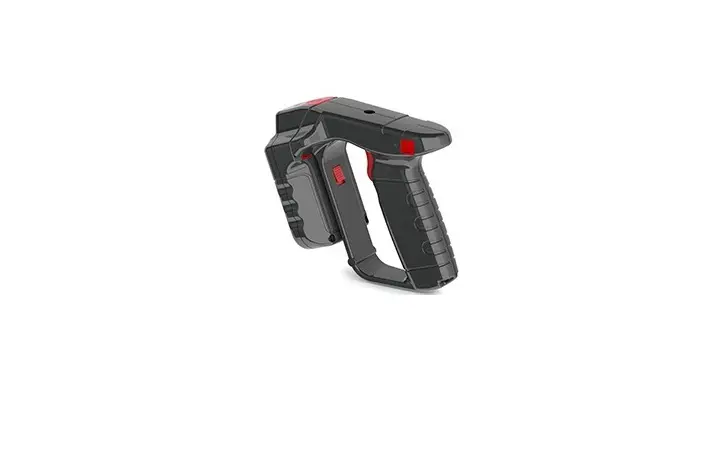
Aidialink AL-700 RFID UHF Handheld Reader/Scanner User Manual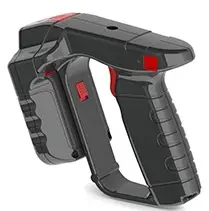
This manual can help you quickly start your AL-700 handheld reader, including reader settings, connection methods, and software testing.
RFID solution
| Software | AL-700 Software development method provided AL-700 SDK(Android) HID Keyboard Mode |
| LED | Bluetooth(Blue) Signal(Green) Power Charger(Red) |
| Tag | General label Anti-metal tag Customized labels The tag frequency range covers 860-960MHz, and you can freely choose the required RFID chip (NXP, Impinj, Alien) |
| Air Interface Protocols | EPC Global UHF Calss 1 Gen2 / ISO 18000-6C |
| Transmit Power | 0 to +29dBm(1dBm/per step) |
| Frequency Region | US,TW,CN,JP,VN |
| Antenna | Circular polarized |
| Communication | Bluetooth:Version 4.2 Bluetooth rage:8m(26ft) Mini USB:Communicate with the selected computer |
| Nominal Read Range | 5m (16ft) depends on tags |
| Nominal Write Range | 3m (10ft) depends on tags |
| Battery Pack | non- Removable, rechargeable, 3 . 6 V Lithium Polymer, 8 watt hours Host: 1515 m Ah、 Handle : 3350 m Ah, |
| Symbologies Supported | Support 1D barcode,2D QR code symbol recognition |
| Environment IP Rating | IP65 |
| Operating Temperature | -10℃ to +40℃ |
| Charging Temperature | 5℃ to +40℃ |
| Storage Temperature | -40℃ to +60℃ |
| Humidity | 5% to 85% non-condensing |
| Dimension | 150 mm x 80 mm x 150 mm |
| Weight | 360g |
Connect with AL-700 Reader
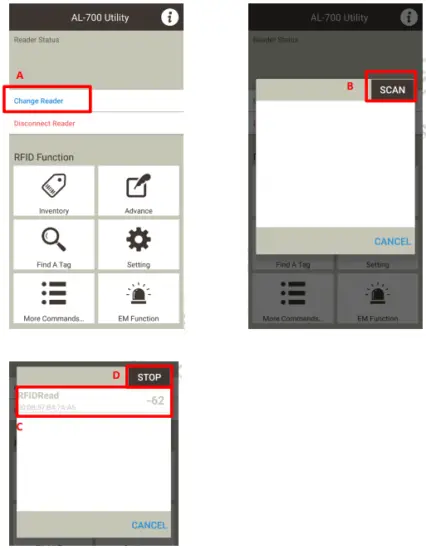
A. Open the App and click Change Reader.
B. After clicking SCAN, the App will automatically scan the surrounding Bluetooth devices and display AL-700 on the screen.
C. Click the RFIDRead device (must be in a non-scanning situation).
D. If you cannot select, please click STOP first, and then select the RFIDRead device.
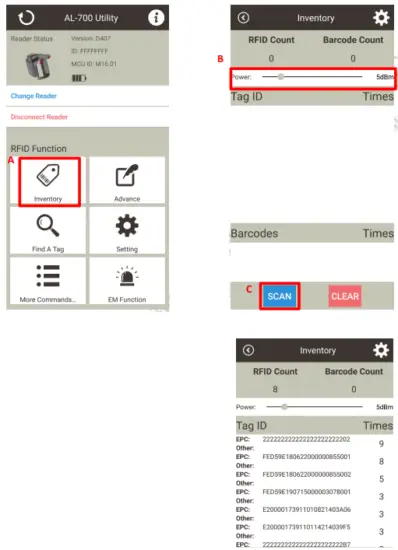
A. Click the RFID Function of Inventory.
B. Pull the Power bar to set the power level.
C. Place the RFID tag to the reading range of the handheld, click SCAN or press the button on the AL-700, after the start, you will see the tag displayed in the list below; quickly press the button on the AL-700 twice,
the handheld appears Infrared can scan Barcode or Qrcode barcode.
NCC, FCC Warning
- For low-power radio frequency motors that have passed the type certification, the company, trade name, or user is not allowed to change the frequency, increase the power, or change the characteristics and functions of the original design without permission.
- The use of low-power radio frequency motors must not affect flight safety and interfere with legal communications: If interference is found, it should be stopped immediately and improved to no interference before continuing to use.
- Legal communications in the preceding paragraph means that low-power radio frequency motors for radio communications that operate in accordance with the Telecommunications Law must endure interference from legal communications or industrial, scientific and medical radio wave radiant electrical equipment.
Federal Communication Commission Interference Statement
This equipment has been tested and found to comply with the limits for a Class B digital device, pursuant to Part 15 of the FCC Rules. These limits are designed to provide reasonable protection against harmful interference in a residential installation. This equipment generates, uses, and can radiate radio frequency energy and, if not installed and used in accordance with the instructions, may cause harmful interference to radio communications. However, there is no guarantee that interference will not occur in a particular installation. If this equipment does cause harmful interference to radio or television reception, which can be determined by turning the equipment off and on, the user is encouraged to try to correct the interference by one or more of the following measures:
- Reorient or relocate the receiving antenna.
- Increase the separation between the equipment and receiver.
- Connect the equipment into an outlet on a circuit different from that to which the receiver is connected.
- Consult the dealer or an experienced radio/TV technician for help.
FCC Caution (15.19 statement)
This device complies with Part 15 of the FCC Rules. Operation is subject to the following two conditions: (1) This device may not cause harmful interference, and (2) this device must accept any interference received, including interference that may cause undesired operation.