 User Manual
v1.2 2023.01
CPRN0000030801 Mic Integrated Wireless Microphone System
 Searching for Keywords
Search for keywords such as “battery” and “install” to find a topic. If you are using Adobe Acrobat Reader to read this document, press Ctrl+F on Windows or Command+F on Mac to begin a search. Navigating to a Topic
View a complete list of topics in the table of contents. Click on a topic to navigate to that section. Printing this Document
This document supports high resolution printing.
Introduction
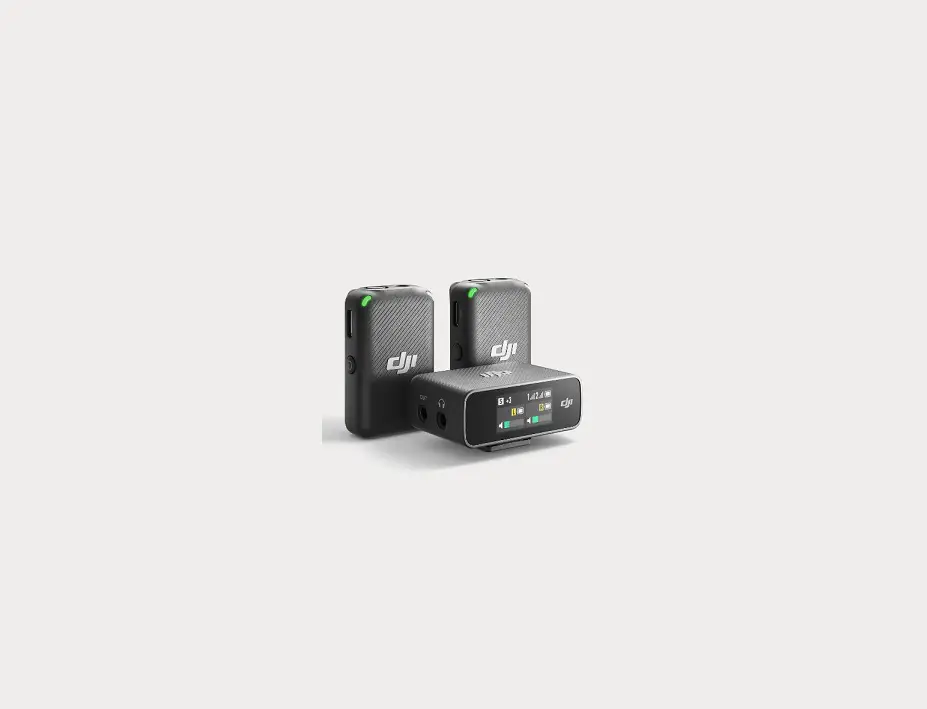
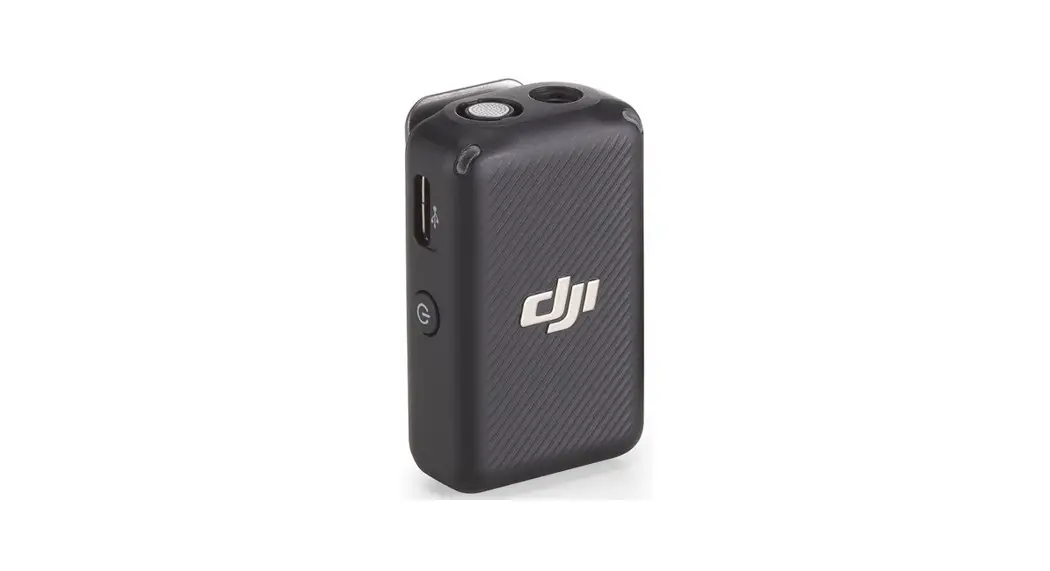
DJI™ Mic is a dual channel wireless microphone system, including two transmitters and one receiver, which is able to record two sound sources simultaneously at a distance of up to 250 m*. The transmitter has a built-in omnidirectional microphone, supports the use of an external microphone, and can be clipped to clothing or any place close to a sound source. With the internal 8 GB storage, DJI Mic is able to record audio for up to 14 hours**.
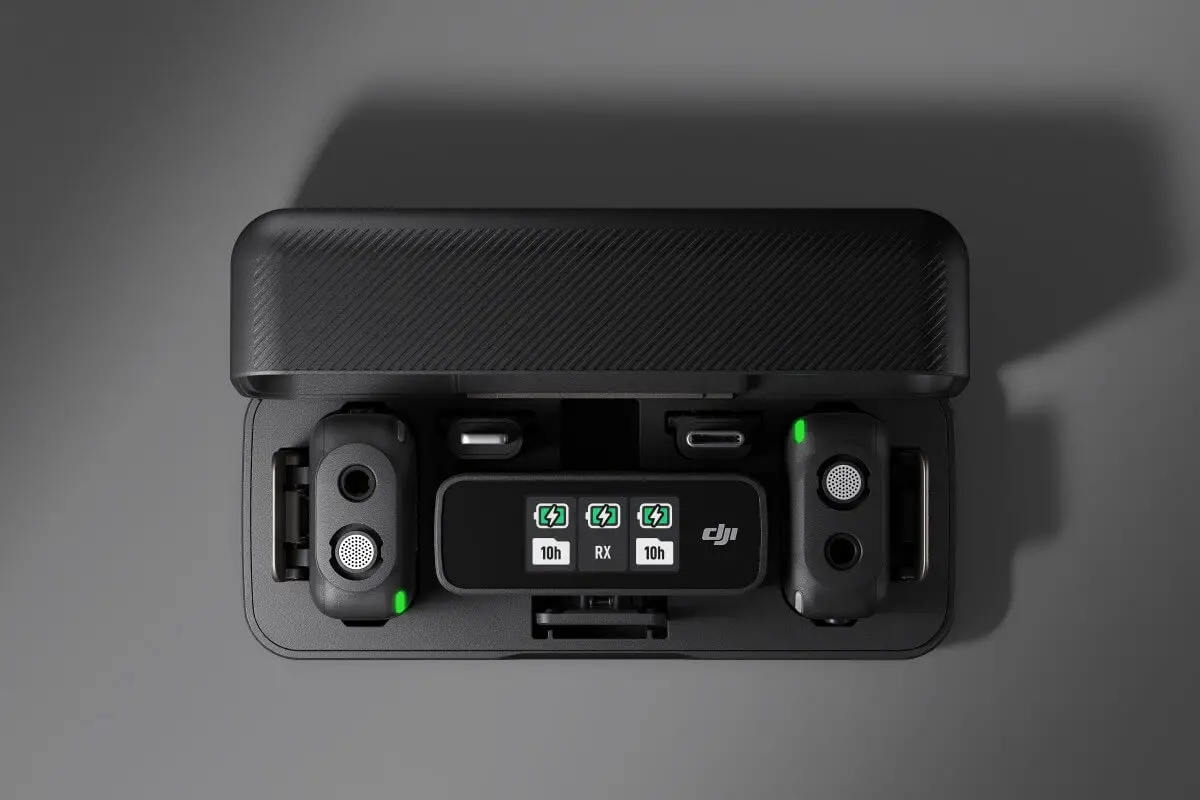
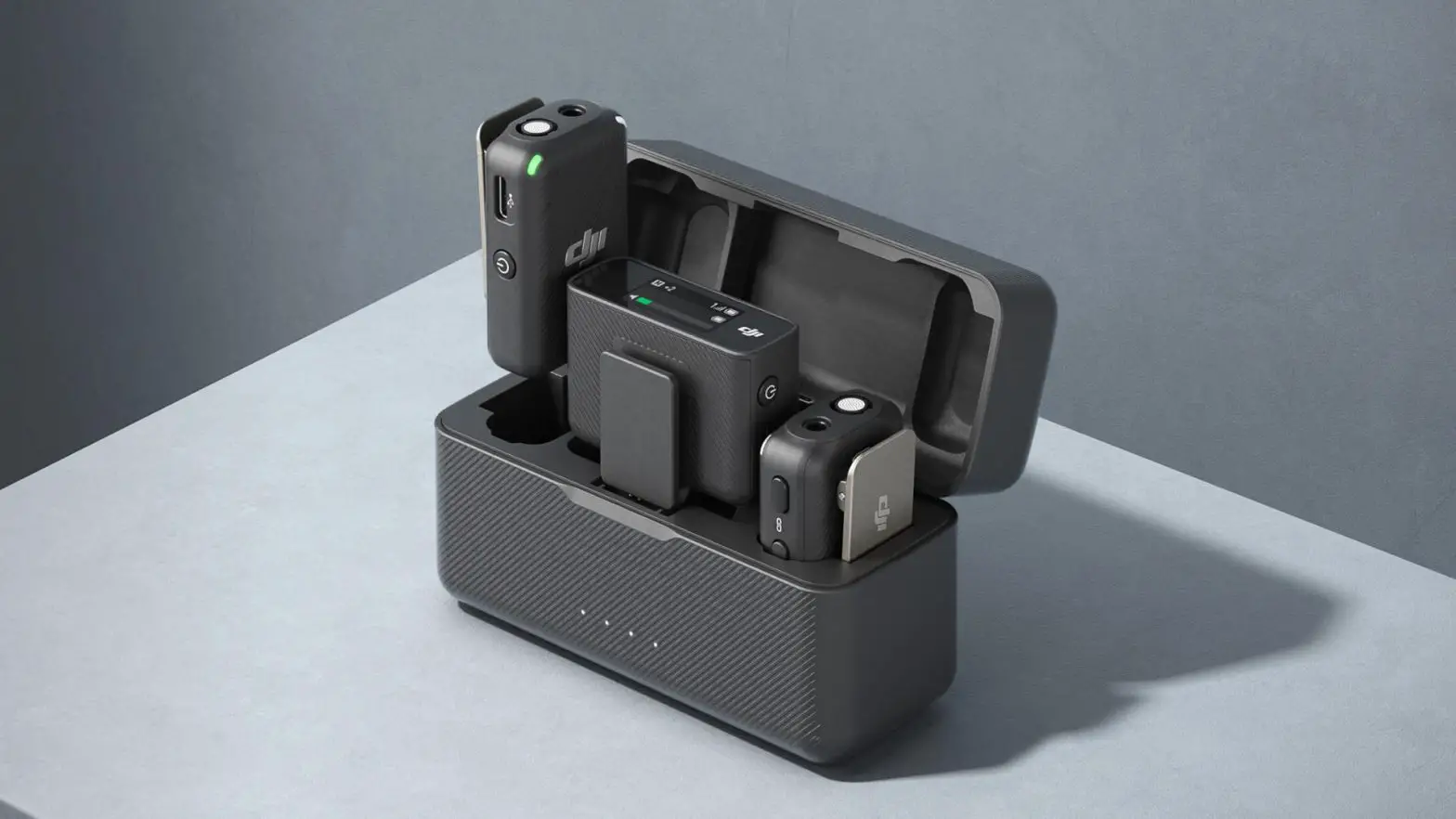
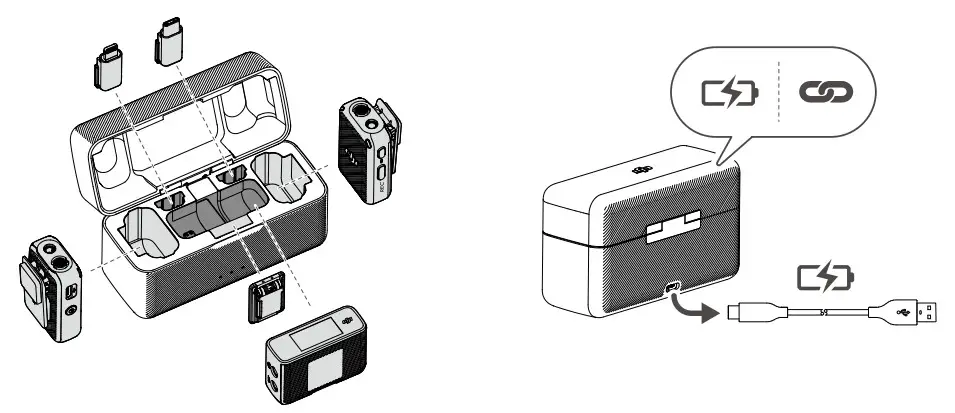
The receiver boasts an OLED touchscreen, on which users can view the real-time volume, wireless signal strength, gain, recording modes, and more. By utilizing the expansion port, the receiver can be connected to a camera or mobile phone to provide high quality audio. The receiver can also be connected to a computer to use as a microphone and with the monitor port the audio can be monitored in real time. The charging case provided is able to charge the transmitters and receiver simultaneously and link them automatically.
* Tested in an obstruction-free outdoor environment.
** Tested with a 48,000Hz sampling rate and 24-bit mono WAV audio format. DJI Mic has different combos, which include additional items. The features described in this manual are general and apply to all combos.
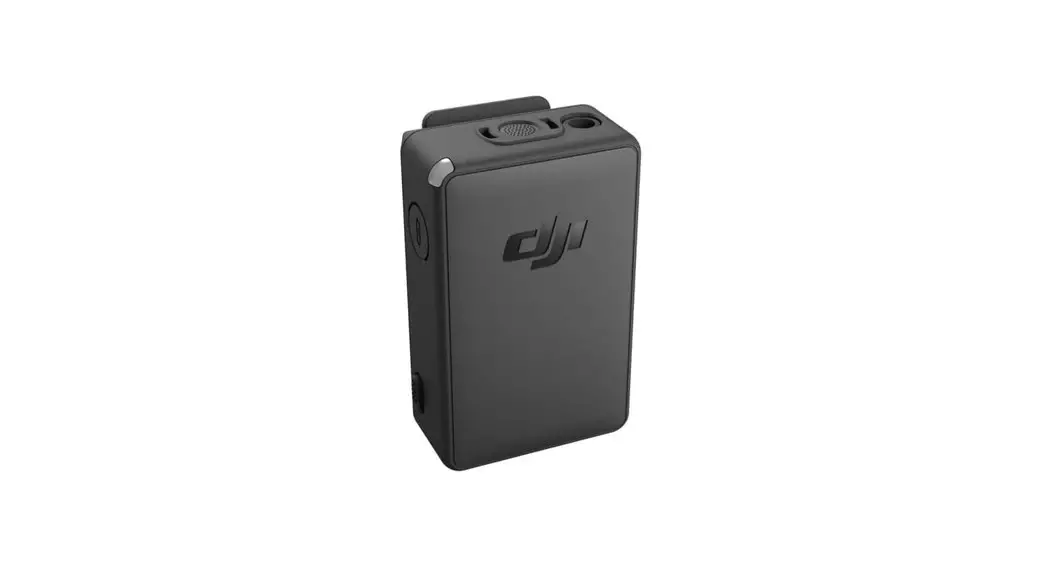
DJI Mic Transmitter
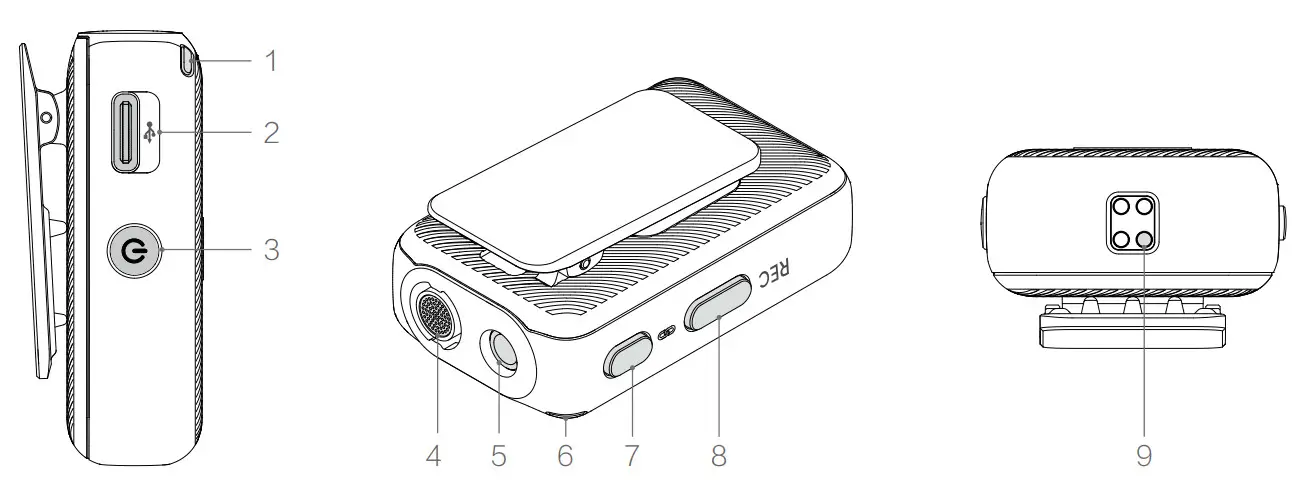
- System Status Indicator
Indicates the connection status with the receiver and the battery level of the transmitter.Blinking Pattern Descriptions Connection Status Solid on Connected with the receiver Blinks slowly Disconnected from the receiver Blinks quickly Linking Blinks red and green alternatively Firmware updating Battery Level Descriptions Solid green Battery Level ≥20% Solid red Battery Level<20% Battery Level During Charging Blinks green slowly Battery level: 0~25% Blinks green twice Battery level: 26~50% Blinks green three times Battery level: 51~75% Blinks green four times Battery level: 76~100% Off Fully charged - Data Port (USB-C)
For copying audio or updating firmware after connecting to a computer. Can also be used for charging. - Power Button
Press and hold to power on or off. Press twice to mute. - Internal Microphone
For recording audio. - 3.5 mm TRS Input
For connecting external microphone. DO NOT connect a microphone with a power supply of 24 V or 48 V. - Recording Status LED
Indicates the record status of the transmitter.Blinking Pattern Descriptions Solid red Recording Pulses red Mute Off Not recording - Linking Button
Press and hold to start linking to the receiver. Once the receiver is attached to a mobile phone and the receiver and transmitter are linked, press once to take a photo or start or stop recording on the mobile phone (only supports mobile phones where the volume button can be used to take a photo or start or stop a video). - Record Button
Press once to start or stop recording. - Charging Pad
Charging will begin after connecting the transmitter to the charging pad of the charging case and the transmitter will automatically link with the receiver in the charging case.
DJI Mic Receiver
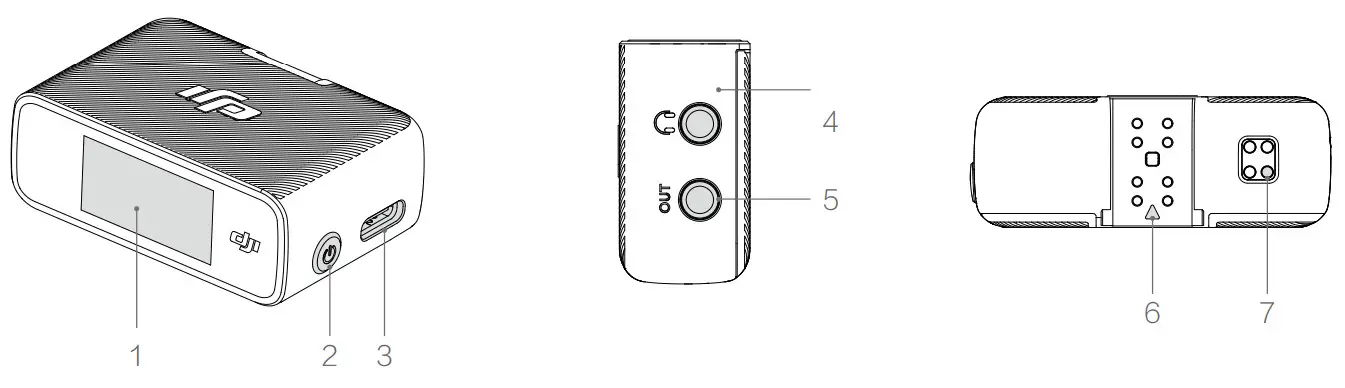
- OLED Touchscreen
Displays information such as the real-time volume, battery level of the receiver and transmitter, charging status, wireless signal strength, gain, and recording modes. Slide down or up on the screen to access settings. - Power Button
Press and hold to power on or off. Press once to lock or unlock the screen. - Data Port (USB-C)
After connecting to a computer, can be used to update firmware or as a microphone for the computer. Can also be used for charging. - Monitor Port
Plug in a 3.5 mm TRS headphone to monitor the transmitter recording. - 3.5 mm TRS Output
For audio output to a camera. DO NOT connect to a device with an output of 24 V or 48 V. - Expansion Port
For connecting to a mobile phone using a mobile phone adapter or connecting to a camera using a hot shoe adapter. - Charging Pad
Charging will begin after connecting the receiver to the charging pad on the charging case and the receiver will link with the transmitter in the charging case automatically.
Charging Case
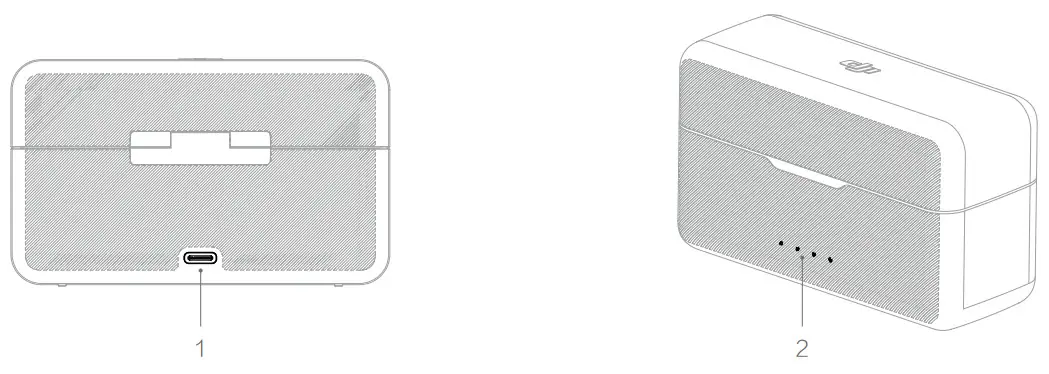
- USB-C Charging Port
For charging the charging case. - Battery Level LEDs
Indicates the battery level of the charging case.
 LED is on
 LED is flashing
 LED is off
| LED1 | LED2 | LED3 | LED4 | Battery Level During Charging (LEDs blink in sequence) |
| | | | 76~99% |
| | | | 51~75% |
| | | | 26~50% |
| | | | ≤25% |
| | | | Battery Level |
| LED1 | LED2 | LED3 | LED4 | 76~100% |
| | | | 51~75% |
| | | | 26~50% |
| | | | 10~25% |
| | | | <10% |
Operation
Linking
The transmitters and the receiver are linked by default. Follow the steps below to link if the transmitter and receiver are disconnected.
- Place the transmitters and the receiver in the charging case and they will link automatically.
- Power on the transmitter and the receiver, press and hold the link button of the transmitter, slide down on the screen of the receiver, select Settings, and scroll through and tap Link Device to start linking. The status LED glow solid green to indicate linking is successfull.
Using DJI Mic
Transmitter
The transmitter can be attached using the magnetic clip to either clothes or a stable surface. The clamp can also be used to attach the transmitter to clothes.
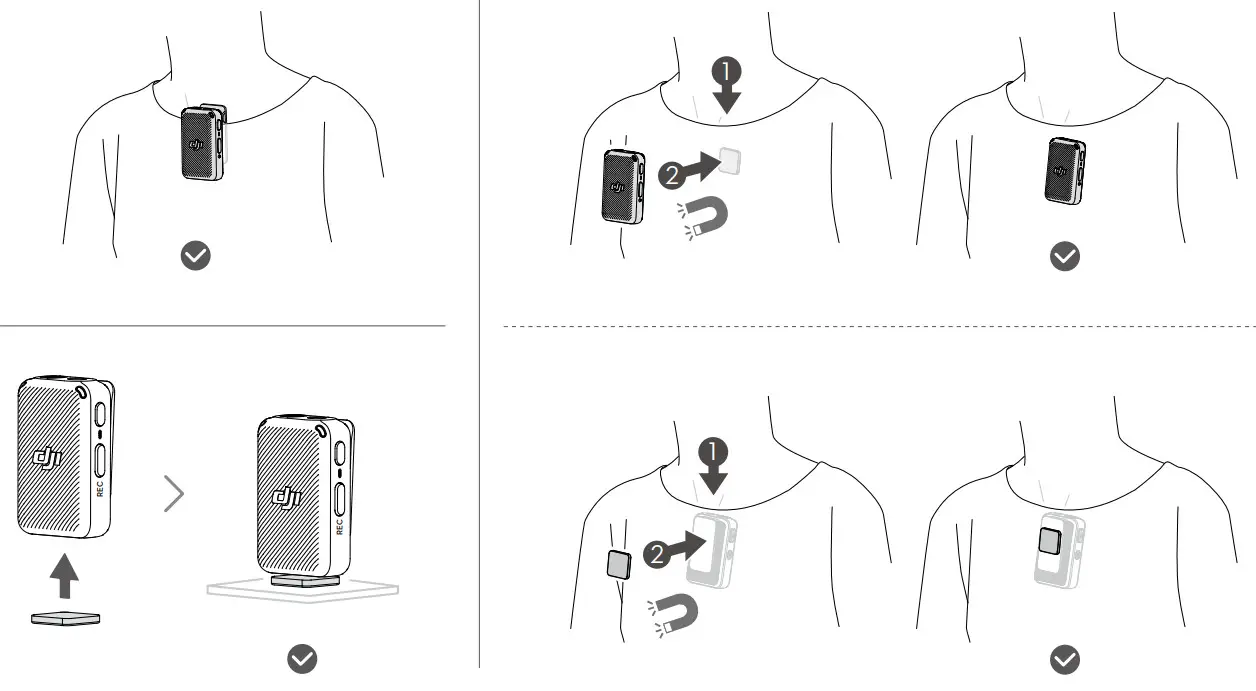
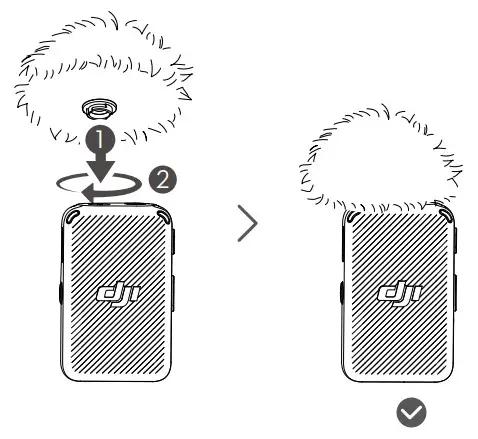
It is recommended to use the windscreen when using the transmitter outdoors or in a windy environment. Attach the windscreen to the transmitter by aligning it with the internal microphone and rotate the windscreen to lock in place.
Receiver
- Using with a Camera
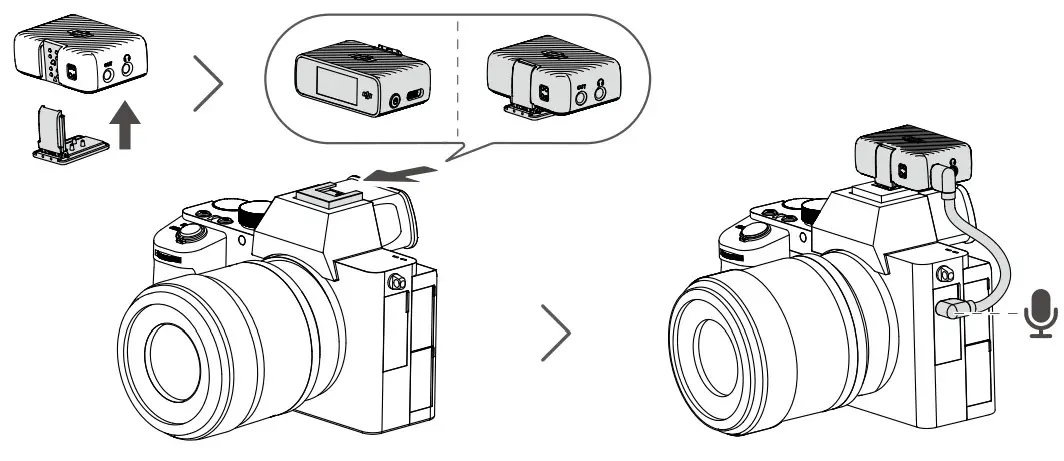
To record audio and transmit to a camera, attach the receiver to a camera using the hot shoe adapter and connect to the microphone port of the camera using the camera cable provided. Lower the volume of the camera to avoid sound distortion.
2. Using with a Mobile Phone
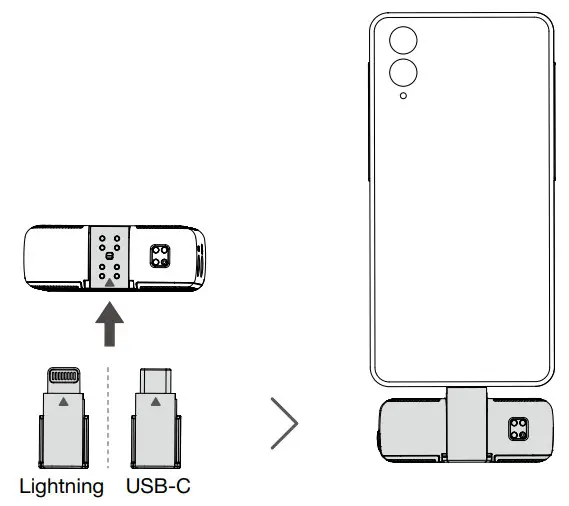
Attach the receiver to a mobile phone using the mobile phone adapter to record audio and transmit to a mobile phone. Audio can be played after the receiver is disconnected from the mobile phone. • The 3.5 mm TRS output port of the receiver cannot output after connecting to a mobile phone adapter.
• Only Mono mode can be used after connecting the receiver to the Lightning mobile phone adapter.
• The mobile phone speaker cannot output sound after connecting the receiver to the mobile phone. Bluetooth headphones or speaker can be used instead.| - Using with a Computer
Connect the receiver to a computer via the USB-C port as a microphone for a computer. Use a standard charging cable to connect DJI Mic with a computer and enter the related input settings on the computer.
 •
• OLED Touchscreen Operations
Home
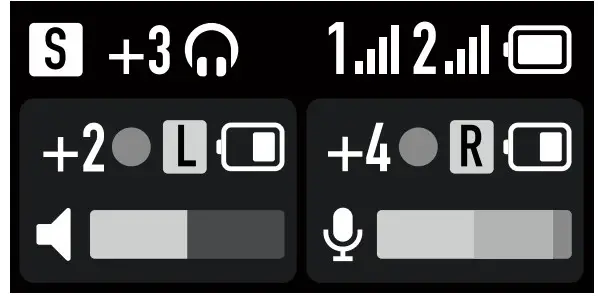
The top part of the screen indicates the status of receiver.
 | Recording Mode. Choose between S (Stereo), M (Mono), and Ms (Mono Safety Track). |
 | Indicates the receiver gain. |
 | Indicates there is external headphone connected. |
 | Indicates the wireless signal strength between transmitter 1 and the receiver. If there is only one transmitter connected, then only the information of one transmitter will be displayed. |
 | Indicates the wireless signal strength between transmitter 2 and the receiver. |
 | Indicates the battery level of the receiver. |
The middle of the screen indicates the status of transmitters.
 | Indicates the transmitter gain. |
 | Indicates audio is being recorded. |
 | Indicates the sound channel. |
| Indicates the battery level of the transmitter. |
The bottom of the screen indicates the real-time volume.
”  ” Indicates the volume of the internal microphone.
”  ” Indicates volume is muted.
”  ” Indicated the volume of the external microphone.
Slide Down
Slide down from the top of the screen to access Settings, slide left or right to select an option, and slide up to return to the previous screen.
Recording Mode Settings
Choose between S (Stereo), M (Mono), and Ms (Mono Safety track).M Mono: Under Mono mode, the audio recorded by the two transmitters will be in one channel. Mono with Safety Track: Similar to Mono mode, the audio will be recorded in -6dB incase the main track gets distorted due to a sudden increase in the audio volume of the source.
 Stereo: Under Stereo mode, the audio will be separated into left and right channels.
 RX Gain: Can be reduced if the sound is distorted.
 Monitor Volume: Tap to adjust the volume of the receiver.
 TX Settings
 Low Cut: Sounds that are 150 Hz or lower will be filtered if Low Cut is enabled.
 Transmitter Gain: Tap to adjust the transmitter input gain according to the real-time volume.
Reduce the gain accordingly when the volume bar turns red. Note that the transmitter gain will affect the volume of the recorded audio. REC REC Stop Lock: off by default. If REC Stop Lock is on, the user cannot stop recording when pressing the REC button to avoid unexpected operation.
 Auto Record: off by default. When Auto record is enabled, the transmitter will automatically start internal recording when powering on.
 Vibration Notification: Enable or disable vibration notification. Once Vibration Notification is enabled, the transmitter will vibrate in the scenarios listed below.
| Operation | Vibration |
| Power on | Vibrates for a short period |
| Power off | Vibrates for a longer period |
| Start recording | Vibrates for a short period |
| Stop recording | Vibrates twice |
 LED Brightness: allows the user to set the brightness of the transmitter LEDs.
General Settings
 | Link Device: Tap to link the transmitter and receiver. |
 | Brightness: Tap to adjust the brightness of the screen. |
 | Language: The screen supports languages of English, Chinese Simplified, Chinese Tranditional, Japanese, Korean, Thai, German, Spanish, French, Portuguese, Italian, Russian, Turkish, Indonesian, and Polish. |
 | Date and Time: Set the date and time for the recording file. |
 | Restore: Tap to reset default settings. |
 | Version: Check the SN, receiver firmware version, and the connected transmitter firmware version. |
 | Compliance Information: View the compliance information. |
Slide Up
Slide up from the bottom of the screen to view and control recording, enable or disable mute, and view the remaining recording time. Slide up from the bottom of the left side of the screen to adjust the settings for transmitter 1 and slide up from the bottom of the right side of the screen to adjust the settings of transmitter 2.
Transmitter Recording
After powering on the transmitter, press the record button once to start recording and press again to stop recording.
The recorded audio format of the transmitter is 24-bit mono WAV. When recording for an extended period, the file will be separated automatically every 30 minutes. The max recording time is approximately 14 hours, at which point newly recorded audio will overwrite the older recorded audio if the storage is full.
Audio File
The recorded audio can be exported or deleted after connecting to a computer and can be formatted via the receiver.
Updating Firmware
When there is new firmware available, update the firmware by connecting the transmitter and the receiver to the computer separately.
How to update firmware:
- Download the firmware on the product page at www.dji.com/mic/downloads.
- Connect the transmitter or receiver to the computer using the USB-C cable provided.
- Place the downloaded firmware update package .bin file under the root directories of the transmitters and receiver.
- The transmitters and receiver firmware updates will start automatically after disconnecting from the computer.
If the firmware update fails, download the firmware again, reboot the receiver or transmitter, and repeat the steps above. After the firmware update is completed, check the firmware version on the receiver to ensure the firmware is updated successfully.
Charging Case Operations
It is recommended to charge the charging case using a 5V/2A charger. The charging case has a built-in battery with a 1800 mAh. Place the transmitter and receiver into the charging case to begin charging. With the charging case opened, the receiver displays the battery level of the three devices and the remaining recording time of the transmitter. The transmitter and receiver will be powered on once removed from the charging case. The total operating time is approximately 15 hours when using the transmitters, receiver, and the charging case together.
A mobile phone adapter and the hot shoe adapter can be placed into charging case either mounted to the receiver or not.
Specifications
| Name | DJI Mic Transmitter |
| Model | ASTO1 |
| Dimensions | 47.3×30.4×20.0 mm |
| Weight | 30 g |
| Wireless Mode | GFSK 1 Mbps and 2 Mbps |
| Transmitter Power (EIRP) | <20 dBm |
| Operating Frequency | 2400-2483.5 MHz |
| Battery Type | LiPo 15 |
| Capacity | 320 mAh |
| Energy | 1.23 Wh |
| Voltage | 3.85 V |
| Charging Temperature | 5° to 45° C (41° to 113° F) |
| Operating Temperature | -10° to 45° C (14° to 113° F) |
| Charging Time | 1 hour 10 minutes |
| Operating Time | 5 hours 30 minutes |
| Microphone Directions | Omnidirectional |
| Frequency Response | Low Cut Disabled: 50 Hz – 20 KHz Low Cut Enabled: 150 Hz – 20 KHz |
| Max Sound Pressure Level (SPL) | 114 dB SPL |
| Max Input Level (3.5 mm) | -17 dBV (THD < 0.1%) |
| Equivalent Noise | 23 dBA |
| Monitor Interface Output Power | Max Output 22mW@1kHz, 320 |
| Name | DJI Mic Receiver |
| Model | ASR01 |
| Dimensions | 47.4×32.2×17.4 mm |
| Weight | 24.9 g |
| Wireless Mode | GFSK 1 Mbps and 2 Mbps |
| Transmitter Power (EIRP) | <20 dBm |
| Operating Frequency | 2400-2483.5 MHz |
| Battery Type | LiPo 1S |
| Capacity | 320 mAh |
| Energy | 1.23 Wh |
| Voltage | 3.85 V |
| Charging Temperature | 5° to 45° C (41° to 113° F) |
| Operating Temperature | -10° to 45° C (14° to 113° F) |
| Charging Time | 1 hour 10 minutes |
| Operating Time | 5 hours |
| Name | Charging Case |
| Model | ASB01 |
| Dimensions | 103.1×61.9×41.5 mm |
| Weight | 162.2 g |
| Battery Type | LiPo 1S |
| Capacity | 1800 mAh |
| Energy | 10 Wh |
| Voltage | 3.87 V |
| Charging Temperature | 5° to 45° C (41° to 113° F) |
| Operating Temperature | 5° to 45° C (41° to 113° F) |
| Charging Time | 2 hours 40 minutes |
| Operating time | Fully charge three devices simultaneously x1.8 |
After-Sales Information
Visit https://www.dji.com/support to learn more about after-sales service policies, repair services, and support.
This content is subject to change.
Download the latest version from
https://www.dji.com/mic
If you have any questions about this document, please contact
DJI by sending a message to [email protected].
Copyright © 2023 DJI All Rights Reserved.