VMS Anesthesia Machine
Product Information
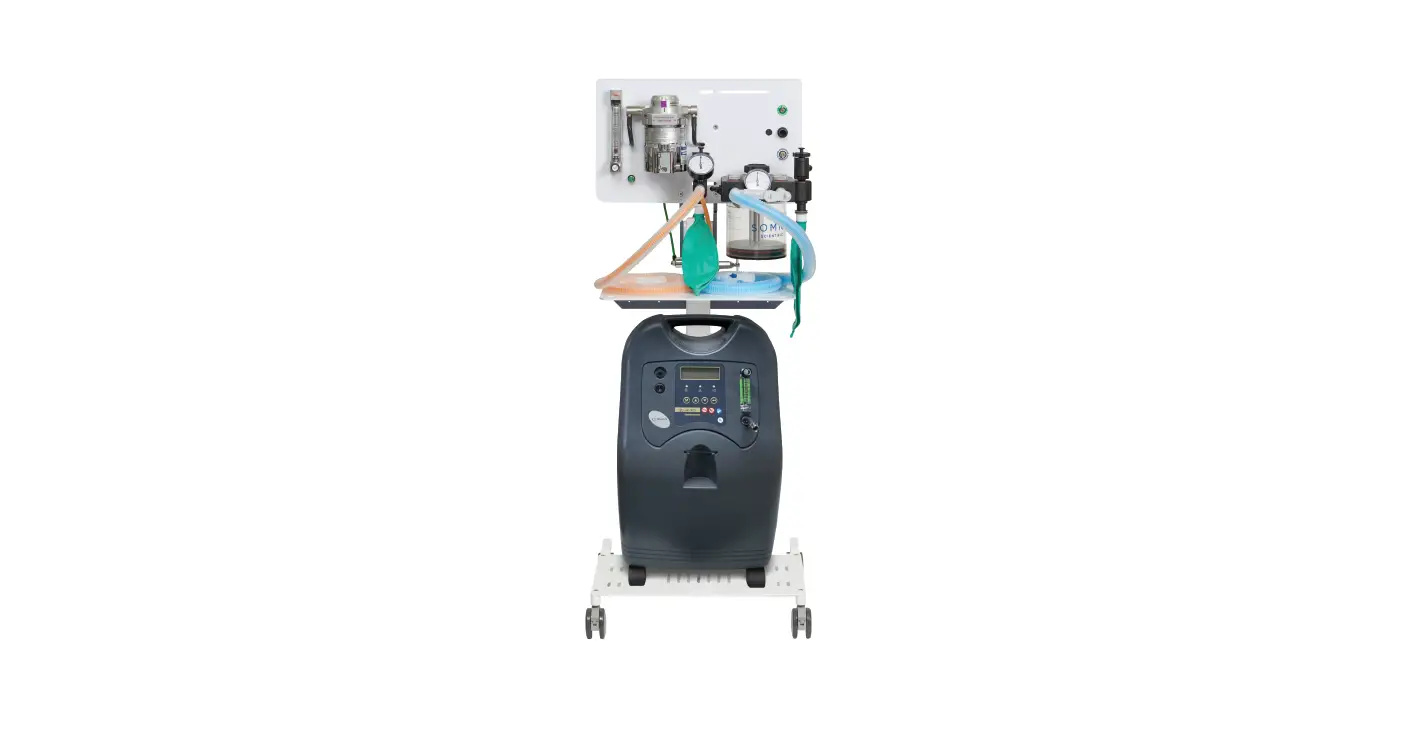
The anesthesia machine is a medical device used by veterinary
professionals trained in anesthesia practice. The machine is
available in various models, including VMS, VMS Plus, and VMC, and
is intended for use in veterinary clinics and hospitals. The
machine has various components, including a scavenging/APL valve,
occlusion valve (VMS & VMS Plus only), exhalation valve,
pressure gauge (manometer), safety valve (negative pressure
relief), inhalation valve, flowmeter, oxygen supply fitting, oxygen
flush, flowmeter adjustment knob, breathing circuit, fresh gas
connection, absorber canister, vaporizer (not included), breathing
bag, and more.
The installation of the anesthesia machine should be done
carefully as per the instructions provided in the manual.
Wall-mounted machines should only be installed in wood stud or
concrete walls. The machine should not be installed in a vehicle or
any other confined space. Waste gases from the machine could cause
impairment to the occupants. The machine should be installed by a
licensed veterinarian or a professional trained in anesthesia
practice.
Product Usage Instructions
- Remove the contents from the cartons and place the base with
casters on the floor. - For wood stud mounting, use #12 x 2 1/2 wood screw and #12 x
5/8 flat washer to mount the wall bracket to the wood stud through
1/2 min drywall. Two screws are required for each mounting. - For concrete wall mounting, drill a hole in the wall for #12
lead anchor as instructed by anchor manufacturer. Drive the anchor
into the wall and use #12 x 2 screw and #12 x 5/8 flat washer to
screw the wall bracket into the anchor. Repeat for each mounting
hole. - Install the tapered end of the mounting column into the
base. - Install the absorber/drawer/shelf assembly into the
column/stud.
Note: The mounting hardware is not included for wall
installation. Refer to the chase installation manual for mounting
hole locations. To install VMS, use hardware included with chase
cabinet (5/16 bolts, washers, and nuts).
Caution: Federal law restricts this device to sale by or on the
order of a licensed veterinarian. The operation of anesthesia
machines is restricted to use by veterinary professionals trained
in anesthesia practice. The product contains natural rubber latex
which may cause allergic reactions. At the end of product life, the
unit(s), accessories, and other consumable goods may become
contaminated from normal use. Consult local codes and ordinances
for proper disposal of equipment and other consumable goods.
Anesthesia Machine Installation
Applies to Models:
VMS® VMS PlusTM VMCTM
WARNING
Wall mounted anesthesia machines should only be installed in wood stud or concrete walls. Do not install anesthesia machine in a vehicle or similarly confined space. Waste gases from the machine could cause impairment to the occupants.
Scavenging / Adjustable Pressure Limiting (APL) Valve
Occlusion Valve (VMS & VMS Plus Only)
Exhalation Valve
Pressure Gauge
(Manometer)
Safety Valve (Negative Pressure Relief)
Inhalation Valve
Flowmeter
Oxygen Supply Fitting
Oxygen Flush
Flowmeter Adjustment
Knob
Breathing Circuit
© 2008 Midmark Corp. | 60 Vista Drive Versailles, OH 45380 USA | 1.800.643.6275 | 1.937.526.3662 |
Fresh Gas Connection
Absorber Canister
Vaporizer (Not Included)
Breathing Bag
VA113701
VA113601
VMS Model Shown Mechanical Components Shown are Typical on All VMS, VMS Plus and VMC Anesthesia Machines.
1
Style G 10578100 Rev. JA5 10/27/22
Important Information
Intended Use
The operation of anesthesia machines is restricted to use by veterinary professionals trained in anesthesia practice.
Caution
Federal law restricts this device to sale by or on the order of a licensed veterinarian.
Disposal of Equipment
At the end of product life, the unit(s), accessories, and other consumable goods may become contaminated from normal use. Consult local codes and ordinances for proper disposal of equipment, and other consumable goods.
Transportation / Storage Conditions
Ambient Temperature Range:………………………………………………………..32°F to 104°F (0°C to 40°C) Relative Humidity…………………………………………………………………………10% to 90% (non condensing) Atmospheric Pressure …………………………………………………….500hPa to 1060hPa (0.49atm to 1.05atm)
Symbols
These symbols may appear on your equipment and/or in the manuals.
Proper Shipping Orientation
0
Maximum stacking height
(Do not stack)
Fragile
Keep Dry
Consult User Guide Do Not Tumble Handle With Care
Safety Symbols
WARNING
Indicates a potentially hazardous situation which could result in serious injury if not avoided.
Caution
Indicates a potentially hazardous situation which may result in minor or moderate injury if not avoided. It may also be used to alert against unsafe practices
Equipment Alert
Indicates a potentially hazardous situation which could result in equipment damage if not avoided.
Caution
This product contains natural rubber latex which may cause allergic reactions.
Note
Amplifies a procedure, practice, or condition.
© 2008 Midmark Corp. | 60 Vista Drive Versailles, OH 45380 USA | 1.800.643.6275 | 1.937.526.3662 |
2
10578100
Stand Mounted Units Only
VMS® Wall Mounted Units Only
Note
Mounting hardware not included for wall installation.
Step 1: Remove contents from cartons. Place base with casters on floor.
Wood Stud Mounting… Use #12 x 2 1/2″ wood screw and #12 x 5/8″ flat washer to mount wall bracket to wood stud thru 1/2″ min dry wall.
Note: Two screws are required for each mounting.
Wood Stud Mounting
Concrete Wall Mounting
Column
Base with Casters
6.300″ (16 cm)
6.300″ (16 cm)
Concrete Wall Mounting… A) Drill hole in wall for #12 lead anchor as instructed by anchor manufacturer. B) Drive anchor in wall. C) Use #12 x 2″ screw and #12 x 5/8″ flat washer to screw wall bracket into anchor.
Note: Repeat for each mounting hole.
Note
Refer to chase installation manual for mounting hole locations. To install VMS, use hardware included with chase cabinet. (5/16″ bolts, washers and nuts)
Step 2: Install tapered end of mounting column into base.
Chase
Wall Bracket
© 2008 Midmark Corp. | 60 Vista Drive Versailles, OH 45380 USA | 1-800-643-6275 | 1-937-526-3662 |
3
Chase Cabinets
10578100
Step 3: Install absorber/drawer/shelf assembly into column/stud.
VMS® Stand Mounted
VMS PlusTM & VMCTM
VMS PlusTM
VMS Wall Mounted
Post Spacer
Secure by Tightening T-handle
© 2008 Midmark Corp. | 60 Vista Drive Versailles, OH 45380 USA | 1.800.643.6275 | 1.937.526.3662 |
VMCTM
Post Spacer
2 3/4″ (6.99 cm) o
Use 3/4″ (1.9 cm) Post Spacer with VMS and Monitor Wall Mount Combination instead of 2 3/4″ (6.99 cm)
used with the VMS wall mount.
4
10578100
Step 4: Install vaporizer.
Note: Vaporizer is not included with anesthesia machine, however the mounting kit and 10 mm nut driver for vaporizer installation is included.
VMS® Stand and Wall Mounted Units
Mount Vaporizer
VMS PlusTM
VMCTM
© 2008 Midmark Corp. | 60 Vista Drive Versailles, OH 45380 USA | 1.800.643.6275 | 1.937.526.3662 |
CAUTION – VMS PlusTM Model ONLY
For proper machine balance, mount single vaporizer as shown. Mount second vaporizer at other end.
5
10578100
Step 5: Install tubing, breathing bag and breathing circuit. Vaporizer Inlet
Breathing Circuit
Breathing Bag
“Y” Connector
Vaporizer Outlet
REFERENCES VMCTM
To Fresh Gas Connection VMS PlusTM
© 2008 Midmark Corp. | 60 Vista Drive Versailles, OH 45380 USA | 1.800.643.6275 | 1.937.526.3662 |
6
10578100
Step 6:
Unlock canister latches. Remove canister from side of assembly. Fill with absorbent according to specifications on canister label. Reinstall canister and secure latches.
Canister Latches
VA1162
© 2008 Midmark Corp. | 60 Vista Drive Versailles, OH 45380 USA | 1.800.643.6275 | 1.937.526.3662 |
7
Canister 10578100
Step 7: Connect oxygen tank and perform leak test.
Equipment Alert
Do not activate the oxygen flush during any part of this leak test.
APL Valve (Scavenging /Adjustable
Pressure Limiting)
Occlusion Valve (VMS® only)
Pressure Gauge
Flowmeter
To perform leak test… A) Close APL (Scavenging /Adjustable Pressure Limiting) valve by turning knob clockwise. B) Place thumb over patient connection of breathing circuit Y. C) Remove breathing bag and cover bag port opening. (Use palm of hand that is covering Y.) D) With oxygen (50-55 PSI [3.4-3.8 Bar]) supplied to anesthesia machine, slowly open
flowmeter to register 30cm H20 on anesthesia machine pressure gauge. E) Turn off flowmeter when pressure reaches 30cm H2O. (If pressure holds steady the system
is leak free but if pressure drops, proceed to step (F).) F) Slowly open flowmeter until pressure stabilizes at 30cm. H2O setting. (This determines the
magnitude of the leak. If leak rate is greater than 300ml/min; proceed to step (G).) G) Refer to “What if machine leaks? H) Replace reservoir bag. Repeat step (B) and steps (D) through (F). This will determine the
integrity of breathing bag. I) Open APL Valve at end of Leak Test Procedure by turning knob counter clockwise.
What if Machine Leaks? 1) Breathing Bag – If leak occurs, replace. 2) Breathing Circuit – Install new breathing circuit or obstruct inhalation / exhalation openings to determine if leak originates from breathing circuit. 3) Vaporizer Fittings – Verify fittings and tubing are securely attached. 4) Canister Gaskets – Check for loose absorbent grains between canister housing gaskets. 5) Verify Canister is seated properly. 6) Safety Valves – Remove valve and obstruct opening to determine if leak originates from negative pressure relief valve. Check the o-ring under valve for damage. 7) APL Valve – Remove valve and obstruct opening to determine if leak originates from APL valve. Check the o-ring under valve for damage. 8) Occlusion Valve – Remove valve and obstruct opening to determine if leak originates from Occlusion valve. Check the o-ring, diaphragm and back up ring on valve for damage. 9) O-Rings under chrome retaining rings. Check the o-rings for damage.
VA113301
© 2008 Midmark Corp. | 60 Vista Drive Versailles, OH 45380 USA | 1.800.643.6275 | 1.937.526.3662 |
8
10578100
Dimensions
Floor to Top of Anesthesia Machine: Total Width of Unit: Width of Shelf: Length of Shelf: Swing Radius: Distance from Wall: Floor Footprint: Wall Footprint: Shipping Weight:
VMS® Stand
54″ (137.15 cm) 12″ (30.48 cm)
N/A N/A N/A N/A 27″ (68.58 cm) N/A 42 lbs
VMS Wall Mounted
N/A 12″ (30.48 cm)
N/A N/A 6 3/4″ (17.14 cm) 8 3/4″ (22.23) N/A 22″ x 12″ (55.88 x 30.48 cm) 26 lbs
VMS Plus
57″ (127 cm) 12″ (30.48 cm) 22″ (55.88 cm) 13 1/4″ (33.65 cm)
N/A N/A 27″ (68.58 cm) N/A 75 lbs
VMC
53 1/2″ (135.89 cm) 21″ (53.34 cm) 12″ (30.48 cm) 12″ (30.48 cm) N/A N/A 27″ (68.58 cm) N/A 75 lbs
Dimensions
Floor to Top of Anesthesia Machine: Total Width of Unit: Width of Shelf: Length of Shelf: Distance from Wall: Floor Footprint: Wall Footprint: Shipping Weight:
VME Stand
51″ (129.54 cm) 15″ (38.1 cm)
10 1/2″ (26.67 cm) 10″ (15.24 cm) N/A 27″ (68.58 cm) N/A 44 lbs
VME Wall Mounted
N/A 15″ (38.1 cm) 13 1/2″ (34.29 cm) 8 1/2″ (21.59 cm)
8 3/4″ N/A 19″ x 14″ (48.26 x 35.56 cm) 27 lbs
VME Tabletop
N/A 15″ (38.1 cm) 13 1/2″ (34.29 cm) 8 1/2″ (21.59 cm)
N/A N/A 19″ x 14” (48.26 x 35.56 cm) 24 lbs
© 2008 Midmark Corp. | 60 Vista Drive Versailles, OH 45380 USA | 1.800.643.6275 | 1.937.526.3662 |
9
10578100