


American Communication Systems Discover the Power of Communications http://lwww.ameradio.com 
Accessories
| Types | Part No. | Description |
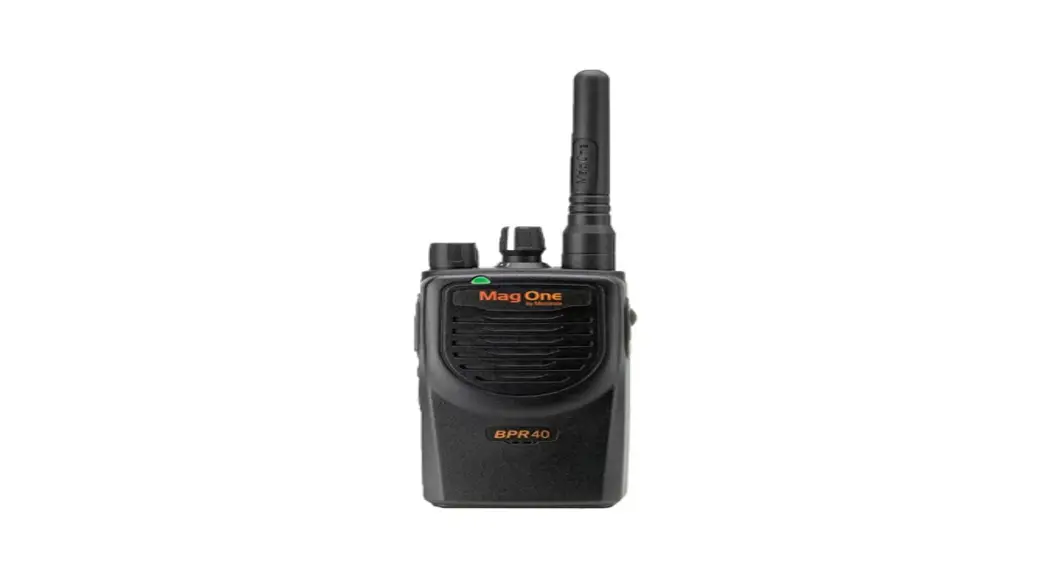
| Antenna | PMAD4051 R | Mag One 150-174MHz Antenna |
| PMAE4020 R | Mag One 450-470MHz Antenna | |
| Audio Accessory | PMMN4008_ | Remote Speaker Microphone |
| PMLN4442 | Earbud with in-line mic and PTTNOX’ Switch | |
| PMLN4443 | Ear Receiver with in-line mic and PTTNOX* Switch | |
| PMLN4445_ | Ultra Lightweight Headset with In-line PTT/VOX” Switch | |
| PMLN4294_ | Earbud with Microphone & PTT Combined | |
| PMLN4605 | Clear Acoustic Kit | |
| PMLN4606 _ | 2-Wire Surveillance Kit with Clear Acoustic Tube | |
| PMLN4658 _ | D-shell Earset with Boom Mic with PTT/VOX” Switch | |
| Battery | PMNN4071 R | Mag One NiMH 1200mAH |
| PMNN4075 R | Mag One Li-Ion 1500mAH | |
| Carry Accessory | PMLN4743_ | Mag One Spring Belt Clip |
| PMLN4741 | Mag One Soft Leather Carry Case | |
| PMLN4742_ | Mag One Hard Leather Carry Case | |
| Charger | PMLN5041 R | Mag One Tri-Chem SUC Base |
| PMLN5048 R | Mag One Tri-Chem SUC with Switching PS US Plug | |
| EPNN9288_ | Switching Power Supply with AC Cord. US plug. 90-264 VAC |
*Caution: Your radio does not support the VOX feature. Please set the accessory switch to ‘PTT’. If the accessory switch is set to ‘VOX’, your radio transmits constantly and never receives.
LED Indicators
| Colour | State | Indication |
| Red | Illuminated | Radio is transmitting. |
| Blinking | The battery voltage is low. | |
| Green | Illuminated | Radio is receiving with PL/DPL disabled. |
| Blinking | The radio is inactive scanning mode. | |
| Orange | Illuminated | Radio is receiving with PL/DPL enabled. |
| Blinking | An error has occurred. |
Audio Alert Tones
Tone Name | Tone Cadence | Description |
| In Chirp Tone | Programmable buttons are pressed. | |
| Out Chirp Tone | Programmable buttons are pressed. | |
| Bad Key Chirp Tone |
| Invalid programmable button function (i.e. pressing the programmable button while button lock is activated.) |
| Talk Prohibit Tone | The continuous tone is heard if PTT is pressed when the transmission is not allowed. | |
| Low Battery Alert Tone |
| Repeating tone heard if the battery level is low. |
| Priority Channel Alert Tone | Received priority channel in Priority Scan mode. |
Low Tone High Tone
Programmable Buttons
• The following functions can be assigned as short press (press and release) or long-press (press and hold for 1 second) in the programmable buttons.
| Button | Function |
| High/Low Power | Select desired power level to Hight or Low*. |
| Volume Set | Allows you to check the audio and alert tone volume level. |
| Monitor | Allows you to monitor the current channel for activity; disables squelch. |
| Sticky Monitor* | The radio monitors continually until you press this button again. |
| Scan | Starts* or Stopst channel scan. |
| Nuisance Channel Delete | Removes unwanted channel(s) temporarily from scan list during the scan. |
| Repeater/Talk around | Toggles radio between functioning in Repeater mode or Talk around mode*. |
| PL/DPL | Enables/Disables* radio from requiring matching PUDPL to receive messages. |
| Button Lock | Locks* or unlocks all buttons except PTT Channel Knob and On/Off/Volume Knob. |
| Battery Save Mode | Toggles between functioning with Battery Saver ON* or Battery Saver OFFt. |
| Squelch | Select desired to squelch level: Normalt or Tight*. |
† In Chirp Tone
* Out Chirp Tone
• Your radio’s default functions are described below. If re-programmed, enter the new functions.
| Press Type | Programmable Button 1 | Programmable Button 2 | ||
| Default | Re-programmed | Default | Re-programmed | |
| Short Press | Monitor | Scan | ||
| Long Press | Sticky Monitor | Nuisance Channel Delete | ||
Attaching and Removing the Antenna
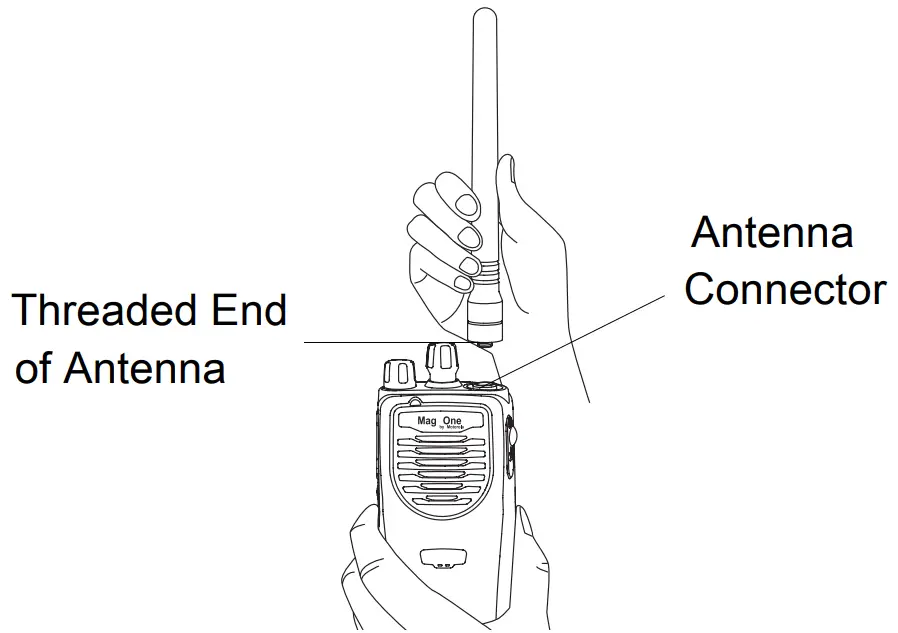 To Attach Antenna
- Fasten the antenna to the radio by placing the threaded end of the antenna into the Antenna Connector.
- Rotate the antenna clockwise until tight.
To Remove Antenna
Turn the antenna in a counter-clockwise direction until it disengages from the radio.
Attaching and Removing the Battery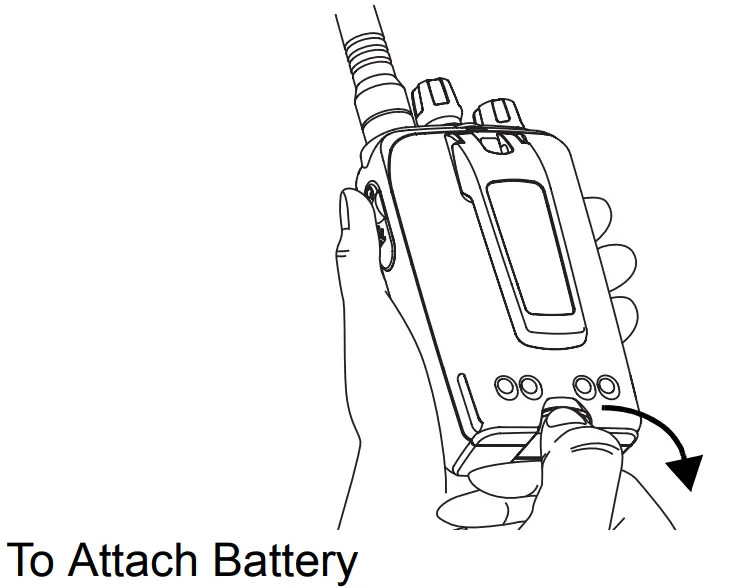 To Attach Battery
- Align and fit the battery tongue into the groove of the chassis of the radio.
- Secure the latch at the bottom of the radio.
To Remove Battery
- Unlatch the battery clasp at the bottom of the radio.
- Gently lift the hilt of the battery nearest to the battery latch away from the housing.
- Slide battery downwards to remove.
Attaching and Removing the Belt Clip
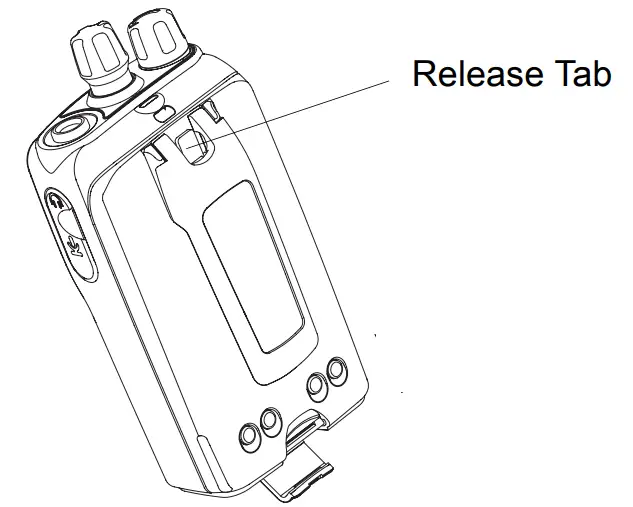 To Attach Belt Clip
- Align the mounting rails of the radio with the grooves of the belt clip.
- Slide the belt clip downwards until it clicks into place.
To Remove Belt Clip
- Lift the release tab.
- Slide the belt clip upwards.
Charging your Radio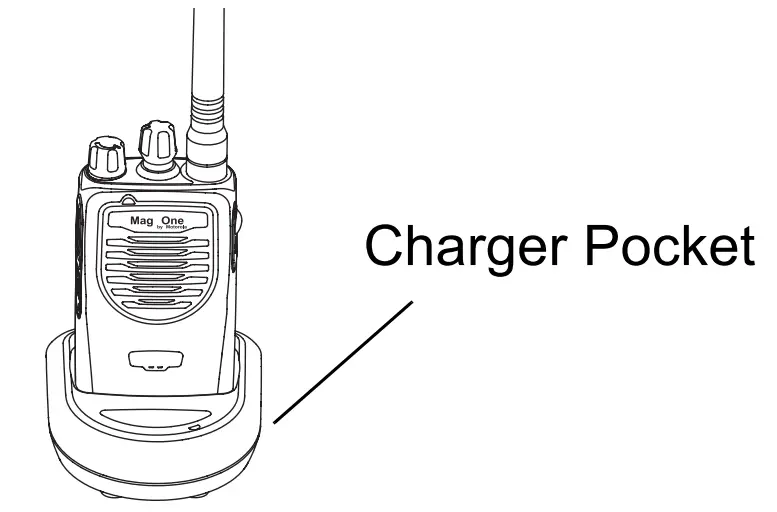
- Turn off your radio and the NC power supply to your charger (if they are on).
- Place your radio in the charger pocket.
- Turn on the charger’s NC power supply.
- While charging your radio, the charger’s LED shows a steady red light. The radio should be charged at least 16 hours initially before decreasing the charging time to 12 hours.
- Turn off the charger’s NC power supply, and remove the radio from the charger pocket.
- For more details, refer to your Tri-Chem Charger User Guide (6871916T01).
PRODUCT SAFETY AND RF EXPOSURE COMPLIANCE Caution
Before using this product, read the operating instructions for safe usage contained in the Product Safety and RF Exposure booklet enclosed with your radio.
ATTENTION!
This radio is restricted to occupational use only to satisfy FCC RF energy exposure requirements. Before using this product, read the RF energy awareness information and operating instructions in the Product Safety and RF Exposure booklet enclosed with your radio (Motorola Publication part number 6881095C98) to ensure compliance with RF energy exposure limits.
For a list of Motorola-approved antennas, batteries, and other accessories, visit the following website which lists approved accessories: http://www.motorola.com/governmentandenterprise
Mag One TM by Motorola is registered in the U.S. Patent and Trademark Office. All other products and service names are the property of their own respective owners.
© Motorola, Inc. 2005, 2006, 2007 1301 E. Algonquin Rd., Schaumburg, IL 60196-1078, U.S.A.
Printed in China. 02/07. All Rights Reserved.