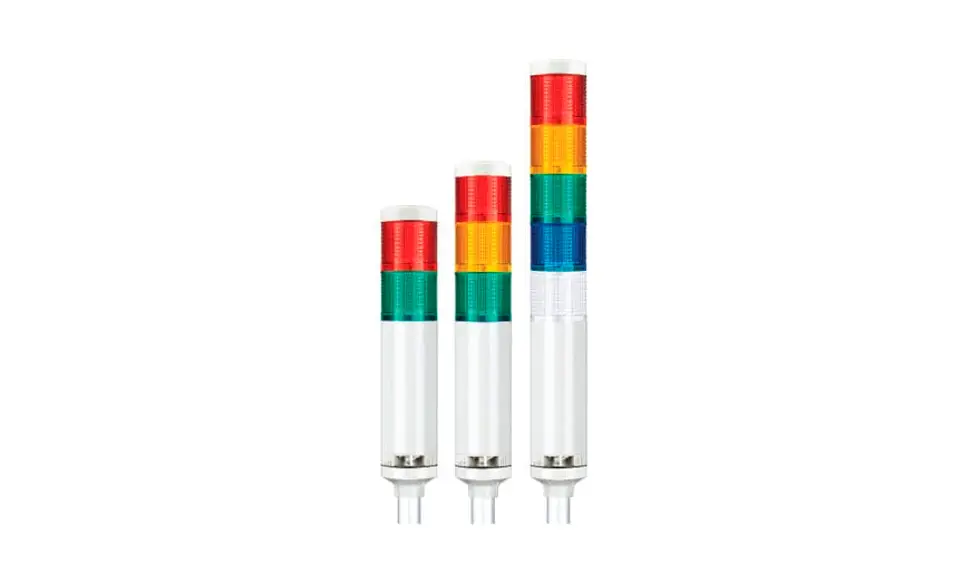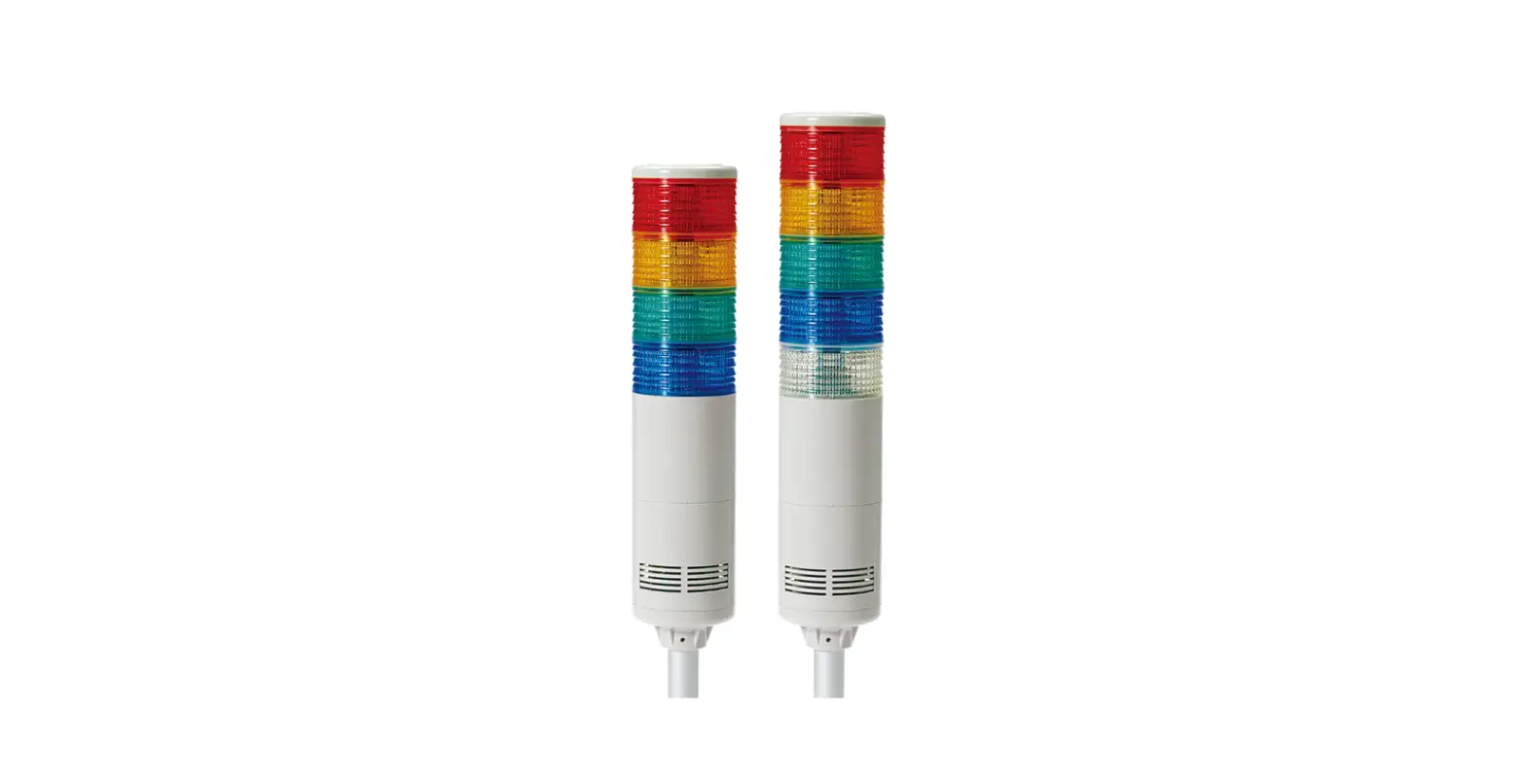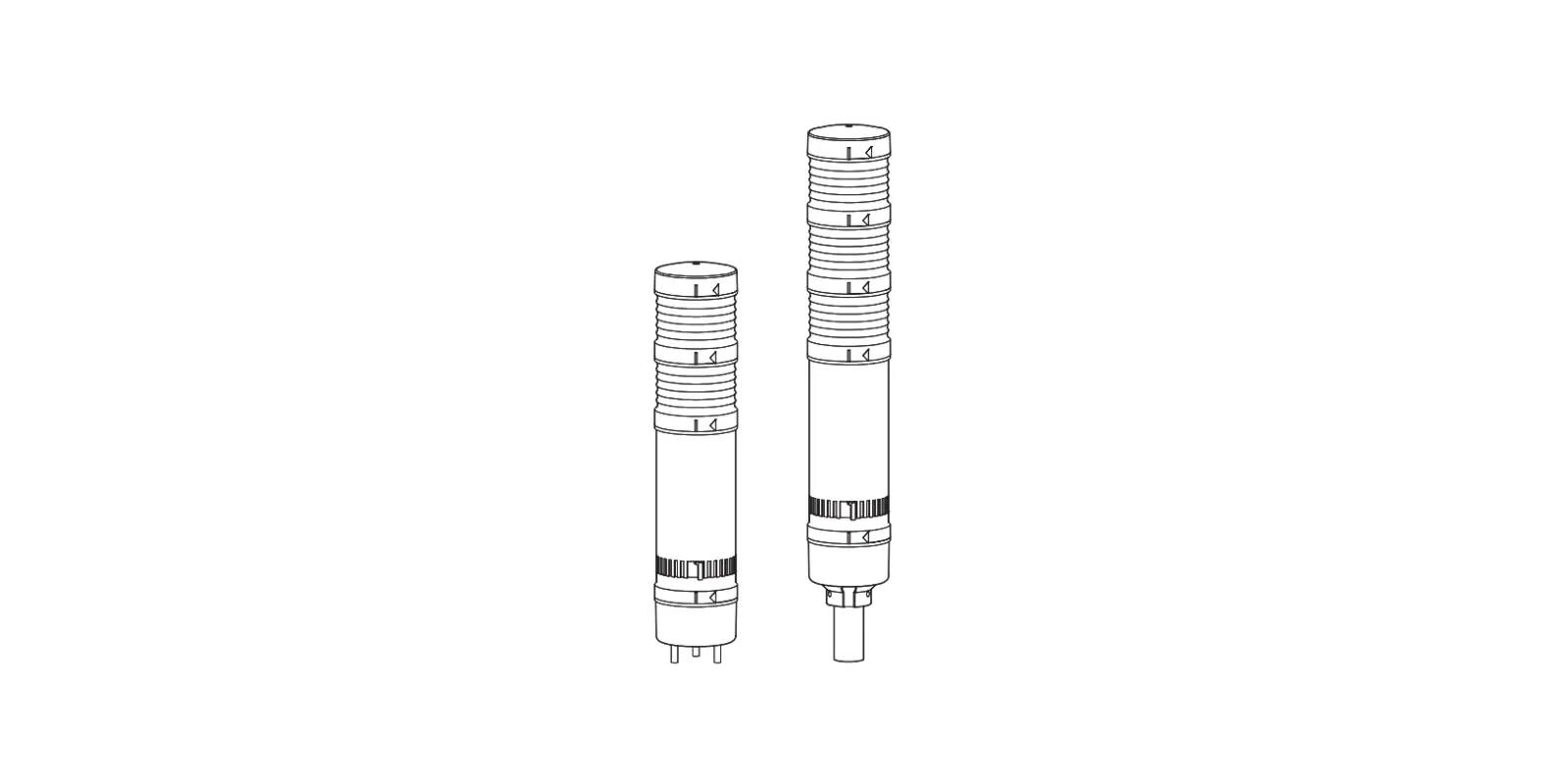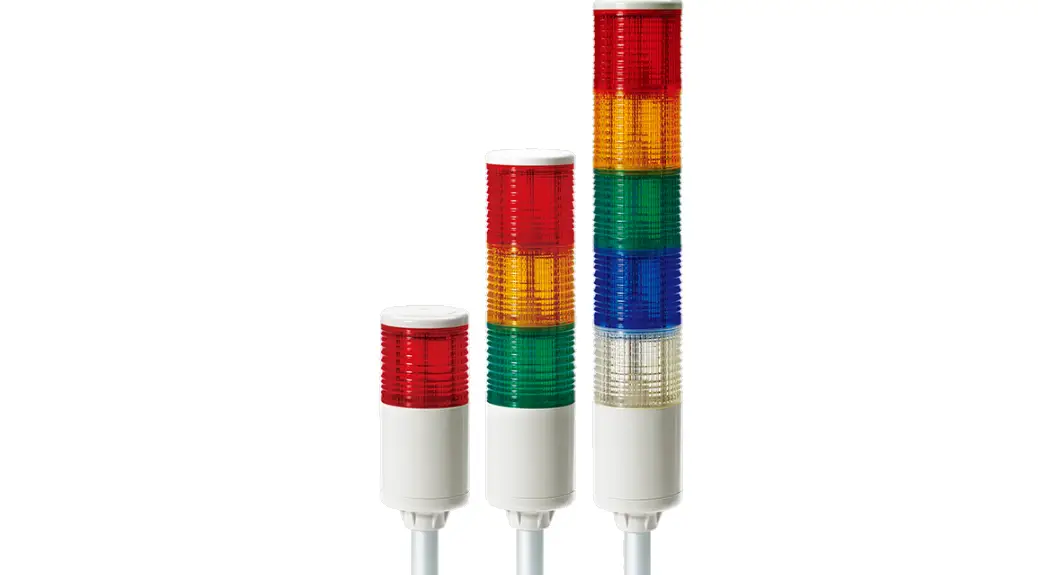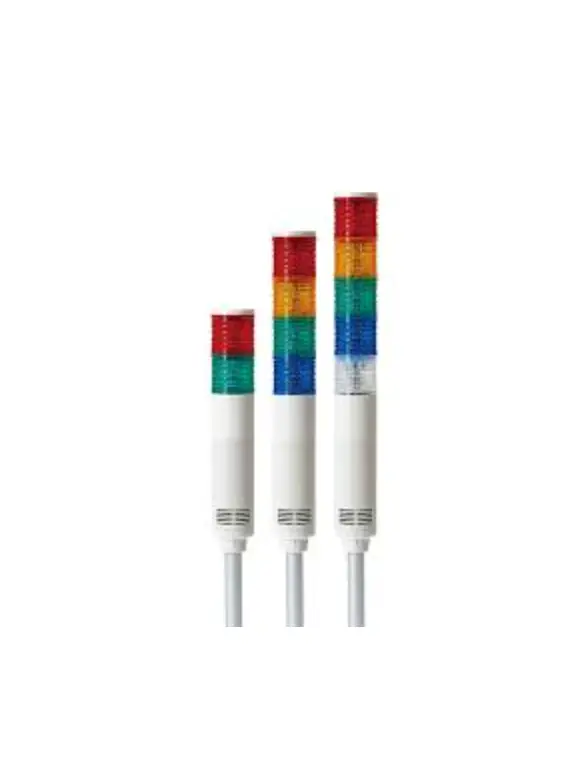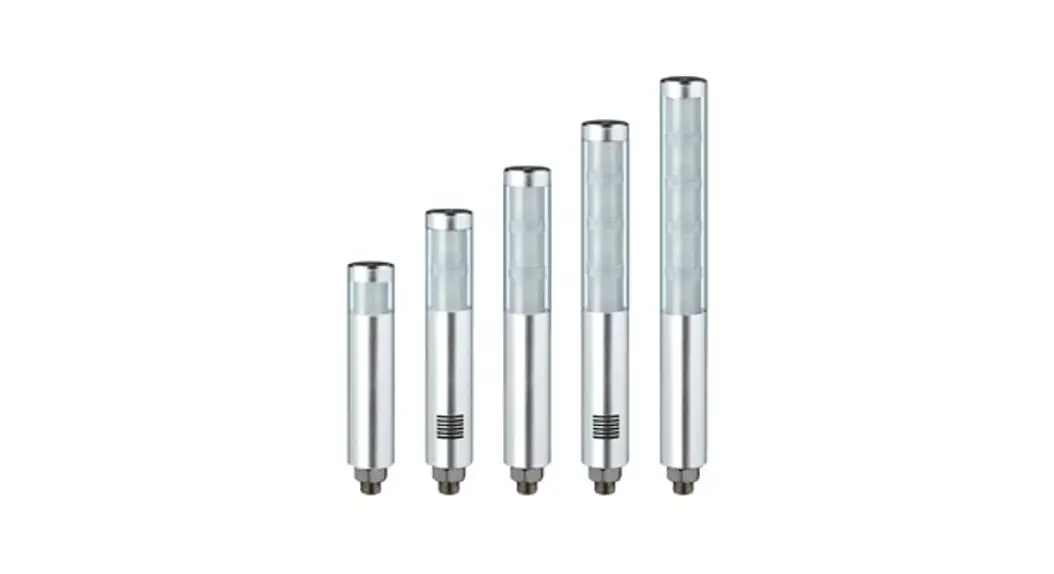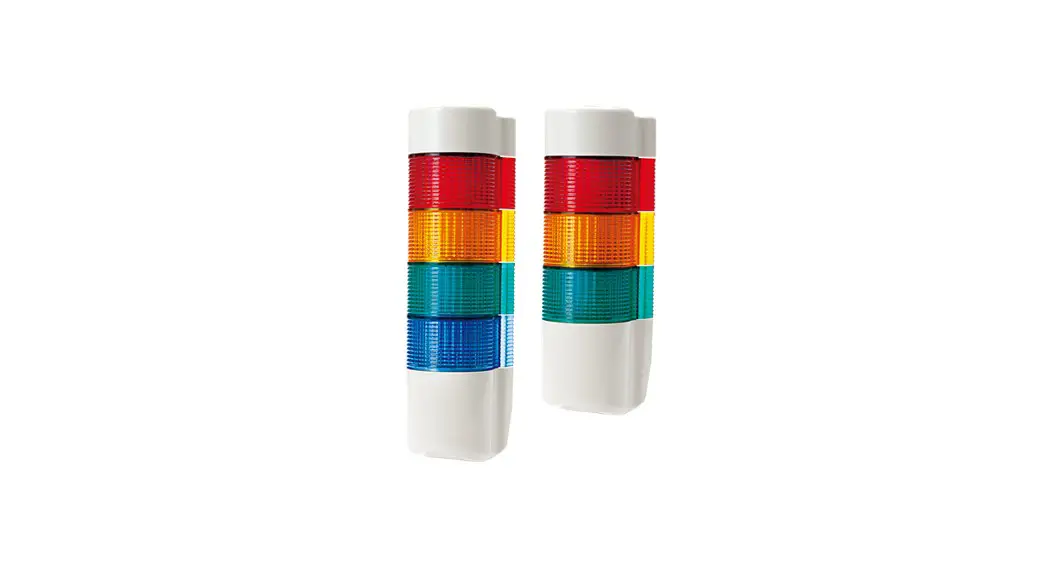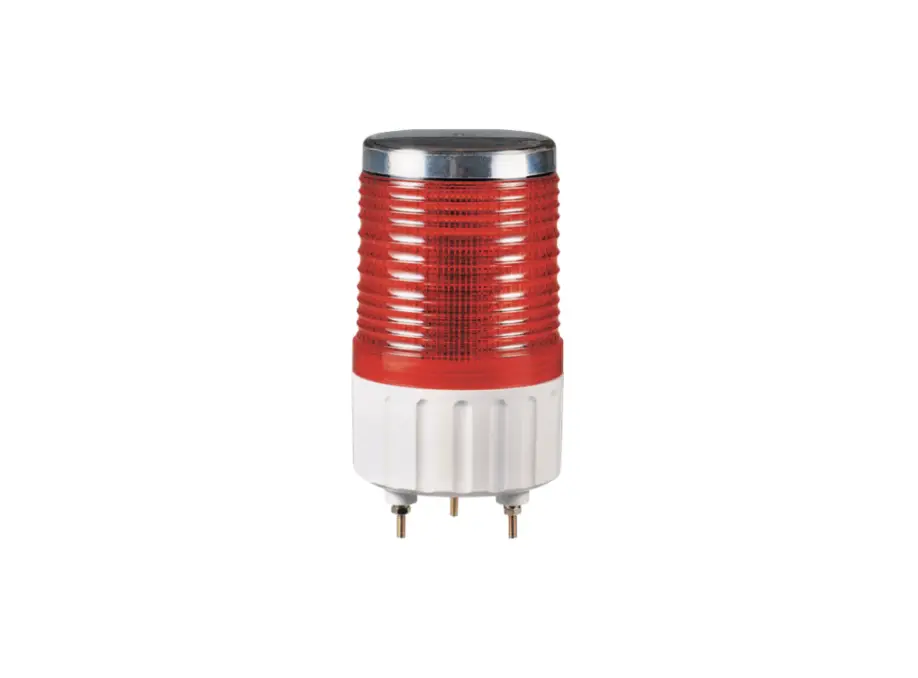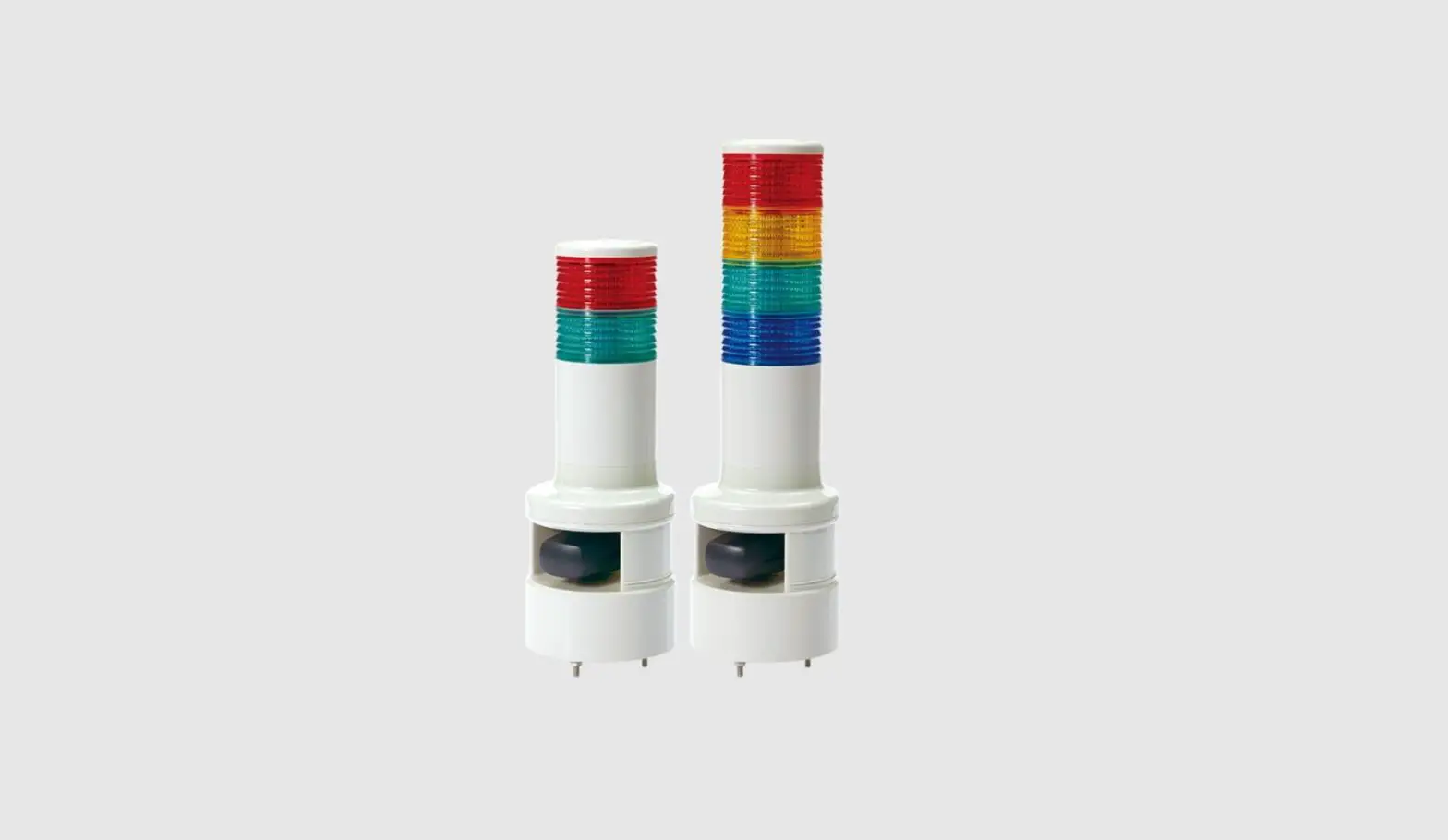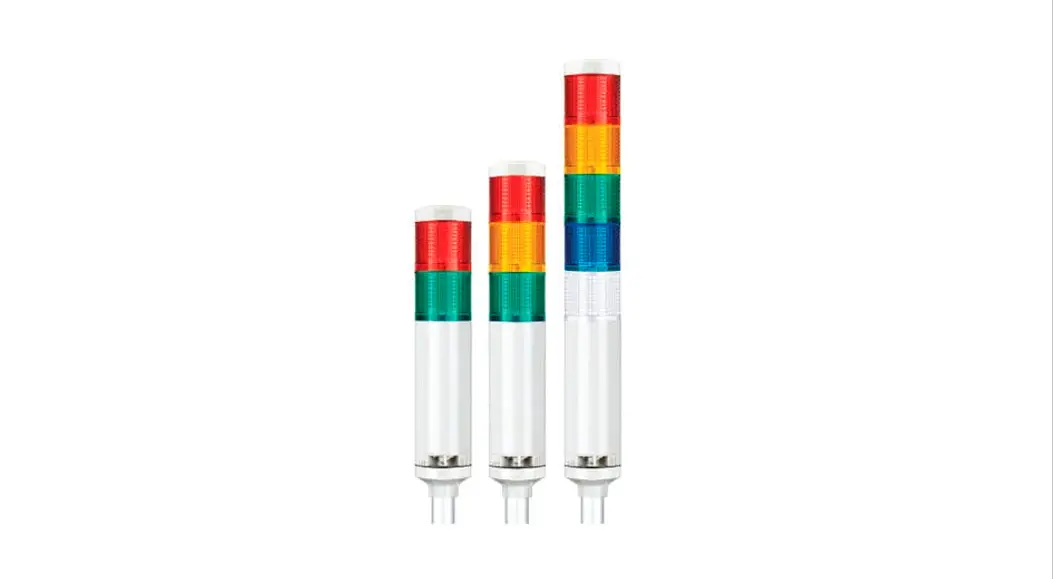
 Wireless LED Steady/Flashing Tower Light
Thank you for purchasing Qlight’s products. Please read this user manual carefully prior to installation and operation to ensure safe and correct use.
 Precautions for Safety
Failure to follow the instructions below may cause a loss of life or serious physical injury.
- During wiring or maintenance, please completely turn off the power of the product. (Failure to follow this may lead to an electric shock.)
- Do not install the product in locations that subject it to excessive dust or water other than the conditions designated by the IP protection ratings indicated for each product. (Failure to follow these instructions may cause a fire to the product, electric shock, physical injury, malfunction, or damage to the product.)
- Do not alter or repair this product. If maintenance or repair service is required, please contact your local Qlight contact point. (Failure to follow these instructions may lead to fire, electric shock, or product damage.)
- Please apply the correct voltage to the product. (Failure to follow these instructions may lead to fire, electric shock, or product damage.)
- When the product is applied to a condition that may impact lives or property, please make sure to have a double safety device. (Failure to follow this may cause damage to property, fire, electric shock, and loss of life.)
Precautions for Correct Use
Failure to follow the proper instructions may cause damage to property, the product, or a malfunction of the product that would void the warranty.
- Please remove any objects that can interrupt ventilation around the product.
- Please turn off the power of the product immediately if it fails to operate properly.
- Carefully wire the product according to each product’s specification.
- Please be careful in preventing chemicals such as thinner, benzene, etc. in contact with the surface of the product.
- Do not apply excessive force/impact to the product.
- Failure to follow any of the instructions above may cause malfunction or damage to the product, fire, and electric shock.
Ordering Specifications
| QTG60ML-WIZ | 3 | 24 | RAG | LW8 |
| [Model number] | • QTG60L-WIZ • QTG60L-WIZ-BZ • QTG60LF-WIZ • QTG60LF-WIZ-BZ • QTGA60L-WIZ • QTGA60L-WIZ-BZ • QTGA60LF-WIZ • QTGA60LF-WIZ-BZ | [Layer count] | • 1 Layer • 2 Layers • 3 Layers • 4 Layers • 5 Layers | [Voltage] | • 12-DC12V • 24-DC24V • 110/220 – AC110V~220V | [Color] | R-Red A-Amber G-Green B-Blue W-White | [Mounting option] | • (Blank) – Standard type • Mounting type – LB18 – LW18 – QZ18 – SZ18 – QL18 – SL18 – QLA18 |
| QTG60ML-WIZ | 3 | 110/220 | RAG | LW24 |
| [Model number] | • QTG70L-WIZ • QTG70L-WIZ-BZ • QTG70LF-WIZ • QTG70LF-WIZ-BZ • QTGA70L-WIZ • QTGA70L-WIZ-BZ • QTGA70LF-WIZ • QTGA70LF-WIZ-BZ | [Layer count] | • 1 Layer • 2 Layers • 3 Layers • 4 Layers • 5 Layers | [Voltage] | • 12-DC12V • 24-DC24V • 110/220 – AC110V~220V | [Color] | R-Red A-Amber G-Green B-Blue W-White | [Mounting option] | • (Blank) – Standard type • Mounting type – LB24 – LW24 – QZ24 – SZ24 – QL24 – SL24 – QLA24 |
 https://www.qlight.com/en/products/?qpcateid=213
Please scan the QR code for more detailed product information.
www.cilight.com
• QTG60ML-WIZ
| • QTG60ML-WIZ | 3 | 110/220 | RAG |
| [Model number] | • QTG60ML-WIZ • QTG60ML-WIZ-BZ • QTG60MLF-WIZ • QTG60MLF-WIZ-BZ • QTGA60ML-WIZ • QTGA60ML-WIZ-BZ • QTGA60MLF-WIZ • QTGA60MLF-WIZ-BZ | [Layer count] | • 1 Layer • 2 Layers • 3 Layers • 4 Layers • 5 Layers | [Voltage] | • 12-DC12V • 24-DC24V • 110/220 – AC110V~220V | [Color] | R-Red A-Amber G-Green B-Blue W-White |
| • QTG60ML-WIZ | 3 | 12 | RAG |
| [Model number] | • QTG60ML-WIZ • QTG60ML-WIZ-BZ • QTG60MLF-WIZ • QTG60MLF-WIZ-BZ • QTGA60ML-WIZ • QTGA60ML-WIZ-BZ • QTGA60MLF-WIZ • QTGA60MLF-WIZ-BZ | [Layer count] | • 1 Layer • 2 Layers • 3 Layers • 4 Layers • 5 Layers | [Voltage] | • 12-DC12V • 24-DC24V • 110/220 – AC110V~220V | [Color] | R-Red A-Amber G-Green B-Blue W-White |
Ordering Specifications
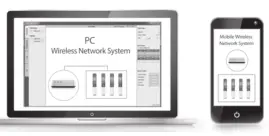
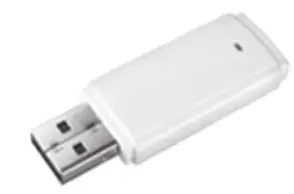
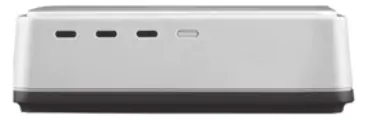
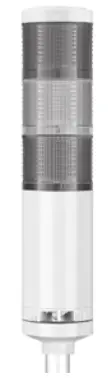
Wireless LED Steady/Flashing Tower light has monitoring and controlling feature via PC that consists of USB DONGLE and GATEWAY.
| Application Software | USB DONGLE | GATEWAY | ROUTER (wireless signaling device) |
 |  |  |  |
■ Description
| No. | Item | Description |
| 1 | PC and mobile Application | PC Application would be a comprehensive control system by enabling the setting, monitoring, control, and log analysis of the wireless signaling device. C# based application and software developer’s API is provided. Mobile applications can help to expand utility managers’ coverage. |
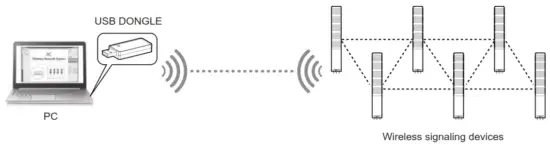
| 2 | USB DONGLE 2 (WIZ32) | USB DONGLE (WIZ32) can connect up to 32 wireless signaling devices and is connected to the PC through a USB port in serial communication. It does not require a separate installation but simply insertion into a USB port for use. Note: USB DONGLE does NOT support the Mobile application. |
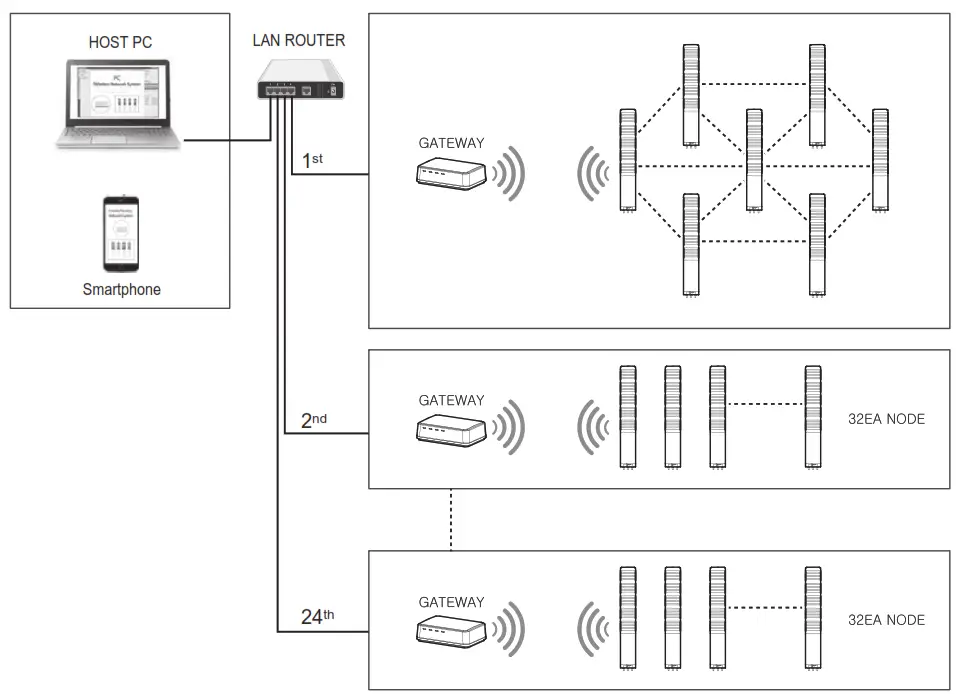
| 3 | GATEWAY (GW768) | GATEWAY (GW768) can connect up to 32 wireless signaling devices. Since it is possible to extend up to 24 GATEWAYs with a LAN ROUTER, they can connect up to 768 wireless signaling devices. Note: GATEWAY supports Mobile applications. |
| 4 | ROUTER (A wireless signaling device) | A wireless signaling device replaces an existing signaling device and converts the status data of production into a wireless one so the control tower can control the status information of production equipment more easily and quickly. information device) It functions to transmit (send) the status information of production equipment wirelessly and help the control tower control the wireless signaling device and send specified information to a worker. |
Components of wireless system
- Connection through USB DONGLE
• USB DONGLE can be easily inserted into the PC and this is a method suitable for building a small-sized single wireless network (up to 32 wireless control display lamps can be connected).
- Connection through GATEWAY
• Up to 768 wireless control indicators can be connected by adopting multiple GATEWAYs. This is suitable for large-scale business sites.
• Smartphones can monitor or control the status of signaling devices.
Information of wireless system
- ROUTER(Wireless Signaling Device)
• The status information of the production equipment can be recognized by using an external contact and the status information is transmitted to USB DONGLE or GATEWAY. ROUTER can receive a control signal from USB DONGLE or GATEWAY.
• Please refer to the wireless information table on the label of the product. • ROUTER Wireless information table reference
ROUTER NAME Model name GROUP ID • Designated GROUP ID by customer. Possible to set 1 to 24 GROUPS.
• It must be set as the same as a receiver(USB DONGLE, GATEWAY).NODE ID • Designated NODE ID(Product ID) by customer. 32 IDs are available.
• Referring to 1101, 11 represents channel number. NODE ID configuration is related to the channel number. (recommended)CHANNEL • Can select up to 16 channels from 11 to 26. It must be configured the same as receivers(GATEWAY and
USB DONGLE).PAN ID • PAN ID can be set from 0 to 65535. It is a wireless network identifier as a unique customer’s number and
designated by the manufacturer. - USB DONGLE
• USB DONGE is a wireless transmitter & receiver that is suitable for a small network with less than 32 wireless signaling devices.
• Please refer to the wireless information table on the label of the product.• USB DONGLE Wireless information table reference
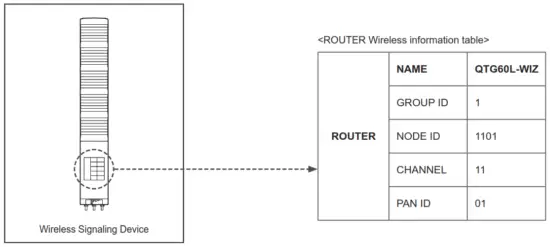 • ROUTER Wireless information table reference
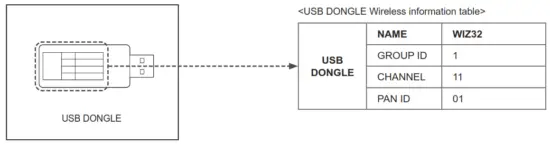 • USB DONGLE Wireless information table reference
| USB DONGLE | NAME | Model name |
| GROUP ID | • Designated GROUP ID by customer. Possible to set 1 to 24 GROUPS. • Possible to use a single unit per PC. GROUP ID must NOT be the same as GATEWAY. • It must be set as the same as ROUTER(Wireless Signaling Device). | |
| CHANNEL | • Can select up to 16 channels from 11 to 26. It must be configured the same as ROUTER(Wireless Signaling Device). | |
| PAN ID | • PAN ID can be set from 0 to 65535. It is a wireless network identifier as a unique customer’s number and designated by the manufacturer. |
- GATEWAY
- Suitable for the large-scaled network over 32 wireless networks. One GATEWAY unit is a single group, that can connect up to 24 groups.
- Support Smartphone Application
- Please refer to the wireless information table on the label of the product.

- GATEWAY Wireless information table reference
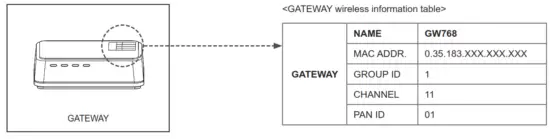
| GATEWAY | NAME | Model name |
| MAC ADDRESS. | • MAC ADDRESS designated by the manufacturer. • MAC ADDRESS is used to set the IP address and network information by searching GATEWAY in the network | |
| GROUP ID | • Designated GROUP ID by customer. Possible to set 1 to 24 GROUPS. • GROUP ID must NOT be the same as USB DONGLE. • It must be set as the same as ROUTER(Wireless Signaling Device). | |
| CHANNEL | • Can select up to 16 channels from 11 to 26. It must be configured the same as ROUTER(Wireless Signaling Device). | |
| PAN ID | • Pan ID can be set from 0 to 65535. It is a wireless network identifier as a unique customer’s number and designated by the manufacturer. |
- Installation of PC Application
(1) SERIAL TO USB DRIVER installation
- There are two options for receiving & controlling the wireless signaling device such as USB DONGLE and USB interface with the GATEWAY. In both cases, `USB to serial device driver’ should be installed (download it from the Qlight website or http://blog.qlight.com).
- Select x64 or x86 EXE. file depending on your OS type.
- Silicon Labs’ drivers are provided as device drivers.
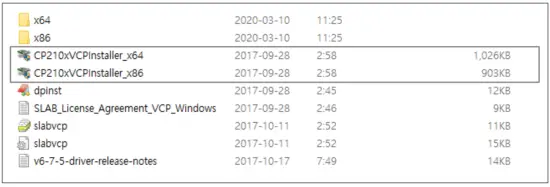
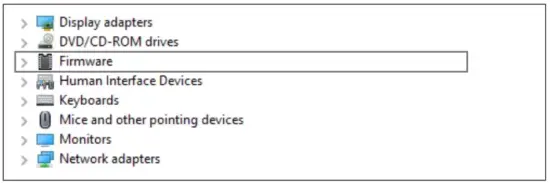
- After the installation completes, check if COM# Port is displayed in the Device Manager of the PC before connecting the USB DONGLE or the GATEWAY through a USB PORT.
- COM# can vary depending on the PC environment.
 (2) Installation of PC Application
 - The PC application is used to monitor, set, and control the status information of a wireless signaling device.
- In case of using C# Library, please refer to the Library User Manual which is provided separately.
- Please download the PC Application from our website and install it.
 <= Please run .exe file. Software VERSION may be upgraded without notice.
**For the installation instruction and usage, please refer to the manual.
 (2) Installation of PC Application
 <= Please run .exe file. Software VERSION may be upgraded without notice.
(3) For the usage of API using DLL, please refer to the manual.
Product Specifications
• QTG60L-WIZ
| Model number | Layer count | Voltage | Current | Certificate | Weight | Color |
| QTG60L-WIZ Steady QTG60L-WIZ-BZ Steadyw/ built-in buzzer OTG6OLF-WIZ Steady/Flashing OTG6OLF-WIZ-BZ Steady/Flashing w/ built-in buzzer QTGA60L-WIZ Steady QTGA60L-WIZ-BZ Stead* built-in buzzer QTGA6OLF-WIZ Steady/Flashing QTGA6OLF-WIZBZ Steady/Flashing w/ built-in buzzer | 1 | DC12V DC24V AC110V-220V | 0.150A 0.110A Max. 0.070A |  | 0.44kg 0.44kg 0.54kg | R-Red |
| 2 | DC12V DC24V AC110V-220V | 0.240A 0.160A Max. 0.100A | 0.53kg 0/53kg 0.63kg | R-Red G-Green | ||
| 3 | DC12V DC24V AC110V-220V | 0.330A 0.220A Max. 0.120A | 0.61 kg 0.61 kg 0.56kg | R-Red A-Amber G-Green | ||
| 4 | DC12V DC24V AC110V-220V | 0.420A 0.270A Max. 0.150A | 0.70kg 0.70kg 0.80kg | “ed A-Amber G-Green B-Blue | ||
| 5 | DC12V DC24V AC110V-220V | 0.510A 0.320A Max. 0.170A | 0.78kg 0.78kg 0.88kg | R-Red A-Amber G-Green B-Blue W-White |
※ Coverage of AC model is AC100VAC to 240VAC.
• QTG60ML-WIZ
| Model number | Layer count | Voltage | Current | Certificate | Weight | Color |
| QTG60ML-WIZ Steady QTG60ML-WIZ-BZ Steadywl built-in buzzer QTG60MLF-WIZ Steady/Flashing QTG60MLF-WIZ- BZ Steady/Flashing w/ built-in buzzer QTGA60ML-WIZ Steady QTGA60ML-WIZBZ Steady/ built-in buzzer QTGA60MLF-WIZ Steady/Flashing QTGA60MLF- WIZ-BZ Steady/Flashing w/ built-in buzzer | 1 | DC12V DC24V AC110V-220V | 0.150A 0.110A Max. 0.070A | | 0.29kg 0.29kg 0.39kg | R-Red |
| 2 | DC12V DC24V AC110V-220V | 0.240A 0.160A Max. 0.100A | 0.37kg 0.37kg 0.47kg | R-Red G-Green | ||
| 3 | DC12V DC24V AC110V-220V | 0.330A 0.220A Max. 0.120A | 0.46kg 0.46kg 0.56kg | R-Red A-Amber G-Green | ||
| 4 | DC12V DC24V AC110V-220V | 0.420A 0.270A Max. 0.150A | 0.54kg 0.54kg 0.64kg | -Red R-Amber A er G_Green B-Blue | ||
| 5 | DC12V DC24V AC110V-220V | 0.510A 0.320A Max. 0.170A | 0.62kg 0.62kg 0.72kg | R-Red A-Amber G-Green B-Blue W-White |
• QTG70L-WIZ
| Model number | Layer count | Volta | Current | Certificate | ht | Color |
| QTG70L-WIZ Steady QTG70L-WIZ-BZ Steady w/ built-in buzzer OTG7OLF-WIZ Steady/Flashing OTG7OLF-WIZ-BZ Steady/Flashing w/ built-in buzzer QTGA70L-WIZ Steady QTGA70L-WIZ-BZ Steadyw/ built-in buzzer QTGA7OLF-WIZ Steady/Flashing QTGA7OLF-WIZBZ Steady/Flashing w/ built-in buzzer | 1 | DC12V DC24V AC110V-220V | 0.150A 0.110A Max. 0.070A | | 0.57kg 0.57kg 0.67kg | R-Red |
| 2 | DC12V DC24V AC110V-220V | 0.240A 0.160A Max. 0.100A | 0.69kg 0.69kg 0.79kg | R-Red G-Green | ||
| 3 | DC12V DC24V AC110V-220V | 0.330A 0.220A Max. 0.120A | 0.84kg 0.84kg 0.94kg | R-Red A-Amber G-Green | ||
| 4 | DC12V DC24V AC110V-220V | 0.420A 0.270A Max. 0.150A | 0.99kg 0/99kg 1.09kg | RRed A-Amber G-Green B-Blue | ||
| 5 | DC12V DC24V AC110V-220V | 0.510A 0.320A Max. 0.170A | 1.23kg 1.23kg 1.32kg | R-Red A-Amber G-Green B-Blue W-White |
※ Coverage of the AC model is AC100VAC to 240VAC.
• QTG70ML-WIZ
| Model number | Layer count | Voltage | Current | Certificate | Weight | Color |
| QTG70ML-WIZ Steady QTG70ML-WIZ-BZ Steadywl built-in buzzer QTG70MLF-WIZ Steady/Flashing QTG70MLF-WIZ- BZ Steady/Flashing w/ built-in buzzer QTGA70ML-WIZ Steady QTGA70ML-WIZBZ Steady/ built-in buzzer QTGA70MLF-WIZ Steady/Flashing QTGA70MLF- WIZ-BZ Steady/Flashing w/ built-in buzzer | 1 | DC12V DC24V AC110V-220V | 0.150A 0.110A Max. 0.070A | | 0.45kg 0.45kg 0.55kg | R-Red |
| 2 | DC12V DC24V AC110V-220V | 0.240A 0.160A Max. 0.100A | 0.59kg 0.59kg 0.69kg | R-Red G_Green | ||
| 3 | DC12V DC24V AC110V-220V | 0.330A 0.220A Max. 0.120A | 0.80kg 0.80kg 0.90kg | R-Red A-Amber G-Green | ||
| 4 | DC12V DC24V AC110V-220V | 0.420A 0.270A Max.0.150A | 0.95kg 0.95kg 1.05kg | R -Red A-Amber G_Green B-Blue | ||
| 5 | DC12V DC24V AC110V-220V | 0.510A 0.320A Max. 0.170A | 1.10kg 1.10kg 1.20kg | R-Red A-Amber G-Green B-Blue W-White |
Dimensions
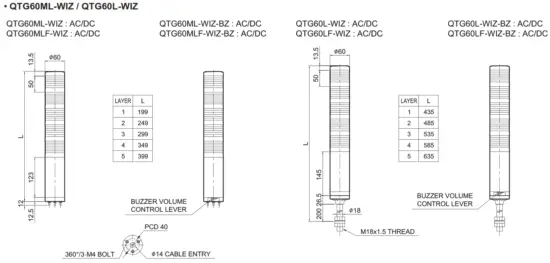
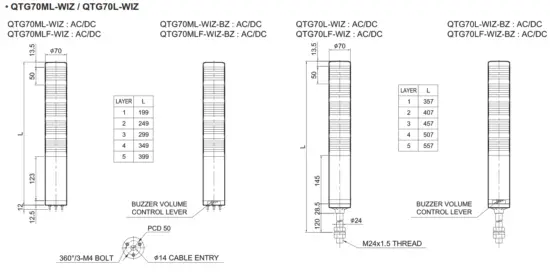
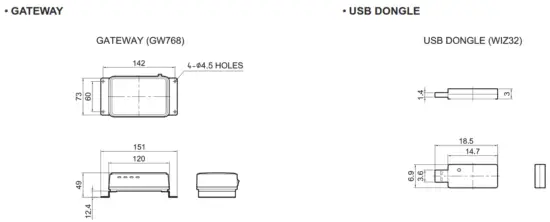
Wiring Instructions
- Please wire the product as followings when you control it via wireless network
| AC/DC Steady/ Flashing | Connection by USB |
| QTG60ML-WIZ QTG60L-WIZ QTG70ML-WIZ QTG70L-WIZ |  |
| AC/DC Steady/ Flashing | Connection by ETHERNET |
| QTG60ML-WIZ QTG60L-WIZ QTG70ML-WIZ QTG70L-WIZ | 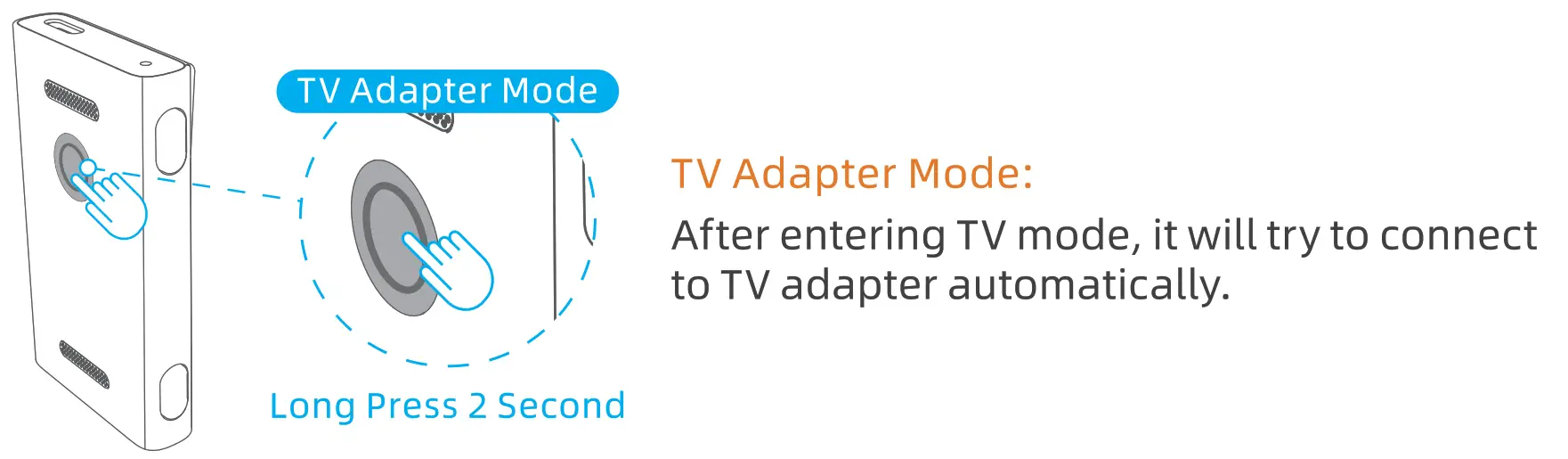 |
- AC Steady type, AC/DC Steady/ Flashing type : External power line – UL1015 AWG18(0.75sq)×2C 400mm
Wiring Instructions
- Please wire the product by referring to below instruction.
- You can monitor the status of tower lights and control them via a wireless network.
| AC/DC Steady | Wiring using external contact |
| QTG60ML-WIZ QTG60L-WIZ QTG70ML-WIZ QTG70L-WIZ | 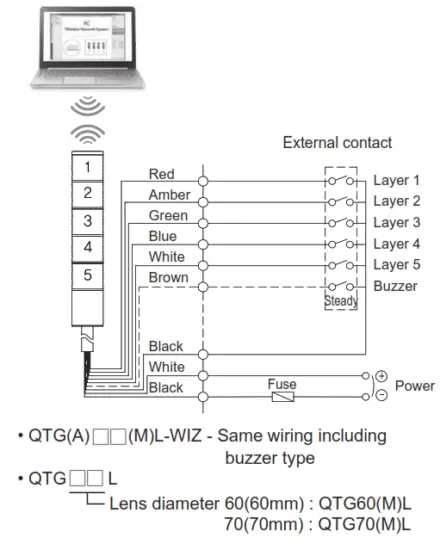 |
| DC Steady/ Flashing | 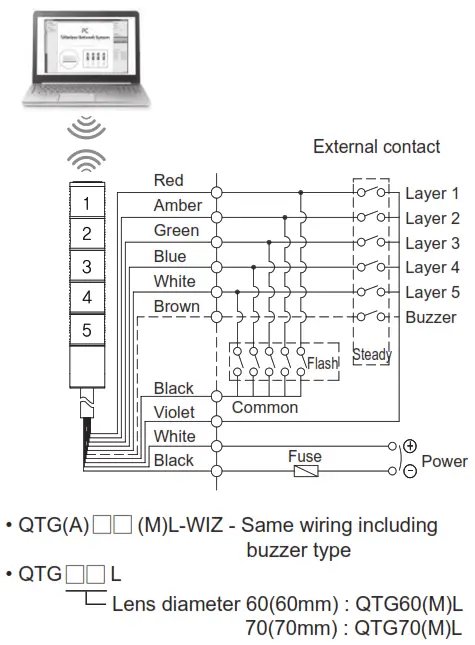 | AC Steady/ Flashing | 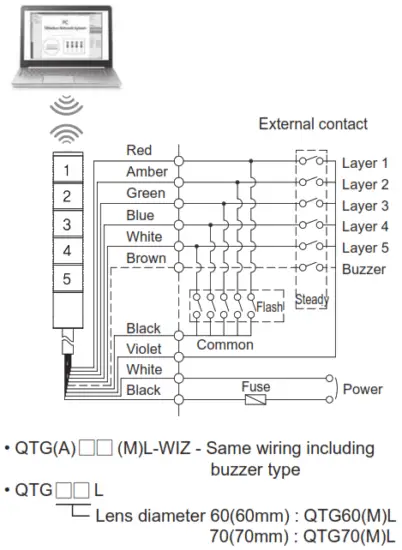 |
| QTG60ML-WIZ QTG60L-WIZ QTG70ML-WIZ QTG70L-WIZ | QTG60ML-WIZ QTG60L-WIZ QTG70ML-WIZ QTG70L-WIZ |
- DC steady type cable specification : External power/ signal line – UL1007 AWG22(0.3sq) 400mm.
- AC steady, AC/DC steady/flashing type cable specification : External power line – UL1015 AWG18(0.75sq) × 2C 400mm, External signal line – UL1007 AWG22(0.3sq) 400mm
Wiring Instructions
• Wiring to the transistor, use the NPN transistor. Please wire properly based on the wiring instructions below.
| AC/DC Steady | Wiring using transistor |
| QTG60ML-WIZ QTG60L-WIZ QTG70ML-WIZ QTG70L-WIZ | 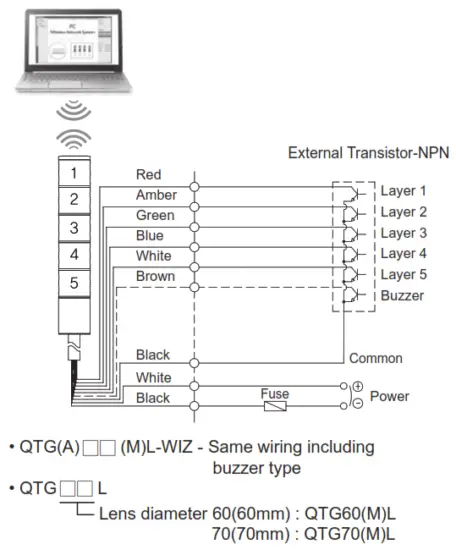 |
| DC Steady/ Flashing | 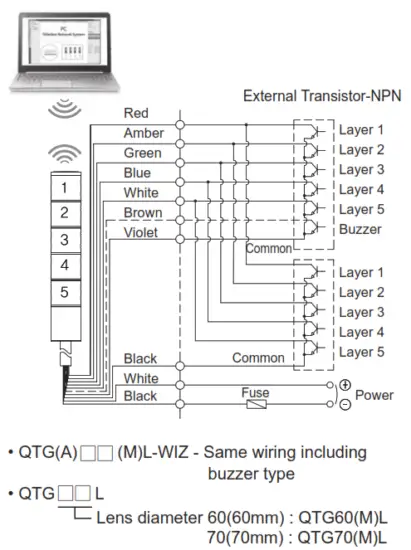 | AC Steady/ Flashing | 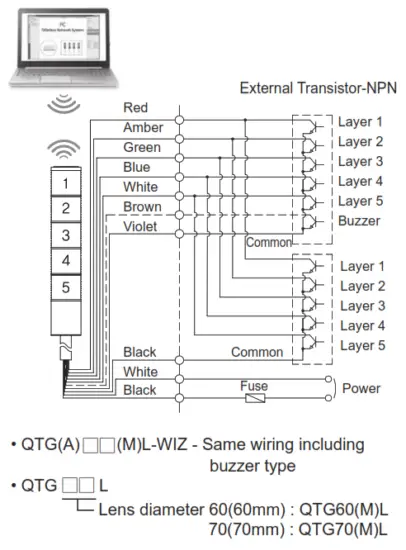 |
| QTG60ML-WIZ QTG60L-WIZ QTG70ML-WIZ QTG70L-WIZ | QTG60ML-WIZ QTG60L-WIZ QTG70ML-WIZ QTG70L-WIZ |
- DC steady type cable specification : External power/ signal line – UL1007 AWG22(0.3sq) 400mm.
- AC steady, AC/DC steady/flashing type cable specification : External power line – UL1015 AWG18(0.75sq) × 2C 400mm, External signal line – UL1007 AWG22(0.3sq) 400mm
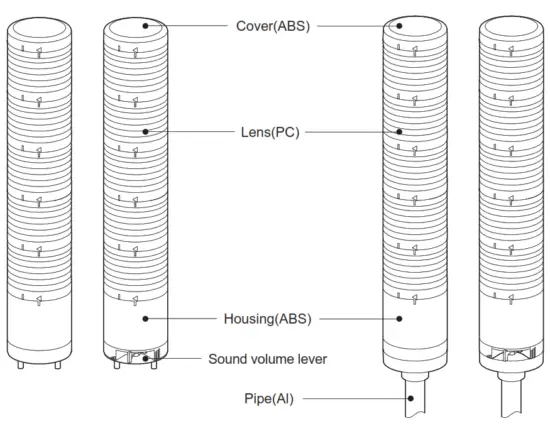
Parts Definition
 How to Change Lens Kit
 How to Change Lens Kit
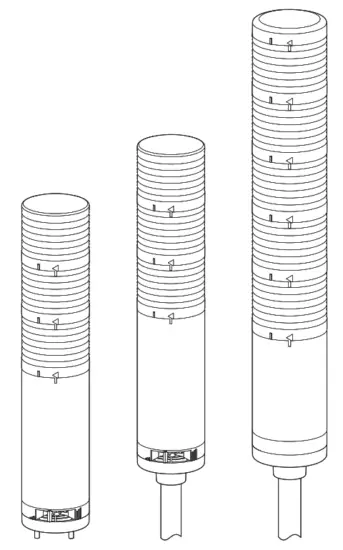
- Disassembling lens kits
① Twist the upper lens kit in a counter-wise direction so the “I” mark from both kits aligns.
② Disassemble by removing the upper lens kit from the lower one.
- Assembling lens kits
① Put the two lens kits together by aligning the upper lens’ “I” mark and the lower lens’ “I” mark together.
② Lock the two kits by twisting the upper lens kit in a counter-wise direction so the upper lens’ “◁” mark aligns with the lower lens’ “I” mark.
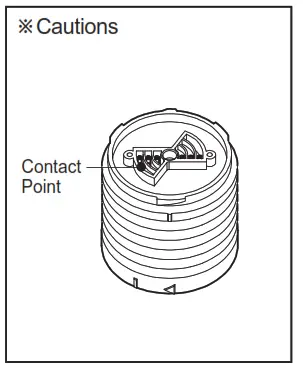
Lens modules are connected through cone-shaped contact points. In case the contact point is damaged, it may cause a contact failure.
Installation Environment and Protection Rating
- This product is designed for indoor use with a protection rating of IP65(standard type) and IP54(buzzer type).
- If the product is installed in locations that subject it to excessive dust or water other than the designated IP protection rating indicated(IP65), it may cause malfunction or damage to the product.
- For further information, please visit our website(www.qlight.com).
Buzzer Sound Volume Adjustment Instructions
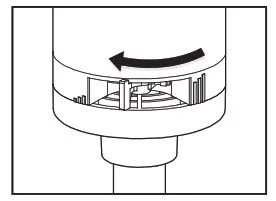
Buzzer volume is reduced by sliding the volume control lever to the left as shown in the diagram to the left. ( Min. 65±4dB/m )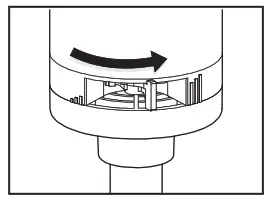 Raise/ Increase the buzzer volume by sliding the control lever to the right as shown in the diagram to the left. ( Max. 85±4dB/m )
Mounting Hole Specifications
■ QTG60ML-WIZ / QTG70ML-WIZ – Direct Mounting Type Model
① Machine holes on the mounting surface referring to the diagram below.
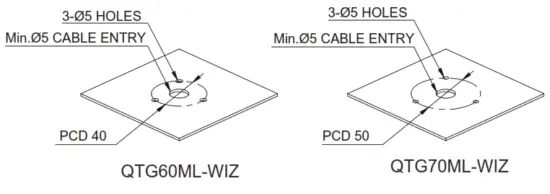
② Remove the flange nuts from bolts and place the product through the mounting surface holes.
③ Fasten the flange nuts on the opposite side of the mounting surface until the product is tightened securely.
Mounting Accessories (Sold Separately)
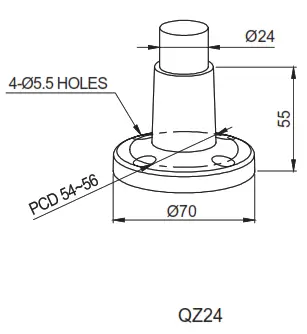
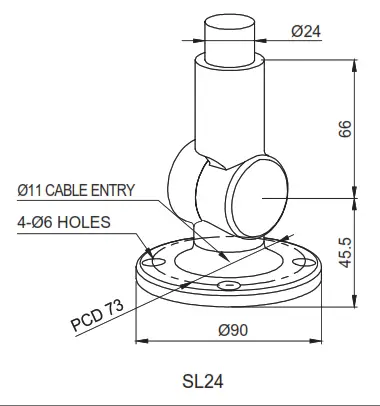
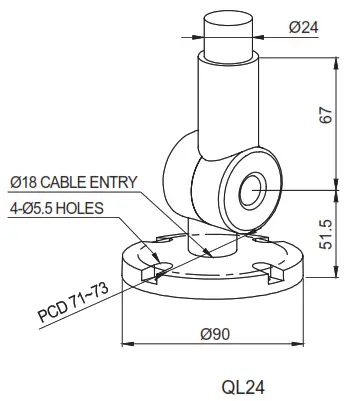
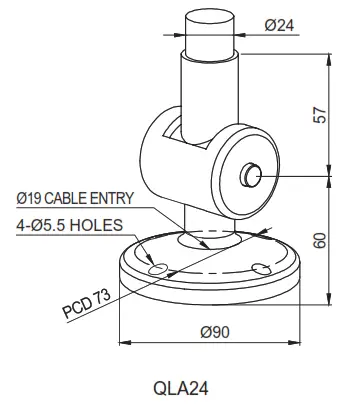
• Please refer to the dimensions below for the installation of mounting brackets.
■ QTG60ML-WIZ/ QTG70ML-WIZ – Direct Mounting Type Model
| Dimensions | ||
| QTG60 series | 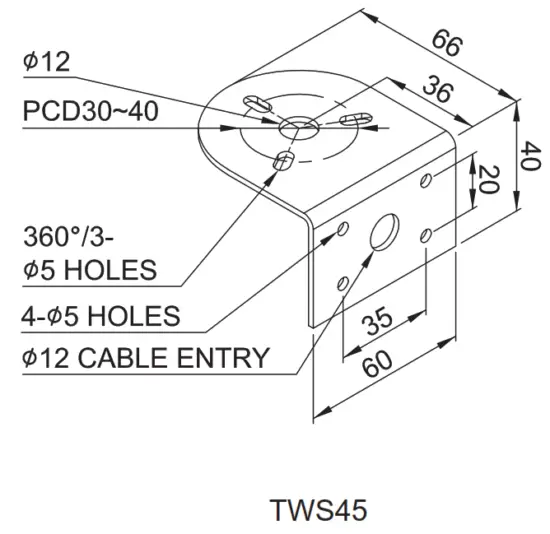 | 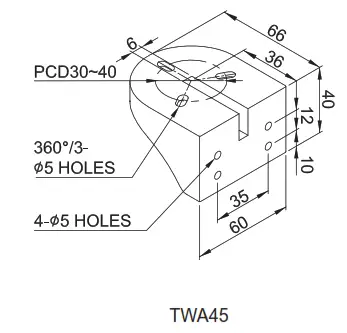 |
| QTG70 series | 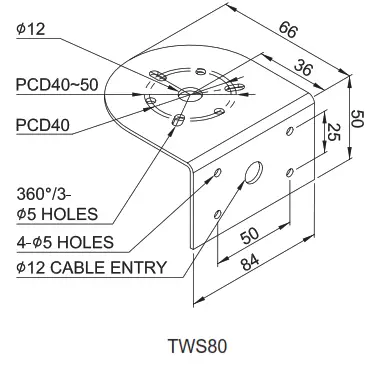 | 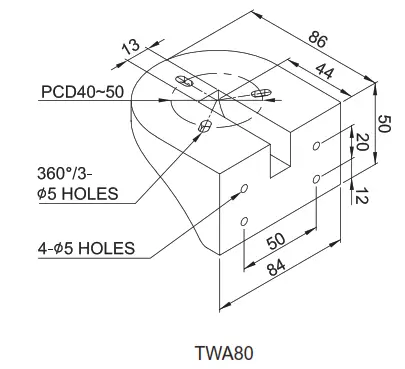 |
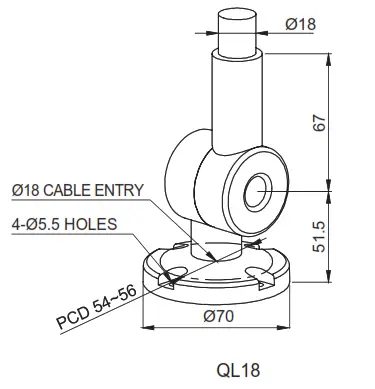
■ QTG60L-WIZ – Pole Mounting Type Model
| QTG60 series | Dimensions |
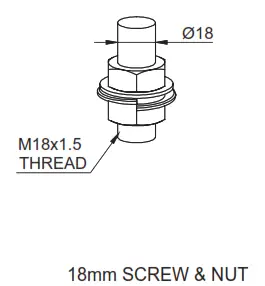 | 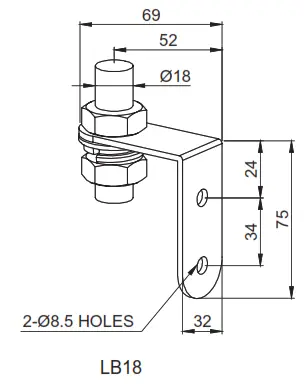 |
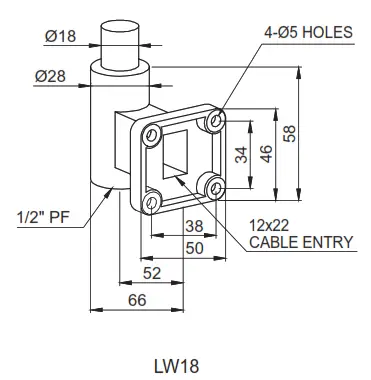 | 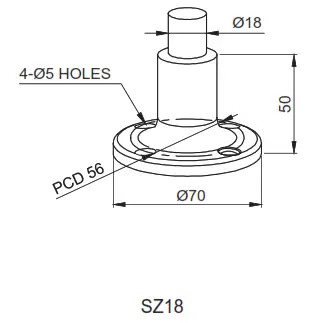 |
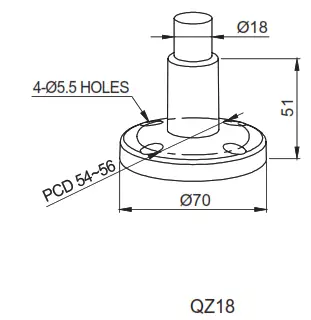 | 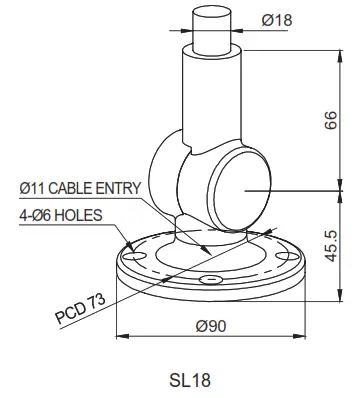 |
 | 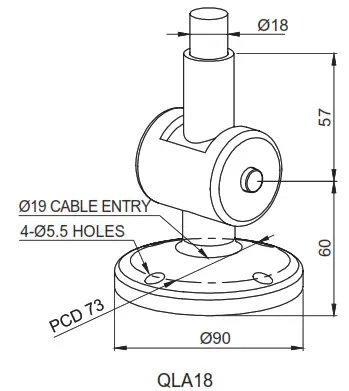 |
■ QTG70L-WIZ – Pole Mounting Type Model
| QTG60 series | Dimensions |
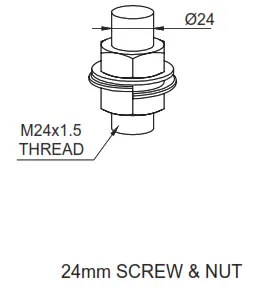 | 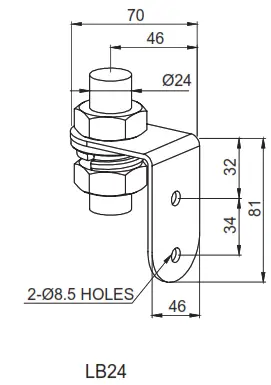 |
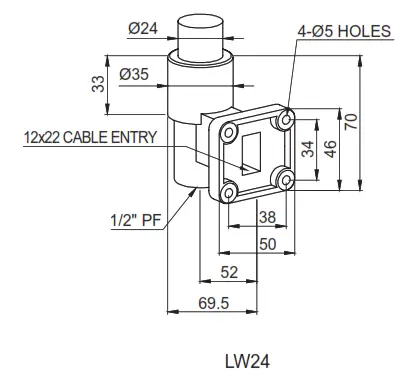 | 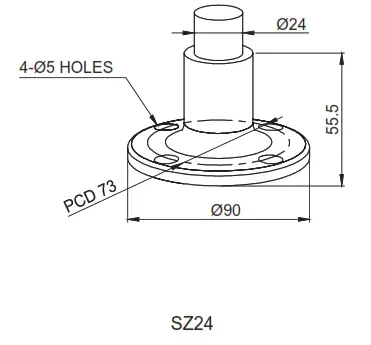 |
 |  |
 |  |
For your safety
Specification and dimensions listed in this catalog are subject to change without notice for product quality improvement.
The newest product information is available on our website.(www.qlight.com)
Please read the instruction manual attached to the product carefully before installation and use.
a.Rule Part 15.19(a)(3): This device complies with part 15 of the FCC Rules. operation is subject to the following two conditions: (1) This device may not cause harmful interference, and (2) this device must accept any interference received, including interference that may cause undesired operation.
b.Rule Part 15.21: The user’s manual or instruction manual for an intentional or unintentional radiator shall caution the user that changes or modifications not expressly approved by the party responsible for compliance could void the user’s authority to operate the equipment.
Note: This equipment has been tested and found to comply with the limits for a Class B digital.
Qlight Co., Ltd. www.qlight.com | [email protected]
Head Office | Suite #1510, STX-V Tower, 128 Gasan digital 1-ro, Geumcheon-gu, Seoul, Korea
Tel. +82-2-2679-6152(Toll free. +82-80-328-2222) Fax. +82-2-2679-6154
Factory | 185-25, Mukbang-ro, Sangdong-myeon, Gimhae-si, Gyeongsangnamdo, Korea Tel. +82-55-328-1111(Toll free. +82-80-328-1111)
Qlight Overseas Sales Dept | 704 Nakdong-daero, Sasang-gu, Busan, Korea(Eomgung-Dong) Tel : +82-51-620-4100
Qlight Public Relations & Marketing Team Office | 704 Nakdong-daero, Sasang-gu, Busan, Korea(Eomgung-Dong) Tel. +82-51-245-0017
Qlight USA, Inc. www.qlight.com www.qlightusa.com | [email protected]
3003 North First Street, Suite #341, San Jose, CA 95134 USA Tel. +1 – 408 – 519 – 5740 Fax. +1 – 408 – 519 – 5739
SHANGHAI Qlight Electronic Co., Ltd. www.qlight.com www.qlightcn.com | [email protected]
China Factory/ Shanghai Sales Office | #19, Nanda Road, Baoshan Area, Shanghai, China Tel. +86 – 21 – 6651 – 7100 Fax. +86 – 21 – 6315 – 3929
Qlight
Innovation in Alam &Signal
Product Operation Inquiry / Customer Support +82-51-620-4100
You can expect prompt service if you have exact information such as model name, symptom, telephone number, and address.
※ALL PRODUCT, PRODUCT SPECIFICATIONS, AND DATA ARE SUBJECT TO CHANGE WITHOUT NOTICE TO IMPROVE
RELIABILITY, FUNCTION OR DESIGN, OR OTHERWISE.
Head office: Suite #1510, STX-V Tower, 128 Gasan Digital 1-ro, Geumcheon-gu, Seoul, Korea (Postal Code: 08507)
Factory : 185-25, Mukbang-Ro, Sangdong-Myeon, Gimhae-Si, Gyeongsangnam-Do, Korea (Postal Code : 50805)
www.qlight.com