
AUO OFH55C 55 Inch HB Open Frame Set User Guide
Safety Instruction
Please carefully read through and keep the following instructions for future reference before using the display.
- Please follow the display’s user manual’s instructions.
- Make sure to check that the local power supply complies with the display’s power requirements
- Do not block the ventilation holes on the display and ensure there is enough space around the display to allow for heat dissipation.
- Our company’s software products are copyrighted. Do not copy without authorization.
- Overexposure to direct sunlight can cause damage over time and a strong reflection will disturb the user’s experience when viewing content on the display.
- Do not install near any heat source, such as radiators, heaters, stoves or any other products that may generate heat.
- Do not install the display on platforms or carts that are unstable, slanted or shaky. It may cause the display to fall, injuring people around it and damaging the display itself. We suggest consulting with professionals in the securing of the display.
- The display may fall, causing serious personal injury or death. To prevent injury, this display must be securely attached to the floor/wall in accordance with the installation instructions.
- Always comply with all warnings and instructions labels on the display.
- Do not install the display in a confined environment.
- If you want to mount the display, please consult the professionals/manufacturers for installation advice. Holes are provided on the display, which are specified in the following user manual, which can be used to help design mounts for the display.
- Avoid excessive pressure or temperature changes as special liquid-crystal material in the display may result in cracks, scratches or damage.
- When the display’s power is on, do not cover or block any of the display’s ventilation pores.
- It is suggested to periodically clean the display’s ventilation pores to ensure heat dissipation.
- Keep candles or other flammable items away from the display to avoid risks of fire.
- Do not stick your finger or other objects between the display and its mounting equipment (if there are any) in order to avoid harming yourself or damaging the display.
- Do not press upon the display with too great a force so as to avoid damaging the product.
- ONLY USE accessories specified by the manufacturer.
- Never attempt to repair or open the display by yourself. Opening and removing the covers may expose you to dangerous voltage or other hazards. Failure to follow this WARNING may result in death or serious injury. Please contact your dealer or a service technician for assistance.
- Hold the display by the sides firmly with two people when carrying the display out of the box.
- The power cord should be connected to a socket outlet with an earthingconnection.
- Only skilled person can replace the fuse of appliance inlet..
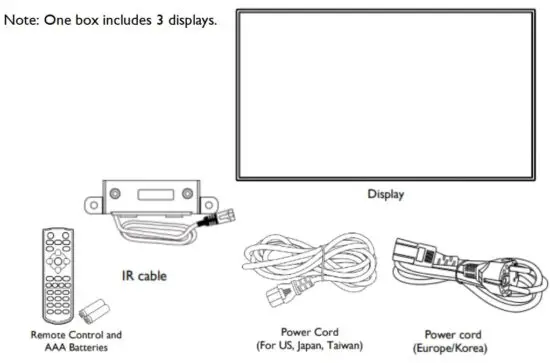
Display Accessory Content
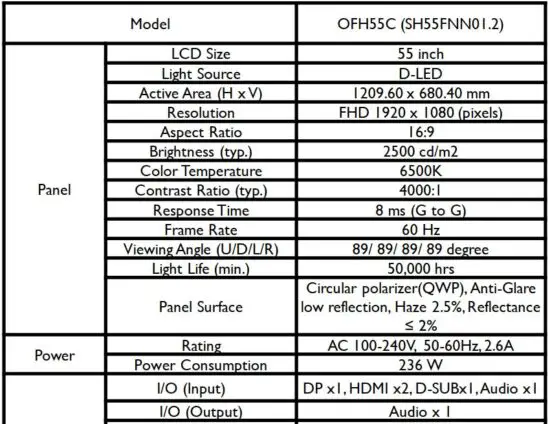
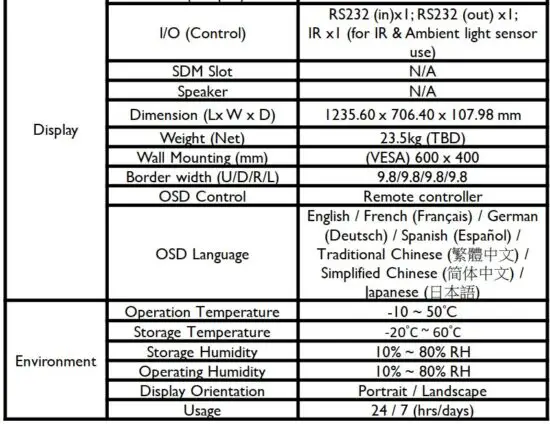
Specification
Safety Information
Carrying the Display
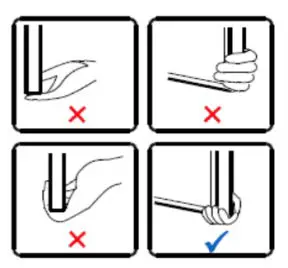 When carrying the display, always hold securely with two people using both hands and the screen facing forward.
 CAUTION: Avoid applying force or using sharp objects on the screen or the frame around the screen at all times.
Placing the Display
When placing the display, keep the display upright. Never tilt the display towards the left, right or balanced on a single corner of the frame.
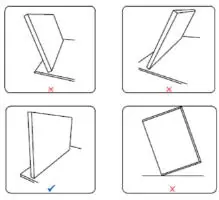
Setting Down the Display
When setting the display down, place the screen face down on a flat and stable surface covered by a protective sheet and a table cushion.
CAUTION: Never press or place anything on the display panels. This may damage the internal parts of the display.
Mounting the Display
Adjusting the Direction
Vertical (Portrait)
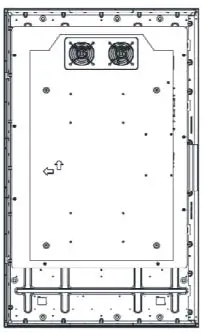
If you want to use the display vertically or horizontally, adjust the display such that the main power switch on the back of the display is pointing rightward or downward and the respective arrow on the rear of the display is pointing upward. If the display is not mounted in such a way the display may not function properly.
Horizontal (Landscape)
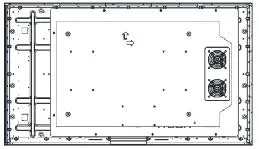
Wall Mount Specification
The back of the display is equipped with four screw-holes with VESA dimensions of 600 x 400mm.
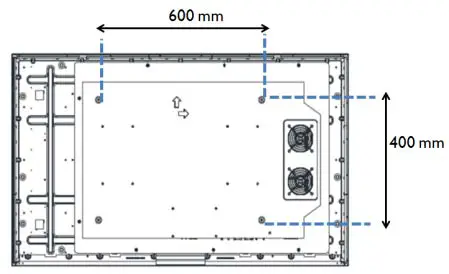
Firmly secure a VESA mount onto the display using four M6 screws (maximum length: 16 mm, maximum torque: 18 kgf-cm).
Controlling the Display
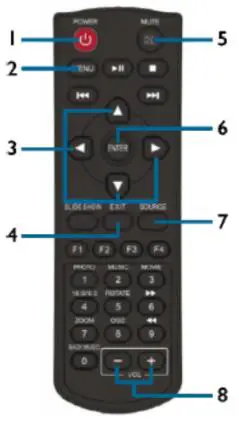
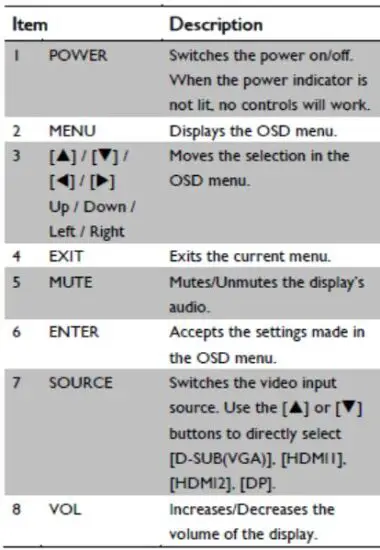
Remote Control
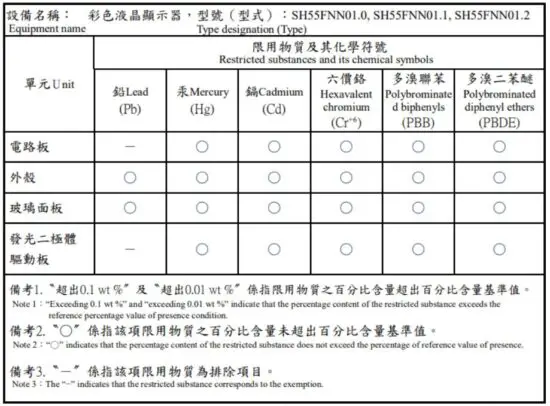
Declaration of the Presence Condition of the Restricted Substances Marking
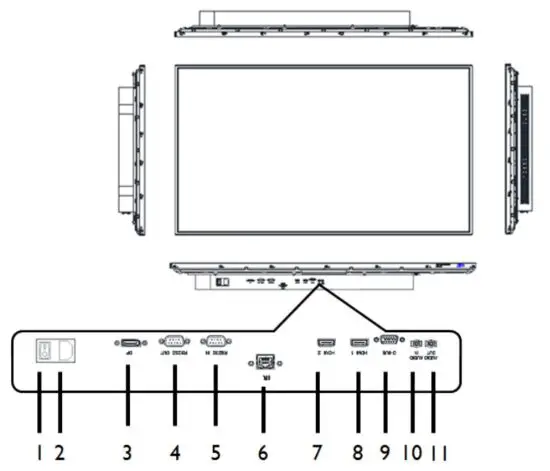
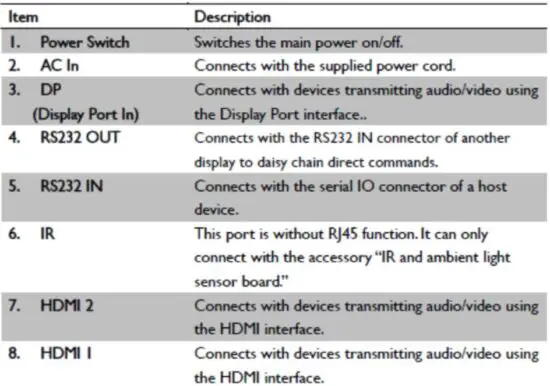
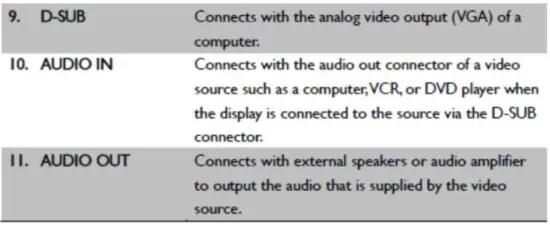
Inputs/Outputs
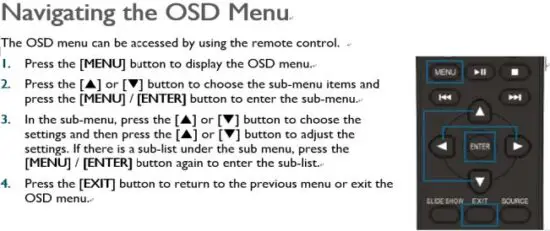
OSD Overview
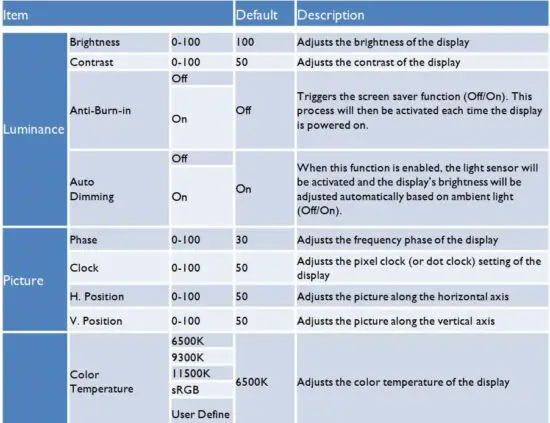
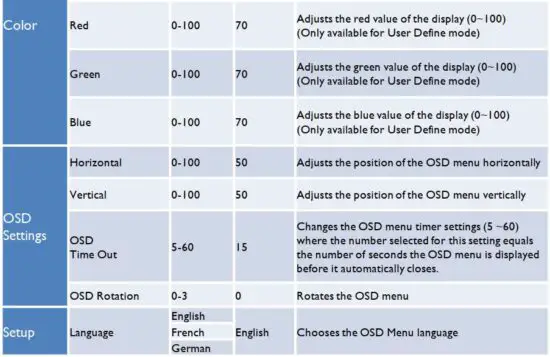
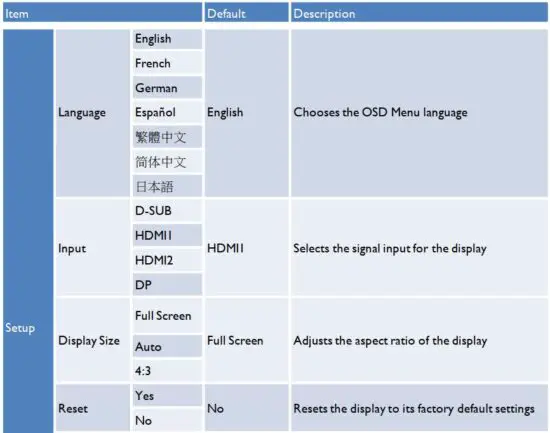
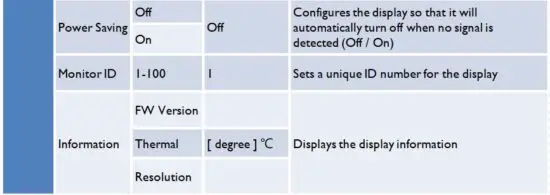
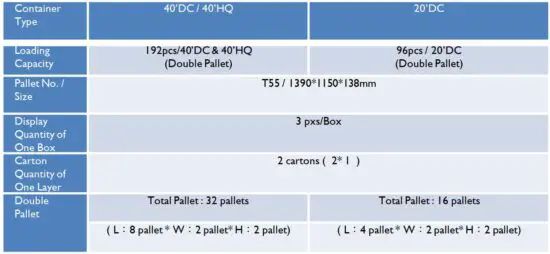
Loading Information
Declaration of Conformity
FCC Declaration of Conformity
47 CFR §2.1077 Compliance Information
Name of Responsible Party:
AU OptronicsCorp. America
Address of Responsible Party:
37085 Grand River Ave.
Farmington, MI 48335
U. S. A.
Contact Person:
Company Representative
Phone No.:
+1 408-518-8800
Fax No.:
+1 408-518-8123
FCC Compliance Statement
This device complies with Part 15 of FCC Rules. Operation is subject to the following two
conditions: (1) This device may not cause harmful interference, and (2) this device must accept any interference received, including interference that may cause undesired operation.
FCC Information
This equipment has been tested and found to comply with the limits for a Class A digital device, pursuant to Part 15 of the FCC Rules. These limits are designed to provide reasonable protection against harmful interference when the equipment is operated in a commercial environment. This equipment generates, uses, and can radiate radio frequency energy and, if not installed and used in accordance with the instructions manual, may cause harmful interference to radio communications. Operation of this equipment in a residential area is likely to cause harmful interference in which case the user will be required to correct the interference at his own expense.
You are cautioned that changes or modifications not expressly approved by the party responsible for compliance could void your authority to operate the equipment.
Please use the supplied power adapter and power cord to ensure the FCC compliance. If a power cord is not provided, please contact your supplier.
Read More About This Manual & Download PDF:







![Planar Hb Series Huddle Board User Manual [hb75, Hb86]](https://static-data1.manualsee.com/1/img/65/54531/2021/01/Planar-HB-Series-Huddle-Board-User-Manual-HB75-HB86.png.jpg "Planar Hb Series Huddle Board User Manual [hb75, Hb86]")