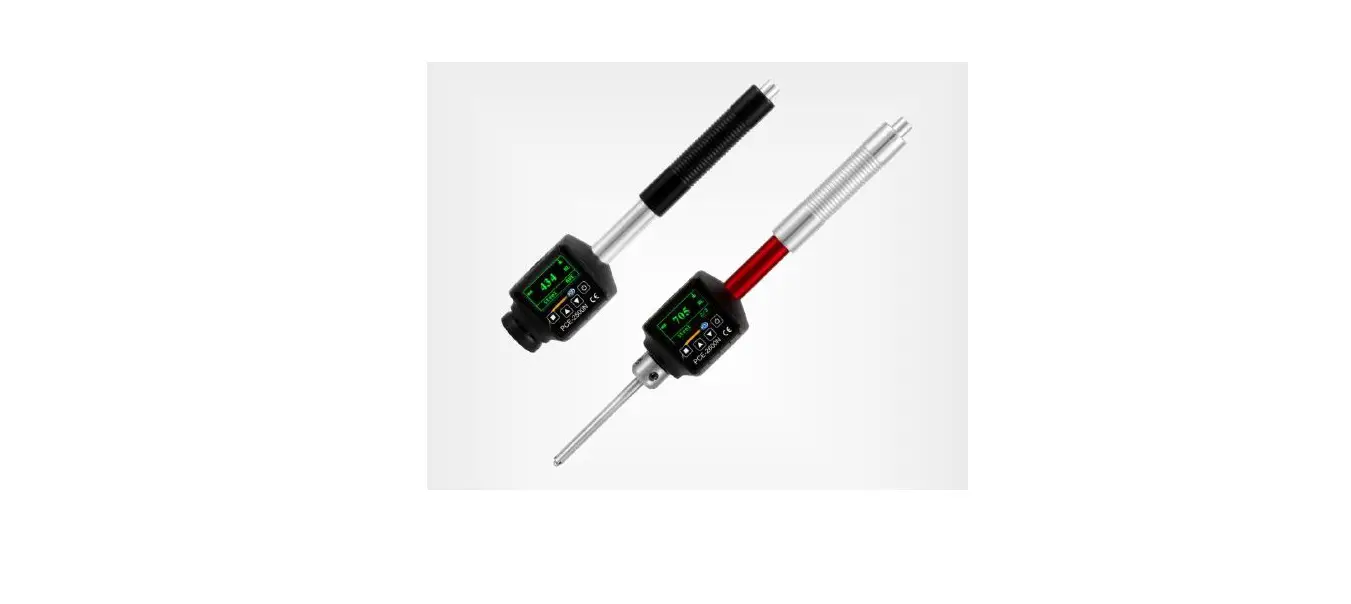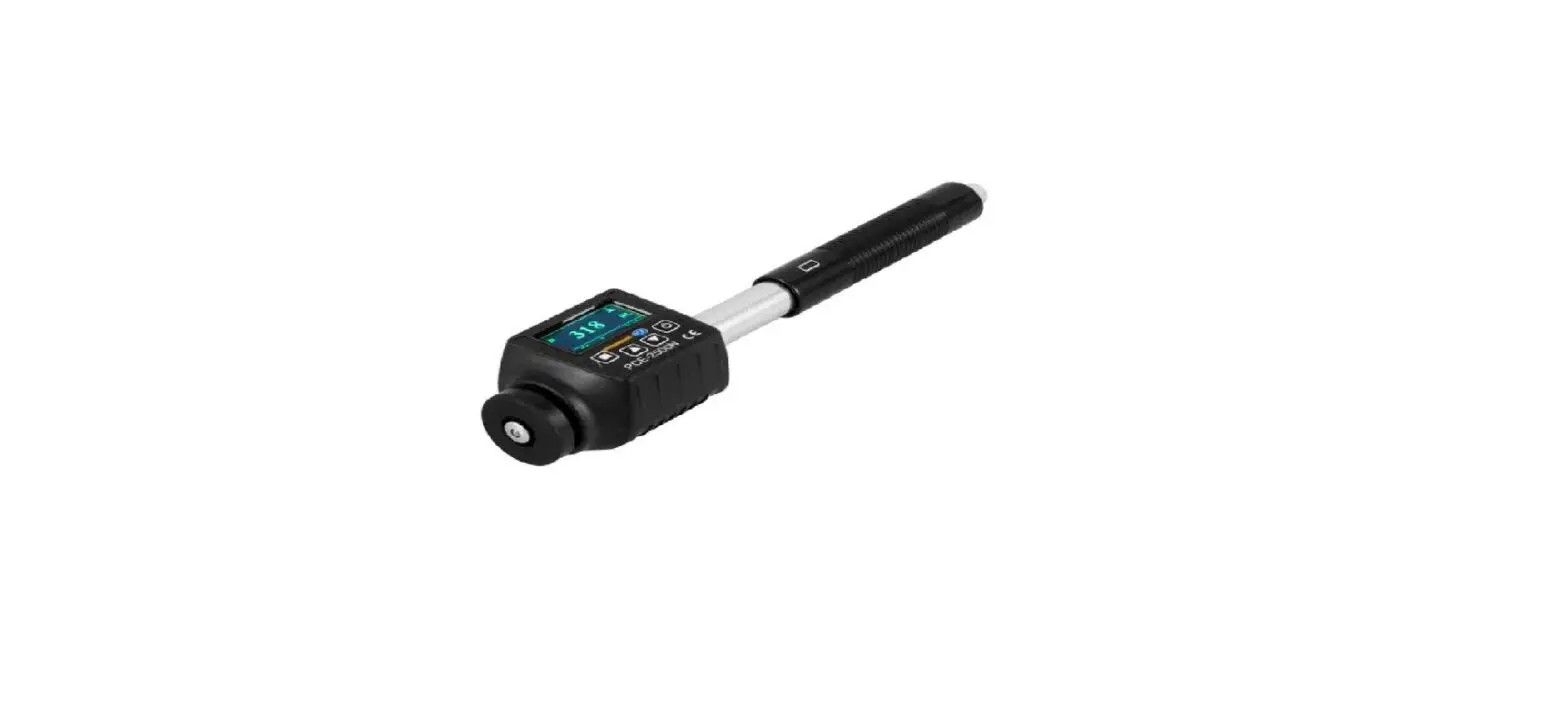

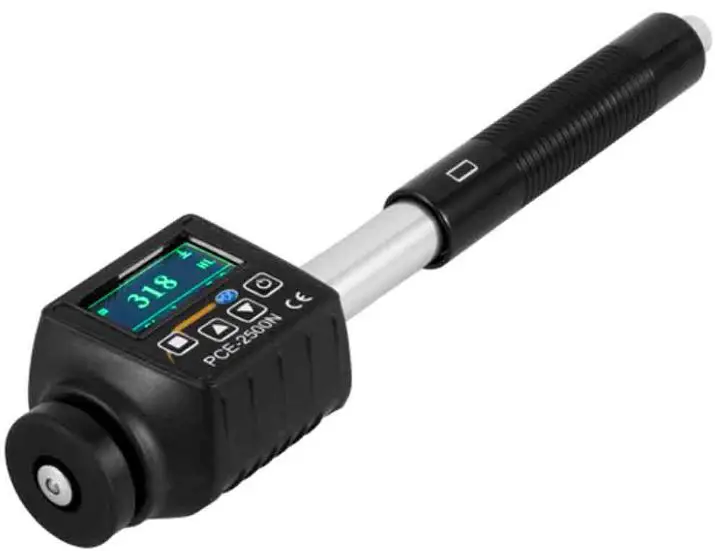
PCE Instruments PCE-2500N Portable Pen-sized Durometer for Metals
Product Information
The PCE-2500N/PCE-2600N Durometer is a hardness tester designed for measuring the hardness of various materials. It utilizes the LEEB method of measurement, which calculates the hardness value based on the rebound velocity of an impact body. The device features a 128*64 OLED display for easy reading, a micro USB storage device for direct connection, and a memory capacity for 600 average values and 6 files. It also includes a limit alarm and an auto power-off function when the battery is low. The device is powered by a rechargeable Li-Ion battery and comes with a carrying case for portability.
Applications for the PCE-2500N/PCE-2600N Durometer include testing the hardness of ball bearings and other parts, fault analysis of pressure vessels, steam turbine generators and plants, heavy workpieces, mechanical and permanently installed parts, and limited space environments.
Product Usage Instructions
- Read the user manual carefully and completely before using the device for the first time.
- The device should only be used by qualified personnel and repaired by PCE Instruments personnel.
- Ensure that the battery is fully charged before use.
- Connect the micro USB storage device directly to the device if needed.
- Press the power button to turn on the device.
- Use the buttons on the device to navigate through the menu options.
- To measure the hardness of a material, select the appropriate impact device based on the material being tested.
- Hold the device against the material surface and press the measurement button to take a reading.
- The hardness value will be displayed on the OLED display.
- If necessary, use the conversion charts provided to convert the hardness value into other standard hardness units.
- After use, turn off the device and store it in the carrying case for safekeeping.
- Refer to the user manual for calibration instructions, battery replacement, and additional information.
If you have any questions or need further assistance, please contact PCE Instruments using the contact details provided in the user manual.
Safety notes
Please read this manual carefully and completely before you use the device for the first time. The device may only be used by qualified personnel and repaired by PCE Instruments personnel. Damage or injuries caused by non-observance of the manual are excluded from our liability and not covered by our warranty.
- The device must only be used as described in this instruction manual. If used otherwise, this can cause dangerous situations for the user and damage to the meter.
- The instrument may only be used if the environmental conditions (temperature, relative humidity, …) are within the ranges stated in the technical specifications. Do not expose the device to extreme temperatures, direct sunlight, extreme humidity or moisture.
- Do not expose the device to shocks or strong vibrations.
- Avoid dust, strong magnetic fields, oil, etc.
- The case should only be opened by qualified PCE Instruments personnel.
- Never use the instrument when your hands are wet.
- You must not make any technical changes to the device.
- The appliance should only be cleaned with a damp cloth. Use only pH-neutral cleaner, no abrasives or solvents.
- The device must only be used with accessories from PCE Instruments or equivalent.
- Before each use, inspect the case for visible damage. If any damage is visible, do not use the device.
- Do not use the instrument in explosive atmospheres.
- The measurement range as stated in the specifications must not be exceeded under any circumstances.
- Non-observance of the safety notes can cause damage to the device and injuries to the user.
We do not assume liability for printing errors or any other mistakes in this manual. We expressly point to our general guarantee terms which can be found in our general terms of business. If you have any questions please contact PCE Instruments. The contact details can be found at the end of this manual.
Features
- 128*64 OLED display;
- Micro USB storage device can be connected directly;
- Memory for 600 average values and 6 files;
- Limit alarm;
- Auto Power Off when battery is low;
- Easy-to-read display, clear digits
- Rechargeable Li-Ion battery
- Applications: ball bearings and other parts, fault analysis of pressure vessels, steam turbine generators and plants, heavy workpieces, mechanical and permanently installed parts, limited space
Delivery contents
- 1 x hardness tester PCE-2500N or PCE-2600N
- 1 x charging cable
- 1 x test block
- 1 x cleaning brush
- 1 x user manual
- 1 x carrying case
Measuring principle
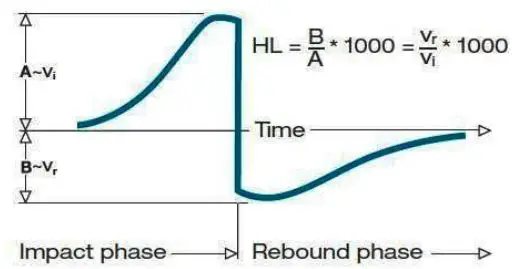
The LEEB method of measurement was first used in 1978. It is defined as the quotient of the rebound velocity of an impact body over its impact velocity, multiplied by 1000. The harder a material surface, the higher the rebound velocity will be. The Leeb hardness value represents the direct relation of a group of materials (e. g. steel, aluminium) to its hardness properties. For the most common metals, conversion charts are available. These enable the user to convert HL hardness values into other standard hardness units (HB, HV, HRC, etc.).
An impact body with a spherical measuring tip made of tungsten carbide is accelerated towards the test surface and then rebounds. The impact and rebound velocities are measured at a distance of 1 mm from the test surface, using the following method: a permanent magnet in the impact body induces an electrical current into the coil when passing through the coil in the coil holder. This electrical current is proportional to the velocities of the magnet. Leeb hardness values can be calculated by using the following formula:
- HL = 1000 x (VB / VA)
- HL: Hardness according to Leeb
- VB: Rebound velocity
- VA: Impact velocity
The voltage curve of the output signal, when the impact body passes through the induction coil, is shown in the following figure:
If you measure the hardness of a material with the conventional static test method, the pressure you apply will affect the reading, e. g. 720 HLD ≠ 720 HLC. Since different impact devices correlate with different conversion charts when converting Leeb hardness values into other hardness units, the impact device used should be indicated in addition to the converted value.
Device description
PCE-2500N
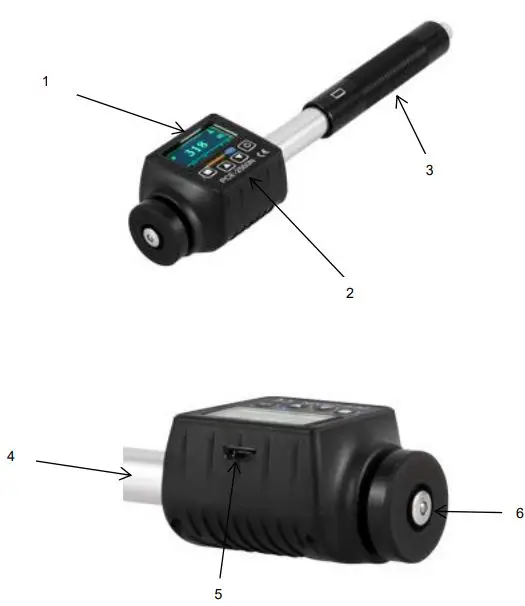
- Display
- Keypad
- Loading tube
- D-type impact body (within guide tube)
- Micro USB charging socket
- Support ring
PCE-2600N
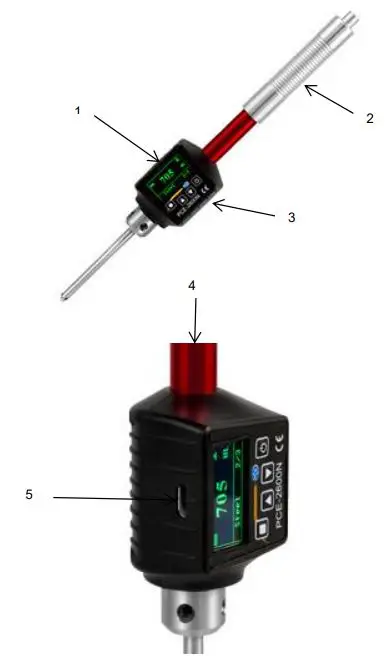
- Display
- Loading tube
- Keypad
- DL-type impact body (within guide tube)
- Micro USB charging socket
Display
After switching on the device, it will show the main screen:
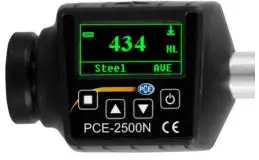
- HL: Hardness scale
- AVE: Average value
 : Impact direction
 : Impact direction
Difference between PCE-2500N and PCE-2600N
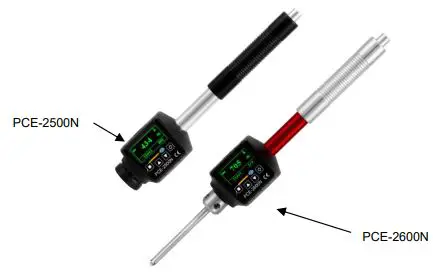
- PCE-2500N has a D probe for even surfaces
- PCE-2600N has a DL probe for uneven, small surfaces
Keys

- On/Off
- Menu/Confirm

- Up
- Down
Technical specifications
| Hardness scales | HL, HV, HRA, HRC, HRB, HB, HV, HS |
| Measurement ranges | 170 … 960 HLD 17.9 … 69.5 HRC 19 … 683 HB 80 … 1042 HV 30.6 … 102.6 HS 59.1 … 88 HRA 13.5 … 101.7 HRB |
| Testable materials | Steel and cast steel, alloyed tool steel, stainless steel, grey cast iron, spheroidal graphite iron, cast aluminium, copper-zinc alloy (brass), copper-tin alloy, copper (bronze) |
| Accuracy | HLD: ±0.5% (800 HLD) |
| Repeatability | HLD: 0.8% (800 HLD) |
| Resolution | 128 x 64 OLED display |
| Operating time | Approx. 10 h |
| Operating conditions | Temperature: 10 ~ 50 °C Humidity max. 90 °C |
| Storage conditions | Temperature: -30 ~ 60 °C Humidity max. 90 °C |
| Power supply | Rechargeable lithium battery |
| Dimensions | PCE-2500N: 148 x 32 x 25 mm PCE-2600N: 205 x 32 x 25 mm |
| Weight | PCE-2500N: 64 g PCE-2600N: 80 g |
Operation
Before using the device, read the information on calibration and about the factors that have an effect on the measuring accuracy.
Preparation of sample surface
When preparing the sample, it is essential to observe the information given in the charts at the end of this manual.
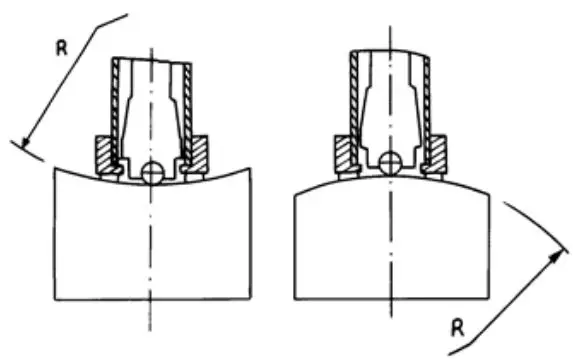
- When preparing the sample surface, bear in mind that heat, cold, etc. affect the hardness of the surface to be tested.
- An excessively rough test surface can cause measurement errors. Therefore, the test surface should have a metallic gloss and be even and free from grease.
- Surface: The test surface should be as smooth as possible. When the radius of curvature R of the surface is smaller than 20 mm, a small support ring or another ring-shaped fixing aid should be used.
Stabilisation of the sample
- Heavy samples do not have to be stabilised;
- Medium-sized samples have to be placed on an even and hard surface. Make sure that the sample rests on the surface evenly and does not move.
- Make sure that the sample is thick enough. For minimum thicknesses of a sample, please refer to the charts at the end of this user manual.
- For samples with a hardened surface, find the minimum depths of the hardened layer in the chart at the end of this manual.
- Coupling
- Lightweight samples must be closely coupled to a solid support. The two coupling surfaces must be even and you must make sure not to use too much coupling gel. The test direction should be vertical to the coupled surface.
- When the sample is a large plate, bar or bent part, it can deform considerably and become unstable, even if the weight and thickness are as required. This causes incorrect readings. In this case, the test surface of the sample should be reinforced or supported.
- The magnetic field of the sample should not exceed 30 Gauss.
Prior to first measurement
Before making your first measurement, you should carry out a test measurement, using the test block which is included in the delivery. Make 5 measurements and calculate the average. If the values from the charts at the end of this manual are exceeded, the internal calibration function can be used.
Power on
- Press the On / Off key. The hardness tester will switch on and automatically enter measurement mode.
Charging
- To lock the impact body, push down the loading tube completely. Do not release the loading tube before you have reached the bottom. Then slowly bring it back to its original position.
- Hold the device between your thumb and index finger and place it onto the sample. While doing so, make sure that the support ring lies firmly on the surface and that the impact direction is vertical to the test surface.
Measurement
- Before applying the trigger, make sure that the sample stands firmly. Also ensure that the direction of the starting force is in line with the axis of the impact device.
- Make a measurement by slightly pressing the trigger at the top of the device. The reading will be shown in the display.
- Each portion of the sample must be measured 5 times. The results should not be below or above the average value of ±15 HL.
- The distance between any two points of impact or between the middle of a point of impact and the edge of a sample should fulfil the requirements in the following chart.
| Centre to centre distance of the two points of impact | Distance from centre of point of impact to edge of sample |
| ≥ | ≥ |
| 3 mm | 5 mm |
- At the end of the measurement, the results can be seen on the display. The hardness value is the average value of 5 measurements at different measuring points.
- To switch off the device, press the On/Off key.
Readings displayed
- The hardness value is displayed in a certain hardness unit. If, for instance, a value of 700 is measured with a Leeb impact device and a D-type impact body, the hardness value will be displayed as 700 HLD, HL standing for hardness according to Leeb and D for the D-type impact body.
- When converting the HLD value into a different hardness unit, the test method should be written as part of the unit. 400HVHLD, for example, stands for a hardness value of 400 HV (hardness according to Vickers), tested by the HLD method (Leeb hardness with D-type impact device).
Menu structure
- Settings and additional functions can be found in the parameter menu. In the main screen, press the Menu key to enter the main menu.
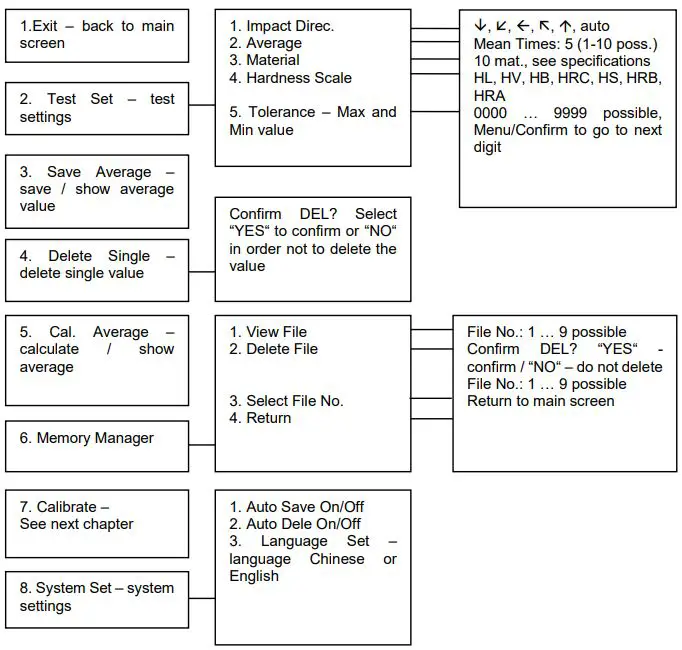
- Select the corresponding options to set the parameters. You can make a selection using the arrow keys. Confirm your selection with the Menu/Confirm key.
Calibration
- Before first use and after not using the hardness tester for a period of time, it must be calibrated by means of the Leeb test block.
- Go to calibration mode via menu item 7.
| x/5 |
| 000 |
| Calibration |
- Measure 5 measuring points of the Leeb hardness block.
- The impact direction must be vertically down.
| 1/5 |
| 772 HL |
| Calibration |
- After the measurement, the hardness tester will show the average value.
- Press the arrow keys to set the average value to the standard value of the test block. (You can set the value up to 15 HL higher or lower). Confirm with the Menu/Confirm key. “Calibration complete“ will be displayed.
- The device shows values in HLDL. In order to calculate your HLD value, please refer to the conversion chart in 10.5.
Battery replacement
- Unscrew the cover on the back side of the display unit.
- Remove the battery.
- Insert the new battery. Observe correct polarity.
- Screw the cover back on.
- Switch on the device to find out if it works properly.
Additional information
Specifications of impact device
| Type of impact device | D (PCE-2500N), DL (PCE-2600N) |
| Impact energy Impact weight | 11 mJ 5,5 g |
| Ball hardness Ball diameter Ball material | 1600 HV 3 mm Tungsten carbide |
| Diameter of impact device Length of impact device Weight of impact device | 20 mm 147 mm 50 g |
Sample requirements
| Max. sample hardness | 940 HV |
| Max. sample roughness Ra | 1.6 μm |
| Min. sample weight Measurement without stabilisation Stabilisation Coupling necessary | >5 kg 2 ~ 5 kg 0.05 ~ 2 kg |
| Max. sample thickness Measurement without coupling Coupling necessary | >5 mm ≤5 mm |
| Min. depth of hardened layer | 0.8 mm |
Ball indentation
| Hardness 300 HV | Indentation diameter Penetration depth | 0.54 mm 24 μm |
| Hardness 600 HV | Indentation diameter Penetration depth | 0.54 mm 17 μm |
| Hardness 800 HV | Indentation diameter Penetration depth | 0.35 mm 10 μm |
Conversion chart materials
| Material | Hardness scale | Value |
| Steel and cast steel | HRC | 17.9~68.5 |
| HRB | 59.6~99.6 | |
| HRA | 59.1~85.8 | |
| HB | 127~651 | |
| HV | 83~976 | |
| HS | 32.2~99.5 | |
| Steel | HB | 143~650 |
| Alloyed tool steel | HRC | 20.4~67.1 |
| HV | 80~898 | |
| Stainless steel | HRB | 46.5~101.7 |
| HB | 85~65 5 | |
| HV | 85~802 | |
| Grey cast iron | HRC | |
| HB | 93~334 | |
| HV | ||
| Spheroidal graphite iron | HRC | |
| HB | 131~387 | |
| HV | ||
| Cast aluminium | HB | 19~164 |
| HRB | 23.8~84.6 | |
| Brass | HB | 40~173 |
| HRB | 13.5~95.3 | |
| Bronze | HB | 60~290 |
| Copper | HB | 45~315 |
Conversion chart HLD/HLDL
| HLD | 300 | 304 | 306 | 308 | 310 | 314 | 316 | 318 | 322 | 324 | 328 | 330 | 334 | 336 | 338 | 340 | 344 | 346 | 348 | 352 | 354 |
| HLDL | 560 | 562 | 564 | 566 | 568 | 570 | 572 | 574 | 576 | 578 | 580 | 582 | 584 | 586 | 588 | 590 | 592 | 594 | 596 | 598 | 600 |
| HLD | 356 | 360 | 361 | 364 | 367 | 370 | 372 | 374 | 377 | 380 | 383 | 386 | 387 | 390 | 392 | 395 | 398 | 400 | 403 | 405 | 408 |
| HLDL | 602 | 604 | 606 | 608 | 610 | 612 | 614 | 616 | 618 | 620 | 622 | 624 | 626 | 628 | 630 | 632 | 634 | 636 | 638 | 640 | 642 |
| HLD | 410 | 413 | 415 | 418 | 420 | 423 | 425 | 429 | 431 | 433 | 436 | 438 | 440 | 444 | 446 | 448 | 451 | 453 | 456 | 458 | 461 |
| HLDL | 644 | 646 | 648 | 650 | 652 | 654 | 656 | 658 | 660 | 662 | 664 | 666 | 668 | 670 | 672 | 674 | 676 | 678 | 680 | 682 | 684 |
| HLD | 464 | 466 | 468 | 472 | 474 | 476 | 479 | 481 | 484 | 487 | 490 | 492 | 495 | 497 | 500 | 502 | 505 | 508 | 510 | 513 | 516 |
| HLDL | 686 | 688 | 690 | 692 | 694 | 696 | 698 | 700 | 702 | 704 | 706 | 708 | 710 | 712 | 714 | 716 | 718 | 720 | 722 | 724 | 726 |
| HLD | 518 | 521 | 524 | 527 | 530 | 532 | 534 | 537 | 540 | 544 | 546 | 548 | 551 | 554 | 557 | 560 | 563 | 566 | 569 | 572 | 574 |
| HLDL | 728 | 730 | 732 | 734 | 736 | 738 | 740 | 742 | 744 | 746 | 748 | 750 | 752 | 754 | 756 | 758 | 760 | 762 | 764 | 766 | 768 |
| HLD | 578 | 581 | 584 | 587 | 590 | 592 | 596 | 599 | 602 | 605 | 608 | 611 | 614 | 617 | 620 | 624 | 627 | 630 | 634 | 637 | 640 |
| HLDL | 770 | 772 | 774 | 776 | 778 | 780 | 782 | 784 | 786 | 788 | 790 | 792 | 794 | 796 | 798 | 800 | 802 | 804 | 806 | 808 | 810 |
| HLD | 644 | 647 | 650 | 654 | 657 | 660 | 664 | 667 | 670 | 674 | 678 | 681 | 684 | 688 | 691 | 695 | 698 | 702 | 706 | 709 | 712 |
| HLDL | 812 | 814 | 816 | 818 | 820 | 822 | 824 | 826 | 828 | 830 | 832 | 834 | 836 | 838 | 840 | 842 | 844 | 846 | 848 | 850 | 852 |
| HLD | 716 | 720 | 724 | 728 | 730 | 734 | 738 | 742 | 746 | 749 | 752 | 756 | 760 | 764 | 768 | 771 | 774 | 778 | 782 | 786 | 789 |
| HLDL | 854 | 856 | 858 | 860 | 862 | 864 | 866 | 868 | 870 | 872 | 874 | 876 | 878 | 880 | 882 | 884 | 886 | 888 | 890 | 892 | 894 |
| HLD | 793 | 797 | 800 | 804 | 808 | 812 | 815 | 819 | 823 | 826 | 830 | 834 | 837 | 841 | 845 | 849 | 852 | 856 | 860 | 864 | 867 |
| HLDL | 896 | 898 | 900 | 902 | 904 | 906 | 908 | 910 | 912 | 914 | 916 | 918 | 920 | 922 | 924 | 926 | 928 | 930 | 932 | 934 | 936 |
| HLD | 871 | 874 | 878 | 882 | 886 | 889 | 893 | – | – | – | – | – | – | – | – | – | – | – | – | – | – |
| HLDL | 938 | 940 | 942 | 944 | 946 | 948 | 950 | – | – | – | – | – | – | – | – | – | – | – | – | – | – |
Contact
- If you have any questions, suggestions or technical problems, please do not hesitate to contact us.
- You will find the relevant contact information at the end of this user manual.
Disposal
For the disposal of batteries in the EU, the 2006/66/EC directive of the European Parliament applies. Due to the contained pollutants, batteries must not be disposed of as household waste. They must be given to collection points designed for that purpose. In order to comply with the EU directive 2012/19/EU we take our devices back. We either re-use them or give them to a recycling company that disposes of the devices in line with the law. For countries outside the EU, batteries and devices should be disposed of in accordance with your local waste regulations. If you have any questions, please contact PCE Instruments.
PCE Instruments’ contact information
Germany
- PCE Deutschland GmbH
- Im Langel 4
- D-59872 Meschede Deutschland
- Tel.: +49 (0) 2903 976 99 0
- Fax: +49 (0) 2903 976 99 29
- [email protected]
- www.pce-instruments.com/deutsch
United States of America
- PCE Americas Inc.
- 711 Commerce Way suite 8
- Jupiter / Palm Beach 33458 FL USA
- Tel: +1 (561) 320-9162
- Fax: +1 (561) 320-9176
- [email protected]
- www.pce-instruments.com/us
China
- PCE (Beijing) Technology Co.,Ltd
- 1519 Room, 6 Building
- Men Tou Gou Xin Cheng, Men Tou Gou District 102300 Beijing China
- Tel: +86 (10) 8893 9660
- [email protected]
- www.pce-instruments.cn
United Kingdom
- PCE Instruments UK Ltd
- Units 12/13 Southpoint Business Park Ensign Way, Southampton Hampshire United Kingdom, SO31 4RF
- Tel: +44 (0) 2380 98703 0
- Fax: +44 (0) 2380 98703 9
- [email protected]
- www.pce-instruments.com/english
Turkey
- PCE Teknik Cihazlan Ltd.Sti.
- Halkali Merkez Mah.
- Pehlivan Sok. No.6/C 34303 Kücükçekmece – Istanbul Türkiye
- Tel: 0212 471 11 47
- Fax: 0212 705 53 93
- [email protected]
- www.pce-instruments.com/turkish
Spain
- PCE Ibérica S.L.
- Calle Mayor, 53 02500 Tobarra (Albacete) España
- Tel.: +34 967 543 548
- Fax: +34 967 543 542
- [email protected]
- www.oce-Instruments.com/espanol
Italy
- PCE Italia s.r.l.
- Via Pesciatina 878 / B-Interno 6
- 55010 LOC. GRAGNANO CAPANNORI (LUCCA) Italia
- Telefono: +39 0583 975 114
- Fax: +39 0583 974 824
- [email protected]
- www.pce-instruments.com/italiano
Scan

© PCE Instruments
References
 France.fr : Actualités, destinations et infos du tourisme en France
-
iberica.es
 Computer Instruments | Home
 Discover Italy: Official Tourism Website - Italia.it
-
N.E.E.D.S., (Nutritional Ecological Environmental Delivery System) specializes in providing products, information, and education
-
PCE(北京)科技有é™å…¬å¸
-
Industrial Measurement Products and Solutions | PCE Instruments
-
Improtek LTDA Distribuidor oficial de PCE Instruments | PCE Instruments
-
PCE Deutschland GmbH Prüfgeräte vom Hersteller | PCE Instruments
-
PCE Brookhuis B.V. | PCE Instruments
-
PCE Americas Inc. : Test Instruments | PCE Instruments
-
PCE Iberica S.L. Instrumentación | PCE Instruments
-
PCE Instruments France | PCE Instruments
-
PCE Italia s.r.l. / Strumenti di Misura | PCE Instruments
-
PCE Teknik Cihazlar Paz. Tic. Ltd.Şti. | PCE Instruments
-
PCE Americas Inc. : Test Instruments | PCE Instruments
-
PCE Americas Inc. : Test Instruments | PCE Instruments
 France.fr : Actualités, destinations et infos du tourisme en France
 iberica.es
 Computer Instruments | Home
 Discover Italy: Official Tourism Website - Italia.it
 N.E.E.D.S., (Nutritional Ecological Environmental Delivery System) specializes in providing products, information, and education
 PCE(北京)科技有é™å…¬å¸
 Industrial Measurement Products and Solutions | PCE Instruments