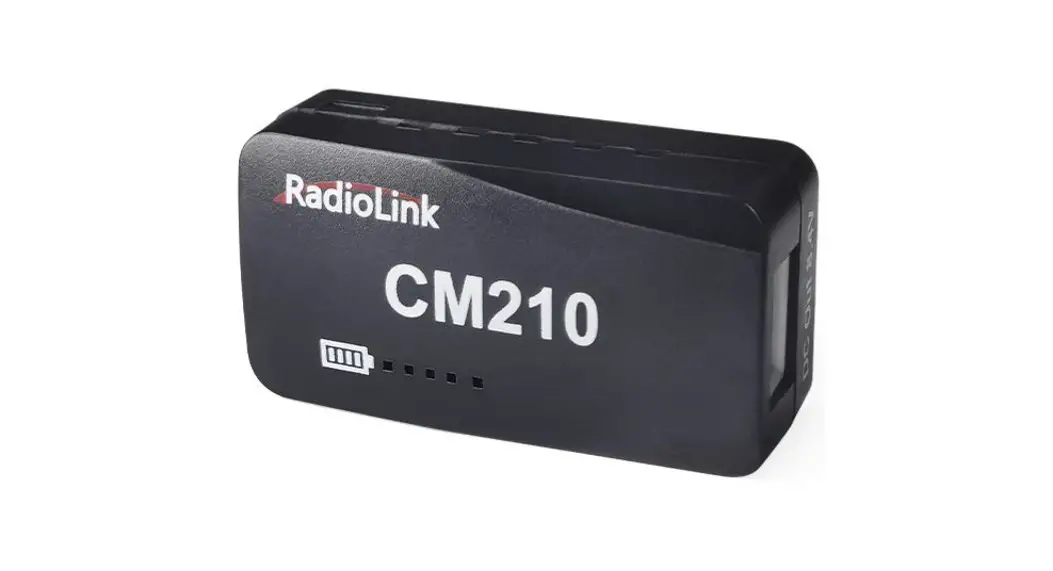
CM210 LiPo Battery Balance Charger
CM210 Balance Charger
User Manual
Note: To ensure the safe use of CM210, please read this manual
carefully before use.
RadioLink Electronic Ltd www.radiolink.com
Safety Precautions
(1) Please read this manual carefully before using to make sure
CM210 is safely operated.
(2) Please connect CM210 to the power supply first, and then
connect the 2S LiPo battery for charging.
(3) Keep the charger always away from children and pets.
(4) Keep the charger supervised when charging.
(5) If the battery has any abnormalities such as leakage,
bulging, peeling of the outer skin, color change or deformation,
please do not charge.
(6) Do not refit or disassemble the charger.
(7) Do not keep the charger or battery close to a combustible
material while in use.
(8) Do not try to charge non-rechargeable dry cells.
Thanks for choosing RadioLink CM210 balance charger. To fully
enjoy the benefits of this product and ensure safety, please read
the manual carefully. If any problems found during the operation
process, either way listed below can be used as online tech
support.
- Send mails to [email protected]
and we will answer your question at the earliest. - Send private message to us on our Facebook page or leave
comments on our YouTube page. - If the product is purchased from the local distributor, you can
also ask them for support and repair as prefer.
Note: Do not allow children (Less than 14 years old) to touch
this product. This product is not a toy. Please be careful when
operating in scenes where children are present.
Functions
- Low-power precharge: When it is detected that the voltage of a
single cell of the battery is lower than 3.0V, a small current is
used to activate the battery to restore the battery capacity. - Fast charge: When it is detected that the voltage of a single
cell of the battery is higher than 3.0V and lower than 4.16V, 1.5A
is used to charge the battery. - Trickle charging: When it is detected that the voltage of a
single cell of the battery is higher than 4.16V, 0.8A is used to
charge the battery to make the battery fully charged and avoid
overcharging. - Temperature control: When it is detected that the board
temperature is higher than 75 degrees Celsius, the charging current
will be reduced to 2/3 of the predetermined current to lower the
board temperature, and when it is detected that the board
temperature is lower than 70 degrees Celsius, predetermined current
will be restored to charge the battery. - Power supply protection: When it is detected that the power
supply voltage drops to 3.7V, the current current is set to a
predetermined current to adapt to various charging heads of
different specifications. - Balance charging: When the battery voltage is charged to 4.16V,
if it is detected that the voltages of the two batteries are not
equal, the balance charging is turned on to ensure that the battery
voltages are consistent. - Charging alarm: When there is no current detected for a long
time, charging will be automatically stopped, and the red LED will
flash to indicate abnormality.
CM210 Balance Charger
(for 2S LiPo battery)
User Manual
Note: To ensure the safe use of CM210, please read this manual carefully before use.
RadioLink Electronic Ltd www.radiolink.com
Contents
1. Safety Precautions …………………………………………………………………………………………………….. 3 2. Functions ………………………………………………………………………………………………………………….. 4 3. Speficifications ………………………………………………………………………………………………………….. 5 4. Instructions for Use ……………………………………………………………………………………………………. 5 5. LED Indicator Status ………………………………………………………………………………………………….. 6 6. Voltage Calibration of CM210 ……………………………………………………………………………………… 7 7. Troubleshooting for Common Problems ……………………………………………………………………….. 7
2
1. Safety Precautions
RadioLink Electronic Ltd www.radiolink.com
(1) Please read this manual carefully before using to make sure CM210 is safely operated. (2) Please connect CM210 to the power supply first, and then connect the 2S LiPo battery for
charging. (3) Keep the charger always away from children and pets. (4) Keep the charger supervised when charging. (5) If the battery has any abnormalities such as leakage, bulging, peeling of the outer skin,
color change or deformation, please do not charge. (6) Do not refit or disassemble the charger. (7) Do not keep the charger or battery close to a combustible material while in use. (8) Do not try to charge “non-rechargeable” dry cells.
Thanks for choosing RadioLink CM210 balance charger. To fully enjoy the benefits of this product and ensure safety, please read the manual carefully. If any problems found during the operation process, either way listed below can be used as online tech support. (1) Send mails to [email protected] and we will answer your question at the
earliest. (2) Send private message to us on our Facebook page or leave comments on our YouTube
page. (3) If the product is purchased from the local distributor, you can also ask them for support and
repair as prefer.
Note: Do not allow children (Less than 14 years old) to touch this product. This product is not a toy. Please be careful when operating in scenes where children are present.
3
RadioLink Electronic Ltd www.radiolink.com
2. Functions
(1) Low-power precharge: When it is detected that the voltage of a single cell of the battery is lower than 3.0V, a small current is used to activate the battery to restore the battery capacity.
(2) Fast charge: When it is detected that the voltage of a single cell of the battery is higher than 3.0V and lower than 4.16V, 1.5A is used to charge the battery.
(3) Trickle charging: When it is detected that the voltage of a single cell of the battery is higher than 4.16V, 0.8A is used to charge the battery to make the battery fully charged and avoid overcharging.
(4) Temperature control: When it is detected that the board temperature is higher than 75 degrees Celsius, the charging current will be reduced to 2/3 of the predetermined current to lower the board temperature, and when it is detected that the board temperature is lower than 70 degrees Celsius, predetermined current will be restored to charge the battery.
(5) Power supply protection: When it is detected that the power supply voltage drops to 3.7V, the current current is set to a predetermined current to adapt to various charging heads of different specifications.
(6) Balance charging: When the battery voltage is charged to 4.16V, if it is detected that the voltages of the two batteries are not equal, the balance charging is turned on to ensure that the battery voltages are consistent.
(7) Charging alarm: When there is no current detected for a long time, charging will be automatically stopped, and the red LED will flash to indicate abnormality.
(8) Charging time: About 40 minutes for a 500mAH 2S battery. (9) Voltage precision: The full voltage is 4.20V±0.02V. (10) Charging efficiency: Higher than 82%.
4
3. Speficifications
RadioLink Electronic Ltd www.radiolink.com
Size: 40.5*21*15 mm Weight: 9g Input Voltage: 5V Supporting Battery: 2S LiPo battery Charging Precision: 0.02V Charging Voltage: Max. 4.2V for each battery cell Charging Current: 1.5A Balance Current: 0.8A Max. Output Power: 20W Power Supply Input Port: USB Type-C Input Charging Port Interface: 2S battery balance port Working Modes: Charging Mode, Balance Mode, Repair Mode (Self-adaptive, with no need to set it)
4. Instructions for Use
1Insert one end of the standard USB cable into the Type-C input port of the CM210 charger (as shown in the picture below), and then connect the other end of the USB cable to power supply equipment such as power bank, computer, mobile phone adapter, etc.. After the right connection, the red LED indicator will be always on.
2Insert the balance port of the standard 2S lithium battery of A560 into the charging port of CM210 (as shown in the picture below). Then the green LED indicator starts flashing, which means it starts to charge the battery. (Note: The green LED indicator flashes during the charging to indicate normal charging; If the red LED indicator flashes during the charging to indicate abnormal charging. Please reconnect battery and cable to troubleshoot the abnormality.)
5
RadioLink Electronic Ltd www.radiolink.com
3When all four LED indicators turn solid green, the battery is fully charged, and the charger will automatically stop charging.
4Remove the battery and then disconnect the power supply.
5. LED Indicator Status
LED color
Status
Meaning
Flash Red
The
charger
abnormality.
detects
Always on
No battery is connected.
All four green LEDs flash once.
The charger is powered on.
The first green LED flashes, and the other The battery voltage is lower
LEDs are off.
than 7.4V.
Green
The first green LED is always on, and the second green LED is flashing. The other LEDs are off.
The battery voltage is lower than 7.8V.
The front two green LEDs are always on, and The battery voltage is lower
the third green LED is flashing. The other than 8.2V.
6
LEDs are off.
RadioLink Electronic Ltd www.radiolink.com
The front three green LEDs are always on, and the fourth green LED is flashing. The other LED is off.
The battery voltage is lower than 8.4V.
All four green LEDs are always on.
The battery is fully charged.
6. Voltage Calibration of CM210
Three power supplies are required. Two 5V power supplies at the battery end, with 0.1A current. When the battery end is connected, turn on the battery end power supply. The voltage of the charging end power supply is set to 5V, with 3A current. When the power supply end is connected, turn on the charging end power supply. Then the MCU runs the calibration program inside . When all the green LED indicators are on at the same time and then go out, the calibration is completed
7. Troubleshooting for Common Problems
1. After the charger is powered on, the red light flashes just after inserting the battery or within 1 minute.
A. The current detection resistor is burned out, and the MCU detects that the current is too large.
B. The switch tube is damaged, so it is unable to switch normally. There is no current output or the output current of the power supply is too small.
2. After the charger is powered on, insert the battery and charging works normally for a period of time, and then the red light flashes.
A. The output current of the power supply is too small, or the battery is damaged. Solution: Replace the power supply or battery to charge it again, if the abnormal phenomenon still occurs, the charger is damaged.
Thank you again for choosing RadioLink product.
7
 RadioLink-Official Website
 RadioLink乐迪电子官网 专注无人机行业二十年