 JL.DD
JL.DD
P X82
INSTRUCTION MANUAL
Display
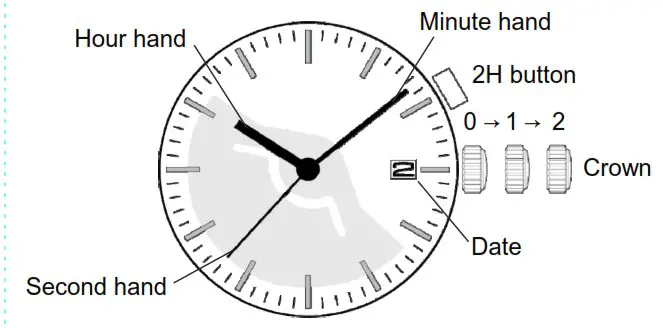
Crown operation
| Crown position | |||
| 0 click | 1st click | 2nd click | |
| Crown | Free | Turn clockwise for date change | Time setting |
| 2H button | Power Storage Indicator | Power Storage Indicator | Free |
* Do not set the date between 9:00 PM and 1:00 AM. Otherwise, the date may not change properly.
Power storage indicator
- How to use
Push the button at 2H position. - Indication
By pressing the button, the second hand moves quickly a certain amount of seconds depending on the power storage in a watch.
The second hand starts to move quickly from current position.
After the second hand moves quickly a certain amount of seconds, it keeps stopping until the current time is caught up with the second hand.
◆ Relationship between the quick movement of the second hand and power storage
Quick movement of second hand | Power storage | |
| No move | 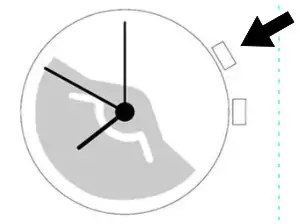 | The watch may run down soon. Please be sure to recharge the watch. The second hand moves two-second interval. |
| 5 seconds | 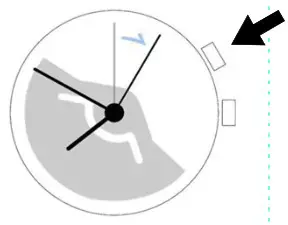 | Approximately more than 1 day of power storage is available. |
| 10 seconds | 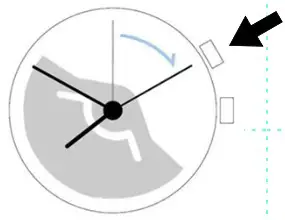 | Approximately more than 7 days of power storage is available. |
| 20 seconds | 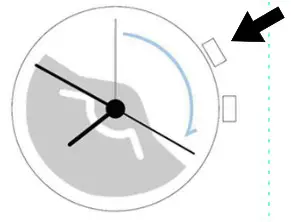 | Approximately 1 month of power storage is available. |
| 30 seconds | 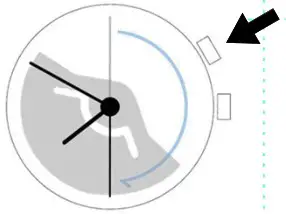 | Approximately 4 to 6 months of power storage is available. |
◆ Recheck the power storage
You can check the power storage one more time immediately by pushing the button.
Stopper:
Before initial operation please remove stopper behind crown. 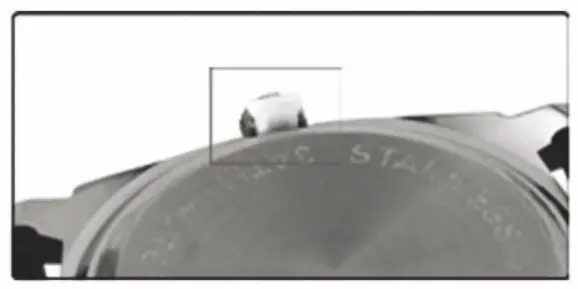
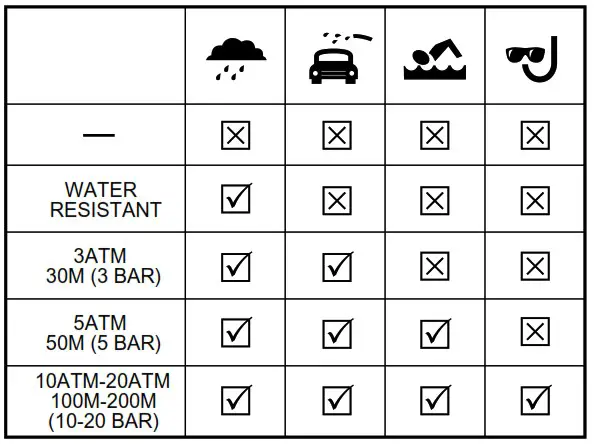
- Always set the crown in the normal position / Tighten screw-lock crown completely.
- When the watch is underwater or wet, never use the pushers/ bezels, or set the time. Watch cases and metal bracelets should be rinsed thoroughly in fresh water after being in salt water.