116030-01Smart Shaper
SMART SHAPER PRODUCT INFORMATION AND USAGE INSTRUCTIONS
Product Information:
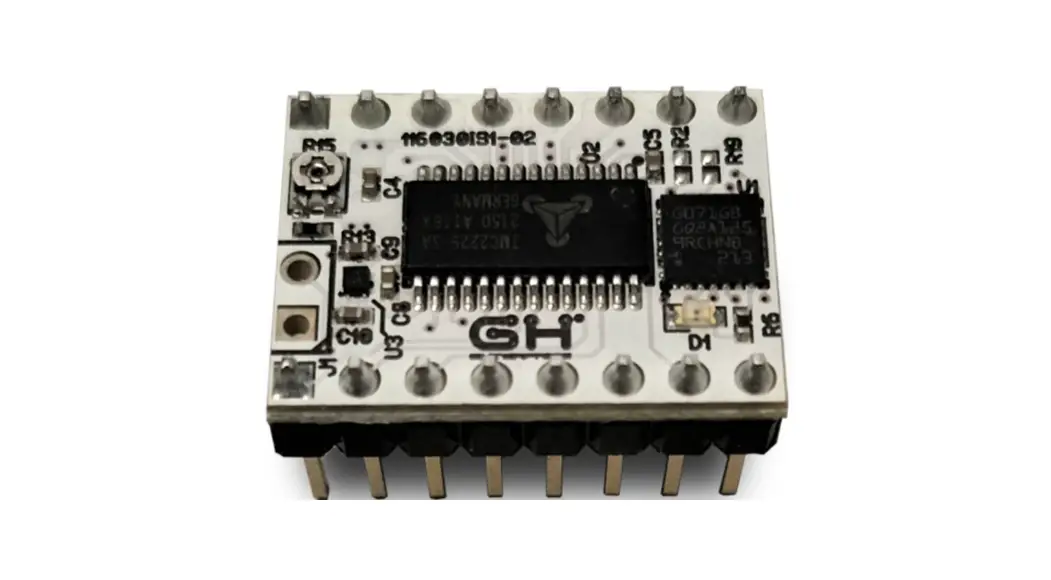
The Smart Shaper Model 116030-01 is a device that utilizes input
shaping algorithms to suppress vibrations characterized by a
particular frequency and dumping ratio. The device requires
hardware such as TMC 2225 Driver, Power Supply, Motor Outputs, and
Control Inputs. The motor current regulation can be adjusted using
the onboard potentiometer. The device measures the axes frequencies
through a calibration model prepared for frequency estimation
consisting of a simple L Model printed with the walls aligned along
X and Y axes.
Usage Instructions:
- Ensure that the Smart Shaper board is installed on the motion
board and the VM power supply is present. - To adjust the driver motor current, match the current tolerated
from your step motors, and adjust the value of VREF using the
onboard potentiometer. Pay attention to avoid any short circuits
when using a screwdriver on the potentiometer. - To find the ringing frequency, measure the distance between two
peaks of the oscillations by marking the peaks. For example, to
measure the Y-axis oscillation frequency, mark seven oscillation
peaks and measure the distance between them to calculate the
frequency.
ENGLISH
User Manual
NAME: SMART SHAPER MODEL: 116030-01
116030SmartShaperUserManualV1-01
INDEX:
Smart Shaper 116030SmartShaperUserManualV1-01
1. INTRODUCTION…………………………………………………………………………………………………3
2. REQUIREMENTS……………………………………………………………………………………………….3
3. RESONANCE FREQUENCY MEASUREMENT……………………………………………………..4
3.1. PRINT CALIBRATION MODEL 4
3.2. FREQUENCY MEASUREMENT 5
4. BOARDS CONFIGURATION……………………………………………………………………………….6
4.1. G-CODE CONFIGURATION SEQUENCE 6
4.2. SEQUENCE GENERATOR
7
4.3. PRINT MODEL WITH INPUT SHAPING 8
4.4. STATUS LED INFORMATION 8
EN – 2
Smart Shaper 116030SmartShaperUserManualV1-01
1. Introduction
Input shaping algorithms are designed to suppress the vibrations characterized by a particular frequency and dumping ratio. Dumping ratio is difficult to estimate and it’s usually assumed to be 10%. Frequency should be estimated experimentally for both axes. The measure of the axes frequencies requires the following steps:
· Print of a reference model (see 4.1.) · Measurement of distance between ringing peaks (see 4.2.) · Frequency calculation by given formula (see 4.2.) Next it will be explained how to configure the boards with the frequencies previously found and the preferred Input Shaping algorithm (see 5.) Finally It will possible to print again the reference model but with Input Shaping Enabled (see 5.3.) in order to verify the correct values of frequencies and the performance of the algorithm.
2. Requirements
The following instructions are intended for the following setup: · Cartesian printer · X/Y axes driven by Smart Shaper Boards · X/Y axes resolution 80 steps/mm · TMC2225 configured with 16 microsteps resolution and interpolation · TMC2225 configuration can be done via UART or bootstrap pins.
EN – 3
Smart Shaper 116030SmartShaperUserManualV1-01
3. Hardware
3.1. TMC 2225 Driver Specifications
· TMC2225-SA stepper motor controller & driver · Supply voltage 5.5-36V · Continuous Iphase = 1.4ARMS · Iphase up to 1.77ARMS = 2,5Apeak for a short time · Quiet operation with StealthChop · Sensorless homing with StallGuard · Energy saving with CoolStep · Configuration and extended diagnostic via UART · Control via Step&Dir interface · Board width 0.6″. board height 0.8″ · 2×8 pin 0.1″ head rows for pins/connectors
3.2. Pinout
Power Supply
GND Ground
VM Motor Supply Voltage 5.5V-36V
VCCIO Logic Supply Voltage 3V-5V
Motor Outputs
OA2 Motor Coil 1
OA1 Motor Coil 1
OB1 Motor Coil 2
OB2 Motor Coil 2
Control Inputs
STEP STEP input (internal pull-down resistor)
DIR DIR input (internal pull-down resistor)
TMC2225
EN Enable Motor Outputs: GND=on, VIO=off
Microsteps resolution configuration (internal pullMS1 down resistors) MS2, MS1: 00: ¼, 01: , 10: 1/16,
11: 1/32
MS2 –
RXD UART RX, Directly connected to the PDN
TXD
UART TX, Connected to the PDN via a 1K resistor on board
DIAG
Diagnostic output. Hi level upon driver error. Reset by ENN=high.
VREF Analog Reference Voltage
EN – 4
3.3. Motor Current Regulation
Smart Shaper 116030SmartShaperUserManualV1-01
Driver motor current should match the current tolerated from your step motors. The current can be adjusted the value of VREF using the onboard potentiometer. VREF [V]= (Irms * 2.5V) / 1.77A = Irms * 1.41 = Imax [A] The value of VREF in Volt corresponds to the value of Peak Current Imax in Ampere. In the following picture are indicated how to measure VREF. TheSmartShaper board should be installed on the motion board and the VM power supply should be present.
Pay attention to avoid any short circuits when using screwdriver on potentiometer
3.4. Dissipation recommendation TMC2225 if not well cooled goes in to thermal protection state and stops to work. It’s highly recommended to:
· Install the Heat Sinks provided with installation set · Use a 3D motion control board equipped with a cooling fan system.
EN – 5
4. Resonance Frequency Measurement
Smart Shaper 116030SmartShaperUserManualV1-01
4.1. Print Calibration Model
The calibration model prepared for frequency estimation consists in a simple L Model printed with the walls aligned along X and Y axes.
The printed part has one wall marked with X label and another one marked with Y label. The X Label is on the wall aligned along the Y axes and the Y Label is on the wall aligned along the X axis. The reason is that the ringing due to Y acceleration/deceleration are visible on X axis and vice-versa. The walls are printed at 100 mm/s. Acceleration is linearly increased from 500 mm/s2 (Bottom) to 18000 mm/s2 (Top) in order to increase the vibrations. TMC2225 is configured in current mode to support high acceleration through G-code sequence. X and Y Coordinates will not exceed 145 mm. Material should be PLA (using a red color improves the measurement of ringings) and nozzle diameter 0.4 mm. Print the model. It’s possible that at some height the printer start to loose steps because acceleration is too high to be tolerated by mechanics. If it happens just stop the printer. Now extract the printed part from the printer and analyze it.
EN – 6
Smart Shaper 116030SmartShaperUserManualV1-01
4.2. Frequency Measurement To find the ringing frequency it should be measured the distance between two peaks of the oscillations. The easiest way is:
· put the part under a light beam parallel to the surface
· mark each visible oscillation peaks · measure with a caliper the total distance D in mm between the first mark and last
mark
· calculate the oscillation frequency (Hz) using the formula f =V (N -1) D
where · V =100 mm/s · N is the number of marks
Example of a Y axis oscillation frequency measurement. We marked 7 oscillation peaks. The measured distance was about 19.8 so the frequency was:
f =100 (7-1)31 Hz 19.8
EN – 7
Smart Shaper 116030SmartShaperUserManualV1-01
5. Boards Configuration
5.1. G-Code configuration sequence Each Smart Shaper board can be programmed via a specific G-Code sequence generated by the spreadsheet SmartShaperGCodeGenerator.ods (see 5.2.). An example of such sequences can be found in the file SmartShaperCalibration.gcode (lines 32-129). In this case they have been inserted two sequences, one for X driver and one for the Y driver, that DISABLE the Input Shaping filter to detect ringings.
EN – 8
Smart Shaper 116030SmartShaperUserManualV1-01
5.2. Sequence Generator The spreadsheet SmartShaperGCodeGenerator.ods is the tool to generate the G-Code configuration sequence.
Damping Ratio Range: 0-99
Start Position Position along the relative axis where the G-Code sequence is executed.
Shaping Algorithm Select DISABLED to bypass Input Shaper or (ZV,MZV,ZVD, EI) to ENABLE the relative Shaping Algorithm
Vibration Freq Insert the frequency measured found previously
Cartesian Axis X to Select Driver on X Axis Y to Select Driver on Y Axis
Vibration Freq Multiplier Leave to 1.
Driver mode Current or Voltage
Max Feed Rate Leave to 600 mm/s
Open the spread sheet and fill all the fields as indicated in the picture. Check that configuration is valid (Config OK green label).
EN – 9
Smart Shaper 116030SmartShaperUserManualV1-01
5.3. Print with Input Shaping Generate a G-Code configuration sequence for each axis according to the measured frequencies. Replace the two original sequences in the SmartShaperCalibration.gcode (lines 32-129) with the new generated ones. Print the modified G-Code. Just after homing procedure the two configuration sequence will be executed.
5.4. Status Led Information A red led is placed on each Smart Shaper board. The blinking frequency provide some information about the board. Just after the startup the Led will blink as many times related to the version of the installed firmware (Ex. Firmware is 1.3 will blink 3 times). After startup the Led will indicate the current status of the board as shown in the following table.
Frequency (Hz) 0.5 1 2
4
Meaning Input Shaper Off Input Shaper On Configuration Failed (wrong parameters) Input Step Rate too high
Led can be used to verify that the configuration has been correctly received and processed by the board.
GH enterprise s.r.l. Via Tolosano, 8 ZIP: 48018 Faenza (RA) Italy
EN – 10