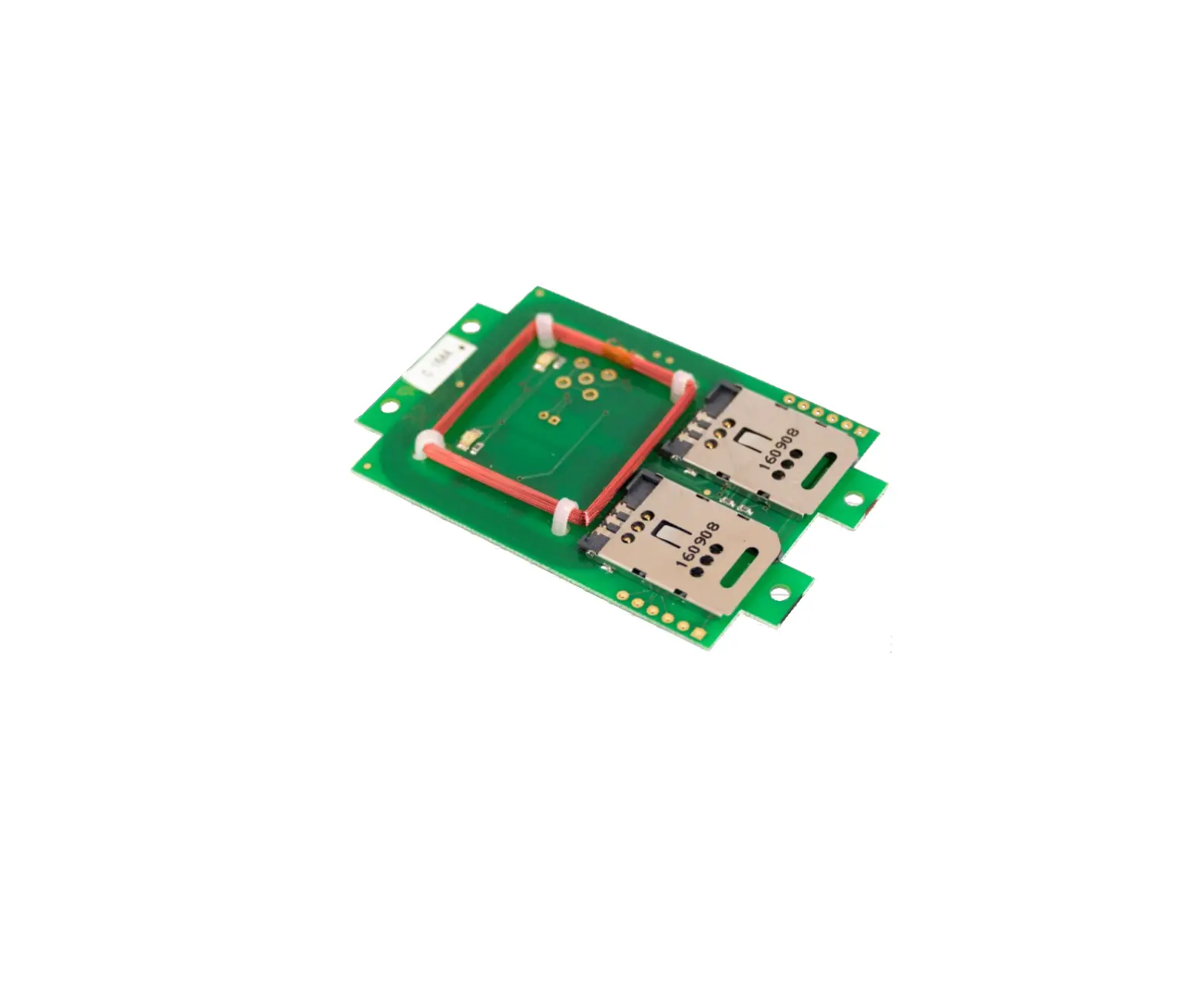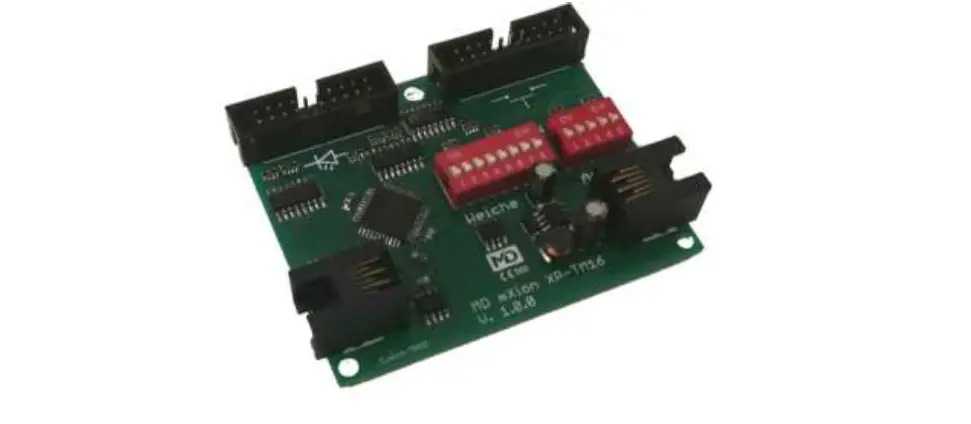

mXion XP-TM16 Switch Module for XpressNet and LocoNet
Introduction
Dear customer, we strongly recommend that you read these manuals and the warning notes thoroughly before installing and operating your device. The device is not a toy (15+).
NOTE: Make sure that the outputs are set to appropriate value before hooking up any other device. We can’t be responsible For any damage if this is disregarded.
General information
We recommend studying this manual thoroughly before installing and operating your new device.
NOTE: Some functions are only available with the latest firmware. Please make sure that your device is programmed with the latest firmware.
Summary of Functions
X-Bus comp. switch and display module Loco Net comp. switch and display module Automatic feedback for switches Storage included
Switches and push buttons
16 switches displayed and switchable
Scope of supply
Manual
Connection cable
mXion XP-TM16
Hook-Up
Install your device in compliance with the connecting diagrams in this manual. The device is protected against shorts and excessive loads. However, in case of a connection error e.g. a short this safety feature can’t work and the device will be destroyed subsequently.
Make sure that there is no short circuit caused by the mounting screws or metal.
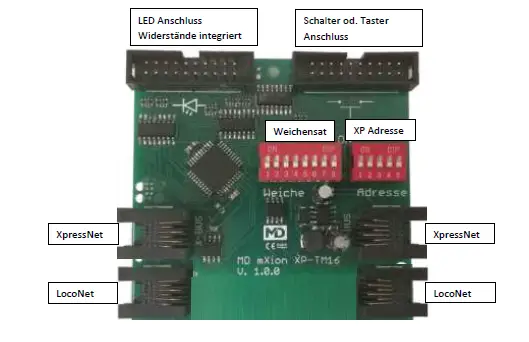
Connectors
DIP switch 8 of the switch address indicates whether the stored position (with buttons) or the real one (with switches) to the central station should be transmitted to get a switch start position.
| Schalter-Nr. | Adress- bereich | Schalter-Nr. | Adress- bereich | ||||||||||
| 1 | 2 | 3 | 4 | 5 | 6 | 1 | 2 | 3 | 4 | 5 | 6 | ||
| 0 | 0 | 0 | 0 | 0 | 0 | 1-16 | 0 | 0 | 0 | 0 | 0 | 1 | 513-528 |
| 1 | 0 | 0 | 0 | 0 | 0 | 17-32 | 1 | 0 | 0 | 0 | 0 | 1 | 529-544 |
| 0 | 1 | 0 | 0 | 0 | 0 | 33-48 | 0 | 1 | 0 | 0 | 0 | 1 | 545-560 |
| 1 | 1 | 0 | 0 | 0 | 0 | 49-64 | 1 | 1 | 0 | 0 | 0 | 1 | 561-576 |
| 0 | 0 | 1 | 0 | 0 | 0 | 65-80 | 0 | 0 | 1 | 0 | 0 | 1 | 577-592 |
| 1 | 0 | 1 | 0 | 0 | 0 | 81-96 | 1 | 0 | 1 | 0 | 0 | 1 | 593-608 |
| 0 | 1 | 1 | 0 | 0 | 0 | 97-112 | 0 | 1 | 1 | 0 | 0 | 1 | 609-624 |
| 1 | 1 | 1 | 0 | 0 | 0 | 113-128 | 1 | 1 | 1 | 0 | 0 | 1 | 625-640 |
| 0 | 0 | 0 | 1 | 0 | 0 | 129-144 | 0 | 0 | 0 | 1 | 0 | 1 | 641-656 |
| 1 | 0 | 0 | 1 | 0 | 0 | 145-160 | 1 | 0 | 0 | 1 | 0 | 1 | 657-672 |
| 0 | 1 | 0 | 1 | 0 | 0 | 161-176 | 0 | 1 | 0 | 1 | 0 | 1 | 673-688 |
| 1 | 1 | 0 | 1 | 0 | 0 | 177-192 | 1 | 1 | 0 | 1 | 0 | 1 | 689-704 |
| 0 | 0 | 1 | 1 | 0 | 0 | 193-208 | 0 | 0 | 1 | 1 | 0 | 1 | 705-720 |
| 1 | 0 | 1 | 1 | 0 | 0 | 209-224 | 1 | 0 | 1 | 1 | 0 | 1 | 721-736 |
| 0 | 1 | 1 | 1 | 0 | 0 | 225-240 | 0 | 1 | 1 | 1 | 0 | 1 | 737-752 |
| 1 | 1 | 1 | 1 | 0 | 0 | 241-256 | 1 | 1 | 1 | 1 | 0 | 1 | 753-768 |
| 0 | 0 | 0 | 0 | 1 | 0 | 257-272 | 0 | 0 | 0 | 0 | 1 | 1 | 769-784 |
| 1 | 0 | 0 | 0 | 1 | 0 | 273-288 | 1 | 0 | 0 | 0 | 1 | 1 | 785-800 |
| 0 | 1 | 0 | 0 | 1 | 0 | 289-304 | 0 | 1 | 0 | 0 | 1 | 1 | 801-816 |
| 1 | 1 | 0 | 0 | 1 | 0 | 305-320 | 1 | 1 | 0 | 0 | 1 | 1 | 817-832 |
| 0 | 0 | 1 | 0 | 1 | 0 | 321-336 | 0 | 0 | 1 | 0 | 1 | 1 | 833-848 |
| 1 | 0 | 1 | 0 | 1 | 0 | 337-352 | 1 | 0 | 1 | 0 | 1 | 1 | 849-864 |
| 0 | 1 | 1 | 0 | 1 | 0 | 353-368 | 0 | 1 | 1 | 0 | 1 | 1 | 865-880 |
| 1 | 1 | 1 | 0 | 1 | 0 | 369-384 | 1 | 1 | 1 | 0 | 1 | 1 | 881-896 |
| 0 | 0 | 0 | 1 | 1 | 0 | 385-400 | 0 | 0 | 0 | 1 | 1 | 1 | 897-912 |
| 1 | 0 | 0 | 1 | 1 | 0 | 401-416 | 1 | 0 | 0 | 1 | 1 | 1 | 913-928 |
| 0 | 1 | 0 | 1 | 1 | 0 | 417-432 | 0 | 1 | 0 | 1 | 1 | 1 | 929-944 |
| 1 | 1 | 0 | 1 | 1 | 0 | 433-448 | 1 | 1 | 0 | 1 | 1 | 1 | 945-960 |
| 0 | 0 | 1 | 1 | 1 | 0 | 449-464 | 0 | 0 | 1 | 1 | 1 | 1 | 961-976 |
| 1 | 0 | 1 | 1 | 1 | 0 | 465-480 | 1 | 0 | 1 | 1 | 1 | 1 | 977-992 |
| 0 | 1 | 1 | 1 | 1 | 0 | 481-496 | 0 | 1 | 1 | 1 | 1 | 1 | 993-1008 |
| 1 | 1 | 1 | 1 | 1 | 0 | 497-512 | 1 | 1 | 1 | 1 | 1 | 1 | 1009-1024 |
| Nr. | XpressNet- Adresse | ||||
| 1 | 2 | 3 | 4 | 5 | |
| 0 | 0 | 0 | 0 | 0 | Zufall |
| 1 | 0 | 0 | 0 | 0 | 1 |
| 0 | 1 | 0 | 0 | 0 | 2 |
| 1 | 1 | 0 | 0 | 0 | 3 |
| 0 | 0 | 1 | 0 | 0 | 4 |
| 1 | 0 | 1 | 0 | 0 | 5 |
| 0 | 1 | 1 | 0 | 0 | 6 |
| 1 | 1 | 1 | 0 | 0 | 7 |
| 0 | 0 | 0 | 1 | 0 | 8 |
| 1 | 0 | 0 | 1 | 0 | 9 |
| 0 | 1 | 0 | 1 | 0 | 10 |
| 1 | 1 | 0 | 1 | 0 | 11 |
| 0 | 0 | 1 | 1 | 0 | 12 |
| 1 | 0 | 1 | 1 | 0 | 13 |
| 0 | 1 | 1 | 1 | 0 | 14 |
| 1 | 1 | 1 | 1 | 0 | 15 |
| 0 | 0 | 0 | 0 | 1 | 16 |
| 1 | 0 | 0 | 0 | 1 | 17 |
| 0 | 1 | 0 | 0 | 1 | 18 |
| 1 | 1 | 0 | 0 | 1 | 19 |
| 0 | 0 | 1 | 0 | 1 | 20 |
| 1 | 0 | 1 | 0 | 1 | 21 |
| 0 | 1 | 1 | 0 | 1 | 22 |
| 1 | 1 | 1 | 0 | 1 | 23 |
| 0 | 0 | 0 | 1 | 1 | 24 |
| 1 | 0 | 0 | 1 | 1 | 25 |
| 0 | 1 | 0 | 1 | 1 | 26 |
| 1 | 1 | 0 | 1 | 1 | 27 |
| 0 | 0 | 1 | 1 | 1 | 28 |
| 1 | 0 | 1 | 1 | 1 | 29 |
| 0 | 1 | 1 | 1 | 1 | 30 |
| 1 | 1 | 1 | 1 | 1 | 31 |
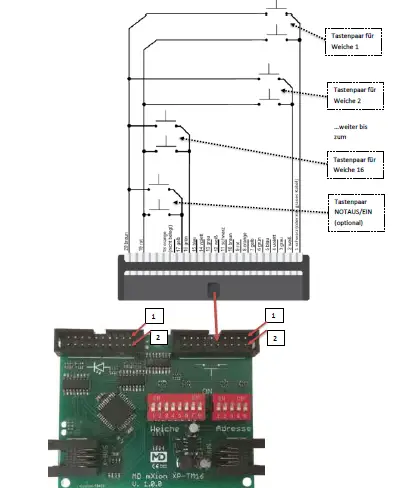
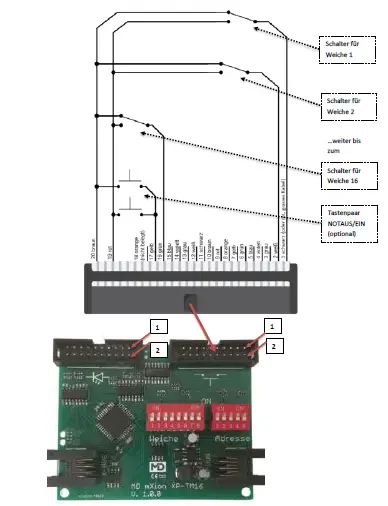
DIP-Schalter 7 = OFF
DIP-Schalter 7 = ON
Product description
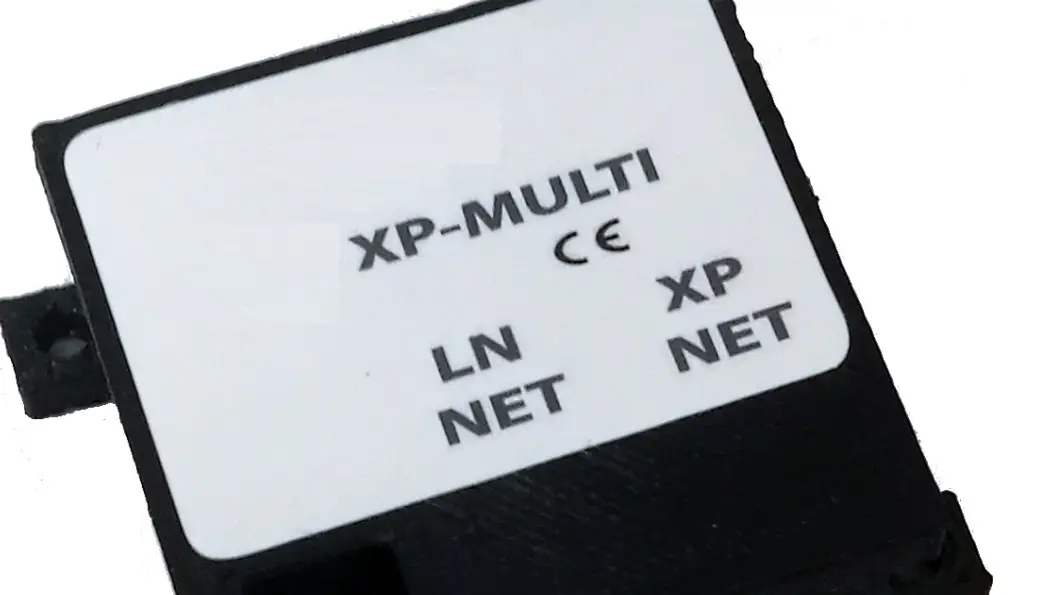
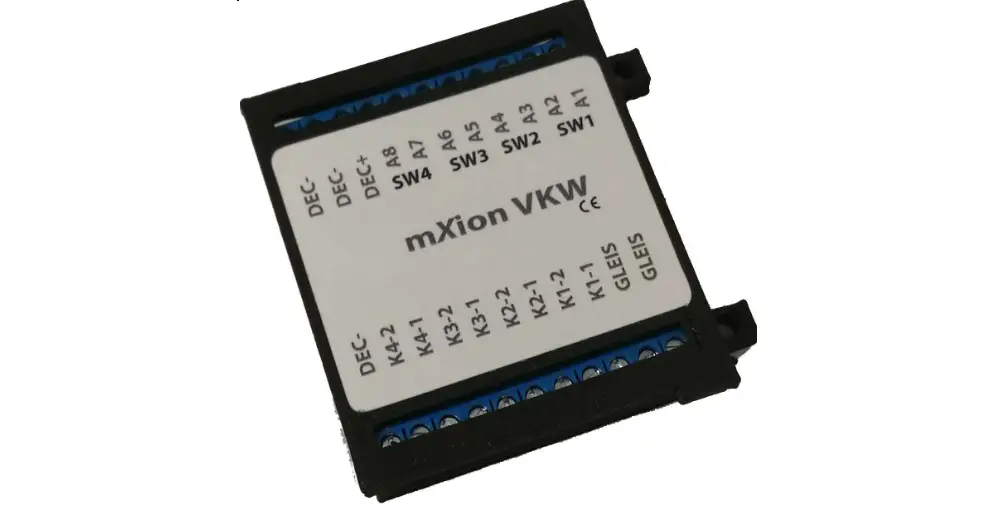
The mXion XP-TM16 is a 16 times switch and feedback module for XpressNet & LocoNet for ours central stations MZSpro and 30Z. With the help of this module is it possible to build consoles without going on the
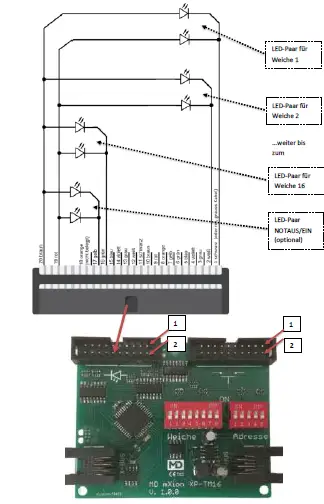
advantages of digital technology are dispensed with have to. The control panel you can according to your own imagine. designing and using switches or buttons equip these as well as the LEDs for display connect to the XP-TM16, switch you now also classic over buttons as well as via the digital control. The signals through the XP-TM16 are via the bus forwarded to the headquarters. Also becomes the last switching position via LED displayed.
For the LEDs, there are 470 Ohm included. The DIP switches are only active by start up sequency.
The Position indivator with LEDs is as follows:
Does the display match the switch position the display of the respective position direction lights up. If the display does not match the switch position, the display flashes in the saved position.
Technical data
- Current: 20mA
- Temperature range: -40 up to 70°C
- Dimensions L*B*H (cm): 7.5*7.5*2
NOTE: In case you intend to utilize this device below freezing temperatures, make sure it was stored in a heated environment before operation to prevent the generation of condensed water. During operation is sufficient to prevent condensed water.
Warranty, Service, Support
Micron-dynamics warrants this product against defects in materials and workmanship for one year from the original date of purchase. Other countries might have different legal warranty situations. Normal wear and tear, consumer modifications as well as improper use or installation are not covered. Peripheral component damage is not covered by this warranty. Valid warrants claims will be serviced without charge within the warranty period. For warranty service please return the product to the manufacturer. Return shipping charges are not covered by
micron-dynamics. Please include your proof of purchase with the returned good. Please check our website for up to date brochures, product information, documentation and software updates. Software updates you can do with our updater or you can send us the product, we update for you free.
Errors and changes excepted.
Hotline
For technical support and schematics for application examples contact:
micron-dynamics
[email protected]
[email protected]
www.micron-dynamics.de
https://www.youtube.com/@micron-dynamics.
 micron-dynamics