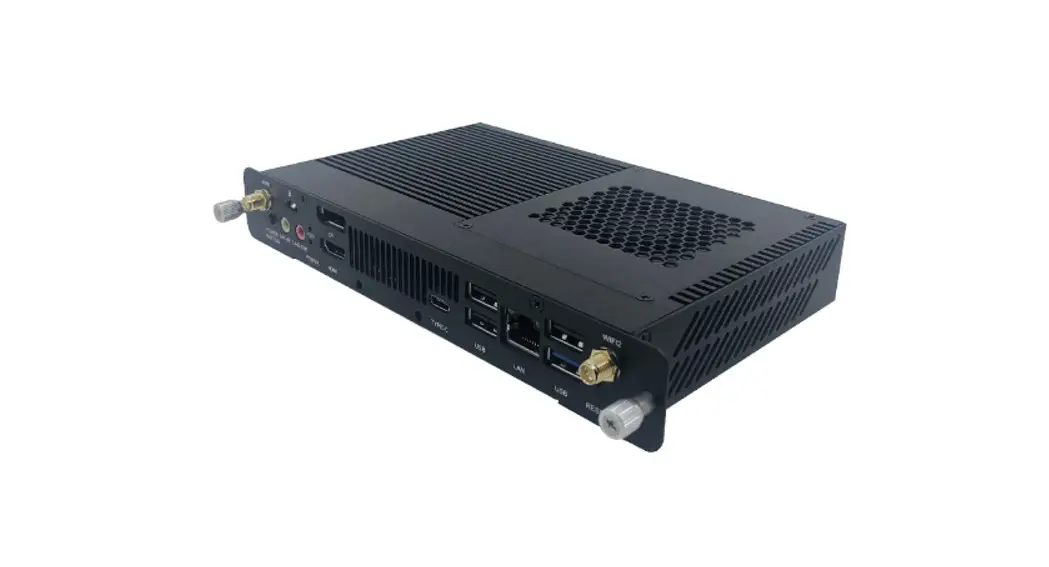
VPC-A31-O1 Display
Product Information
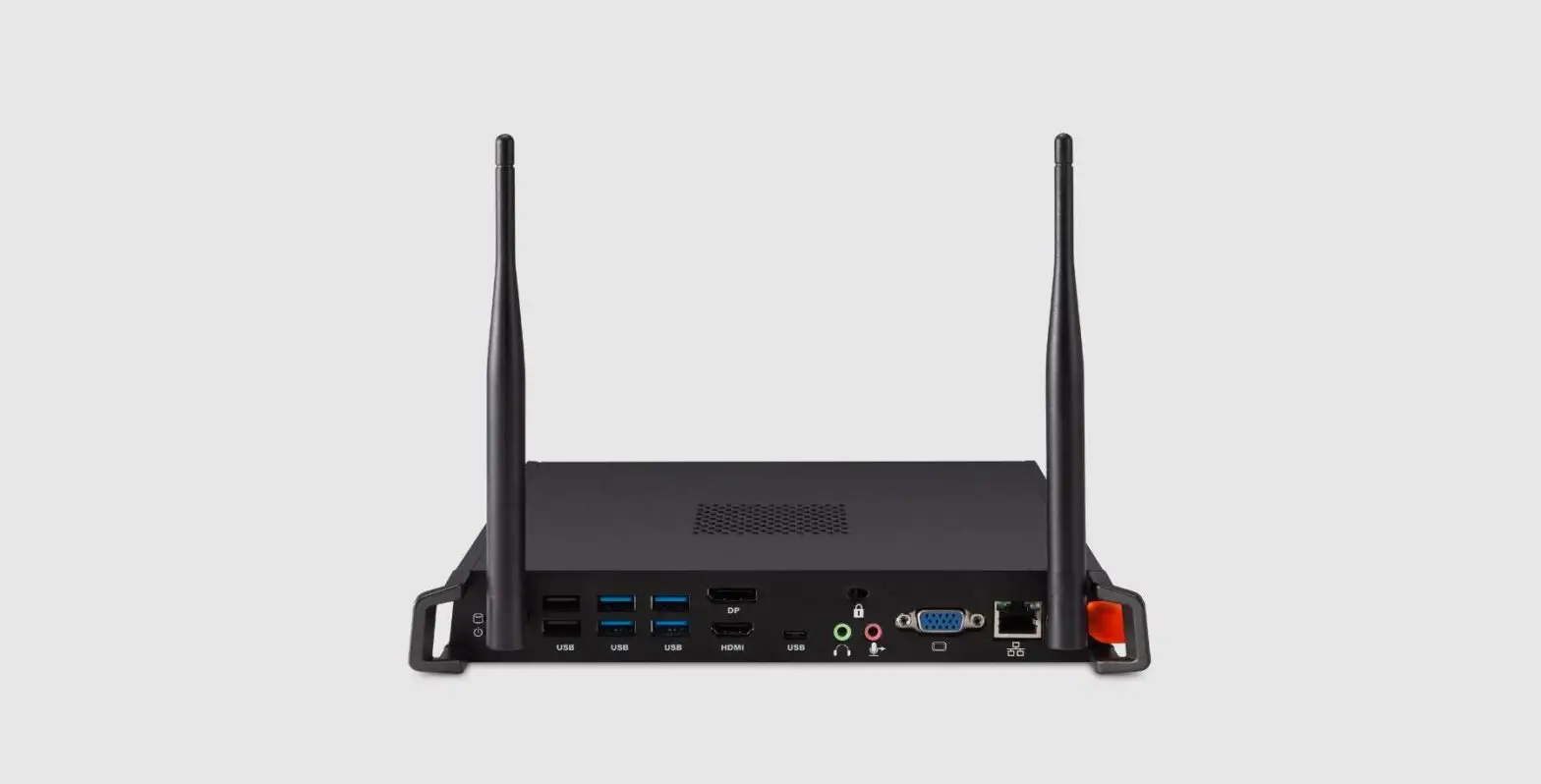
The VPC-A31-O1 is a device that allows users to connect multiple
devices to a single display. It has three USB 3.0 ports, an RJ45
internet connection port, HDMI in and out ports, a line-out port, a
mic-in port, and a reset button. The device also comes with three
Wi-Fi antennas and a screw for installation.
Product Usage Instructions
Initial Setup
To install the VPC-A31-O1:
- Connect the device to your display using an HDMI cable.
- Connect the device to the internet using the RJ45 port.
- Connect any USB devices to the USB ports on the device.
Making Connections
The VPC-A31-O1 has the following connection options:
- Network Connection: Connect the device to the
internet using the RJ45 port. - USB Connection: Connect any USB devices to the
USB ports on the device.
Using the Device
To use the VPC-A31-O1:
- Select an input source by pressing the corresponding button on
the device (IFP Series, CDE Series, or IFPG1 Series). - If using the HDMI input, connect it to a PC or other device
with HDMI output. - If using the line-out port, connect it to headphones or
speakers. - If using the mic-in port, connect a microphone.
Appendix
For more information on the VPC-A31-O1, refer to the
specifications and regulatory information in the appendix of the
user manual.
VPC-A31-O1
User Guide
IMPORTANT: Please read this User Guide to obtain important information on installing and using your product in a safe manner, as well as registering your product for future service. Warranty information contained in this User Guide will describe your limited coverage from ViewSonic® Corporation, which is also found on our web site at
http://www.viewsonic.com in English, or in specific languages using the Regional selection box of our website.
Model No. VS19699 P/N: VPC-A31-O1
Thank you for choosing ViewSonic®
As a world-leading provider of visual solutions, ViewSonic® is dedicated to exceeding the world’s expectations for technological evolution, innovation, and simplicity. At ViewSonic®, we believe that our products have the potential to make a positive impact in the world, and we are confident that the ViewSonic® product you have chosen will serve you well.
Once again, thank you for choosing ViewSonic®!
2
Contents
Introduction ………………………………………………………. 4
Package Contents ………………………………………………………………………………………4 Product Overview ………………………………………………………………………………………5
Initial Setup……………………………………………………….. 6
Installing the VPC-A31-O1 …………………………………………………………………………..6
Making Connections……………………………………………. 7
Network Connection…………………………………………………………………………………..7 USB Connection …………………………………………………………………………………………7
Using the Device…………………………………………………. 8
Selecting an Input Source ……………………………………………………………………………8 IFP Series ………………………………………………………………………………………………….. 8 CDE Series…………………………………………………………………………………………………. 9 IFPG1 Series………………………………………………………………………………………………. 9
Appendix…………………………………………………………. 10
Specifications…………………………………………………………………………………………..10
Regulatory and Service Information …………………….. 12
Compliance Information……………………………………………………………………………12 FCC Compliance Statement……………………………………………………………………….. 12 CE Conformity for European Countries ……………………………………………………….. 13 Para su uso en México………………………………………………………………………………. 13 Declaration of RoHS2 Compliance………………………………………………………………. 14 Indian Restriction of Hazardous Substances ………………………………………………… 15 Product Disposal at End of Product Life ………………………………………………………. 15
Copyright Information ………………………………………………………………………………16 Customer Service …………………………………………………………………………………….. 17
3
Introduction
Package Contents
VPC-A31-O1 (with screw x 2)
Antenna x 3
Quick Start Guide
NOTE:If anything is missing or damaged, please contact your local reseller for more information.
4
Product Overview
1
2 345
6
78 9
10 11 12
Number 1
2
3 4 5 6
7
8 9 10
Item Antenna
RJ45 USB 1 USB 2 USB 3
Antenna Antenna
11
Status LED
12
Power LED
13
HDMI IN
14
HDMI OUT
15
16
LINE-OUT
17
MIC-IN
18
RESET
13
14 15 16 17 18
Description
Wi-Fi antenna interface Standard RJ45 (10M/100M/1G) internet connection port
NOTE: This network port is only used for PC. USB 3.0 port USB 3.0 port USB 3.0 port Handle
Security lock
2.4G antenna interface Wi-Fi antenna interface Power button Status indicator light (Green)
Mode Standby
On
Description Indicator light is off Green indicator light is always on
Power indicator light (Red)
Mode Standby
On
Description Indicator light is off Red indicator light is flashing
HDMI input. Connect to a PC or other device with HDMI output. Extend content out to another display device.
USB Type C input (Data only; 5V/0.9A charging)
Audio out for connected headphones or speakers. Microphone connection Reset button
5
Initial Setup
Installing the VPC-A31-O1
1. Remove the slot-in PC cover of the display.
2. Using the handle of the VPC-A31-O1, carefully insert it into the PC slot of the display.
3. Secure the VPC-A31-O1 to the display with the two (2) included screws. NOTE:Please note that the three (3) antennas must be installed on the VPCA31-O1. 6
Making Connections
Network Connection
To connect to the Internet or a network, connect one end of a RJ45 cable to the RJ45 port of the VPC-A31-O1, then connect the other end to your network.
USB Connection
USB peripherals such as keyboards, mice, storage devices, etc. can be connected to the VPC-A31-O1’s USB 1, USB 2, or USB 3 port.
7
Using the Device
Selecting an Input Source
IFP Series
To select an input source: 1. Press INPUT/ on the remote control, press the setting button on the front
panel, or press the Settings icon from the toolbar to display the Input Settings menu. 2. Press /// on the remote control to select the PC source. 3. Press OK/ENTER on the remote control, or touch the input source directly. 4. Press EPG/BACK/ on the remote control, or touch a blank area outside of the menu to exit. NOTE:The above image is for reference only and is subject to change without
notice.
8
CDE Series
VGA Custom
To select an input source: 1. Press INPUT/ on the remote control. 2. Press / on the remote control to select the PC source. 3. Press OK/ENTER on the remote control. 4. Press EPG/BACK/ on the remote control to exit.
NOTE:The above image is for reference only and is subject to change without notice.
IFPG1 Series To select an input source: 1. Press INPUT/ on the front panel. 2. In the OSD Menu, touch INPUT. 3. Touch the PC input source directly. 4. Touch a blank area outside of the menu to exit.
NOTE:The above image is for reference only and is subject to change without notice.
9
Appendix
Specifications
Category Core
Graphic Memory
I/O
Physical
Operating Conditions Storage Conditions
Power
Item
CPU Chipset
Memory
Ports
Dimensions (mm) Dimensions (in.)
Weight (kg) Weight (lbs.)
Altitude Humidity Temperature Altitude Humidity Temperature Voltage Consumption
Specifications
MediaTek MT8195
GPU: Mali G57 MC5 NPU: 4.8Tops Slot type: LP-DDR4x Size: 8GB 1 x HDMI IN (v. 2.0, 4K@60Hz)1 1 x HDMI OUT (v. 2.0, 4K@60Hz)1 1 x RJ45 (LAN) 3 x USB 3.0 Type A 1 x USB 3.0 Type C (Data only, no PD support, 5V/900mA) 1 x Analog audio-in(3.5 mm, mic-in) 1 x Analog audio-out (3.5 mm) 3 x Antenna 200 x 118 x 30 mm 7.87″ x 4.65″ x 1.18″ 0.75 kg 1.65 lbs. < 5000 m 10% ~ 90% (non-condensing) 0°C ~ 40°C (32°F ~ 104°F) < 5000 m 10% ~ 90% (non-condensing) -20°C ~ 60°C (-4°F ~ 140°F) 12~19V DC 35W
¹ Does not support CEC.
10
Category Wi-Fi Module
Item
Form Factor
Frequency Range and Output Power (Max.)
Specifications
Wi-Fi 6 (IEEE 802.11 a/b/g/n/ac/ax WiFi 2T/2R+) Bluetooth 5.2 (V2.1/4.2/5.2 USB2.0/3.0 Module) Typical RF Output Power at each RF chain, at a room temperature of 25°C (77°F)
2.4G · 14±2dBm VHT20 at MCS0~7 · 13±2dBm VHT20 at MCS8~9 · 14±2dBm VHT40 at MCS0~7
· 13±2dBm VHT40 at MCS8~9
5G · 14±2dBm VHT20 at MCS0~7 · 13±2dBm VHT20 at MCS8~9 · 14±2dBm VHT40 at MCS0~7 · 13±2dBm VHT40 at MCS8~9 · 13±2dBm VHT80 at MCS0~9
11
Regulatory and Service Information
Compliance Information
This section addresses all connected requirements and statements regarding regulations. Confirmed corresponding applications shall refer to nameplate labels and relevant markings on the unit.
FCC Compliance Statement This device complies with part 15 of FCC Rules. Operation is subject to the following two conditions: (1) this device may not cause harmful interference, and (2) this device must accept any interference received, including interference that may cause undesired operation. This equipment has been tested and found to comply with the limits for a Class B digital device, pursuant to part 15 of the FCC Rules.
These limits are designed to provide reasonable protection against harmful interference in a residential installation. This equipment generates, uses, and can radiate radio frequency energy, and if not installed and used in accordance with the instructions, may cause harmful interference to radio communications. However, there is no guarantee that interference will not occur in a particular installation. If this equipment does cause harmful interference to radio or television reception, which can be determined by turning the equipment off and on, the user is encouraged to try to correct the interference by one or more of the following measures:
· Reorient or relocate the receiving antenna. · Increase the separation between the equipment and receiver. · Connect the equipment into an outlet on a circuit different from that to which
the receiver is connected. · Consult the dealer or an experienced radio/TV technician for help.
Warning: You are cautioned that changes or modifications not expressly approved by the party responsible for compliance could void your authority to operate the equipment.
Industry Canada Statement FCC ID: GSS-VS19699 IC ID: 4280A-VS19699 CAN ICES-003(B) / NMB-003(B)
12
CE Conformity for European Countries The device complies with the EMC Directive 2014/30/EU, Low Voltage Directive 2014/35/EU and Radio Equipment Directive 2014/53/EU.
The following information is only for EU-member states: The mark shown to the right is in compliance with the Waste Electrical and Electronic Equipment Directive 2012/19/EU (WEEE). The mark indicates the requirement NOT to dispose of the equipment as unsorted municipal waste, but use the return and collection systems according to local law. Para su uso en México “La operación de este equipo está sujeta a las siguientes dos condiciones: (1) es posible que este equipo dispositivo no cause interferencia perjudicial y (2) este equipo o dispositivo debe aceptar cualquier interferencia, incluyendo la que pueda causar su operación no deseada”. “Este equipo ha sido diseñado para operar con antenas tipo monopolo con ganancia de 5 dBi para 2.4 GHz y 5 GHz WLAN. El uso con este equipo de antenas que tengan una ganancia mayor que 5 dBi quedan prohibidas. La antena es única y la impedancia requerida es de 50 ohms”.
13
Declaration of RoHS2 Compliance
This product has been designed and manufactured in compliance with Directive 2011/65/EU of the European Parliament and the Council on restriction of the use of certain hazardous substances in electrical and electronic equipment (RoHS2
Directive) and is deemed to comply with the maximum concentration values issued by the European Technical Adaptation Committee (TAC) as shown below:
Substance
Lead (Pb) Mercury (Hg) Cadmium (Cd) Hexavalent Chromium (Cr6) Polybrominated biphenyls (PBB) Polybrominated diphenyl ethers (PBDE) Bis(2-ethylhexyl) phthalate (DEHP) Butyl benzyl phthalate (BBP) Dibutyl phthalate (DBP) Diisobutyl phthalate (DIBP)
Proposed Maximum Concentration 0.1% 0.1% 0.01% 0.1% 0.1%
0.1%
0.1% 0.1% 0.1% 0.1%
Actual Concentration
< 0.1% < 0.1% < 0.01% < 0.1% < 0.1%
< 0.1%
< 0.1% < 0.1% < 0.1% < 0.1%
Certain components of products as stated above are exempted under the Annex III of the RoHS2 Directives as noted below: · Copper alloy containing up to 4% lead by weight.
· Lead in high melting temperature type solders (i.e. lead-based alloys containing 85% by weight or more lead).
· Electrical and electronic components containing lead in a glass or ceramic other than dielectric ceramic in capacitors, e.g. piezoelectronic devices, or in a glass or ceramic matrix compound.
· Lead in dielectric ceramic in capacitors for a rated voltage of 125V AC or 250V DC or higher.
14
Indian Restriction of Hazardous Substances Restriction on Hazardous Substances statement (India). This product complies with the “India E-waste Rule 2011” and prohibits use of lead, mercury, hexavalent chromium, polybrominated biphenyls or polybrominated diphenyl ethers in concentrations exceeding 0.1 weight % and 0.01 weight % for cadmium, except for the exemptions set in Schedule 2 of the Rule. Product Disposal at End of Product Life ViewSonic® respects the environment and is committed to working and living green. Thank you for being part of Smarter, Greener Computing. Please visit the ViewSonic® website to learn more. USA & Canada: https://www.viewsonic.com/us/go-green-with-viewsonic Europe: https://www.viewsonic.com/eu/go-green-with-viewsonic Taiwan: https://recycle.epa.gov.tw/
15
Copyright Information
Copyright© ViewSonic® Corporation, 2023. All rights reserved. Macintosh and Power Macintosh are registered trademarks of Apple Inc. Microsoft, Windows, and the Windows logo are registered trademarks of Microsoft Corporation in the United States and other countries. ViewSonic®, the three birds logo, OnView, ViewMatch, and ViewMeter are registered trademarks of ViewSonic® Corporation. VESA is a registered trademark of the Video Electronics Standards Association. DPMS, DisplayPort, and DDC are trademarks of VESA. Disclaimer: ViewSonic® Corporation shall not be liable for technical or editorial errors or omissions contained herein; nor for incidental or consequential damages resulting from furnishing this material, or the performance or use of this product. In the interest of continuing product improvement, ViewSonic® Corporation reserves the right to change product specifications without notice. Information in this document may change without notice. No part of this document may be copied, reproduced, or transmitted by any means, for any purpose without prior written permission from ViewSonic® Corporation.
VPC-A31-O1_UG_ENG_1a_20230524 16
Customer Service
For technical support or product service, see the table below or contact your reseller.
NOTE:You will need the product’s serial number.
Country/ Region
Website
Country/ Region
Website
Asia Pacific & Africa
Australia (China)
www.viewsonic.com/au/ www.viewsonic.com.cn
Bangladesh ()
www.viewsonic.com/bd/ www.viewsonic.com/hk/
Hong Kong (English)
www.viewsonic.com/hk-en/
India
www.viewsonic.com/in/
Indonesia (Japan)
www.viewsonic.com/id/ www.viewsonic.com/jp/
Israel Korea
www.viewsonic.com/il/ www.viewsonic.com/kr/
Malaysia
www.viewsonic.com/my/
Middle East
www.viewsonic.com/me/
Myanmar
www.viewsonic.com/mm/
Nepal
www.viewsonic.com/np/
New Zealand
www.viewsonic.com/nz/
Pakistan
www.viewsonic.com/pk/
Philippines (Taiwan)
www.viewsonic.com/ph/ www.viewsonic.com/tw/
Singapore
www.viewsonic.com/sg/ www.viewsonic.com/th/
Vit Nam
www.viewsonic.com/vn/
South Africa & Mauritius www.viewsonic.com/za/
Americas
United States
www.viewsonic.com/us
Canada
www.viewsonic.com/us
Latin America
www.viewsonic.com/la
Europe
Europe
www.viewsonic.com/eu/
France
www.viewsonic.com/fr/
Deutschland
www.viewsonic.com/de/
www.viewsonic.com/kz/
www.viewsonic.com/ru/
España
www.viewsonic.com/es/
Türkiye
www.viewsonic.com/tr/
www.viewsonic.com/ua/
United Kingdom
www.viewsonic.com/uk/
17
References
 ViewSonic
 优派中国 ViewSonic China | ViewBoard, LED LCD 液晶显示器, 投影机, 数位看板, 互动白板
-
ViewSonic Australia | ViewBoards, Monitors, and Visual Solutions
-
ViewSonic Bangladesh | ViewBoards, Monitors, and Visual Solutions
-
ViewSonic Germany | ViewBoards, Monitors, and Visual Solutions
-
ViewSonic Spain | ViewBoards, Monitors, and Visual Solutions
-
ViewSonic Europe | ViewBoards, Monitors, and Visual Solutions
-
Solution ViewBoard, Écrans PC, Vidéoprojecteurs | ViewSonic
-
ViewSonic Hong Kong | ViewBoards, Monitors, and Visual Solutions
-
ViewSonic Hong Kong | ViewBoards, Monitors, and Visual Solutions
-
ViewSonic Indonesia | ViewBoards, Monitors, and Visual Solutions
-
ViewSonic Israel | ViewBoards, Monitors, and Visual Solutions
-
ViewSonic India | Gaming Monitors, Projectors & ViewBoards
-
ビューソニックジャパン
-
뷰소닉 코리아 | 프로젝터, LCD 모니터, 디지털사이니지, 전자칠판등의 미국디스플레이 전문 기업
-
ViewSonic Kazakhstan | ViewBoards, Monitors, and Visual Solutions
-
ViewSonic
-
ViewSonic Middle East | ViewBoards, Monitors, and Visual Solutions
-
ViewSonic Myanmar | ViewBoards, Monitors, and Visual Solutions
-
Projectors, Monitors & Visual Solutions | ViewSonic MY
-
ViewSonic Nepal | ViewBoards, Monitors, and Visual Solutions
-
ViewSonic New Zealand | ViewBoards, Monitors, and Visual Solutions
-
ViewSonic Philippines | ViewBoards, Monitors, and Visual Solutions
-
ViewSonic Pakistan | ViewBoards, Monitors, and Visual Solutions
-
ViewSonic Russia | ViewBoards, Monitors, and Visual Solutions
-
Projector, 4K Monitor & Digital Signage | ViewSonic SG
-
ViewSonic Thailand | ViewBoards, Monitors, and Visual Solutions
-
ViewSonic Turkey | ViewBoards, Monitors, and Visual Solutions
-
ViewSonic Taiwan | ViewBoards, Monitors, and Visual Solutions
-
ViewSonic Ukraine | ViewBoards, Monitors, and Visual Solutions
-
ViewSonic UK | ViewBoards, Monitors, and Visual Solutions
-
ViewSonic
-
Trang chủ - ViewSonic Việt Nam | Website Chính Thức
-
ViewSonic South Africa | ViewBoards, Monitors, and Visual Solutions
 資æºå›žæ”¶ç¶²(資æºå›žæ”¶å°ˆç·š:0800-085717您幫我清一清)
 ViewSonic
 优派中国 ViewSonic China | ViewBoard, LED LCD 液晶显示器, 投影机, 数位看板, 互动白板
 資æºå›žæ”¶ç¶²(資æºå›žæ”¶å°ˆç·š:0800-085717您幫我清一清)