 COMP
COMP
SCIENTIFIC CALCULATOR
MANUAL
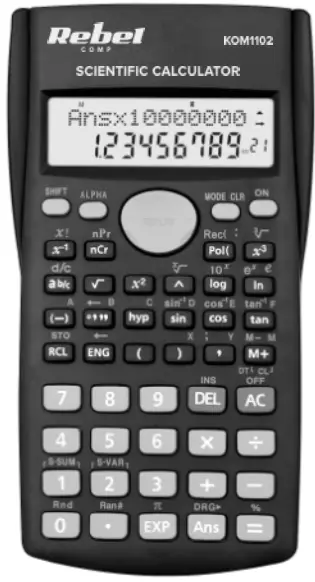 model: KOM1102
KOM1102 Scientific Calculator
Fraction calculations
Values are displayed in decimal format automatically whenever the total number of digits of a fractional value (integer + numerator + denominator) exceeds 10.
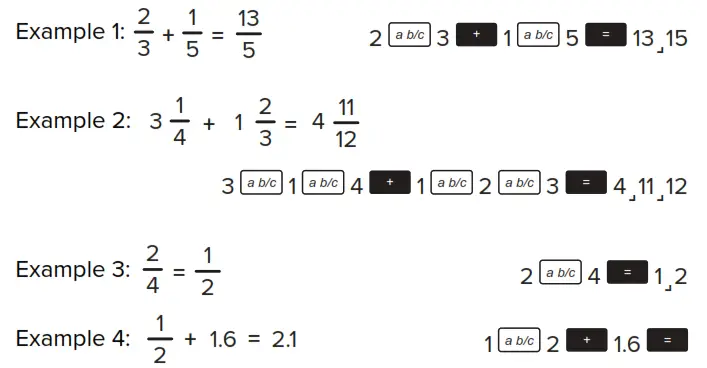
Results of calculations that mix fraction and decimal values are always decimal.
Decimal to fraction conversion
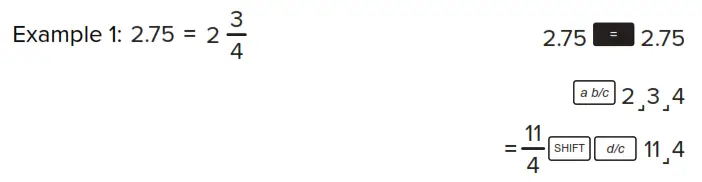
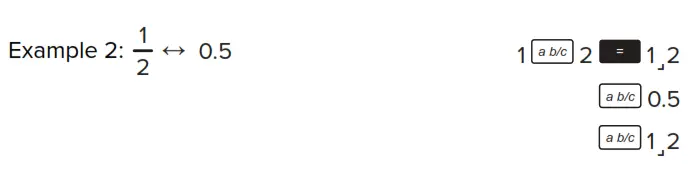
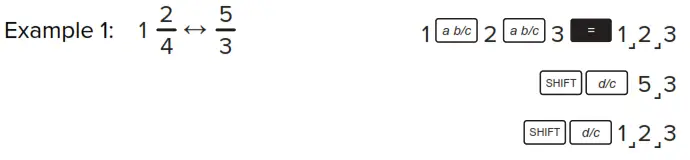
Mixed to improper fraction conversion
Degrees and minutes
You can perform sexagesimal calculations using degrees (hours), minutes, and seconds, and convert between sexagesimal and decimal values.
Example 1: To convert the decimal value 2.258 to a sexagesimal value and then back to a decimal value:
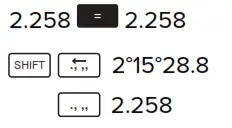
Example 2:
To perform the following calculation: 12°34’56’’ X 3.45:

FIX, SCI, RND functions
To change the settings for the number of decimal places, the number of significant digits, or the exponential display format, press the MODE key a number of times until you reach the setup screen shown below.
- Press the 1 button to select a number of decimal places.
- Press the 2 buttons to select a number of significant digits.
- Press the 3 buttons to select an exponential display format.
Memory function
To clear independent memory, input 0, SHIFT, STO, M, M+.
Variables
- There are nine variables (A, F, M, X, Y) that can be used to store data, constants, results, and other values.
- Perform the following key operation to delete data assigned to a particular variable: 0, SHIFT, STO, A. This operation will delete data assigned to A.
Scientific functions
Trigonometric functions
- To change the default angle unit, press the MODE button twice. Select the unit with 1, 2, or 3 buttons.
Hyperbolic
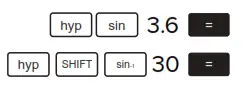 |
Logarithms
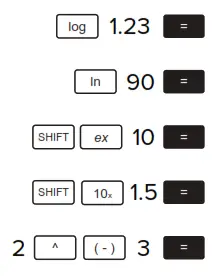 |
Square roots, powers
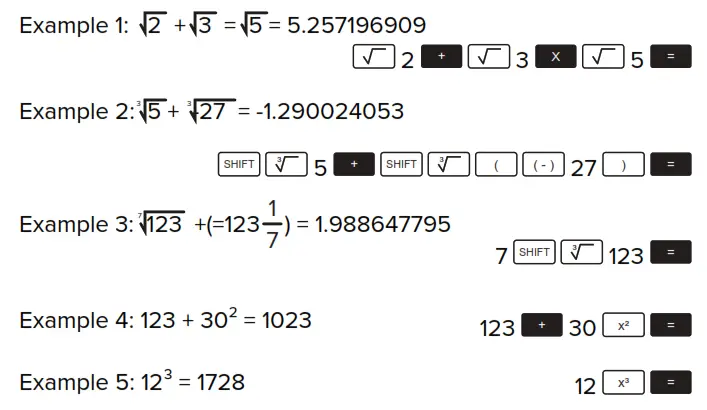
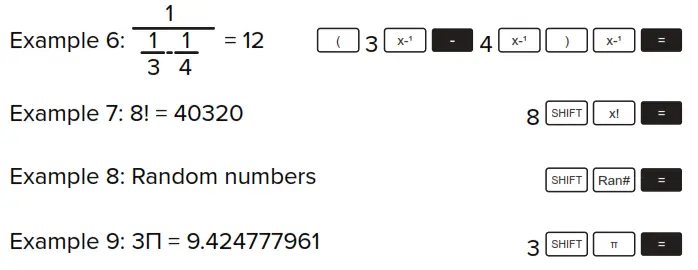
Example 10: To determine how many different 4-digit values can be produced using the numbers 10 through 7.
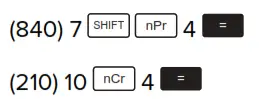
Angle unit conversion
- Press the
 and
and buttons to display the angle unit menu.
 - Press 1, 2, or 3 to select the angle unit.
 and
and buttons to display the angle unit menu.
Coordinate conversion (Pol (x,y) Rec (r, θ))
- Calculation results are automatically assigned to variables E and F.
- To convert polar coordinates (r=2, θ=60°) to rectangular coordinates (x, y):
Coordinate conversion (Pol (x,y) Rec (r, θ))
- Calculation results are automatically assigned to variables E and F.
- To convert polar coordinates (r=2, θ=60°) to rectangular coordinates (x, y):

- To convert rectangular coordinates (1, 3 ) to polar coordinates:

Engineering notation calculations
Example 1: To convert 56,088 meters to kilometers:

Example 2: To convert 0,08125 grams to milligrams:
Statistical calculations
Standard deviation
- Press the
 , then the 2 buttons to go to the standard deviation mode.
 - In the SD Mode and REG Mode, the button operates as the theM+button.
- Input data using the key sequence: <x-data>
- To clear statistical memory:
 (scl),
- Values for n, Σx, Σx2, x-, σn, σn-1 can be recalled with:
 , then the 2 buttons to go to the standard deviation mode.
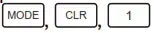 (scl),
| Value | Perform this button operation |
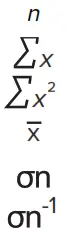 | SHIFT S-SUM 1 = |
| SHIFT S-SUM 2 = | |
| SHIFT S-SUM 3 = | |
| SHIFT S-VAR 1 = | |
| SHIFT S-VAR 2 = | |
| SHIFT S-VAR 3 = |
- Each time you press
 the button to register an input, the number of data input up to that point is indicated on the display (n value).
 the button to register an input, the number of data input up to that point is indicated on the display (n value).
Regression calculations
- Press the button, then the 3 buttons to go to the regression calculation.
- In the SD Mode and REG Mode, the M+ button operates as the button.
- Input data using the key sequence: <x-data> ‘ <y-data>
- Values of regression calculations may depend on input values and can be recalled with combinations below:
| Recalled value | Perform this button operation |
 | SHIFT S-SUM 1 |
| SHIFT S-SUM 2 | |
| SHIFT S-SUM 3 | |
| SHIFT S-SUM ► 1 | |
| SHIFT S-SUM ► 2 | |
| SHIFT S-SUM ► 3 | |
| SHIFT S-VAR 1 | |
| SHIFT S-VAR 2 | |
| SHIFT S-VAR 3 | |
| SHIFT S-VAR ► 1 | |
| SHIFT S-VAR ► 2 | |
| SHIFT S-VAR ► 3 | |
| Regression coefficient A | SHIFT S-VAR ►► 1 |
| Regression coefficient B | SHIFT S-VAR ►► 2 |
| Regression calculations other than quadratic regression | |
| Correlation coefficient r | SHIFT S-VAR ►► 3 |
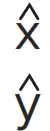 | SHIFT S-VAR ►►► 1 |
| SHIFT S-VAR ►►► 2 | |
- The following shows the key operation to recall results in the case of quadratic regression.
| Recalled value | Perform this button operation |
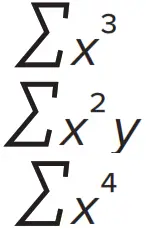 | SHIFT S-SUM ►► 1 |
| SHIFT S-SUM ►► 2 | |
| SHIFT S-SUM ►► 3 | |
| SHIFT S-SUM ►► 3 SHIFT S-VAR ►► 3 | |
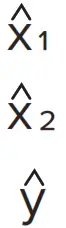 | SHIFT S-VAR ►►► 1 |
| SHIFT S-VAR ►►► 2 | |
| SHIFT S-VAR ►►► 3 |
The values above can be used inside of expressions the same way you use variables.
Linear regression
- The regression formula: y=A+Bx
Logarithmic, exponential, power, and inverse regression
- Use the same key operations as linear regression to recall results for these types of regression.
- The following shows the regression formulas for each type of regression.
- Logarithmic regression: y=A+B*lnx
- Exponential regression: y=A*eB*x(ln y=lnA+B)
- Power regression: y=A*xB(ln y=lnA+B ln)
- Inverse regression: y=A+B*1x
Quadratic regression
- Quadratic regression formula: y=A + Bx + Cx²
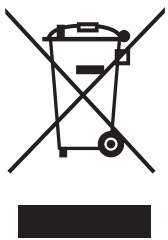 Correct Disposal of This Product
(Waste Electrical & Electronic Equipment)
(Applicable in the European Union and other European countries with separate collection systems) This marking shown on the product or its literature indicates that it should not be disposed of with other household wastes at the end of its working life. To prevent possible harm to the environment or human health from uncontrolled waste disposal, please separate this from other types of waste and recycle it responsibly to promote the sustainable reuse of material resources. Household users should contact either the retailer where they purchased this product, or their local government office, for details of where and how they can take this item for environmentally safe recycling. Business users should contact their suppliers and check the terms and conditions of the purchase contract. This product should not be mixed with other commercial wastes for disposal. Made in China for LECHPOL ELECTRONICS Sp. z o.o. Sp.k., ul. Garwolińska 1, 08-400 Miętne.
 Rebel Electro - Co weekend SuperOkazje