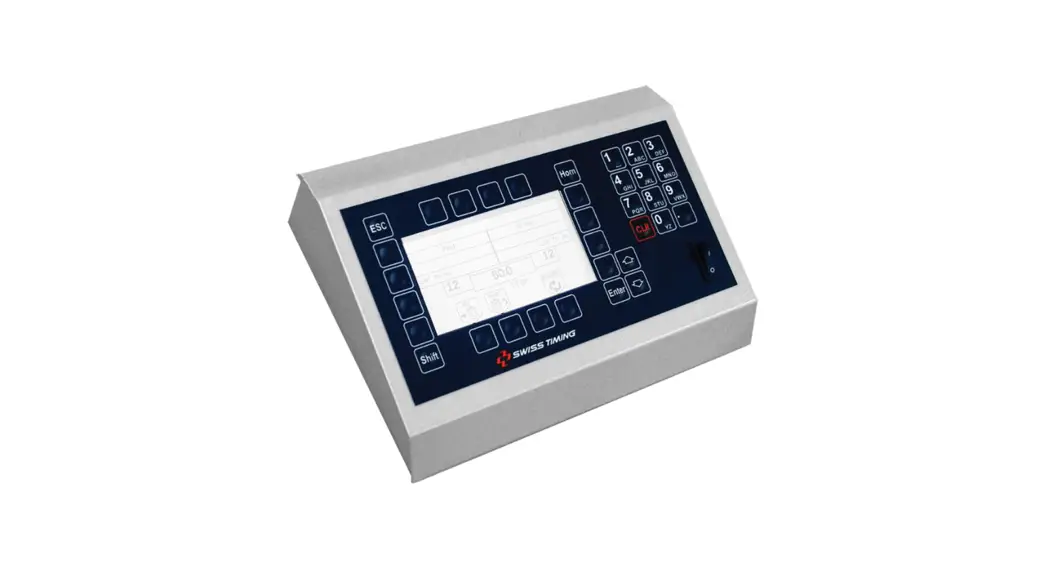
 3412.514.02 VEGA CONSOLE
User Manual

Caution and safety precautions
- Never use any other charger than the supplied or a type approved by Swiss Timing. This could destroy the battery, cause damage to unit, and possible cause personal injury due to fire or/and electrical shock.
- Never bypass a power cord ground lead by breaking off the ground pin, or by using inappropriate extension cords or adapters.
- Never plug a power cord into the AC power source until you have made sure that all installation, cabling and power levels, are proper, and that the applicable procedures in this manual have been followed.
- Protect the equipment against splashing, rain and excessive sun rays.
- Never use the device if it is damaged or insecure.
- Verify the selection of the power distribution.
- Verify that the voltage quoted on the rating plate is the same as your voltage. Connect the appliance only to power sockets with protective earth. The use of incorrect connection voids warranty.
- This program may be modified at any time without prior notification.
- Do not open the case; there is nothing that needs servicing inside it. Nevertheless, if the case must be opened, you must call for some qualified personnel. The power supply cable must be disconnected before opening the case.
- During the transport of all Swiss Timing equipment delivered with a reusable carry case, the said case should be used at all times. This is imperative to limit the damage, such as shocks or vibration that can be caused to the units during transport.
- The same cases should also be used when returning equipment to Swiss Timing for repair. Swiss Timing reserves the right to refuse all guarantees if this condition is not fulfilled.
- If the installation includes a horn, be sure to maintain a sufficient security distance from the public.
Documentation Updates
Swiss Timing SA reserves the right to make improvements in the products described in this documentation at any time without prior notice. Furthermore, Swiss Timing SA reserves the right to revise this documentation in its content at any time and without any obligation to notify any person or organization of such revision.
Disclaimer
The information provided in this documentation has been obtained from sources believed to be reliable, accurate and current. However, Swiss Timing SA makes no representation or warranty, express or implied, with respect, but not limited to, the completeness, accuracy, correctness and actuality of the content of this documentation. Swiss Timing SA specifically disclaims any implied warranty of merchantability, quality and/or fitness for any particular purpose. Swiss Timing SA shall not be liable for errors contained in this documentation or for incidental or consequential damages in connection with the supply, performance or use of this documentation.
Environment This symbol indicates that this product should not be disposed with household waste. It has to be returned to a local authorized collection system. By following this procedure you will contribute to the protection of the environment and human health. The recycling of the materials will help to conserve natural resources.
Copyright
© Swiss Timing SA
All rights reserved.
This documentation may not, as a whole or in part, be copied, translated, reproduced, transmitted or reduced and/or stored to any electronic medium or machine-readable form without the prior written consent of Swiss Timing SA
INTRODUCTION
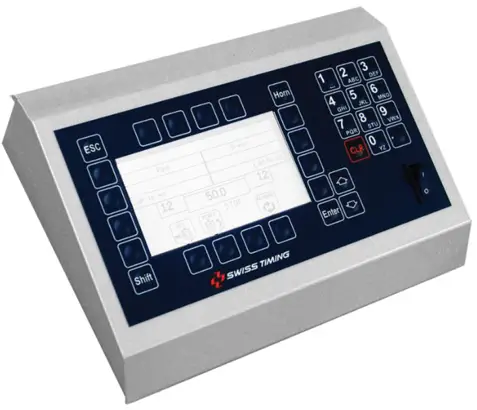
Swiss Timing offers a large selection of scoreboards of the VEGA range, which are suitable for all external sports stadiums. The selection of the scoreboard can be done from one ergonomic console. The keyboard of the console has partially alphanumeric and functional keys, making the use for the operator comfortable. This console can also be used with the SATURN and ORION display boards.
This manual is valid for the version of the software mentioned on the title page. When you switch on, you will see the version on the display.
Some peripheral devices complete the equipment of the VEGA scoreboard, for example:
- Bluetooth wireless transmission
- External Start/Stop for all sports with game time
1.1 Installation
See installation manual 3412.515.
1.2 Set-up
Before you connect the scoreboard and the console to the power supply, please ensure the power and the information cables are installed as per installation manual.
Switch on the console at the rear back.
1.3 Keyboard
The keyboard consists of three types of keys:
- The alphanumeric keys.
- The keys with one function.
- The keys with several functions.
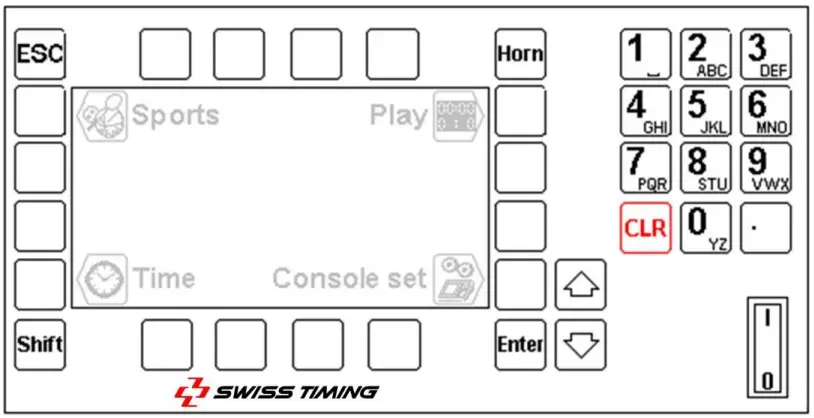
 | Escapes the function or the menu without validating the possible modifications (ESCAPE) |  | Manual horn (scoreboard) |
 | Chooses the second function on the key (Shift + key) |  | Confirms the application or the action. |
 | Moves the cursor up |  | Function key relating to the image shown on its side on the screen |
 | Moves the cursor down |  | Clears the current operation or clears the whole scoreboard when in the main menu. |
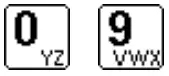 | Alphanumeric keyboard | 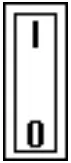 | Switch Start/Stop 0 = Stop I = Start |
When you switch on, the main menu appears. It shows the selected sport, the time and date, as well as the main menus:
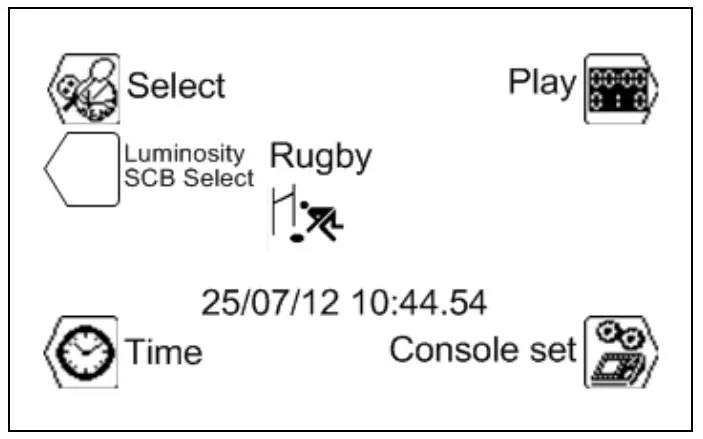
| Console | refer to chapter: 3 |
| Time | refer to chapter: 4 |
| Select | refer to chapter: 5 |
| Play | refer to chapter: 6 |
To choose one of the menus, press one of the keys with the function image. [CONSOLE SET] PARAMETERIZATION OF THE CONSOLE
In this menu you can introduce the different settings of the console. [TIME] DAY TIME
In this menu you can set date and day time. [SELECT] GAME PARAMETERS
In this menu you can select and save the different sport settings. [PLAY] MATCH
In this menu you can start a game. [SELECT SCB LUMINOSITY] SET UP OF THE SCB’S LUMINOSITY
In this menu you can set the luminosity of the scoreboard
 [CONSOLE SET] PARAMETERIZATION OF THE CONSOLE
In this menu you can configure the different settings of the console. The top of the screen shows the console’s software version.
3.1 Ext Start/Stop – External Start/Stop
You have the possibility to connect an external Start/Stop switch to the socket situated at the back of the console. Press the function key depending on the application: external Start/Stop switched on.
 external Start/Stop switched off (in this mode, a possible external Start/Stop will only drive the ball possession time (shot clock).
3.2 Test
This function sends a test program to the scoreboard and appears on the display of the console. Press the  key to exit the program.
3.3 Advance
This menu allows the management of the language and the Bluetooth link.
3.4 Languages
Select menu language (English, Français, Italiano) pressing the function key.
3.5 Bluetooth configuration
The “BT” key allows you to select the Bluetooth scoreboards that have to be wireless connected to this console. Do not use this function if your console is not equipped with the internal bi-directional Bluetooth option.
If you want to change the Bluetooth scoreboards connected to this console:
- If the console uses an external Bluetooth module, connect it directly to the console without any intermediate cable. If the Bluetooth is internal to the console, skip to the next point.
- Power ON all the requested scoreboards.
- On the console, press the “Yes” key.
NEVER SWITCH OFF THE CONSOLE DURING THE CONFIGURATION ! - Wait until question is displayed.
- The name of the scoreboard is displayed. Answer “Yes” if the scoreboard found has to be connected to the console, answer “No” to disconnect this scoreboard or “V” for not changing the configuration of this scoreboard.
- Repeat the previous points for each scoreboard found.
- Then the software automatically goes back to the “Advance” menu. Press the “ESC” key twice to go back to the main menu.
- The day time must be displayed on the scoreboard (if not, wait about a minute for Bluetooth connection).
Note: only Bluetooth scoreboard with the same password can be configured.
3.6  Name – Teams names, Players numbers, Players names
This menu allows the management of the teams’ names as well as the players’ names and numbers.
3.6.1 Sending the teams names
If the “Send Team” box is ticked (), the teams’ names will be sent when entering the match (the
message “Wait for data transmission” will appear on the screen during a few seconds).
Tick this box only if you have the optional module “Team Name”.
3.6.2 Sending the players’ names
If the “Send Player” box is ticked (), the players’ names will be sent when entering the match (the
message “Wait for data transmission” will appear on the screen during a few seconds).
Tick this box only if you have the optional modules “Players Names”.
3.6.3 Instant sending of the names
Press key to instantly send the teams and players’ names to the board. During the sending, the text “Sending…” is displayed on the bottom of the screen. Press the key to stop the transmission.
3.6.4 Introduction of players names and numbers
Using the “Modify Visitors” and “Modify Home” keys, you can introduce the team name as well as players’ names and numbers, for the visitors and local team.
In this screen:
- The “Team” key allows the edition of the team’s name*.
- The
 and
and  keys allow to choose one of the players to be modified (N = 1 to 16).
 - When you first press on the “N Num Name” key, you can modify the player’s number.
- After confirmation of the player’s number, if you press a second time on the “N Num Name” key, you will be able to edit the player’s name*. After validation, the key automatically goes to the next player (N = 1 to 16).
- It is possible to have up to 16 players per team.
*: The and keys allow to move the cursor.
The key allows to erase the letter preceding the cursor.
The and
and  keys allow to introduce a letter or a number, the same way as for a mobile phone (by pressing successively on the same key).
The key allows to validate the modifications.
The key allows to cancel the modifications.
 and
and  keys allow to introduce a letter or a number, the same way as for a mobile phone (by pressing successively on the same key).
3.7  Update the software
The VEGA line allows the download of a new software version in case of rule changes in the different sports. Follow the procedure displayed on the screen.
Operating of the console:
- Connect the console to the serial port RS232 of the computer (Cable Sub-D 9 poles male-female pin to pin, null modem [article STSA No. 9051.1307]).
- Switch on the console.
- Select menu [Console set].
- Press function key
 . The screen shows the Swiss Timing logo, as well as the actual software version installed.
 - Press function key
 and follow the instructions:
 and follow the instructions:
Firmware upload
Actual version: x.xx
- Connect serial cable
- Press Program Flash on PC
- When completed, turn power OFF and ON
Operating of the computer
- Load the Flash Simple program (available on our internet site) and start.
- Press on the “Flash” menu then “Setting” and introduce following values (only for the first use):o H8S/2134F for Device name
o Direct Connection for Interface name
o Port com: X (according to your computer’s serial port)
o Baud rate 9600
o USER mode
Press OK to confirm the parameters. - Press on the “Browse” button and download the software (Ex. OMEGA455.fpr).
- Press on the “FLASH program” button and wait for the loading of the software to be finished; the message “The device was successfully programmed” must appear. This operation lasts for about 4 minutes.
- When loading is finished, switch the console off, then turn it on again, and check the update version (Ex. Ver 5.00).
- Press the Select button.
- Press on “All def. & Save” button and validate by pressing Yes in order to initialize the console with the factory values.
This last operation will erase your specific parameters, but it is essential to keep the new software version in correct working order.
 [TIME] DAY TIME
This menu allows you to introduce the date and day time. Only the day time can be transmitted to a VEGA scoreboard. Select the needed function key:
 | For the selection of the date |
 | For the selection of the month |
 | For the selection of the year |
 | For the selection of the hours |
 | For the selection of the minutes |
To modify the value, use the alphanumeric keyboard or the keys (plus 1) and (minus 1), then press the key to confirm the entry. To go back to the initial value, press on the key instead of the key. Repeat this procedure until all the values match your requirements.
The synchronization of the clock must be done at 0 second by pressing the key in the selection menu.
The display of the day time is automatically done when in the main menu of the console.
- An internal battery allows keeping the exact time and dating during 30 days after the last switch off.
- The parameters of the console and sports always remain in the memory (not limited in time).
[SELECT] GAME PARAMETERS
The selection and back up of the various games parameters (duration of the period, horn, direction of clock counting) is done in this menu.
Choose the required sport with  and
and  keys.
keys.
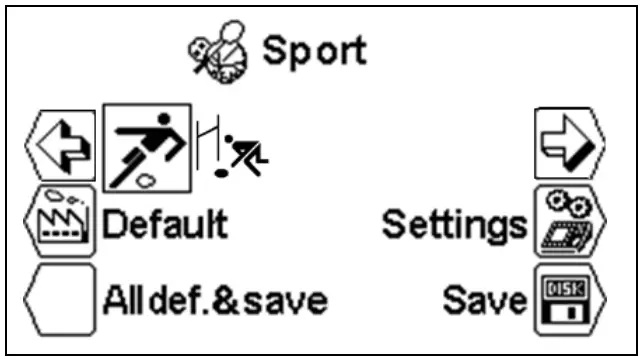
- According to the selected sport, some parameters cannot be programmed.
- Each sport memorizes its specific parameters.
5.1 [Settings] Choose the common settings
When you have selected the desired sport, press on the key [Settings] to change the parameters. Use and keys to see all the parameters. [Number period]
Number of match period. The actual number of periods is displayed on the right followed by the number of extra periods [EP for Extra Period]. [Setting period & Pause]
Modification of the game times of the several periods, the number of extra periods and duration of times out. [Period]
Use the keys (plus 1) and (minus 1) to read the values of the several periods. [Min. xx] Value of the several periods in minutes. [Sec. xx] Value of the several periods in seconds. [Extra Period x] Selection of the number of extra periods. [Pause] Introduction of the value of the two possible times out, following the same procedure as for the duration of the periods.
The AUTO box allows to choose when the countdown of the pause must start: At the end of the period (in basketball for example). At the moment of the  key is pressed (when the last player goes off the ice in hockey for example).
 [Count up]
Changes the way of counting from ascending [Count up] into descending  [Count down]. [Visual 1/10] The tenth of a second is displayed during the last minute of the descending mode. [Stop Time clock] The play time is stopped at the end of the period. [Total time] The play time continues at the end of the period. The time of the first period is added to the time of the second period.
The time of the first extra period starts at 0.00
The time of the first extra period is added to the time of the second extra period. All the periods start at 0.00. [Setup Time Out]
Selection menu of the time outs parameters. [Time Out on Clock]
The time out is displayed instead of the game time. The time out is displayed on the extra module. [Number Time out] Number of authorized times out (per period or per match) [Sec. Time Out] Duration of the time out in seconds. [Setting Horn]
Selection and duration of the horn at the end of a period, pause and timeout.
| [Period: x] | Duration in seconds of the horn (on the board) at the end of each period (introduce 0 if no horn is wished at the end of each period). |
| [10 Sec] | If the box is ticked ( ), the horn will be activated for one second, 10 seconds before the end of each timeout. |
| [Pause & Timeout: x] | Duration in seconds of the horn (on the board) at the end of each pause and each timeout. |
| [Pause] | If the box is ticked ( ), the horn will be activated at the end of each pause. |
| [Timeout] | If the box is ticked ( ), the horn will be activated at the end of each timeout. |
5.2 [Settings] Choose the settings for RUGBY
When you have selected the desired sport, press on the key [Settings] to change the parameters. Use and keys to see all the parameters. [Key +2 +3]
Displays the keys and in the menu [Play]. These keys allow increasing the score of 2 or 3 points in one function only.[Shot clock]
Selection menu of the parameters of time allowed for penalty and try.
| [Shot clock] | If the box is ticked ( ), the function of time allowed will be activated. |
| [Value Sec] | Duration of time allowed for penalty. |
| [Value Sec] | Duration of time allowed for try. |
[Light send]
This function is used to send only the main information on serial line (game time, scores, period, stop). [light send] If the box is ticked ( ), the function of data light sending will be activated. [Rugby 7 mode]
This function is used to add an extra period.
5.3  [Save] Save the sport settings
The last modifications of parameters in the several sports are saved in the console. A confirmation message is displayed before the backup.
5.4  [Default] Change the standard settings for a sport
Downloads the standard settings for the selected sport. This operation does not save those values in the memory. If you wish to use these parameters for the next competitions, you must save the values as described in the above chapter.
5.5 [All Def & Save] Reset the standard settings for all sports
Downloads all the parameters of each sport and saves them in the memory. This function downloads the standard settings of Swiss Timing (see chapter Standard Settings).
This function must be done after a firmware upload.
 [PLAY] MATCH
This menu allows you to start a game. You must first select the sport you want in the menu [Select].
Arrange the keys and of the sport you want and press . The VEGA software is now activated in the main menu and the image of the selected sport is displayed in the middle of the screen.
Press on key  [Play] to start the game. The software first asks you if you wish to continue the previous game or start a new one:
 Download previous game?
Answers to start a new game.
 to continue the previous game.
When the switch start/stop is on start:Move switch in off position !
To continue put the switch start/stop on STOP.
Depending on the chosen settings, the console shows the values of the first period.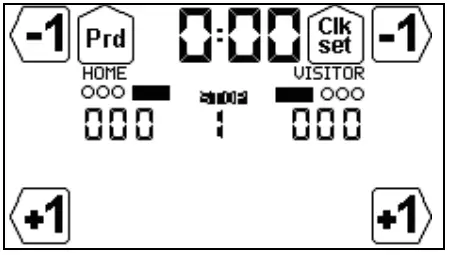 6.1 Sports with game time
The display is split in three parts:
A. The general display with regulation of Game Time:
| Display | Description |
 | Game Time |
 | Game Time is stopped |
 | Current period |
| Modify the period |
 | Modifying the Game Time during the game |
B. Display of the home team (HOME or a name introduced in the console’s settings).
C. Display of the visitors team (VISITOR or a name introduced in the console’s settings).
| Visitors | Visitors | Description | Home | Visitors | Description |
| Scores | 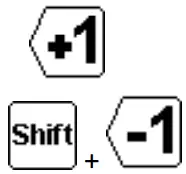 | 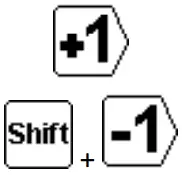 | Score +1 | |
| Score -1 |
6.1.1 Start the period
To start the period, put the START/STOP switch on START. The current time starts to count up or down depending on the game settings.
- In START position, the display shows
Turn the switch to STOP, to stop the game time.
- In STOP position, the display shows
 .
.
6.1.2 Modification of the scores
With the help of the function keys you can change the scores.
- Press one of the keys


 to increase the score.
 - The keys and are visible only when the parameter setting
 is active.
 - Press the key
 then
then  (it is the key with functionality changed by ), to reduce the score.
 - The score can also be reduced by pressing then or .


 to increase the score.
 (it is the key
 6.1.3 Modification of the period
The period is not automatically increased at the end of a game in order to be able, if needed, to modify the score or any other setting before starting the next period. To go to the next period or to modify its value:
- Press
 to increase the period by 1.
 - Press the key then to reduce the period by 1.
See also chapter 6.1.7. End of a period
6.1.4 Activation of the time allowed for penalty (RUGBY)
During game time, the 60 seconds allowed for penalty can be activated by pressing on key 60  .
.
To disable this time, press on key then 60 .
6.1.5 Activation of the time allowed for try (RUGBY)
During game time, the 90 seconds allowed for try can be activated by pressing on key 90 .
To disable this time, press on key then 90 .
6.1.6 Modification of game time during a game
When the game time has stopped, the key function becomes active. Now you can modify the current period and introduce a new time. Herewith you do not change the chosen settings for the period.
Regarding to the sport, some of the following functions are not available.
- When you press the key
 , the correction menu appears for the game time.
 - Chose the key
 [Minutes], to modify the minutes.
o Introduce the new values and validate with the key.
o Press to go out without saving. - Press the key [Seconds], to modify the seconds:
o Introduce the new values and validate with the key.
o Press, to go out without validating. - Choose the key [1/10] to modify the tenth of a second:
o Introduce the new values and validate with the key.
o Press to go out without saving the new value. - Press the key [Sec. 24] to modify the possession time:
o Introduce the new values and validate with the key.
o Press to go out without saving the new value. - Press the key [HOME] to modify the expulsion time for the local team.
- Press the key [VISITORS] to modify the expulsion time for the visitors team.
- Press the key [Pause] to introduce a pause at any time of the match (see chapter 6.1.8 fo more details).
To go back to the menu [Play]:
- Press the key , to save modifications.
- Press the key , to go out without validating and saving.
6.1.7 End of a period
When the period has finished, the following display appears:
6.1.7 End of a period
When the period has finished, the following display appears:
Turn the switch on to Stop.
If necessary, adjust score or other events that could have occurred.
Press the key to go to the next period.
Then, choose whether a time out must be introduced or not. The duration of the two times out available can be set in [Settings]. Choose the settings for a sport. Please note that the countdown of a time out will start as soon as key is pressed (if “AUTO” is not checked in the “Settings”) or as soon as the period has ended (if “AUTO” is checked). Press to cancel the countdown of a time out.
6.1.8 Pause
When the game is stopped and at any time, it is possible to introduce a countdown (or pause or time out) of certain duration. This is very useful for example, to indicate the beginning of the match or the remaining warm-up time.
- Press the key then [Pause].
- Select the duration of the pause using [Minutes] and [Seconds].
- Validate the duration of the pause by pressing the key . The duration of the pause is now displayed on the screen and on the board.
- At the end of the pause the display and the board show the game time again.
- Press to cancel a pause in progress.
6.1.9 End of game
When the last period is finished, press on the key ; a screen will ask you if you wish an extra period: Extra period ?
Answers to end the play. The console will show GAME OVER and it will not be possible to start the game time again. to enter the first extra time.
When the console shows GAME OVER or at any other moment, press the key to exit the game: Would you exit the game ?
Answers to stay in the game. to leave the game.
To start a new game, it is essential to leave the current game first.
DEFAULT SETTINGS
| Description | Authorized values |  |  | |
| Soccer | Rugby | |||
| Number period | 1-9 | 2 | 2 | |
| Setting period & pause | Period/Time | 1-4/0-99:0-59 | 1 / 45:00 | 1 / 40:00 |
| 2 / 45:00 | 2 / 40:00 | |||
| Extra period/Time | 0-(10-période) | EP1 / 15:00 | EP1 / 10:00 | |
| EP2 / 15:00 | EP2 / 10:00 | |||
| Pause/Time | 1-2/0-99 | P1 / 15:00 | P1 / 15:00 | |
| P2 / 10:00 | P2 / 10:00 | |||
| P3 / 5:00 | P3 / 5:00 | |||
| Pause AUTO |  | | | |
| Count up / down | ||||
| Visual 1/10 | | | | |
| Stop time clock | | | | |
| Total time | | | | |
| Keys +2 +3 | | | ||
| Shot clock | | | ||
| Penalty | 0-99 | 60 s | ||
| Try | 0-99 | 90 s | ||
| Light send | | | ||
CONNECTION OF THE CONSOLE
Console 3400.627
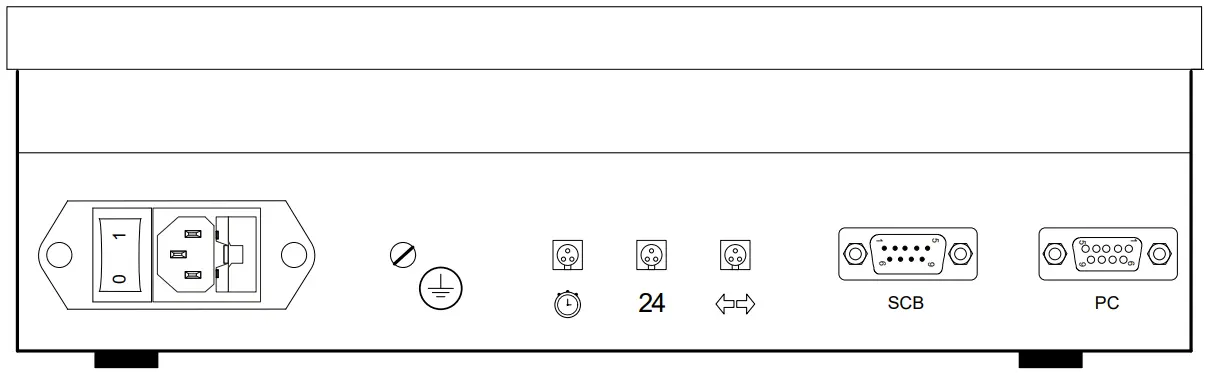
WARNING:
- When the console is equipped with the internal Bluetooth option, TX1 (pin 1 and 2 of Scoreboard connector) IS NOT AVAILABLE.
- When the “SCB on Bluetooth dis.” box is checked (in the “Console set” menu) and no internal Bluetooth exists, pins 1 and 2 of the Scoreboard connector are input instead of output (TX1- → RX1-, TX1+ → RX1+).
- It is so recommended to always connect the scoreboards on pin 3 and 4 of the scoreboard connector.
| Connector | Pin | Description | START/STOP connector & external RESET |
| Scoreboard (RS485) SCB | 1 | TX1- (RX1-) | |
| 2 | TX1+ (RX1+) | ||
| 3 | TX2- | ||
| 4 | TX2+ | ||
| Computer (RS232) PC | 2 | TX | |
| 3 | RX | ||
| 5 | GND | ||
 Start/Stop | 1 | Not used | 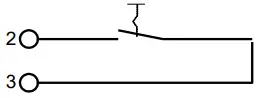 |
| 2 | Start/Stop | ||
| 3 | Common | ||
| 24 Start/Stop + Reset | 1 | Reset | 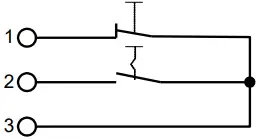 |
| 2 | Start/Stop | ||
| 3 | Common | ||
 Possession | 1 | Home | 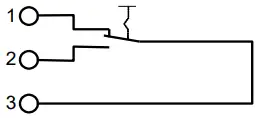 |
| 2 | Visitors | ||
| 3 | Common |
Console 3400.628
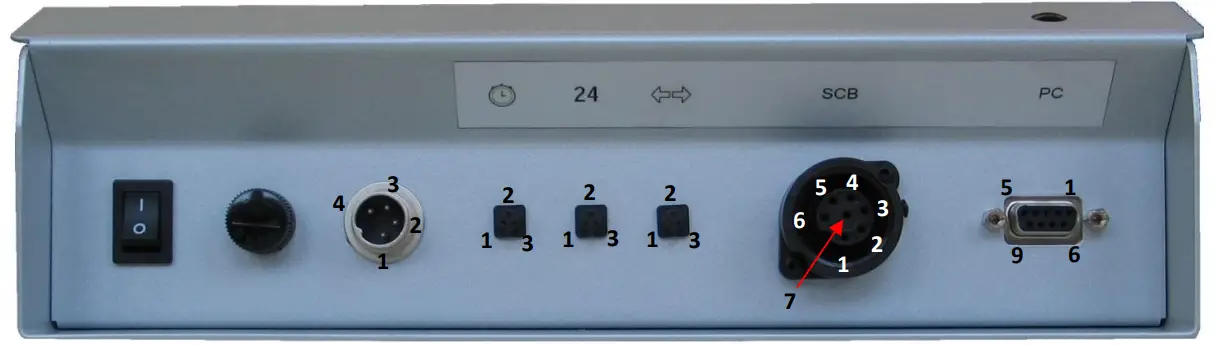
| Connector | Pin | Description | |
| I/O Switch On/Off | |||
| Fuse T1A 250V | |||
| Power input [DIN 4pM] | 1 | DC input+ (9-18VDC) | |
| 2 | GND | ||
| 3 | Not connected | ||
| 4 | Not connected | ||
Start/Stop | 1 | Not used | |
| 2 | Start/Stop | ||
| 3 | Common | ||
| 24 Start/Stop + Reset | 1 | Reset | |
| 2 | Start/Stop | ||
| 3 | Common | ||
Possession | 1 | Home | |
| 2 | Visitors | ||
| 3 | Common | ||
| SCB [Tuchel 7pF] scoreboard (RS485) | 1 | DC input+ (9-18VDC) Do not connect | |
| 2 | DC output+ (max 40mA) | ||
| 3 | TX2- | ||
| 4 | TX2+ | ||
| 5 | TXr* | ||
| 6 | TX1+* | ||
| 7 | GND | ||
| PC [Sub-D 9pF] Computer (RS232) | 2 | TX | |
| 3 | RX | ||
| 5 | GND |
APPENDICE
9.1 Version history
| Version | Date | Modifications since last version |
| 1.0 | 13/07/05 | Initial version |
| 4.86 | 16/09/05 | New version |
| 4.92 | 22/05/08 | Logo and canevas ST |
| 5.0 | 14/08/08 | Integration of languages choice |
| 5.1 | 30/06/14 | Added settings for Rugby + connection 3400.628 + New design |
| 5.2 | 28/07/15 | New design |
| 5.3 | 22/12/16 | Comments added in chapter 3.5 Bluetooth Configuration |
NOTES: —————
Swiss Timing LTD
P.O. Box 138, Rue de l’Envers 1
CH-2606 Corgémont – Switzerland
Phone +41 32 488 36 11
[email protected]
www.swisstiming.com
3412.514.02
Version 5.3
December 2016
A COMPANY OF THE SWATCH GROUP
 Swiss Timing - Swiss Timing