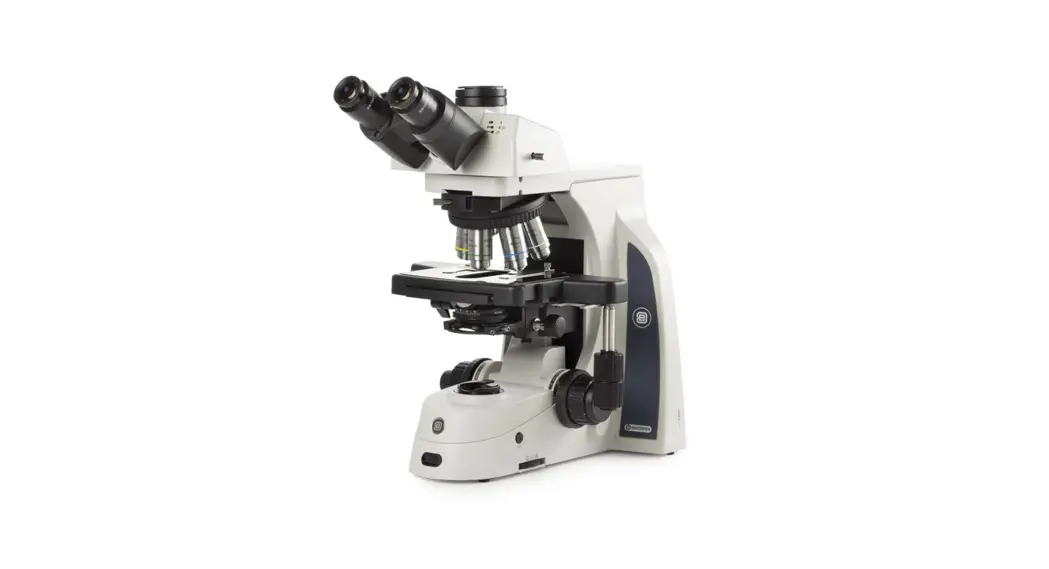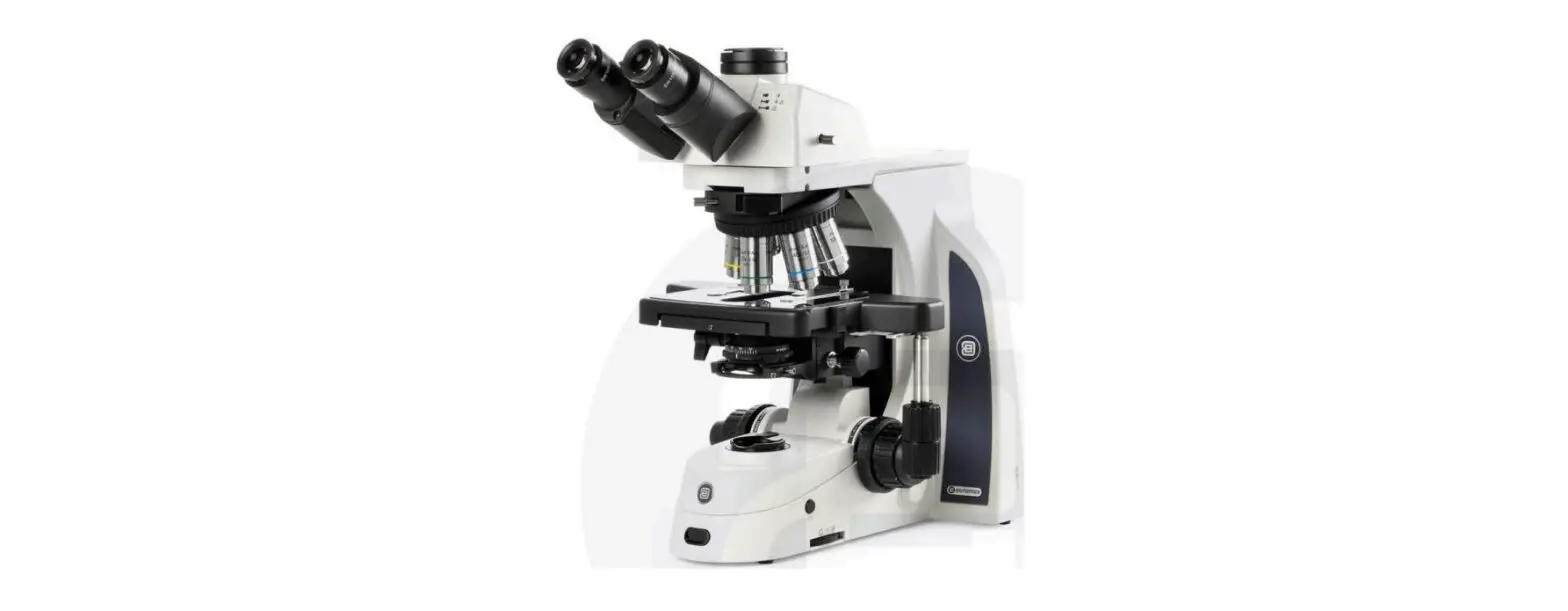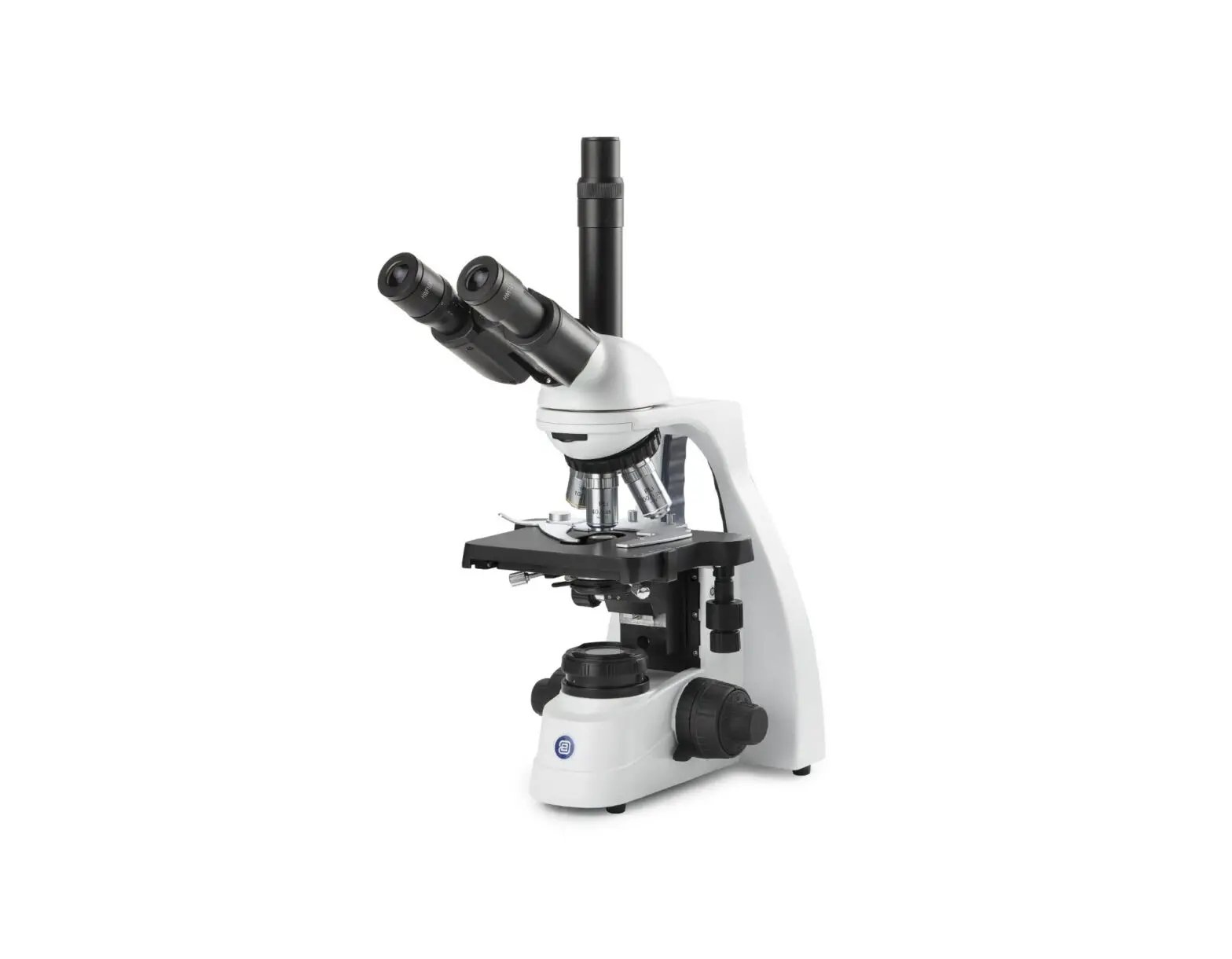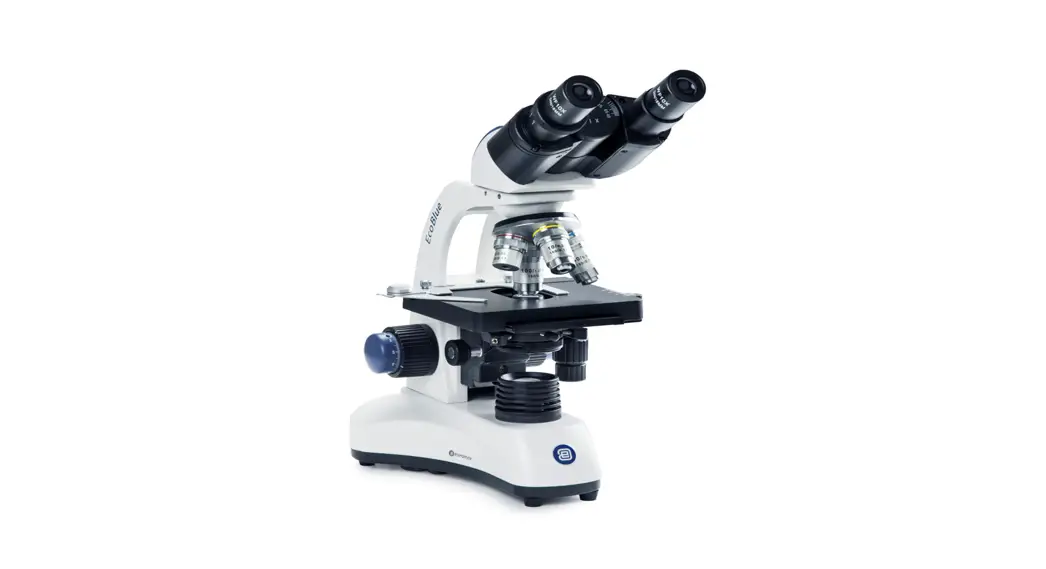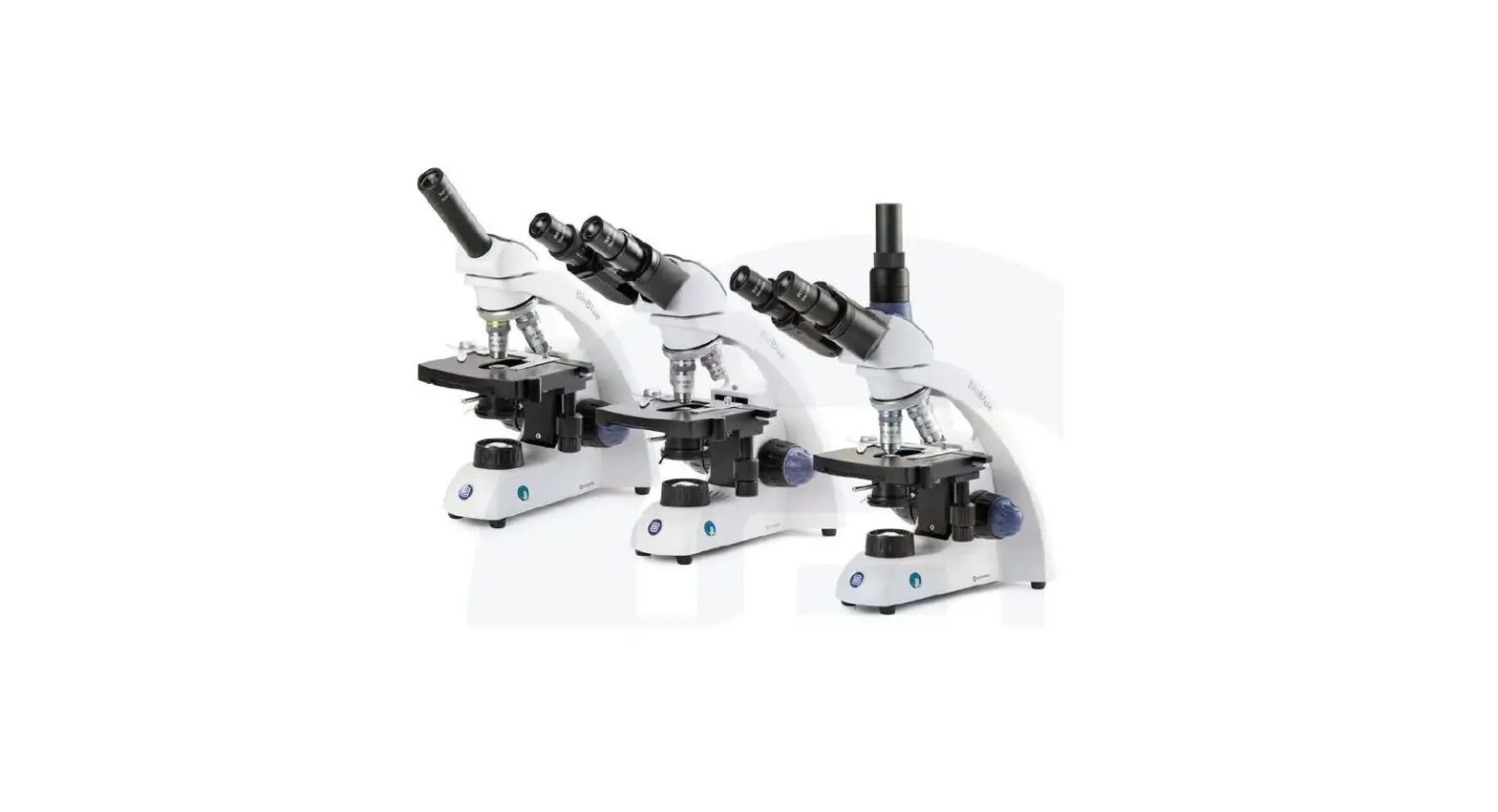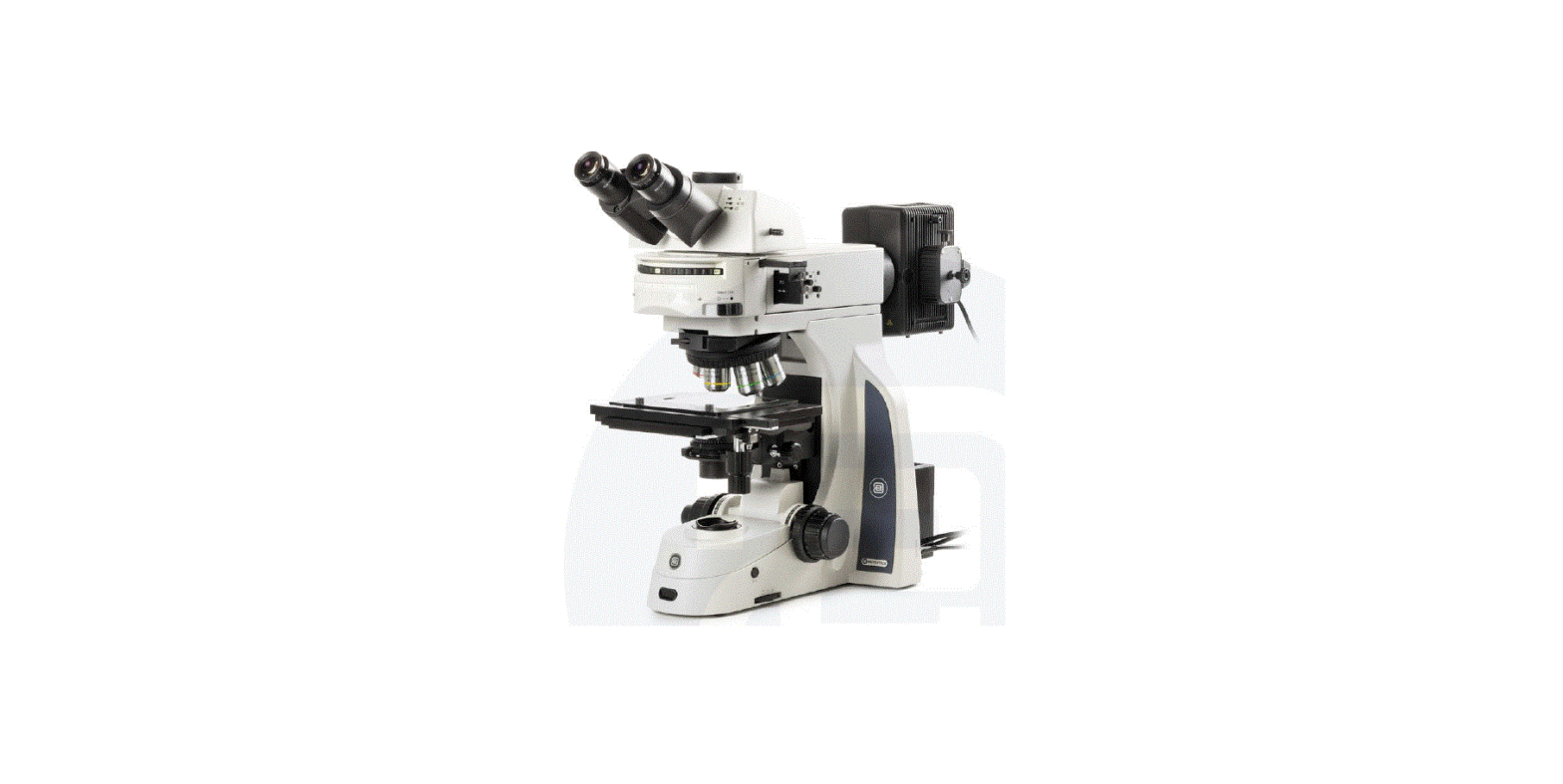

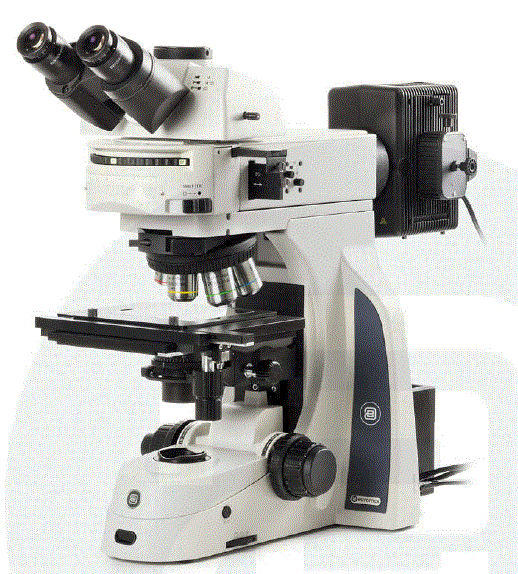
euromex DX.2153-PLi Delphi-X Metallurgical Observer Clinical Microscope
Introduction
Thank you for purchasing the Euromex Delphi-X Observer metallurgical The Delphi-X Observer series has been designed with all kinds of industrial applications and great durability in mind. This resulted in a modern, robust and high level microscope for advanced use, equipped with the best optical and mechanical components. The 25 mm field of view of the eyepieces and the plan apochromatic objectives enable observations with perfect color rendering at high resolving powers. Specific attention to production methods resulted also in an excellent price/performance ratio. Please read this manual carefully before using this product to ensure correct and save usage
- The contents of this manual are subject to change without notice
- The appearance of the actual product can differ from the models described in this manual
- Not all equipment mentioned in this manual has to be part of the set you have purchased
- All optics are anti-fungus treated and anti-reflection coated for maximum light throughput
General safety instructions
Dangers associated with the operation
- Improper use could result in injury, malfunction or damage to property. It must be ensured that the operator informs every user of existing hazards
- Danger of electrocution. Disconnect the power to the entire lighting system before installing, adding or changing any component
- Not to be used in corrosive or explosive environments
- Avoid direct exposure of eyes to the collimated light beam or direct light from the light guides or fibres
- To avoid a hazard to children, account for all parts and keep all packing materials in a safe place
Disinfection and decontamination:
- Exterior casing and mechanical surfaces must be wiped with a clean cloth, dampened with a disinfectant
- Soft plastic parts and rubber surfaces can be cleaned by gently wiping a clean cloth, dampened with a disinfectant. Discoloration can occur if alcohol is used
- The front lens of eyepieces and objectives are sensitive to chemicals. We recommend not to use aggressive disinfectants but to use lens paper or a soft fibre-free tissue, damped in cleaning solution. Cotton swabs may also be used. We recommend you use personal eyepieces without eyes hades in order to minimize risk
- Never immerse or dip the eyepiece or objective into a disinfectant liquid! This will damage the component
- Never use abrasive compounds or cleaners that may damage and scratch optical coatings
- Properly clean and disinfect all possible contaminated surfaces of the microscope or contaminated accessories before storing for future use. Disinfection procedures must be effective and appropriate
- Leave the disinfectant on the surface for the required exposure time, as specified by the manufacturer. If the disinfectant evaporates before the full exposure time, reapply disinfectant on the surface
- For disinfection against bacteria, use a 70% aqueous solution of isopropanol (isopropyl alcohol) and apply for at least 30 seconds. Against viruses, we recommend to refer to specific alcohol or non-alcohol based disinfection products for laboratories
Before returning a microscope for repair or maintenance through a Euromex dealer, an RMA (return authorization form) together with a decontamination statement must be filled in! This document – available from Euromex for any reseller- must be shipped together with the microscope at all times
Handle with care
- This product is a high quality optical instrument Delicate handling is required
- Avoid subjecting it to sudden shocks and impacts
- Impacts, even small ones, can affect the precision of the instrument
Handling the halogen bulb
Note: Always disconnect the power cord from your microscope before handling the halogen bulb and power unit and allow the system to cool down approximately 35 minutes to avoid burns
- Never touch the halogen bulb with your bare hands
- Dirt or fingerprints will reduce the life span and can result in uneven illumination, lowering the optical performance
- Use only original Euromex replacement halogen bulbs
- The use of other products may cause malfunctions and will void warranty
- During use of the microscope the power unit will get hot; never touch it while in operation and allow the system to cool down approximately 35 minutes to avoid burns
Dirt on the lenses
- Dirt on or inside the optical components, such as eyepieces, lenses, etc., affects the image quality of your system negatively
- Always try to prevent your microscope from getting dirty by using the dust cover, prevent leaving fingerprints on the lenses and clean the outer surface of the lens regularly
- Cleaning optical components is a delicate matter. Please, read the cleaning instructions further on in this manual
Environment, storage and use
- This product is a precision instrument and it should be used in a proper environment for optimal use
- Install your product indoors on a stable, vibration free and level surface in order to prevent this instrument to fall thereby harming the operator
- Do not place the product in direct sunlight
- The ambient temperature should be between 5 to +40°C and humidity should be within 80% and 50%
- Although the system is anti-mold treated, installing this product in a hot, humid location may still result in the formation of mold or condensation on lenses, impairing performance or causing malfunctions
- Never turn the right and left focus knobs in opposite directions at the same time or turn the coarse focus knob past its farthest point as this will damage this product
- Never use undue force when turning the knobs
- Make sure that the microscope system can dissipate its heat (fire hazard)
- Keep the microscope away from walls and obstructions for at least approximately 15 cm
- Never turn the microscope on when the dust cover is in place or when items are placed on the microscope
- Keep flammable fluids, fabrick, etc. well out of the way
Disconnect power
Always disconnect your microscope from power before doing any maintenance, cleaning, assembling or replacing bulbs to prevent electric shocks
Prevent contact with water and other fluids
Never allow water or other fluids to come in contact with your microscope, this can cause short circuiting your device, causing malfunction and damage to your system
Moving and assembling
- This microscope is a relatively heavy system, consider this when moving and installing the system
- Always lift the microscope by holding the main body and base of the microscope
- Never lift or move the microscope by its focusing knobs, stage or head
- When needed, move the microscope with two persons instead of one
Configuration, construction and controls
This chapter describes the main parts and functions of the Delphi-X Observer
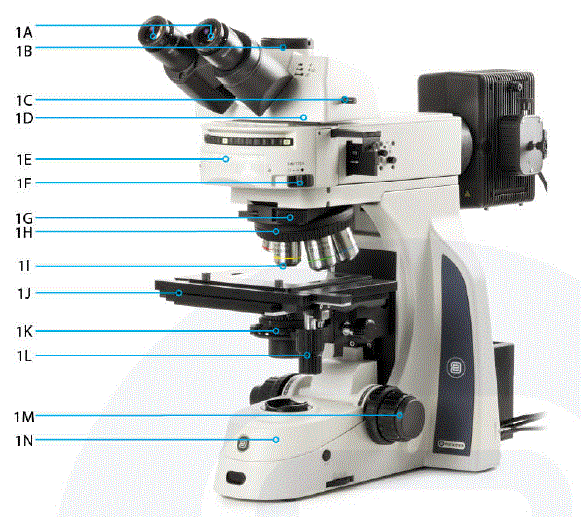
| 1A | Eyepieces | 1H | Nosepiece |
| 1B | Photoport | 11 | Objectives |
| 1C | Optical lightpath selector | 1J | Stage |
| 10 | Trinocular head | 1K | Long distance condenser |
| 1E | Metallographicattachment | ll | X-Y stagemovement |
| 1F | Reflected light stopbutton | 1M | Coarse and fine focusing knob |
| 1G | Optional slider (DIC,POL,etc) | 1N | Body |
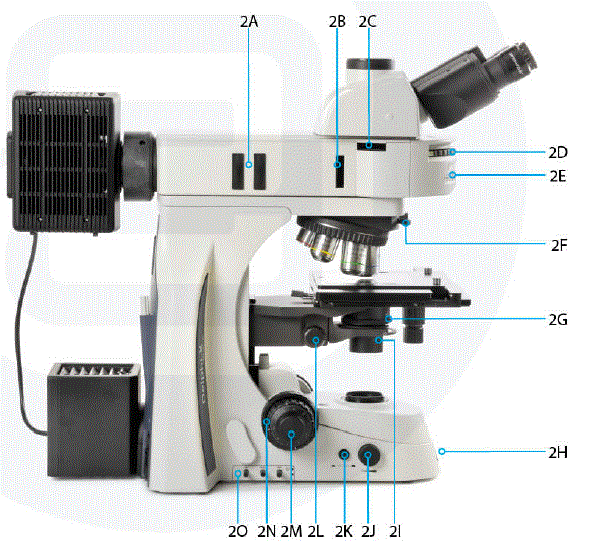
| 2A | ND filter slots | 21 | Longdistance condenser |
| 2B | Slot for polarization slider | 2J | Light intensity controlknob |
| 2C | Slot for analyser slider | 2K | Upperand lower lightingswitch |
| 2D | Rotating turret | 2L | Condenser height control |
| 2E | Turret position indicator | 2M | Coarse and finefocusingknob |
| 2F | Slider fastening screw | 2N | Adjustable rackstop |
| 2G | Condenser diaphragm adjusting ring | 20 | Filter switchlevers |
| 2H | iCare sensor |
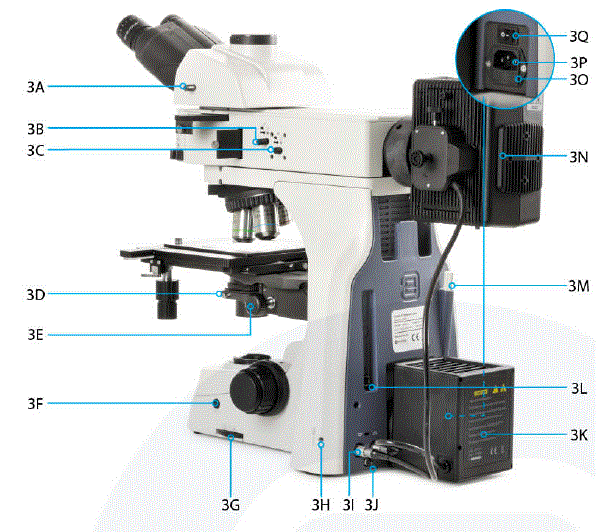
| 3A | Optical pathselector | 3J | Earthingconnection screw |
| 3B | Viewing diaphragm | 3K | Lamphouse unit |
| 3C | Aperture diaphragm | 3L | USBinterface (future feature,not in use now) |
| 3D | Condenser fastening screw | 3M | Universal tool |
| 3E | Condenser heightcontrol | 3N | Lamphouse unit |
| 3F | iCare button | 30 | Fuse compartment |
| 3G | Field aperture control(fortransmitted lightmode) | 3P | Power socket |
| 3H | Lamphouse fastening screw | 3Q | Power switch |
| 31 | Light source plug |
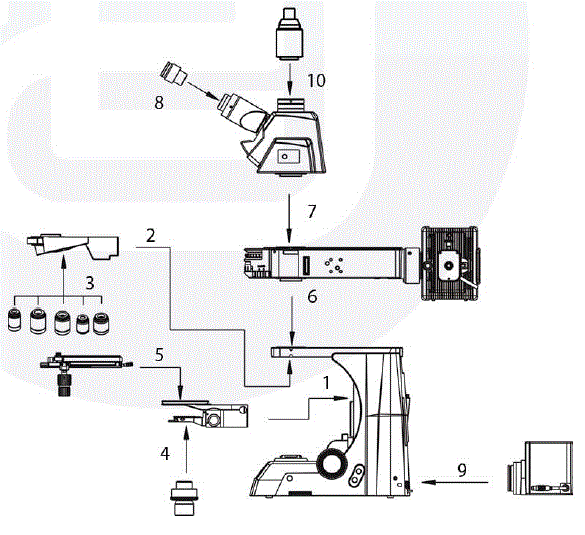
Step 1 I Attaching the focus cassette
- Attach the focus cassette according to the path shown in figure 1
- The dovetail slot needs to be aligned with the slot of focusing cassette
- Slide it down until it reaches the locking pin
- Then use the hexagon wrench (Allen) tool to tighten the screw shown as I (in figure 2)
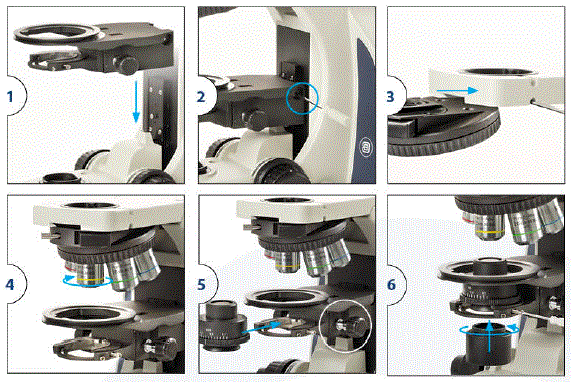
Step 2 I Attaching nosepiece (figure 3)
- Slide the nosepiece into the slot
- Fix into place with screw
Inserting the objectives
Insert the objectives ranging from low to high magnification (figure 4)
Placing the condenser
- Use the condenser height control knob to lower the condenser holder to the lowest position
- Unscrew the two parts of the condenser
- Insert the top part of the condenser into the holder as shown in figure 5 and secure it by fixing the screw indicated in figure 6. (Centering the condenser is described later in this manual)
- Then screw the lower part into the top part
Attaching the mechanical X/Y stage
- Turn the coarse focus knob until the elevating section is brought to the lowest position
- Attach the mechanical object stage according figure 7 by aligning the stage above the ring of the focus cassette
- Fix the mechanical stage into place with screw at the back of the stage
- Place the plass plate (figure 8)
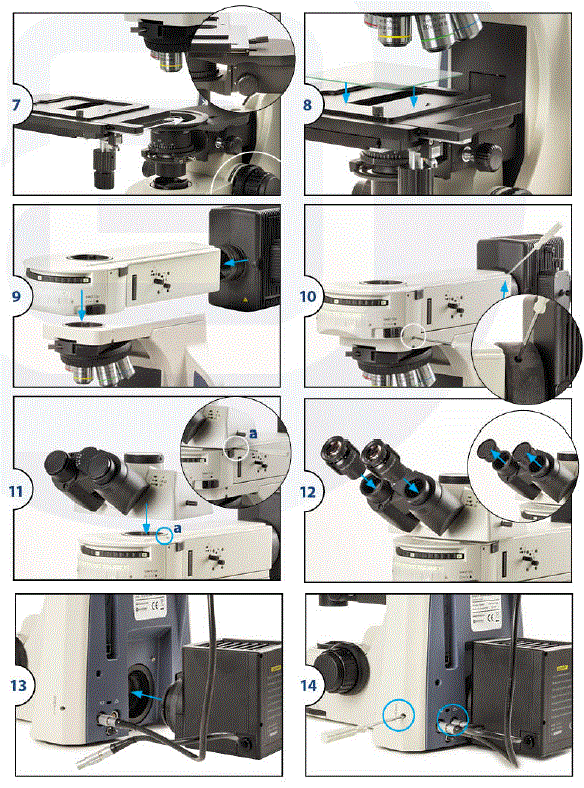
Placing the reflected light attachment and lamp house
The metallographical attachment must be inserted between the body and the head of the microscope in accordance with the serial number in Fig. 5 and transferred to the appropriate position, then tighten the screw with hexagon wrench to fasten
Placing the microscope head
- Place the head by loosening the screw (a)
- Mount the head in its position inside the microscope arm
- Secure it by tightening the screw again
Placing and mounting the eyepieces
- First remove the dustcover of eyepiece tubes
- Insert the eyepieces into the eyepiece tubes
Attaching the halogen lamp chamber
- Slide the lampunit (Halogen) into position at back of microscope base
- Use the wrench screw tool to secure bolt (VI)
- Connect the plug
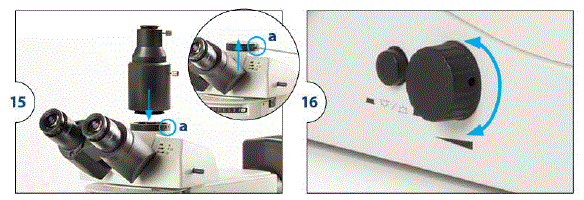
Placing the C-mountor photo port onto the microscope head
- loosen the screw (a)
- Place either the (-mount or photo port and tighten the screw
Connecting the power cord
The Delphi-X Observer microscopes support a wide range of operating voltages: 100 to 240 V. Please use a grounded power connection
- Make sure the power switch is off before connecting
- Insert the connector of the power cord into the Delphi-X Observer power socket and make sure it connects well
- Insert the other connector into the mains socket and make sure it connects well
- Put the power switch to ON
Operation
Placing the sample
- lower the stage to make room for the sample
- Bring the 4x objective (or lowest objective in your configuration) into the optical path by rotating the nosepiece until! the right objective clicks into position
- Gently place the sample into position and make sure it will not damage the objective
- Use the Xand Y axis control knobs of the mechanical stage to move to area of interest of the sample into the optical path
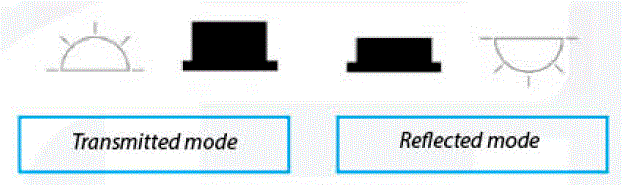
Switching between light sources
Next to the intensity controller there is a button for switching between transmitted and reflected illumination
Note:transmitted light is only available on some models
- When the button is pushed in, the light is set to reflected mode
- When the button is pushed out, the light is set to transmitted mode (standard)
Getting the specimen in focu
- Use the coarse control knobs to adjust the focus quickly and roughly
- Get the specimen into sight through the eyepieces
- Then use the fine focus control knob to adjust the focus in detail
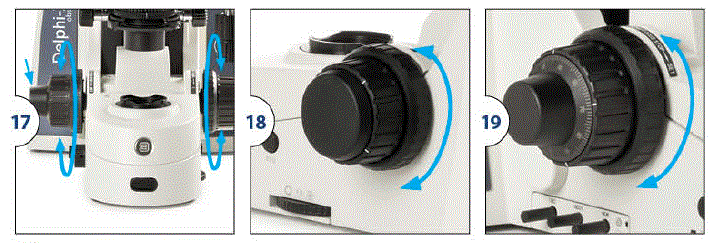
Adjusting the coarse focus tension
Next to the right side coarse focus know there is a ring for adjusting the coarse focus tensions This can be used to make the coarse control move lighter or heavier, according to user’s preference
Setting the focus lock
Next to the left side coarse focus knob there is a ring setting the focus lock. The focus lock can be used to limit the maximum position of the stage at a certain height in order to prevent objectives to get damaged, slides from breaking, or to set the stage at a reference height
- Move the stage to the desired height then fix the ring tight to lock the mechanical stage’s maximum height
- The stage still can be lowered but the highest position is now limited to the set position
- Release the ring to undo the focus lock
Switching the fine focus knobs
The fine focus knobs can be switched from left to right to meet the user’s preference
- Pull the knobs with moderate force to release the magnet holding the knobs onto the stand
- Attach the magnets onto the holder and let it grab the knobs again to mount them onto the holder
Adjust interpupillary distance
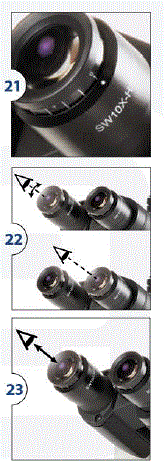
The Delphi-X Observer has an interpupillary distance range of 47 to 78 mm. The correct interpupillary distance is reached when one round image is seen in the field of view This distance can be set by either pulling the tubes towards each other or pulling them from each other. This distance is different for each observer and this should be set individually. When more users are working with the microscope it is recommended to remember your interpupillary distance for a quick setup during new microscopy sessions
Adjustments of dioptre of a compound microscope
In order to compensate for human eye differences, distortion, thickness differences in cover glasses and tune for the best parfocality between objectives, one can use the dioptre to do so:
- Take a good prepared slide for your reference
- Set (both) the dioptre adjustments of the eyepieces to •o•
- Select the 10x objective, look for a interesting area on the specimen and focus on this area
- Select the 40x objective and focus on the specimen
Warning: don’t touch the coarse and fine adjustment anymore - Select the 10x objective again
- With your dominant eye open (close your other eye), rotate the dioptre adjustment from untill the selected area get as sharp as possible as with the 40x objective
- If during this operation the image becomes unsharp, take your eyes from
the eyepieces and turn the dioptre adjustment, without looking Into the eyepieces, a few divisions back from - Look into the eyepieces again and turn the dioptre adjustment from ‘+’ to ‘-‘ untill the selected area on your specimen gets the optimal sharpness
- Repeat for your non-dominant eye, and with the second dioptre
Verification:
- take your eyes from the eyepieces and look for 2 seconds to a far point in the room in order to “reset” your eyes
- Look again into the eyepieces. If the adjustment is not good, repeat the operation till you reach the same sharpness for the 10x and 40x objective without touching the coarse and micrometric adjustments
The correct eye point
The eye point is the distance from the eyepiece to the user’s pupil. To obtain the correct eye point, move the eyes towards the eyepieces until a sharp image is reached at a full field of view
Select balance between eyepiece- and camera light throughput
The Delphi-X Observer gives users the option to select out of three output types, giving large flexibility when using cameras. The push/pull rod on the side of the microscope head can be set to three positions
- POSITION 1 I The optical light path is sent to the eyepieces only. Ideal for when no camera is used
- POSITION 21 The optical light path is sent to the eyepieces for 20% only. Ideal standard setting for when a camera is used
- POSITION 3 I The optical light path is sent to the camera only. Ideal for when camera is used at low light imaging These positions are Indicated on the head for the user’s convenience
| Push rod in completely | . 100/0 | |
|
| Pullrod towards the middle | 20/80 |
| Pullrod out completely | 0/100 |
Centering the condenser
- Move the condenser to the top position (1)
- Focus on a specimen using the smallest objective (f.e. 4x or 1 Ox objective)
- Close the field diaphragm (2)
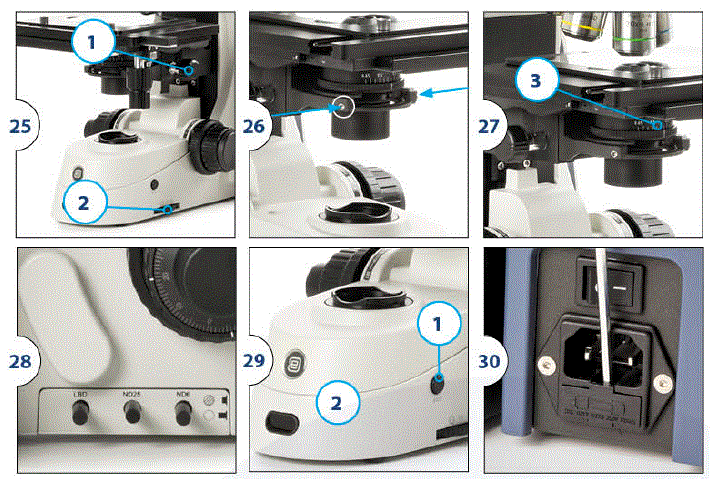
- Use screws (figure 26) to move the field diaphragm into to view center
- Open the field diaphragm (2) carefully to the outside of the field of view to ensure the field diaphragm is in the center and so the condenser has been centered properly
Using the aperture diaphragm
The aperture diaphragm (figure 27/3) should be used to adjust the numerical aperture, not to adjust image brightness. When the aperture diaphragm is opened to the 70 ~ 80% of objective aperture the ideal position is reached
The simplest way to do this is to use the markings on the condenser
Using halogen with LBD, ND 6 and ND 25 filters
(figure 28: Halogen version with LBD and two ND filters) The halogen version has three filter options:
- LBD is a filter for increasing color temperature
- ND25 is a filter with 25% light transmittance
- ND 6 is a filter with 6% light transmittance
iCare sensor
The unique iCare sensor is developed to avoid unnecessary loss of energy. The illumination of the microscope automatically switches off shortly after the user steps away from his or her position
- Pushing the iCare button (1) will re-active the light
- The iCare function is turned on by default
- To turn off the iCare function push the iCare button for 4 seconds
- The function will be deactivated and the bright LED (2) will dim to indicate the function has be turned off
- Repeating this step will turn the function back on
Replacing the fuse
The fuse is placed in a drawer
- To open it push the drawer aside with a screwdriver
- Take out the drawer and replace the fuse gently
Reflected illumination unit
Use of the optional color filter
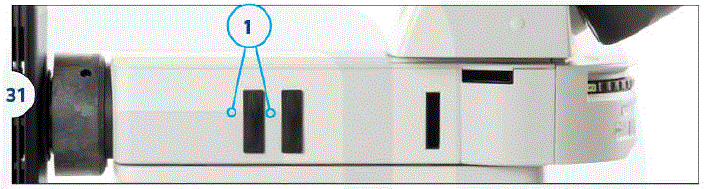
- Insert the filter slider for the observation purposes into the filter slot {1, Fig. 31). Make sure you insert it from the left
- The first “click” means that the empty position is in place. The second 0click” indicates that the filter is in the light path
| Color temperature | Convert lighting to daylight for general observation and color photography |
| Greenfilter | Increase contrast for black-and-white photography |
| Yellowfilter | Increase contrast when semi-conductor wafer isobserved |
| Frosted sheet | Difusses light (but reduces intensity) |
| ND6 | Reduce light intensity (transmittance:6%) |
| ND25 | Reduce light intensity (transmittance:25%) |
Reflective optical path selection
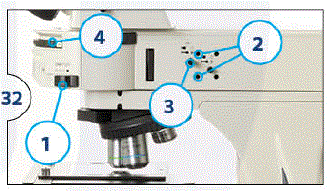
Rotate the disc (4) in the metallographic attachment according to the required observation path
- BF1: reflected brightfield observation (transmittance: 6%)
- BF2: reflected brightfield observation
- DF: reflected darkfield observation
“BF2” is the standard brightfield position. In case of high i lght intensity “BFI” can be used as it contains a neutral density filter to lower the light intensity
Diaphragm against mid-field view
- Put the reflected light stop on the “e” position
- Rotate the darkfield/brightfield quick selector (disc) to the BF position
- Put the reflected light stop on the “O” position and let the light through
- Rotate the nosepiece to place the 10x objective into the light path. The sample is then placed on the stage and the image is roughly focused
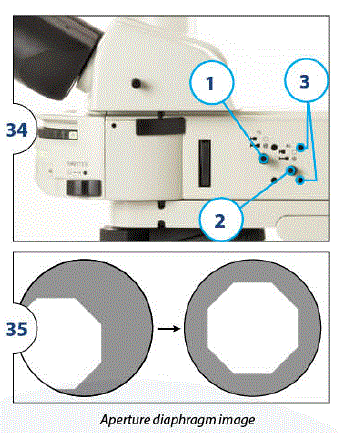
- Pull the lever (3, fig. 32) until the aperture diaphragm is at its smallest diameter
- Use a hexagonal wrench to insert the two field diaphragm centering holes (2, fig. 32).Adjust the image of the aperture to the center of the field of view (fig. 33 shows the adjustment process)
- Push the rod (3, fig. 32) to open the aperture until the image of the aperture and the perimeter of the field of view are inscribed. If the image is not correctly aligned, re-align until it is centered
- Open the diaphragm so that the image is exactly connected to the field of view
Field stop
The field stop adjusts the lighting area to produce high-contrast images. According to the objective in use, adjust the rod of the field of view (no. 3, fig. 32) of the reflecting illuminator until the aperture image is outside the field of view, to screen out unnecessary light
Note
The diaphragm knob must be pushed forward to fully open the diaphragm
Use of the aperture diaphragm
- Move the reflected light stop to the position thus blocking the light path
- Rotate the darkfield/brightfield quick selector (disc) to the BF position
- Move the reflected light stop to the position to ad mid the light
- Turn the nosepiece to bring the 10x objective into the light path, then place the sample on the stage to roughly focus the image
- Move the reflected light stop to the “e’ position and close the light path
- Rotate the darkfield/brightfield quick selector (disc) to the BF position
- Move the reflected light stop to the ·o· position and admit the light
- Turn the nosepiece to bring the 10x objective into the light path, then place the sample on the stage to roughly focus the image
- Adjust the aperture diaphragm untill it is at its minimum diameter
- Adjust the field diaphragm untill it is at its minimum diameter. Meanwhile, the aperture diaphragm image can be seen as well
- Insert the hex wrench into two aperture diaphragm alignment holes (3), the position can now be adjusted to the center position (see 35)
Use of the polarizer and analyzer
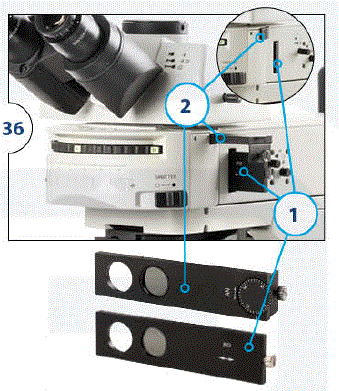
- Remove the dustcover in the polarizer slot then place the polarizer slider with the text facing the operator into the polarizer slot (1). The slider has two positions, one contains the polarizer the other contains a hole for when no polarization is wanted
- Remove the dust caps that close off the slot for the analyser then place the analyzer into the slot (text upwards) (2)
- Turn the wheel of the analyzer to change the orientation of the polarization filter
Cleaning optics
How to keep the optics clean?
Dust and dirt particles have a negative affect on the image quality. Keeping the optical system of your microscope clean is essential for the best image quality and overall lifetime of your microscope. Dust and dirt on optical elements such as lenses, prisms and filters that are left unattended can become difficult – or even impossible – to remove and may cause mold
- Place your objective or eyepiece on a secure location
- Objectives can be screwed into the cover of an objective case
- Eyepieces can be placed in the microscope box
- Condensers and collector lenses can remain in place in the microscope
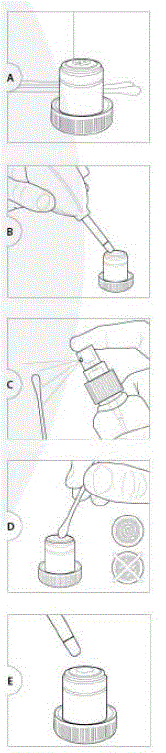
- To prevent scratches on coatings and optical glass try to remove dirt and dust that sticks to the optical surface first with an air-blower or with pressurized dry air (oil-free and under moderate pressure version only)
- Use an absorbent lens paper or cotton swap. Dampen a swap or towel with a small amount of lens cleaning fluid or cleaning mixture (either pure iso-propanol or a mixture of 7 parts ether and 3 parts alcohol)
- Clean the lens by using the tip of the cotton swap or the lens paper. Use enough lens paper so that solvents do not dissolve oils from your hands which can make their way through the paper on to the coated surface
- When cleaning a large lens surface, wipe with little pressure from the centre towards the periphery in a circular motion. Do not use ziq-zaq motion
- Discard each lens paper or cotton swap after a single use • Wait until the cleaning fluid is evaporated, or speed up this process by using pressurized dry air
- Check if the surface is clean by using a magnifying glass
- Place the cleaned item back on the microscope
Please note that cleaning of the optical surfaces indicated in this instruction only applies to external surfaces of objectives, eyepieces, filters and condensers. Internal surfaces must always be done by yourEuromex microscopes distributor
Troubleshooting
Proper use and maintenance ensure best performance of your Delphi-X Observer. If problems occur this chapter explains how to resolve most issues. Please make sure this chapter is read and checked before contacting your Euromex distributor for service. If a problem is not described in this list or the suggested solution does not bring the result needed, please contact your Euromex distributor
| Check if the powercableisconnected well,try other powercable | ||
| There isno light fromthe lamp | No power | |
| The bulb is not inserted | Removethe bulband placeit back | |
| The bulb isdefective | Removethe bulband placeitback | |
| The transmitted-reflected illumination switch is in the wrong position | Change positionof theswitch | |
| The fuse hasblown | Replace the fuse | |
| There is no powerfrom the mains connection | Replace it | |
| The light selector is in the wrong position | Press thelightselector | |
| Shutterisclosed | Open theshutter | |
| Thelamp burns out suddenly | Poor bulbquality | Usethespecified lamp to replaceit. Ifthe problemis not solved,contact your reseller |
| The bulb flickers or the brightnessis vertiginous | The bulb is at the end of it’s life span | Replacethebulb |
| The bulb is not inserted entirely into the holder | Removethebulband replaceit | |
| iCare sensor does notturn off the illumination | There are otherthings in front of microscope (within 1 meter) | Clear allobjectina 1 meterradius |
| The iCarefunction isturned off .. | Press and hold theiCarebutton for3 secondsto activatethe function | |
| llJ’r.fflhrn | Bmm | |
| The edge of the field of view is dark or the brightnessis not uniform | The nosepiece isnot in the located position (objective and light path are notcoaxial) | Locate thenosepiece properly where itclicks |
| The image of the lampis not centered | Center thelamps | |
| Thelens(objective, condenser,eyepiece or collector) is dirty | Clean it thoroughly | |
| Find dustand stain in the fieldof view | First rotate the eyepieces, if the dust moves: | Clean theeyepieces |
| Next move the stagewith slide,if the dust moves: | Clean theslide orreplacetheslide | |
| Next move the condenser up and down, if the dust moves (using 4 or 10xobjective): | Clean the topof the condenser | |
| Next change objective, if the dirt isno longer visible: | Clean thebottom lensof theobjective | |
| If problem remains: | Clean thecollectorlens | |
| Image quality is not optimal (resolution or contrast) | There are stainson the lens(including condenser, objective, eyepiece and collector) | Cleanthe opticalelements |
| Thesizeof the aperture diaphragm istoo large | Close the diaphragm | |
| The sizeoftheaperture diaphragm is too small | Open thediaphragm | |
| The position of the condenser is too low | Adjustthe position | |
| Periphery of the image isdark/ unclear (unevenly illuminated) | Diaphragm(s) closed too far | Open thediaphragm(s) |
| Lamp unit is not placed correctly | Take outlampunitandre-install | |
| Incorrect position of the light path switching lever | Set toright position | |
| The nosepieceis not in the right position | Turnthenosepiece untilit ‘clicks•into position | |
| Slider(s) is (are) not in correct position | Place inright position | |
| One side of the imageisdark | Thecondenser is not centered correctly | Center the condenser |
| The condenser is placed inclined in it’s holder | Install the condenseragainand centerit | |
| The nosepieceis not in the right position | Turn thecondenser until it 1clicks •into position | |
| Diaphragm(s) is (are) not centered | Center diaphragm(s) | |
| Slider(s) is (are) not in correct position | Place inright position | |
| Onepart of the image is not in focus.Part of the image becomes out offocus while moving specimen | The condenser is placed inclined in it’s holder | Install the condenseragain and centerit |
| The stageistilted | Re-install thestagemaking sureit islevelled | |
| The specimen slideis not placed flaton the stage | Replace theslideon thestage | |
| The nosepieceis not in the right position Thespecimen slideis not prepared well | Turnthenosepiece until it *clicks” into position | |
| Tryaspecimenof known qualityand confirm | ||
| Image can not be focused while stage is in highest position | Focus lock system is secured at the wrong position | Release the focuslock, focusand lock again |
| Thestage is notinstalled correctly | Re-install thestagemaking sureit islevelled | |
| The image through the eyepieces is shown asa double image or half moons appear | lnterpupillary distance hasnot been set correctly | Performinterpupillaryadjustment |
| Dioptre adjustment has not been donecorrectly | Performdiopteradjustment | |
| Eyes are getting tired | lnterpupillarydistance hasnot been set correctly | Perform interpupillaryadjustment |
| Dioptre adjustment has not been donecorrectly | Perform diopteradjustment | |
| Brightness is not correct | Adjustbrightnessusing intensity control knobor filters | |
| The image is too dark | Too low intensity set on intensity controller | Increase theintensity by rotating thecontroller |
| The size of the aperture diaphragm is too small | Adjustagain | |
| The position of the condenser is too low | Adjust the position | |
| Poor bulb quality | Use thespecified lamp | |
| Diaphragm(s)closed too far | Open thediaphragms | |
| Light path selector set in wrong position | Select the 100:0or 20:BOposition | |
| The bulb isat the end of it’s lifespan | Replace thebulb | |
| The Kohler incident light is not in the centre | Adjusttheboltof Kohlerincident light | |
| The image is too bright | Too high intensity set on intensity controller | Decrease theintensity by rotating thecontroller |
| The size of the aperture diaphragm is too large | Adjustagain | |
| The position of the condenser is too high | Adjust the position | |
| The imageappears blue-ish, yellow-ish or orange-ish | Too low or too highintensity set on intensity controller (Halogen illumination only) | Increase or decrease the intensity by rotating the controller, andusethe NO filters |
| The bulb isat the end ofit’s lifespan | Replacethebulb | |
| Acolor filter is inserted | Remove filter | |
| The image cannot be focussed when using high magnification objectives | Focus lock system is secured at the wrong position | Release the focuslock, focus andlockagain |
| The stage is not in the highest position | Adjust heightof stage | |
| Thesampleistoo small | Change sample | |
| The objective touches the specimen when the magnification is being changed | Focus lock system is secured at the wrong position | Release the focuslock, focus andlockagain |
| Large focus deviation while changing objectives | An objective is placed incorrectly, not screwed in allthe way | Make surethe rightobjective isused and screwitall thewayintotherevolving nosepiece |
| Diopter adjustment has not been donecorrectly | Perform diopteradjustment | |
| The slide does not move, ormoves too heavily | The tension of the X/Y controls of the stageare set too tight | Adjusttensionto proper setting |