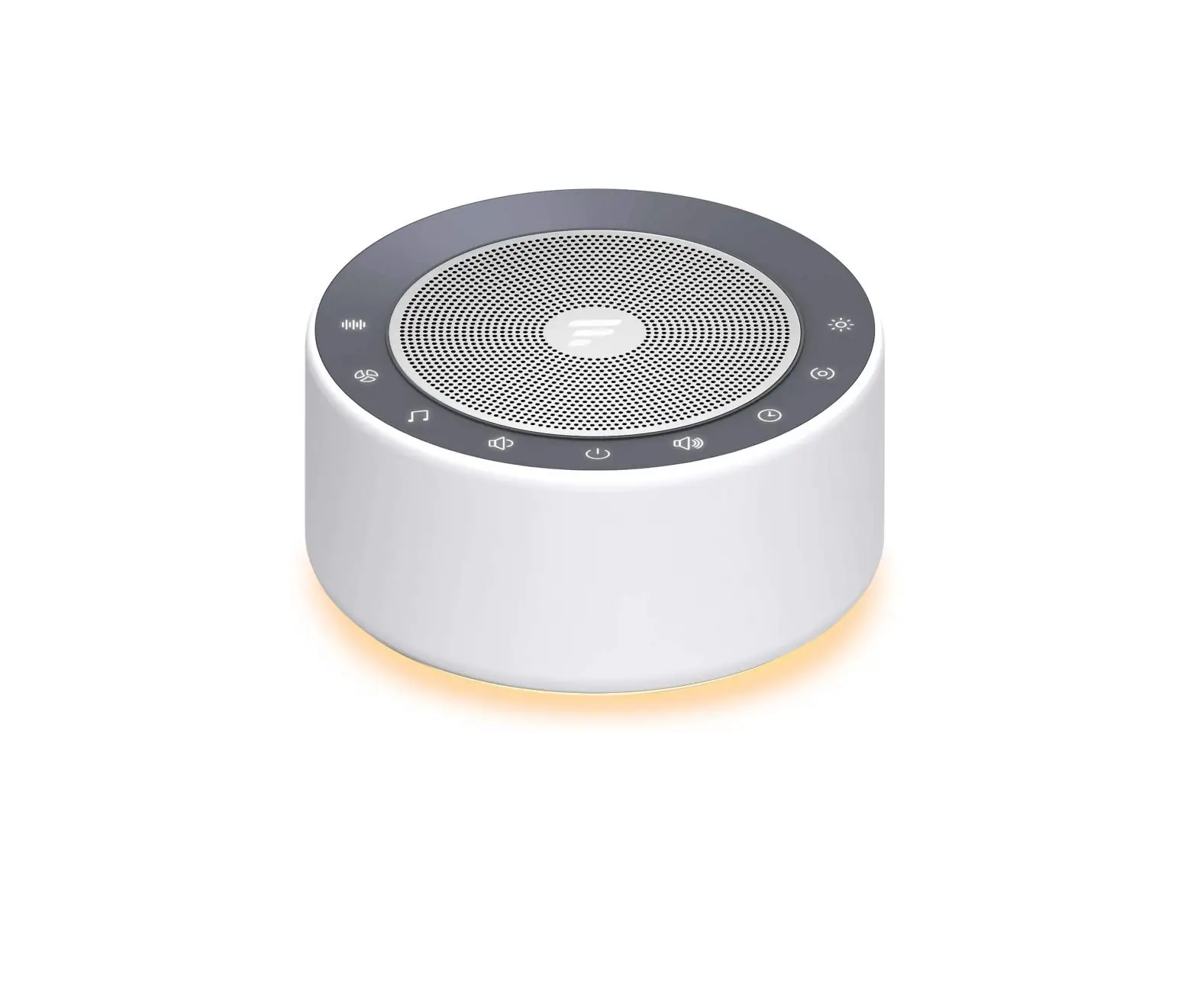
HONGKONG ZHINYU
TECHNOLOGY CO LIMITED T129L Sleep Sound Machine
User Manual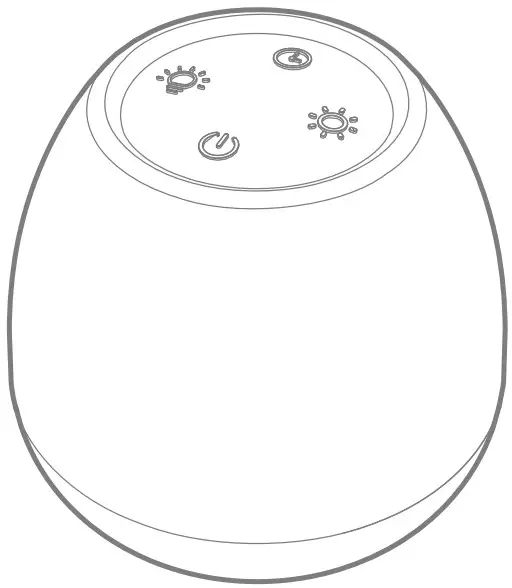 T129L
T129L
SLEEP SOUND MACHINE
User Manual (V1.0)
T129L Sleep Sound Machine
Thank you for purchasing our products.
This manual addresses the safety guidelines, warranty and operating instructions. Please review this manual thoroughly before operating your device.
This white noise machine can be used directly with its buttons or can also be used on the app downloading from a mobile phone.
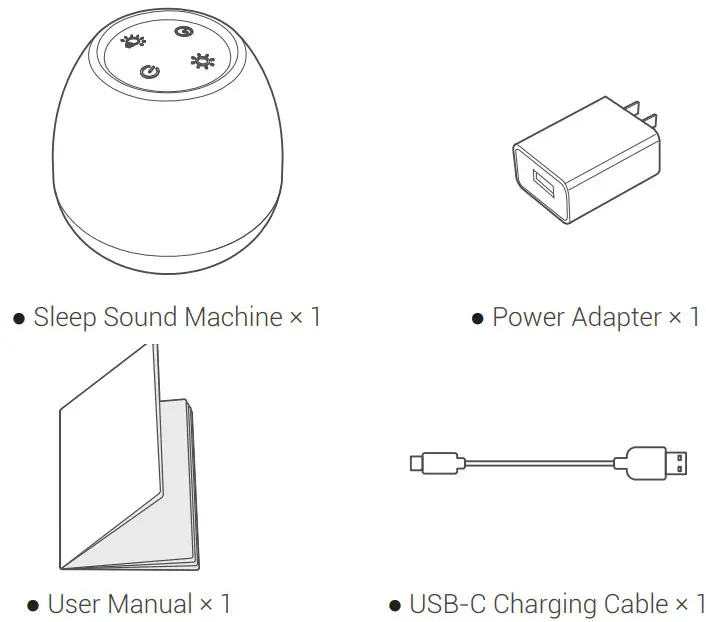
Package Contents
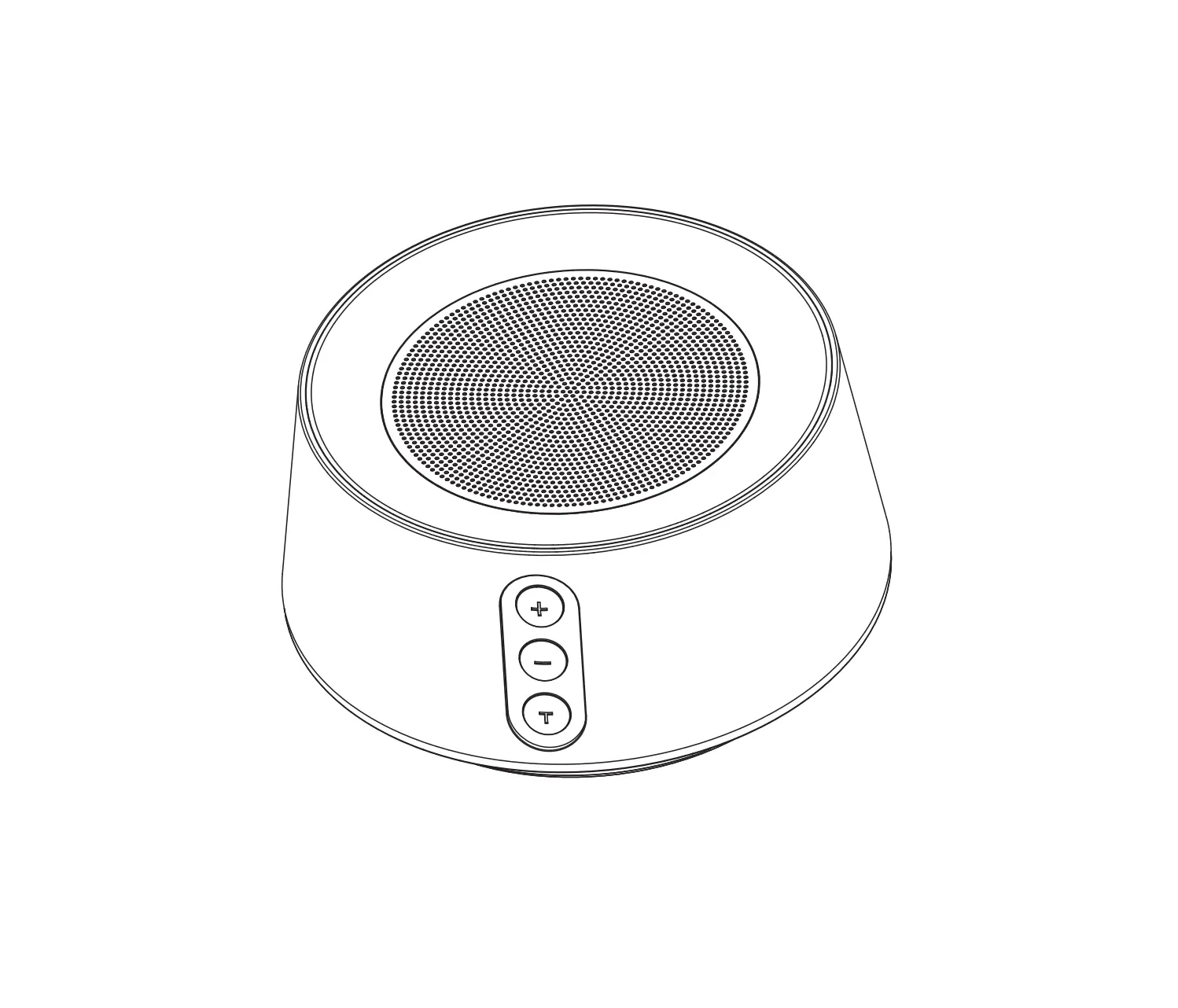
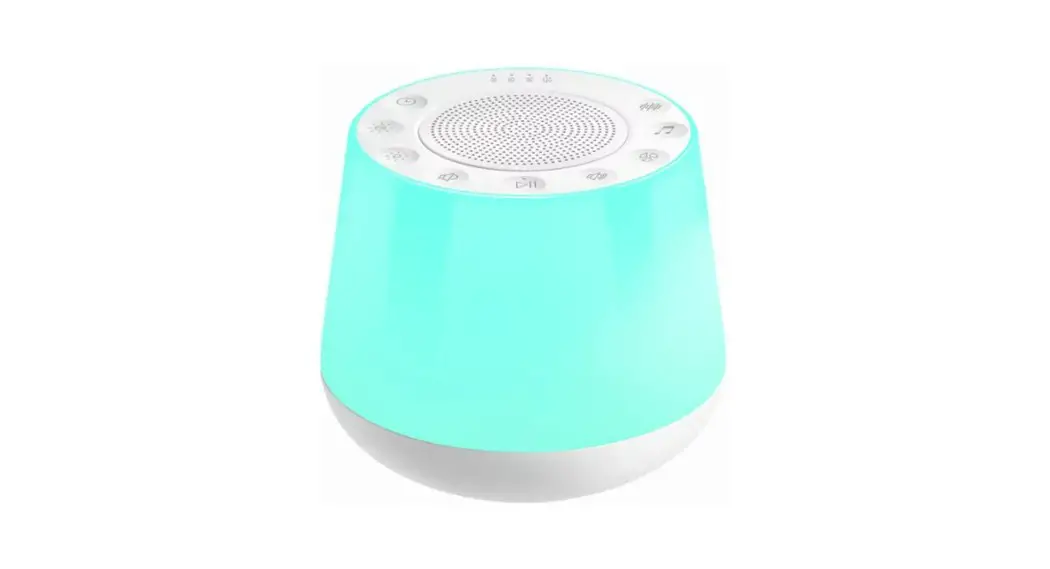
At a Glance
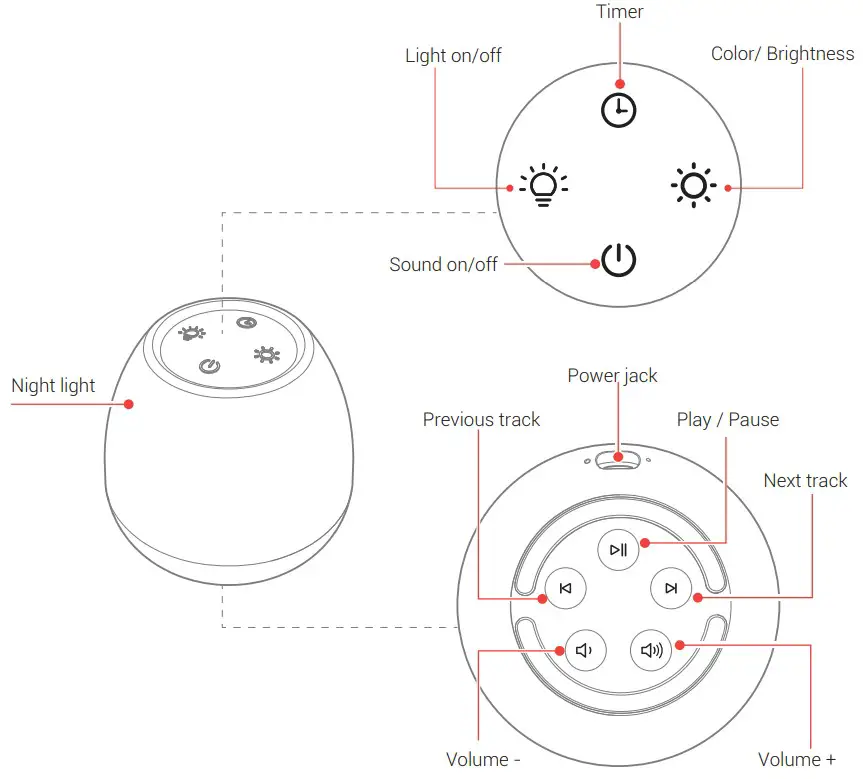
Use the Machine
Sound on/off
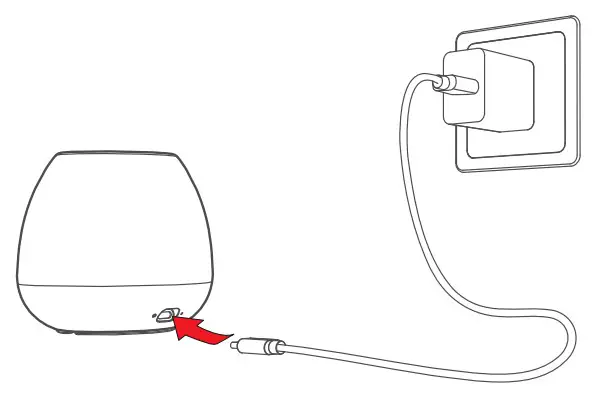
- Plug the Type-C end of the USB charging cable into the power input port of the machine.

- Insert the USB-A end of the USB charging cable into the USB power adapter.
- After powering on, the machine will sound a beep.
- Press the “
 ” button in the top of machine to turn on/off the machine and the machine will sound a “Beep”. The machine will play the white noise after turning on.
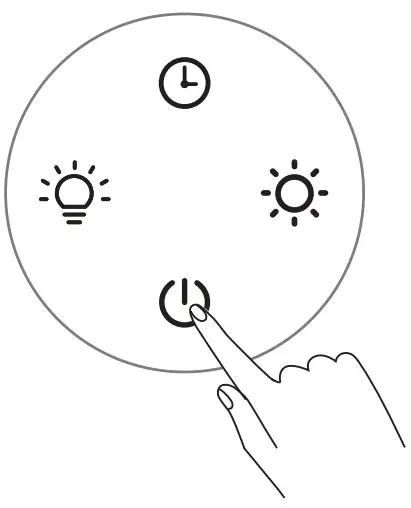
Note: Press the “ ” button in the top of machine will not affect the use of night light or the colorful ambient light.
Choose Your Sound
Press the ”  ” or “
 ” button to choose the sound you wish to listen. The machine provides 24 soothing :
| ● White noise sound 1) White Noise 2) Pink Noise 3) Brown Noise | ● Fan sound 4) Fan Noise 1 5) Fan Noise 2 6) Fan Noise 3 7) Hair dryer 8) Clothes dryer |
| ● Natural sound 9) Birds 10) Crickets 11) Heavy rain 12) Moderate rain 13) Wind 14) Sea waves 15) Flowing water 16) Flame | ● Lullaby 17) Lullaby 1 18) Lullaby 2 19) Lullaby 3 20) Lullaby 4 21) Lullaby 5 22) Lullaby 6 23) Lullaby 7 24) Lullaby 8 |
Play / Pause
Press the ”  ” button at the bottom of the device to play or pause the sound.
Volume Control
Press or hold the ”  ” button to increase / decrease the volume. There are 15 levels of volume, and the default level of volume is 10.
Using the night light
Press the ”  ” in the top of the device to turn on/off the night light.
Set the night light or the colorful ambient light
- Press the “
 ” in the top of the device to choose the color of the night light. There are 9 colors for the night light, including warm color, white color, red color, orange, yellow, green, light blue, pink and gradually changing mode. The default color is warm color.
 - When the night light is on, press and hold the “ ” button to adjust the brightness.
 ” in the top of the device to choose the color of the night light. There are 9 colors for the night light, including warm color, white color, red color, orange, yellow, green, light blue, pink and gradually changing mode. The default color is warm color.
Set Auto-Off timer
When the sounds playing or the light is on, press the “ ” button in the top of the device to set the timer for 15 minutes / 30 minutes / 1 hour / 2 hours / 3 hours / 4 hours or timing cancel. The default timer setting is timing cancel. You also can press and hold the ” ” for 2 seconds to turn off the timer directly.
Note:
Turn off the timer if you wish to listen to the sounds or use the light continuously.
App binding and connecting to Wi-Fi
1. Download and install the App
Scan the QR code to download the Smart Life app, or search for the Smart Life app in the mobile app store to download and install it. https://smartapp.tuya.com/smartlife
2. Bind the device with phone and connect with network
- Make sure your smartphone connects with 2.4G Wi-Fi (Please note the smartphone must connect with the Wi-Fi Router in 2.4G.)
- Open the Smart Life app in your smartphone.
- Note: If your smartphone is an Android phone, please set to allow the Smart Life app to open the phone’s location service permissions.
- Go the Smart life app page, and click “Add” to add a T129L device or click “
 ” icon to search and add a T129L machine.
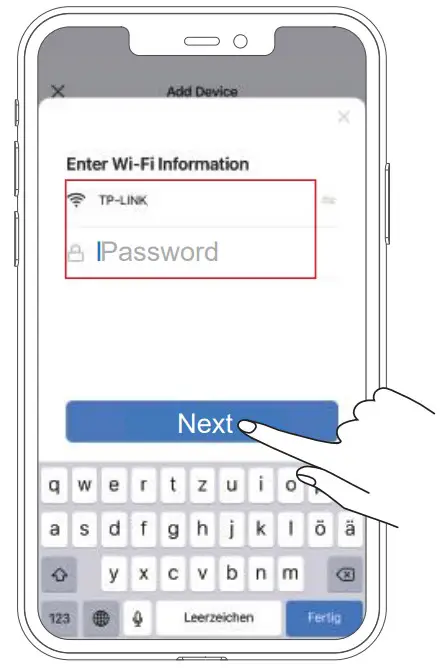
- Enter the 2.4G Wi-Fi Network and password and click “Next”.

- Then the Smart life app will add the T129L machine automatically. After the T129L machine is added, click “Done” to enter the APP setting page, which means the binding completed.

 ” icon to search and add a T129L machine.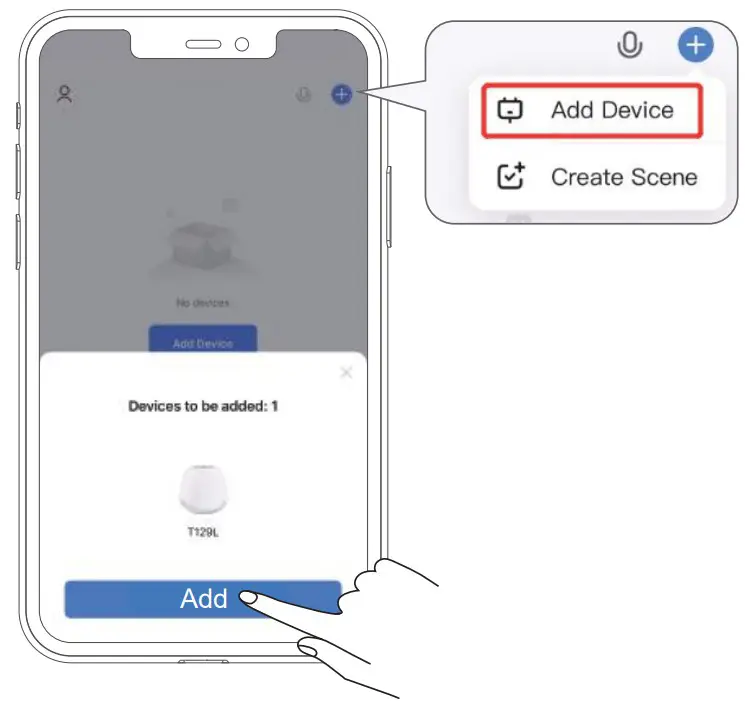
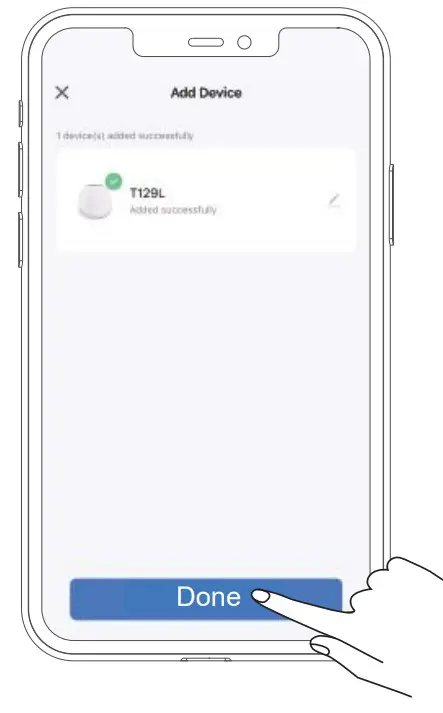
Control T129L through Smart Life App
Open the Smart Life app on your smartphone and click the “T129L” icon to use the app to set the machine.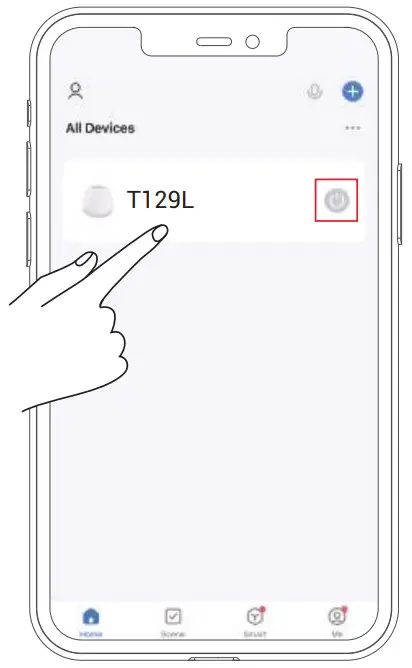 Note: The “
  ” icon on the app page is only used for turning on/off the light, which will not affect the sounds playing.
Set night light or the colorful ambient light on the app
Please click the “  ” icon on the app to turn on the night light, and then you also can click the “White” or “Color” icon to choose the white night light color or colorful night light color.
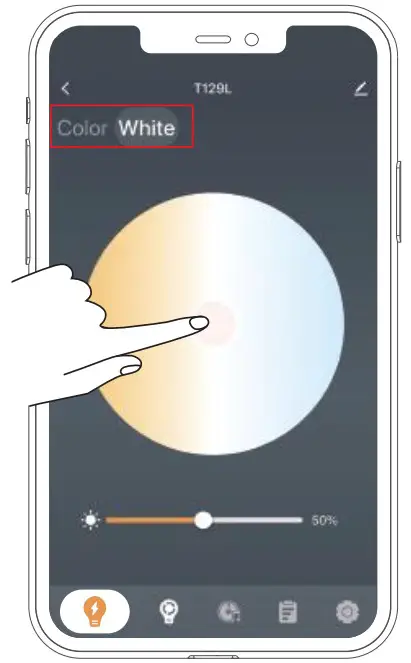 Under “White” setting: you can adjust the color temperature or brightness as shown below.
Under “Color” setting:
You can choose the color you like in the color wheel, or you can choose the default color in the app. Preset the lighting effect and the DIY lighting effect.
You can click the “  ” icon to choose more default lighting effects and the DIY lighting effects.
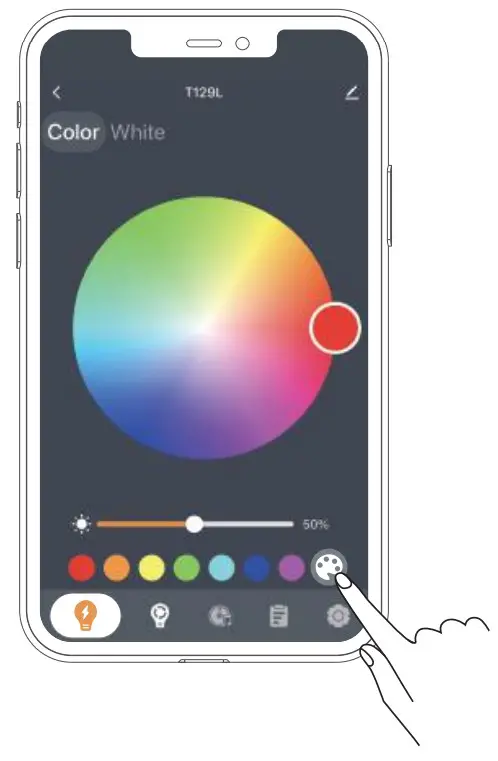 DIY lighting effects
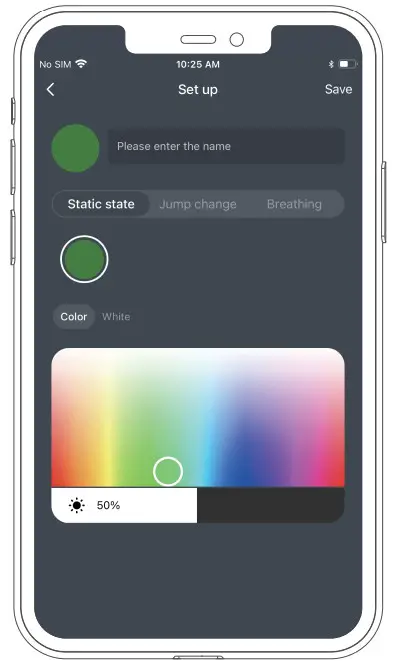
There are three modes of the DIY lighting effects, the static state, the jump change and the breathing.
- The static state:
You can click the “ ” icon and then click the “Static state” to choose the colors and brightness of the light. And then enter the customized light name and click “Save” to save the settings.

- The jump change :
You can click the “ ” icon and then click the “Jump change” to choose the colors, brightness and the color transform speed of the light. And enter the customized light name and click “Save” to save the settings.
- The breathing :
You can click the “ ” icon and then click the “Breathing” choose the colors, the brightness and the color transform speed of the light. And enter the customized light name and click “Save” to save the settings.
- Modify and delete the DIY lightning effects:
Tap the “ ” icon to modify the DIY lightning effects. Tap “Delete” to delete the DIY lightning effects.
 ” icon and then click the “Static state” to choose the colors and brightness of the light. And then enter the customized light name and click “Save” to save the settings.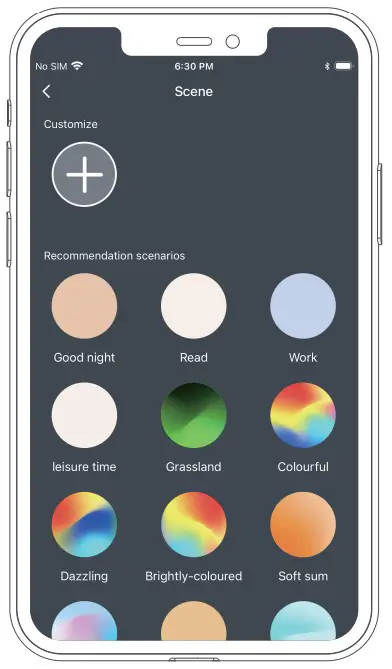
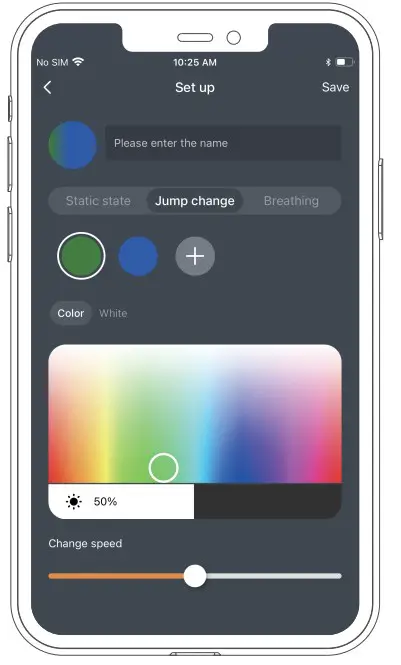
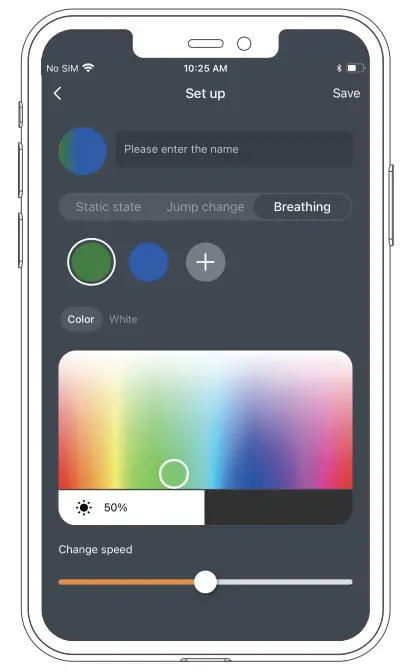
 ” icon to modify the DIY lightning effects. Tap “Delete” to delete the DIY lightning effects.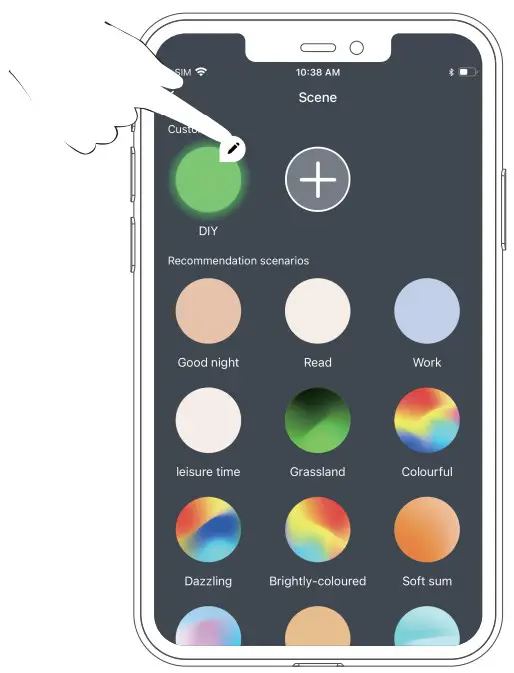
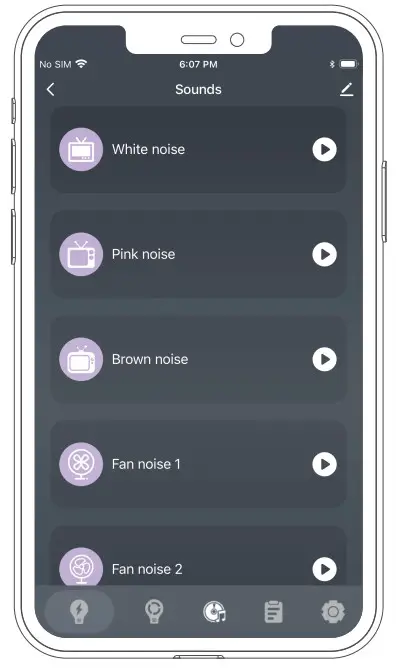
The sounds setting
Tap the “  ” icon to choose the sound you like and click “
 ” icon to play.
 Programs setting
Tap the “ ” icon to enter the Programs settings.
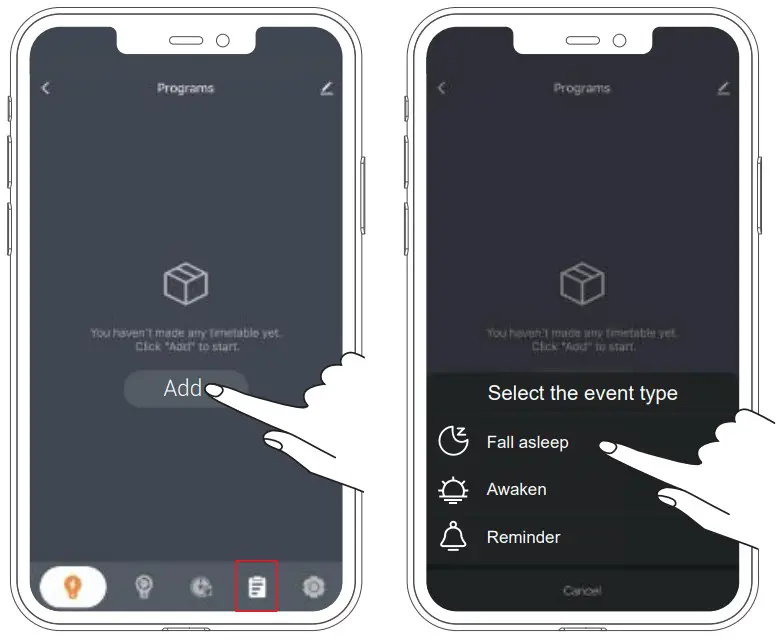 The machine has three types Timer programs Settings, including Fall asleep, Awaken and Reminder.
- Fall asleep mode:

The minimum time of the timer is 15 minutes. After setting the time for the timer, the light brightness and sounds will become smaller in last 5 minutes while the light brightness and sounds will turn off by the timer end. - Awaken mode:

The minimum time of the timer is 1 minutes. After setting the time for the timer, the light and sound will gradually become greater in the first minute while the light brightness and sounds will turn off by the timer end. - Reminder mode:

After setting the time for turning on and turn off, the machine will turn on and off the night light and sounds following the setting time.


1. Fall asleep mode setting
- Click “
 ” icon and “Add”, and then click the “
  Fall asleep” on the app to enter the setting of the Fall asleep mode settings.
 - Select the start time, the end time, and the repeat days for every week. The default setting is to turn on from Monday to Sunday.
- Select the sounds and volume, the night light and brightness. (Pull up the screen to display brightness in the app.), and click the “Save” to save.
 Fall asleep” on the app to enter the setting of the Fall asleep mode settings.
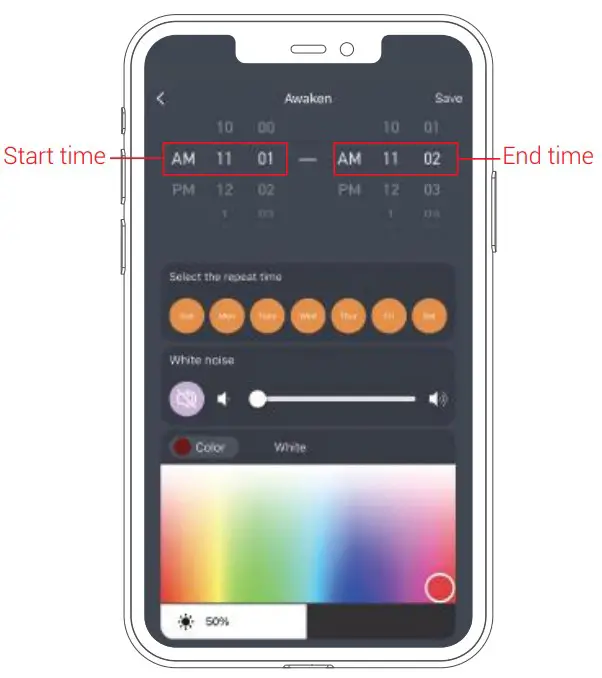
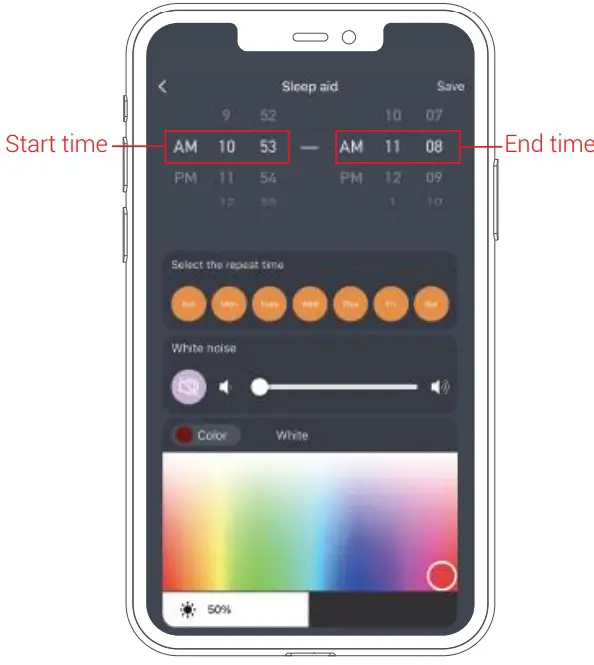 2. Awaken mode setting
- Click “ ” icon and “Add”, and then click the “
 Awaken” in the APP to enter the setting of the Awaken mode settings.
 - Select the start time, the end time and the repeat days for every week. The default setting is to turn on from Monday to Sunday.
- Select the sounds and volume, the night light and brightness. (You can pull up the screen to display brightness in the APP.) Finally click the “Save” to save.
 Awaken” in the APP to enter the setting of the Awaken mode settings.
 3. Reminder mode setting
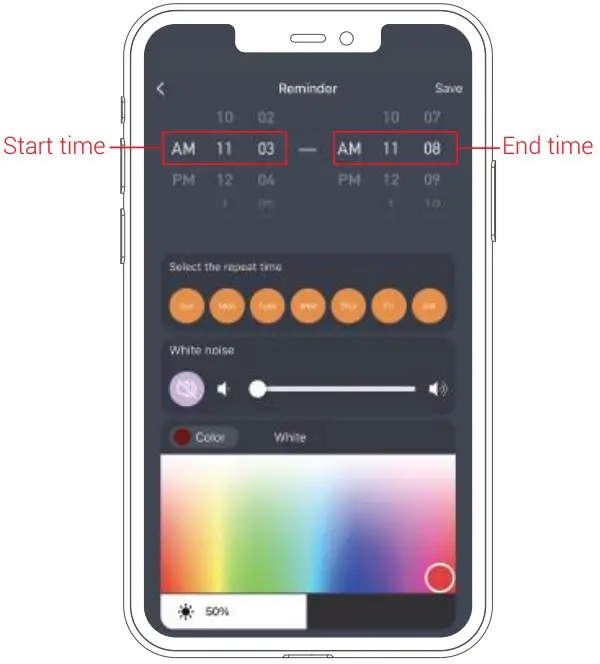
- Click “ ” icon and “Add”, and then click the “
 Reminder” in the app to enter the setting of the Reminder mode settings.
 - Select the start time, the end time, and then select the repeat days for every week. The default setting is to turn on from Monday to Sunday.
- Select the sounds and volume, the night light and brightness. (You can pull up the screen to display brightness in the APP.) Finally click the “Save” to save.
 Reminder” in the app to enter the setting of the Reminder mode settings.
 Notes:
- If you want to turn off the sound in advance, you can press the “ ” button on the device.
- If you want to turn off the night light in advance, you can press the “
 ” button in the device.
 - You can click the “
 ” icon in Programs of the app to turn on/off the timer programs. Then it will turn on or off.
 - Click the “
 ” in Programs of the app to delete the the timer programs. Then it will be deleted.
 ” in Programs of the app to delete the the timer programs. Then it will be deleted.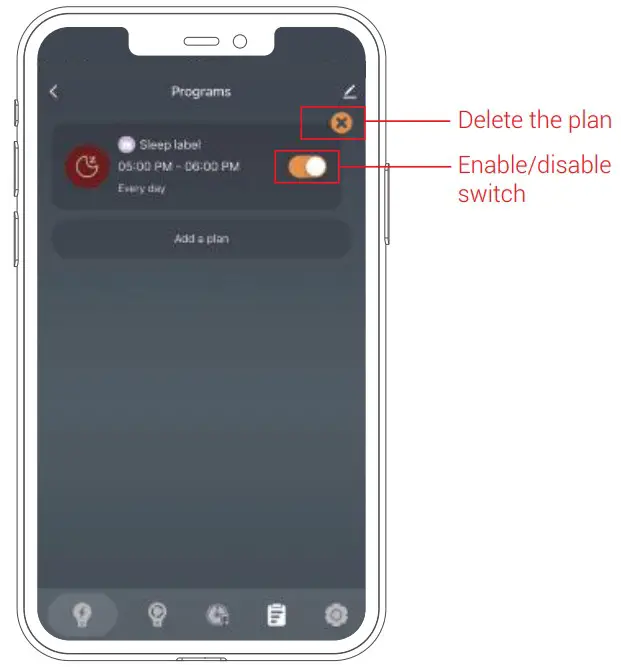
Set child lock
Click the ”  ” icon and “
  General”, and then click “
 ” in the app to turn on/off the child lock function. When the child lock function is on, the buttons on the machine are disabled.
Hold the ” ” button on the machine for 2 seconds until the device play a “Beep Beep” to unlock the Child lock.
Countdown shutdown
Click the ” ” icon and “ General”, and then click “ Countdown shutdown” to set the countdown time for the machine to shutdown, and tap “Confirm” to star the Countdown.
Night light timer
Click ” ” and “ Count down” to set night light timer, light color and the night light color when time is up.
Tap “confirm” to star the night light timer.
When time is up, the machine will sound a “Cheers”.
Unbind the device with the App
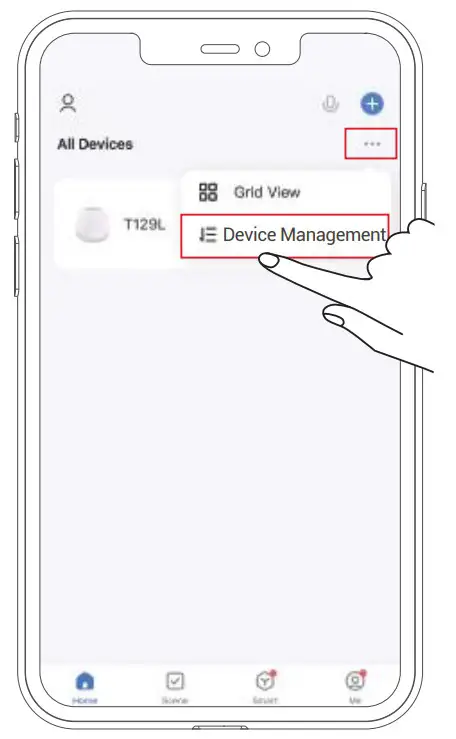
- Click “
 ” at the following app image, and click “Device Management” and choose the device “T129L”
 - Click “Remove Device” to remove the device and then click “Confirm”. The phone will unbind with the device.
- Click the “Done” in the right corner to return the app page.
 ” at the following app image, and click “Device Management” and choose the device “T129L”
Restoring Factory Defaults
Hold the “ ” button in the top of the device and the “ ” button at the bottom of the device at the same time for 3 seconds until you hear a voice prompt sound “Beep”, meanwhile, the warm color night light is on, the machine is unbind with your phone, and restores factory default settings.
Specifications
- Working Voltage: DC 5V/1A
- Speaker Power: 3W
- Light Power: 2W
- Working Temperature: -10°C to 50°C
- Dimension: 104 x 104 x 97 mm
- Weight: 188g
SAFETY AND WARRANTY
Important Safety Instructions
- This machine is designed for indoor use only. Please refrain from using outdoors.
- Clean the machine regularly with a soft, dry cloth. Do not use any liquids, sprays (including solvents, chemicals, alcohol, or abrasives) to clean.
- The machine should not be used near water, such as a bathtub, swimming pool, faucet or basin, which may cause risk of injury.
- Never drop or insert objects into any opening on the device.
- Do not operate where aerosol (spray) products are being used or where oxygen is being administered.
- Avoid placing the machine in areas that are exposed to direct sunlight or close to heat-radiating products such as electric heaters. Do not place the device on top of the stereo equipment that may emit heat.
- Avoid placing the machine in areas that are dusty, humid, moist, lack ventilation, or are subject to constant vibration.
- The machine may be subject to interference from external sources such as transformers, electric motors or other electronic devices. To avoid distortion from such sources, please make sure you place the device as far away from these disturbances as possible.
- Do not apply excessive force when using any of the control buttons.
- Power cords should be routed to avoid being walked on or pinched by items placed on or against them.
- Disconnect the power supply of the machine when it is unused for an extended period of time or when moving the device.
- Use this device only for its intended purpose as described in this manual.
- Close supervision is necessary when this appliance is used by or near children, people with learning difficulties or people that have a disability.
- Never operate this device if it has a damaged cord, cable or housing.
Warranty
We strive to build our products with the highest attention to detail and craftsmanship. However, sometimes there are occurrences of a defect, so we are happy to offer a ONE-year hassle-free warranty to all our devices as we continue to make amazing products. Please contact us if you have any questions about our devices.
FCC ID: 2A598-T129L
NOTE: This equipment has been tested and found to comply with the limits for Class B digital devices, in accordance with section 15 of the FCC Rules. These limits are designed to provide reasonable protection against harmful interference in a residential installation. This equipment generates uses and can radiate radio frequency energy and, if not installed and used in accordance with the instructions, may cause harmful interference to radio communications. However, there is no guarantee that interference will not occur in a particular installation. If this equipment does cause harmful interference to radio or television reception, which can be determined by turning the equipment off and on, the user is encouraged to try to correct the interference by one or more of the following measures:
- Reorient or relocate the receiving antenna.
- Increase the separation between the equipment and receiver.
- Connect the equipment into an outlet on a circuit different from that to which the receiver is connected.
- Consult the dealer or an experienced radio/TV technician for help Changes or modifications not expressly approved by the party responsible for compliance could void the user’s authority to operate the equipment.
This device complies with Part 15 of the FCC Rules. Operation is subject to the following two conditions:
- this device may not cause harmful interference, and
- this device must accept any interference received, including interference that may cause undesired operation.
FCC Radiation Exposure Statement:
This equipment complies with FCC radiation exposure limits set forth for an uncontrolled environment.This equipment should be installed and operated with minimum distance 20cm between the radiator& your body.