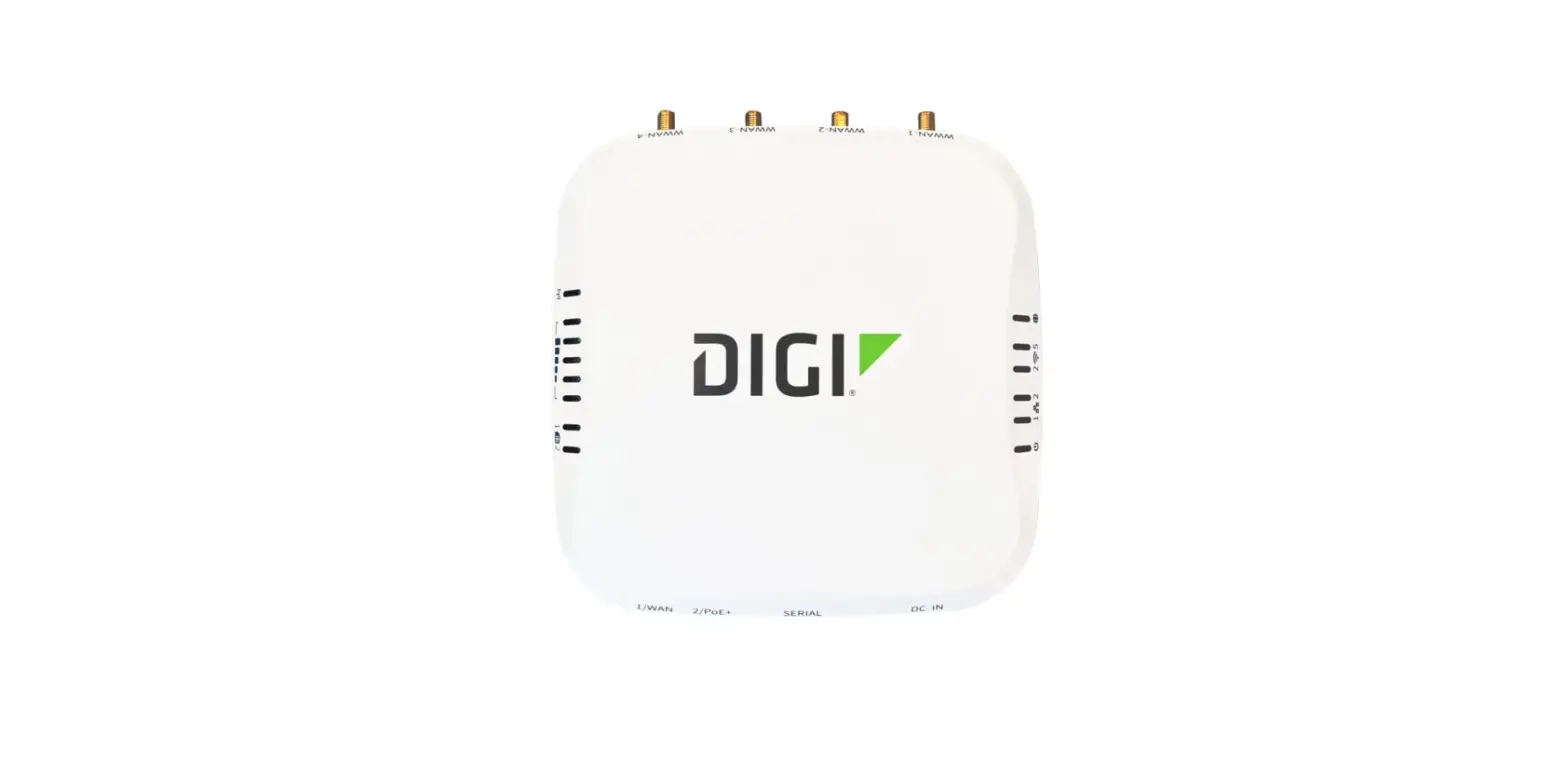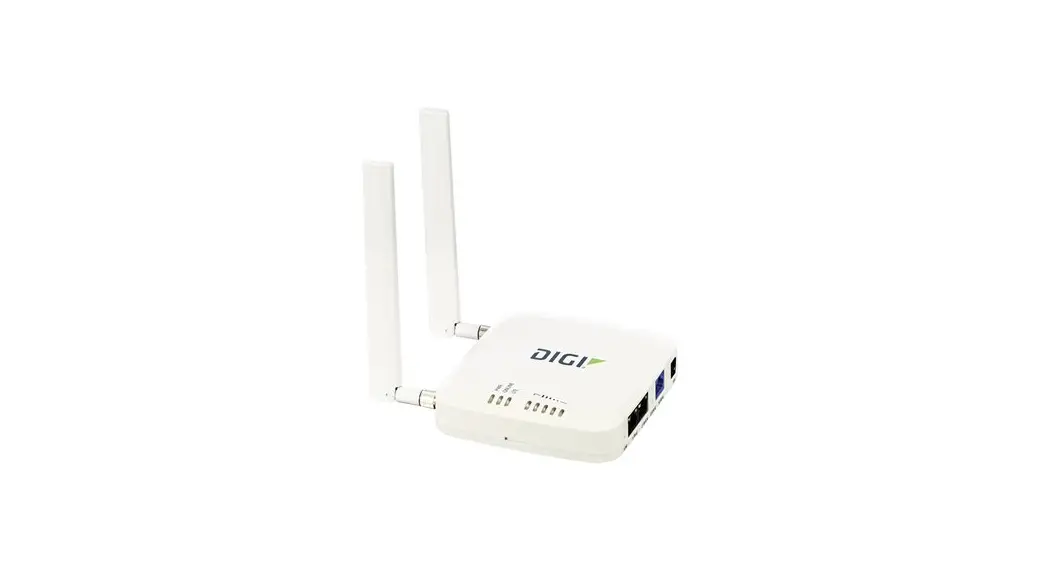
 EX40 Cellular Router with 4G LTE Advanced Pro Connectivity
User Manual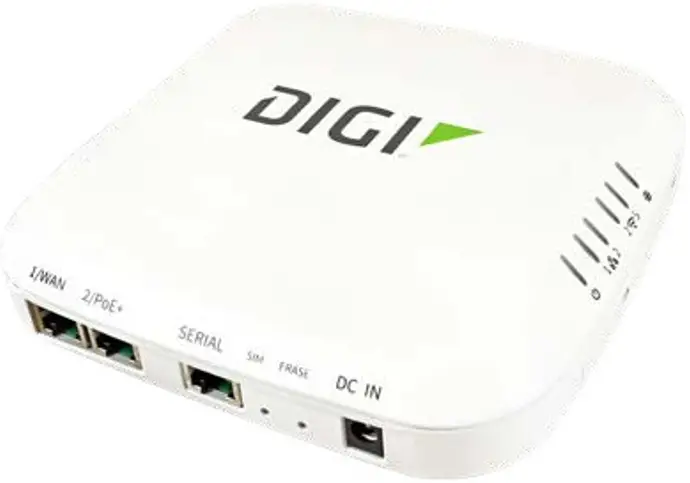
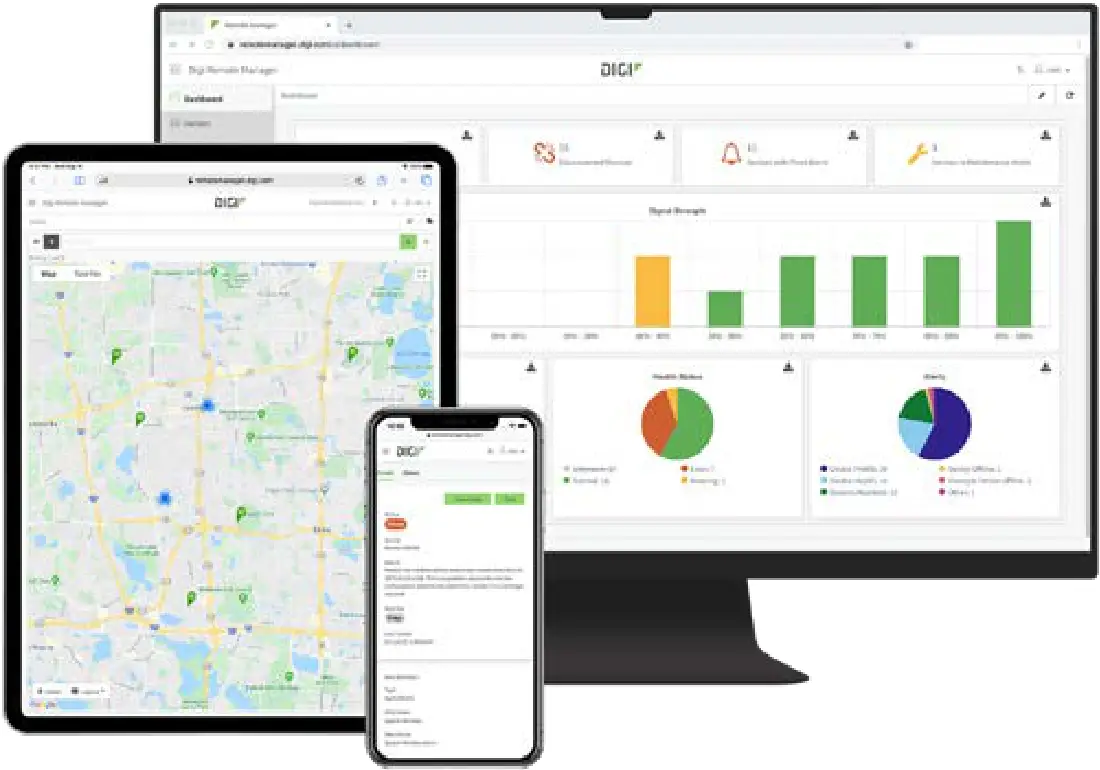 Manage this device with Digi Remote Manager
4G LTE Advanced Pro enterprise solution for primary or backup wireless connectivity
The business has forever changed with millions of employees working remotely. The Digi EX40 cellular router with 4G LTE Advanced Pro connectivity provides your business with a fast, secure, and resilient enterprise-grade network that changes the work-from-anywhere experience for good.
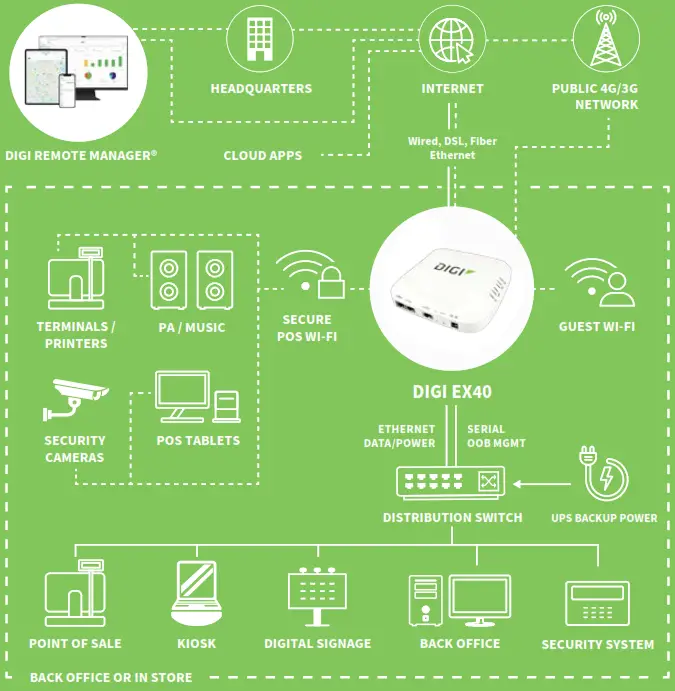
Digi EX40 is an ideal choice for your business as you adapt to the new normal. The small form factor of Digi EX40 makes it the 4G enterprise solution where the work is happening: at the headquarters for backup connectivity, at the branch for cost-optimized primary connectivity, or at the IT-managed home office for secure, all-in-one connectivity with Wi-Fi.
Part of Digi enterprise solutions, this router comes with industry-leading software, including Digi Accelerated Linux (DAL OS), Digi TrustFence® security framework, and the Digi Remote Manager® configuration and management platform. These tools deliver security, reliability, and system-wide management of your entire infrastructure.
Dual-SIM slots provide carrier flexibility and wireless failover, and with 4G LTE and 3G fallback, you’re covered in areas where 5G is not yet deployed. The latest generation Wi-Fi 6 radios in the Digi EX50 router operate simultaneously for higher speed, capacity, quality of service, and range than previous Wi-Fi products. Dual 2.5 Gigabit Ethernet ports break the Gigabit barrier and deliver 4G speeds for future-ready networks.
Digi EX40 supports indoor use-cases with an extended operating temperature range, such as smart factories, warehouses, construction sites, or infrastructure sheds.
An available serial port with Cisco straight-through pinout enables secure out-of-band (OOB) management of other onsite equipment.
To simplify installation, Digi EX40 can be directly powered by an active PoE+ switch or a DC IN barrel connector as the primary or backup power source for redundancy.
FEATURES AND BENEFITS
- Future-proof and ready for new use cases such as 4G dual-APN, SD-WAN, 4K/8K cameras, and AR/VR
- High-speed 4G LTE-Advanced Pro Cat 20 connectivity cellular radio
- Enterprise-grade Wi-Fi 6 and dual 2.5 Gigabit Ethernet
- Extended operating temperature range for wider use cases
- Standards-based Power over Ethernet simplifies installation
- Multiple mounting options and accessories
- Serial port for remote, out-of-band management
- Securely deploy, monitor, and control devices with Digi Remote Manager®
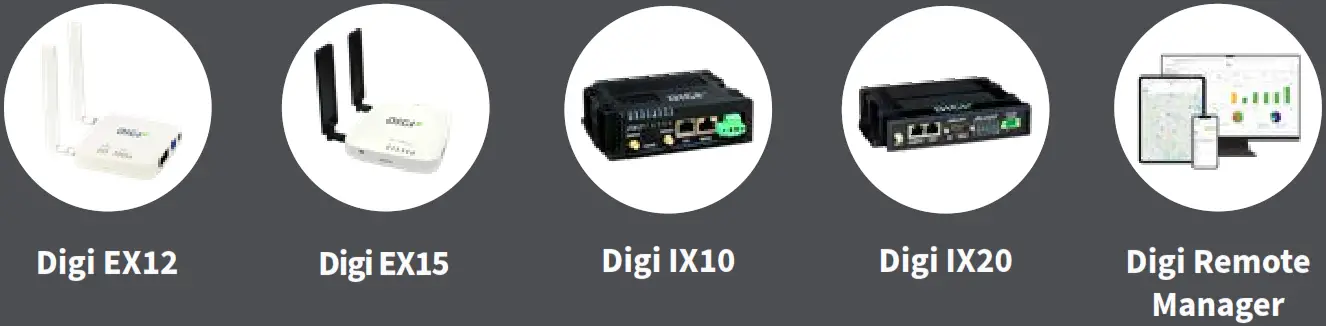
RELATED PRODUCTS
APPLICATION EXAMPLE
SPECIFICATIONS
| CELLULAR CONNECTIVITY | |
| 5G NR | Bands: not supported |
| 4G LTE-ADVANCED PRO | Bands: B1, B2, B3, B4, B5, B7, B8, B12, B13, B14, B17, B18, B19, B20, B25, B26, B28, B29, B30, B32, B34, B38, B39, B40, B41, B42, B46, B48, B66, B71; CBRS, LAA |
| 3G HSPA+ | Bands: B1, B2, B3, B4, B5, B6, B8, B9, B19 |
| ANTENNA CONNECTORS | (4) 50 Ω SMA (center pin: female) |
| SIM SLOTS | (2) Mini-SIM (2FF); software selectable, hardware switchable; SIM slot cover plate |
| SOFTWARE AND MANAGEMENT | |
| SOFTWARE | Digi Accelerated Linux (DAL OS); secure, reliable, intelligent, customizable |
| REMOTE MANAGEMENT | Digi Remote Manager®; security, management, updates, alerts, scheduling, and intelligence |
| LOCAL MANAGEMENT | Web Interface (HTTPS); Command Line Interface (SSH, serial port) |
| PERFORMANCE | |
| ETHERNET THROUGHPUT | 2.0 Gbps |
| CELLULAR THROUGHPUT | 1.0 Gbps |
| IPSEC VPN THROUGHPUT | 500 Mbps |
| VPN TUNNELS | 10 tunnels |
| CLIENT COUNT | 50 clients (typical) |
| PROCESSOR | |
| APPLICATION PROCESSOR | ARM® Cortex®-A53, 1.8 GHz, quad-core, 64-bit |
| MEMORY | 512 MB RAM, 512 MB flash |
| ETHERNET | |
| PORTS | (2) RJ-45; 10/100/1000/2500 Mbps (auto-sensing) |
| WI-FI | |
| RADIOS | Wi-Fi 6 / 802.11ax, enterprise-grade, dual-band simultaneous, 2×2 MIMO; 2.4 GHz: 802.11b/g/n/ax; 2.4 GHz and 5 GHz: 802.11a/n/ac/ax |
| ANTENNAS | Integrated 2×2 MIMO, 2.4 GHz (8 dBi gain) and 5 GHz (5 dBi gain) |
| SECURITY | Open, Enhanced Open, WPA, WPA2, WPA3; Personal, Enterprise |
| MODES | (4) Wi-Fi access points; (2) Wi-Fi clients; (50) Wi-Fi users (typical) |
| SERIAL | |
| PORTS | (1) RS-232 (RJ-45); Cisco straight-through pinout; for out-of-band management of network appliances and servers |
| PHYSICAL | |
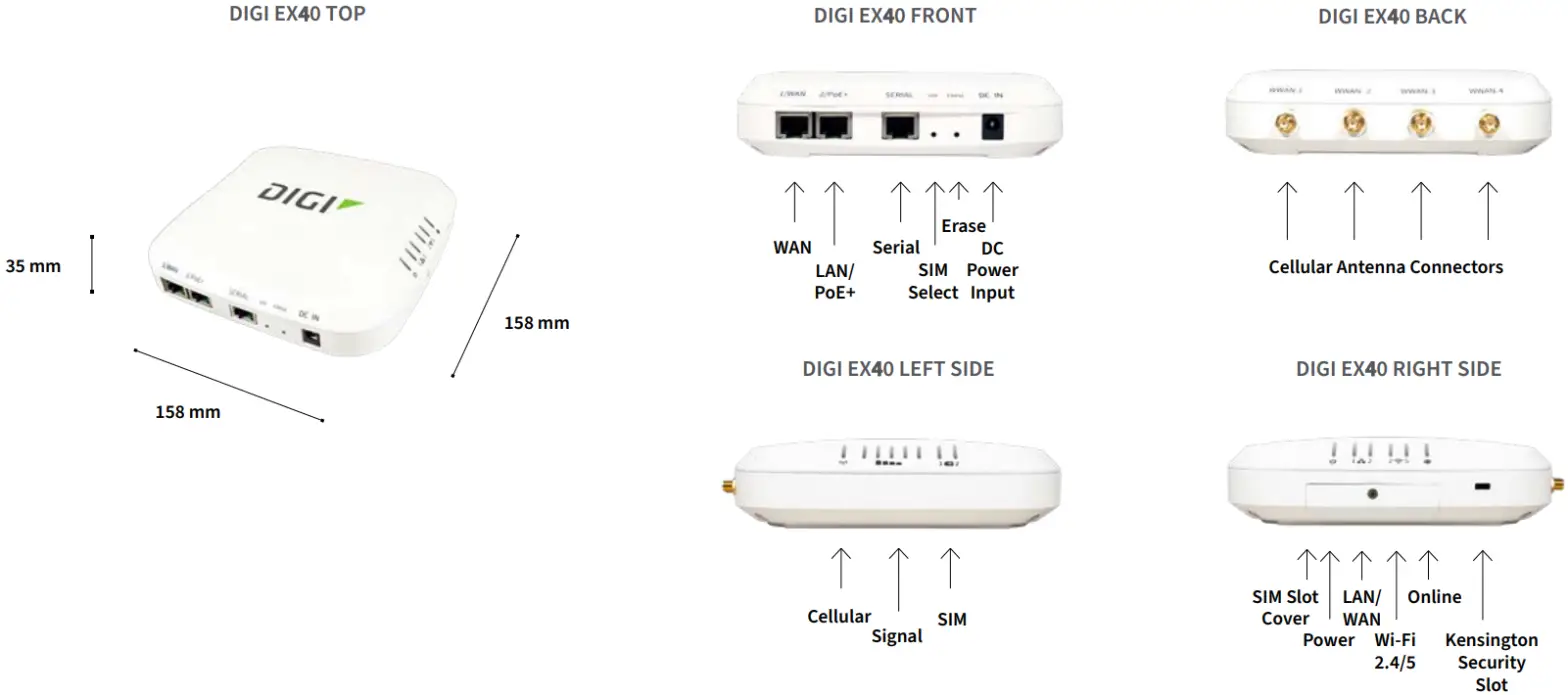
| DIMENSIONS (L x W x H) | 158 mm x 158 mm x 35 mm (6.2 in x 6.2 in x 1.4 in) |
| WEIGHT | 600 g (21 oz) |
| STATUS LEDs | (14) total for easy visual troubleshooting; Power, LAN, WAN, Wi-Fi 2.4/5, Online, Cellular Signal, Cellular Service, SIM 1/2 |
| ENCLOSURE | Hybrid (die-cast aluminum + ABS plastic); Kensington Security Slot |
| POWER REQUIREMENTS | |
| DC BARREL INPUT | 19 VDC / 2.5 A barrel connector, 2.5 mm pin, center-positive |
| POWER OVER ETHERNET | Standards-based, IEEE 802.3at, PoE+ (25.5 W) |
| POWER CONSUMPTION | 8 W (idle), 15 W (typical), 25 W (maximum) |
| ENVIRONMENTAL | |
| OPERATING TEMPERATURE | 0° C to 40° C (32° F to 104° F) with included commercial-rated power supply; -30° C to 60° C (-22° F to 140° F) with Power over Ethernet or industrial-rated power supply |
| RELATIVE HUMIDITY | 5% to 95% (non-condensing) |
| APPROVALS | |
| CELLULAR | Visit www.digi.com/resources/certifications for the latest certifications |
| EMISSIONS / IMMUNITY | CE; RED; FCC Part 15 Subpart B; CAN ICES-003 |
| SAFETY | IEC62368-1, CB, EN62311 |
| WARRANTY | |
| PRODUCT WARRANTY | 3-year* |
* Standard 3-year warranty upgradeable to 5 years with the purchase of a Digi Remote Manager Premier 5-year subscription applicable to the product purchased only at the time of product purchase and with product registration at that time in Digi Remote Manager.
PRODUCT IMAGES
DIGI REMOTE MANAGER®
Digi Remote Manager is the technology platform that brings networks to the next level, allowing networks — and the people who manage them — to work smarter. With Digi Remote Manager you can transform a multitude of dispersed IoT devices into a dynamic, intelligent network. Now you can easily deploy, monitor, and diagnose thousands of mission-critical devices from a single point of command — on your desktop, tablet, or phone. All the while, its software-defined security diligently safeguards your entire Digi ecosystem.
Learn more at www.digi.com/digi-remote-manager
CAPABILITIES
- Activate, monitor, and diagnose your mission-critical devices from a single point of command and control — on your desktop or mobile app
- Schedule key operations — including firmware updates and file management —on a single device or on a group of devices, keeping your network functionality up-to-date and maintaining compliance standards
- Manage edge devices out-of-band via console terminal access
- Keep tabs on device health and connectivity across device deployments of any size
- Create detailed reports and enable real-time alerts for specified conditions
- Integrate device data through open APIs to gain deeper insights and control with third-party applications
- Report and alert on performance statistics, including connection history, signal quality, latency, data usage, and packet loss
INFRASTRUCTURE
- Hosted in a commercial-grade cloud server environment that meets SOC 1®, SOC 2®, and SOC 3® standards
- Superior availability, operating to 99.9% or greater
- Open APIs available to support application development
SECURITY
- More than 175 security controls are in place to protect your data
- Member of the Center for Internet Security® (CIS®)
- Enables compliance with security frameworks like IS027002, HIPAA, NIST, and more
- Earned Skyhigh’s Cloudlrust™ Program’s highest rating of Enterprise-Ready
| PART NUMBERS | DIGI EX50 |
| EX50-WX20-GLB | Digi EX20 – Global, 4G LTE Advanced Pro Cat-20 with 3G fallback, Wi-Fi 6 2×2 MIMO DBS, dual 2.5 GbE, RS-232, with accessories* |
* Includes DC power supply, mounting hardware, Ethernet, and serial cables.
| PART NUMBERS | DIGI REMOTE MANAGER® |
| DIGI-RM-STD-1YR | Digi Remote Manager Standard – 1-year subscription |
| DIGI-RM-PRM-1YR | Digi Remote Manager Premier – 1-year subscription |
| DIGI-RM-PRM-3YR | Digi Remote Manager Premier – 3-year subscription |
| DIGI-RM-PRM-5YR | Digi Remote Manager Premier – 5-year subscription |
Digi EX50 regulatory and safety statements
RF exposure statement
In order to comply with RF exposure limits established in the ANSI C95.1 standards, the distance between the antenna or antennas and the user should not be less than 20 cm.
Federal Communication (FCC) Part 15 Class B
Radio Frequency Interference (RFI) (FCC 15.105)
The Digi EX50 has been tested and found to comply with the limits for a Class B digital device, pursuant to Part 15 of the FCC Rules. These limits are designed to provide reasonable protection against harmful interference in a residential installation. This equipment generates, uses, and can radiate radio frequency energy and, if not installed and used in accordance with the instructions, may cause harmful interference to radio communications. However, there is no guarantee that interference will not occur in a particular installation. If this equipment does cause harmful interference to radio or television reception, which can be determined by turning the equipment off and on, the user is encouraged to correct the interference by one or more of the following measures:
- Reorient or relocate the receiving antenna.
- Increase the separation between the equipment and the receiver.
- Connect the equipment into an outlet that is on a circuit different from the receiver.
- Consult the dealer or an experienced radio/TV technician for help.
Labeling Requirements (FCC 15.19)
EX50 complies with Part 15 of FCC rules. Operation is subject to the following two conditions:
- this device may not cause harmful interference, and
- this device must accept any interference received, including interference that may cause undesired operation.
If the FCC ID is not visible when installed inside another device, then the outside of the device into which the module is installed must also display a label referring to the enclosed module FCC ID.
Modifications (FCC 15.21)
Changes or modifications to this equipment not expressly approved by Digi may void the user’s authority to operate this equipment.
European Community – CE Mark Declaration of Conformity (DoC)
Digi has issued Declarations of Conformity for the EX50 concerning emissions, EMC, and safety. For more information, see www.digi.com/resources/certifications.
Important note
Digi customers assume full responsibility for learning and meeting the required guidelines for each country in their distribution market. Refer to the radio regulatory agency in the desired countries of operation for more information.
Innovation, Science, and Economic Development Canada (ISED) statements
CAN ICES-003 (B)/NMB-003(B)
This digital apparatus does not exceed the Class B limits for radio noise emissions from digital apparatus set out in the Radio Interference Regulations of the Canadian Department of Communications. Operation is subject to the following two conditions:
- This device may not cause interference, and
- This device must accept any interference, including interference that may cause undesired operation of the device.
This radio transmitter has been approved by Industry Canada to operate with the antenna types listed below with the maximum permissible gain indicated.
Antenna types not included in this list, having a gain greater than the maximum gain indicated for that type, are strictly prohibited for use with this device.
| Antenna type | Frequency Band (MHz) | TX Paths | Max Antenna Gain (dBi) | CDD Directional Gain (dBi) | |
| For Power | For PSD | ||||
| Omni Antenna | 2412 ~ 2462 | 2 | 8 | 8 | 11 |
| 5150 ~ 5850 | 2 | 5 | 5 | 8 | |
Caution
- The device for operation in the band 5150–5250 MHz is only for indoor use to reduce the potential for harmful interference to co-channel mobile satellite systems;
- For devices with detachable antenna(s), the maximum antenna gain permitted for devices in the bands 5250-5350 MHz and 5470-5725 MHz shall be such that the equipment still complies with the e.i.r.p. limit;
- For devices with detachable antenna(s), the maximum antenna gain permitted for devices in the band 5725-5850 MHz shall be such that the equipment still complies with the e.i.r.p. limits as appropriate.
- The high-power radars are allocated as primary users (i.e. priority users) of the bands 5250-5350 MHz and 5650-5850 MHz and these radars could cause interference and/or damage to LE-LAN devices.
- DFS (Dynamic Frequency Selection) products operate in the bands 5250- 5350 MHz, 5470-5600MHz, and 5650-5725MHz.
IMPORTANT NOTE
Radiation Exposure Statement:
This equipment complies with IC radiation exposure limits set forth for an uncontrolled environment. This equipment should be installed and operated with a minimum distance of 20cm between the radiator and your body.
FOR MORE INFORMATION PLEASE VISIT DIGI.COM
DIGI SERVICE AND SUPPORT / You can purchase with confidence knowing that Digi is always available to serve you with expert technical support and our industry-leading warranty. For detailed information visit www.digi.com/support.
© 1996-2021 Digi International Inc. All rights reserved.
All trademarks are the property of their respective owners.
DIGI INTERNATIONAL WORLDWIDE HQ
877-912-3444 / 952-912-3444 / www.digi.com
DIGI INTERNATIONAL JAPAN
+81-3-5428-0261 / www.digi-intl.co.jp
DIGI INTERNATIONAL GERMANY
+49-89-540-428-0
DIGI INTERNATIONAL SINGAPORE
+65-6213-5380
DIGI INTERNATIONAL CHINA
+86-21-50492199 / www.digi.com.cn
DOCUMENT RESOURCES
Copyright
Product page More documentation
DIGI RESOURCES
About us Contact us Support
DIGI.COM
© 2021 Digi International Inc. All rights reserved.
Innovation, Science, and Economic Development Canada (IC) certifications were updated on 16 Nov 2021 at 10:15 PM
91004462
B3/1121
References
 IIoT Devices and Services for M2M Networking | Digi International
-
Industrial IoT (IIoT) Devices and Services for M2M Networking | Digi International
-
About Digi | Digi International
-
Contact Us | Digi International
-
IoT Device Monitoring - Centralized Remote Device Management Solution - Digi Remote Manager | Digi International
-
IoT Products and Services - Wireless Devices, System-on-Modules and Single Board Computers for Development of Demanding IoT Applications | Digi International
-
Certifications and Radio Equipment Directive (RED) | Digi International
-
Support Services | Digi International
-
Product
-
YouTube
 IIoT Devices and Services for M2M Networking | Digi International
 Industrial IoT (IIoT) Devices and Services for M2M Networking | Digi International
 YouTube