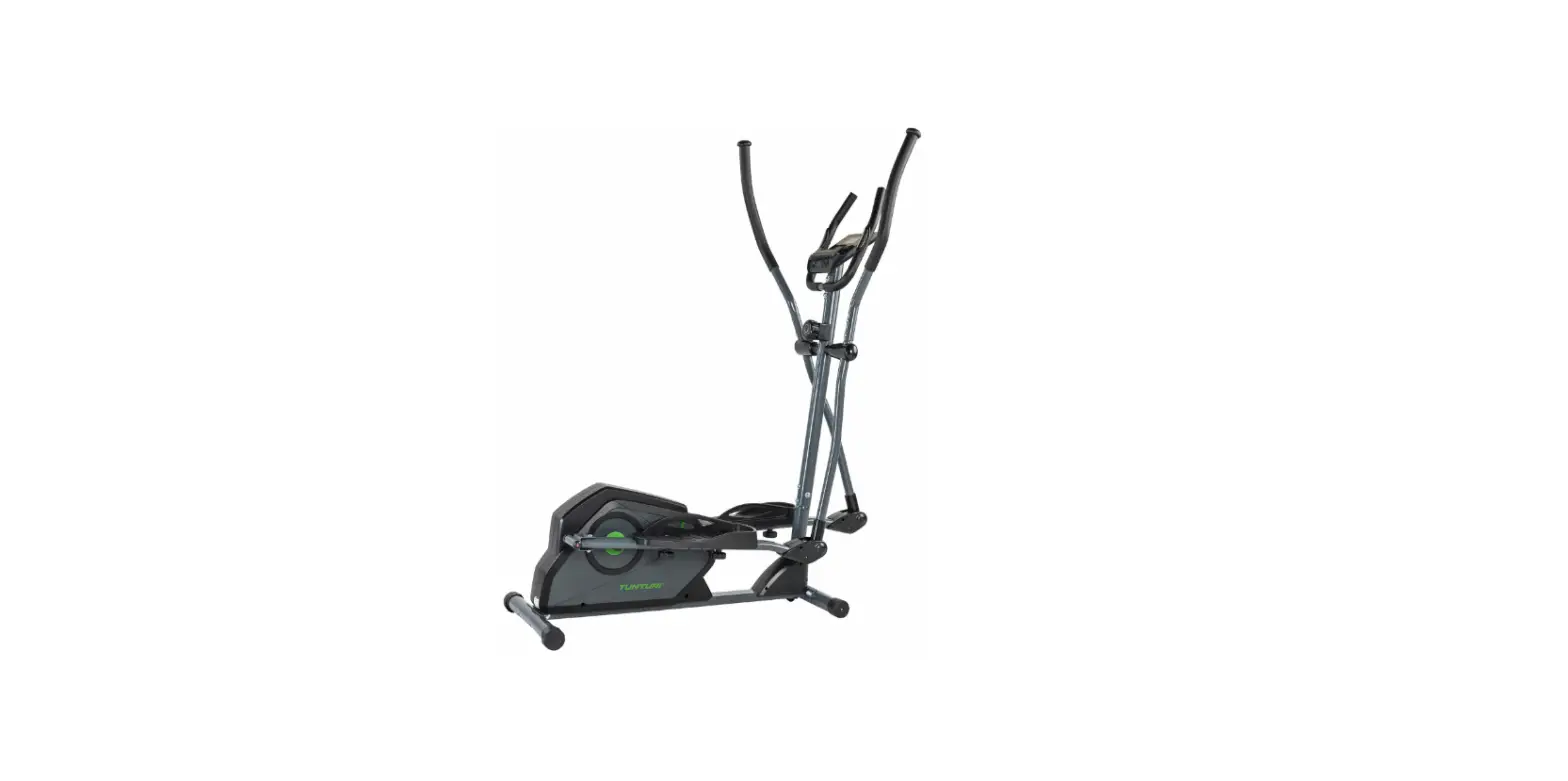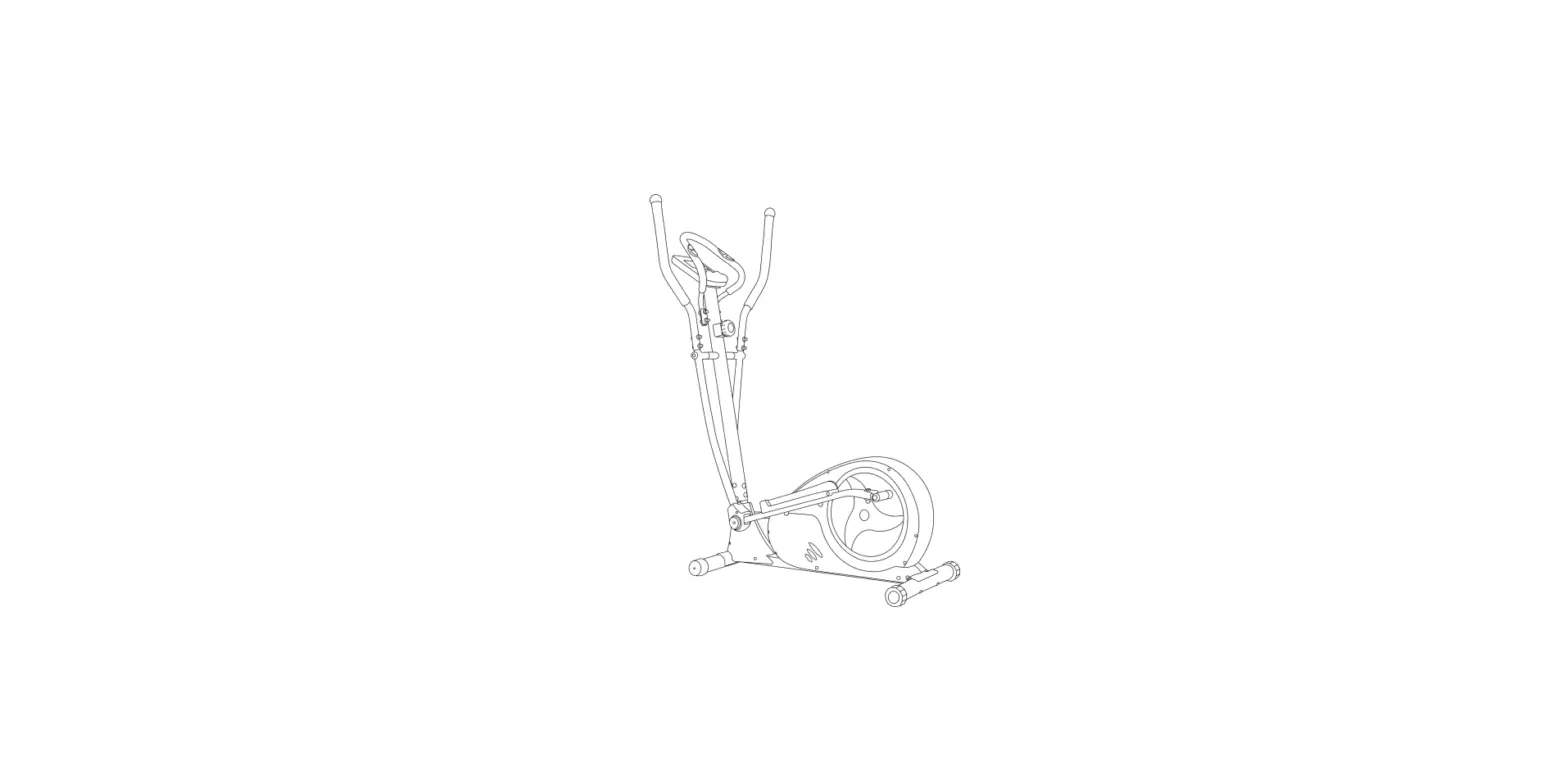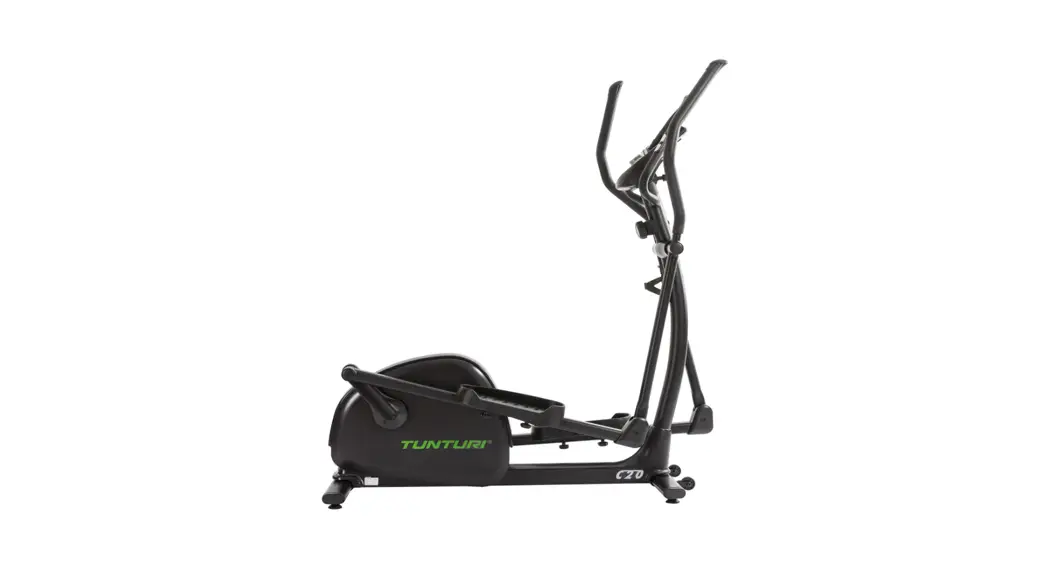

 C20 Cross Trainer
User Manual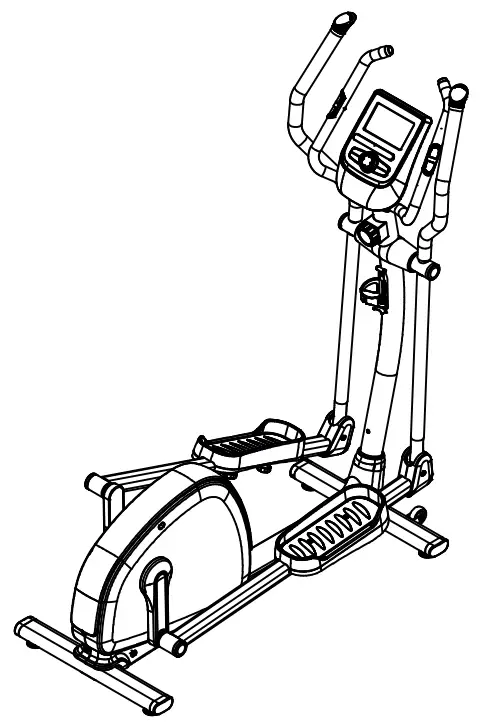 C20 Cross trainer
C20 Cross Trainer
– Please read this Owner’s manual before assembling this product.
www.tunturi.com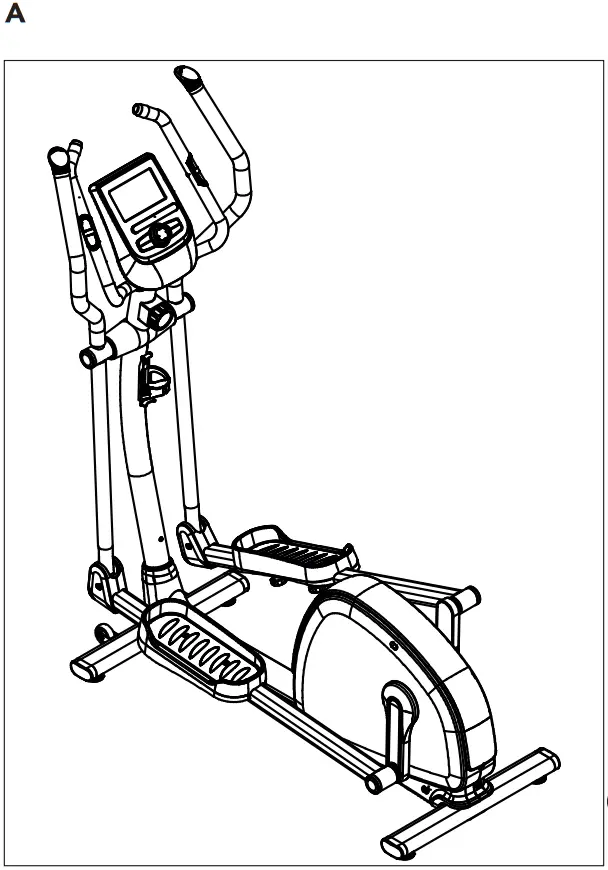
Crosstrainer
Welcome to the world of Tunturi New Fitness! Thank you for purchasing this piece of Tunturi equipment. Tunturi offers a wide range of home fitness equipment, including crosstrainers, treadmills, exercise bikes and rowers. The Tunturi equipment is suitable for the entire family, no matter what fitness level. For more information, please visit our website www.tunturi.com
Safety warnings
 WARNING
Read the safety warnings and the instructions.
Failure to follow the safety warnings and the instructions can cause personal injury or damage to the equipment. Keep the safety warnings and the instructions for future reference.
– The equipment is suitable for domestic use only. The equipment is not suitable for commercial use.
– Max. usage is limited to 3 hrs a day.
– The use of this equipment by children or persons with a physical, sensory, mental or motorial disability, or lack of experience and knowledge can give cause to hazards.
Persons responsible for their safety must give explicit instructions or supervise the use of the equipment.
– Before starting your workout, consult a physician to check your health.
– If you experience nausea, dizziness or other abnormal symptoms, immediately stop your workout and consult a physician.
– To avoid muscular pain and strain, start each workout by warming up and finish each workout by cooling down. Remember to stretch at the end of the workout.
– The equipment is suitable for indoor use only. The equipment is not suitable for outdoor use.
– Only use the equipment in environments with adequate ventilation. Do not use the equipment in draughty environments in order not to catch a cold.
– Only use the equipment in environments with ambient temperatures between 10 °C and 35 °C. Only store the equipment in environments with ambient temperatures between 5 °C and 45 °C.
– Do not use or store the equipment in humid surroundings. The air humidity must never be more than 80%.
– Only use the equipment for its intended purpose. Do not use the equipment for other purposes than described in the manual.
– Do not use the equipment if any part is damaged or defective. If a part is damaged or defective, contact your dealer.
– Keep your hands, feet and other body parts away from the moving parts.
– Keep your hair away from the moving parts.
– Wear appropriate clothing and shoes.
– Keep clothing, jewelry and other objects away from the moving parts.
– Make sure that only one person uses the equipment at a time. The equipment must not be used by persons weighing more than 120 kg (265 lbs).
– Do not open equipment without consulting your dealer.
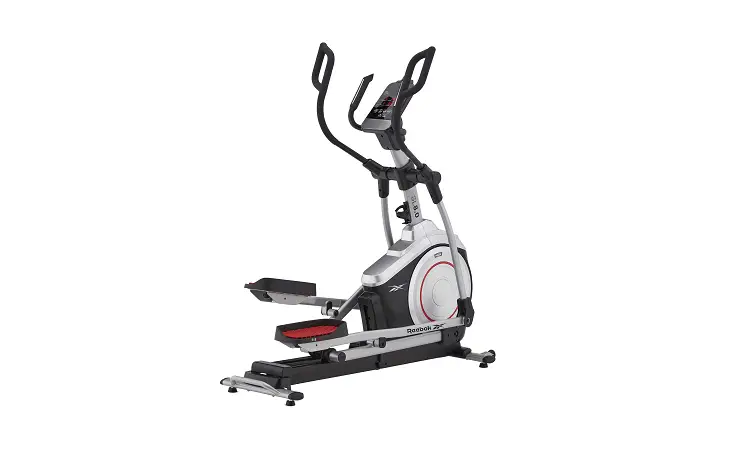
Description (fig. A)
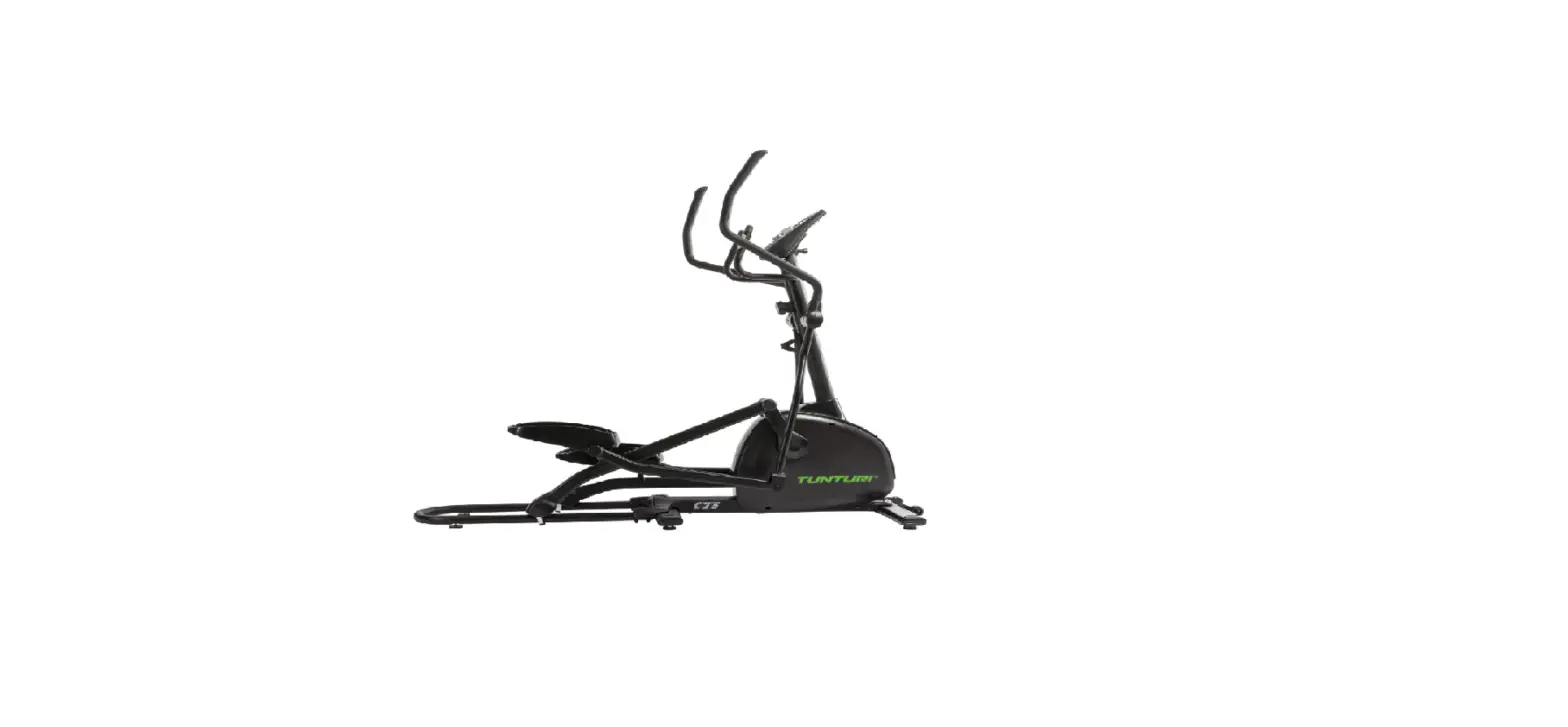
Your Crosstrainer is a piece of stationary fitness equipment used to simulate cycling without causing excessive pressure to the joints.
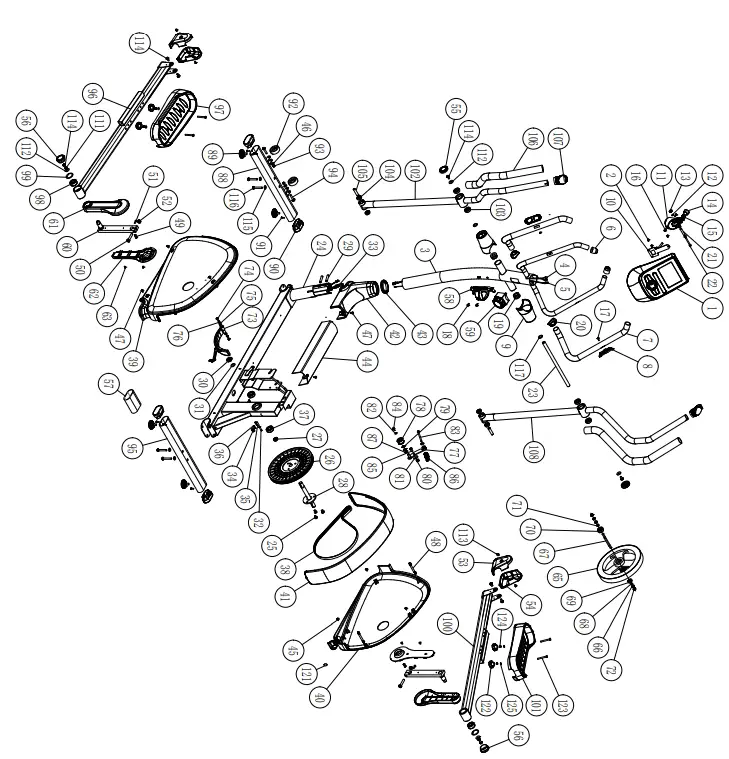
Package contents (fig. B & C)
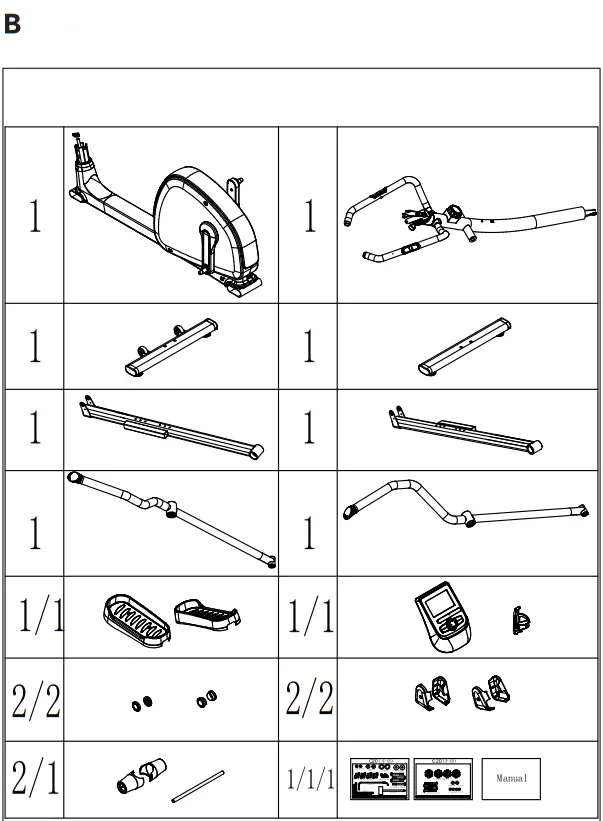
– The package contains the parts as shown in fig. B.
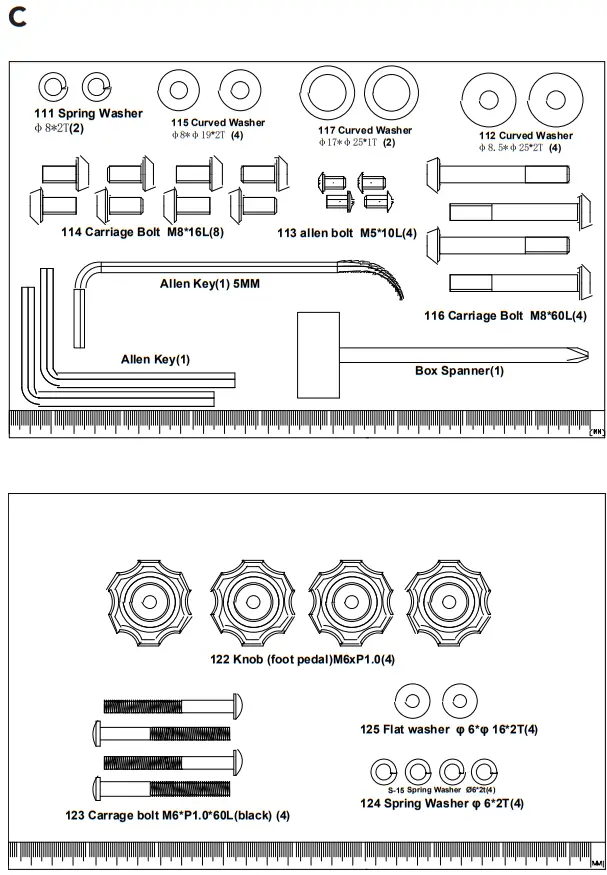
– The package contains the fasteners as shown in fig. C. Refer to the section “Description” NOTE
NOTE
If a part is missing, contact your dealer.
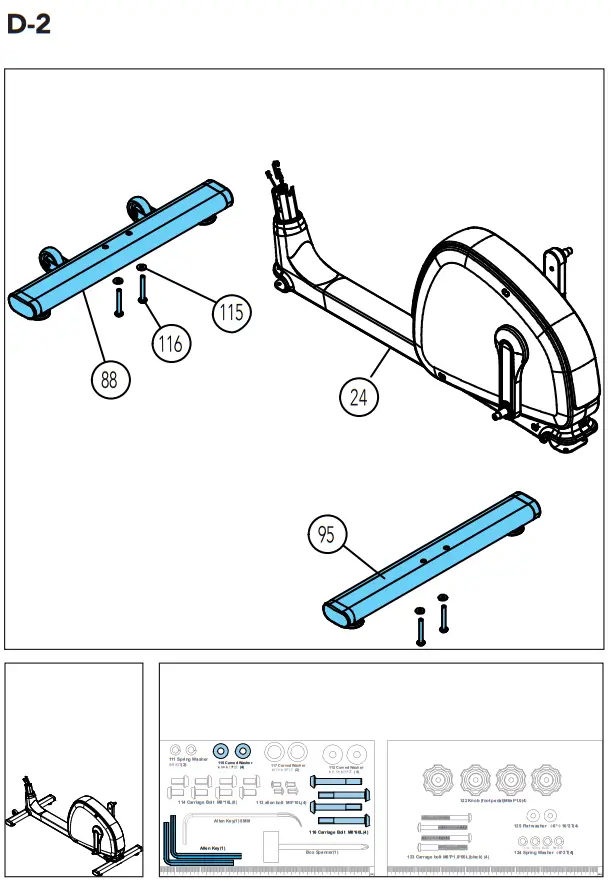
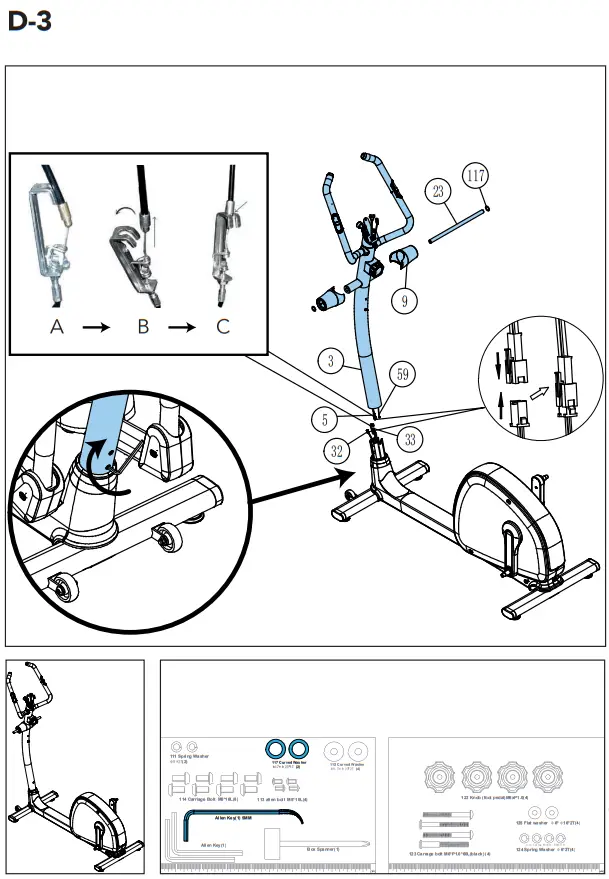
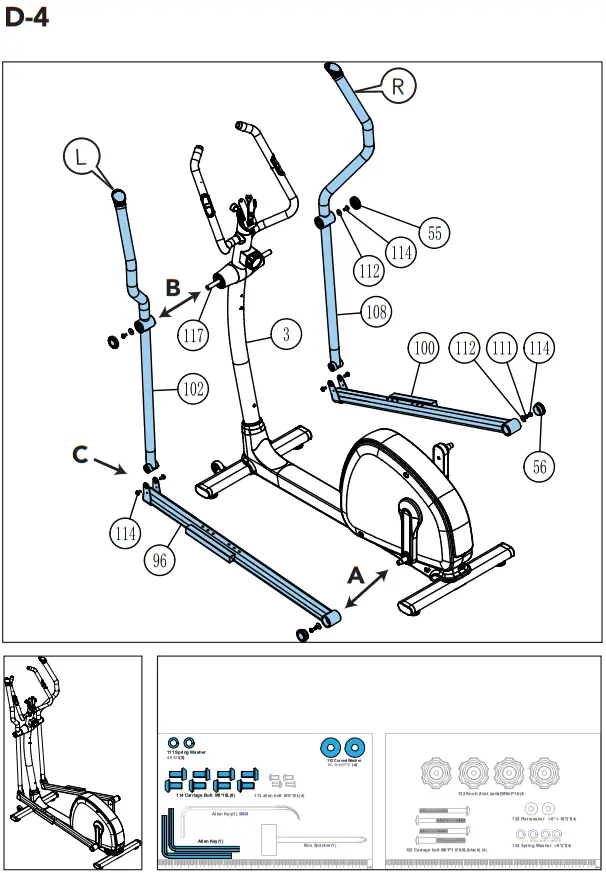
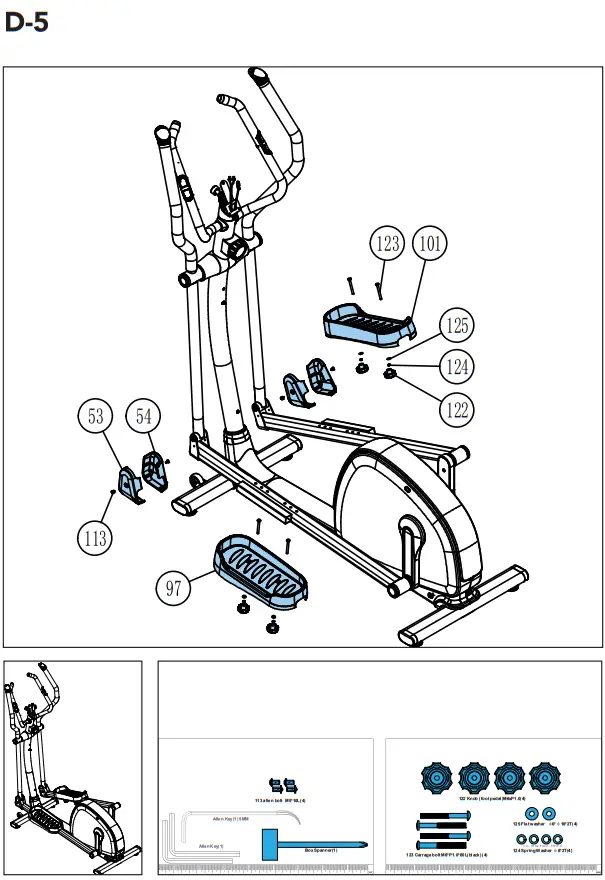
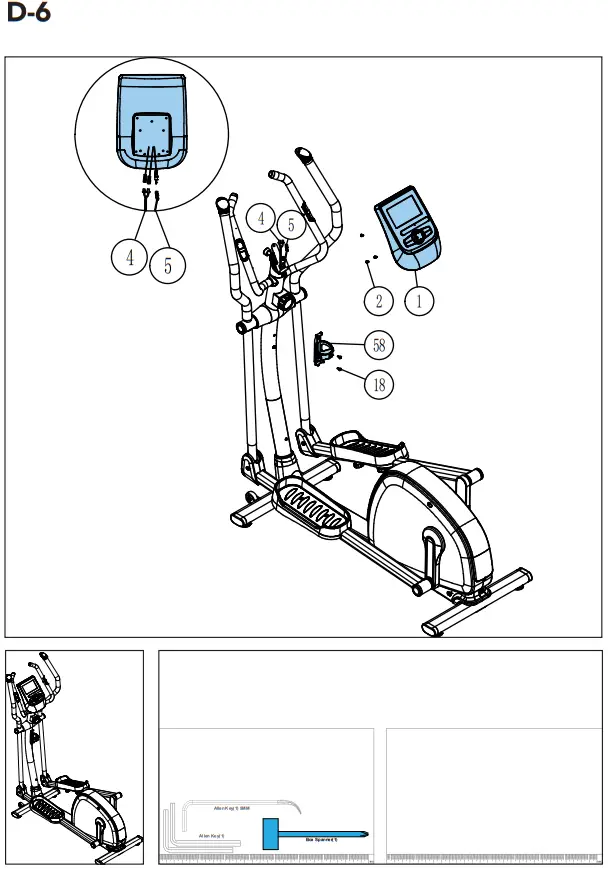
Assembly (fig. D) WARNING
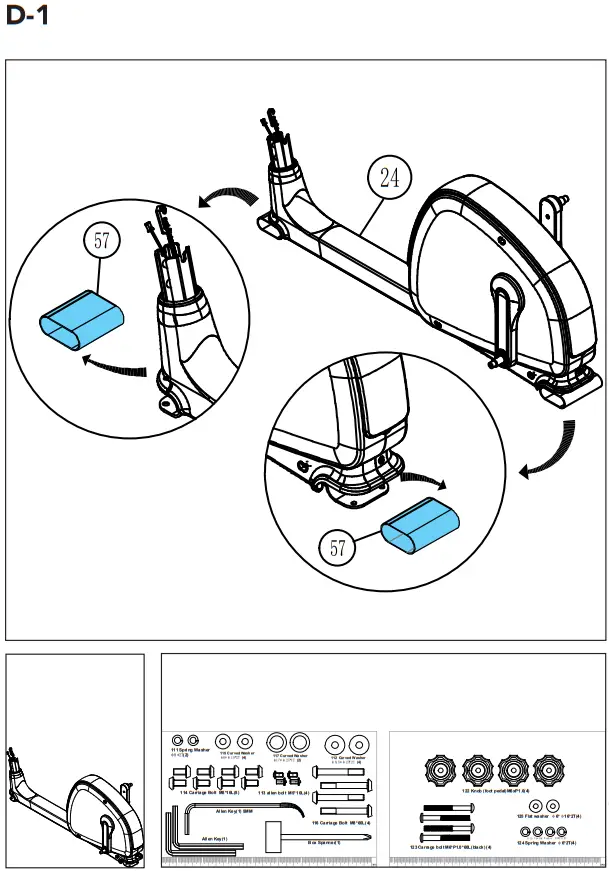
- Assemble the equipment in the given order.
- Carry and move the equipment with at least two persons.
CAUTION
- Place the equipment on a firm, level surface.
- Place the equipment on a protective base to prevent damage to the floor surface.
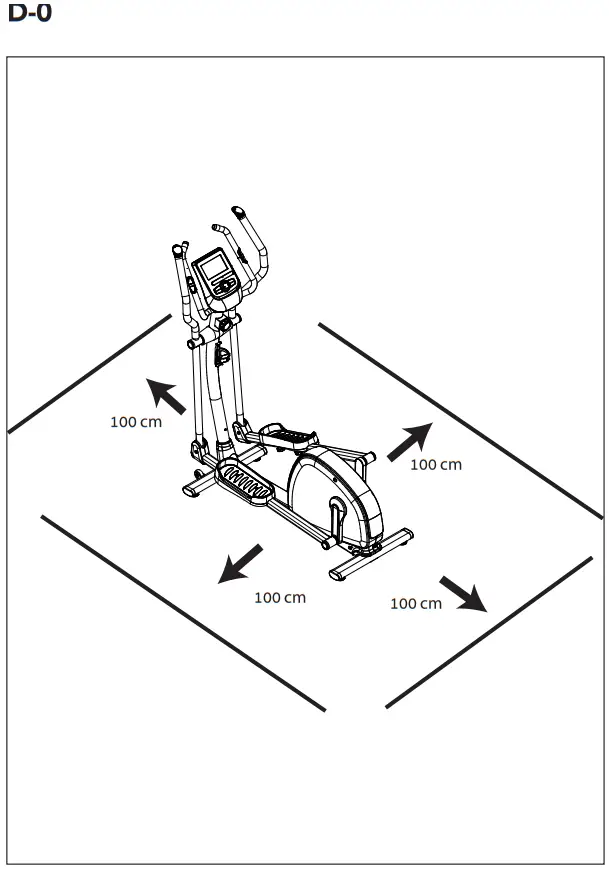
- Allow at least 100 cm of clearance around the equipment.
- Refer to the illustrations for the correct assembly of the equipment.
NOTE
- Save the tools provided with this product, after you completed the product assembly, for future service purposes.
Workouts
The workout must be suitably light, but of long duration. Aerobic exercise is based on improving the body’s maximum oxygen uptake, which in turn improves endurance and fitness. You should perspire, but you should not get out of breath during the workout.
To reach and maintain a basic fitness level, exercise at least three times a week, 30 minutes at a time. Increase the number of exercise sessions to improve your fitness level. It is worthwhile to combine regular exercise with a healthy diet. A person committed to dieting should exercise daily, at first 30 minutes or less at a time, gradually increasing the daily workout time to one hour.
Start your workout at low speed and low resistance to prevent the cardiovascular system from being subjected to excessive strain.
As the fitness level improves, speed and resistance can be increased gradually. The efficiency of your exercise can be measured by monitoring your heart rate and your pulse rate.
Pulse rate measurement
(hand pulse sensors)
The pulse rate is measured by sensors in the handlebars when the user is touching both sensors at the same time. Accurate pulse measurement requires that the skin is slightly moist and constantly touching the hand pulse sensors. If the skin is too dry or too moist, the pulse rate measurement will become less accurate. NOTE
- Do not use the hand pulse sensors in combination with a heart rate chest belt.
- If you set a heart rate limit for your workout, an alarm will sound when it is exceeded.
Heart rate measurement
(heart rate chest belt)
The most accurate heart rate measurement is achieved with a heart rate chest belt. The heart rate is measured by a heart rate receiver in combination with a heart rate transmitter belt. Accurate heart measurement requires that the electrodes on the transmitter belt are slight moist and constantly touching the skin. If the electrodes are too dry or too moist, the heart rate measurement will become less accurate. WARNING
If you have a pacemaker, consult a physician before using a heartrate chest belt. CAUTION
- If there are several heart rate measurement devices next to each other, make sure that the distance between them is at least 1.5 metres.
- If there is only one heart rate receiver and several heart rate transmitters, make sure that only one person with a transmitter is within transmission range.
NOTE
- Do not use a heart rate chest belt in combination with the handpulse sensors.
- Always wear the heart rate chest belt under your clothes directly in contact with your skin. Do not wear the heart rate chest belt above your clothes. If you wear the heart rate chest belt above your clothes, there will be no signal.
- If you set a heart rate limit for your workout, an alarm will sound when it is exceeded.
- The transmitter transmits the heart rate to the console up to a distance of 1 metre. If the electrodes are not moist, the heart rate will not appear on the display.
- Some fibers in clothes (e.g. polyester, polyamide) create static electricity which can prevent accurate heart rate measurement.
- Mobile phones, televisions and other electrical appliances create an electromagnetic field which can prevent accurate heart rate measurement.
Maximum heart rate
(during training)
The maximum heart rate is the highest heart rate a person can safely achieve through exercise stress. The following formula is used to calculate the average maximum heart rate: 220 – AGE. The maximum heart rate varies from person to person. WARNING
- Make sure that you do not exceed your maximum heart rate during your workout. If you belong to a risk group, consult a physician.
Beginner
50-60% of maximum heart rate
Suitable for beginners, weight-watchers, convalescents and persons who have not exercised for a long time. Exercise at least three times a week, 30 minutes at a time.
Advanced
60-70% of maximum heart rate
Suitable for persons who want to improve and maintain fitness. Exercise at least three times a week, 30 minutes at a time.
Expert
70-80% of maximum heart rate
Suitable for the fittest of persons who are used to long-endurance workouts.
Use
Adjusting the support feet
The equipment is equipped with 4 support feet. If the equipment is not stable, the support feet can be adjusted.
– Turn the support feet as required to put the equipment in a stable position.
– Tighten the locknuts to lock the support feet.
Adjusting resistance
To increase or decrease resistance, turn the adjustment knob at the top of the handlebar support tube clockwise (+ direction) to increase resistance and counter-clockwise (- direction) to decrease resistance.
The scale above the knob (1-8) helps you find and reset a suitable resistance.
Adjusting the pedal position
The both pedals can be adjusted according to the height and the exercise position of the user.
– Loosen the 2 pedal fixing knobs.
– Move the pedal to the required position.
– Tighten the pedal fixing knobs.
NOTE
- Make sure the both pedals are fitted into similar positions always.
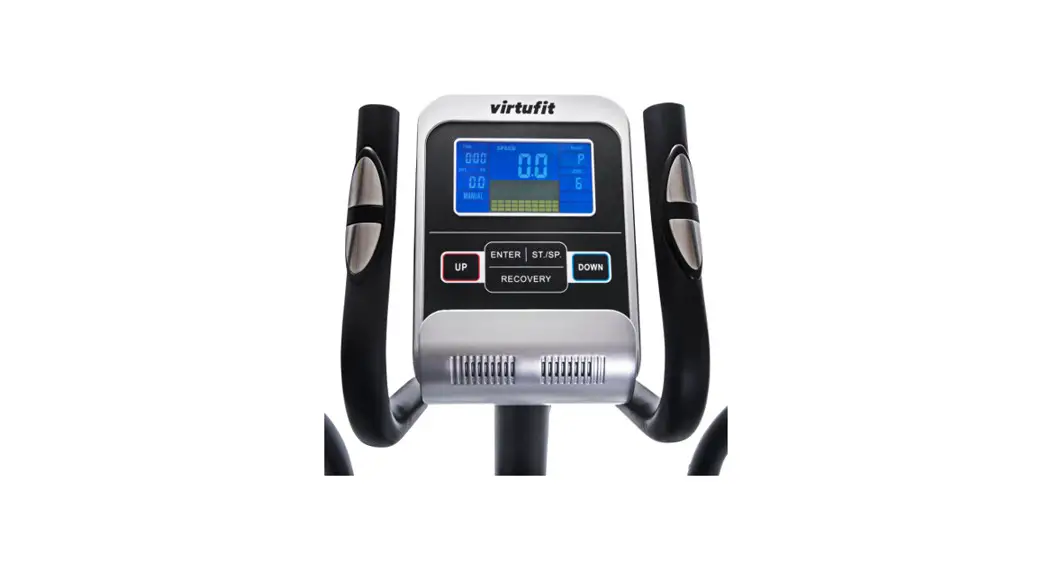
Console (fig F)
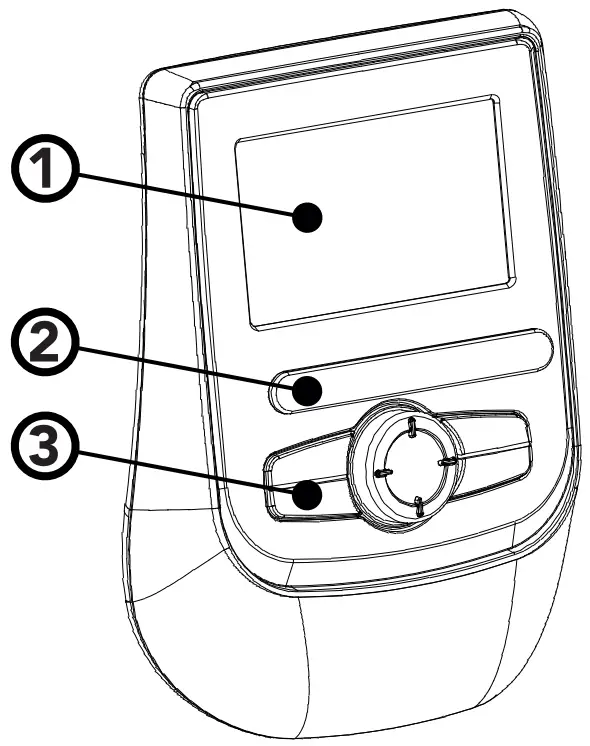
- Display
- Tablet/ book support
- Buttons
CAUTION
- Keep the console away from direct sunlight.
- Dry the surface of the console when it is covered with drops of sweat.
- Do not lean on the console.
NOTE
- The console switches to standby mode when the equipment is not used for 4 minutes. If the console is in standby mode, the display shows the room temperature
Explanation of buttons
Up (Dail)
– Press UP Key to increase value. Press and hold the key to increase value faster.
– TIME setting range: 00:00~99:00 (Each increment is 1:00)
– CAL setting range: 0~9990 (Each increment is 10)
– DIST setting range: 0.00~99.50 (Each increment is 0.5)
– PULSE setting range: 0-30~230 (Each increment is 1)
Down (Dail)
– Press DOWN Key to decrease value. Press and hold the key to decrease the value faster.
– TIME setting range: 00:00~99:00 (Each decrement is 1:00)
– CAL setting range: 0~9990 (Each decrement is 10)
– DIST setting range: 0.00~99.50 (Each decrement is 0.5)
– PULSE setting range: 0-30~230 (Each decrement is 1)
Mode/ Enter
– Choose each function by pressing MODE/ ENTER key.
– Press and hold MODE/ENTER key for 2 seconds to reset all functions (same feature as the reset key if press for 2 seconds).
Reset
– In setting mode, press RESET key once to reset the current function figures.
– Press RESET key and hold for 2 seconds to reset all function figures
Recovery
– After the console detects pulse signal, press the RECOVERY key to enter recovery mode to monitor heart rate recovery ability
Body Fat
– Test body fat% and BMI.
Total reset
– Console will restart over.
Explanation Display functions
Scan
– In SCAN mode, press MODE/ENTER key to choose functions.
– Automatically scan through each mode in sequence every 6 seconds.
– The sequence of display when press MODE/ ENTER key : TIME » DIST » CAL » PULSE » RPM/SPEED
Speed
– Range 0.0 ~ 99.9
– Without any signal being transmitted into the monitor for 4 seconds during workout, SPEED will display “0.0”
RPM
– Range 0 ~ 999
– Without any signal being transmitted into the monitor for 4 seconds during workout, RPM will display “0”
Time
– Without setting the target value, time will count up.
– When setting the target value, time will count down from your target time to 0 and alarm will sound or flash.
– Without any signal being transmitted into the monitor for 4 seconds during workout, time will STOP
– Range 0:00~99:59
Distance
– Without setting the target value, distance will count up.
– When setting the target value, distance will count down from your target distance to 0 with an alarm sound or flash.
– Range 0.00~99.99
Calories
– Without setting the target value, calorie will count up.
– When setting the target value, calories will count down from your target calorie to 0 with an alarm sound or flash.
– Range 0~9999 NOTE
This data is a rough guide for comparison of different exercise sessions which cannot be used in medical treatment
Pulse
– Current pulse will display after 6 seconds when detected by the console.
– Without any pulse signal for 6 seconds, console will display “P”.
– Pulse alarm will sound when current pulse is over the target pulse.
– Range 0-30~230 BPM
Operation
Power on
– Press any key to power on the console when being in sleep mode..
– Start pedaling to power on the console when being in sleep mode.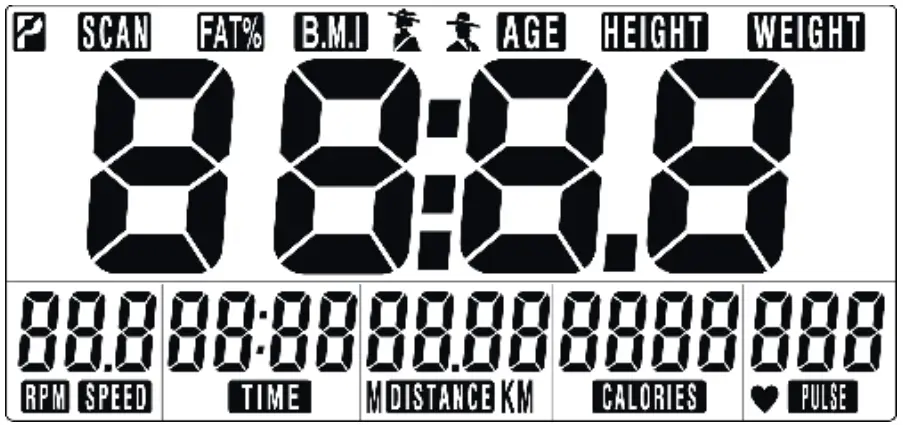 LCD will display all segments as Drawing.
Power off
Without any signal being transmitted into the monitor for 4 minutes the monitor will enter SLEEP mode automatically.
User Profile setting
– Use UP or DOWN (Dail) to set SEX, HEIGHT, WEIGHT and AGE.
– Press MODE/ENTER to confirm.
Workout setting
– Press MODE/ ENTER key to select the function of TIME, DISTANCE, CALORIES, and PULSE. Use UP or DOWN (DAIL) for setting and press MODE/ENTER key for confirmation.
– For instance the time set-up, when the time value is blinking, you can use UP and DOWN (DAIL) to adjust the number. Press MODE/ ENTER key for confirmation and skip to next set-up. The set-up of DISTANCE, CALORIES and PULSE is the same as TIME set-up.
– Once the workout begins and the console picks up the exercise signal, the value of SPEED/ RPM, TIME, DST and CAL will count up on the display.
Recovery
– The RECOVERY key will only be valid if pulse is detected.
– TIME will show „0:60“ (seconds) and counts down to 0.
– Computer will show F1 to F6 after the countdown to test heart rate recovery status.
User can find the heart rate recovery level based on the chart below.
– Press RECOVERY key again to return to the beginning.
| F1 | Outstanding |
| F2 | Excellent |
| F3 | Good |
| F4 | Fair |
| F5 | Below average |
| F6 | Poor |
Body Fat
– Press the BODY FAT key to start body fat measurement.
– During measuring, users have to hold both hands on the hand grips. LCD display “-” “- -” “- – -” “- – – -” for 8 seconds until computer finish measuring.
– LCD will display BMI and FAT %.
Body fat mode error codes
– *E-1
There is no heart rate signal input detected.
– *E-4
Occurs when FAT% and BMI result is below 5 or exceeds 50.
Trouble shooting:
– When the display of LCD is dim, it means the batteries need to be changed.
– If there is no signal when you pedal, please check if the cable is well connected. NOTE
- When stop training for 4 minutes, the main screen will be off.
- If the computer displays abnormally, please re-install the batteries and try again.
Cleaning and maintenance
The equipment does not require special maintenance. The equipment does not require recalibration when it is assembled, used and serviced according to the instructions. WARNING
- Do not use solvents to clean the equipment.
- Clean the equipment with a soft, absorbent cloth after each use.
- Regularly check that all screws and nuts are tight.
- If necessary, lubricate the joints.
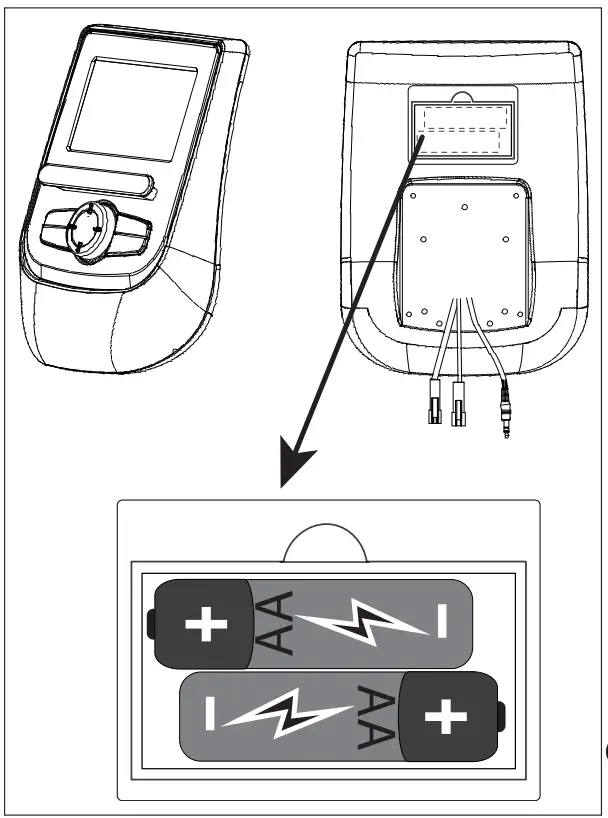
Replacing the batteries (Fig. E)
The console is equipped with 2 AA batteries at the rear of the console.
– Remove the cover.
– Remove the old batteries.
– Insert the new batteries. Make sure that batteries match the (+) and (-) polarity markings.
– Mount the cover.
Defects and malfunctions
Despite continuous quality control, defects and malfunctions caused by individual parts can occur in the equipment. In most cases, it will be sufficient to replace the defective part.
– If the equipment does not function properly, immediately contact the dealer.
– Provide the model number and the serial number of the equipment to the dealer. State the nature of the problem, conditions of use and purchase date.
Transport and storage
WARNING
- Carry and move the equipment with at least two persons.
- Remain standing in front of the equipment on each side and take a sturdy grip at the handlebars. Tilt the front of the equipment so as to lift the rear of the equipment on
the wheels. Move the equipment and carefully put the equipment down. Place the equipment on a protective base to prevent damage to the floor surface. - Move the equipment carefully over uneven surfaces. Do not move the equipment upstairs using the wheels, but carry the equipment by the handlebars.
- Store the equipment in a dry place with as little temperature variation as possible.
Technical data
| Parameter | Unit of measurement | Value |
| Length | cm inch | 144 56.7 |
| Width | cm inch | 67 26.4 |
| Height | cm inch | 164 64.6 |
| Weight | kg lbs | 55.6 122.5 |
| Max. user weight | kg lbs | 120 265 |
| Battery size | AA |
Warranty
Tunturi purchaser‘s warranty
Warranty terms
The consumer is entitled to the applicable legal rights stated in the national legislation concerning the commerce of consumer goods. This warranty does not restrict these rights. The Purchaser’s Warranty is only valid if the item is used in an environment approved by Tunturi New Fitness BV for that particular equipment. The product-specific approved environment is stated in the Owner’s Manual provided with your equipment.
Warranty conditions
The warranty conditions commence from the date of purchase. Warranty conditions may vary per country, so please consult your local dealer for the warranty conditions.
Warranty coverage
Under no circumstances shall Tunturi New Fitness BV or the Tunturi Distributor be liable by virtue of this warranty or otherwise for any special, indirect, secondary or consequential damages of any nature arising out of any use or inability to use this equipment.
Warranty limitations
This warranty covers manufacturing defects in the fitness equipment as originally packed by Tunturi New Fitness BV. The warranty shall apply only under conditions of normal, recommended use of the product as described in the Owner’s Manual and providing that Tunturi New Fitness BV’s instructions for installation, maintenance and use have been complied with. Neither Tunturi New Fitness BV’s nor the Tunturi Distributors’ obligations apply to defects due to reasons beyond their control. The warranty applies only to the original purchaser and is valid only in countries where Tunturi New Fitness BV has an authorised importer. The warranty does not extend to fitness equipment or components that have been modified without the consent of Tunturi New Fitness BV. Defects resulting from normal wear, misuse, abuse, corrosion, or damage incurred during loading or transportation are not covered.
The warranty does not cover sounds or noises emitted during use where these do not substantially impede the use of the equipment and where they are not caused by a fault in the equipment. The warranty does not cover defects arising from the failure to carry periodic maintenance as outlined within the Owner’s Manual for the product. Furthermore, the warranty does not cover defects arising from usage and storage within an unsuitable environment as described within the Owner’s Manual which should be indoors, dry, dust and grit free and within a temperature range of +15°C to +35°C. The warranty does not cover maintenance activities, such as cleaning, lubricating, and normal part adjustments, nor installation procedures that customers can accomplish themselves, such as changing uncomplicated meters, pedals and other similar parts not requiring any dismantling/reassembling of the fitness equipment. Warranty repairs carried out by other than authorised Tunturi representatives are not covered.
Failure to follow the instructions given in the Owner’s Manual will invalidate the product’s warranty.
Declaration of the manufacturer
Tunturi New Fitness BV declares that the product is in conformity with the following standards and directives: EN 957 (HB), 89/336/EEC. The product therefore carries the CE label. 01-2017
Tunturi New Fitness BV
Purmerweg 1
1311 XE Almere
The Netherlands
Disclaimer
© 2017 Tunturi New Fitness BV
All rights reserved.
The product and the manual are subject to change.
Specifications can be changed without further notice.
| No. | Description | QTY |
| 1 | Console | 1 |
| 2 | Screw | 3 |
| 3 | Handlebar post | 1 |
| 4 | Hand pulse sensor wire | 1 |
| 5 | Console wire | 1 |
| 6 | End cap | 2 |
| 7 | Foam grip | 2 |
| 8 | Hand pulse sensor | 2 |
| 9 | Front post cover | 2 |
| 10 | Console bracket | 1 |
| 11 | Console bracket seat | 1 |
| 12 | Flat washer Ø6xØ13x1t | 2 |
| 13 | Nylon nut M6 | 1 |
| 14 | Console locking knob | 1 |
| 15 | Fixed washer | 1 |
| 16 | Screw M5x14L | 2 |
| 17 | Screw M4x16L | 2 |
| 18 | Screw M5x20L | 2 |
| 19 | Handlebar axle bushing | 2 |
| 20 | Handlebar cap | 2 |
| 21 | Bushing Ø6.0*Ø9.8*50L | 2 |
| 22 | Screw M6x60L | 1 |
| 23 | Handlebar fixed axle | 1 |
| 24 | Main frame | 1 |
| 25 | Hex. Screw M8xP1.25x12Lx5t | 3 |
| 26 | Driving pulley | 1 |
| 27 | Bushing Ø20.5xØ25×7.5mm | 1 |
| 28 | Axle | 1 |
| 29 | Locking screw | 2 |
| 30 | Nylon nut M20 | 1 |
| 31 | Flat washer Ø20.3xØ30x1t | 1 |
| 32 | Sensor wire | 1 |
| 33 | Tension cable | 1 |
| 34 | Screw M4xP1.5*16L | 2 |
| 35 | Sensor holder | 1 |
| 36 | Flat washer Ø5xØ10x1t | 2 |
| 37 | Bearing 6004RS | 2 |
| 38 | Driving belt | 1 |
| 39 | Side cover ( L) | 1 |
| 40 | Side cover ( R) | 1 |
| 41 | Top cover | 1 |
| 42 | Handlebar post cover | 1 |
| 43 | Ring for handlebar post | 1 |
| 44 | Cover of bottom tube | 1 |
| 45 | Screw M4x16 | 3 |
| 46 | Flat washer Ø10xØ18x1t | 2 |
| 47 | Screw M5x16 | 5 |
| 48 | Shaft of chain cover | 2 |
| 49 | Pin | 2 |
| 50 | Hex. screw M10xP1.5x50L | 2 |
| 51 | Hex. screw M5*P0.8*16L | 2 |
| 52 | Nylon nut M10 | 2 |
| 53 | Pedal arm front cover, left | 2 |
| 54 | Pedal arm front cover, right | 2 |
| 55 | Cap for handlebar R/L | 2 |
| 56 | Cap for Pedal arm R/L | 2 |
| 57 | Fixed tube of semi-bracket | 2 |
| 58 | Bottle holder | 1 |
| 59 | Tension control | 1 |
| 60 | Disc crank | 2 |
| 61 | Crank cap (outer) | 2 |
| 62 | Crank cap (Inner) | 2 |
| 63 | Screw M5x6L | 4 |
| 64 | Flywheel assy set (65~72) | 1 |
| 65 | Flywheel | 1 |
| 66 | Nut 3/8“ | 3 |
| 67 | Axle for flywheel | 1 |
| 68 | Flat washer Ø10xØ14x1t | 1 |
| 69 | Bearing 6000RS | 1 |
| 70 | Bearing 6300RS | 1 |
| 71 | Plastic sleeve | 1 |
| 72 | Pattern nut | 2 |
| 73 | Magnetic brake set | 1 |
| 74 | Hex. screw M6xP1.0*16L | 2 |
| 75 | Flat washer Ø6xØ13x1t | 2 |
| 76 | Spring washer Ø6 | 2 |
| 77 | Belt tightener | 1 |
| 78 | Wheel for belt tightener | 1 |
| 79 | Curved washer Ø10.5xØ15×0.3t | 2 |
| 80 | Nylon nut M8 | 1 |
| 81 | Flat washer Ø8.5xØ25x2t | 1 |
| 82 | Flat washer Ø6xØ13x1t | 2 |
| 83 | Hex. screw M6xP1.0x80L | 1 |
| 84 | Hex. screw M6xP1.0x12L | 1 |
| 85 | Hex. screw M6xP1.0x18L | 1 |
| 86 | Spring | 1 |
| 87 | Flat washer Ø10xØ14x1t | 1 |
| 88 | Front foot | 1 |
| 89 | Adjusting cushion | 4 |
| 90 | End cap | 4 |
| 91 | Screw 3/16“x1/2“ | 4 |
| 92 | Transportation wheel | 2 |
| 93 | Nylon nut M8 | 2 |
| 94 | Allen bolt M8xP1.25x40L | 2 |
| 95 | Rear foot | 1 |
| 96 | Pedal arm, left | 1 |
| 97 | Pedal, left | 1 |
| 98 | Bearing | 2 |
| 99 | Rubber band Ø40 | 2 |
| 100 | Pedal arm, right | 1 |
| 101 | Pedal, right | 1 |
| 102 | Movable handlebar, left | 1 |
| 103 | Bearing 6003RS | 4 |
| 104 | Bearing 6001RS | 4 |
| 105 | Lower handlebar axle | 2 |
| 106 | Foam grip for moving handlebar | 2 |
| 107 | End cap for moving handlebar | 2 |
| 108 | Movable handlebar, right | 1 |
| 111 | Spring washer Ø8.1*Ø12.9*2.4T | 2 |
| 112 | Flat washer Ø8.5xØ25x2t | 4 |
| 113 | Screw M5xP0.8x10L | 4 |
| 114 | Screw M8xP1.25x16L | 8 |
| 115 | Flat washer Ø8xØ19x2t | 4 |
| 116 | Screw M8xP1.25x60L | 4 |
| 117 | Flat washer Ø17.5xØ25x1t | 2 |
| 121 | Cap for DC hole | 1 |
| 122 | Knob for pedal | 4 |
| 123 | Carriage bolt M6xP1.0x60L | 4 |
| 124 | Spring washer Ø6 | 4 |
| 125 | Flat washer Ø6xØ13x1t | 4 |
 Tunturi New Fitness BV
Purmerweg 1 NL – 1311 XE Almere
P.O. Box 60001 NL – 1320 AA Almere
The Netherlands
www.tunturi-fitness.com
 Tunturi Fitness | Feel Better Every Day - Tunturi New Fitness B.V.