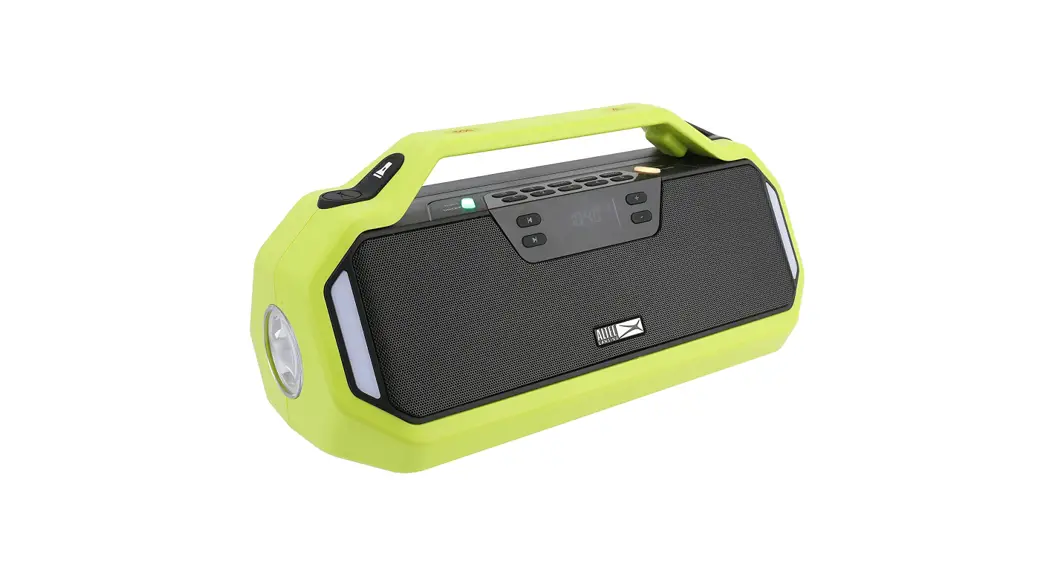
 STORM CHASER
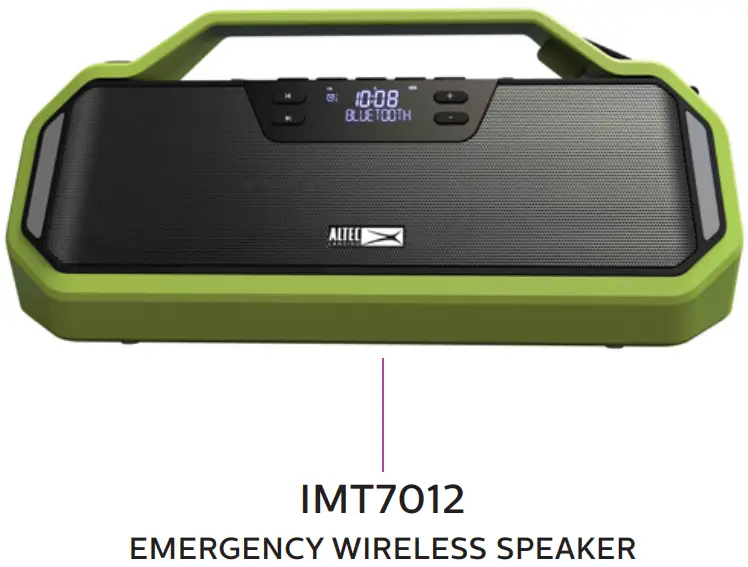
EMERGENCY WIRELESS SPEAKER
50W PEAK POWER
EMERGENCY WIRELESS SPEAKER SAME/FM/AM/SW/CLOCK
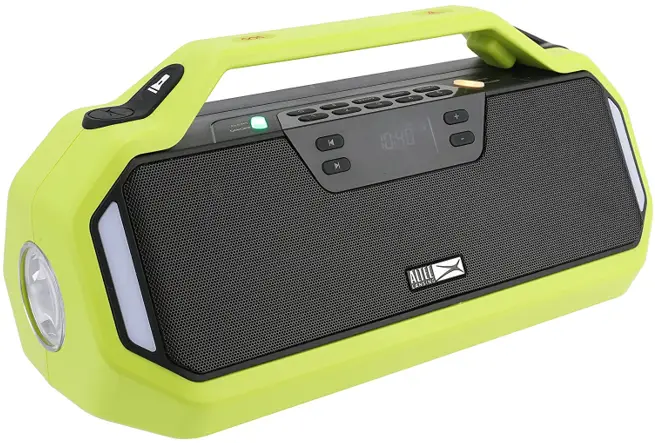
 ITEM NO: IMT7012
Quick Start Guide
WHAT′S INCLUDED
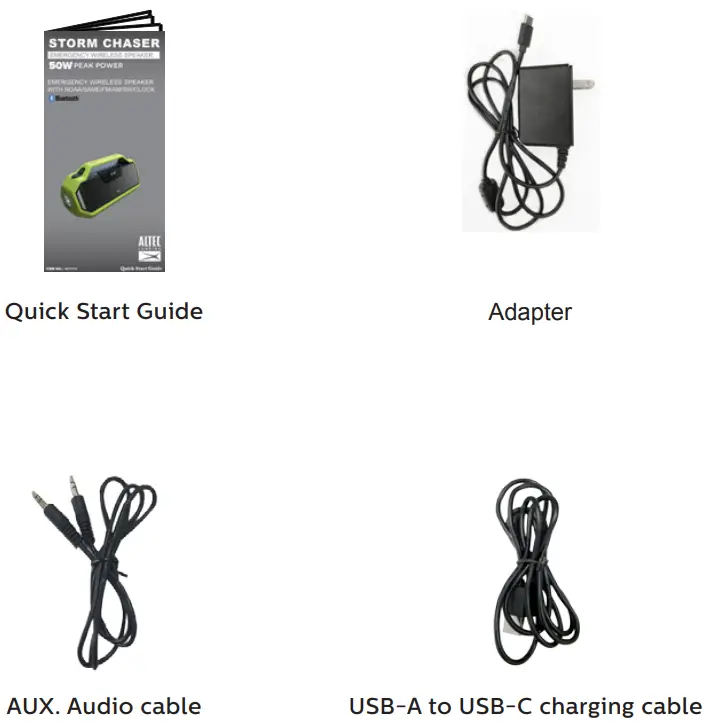
GENERAL FUNCTIONS
- Bluetooth
- 3.5mm AUX-IN audio port
- Speakerphone with an integrated hands-free microphone
- AM/ FM/ SW Radio with 5 presets per band
- WB Radio with NOAA/NWS bands
- Specific Area Message Encoding (SAME) alerts (for local area)
- Clock with two alarms
- Backlit LCD display screen
- USB Charging Port
- Built-in Flashlight
- Hazard lights
- Rotary Hand Crank for battery
- Solar Charging Panel with LED Flood light
- Bottle opener
- Storage compartment
USER INTERFACE
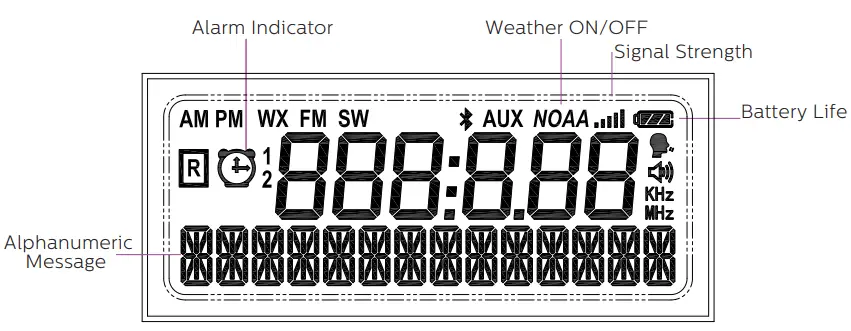
FEATURES/CONTROLS
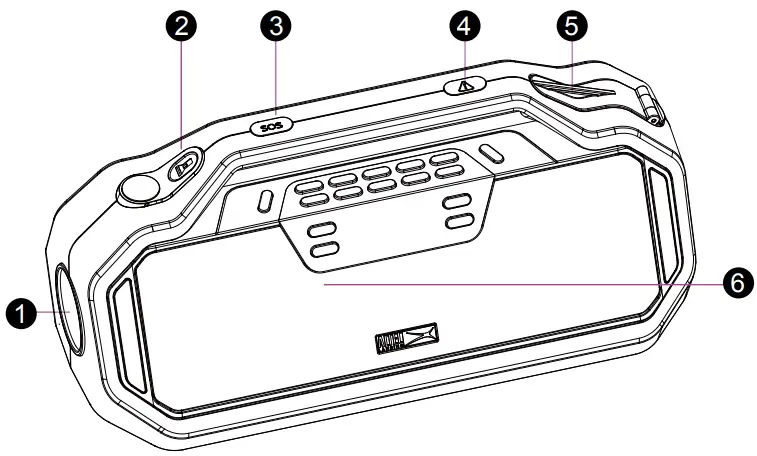
- Flashlight
- Flashlight button: Press briefly to flash the light. Press and hold for 5 seconds to keep the light on
- SOS button: Flashlight sends S-O-S message in Morse Code
- Hazard button: Hazard indicators (front and back) flash on and off
- Rotary Hand Crank: To manually charge the interior battery
- Integrated hands-free mic.: Speakerphone Mic. when paired to the phone

- Bottle Opener
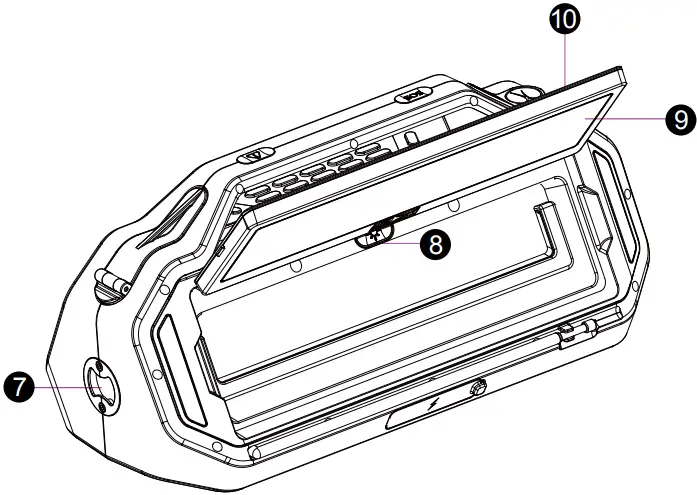
- LED Flood Light Power button
- LED Flood Light
- Solar Panel: Charges interior battery from strong sunlight
CONTROL PANEL
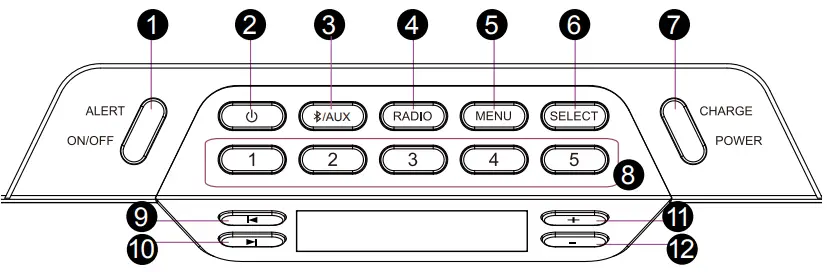
1. Local Weather and Area Alert button/LED
Press: Alert function On/Off
Green: Alerts Enabled
Yellow: ‘Advisory’ Level Alert Received
Orange: ‘Watch’ Level Alert Received
Red: ‘Warning’ Level Alert Received
2. Power button
Press: Standby/On
Press and hold: Full Off
3. Bluetooth / AUX button
Press Briefly: Bluetooth on (also acts as play/pause in BT mode)
Press and hold: Drop connection and pair a new device
When in BT mode and paired with a phone press briefly to answer/hang up a call, press and hold to reject an incoming call
Press to select Aux when an Auxiliary lead is plugged into the rear
4. Radio button
Press to toggle through the radio bands (FM/ AM/ SW/ WX)
5. Menu button
Press to toggle through menu options
6. Select the button
Used to select items for adjustment in Menus
7. Power button/LED
Press: Enable/Disable USB charging output
Green: 80 – 100% charge
Orange: 10-80% charge
Flashing Red: <10% charge (charge needed)
8. Radio Presets (1-5): In radio mode press and hold one of the numbered buttons to save a radio station
9. Previous Track/Scan button: Press to go to the Previous track. Press and hold to scan to the Previous radio station.
10. Next Track/Scan button: Press to go to the next track. Press and hold to scan to the next radio station.
11. Volume up/Menu up: Press to increase the volume. In Menu mode, press to toggle through Menu options.
12. Volume down/Menu down Press to decrease the volume. In Menu mode, press to toggle through Menu options.
Press MENU to access top-level menus.
Repeatedly press the MENU button or use the + and – buttons at the top level to change to the next available menu.
Press SELECT to enter that menu.
Press |< and >| buttons to move forward/back selecting items to be changed.
Press + and – buttons to change the parameters of the selected item.
Menu Pages and Options
SET TIME
(Hours) (Minutes)
SET ALARM 1
88:88 (Hours)
88:88 (Minutes) ON/OFF, RADIO/BUZZER, VOLUME
SET ALARM 2
88:88 (Hours)
88:88 (Minutes) ON/OFF, RADIO/BUZZER, VOLUME
SET WEATHER CHANNEL
| Ch.# | Frequency |
| 1 | 162.400 MHz |
| 2 | 162.425 MHz |
| 3 | 162.450 MHz |
| 4 | 162.475 MHz |
| 5 | 162.500 MHz |
| 6 | 162.525 MHz |
| 7 | 162.550 MHz |
SET LOCATION
ALL / MULTI / SINGLE
ALERT DISPLAY
BROADCAST / SIREN / STROBE / DISPLAY ONLY
SELECT EVENTS
DEFAULT/ MAJOR ONLY/ ALL/ USER
SET LANGUAGE
ENGLISH / ESPANOL / FRANCAISE
BACKLIGHT
ON BRIGHT / ON DIM / OFF / ALERT ONLY
ALERT TEST/ VOL
TREBLE/BASS
TREBLE / BASS (±5dB)
RESET
SURE Y/N
Setting the Time
- Press the Menu button until
 appears on the display. Pressing Menu will move to the next menu, and pressing + or – will also move back and forward to the next menu.
 - Press the Select button to edit the clock’s time. Press the + and – buttons to change the hour. AM and PM are set by changing the time. (the hour number will be flashing when being set)
- Press the Select or >| button to select and edit the minutes. Use the + and – buttons to change the time. (the minute’s number will be flashing when being set)
- Press Select or >| to save the hour and move to minutes.
- Press Select or >| to save the time and exit the menu.
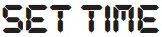 appears on the display. Pressing Menu will move to the next menu, and pressing + or – will also move back and forward to the next menu.
Setting the Alarms (Alarms 1 and 2)
- Press the Menu button until
 (or
(or  ) appears on the display.
 - Press the Select or >| button to edit the alarm time. Use the + and – buttons to change the hour. AM and PM are set by changing the time. (the hour number will be flashing when being set)
- Press the Select or >| button to select and edit the minutes. Use the + and – buttons to change the time. (the minute’s number will be flashing when being set)
- Press the Select or >| button to select the ON/OFF setting. Press the + or – button to turn the alarm ON/OFF (a clock will appear with 1 (or 2) next to it when ON).
- Press the >| button to change to the next menu. Press the + or – button to choose between Buzzer (Alarm sound) or Radio. The ‘R’ symbol lights up if the radio is selected for wakeup.
- Press the >| button to change the alarm volume. Press the + or – button to increase or decrease the volume of the alarm.
- Press Select or >| to save the alarm and exit the menu.
 (or
(or  ) appears on the display.
Setting up weather alerts
Setting the Weather Channel (the frequency used by the local transmitter for your area)
For the US there are two ways to find the frequency used by the local transmitter for your area.
Option 1
Find your local station via the listing at https://www.weather.gov/nwr/station_listing
Click on your state, find your area and note the station’s call sign and its frequency.
Option 2
Search at https://www.weather.gov/nwr/coverage/station_search.php
Enter the name of your area or state, and click on the icon displayed on the map for information and details about the transmitter.
For Canada find your local station via the interactive map at:
https://www.canada.ca/en/environment-climate-change/services/weatheradio/find-your-network.html
- Press the Menu button until the
 appears on the display.
 - Press SELECT or >| to enter the menu, then press the + and – buttons to find the desired weather channel (frequency).
- Press SELECT or >| to save the channel and exit the menus.
 appears on the display.
NOTE: When you exit this menu option, the Radio Alert function will automatically turn On. Press the Alert ON/OFF button to turn the Radio Alert function on/off.
The frequency set above will also be the frequency the radio tunes to if you choose to listen to WX (Weather) RADIO via the RADIO button.
Setting your Location (the area/s you are interested in for SAME alerts)
The Storm Chaser can receive and decode Specific Area Message Encoding (SAME)
Alerts are displayed as text on the display.
To do this you need to tell the unit the Location/s you want alerts for. If you select All from USA or Canada you will receive all alerts generated in that country. If you want to set either a list of specific areas (Multi) or just your single local area (Single) then you need to enter the special SAME code for your areas.
For the USA find the SAME codes for your area via the listing at https://www.weather.gov/nwr/counties note down the SAME numbers you are interested in.
For Canada find the SAME codes via the interactive map at https://www.canada.ca/en/environment-climate-change/services/weatheradio/specific-area-message-encoding/forecast-regions.html
- Press the Menu button until
 appears on the display .
 - Press SELECT or >| to enter the menu, then press the + or – buttons to choose between ALL (all alerts from either USA or CANADA), MULTI (multiple i.e. set your
own list of multiple states/counties in the USA or CANADA) and SINGLE (set to one state/ county in USA or CANADA)
 appears on the display .
- If MULTI is selected then you will be asked to input a list of your preferred locations (up to 10 locations).
Press the + and – buttons to choose between the USA and Canada, then press the SELECT or >| buttons to move to the next step.
Press the + and – buttons to choose the position in the list (will initially be ‘01’) and press SELECT or >|.
Press the + or – buttons to set the first digit. Press >| to move to the next digit press |< to move back one digit.
Pressing >| after the last digit moves to the next list item. Press the + or – buttons to choose the next position in the list you want to edit.
Once you have entered all locations press Menu to save and exit the menu.
- If SINGLE is selected then you will be asked to input one specific location in the same way as above.
Choosing Alert Display (How an Alert is displayed or presented)
- Press the Menu button until
 appears on the display .
 - Press the Select or >| button to enter the menu .
- Press the + and – buttons to toggle through the following 4 options, then press SELECT.
- Press Select or >| to save the desired option and exit the menu.
 appears on the display .
BROADCAST – Full broadcast – The speaker will make an alert sound and flash the Alert LEDs for eight seconds. This is followed by the weather broadcast audio and the display will show the alert text.
SIREN – Siren but no broadcast audio – The speaker will make an alert sound and flash the Alert LEDs for eight seconds. The display screen will show the alert text.
There will be no broadcast audio.
STROBE – LEDs only, no audio – The speaker will flash the Alert LEDs for eight seconds. The display screen will show the alert text. There will be no broadcast audio or siren.
DISPLAY ONLY – No LEDs or audio – The speaker will show the alert text only.
Note: The Alert function must be enabled for Alerts to be received (The Alert On/Off button enables/disables alerts).
When there is an alert, the Alert button will illuminate according to the level or Alert:
Green – Alert reception is on, nothing has been received.
Flashing Red – Warning
Flashing Orange – Watch
Flashing Yellow – Advisory
Setting Events (The type of event you want to be alerted about)
Alerts are categorized as Advisory, Watch, and Warning and then by type of events such as Flood Watch or Tornado Warning, etc.
For the full list of events, the Storm Chaser can receive in the modes set below see page 11.
- Press the Menu button until appearing on the display.
- Press the Select or >| button to enter the menu.
- Press the + and – buttons to toggle through the following 4 options, then press SELECT.
- Press Select or >| to save the desired option and exit the menu.
ALL – Enables all alerts including test alerts
DEFAULT – Enables all alerts except some advisory level test alerts
MAJOR – Enables a fixed list of all important alerts (see page 11).
USER – This allows the user to set their preference. Various major alerts cannot be disabled as these are crucial to the operation of the NOAA/SAME service. (see page 11).
Setting the Language
- Press the Menu button until
 appears on the display.
 - Press the Select or >| button to enter the menu.
- Press the + and – buttons to toggle through the following 3 options; English, Espanol, or Francaise then press SELECT.
- Press Select or >| to save the desired option and exit the menu.
 appears on the display.
Setting Backlight Brightness
- Press the Menu button until
 appears on the display.
 - Press the Select or >| button to enter the menu
- Press the + and – buttons to select between On Bright, On Dim, Alert Only (only comes on when displaying alert text), and Off.
- Press Select or >| to save the desired option and exit the menu
 appears on the display.
Testing/Setting the Alert Siren Volume
- Press the Menu button repeatedly until
 appears on the display.
 - Press the Select or >| button to enter the menu, and the Alert will sound.
- Press the + and – buttons to increase or decrease the volume of the alert sound.
- Press Select or >| to save the volume level (which will be used for the next alert) and exit the menu.
 appears on the display.
Setting TREBLE/ BASS
- Press the Menu button until
 appears on the display.
 - Press the Select or >| button to enter the menu.
- Press the + and – buttons to adjust the treble.
- Press the >| button to move to the next setting.
- Press the + and – buttons to adjust the bass.
- Press SELECT or >| to save the adjustment and exit the menus .
 appears on the display.
Reset Settings
Note this resets all settings including radio presets, NOAA/SAME frequency, location, etc.
- Press the Menu button until
 appears on the display.
 - Press SELECT or >| to enter the menu.
- Press Select again when the display is showing SURE Y/N to reset all settings unit will go back to all factory defaults
 appears on the display.
EVENT LISTINGS
DEFAULT/MAJOR ONLY: – means the event is disabled, * means the event is enabled.
USER: can select ON/OFF (ON = enabled, OFF = disabled), events that cannot be disabled are shown ON only.
| EVENT DESCRIPTION | LEVEL | DEFAULT | MAJOR ONLY | USER |
| ADMINISTRATIVE MESSAGE | Advisory | – | – | ON/OFF |
| AVALANCHE WATCH | Watch | * | – | ON/OFF |
| AVALANCHE WARNING | Warning | * | – | ON/OFF |
| BIOLOGICAL HAZARD WARNING | Warning | * | * | ON |
| BOIL WATER WARNING | Warning | * | – | ON/OFF |
| BLIZZARD WARNING | Warning | * | – | ON/OFF |
| CHILD ABDUCTION EMERGENCY | Advisory | * | – | ON/OFF |
| CIVIL DANGER WARNING | Warning | * | * | ON |
| CIVIL EMERGENCY MESSAGE | Warning | * | * | ON |
| COASTAL FLOOD WATCH | Watch | * | – | ON/OFF |
| COASTAL FLOOD WARNING | Warning | * | – | ON/OFF |
| CHEMICAL HAZARD WARNING | Warning | * | * | ON |
| CONTAMINATED WATER WARNING | Warning | * | * | ON |
| DAM WATCH | Watch | * | – | ON/OFF |
| DAM BREAK WARNING | Warning | * | * | ON |
| CONTAGIOUS DISEASE WARNING | Warning | * | * | ON |
| PRACTICE/DEMO | Advisory | – | – | ON/OFF |
| DUST STORM WARNING | Warning | * | – | ON/OFF |
| EMERGENCY ACTION NOTIFICATION | Warning | * | * | ON |
| EMERGENCY ACTION TERMINATION | Advisory | * | * | ON |
| EARTHQUAKE WARNING | Warning | * | * | ON |
| IMMEDIATE EVACUATION | Warning | * | * | ON |
| EVACUATION WATCH | Watch | * | – | ON/OFF |
| FOOD CONTAMINATION WARNING | Warning | * | * | ON |
| FLASH FLOOD WATCH | Watch | * | – | ON/OFF |
| FLASH FLOOD STATEMENT | Advisory | * | – | ON/OFF |
| FLASH FLOOD WARNING | Warning | * | – | ON/OFF |
| FLOOD WATCH | Watch | * | – | ON/OFF |
| FLOOD STATEMENT | Advisory | * | – | ON/OFF |
| FLOOD WARNING | Warning | * | – | ON/OFF |
| FIRE WARNING | Warning | * | – | ON/OFF |
| FLASH FREEZE WARNING | Warning | * | – | ON/OFF |
| FREEZE WARNING | Warning | * | – | ON/OFF |
| HURRICANE STATEMENT | Advisory | * | – | ON/OFF |
| HAZARDOUS MATERIAL WARNING | Warning | * | * | ON |
| HURRICANE WATCH | Watch | * | – | ON/OFF |
| HURRICANE WARNING | Warning | * | * | ON |
| HIGH WIND WATCH | Watch | * | – | ON/OFF |
| HIGH WIND WARNING | Warning | * | – | ON/OFF |
| ICEBERG WARNING | Warning | * | – | ON/OFF |
| INDUSTRIAL FIRE WARNING | Warning | * | * | ON |
| LOCAL AREA EMERGENCY | Advisory | * | * | ON |
| LAW ENFORCEMENT WARNING | Warning | * | * | ON |
| LANDSLIDE WARNING | Warning | * | * | ON |
| NATIONAL AUDIBLE TEST | Advisory | – | – | ON/OFF |
| NATIONAL INFORMATION CENTER | Advisory | – | – | ON/OFF |
| NETWORK NOTIFICATION MESSAGE | Advisory | – | – | ON/OFF |
| NATIONAL PERIODIC TEST | Advisory | – | – | ON/OFF |
| NATIONAL SILENT TEST | Advisory | – | – | ON/OFF |
| NUCLEAR POWER PLANT WARNING | Warning | * | * | ON |
| EVENT DESCRIPTION | LEVEL | DEFAULT | MAJOR ONLY | USER |
| POWER OUTAGE ADVISORY | Advisory | * | – | ON/OFF |
| RADIOLOGICAL HAZARD WARNING | Warning | * | * | ON |
| REQUIRED MONTHLY TEST | Advisory | – | – | ON/OFF |
| REQUIRED WEEKLY TEST | Advisory | – | – | ON/OFF |
| SPECIAL MARINE WARNING | Warning | * | – | ON/OFF |
| SPECIAL WEATHER STATEMENT | Advisory | * | – | ON/OFF |
| SHELTER-IN-PLACE WARNING | Warning | * | * | ON |
| SEVERE THUNDERSTORM WATCH | Watch | * | – | ON/OFF |
| SEVERE THUNDERSTORM WARNING | Warning | * | – | ON/OFF |
| SEVERE WEATHER STATEMENT | Advisory | * | – | ON/OFF |
| TORNADO WATCH | Watch | * | – | ON/OFF |
| 911 TELEPHONE OUTAGE EMERGENCY | Advisory | * | – | ON/OFF |
| TORNADO WARNING | Warning | * | * | ON |
| TROPICAL STORM WATCH | Watch | * | – | ON/OFF |
| TROPICAL STORM WARNING | Warning | * | * | ON |
| TSUNAMI WATCH | Watch | * | * | ON |
| TSUNAMI WARNING | Warning | * | * | ON |
| TRANSMITTER BACKUP ON | Advisory | – | – | ON/OFF |
| TRANSMITTER CARRIER OFF | Advisory | – | – | ON/OFF |
| TRANSMITTER CARRIER ON | Advisory | – | – | ON/OFF |
| TRANSMITTER PRIMARY ON | Advisory | – | – | ON/OFF |
| VOLCANO WARNING | Warning | * | * | ON |
| WILDFIRE WATCH | Watch | * | – | ON/OFF |
| WILDFIRE WARNING | Warning | * | * | ON |
| WINTER STORM WATCH | Watch | * | – | ON/OFF |
| WINTER STORM WARNING | Warning | * | * | ON |
| UNRECOGNIZED WATCH | Watch | * | – | ON/OFF |
| UNRECOGNIZED EMERGENCY | Advisory | * | – | ON/OFF |
| UNRECOGNIZED STATEMENT | Advisory | * | – | ON/OFF |
| UNRECOGNIZED WARNING | Warning | * | * | ON |
| UNRECOGNIZED MESSAGE | Warning | * | * | ON |
INPUT/OUTPUT PORTS
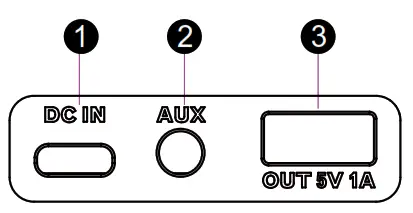
1. Adapter port
Charge via USB C lead (supplied) from USB adaptor (supplied) or other USB port
2. 3.5mm AUX port
For line-level or headphone output from audio sources, phones, etc.
3. USB port
For charging mobile devices – Note CHARGE/POWER button on the top panel turns on/off USB output
Bluetooth Connection
Go to the Bluetooth settings menu on your phone. Make sure Bluetooth is on before connecting to the available device “AL Storm Chaser”.
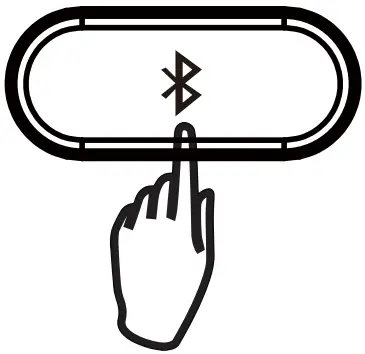 *Press to select BT mode, the speaker will go to pairing mode and auto-reconnect if already paired.
*Press and hold to drop an already paired BT connection if you want to change the device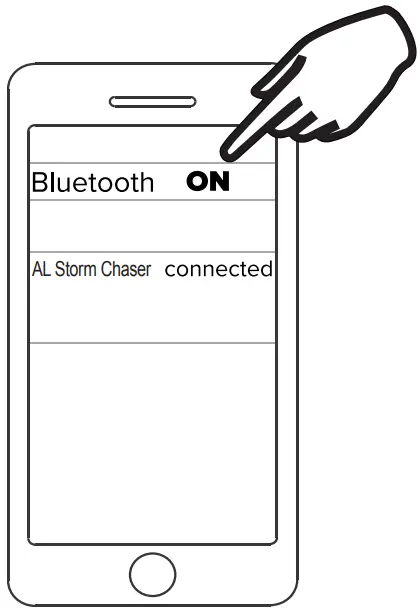
SPECIFICATIONS
POWER Audio: 15W (RMS), 50W (Peak)
Play time: 10Hrs @ 50% volume level
Charge Time: 4Hrs
Driver Units: 3” x1 +ABR x2 + 1” x1
Separation: ≥40dB
S/N: ≥70dB
Distortion: ≤0.5% (1K,1W)
DC input: 5V  2A
2A
Dimensions: W331xD162xH158(min)
Length of Audio cable(stereo-to-stereo):90cm
Length of USB-A to Type-C charging cable: 90 cm
Length of adaptor:110cm
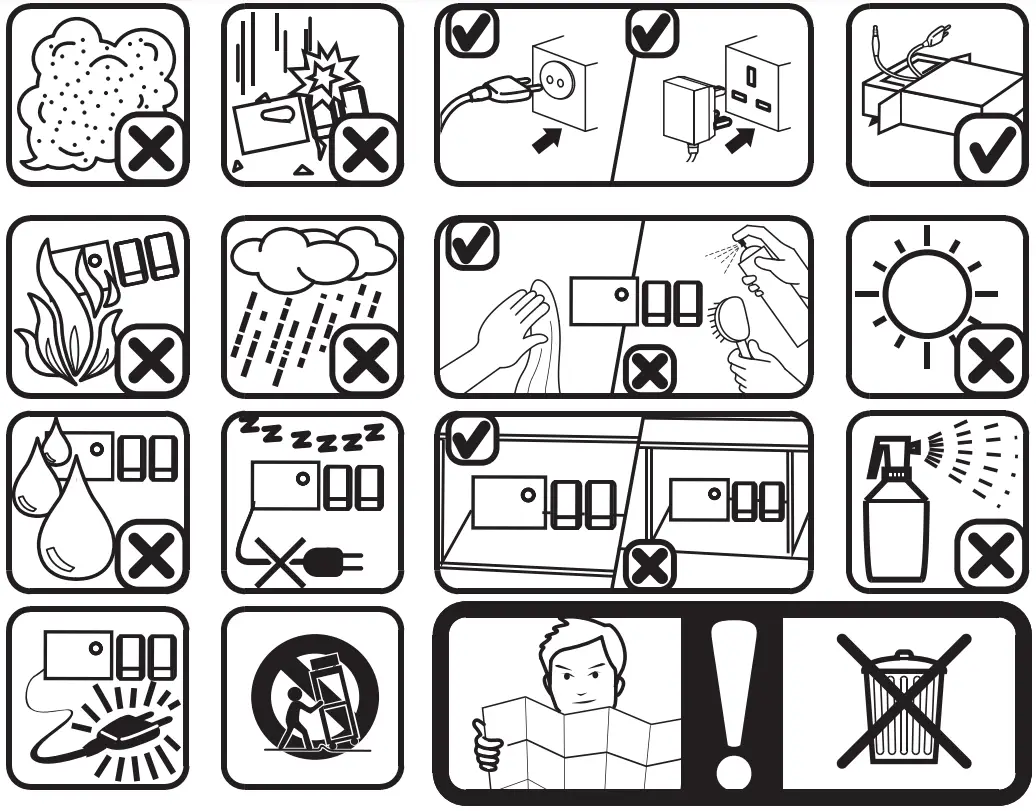
SAFETY PRECAUTIONS
 Having Trouble? We’re here to help!
Call us 24/7 at 1-855-292-4087
E-mail us at support©alteclansing.com
or visit us at alteclansing.com
FCC STATEMENT
Changes or modifications not expressly approved by the party responsible for compliance could void the user’s authority to operate the equipment.
This device complies with Part 15 of the FCC Rules. Operation is subject to the following two conditions: (1) this device may not cause harmful interference, and (2) this device must accept any interference received, including interference that may cause undesired operation.
This equipment has been tested and found to comply with the limits for a Class B digital device, pursuant to Part 15 of the FCC Rules. These limits are designed to provide reasonable protection against harmful interference in a residential installation. This equipment generates, uses and can radiate radio frequency energy and, if not installed and used in accordance with the instructions, may cause harmful interference to radio communications. However, there is no guarantee that interference will not occur in a particular installation. If this equipment does cause harmful interference to radio or television reception, which can be determined by turning the equipment off and on, the user is encouraged to try to correct the interference by one or more of the following measures:
— Reorient or relocate the receiving antenna.
— Increase the separation between the equipment and receiver.
— Connect the equipment into an outlet on a circuit different from that to which the receiver is connected.
— Consult the dealer or an experienced radio/TV technician for help.
Suppliers Declaration of Conformity 47 CFR § 2.1077 Compliance Information
Unique Identifier
Trade Name: Altec Lansing
Model No.: IMT7012
Responsible Party — U.S. Contact Information
US Company Name: SAKAR INTERNATIONAL INC.
Address: Edison, NJ 08817
Telephone number or internet contact information: 855-292-4087
RF Exposure Compliance
This equipment complies with FCC radiation exposure limits set forth for an uncontrolled environment. This equipment should be installed and operated with minimum distance 20cm between the radiator and your body.
WARRANTY CARD
This warranty covers the original consumer purchaser only and is not transferable.
This warranty covers products that fail to function properly UNDER NORMAL USAGE, due to defects in material or workmanship. Your product will be repaired or replaced at no charge for parts or labor for a period of one year.
What Is Not Covered by Warranty:
Damages or malfunctions not resulting from defects in material or workmanship and damages or malfunctions from other than normal use, including but limited to, repair by unauthorized parties, tampering, modification or accident.
To Obtain Warranty Service and Troubleshooting Information: Call 1-855-292-4087 or Visit our website at www.alteclansing.com.
To receive a Warranty service along with the name and address of an authorized product service center, the original consumer purchaser must contact us for problem determination and service procedures. Proof of purchase in the form of a bill of sale or receipted invoice, evidencing that the Product is within the applicable Warranty period(s), MUST be presented in order to obtain the requested service. It is your responsibility to properly package and send any defective products along with a dated copy of proof of purchase, a written explanation of the problem, and a valid return address to the authorized service center at your expense. Do not include any other items or accessories with the defective product. Any products received by the authorized service center that are not covered by warranty will be returned unrepaired.
NO WARRANTIES, WHETHER EXPRESS OR IMPLIED, INCLUDING, BUT NOT LIMITED TO, ANY IMPLIED WARRANTIES OF MERCHANTABILITY OR FITNESS FOR A PARTICULAR PURPOSE, OTHER THAN THOSE EXPRESSLY DESCRIBED ABOVE SHALL APPLY. DISTRIBUTOR FURTHER DISCLAIMS ALL WARRANTIES AFTER THE EXPRESS WARRANTY PERIOD STATED ABOVE. NO OTHER EXPRESS WARRANTY OR GUARANTY GIVEN BY ANY PERSON, FIRM OR ENTITY WITH RESPECT TO THE PRODUCT SHALL BE BINDING ON THE DISTRIBUTOR. REPAIR, REPLACEMENT, OR REFUND OF THE ORIGINAL PURCHASE PRICE – AT THE DISTRIBUTOR’S SOLE DISCRETION -ARE THE EXCLUSIVE REMEDIES OF THE CONSUMER. IN NO EVENT WILL DISTRIBUTOR, ITS MANUFACTURERS, OR SAKAR INT. BE LIABLE FOR ANY INCIDENTAL, DIRECT, INDIRECT, SPECIAL, PUNITIVE OR CONSEQUENTIAL DAMAGES (SUCH AS, BUT NOT LIMITED TO, DAMAGES FOR LOSS OF PROFITS, BUSINESS, SAVINGS, DATA OR RECORDS) CAUSED BY THE USE, MISUSE OR INABILITY TO USE THE PRODUCT. EXCEPT AS STATED HEREIN, NO OTHER WARRANTIES SHALL APPLY. NOTWITHSTANDING THE FOREGOING, CONSUMER’S RECOVERY AGAINST DISTRIBUTOR SHALL NOT EXCEED THE PURCHASE PRICE OF THE PRODUCT SOLD BY DISTRIBUTOR. THIS WARRANTY SHALL NOT EXTEND TO ANYONE OTHER THAN THE ORIGINAL CONSUMER WHO PURCHASED THE PRODUCT AND IS NOT TRANSFERABLE.
Some countries, states or provinces do not allow the exclusion or limitation of incidental or consequential damages or allow limitations on warranties, so limitations or exclusions may not apply to you. This warranty gives you specific legal rights, and you may have other rights that vary from state to state or province to province. Contact your authorized retailer to determine if another warranty applies. This product is manufactured, distributed and sold by SAKAR International, Inc. All other trademarks are the property of the respective owner, who has not sponsored, endorsed or approved this product.
IMPORTANT SAFETY INSTRUCTIONS
- Read these instructions – All the safety and operating instructions should be read before this product is operated.
- Keep these instructions – The safety and operating instructions should be retained for future reference.
- Heed all warnings – All warnings on the appliance and in the operatinginstructions should be adhered to.
- Follow all instructions – All operating and use instructions should be followed.
- Do not use this apparatus near water – The appliance should not be used near water or moisture – for example, in a wet basement or near a swimming pool, and the like.
- Clean only with dry cloth.
- Do not block any ventilation openings. Install in accordance with the manufacturer’s instructions.
- Do not install near any heat sources such as radiators, heat registers, stoves, or other apparatus (including amplifiers) that produce heat.
- Do not defeat the safety purpose of the polarized or grounding plug. A polarizedplug has two blades with one wider than the other. A grounding plug has two blades and a third grounding prong. The wide blade or the third prong is provided for your safety. If the provided plug does not fit into your outlet, consult an electrician for replacement of the obsolete outlet.
- Protect the power cord from being walked on or pinched particularly at theplugs, convenience receptacles, and at the point where they exit from the apparatus.
- Only use attachments/accessories specified by the manufacturer.
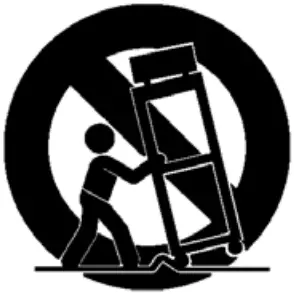
- Use only with the cart, stand, tripod, bracket, or table specified by the manufacturer, or sold with the apparatus. When a cart or rack is used, use caution when moving the cart/apparatus combination to avoid injury from tip-over.

- Unplug the apparatus during lightning storms or when unused for long periods of time.
- Refer all servicing to qualified personnel. Servicing is required when theapparatus has been damaged in any way, such as power supply cord or plug is damaged, liquid has been spilled or objects have fallen into the apparatus has been exposed to rain or moisture, does not operate normally, or has been dropped.
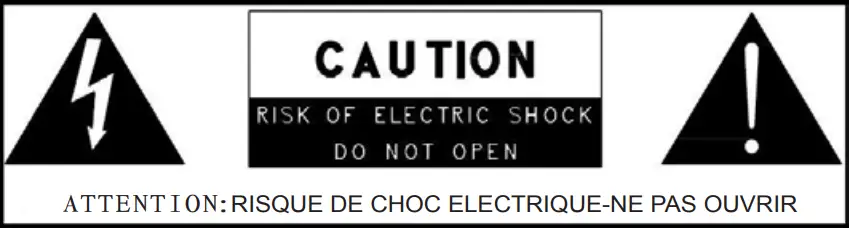
- CAUTION: These servicing instructions are for use by qualified service personnel only. To reduce the risk of electric shock, do not perform any servicing other than that contained in the operating instructions unless you are qualified to do so.
- .WARNING:To reduce the risk of fire or electric shock, do not expose this apparatus to rain or moisture. The apparatus shall not be exposed to dripping or splashing and that objects filled with liquids, such as vases, shall not be placed on apparatus.
- WARNING:For the terminals marked with symbol of “ ” may be of sufficient magnitude to constitute a risk of electric shock. The external wiring connected to the terminals requires installation by an instructed person or the used of ready-made leads or cords.
- This equipment is a Class II or double insulated electrical appliance. It has been designed in such a way that it does not require a safety connection to the electrical earth.
 19. This lightning flash with an arrowhead symbol within an equilateral triangle is intended to alert the user to the presence of non-insulated “dangerous voltage” within the product’s enclosure that may be of sufficient magnitude to constitute a risk of electric shock.
– Warning: To reduce the risk of electric shock, do not remove cover (or back) as there are no user-serviceable parts inside. Refer servicing to qualified personnel.
– The exclamation point within an equilateral triangle is intended to alert the userto the presence of important operating and maintenance instructions in the literature accompanying the appliance.
 19. This lightning flash with an arrowhead symbol within an equilateral triangle is intended to alert the user to the presence of non-insulated “dangerous voltage” within the product’s enclosure that may be of sufficient magnitude to constitute a risk of electric shock.
Keep manual and all relevant information for future reference.
JUST LISTEN.
The Bluetooth® word mark and logos are registered trademarks owned by the BluilSth SIG, Inc. and any use of such marks by Sakar International is under license. Ottffirademarks and trade names are those of their respective owners.
 Home - Canada.ca
 NWR Station Listing