
Saramonic MV-Mixer Dual-Channel Audio Interface
Statement
Please read this manual carefully before using and strictly operate and store in accordance with the instructions. Please save the manual for your future reference.
If the user manual can not help you to solve certain problems, please consult with your retailer for help or email us: [email protected].
General Introduction
Saramonic MV-Mixer is a dual-channel USB audio interface, providing a simple and compact audio mixing solution for singers, musicians, pod casters, producers and more.
With two XLR-1/4″ combo inputs and selectable 48V phantom power, the MV-Mixer could compatible with most XLR microphones (dynamic or condenser) and music instruments on the market, providing mic and line-level signals with clarity and natural tonality. Independent gain controls are provided for each input. The MV-Mixer is capable of recording audio in up to 24-bit, 192 kHz resolution to ensure the high-fidelity and rich detail of your signals.
With two 1/4″ line outputs and a headphone output, the MV-Mixer can drive a set of speakers and headphones while offering independent volume controls for both. The INPUT/PLAYBACK switch allows you to real time monitor the input signal without audio latency.
Features
- Dual-channel audio interface with USB-C output
- Compatible with Mac/Windows computers
- XLR-1 /4″ combo inputs for dynamic/condenser XLR mimes, instruments or line-level signals LINE/INST mode switch
- Independent gain and level controls
- 1/4″(6.35mm) audio outputs
- Selectable separately 48V phantom power for two XLR inputs
- Real time and playback headphone monitoring
- Multicolor LED indicators clearly show working status
Product Structure
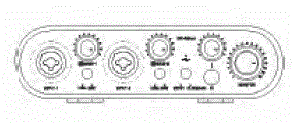
Front Panel
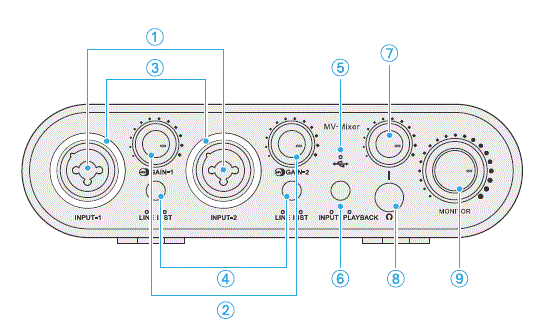
- Input 1 &2 XLR-1/4″(6.35mm) combo sockets.
1/4″(6.35mm) input: for connecting instruments and line-level devices.
XLR input: for connecting dynami/condenser XLR microphones. - Gain knob/48V phantom power switch,
Function Operation Gain Control Adjust audio level for inputs 1 and 2 respectively. (Gain-1 for INPUT-1; Gain-2 for INPUT-2)
Turn the knob to adjust the gain. Brightness of the indicator ring changes when adjusting the knob.
48V Phantom Power Supply. (Only for XLR inputs) Long press the knob to turn on/off the 48V phantom power. - 48V phantom power I peak indicator
Function Indicator 48V Phantom Power Indicator 48V Phantom Power ON: 48V Phantom Power OFF
Peak Indicator Input signal is overload - LINE/INST Switch
Press to switch between LINE and INST modes.
LINE: accepts line-level signals.
INST: accepts signals from instruments such as guitar, bass, keyboard. - USB LED Indicator
- Real-time Monitoring switch
Press to switch between INPUT and PLAYBACK modes.
INPUT mode: enable both Real-time and playback monitoring.
PLAYBACK mode: only playback monitoring enabled. - Headphone volume control
Turn the knob to adjust the headphone volume.
Brightness of the indicator ring changes when adjusting the knob. - 1 /4″(6.35mm) headphone output
Connect headphones for audio monitoring.
To connect headphones with a 3.5mm plug, please use the supplied 6.35mm to 3.5mm
adapter. - Output volume control
Turn the knob to set the output level for outputs LEFT-(II and RIGHT- at the rear panel.
Brightness of the indicator ring changes when adjusting the knob.
Real Panel
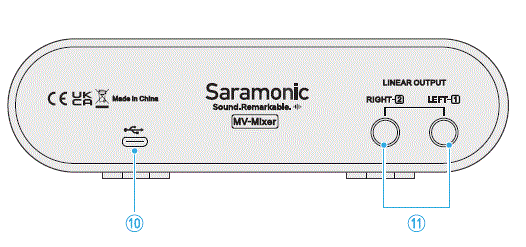
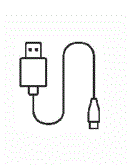
- USB-C port
Use the supplied USB cable to connect to your computer - Line outputs
1/4″(6.35mm) LEFT and RIGHT output jacks.
To connect devices with 3.5mm connector, please use the supplied 6.35mm to 3.5mm adapter.
Accessories
Preparations
For Windows 7 Users:
Before getting started, please download the driver from the website below: https://www.saramonic.com/product/mv-mixer/
For Mac/Windows 10 Users:
The MV-Mixer is perfectly compatible with Mac/Windows 10 system, no need for drivers.
Set-Up for Windows
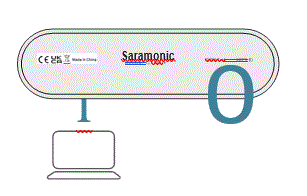
- Connect the MV-Mixer to your computer with the supplied USB cable.
- Go to Control Panel —-> Hardware and Sound —-> Manage audio devices.
- Select “MV-Mixer” as the default device under the “Playback” tab.
- select “MV-Mixer” as the default device under the “Recording” tab.
Set-Up for Mac
- Connect the MV-Mixer to your computer with the supplied USB cable.
- Go to Apple menu–>System Preferences–>Sound Icon.
- Select “MV-Mixer” under “Input” tab.
- Select “MV-Mixer” under “Output” tab.
Connection Example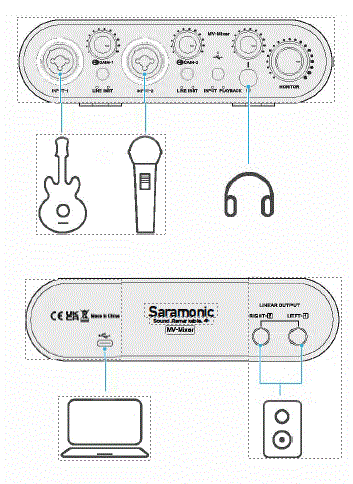
Specification
| Sample Rates | 44.1 kHz, 48 kHz, 88.2 kHz, 96 kHz, 176.4 kHz, 192 kHz |
| Power Requirement | USB bus powered |
| Microphone Power Supply | 48V phantom power (only for XLR inputs) |
| Supported System | Windows/Mac OS |
| Compatible Software | Logic Pro X / Cubase/Adobe Audition |
Microphone Inputs
| Frequency Response | 20-20KHz±1dB |
| Dynamic Range | 110 (A-weighted) |
| THD+N | <0.005% |
| Noise EIN | -120dBu |
| Maximum Input Level | 5dBu |
| Gain Range | 48dBu |
| Input Impedance | 3K |
Line Inputs
| Frequency Response | 20-20KHZ±1dB |
| Dynamic Range | 110 (A-weighted) |
| THD+N | <0.005% |
| Noise EIN | -120dBu |
| Maximum Input Level | 15dBu (at minimum gain) |
| Gain Range | 48dBu |
| Input Impedance | 20K |
Instrument Inputs
| Frequency Response | 20-20KHZ±1dB |
| Dynamic Range | 110 (A-weighted) |
| THD+N | <0.05% |
| Noise EIN | -110dBu |
| Maximum Input Level | 9d8u (at minimum gain) |
| gain Range | 48d8u |
| Input Impedance | 1M |
Line/Monitor Outputs
| Dynamic Range | 102 (A-weighted) |
| THD+N | <0.005% |
| Maximum Output Level | 108 (A-weighted) |
| Output Impedance | 560Q |
Headphone Outputs
| Dynamic Range | 105 (A-weighted) |
| THD+N | <0.005% |
| Maximum Output Level | +BdBU |
| Output Impedance | 10Q |
Packing List
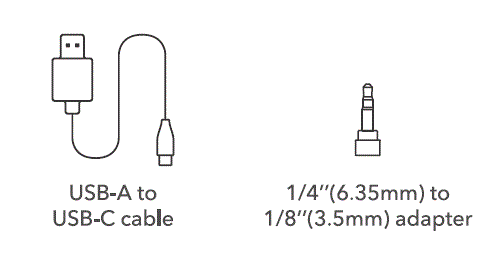
- 1 xMV-Mixer dual-channel audio interface

- 1 xUSB-A to USB-C cable (2m)

- 2x 1/4″(6.35mm) to 1/8″(3.Smm) adapter 10

 Scan the QR code and /follow us.