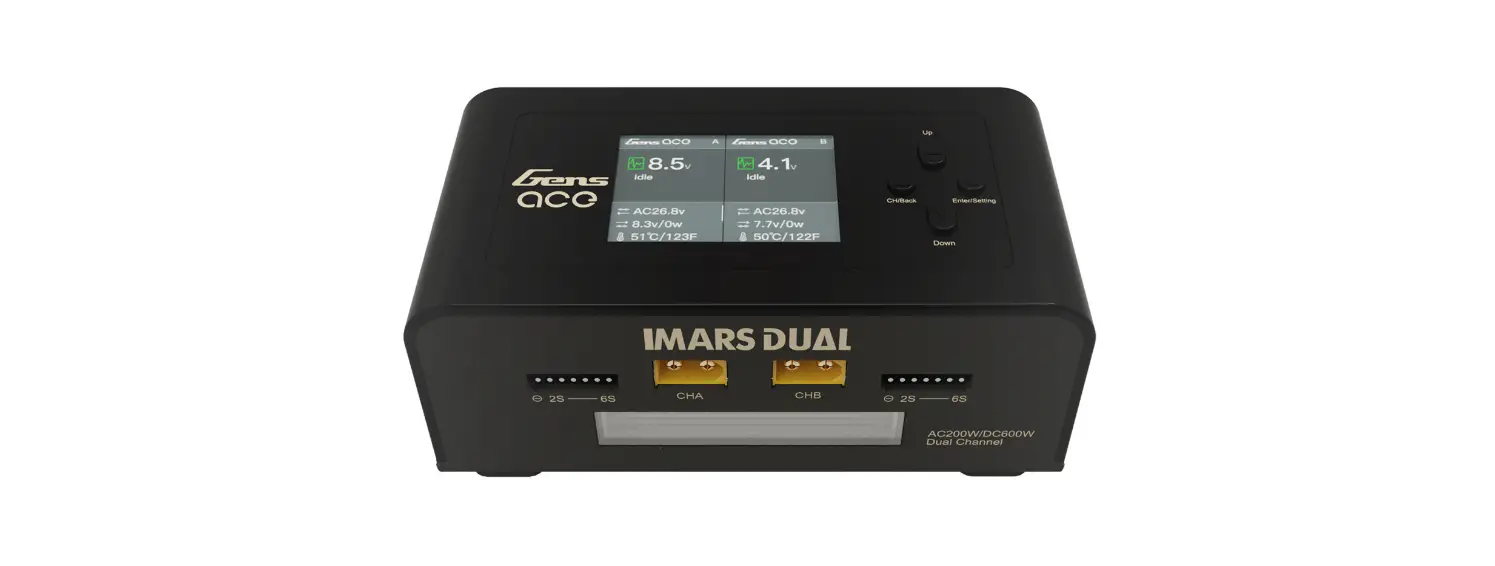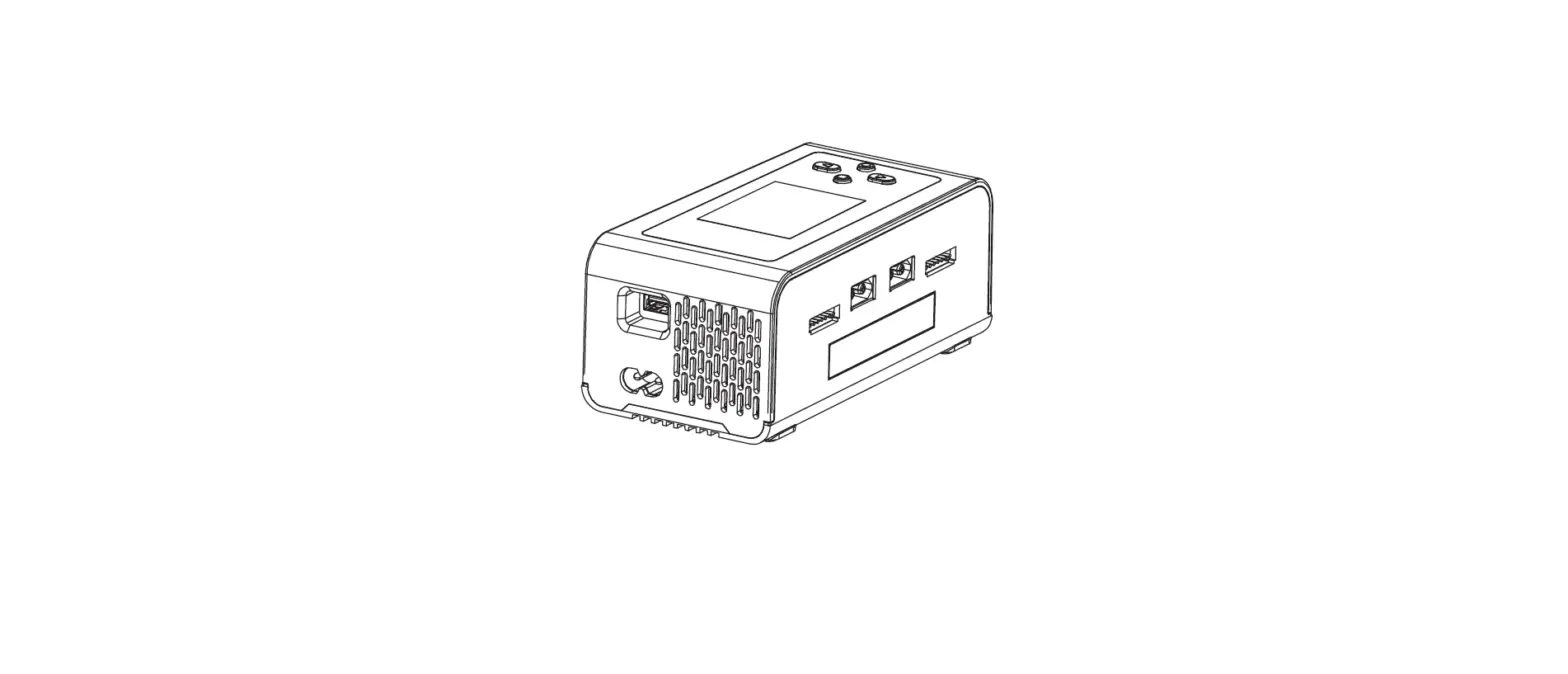

Gensace GEA200WDUAL-UW Imars Dual Smart Balance Charger
NOTICE
All instructions, warranties and other collateral documents are subject to change at the sole discretion of Gens Ace. For up-to-date product literature, visit www.genstattu.com.
MEANING OF SPECIAL LANGUAGE
The following terms are used throughout the product literature to indicate various levels of potential harm when operating this product:
WARNING: Procedures, which if not properly followed, create the probability of property damage, collateral damage, and serious injury OR create a high probability of superficial injury.
CAUTION: Procedures, which if not properly followed, create the probability of physical property damage AND a possibility of serious injury.
NOTICE: Procedures, which if not properly followed, create a possibility of physical property damage AND little or no possibility of injury.
Age Recommendation: Not for children under 14 years. This is not a toy.
WARNING: Read the ENTIRE instruction manual to become familiar with the features of the product before operating. Failure to operate the product correctly can result in damage to the product, personal property and cause serious injury. This is a sophisticated hobby product. It must be operated with caution and common sense and requires some basic mechanical ability. Failure to operate this product in a safe and responsible manner could result in injury or damage to the product or other property. This product is not intended for use by children without direct adult supervision. Do not attempt disassembly, use with incompatible components or alter product in any way without the approval of Gens Ace. The package contains manual for safety, operation and maintenance. It is essential to read and follow all the instructions and warnings in the manual, prior to assembly, setup or use, in order to operate correctly and avoid damage or serious injury.
GENERAL CHARGING WARNINGS
WARNING: Failure to exercise caution while using this product and comply with the following warnings could result in product malfunction, electrical issues, excessive heat, FIRE, and ultimately injury and property damage.
- NEVER LEAVE CHARGING BATTERIES UNATTENDED DURING USE.
- NEVER CHARGE BATTERIES OVERNIGHT.
- Never attempt to charge dead, damaged or wet battery packs.
- Never attempt to charge a battery pack containing different types of batteries.
- Never allow children under 14 years of age to charge battery packs.
- Never charge batteries in extremely hot or cold places or place in direct sunlight.
- Never charge a battery if the cable has been pinched or shorted.
- Never connect the charger if the power cable has been pinched or shorted.
- Never connect the charger to an automobile 12V battery while the vehicle is running.
- Never attempt to dismantle the charger or use a damaged charger.
- Never attach your charger to both an AC and a DC power source at the same time.
- Never connect the input jack (DC input) to AC power.
- Always use only rechargeable batteries designed for use with this type of charger in the correct programming mode.
- Always inspect the battery before charging.
- Always keep the battery away from any material that could be affected by heat.
- Always monitor the charging area and have a fire extinguisher available at all times.
- Always end the charging process if the battery becomes hot to the touch or starts to change form (swell) during the charge process.
- Always connect the charge cable to the charger first, then connect the battery to avoid short circuit between the charge leads. Reverse the sequence when disconnecting.
- Always connect the positive red leads (+) and negative black leads (–) correctly.
- Always disconnect the battery after charging, and let the charger cool between charges.
- Always charge in a well-ventilated area.
- Always terminate all processes and contact Gens Ace. if the product malfunctions.
- Charge only rechargeable batteries. Charging non-rechargeable batteries may cause the batteries to burst, resulting in injury to persons and/or damage to property.
- The socket-outlet shall be installed near the equipment and shall be easily accessible.
WARNING: Never leave charger unattended, exceed maximum charge rate, charge with non-approved batteries or charge batteries in the wrong mode. Failure to comply may result in excessive heat, fire and serious injury.
CAUTION: Always ensure the battery you are charging meets the specifications of this charger and that the charger settings are correct. Not doing so can result in excessive heat and other related product malfunctions, which can lead to user injury or property damage. Please contact Gens Ace. or an authorized retailer with compatibility questions.
SAFETY INSTRUCTIONS
- Before using this product, please read the following safety instructions. Please follow each instruction to ensure your safety. Improper operation may result in serious injury to the user and/or property damage.
- Do not use the charger unattended, if there’s any abnormality, please disconnect the power supply immediately;
- Keep the charger away from a humid environment and heat sources during use; please pay attention to proper ventilation, heat dissipation, and keep away from flammable materials at all times.
- Please set the charge and discharge parameters correctly. The wrong settings may cause accidents;
- Please check the equipment for damage before use. Do not use the device if it is damaged;
- Do not place metal debris in or on any parts of the charger, or it may cause damage to the device or injury to the user.
- This product is not a toy; do not allow children to operate the charger.
- After use, disconnect the power cord;
- Do not try to charge non rechargeable dry batteries;
- Please pay attention to the setting of the battery type when using; wrong settings may lead to serious injury to the user and/or property damage;
- Do not disassemble the product. There are no user serviceable parts inside.
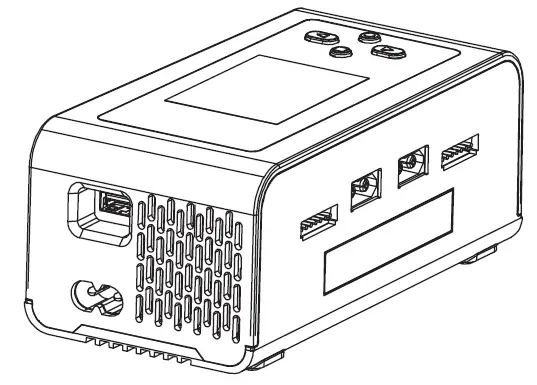
PRODUCT OVERVIEW
Product Parameters
The Charger presets the battery type and task parameters
| Cell type Assignment parameter | LiHv | LiPo | Li-lon | LiFe | NiMH |
| Rated voltage | 3.8V | 3.7V | 3.6V | 3.2V | 1.2V |
| Full charge voltage | 4.35V Adjustable range (4.1-4.4V) | 4.2V Adjustable range (4.0-4.25V) | 4.1V Adjustable range (3.9-4.15V) | 3.65V Adjustable range (3.4-3.7V) | 1.5V |
| Discharge voltage | 3.7V Adjustable range (3.6-4.15V) | 3.6V Adjustable range (3.5-4.0V) | 3.5V Adjustable range (3.4-3.9V) | 3.2V Adjustable range (2.9-3.4V) | 0.9V Adjustable range (0.3-1.3V) |
| Storage voltage | 3.85V Adjustable range (3.75-3.95V) | 3.8V Adjustable range (3.7-3.9V) | 3.7V Adjustable range (3.6-3.8V) | 3.3V Adjustable range (3.2-3.4V) | NO |
| Balancing | 3.8V Adjustable range (3.6-4.4V) | 3.8V Adjustable range (3.5-4.25V) | 3.8V Adjustable range (3.4-4.15V) | 3.7V Adjustable range (2.9-3.7V) | NO |
| ExtDischarge | YES | YES | YES | YES | YES |
| SyncCharging | 4.35V Adjustable range (4.1-4.4V) | 4.2V Adjustable range (4-4.25V) | 4.1V Adjustable range (3.9-4.15V) | 3.65V Adjustable range (3.4-3.7V) | 1.5V Adjustable range (1.3-1.5V) |
| Support serial numbers | 1-6S | 1-6S | 1-6S | 1-6S | automatic detection |
| Maximum charging current | 15A | 15A | 15A | 15A | 15A |
| Digtal Power | Target voltag:5-29V Target current:0.1-15A | ||||
Product parameter table
| LCD Display | The 2.4 inch IPS screen | Maximum Charging power | AC200W (Smart Allocation) DC 2X300W |
| Channel | 2 | Balanced Serial Number | 1-6S |
| Input Voltage | AC100-240V DC7-30V | Battery Type | LiPo/LiPo/LIHV/LiFe 1~6S; NiMH/Cd 1~16S |
| Output Voltage Range | DC 1~30V | Working Temperature | 0~65 ℃ |
| Max. Input Current | DC-30A | Storage Temperature | -20~60 ℃ |
| Charging Current | 0.1-15A *2 | DC, Input, Interface | XT60PW-M |
| Balance Current | 1.2A/Cell max *2 | Output Joggle | XT60PW-M |
| Voltage Tolerance | Standard ±10mV | Product Size | 145x76x62mm |
| Discharge Current | 0.1-3A *2 | Net Weight | Approx. 530g |
| Maximum Discharge Power | 15W *2 (Main port 6W * 2, equilibrium port 9W * 2) | ||
OPERATION DESCRIPTION
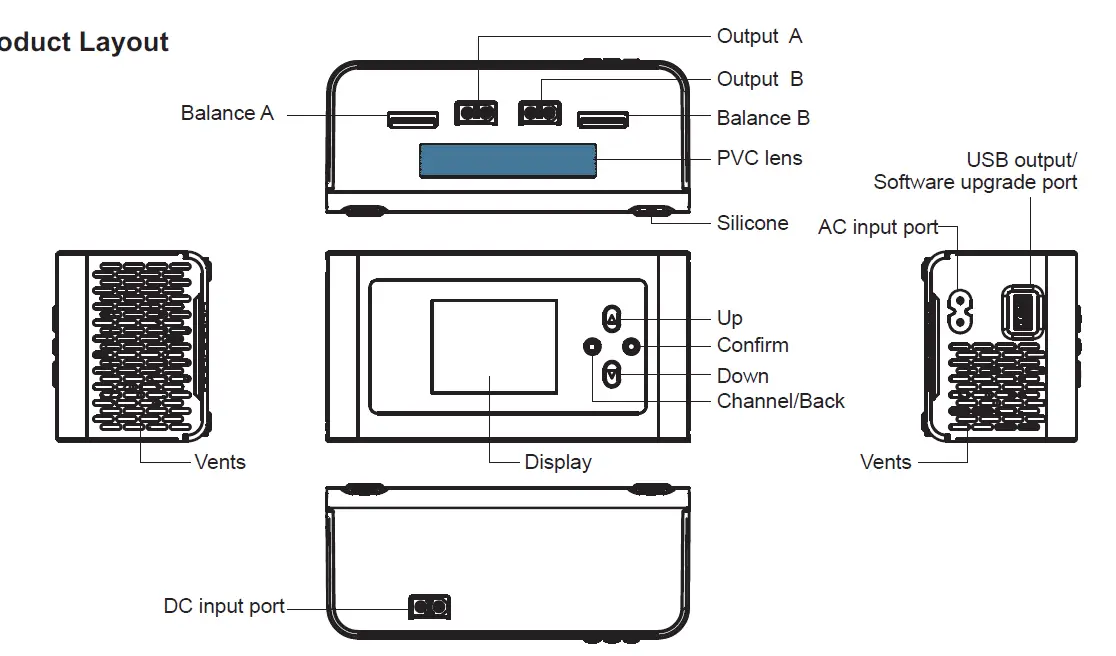
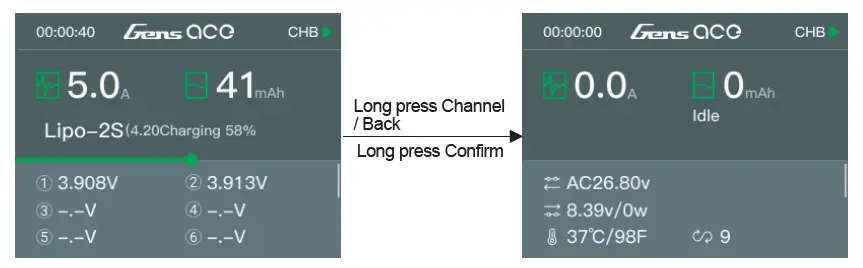
Interface Layout
Operating Procedures
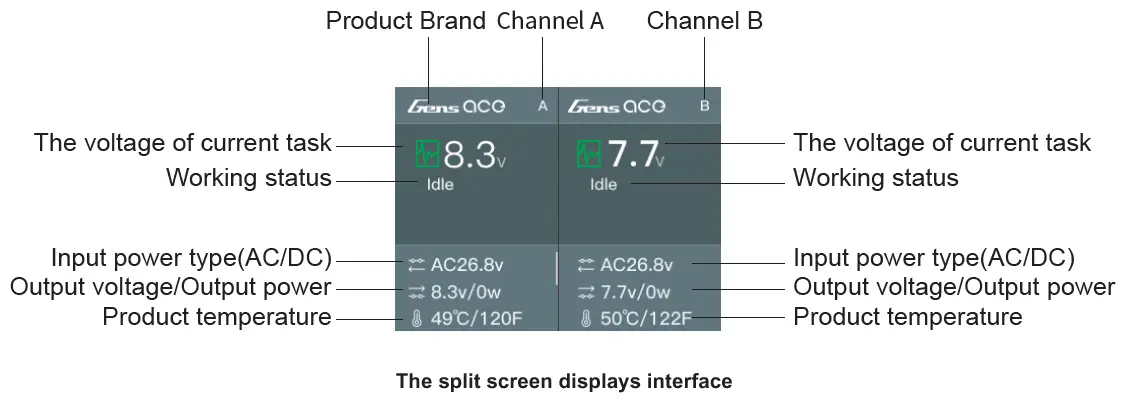
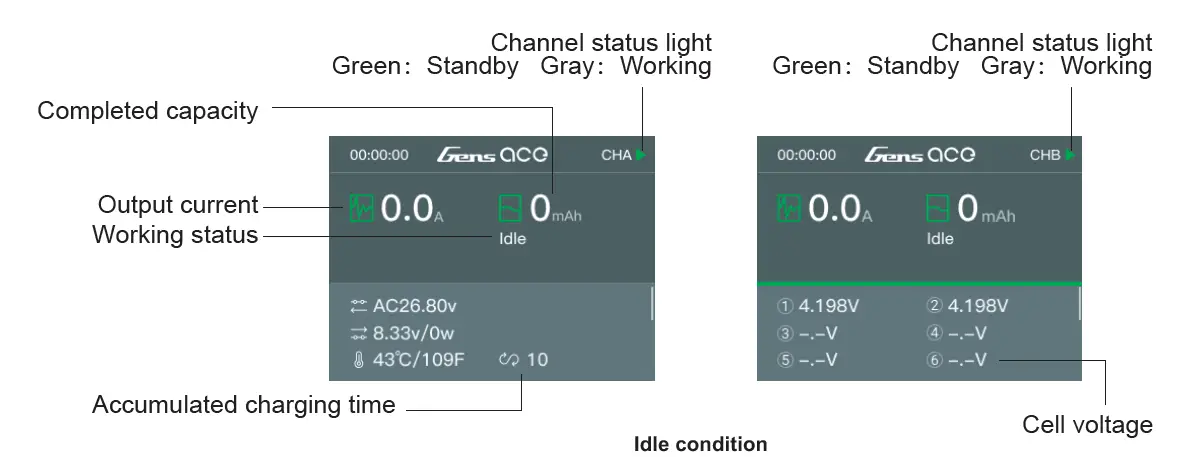
The charger connects to the power supply, enter the product LOGO interface for about 2 Second, then enter the split screen display interface, access the battery to the charger, short press the “channel / exit” button, you can switch the channel freely. After selecting the corresponding channel button, briefly press the “confirm” button to enter the function setting interface;
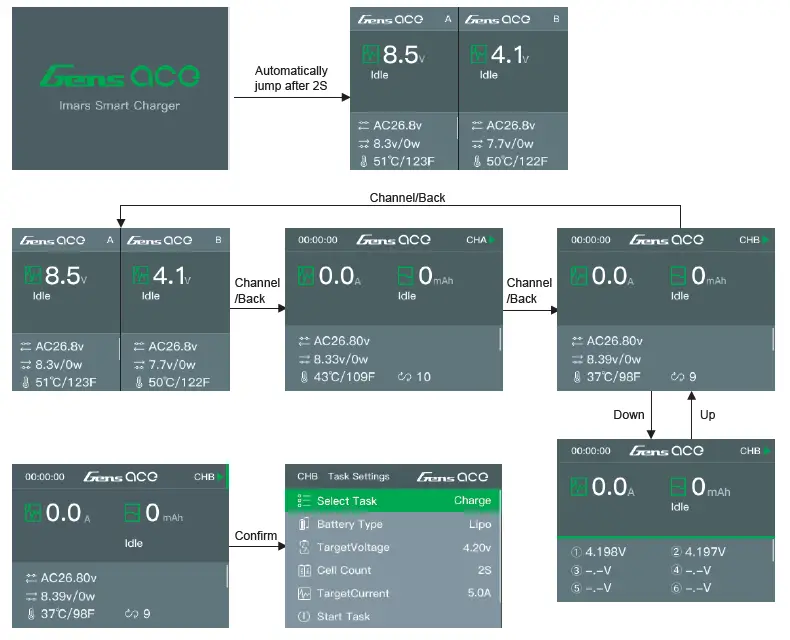
When the current task is in progress, the short click of the “Confirm” button can pop up the “Function adjustment” menu to adjust the task current;
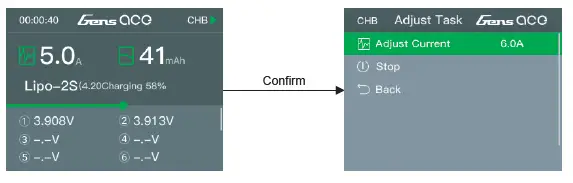
Long press the “Channel/Back” button or long press the “confirm” button to quickly end the current channel task and enter the standy interface.
Long press the “Confirm”button to enter the device setting interface
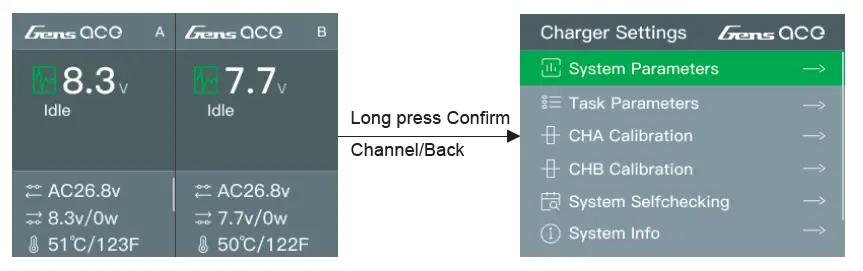 Setting Option
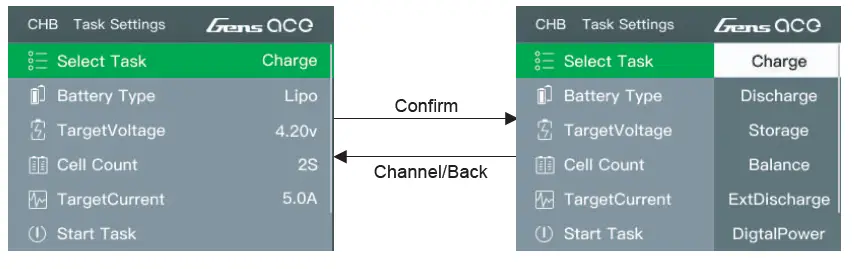
Function setting list
| Select task | Charge, Discharge, Storage, Balance, ExtDischarge, Digtal Power, SyncCharge |
| Battery type | LiHV,LiPo,Li-Ion,LiFe,NiMH |
| Battery voltage | Set the work completed voltage |
| Cell count | Set the series of battery |
| Target crrent | Set the maximum operating current |
| Start task | Start the work after the setting parameters are completed |
ExtDischarge function introduction:
First, insert the battery that needs to be discharged into the DC input port of the charger. The discharge plug of the battery must be an XT60 plug. Then insert the discharger of the external load into the corresponding channel port. If a resistor is used as a load for discharge, the resistor will generate a lot of heat. Please pay attention to safety to avoid accidents or personal injury. Work interface description:
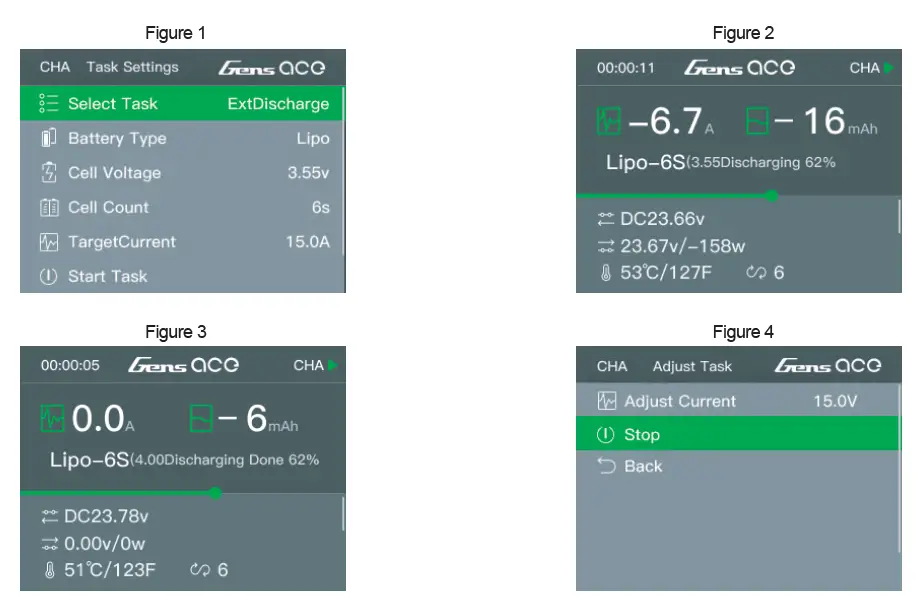
- Set up at the interface shown in Figure 1: a. Select task b. Battery Type c.Battery voltage d. Cell count e.Target current(Max current)
- After starting the task, the working interface of the product is shown in Figure 2;
- When the external discharge is working, click the “Confirm” button to enter the interface shown in Figure 4 to adjust the working current;
- After the discharge is completed, the product will enter the interface shown in Figure 3.
DigtalPower function introduction:
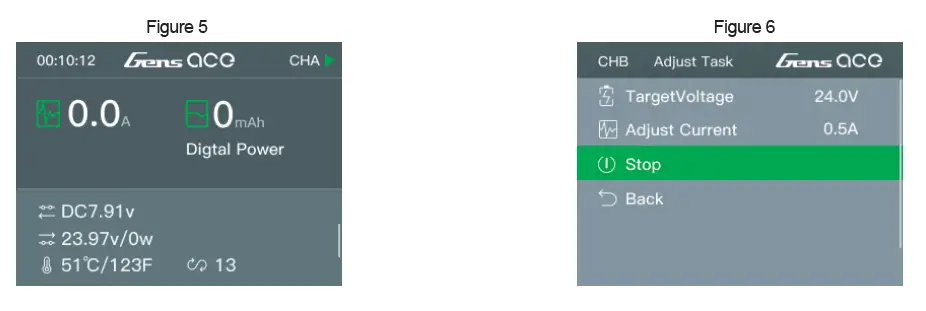
When the digital power supply function is selected, the entire charger is equivalent to an adjustable power supply, and the voltage and current of the output port can be set. The output port voltage can be set between 5-29V, and the current can be set between 0.1-15A. The output port cannot be short-circuited or overloaded, otherwise it will burn the product. Work interface description: After entering the work, the display is shown in Figure 5. Click the “Confirm” button to enter the interface shown in Figure 6 to adjust the power supply voltage and current.
SyncCharging function introduction
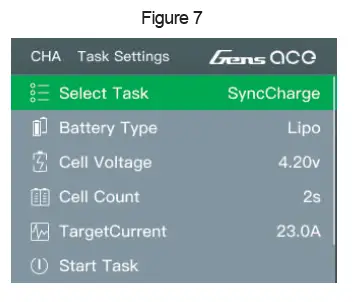
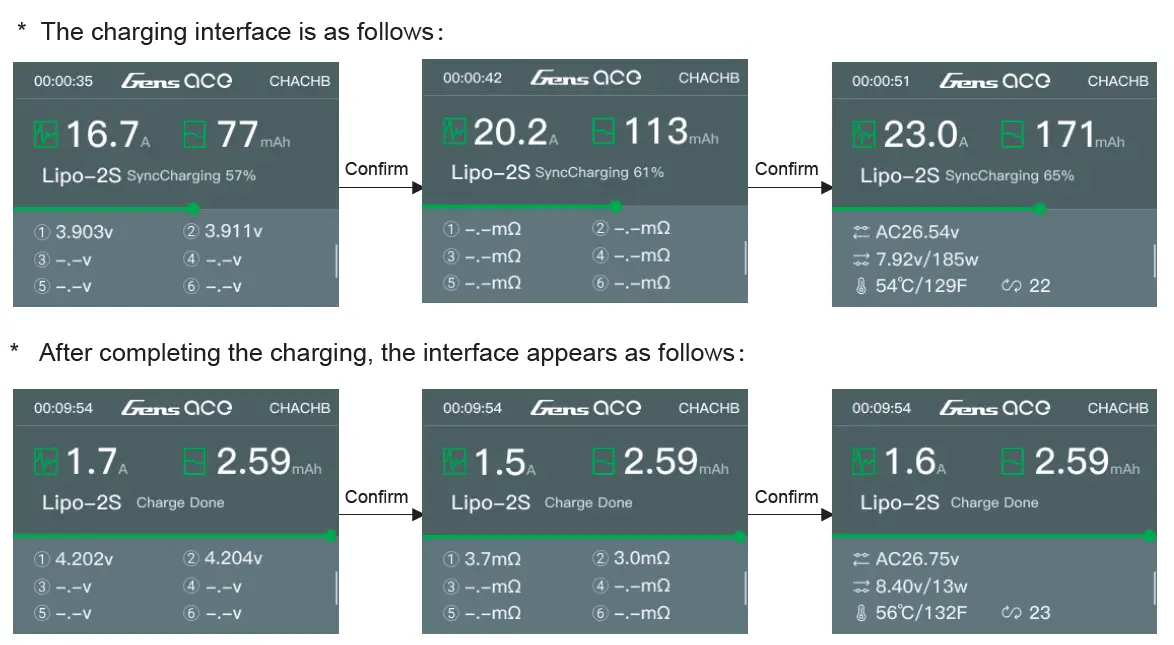
The maximum output power of SyncCharge function is 500W (The power of the external DC input power supply needs to be more than 550W@20V to meet the max power output, but must be below 700W), and the adjustable range of charging current is 0.1A-23A. When charging, it is necessary to correctly connect the battery major connector and the balance connector to the charger. Work interface description:
Set up at the interface shown in Figure 7:
- a.Select task
- b. Battery Type
- c.Battery voltage
- d. Cell count
- e.Target current(Max current)
* The charging interface is as follows:
Device Settings
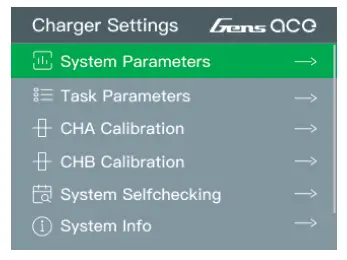
System Setting Menu Long press the “Confirm” button to enter the device setting interface
| System Parameters | Language, Max Input Power, Min Input Voltage, BackLight, Volume, Complete Voice, Factory Reset |
| Task Parameters | Safety Timer, Capacity Limit |
| CHA Calibrate | |
| CHB Calibrate | |
| System SelfChecking | Start the device self-test, Do not Connect Battery |
| System Info | Check device information |
| Return | Return to the home screen |
Firmware Upgrade
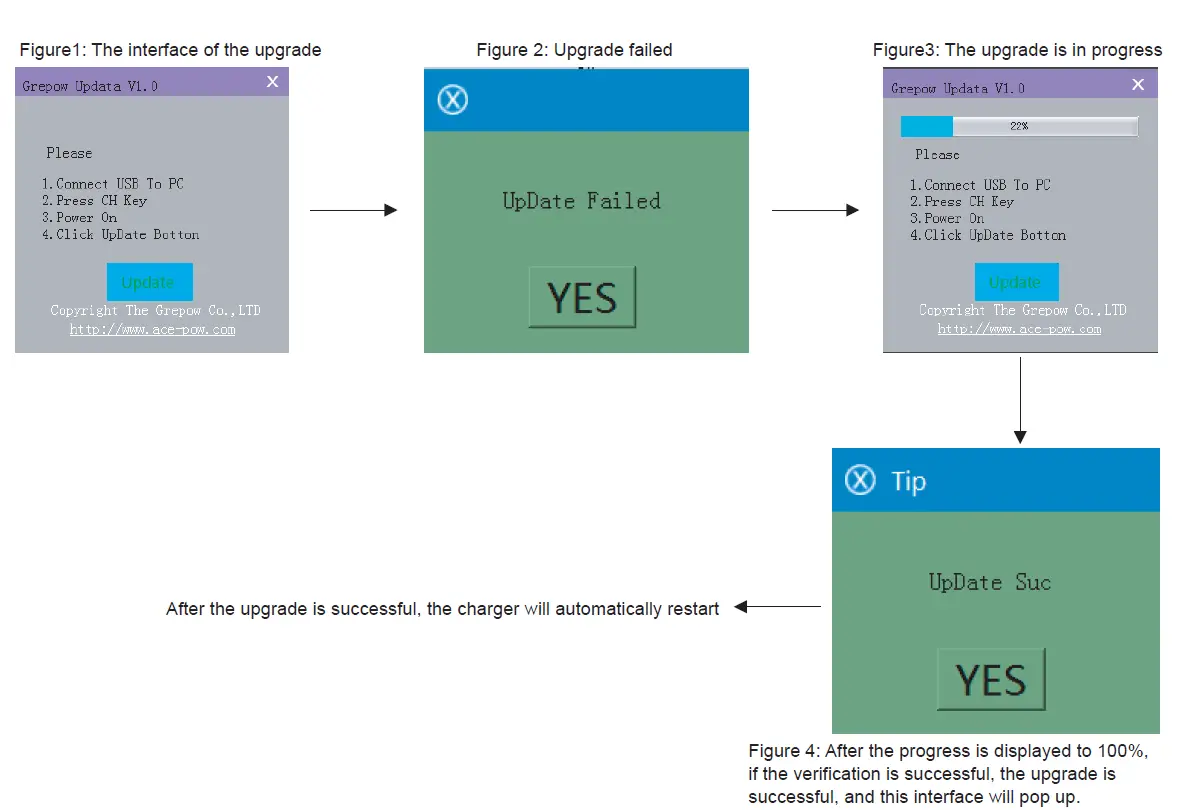
- If you need to upgrade the firmware of the product, please use the USB cable in the box to connect the charger to the computer. During the operation, you may need to connect to the Internet to automatically install the USB driver software;
- Long press the “Channel/Exit” button of the charger, then connect the charger to the power supply until the charger emits a “beep” sound, then release the button, double-click to open the upgrade software, and click “Update” as shown in Figure 1 When the upgrade starts, the charger screen goes black until the upgrade is complete. During the upgrade process, if the USB is unplugged, the power is cut off, etc., the upgrade will fail (the original version of the software has been cleared at this time). As shown in Figure 2, you can repeat steps 1 and 2 above to restart the upgrade.
CHARGER ERRORS
- Self-inspection error process: The charger will automatically execute the self-test program when it is connected to the power supply. At this time, if the battery is connected, it will cause the self-test to report an error.
- Battery connection abnormal error reporting processing: Re-plug the battery and ensure that all connections are in reliable contact. If the error message appears repeatedly, check whether the metal parts of the battery interface are oxidized and burned to affect the possibility of contact
- If the charger displays an error, follow the on-screen prompts to remedy the error. If necessary, disconnect the battery from the output and balance ports, disconnect the power supply, and restart the charger.
WARRANTY
Thank you for purchasing this product. If you have any problems with this charger. Please discontinue any further use and contact your local distributor immediately. This product is warranted to be free from manufacturer defects for 1 year from original purchase date. Please keep your original proof of purchase for warranty purposes.
What is not covered by the warranty
- Failure to use correct input voltage(100-240VAC)
- Failure to follow instruction manual
- Mechanical damage due to external causes
- Disassembly ,modification by the user(modifying original connectors, wires, components, etc.)
- Use in improper conditions(damage or rust from rain, humidity, etc.)
- Normal wear and tear surface shell, dents and scratches Gens Ace is not responsible for the abuse or misuse of this product.
- We reserve the sole right to modify this manual at any time without notice
Grepow Inc.
Tel: 925 364 7166
Fax: +1-925-364-7177
Email: [email protected]
290 Lindbergh Ave Livermore, CA 94551 United State
 The Leading Global Professional Customize Battery Manufacturer & Supplier - Grepow
 Gens ace & Tattu Lipo Battery for RC Car FPV Heli UAV Drone - Gens Ace
 Tattu & Gens ace - RC Hobby FPV Heli UAV Lipo Battery
 The Leading Global Professional Customize Battery Manufacturer