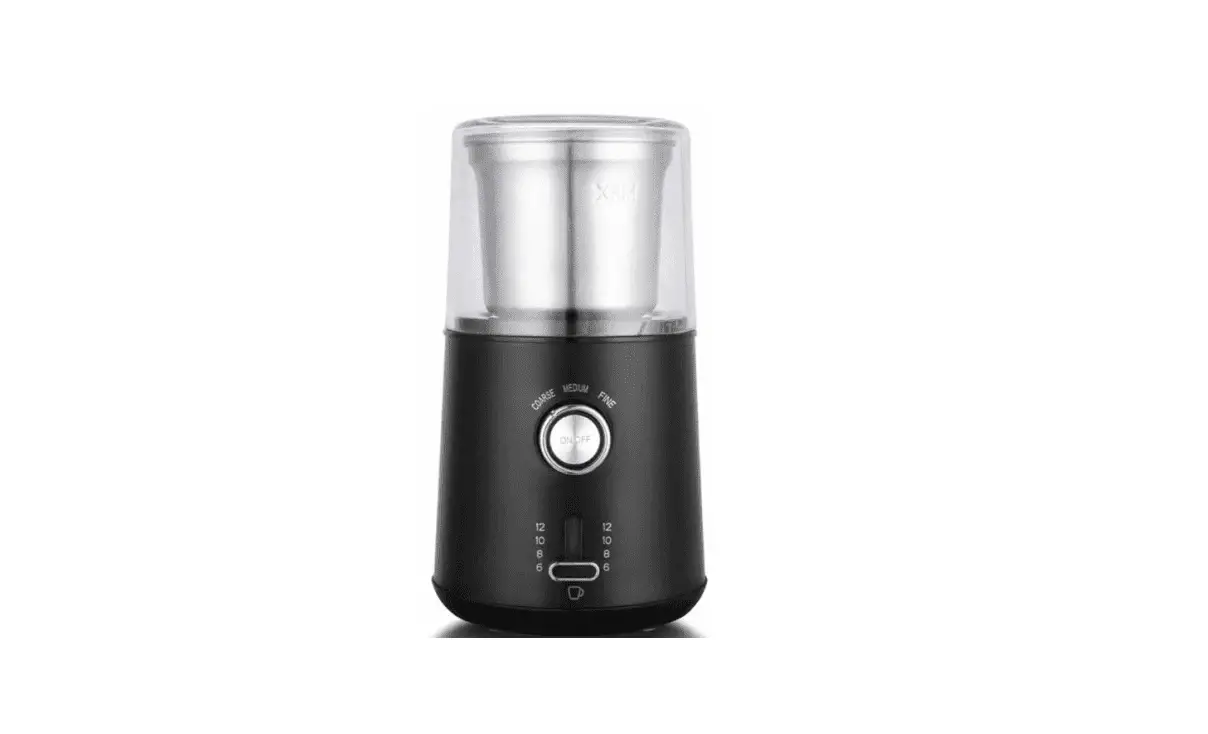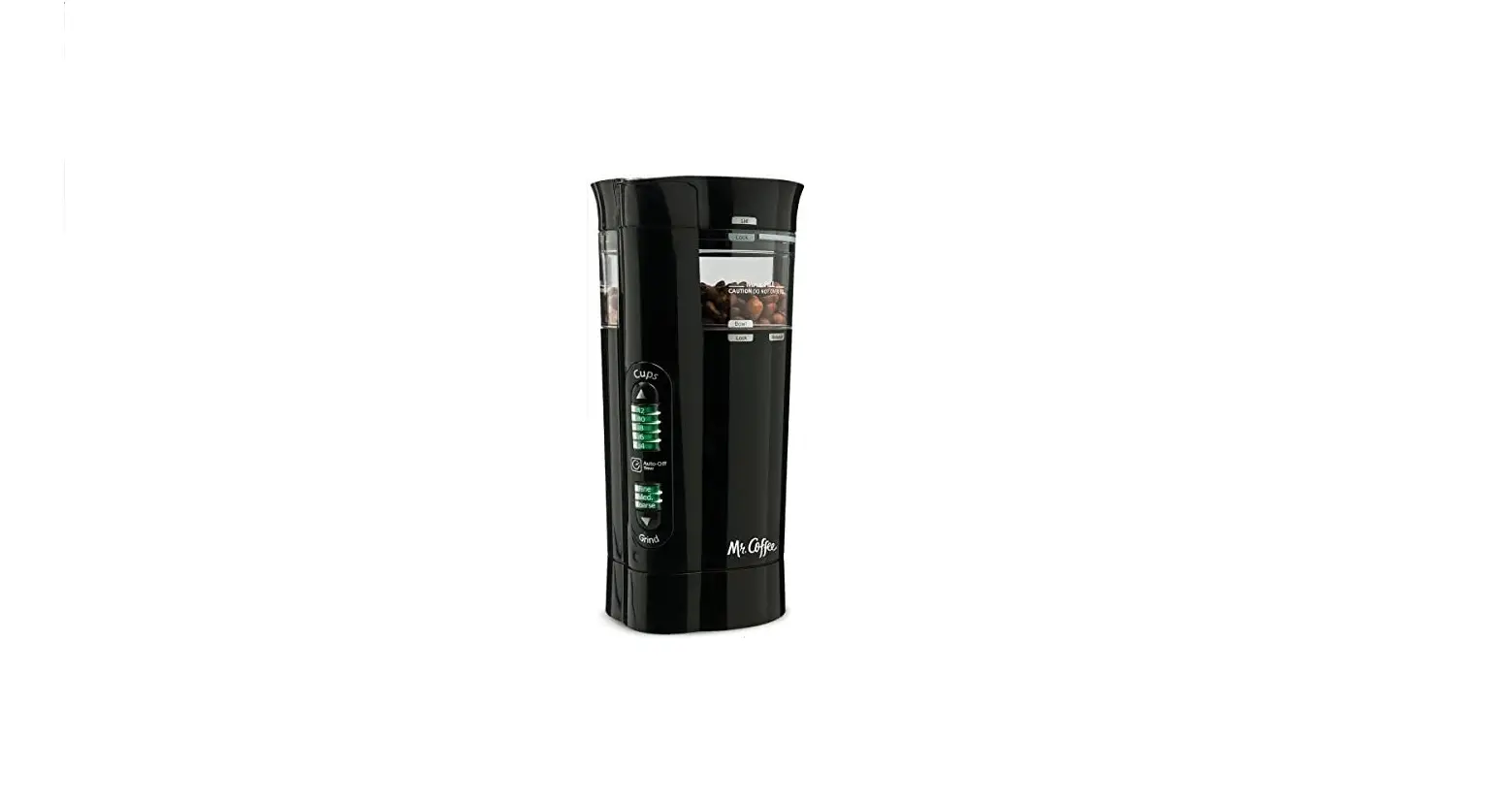

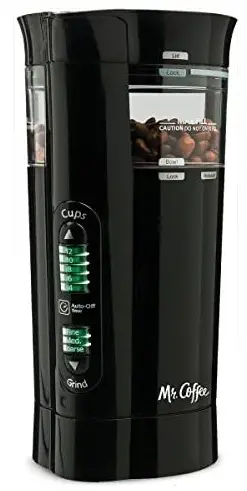
Mr. Coffee IDS77-RB 12 Cup Electric Coffee Grinder
INTRODUCTION
Thank you for selecting MR. COFFEE® IDS75/IDS77 Precision™ Coffee Grinder with Chamber Maid™ Cleaning System, a highly innovative and ergonomically designed, state-of-the-art coffee grinder. Your unit can grind whole coffee beans to brew up to 12 cups of coffee.
It has setting indicator lights, an auto-off timer, variable grind settings – from fine to coarse, a dishwasher-safe, fully removable grinding chamber that includes a no-spill, flip-open lid for easy pouring and filling, and a self-cleaning upper collar with integrated Chamber Maid™ bowl scrapers, plus discreet cord storage. Your new MR. COFFEE® Precision™ Coffee Grinder with Chamber Maid™ Cleaning System lets you enjoy the freshest cup of coffee ever.
Please read ALL of the instructions in this manual carefully before you begin to use this appliance. Proper care and maintenance will ensure a long life and a trouble-free operation. PLEASE SAVE THESE INSTRUCTIONS AND REFER TO THEM FOR CLEANING AND CARE TIPS.
IMPORTANT SAFEGUARDS
When using electrical appliances, basic safety precautions should always be followed to reduce the risk of fire, electric shock and/or injury to persons including the following:
- READ ALL INSTRUCTIONS BEFORE USING THE APPLIANCE.
- Do not touch hot surfaces. Use handles or knobs.
- To protect against electric shock, do not put the cord, plugs, or motor base in water or any other liquids.
- Close adult supervision is necessary when this appliance is used by or around children.
- Unplug from the outlet when Precision™ Coffee Grinder is not in use and before cleaning. Allow cooling before putting on or taking off parts and before cleaning the appliance.
- The use of accessory attachments that are not MR. COFFEE® brand may cause hazards or injuries.
- Do not use outdoors.
- Do not let the cord hang over the edge of the table or counter, or touch hot surfaces.
- Do not place this appliance on or near a hot gas or electric burner or in a heated oven.
- To disconnect, turn the unit off, then remove the plug from the wall outlet.
- Do not use appliance for other than its intended use.
- Use on a hard, flat-level surface only, to avoid interruption of the airflow underneath the appliance.
- Do not operate any appliance with a damaged cord or plug or after the appliance malfunctions, or has been damaged in any manner. Return this appliance only to the nearest Authorized Service Center for examination, repair, or adjustment.
- WARNING: To reduce the risk of fire or electric shock, do not remove any service covers. No user-serviceable parts inside. Repair should be done by authorized personnel only. Opening the bottom service cover will void the warranty.
SPECIAL CORD SET INSTRUCTIONS
A short power supply cord is provided to reduce the hazards resulting from a person or pet becoming entangled in or tripping over a longer cord. This appliance has a polarized plug (one blade is wider than the other). To reduce the risk of electric shock, this plug will fit in a polarized outlet only one way. If the plug does not fit fully in the outlet, reverse the plug. If it still does not fit, contact a qualified electrician. Do not modify the plug in any way.
SAVE THESE INSTRUCTIONS
PARTS DIAGRAM
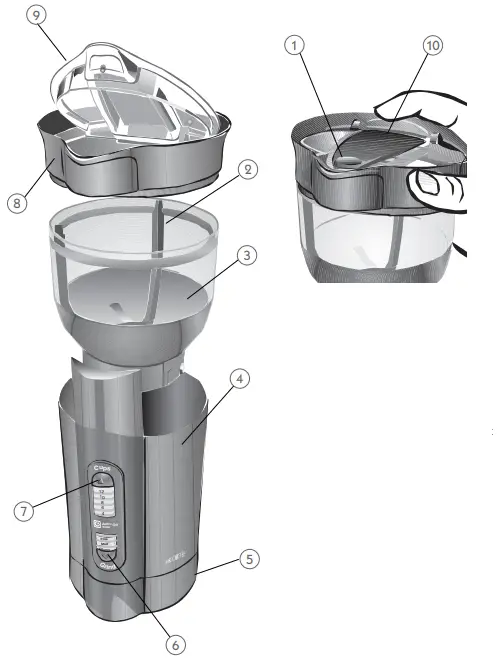
- Start Button
- Chamber Maid™ Cleaning System
- Removable grinding chamber
- Grinder base
- Cord Storage
- Grind setting button and indicator light
- Cup selector and indicator light
- Cap assembly
- Flip open lid
- Finger tab
CLEANING AND PREPARING YOUR MR. COFFEE® PRECISION™ COFFEE GRINDER FOR USE
Before using your coffee grinder for the first time, clean it according to the following instructions. Then, to ensure optimal grinder function and durability, clean it regularly following these simple steps.
- Always make sure your grinder is unplugged before cleaning and after use.
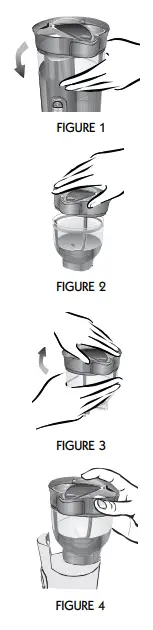
- Remove the removable grinding chamber from the base by rotating it counterclockwise until it stops, then lift it straight up. FIGURE 1
- Now rotate the cap assembly counterclockwise until it stops.
- Lift the cap assembly straight up. FIGURE 2
- Wash grinding chamber components with mild detergent and water. You may also wash them in your dishwasher’s top rack. WARNING! Do not put grinder base in the dishwasher.
- Once both components are clean, make sure they are completely dry before reinstalling them in the grinder.
- Align the arrow on the cap spout with the cap unlock symbol on the grinding chamber and insert.
- Rotate the cap assembly clockwise until the cap stops. FIGURE 3
- Reinsert the grinding chamber into the grinder base and rotate clockwise until it stops. Be sure the cap spout arrow is aligned with the cap lock symbol in front of the unit. FIGURE 4

USING YOUR MR. COFFEE® PRECISION™ COFFEE GRINDER
The MR. COFFEE® Precision™ Coffee Grinder with Chamber Maid™ Cleaning System features 3 grind settings, from fine to coarse. The coffee grinder uses specialized blades to chop the whole beans to a uniform grind, releasing the unique flavor and aroma of your favorite coffee.
To use:
- Make sure the unit is clean as per the instructions on page 5.

- Open the Flip Open Lid and fill the Grinding Chamber with fresh coffee beans, according to the Coffee Measurement Chart.
COFFEE MEASUREMENT CHART For Automatic Drip coffeemakers, use the medium grind setting, fine for espresso and coarse for French Press coffeemakers. Use more or less coffee to suit your taste. For best results, do not grind more than 12 tbsp. of coffee at a time.
 - Close the lid.
- Plug in the unit.
- Press the Grind Setting Button until the indicator light shows your preferred grind setting. FIGURE 6.

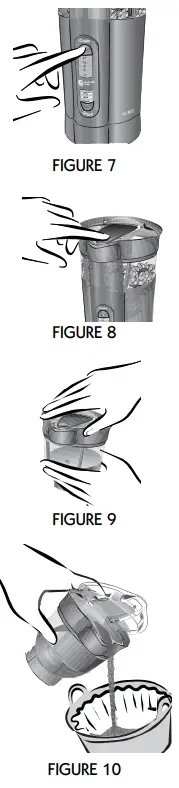
- Select the number of cups of coffee you will be brewing with the Cup Selector, from 4 to 12 cups. FIGURE 7. To obtain the best cup of coffee or espresso, grind only the amount of coffee beans you will use immediately.
- Press and hold the Start Button (FIGURE 8) until the timed grinding cycle is complete, about 15 seconds for 12 cups.
- When grinding is complete, remove the grinding chamber from the base by rotating it counterclockwise until it stops, then lift it straight up.
- Use the Chamber Maid™ feature by twisting the cap back and forth to remove the coffee grounds from the sides of the grinding chamber. FIGURE 9
- Gently lift the chamber lid using the convenient finger tab.
- Gently shake the coffee grounds into your coffee brewer. FIGURE 10
- Replace the grinding chamber in its base.
NOTE: When unplugged, the grinder will revert to its default setting to grind coffee beans for 12 cups of coffee using a medium grind.
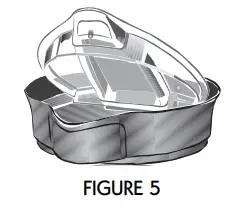
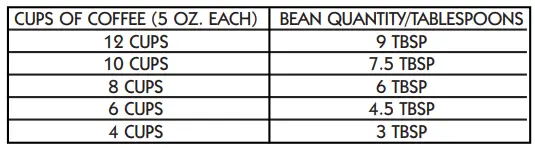 For Automatic Drip coffeemakers, use the medium grind setting, fine for espresso and coarse for French Press coffeemakers. Use more or less coffee to suit your taste. For best results, do not grind more than 12 tbsp. of coffee at a time.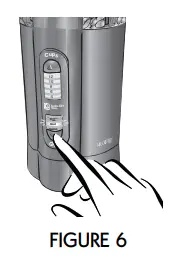
HELPFUL GRINDING HINTS
You may customize the bean quantity recommendations presented as you familiarize yourself with your new MR. COFFEE® Precision™ Coffee Grinder, but always bear in mind the following:
- Use medium grind for automatic drip coffee makers, fine for espresso, and coarse for French press.
- Using fine grounds for brewing coffee in automatic drip coffee makers might cause an overflow of the paper filter and/or the brew basket. Also, the taste of the coffee to be stronger than desired.
- Using coarse grounds for brewing coffee in an automatic drip coffee maker might cause the taste of the coffee be weaker than desired.
- To brew espresso or cappuccino, grind the number of coffee grounds recommended by your product manufacturer.
- For Mr. Coffee® Espresso products:
- Set the coffee grinder to Fine grind and 4 cups.
- Use the chart on page 6 for the recommended amount of coffee grounds.
- Using improper medium or coarse coffee grinding settings might affect the taste of the brewed espresso coffee because the optimum coffee extraction is not achieved using the coarse grind setting.
- For Mr. Coffee® Espresso products:
- If a coarser setting is required to brew coffee manually, in a percolator, or using a French press, grind the number of coffee grounds recommended by your product manufacturer using the coarse grind setting.
- Remember, you can customize the recommendations above as you discover which settings best meet your personal coffee-making preference.
FOR BEST RESULTS
- Use only coffee beans in this unit, do not grind nuts or spices.
- Do not store coffee beans in the grinding chamber.
- Do not use the finest setting when grinding coffee for your automatic drip coffeemaker. The finer grounds could cause the coffee basket to overflow.
- To avoid overheating the motor, do not grind more than 2 full 12-cup cycles without a break. Allow the motor to cool at least 5 minutes between cycles.
- Flavored coffee beans may gum up the blades and leave an oily residue on them. Be sure to clean your grinder more frequently when using flavored beans and to clean all caked-on coffee particles from your grinder during cleaning.
- Clean unit after every use for best performance.
TROUBLESHOOTING
TROUBLESHOOTING YOUR MR. COFFEE® PRECISION™ COFFEE GRINDER
Your MR. COFFEE® Precision™ Coffee Grinder with Chamber Maid™ Cleaning System has been carefully designed to give you many years of trouble-free service. In the unlikely event that your new coffee grinder does not operate satisfactorily, please review the following potential problems and try the steps recommended BEFORE you call an Authorized Sunbeam Service Center.
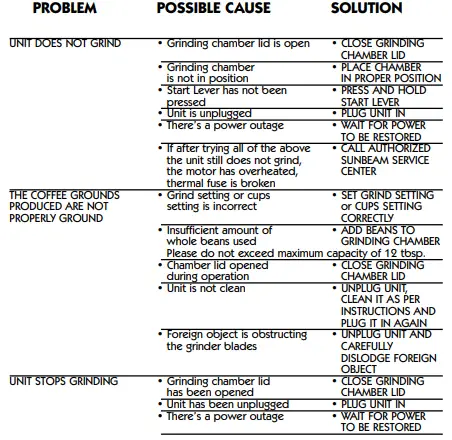
IF SERVICE IS REQUIRED
If your coffee grinder requires service, do not return it to the store where you purchased it.
All repairs must be made by Sunbeam or by an authorized MR. COFFEE® Service Center. If you live in the U.S. or Canada, please call us at the following toll-free telephone numbers to find the location of the nearest authorized service center: U.S. 1-800-MR COFFEE (1-800-672-6333)
In Canada call 1-800-667-8623
You may also visit our website at mrcoffee.com for a list of service centers. To assist us in serving you, please have the coffee grinder model number and date of purchase available when you call. The model number is found on the bottom of the coffee grinder.
We welcome your questions, comments or suggestions. In all your communications, please include your complete name, address and telephone number and a description of the problem.
Visit our website at mrcoffee.com and discover the secret to brewing the perfect cup of coffee. You will also find a rich blend of gourmet recipes, entertaining tips and the latest information on MR. COFFEE® products.
WARRANTY INFORMATION
1-YEAR LIMITED WARRANTY
Sunbeam Products, Inc, or if in Canada, Sunbeam Corporation (Canada) Limited (collectively “Sunbeam”) warrants that for a period of one year from the date of purchase, this product will be free from defects in material and workmanship. Sunbeam, at its option, will repair or replace this product or any component of the product found to be defective during the warranty period. Replacement will be made with a new or remanufactured product or component. If the product is no longer available, replacement may be made with a similar product of equal or greater value. This is your exclusive warranty from Sunbeam.
This warranty is valid for the original retail purchaser from the date of the initial retail purchase and is not transferable. Keep the original sales receipt. Proof of purchase is required to obtain warranty performance. Sunbeam dealers, service centers, or retail stores selling Sunbeam products do not have the right to alter, modify or any way change the terms and conditions of this warranty. This warranty does not cover normal wear of parts or damage resulting from any of the following: negligent use or misuse of the product, use on improper voltage or current, use contrary to the operating instructions, disassembly, repair or alteration by anyone other than Sunbeam or an authorized Sunbeam service center. Further, the warranty does not cover Acts of God, such as fire, flood, hurricanes and tornadoes.
What are the Limits on Sunbeam’s Liability?
Sunbeam shall not be liable for any incidental or consequential damages caused by the breach of any express, implied or statutory warranty or condition.
Except to the extent prohibited by applicable law, any implied warranty or condition of merchantability or fitness for a particular purpose is limited in duration to the duration of the above warranty. Sunbeam disclaims all other warranties, or conditions or representations, express, implied, statutory or otherwise. Sunbeam shall not be liable for any damages of any kind resulting from the purchase, use or misuse of, or inability to use the product including incidental, special, consequential or similar damages or loss of profits, or for damages arising from any tort, including negligence or gross negligence, or fault committed by Sunbeam, its agents or employees or for any breach of contract, fundamental or otherwise, or for any claim brought against the purchaser by any other party.
Some provinces, states or jurisdictions do not allow the exclusion or limitation of incidental or consequential damages or limitations on how long an implied warranty lasts, so the above limitations or exclusions may not apply to you.
This warranty gives you specific legal rights, and you may also have other rights that vary from province to province, state to state or jurisdiction to jurisdiction.
How to Obtain Warranty Service
In the U.S.A.
If you have any questions regarding this warranty or would like to obtain warranty service, please call 1-800- 672-6333 and a convenient service center address will be provided to you.
In Canada
If you have any questions regarding this warranty or would like to obtain warranty service, please call 1-800-667-8632 and a convenient service center address will be provided to you. In the U.S.A., this warranty is offered by Sunbeam Products, Inc., located in Boca Raton, Florida 33431. In Canada, this warranty is offered by Sunbeam Corporation (Canada) Limited, located at 5975 Falbourne Street, Mississauga, Ontario L5R 3V8. PLEASE DO NOT RETURN THIS PRODUCT TO ANY OF THESE ADDRESSES OR TO THE PLACE OF PURCHASE
FAQs
The IDS75 has a 12 cup capacity, while the IDS77 has a 14 cup capacity.
To clean your coffee grinder, remove the lid and collar from the grinding chamber. Rinse both parts with warm water. Fill the grinding chamber with hot water and add a small amount of mild detergent. Place lid on top of grinding chamber and turn upside down to allow water to rinse through grinder. After rinsing, allow parts to air dry.
It is recommended that you replace your burrs every two years for best results.
The Chamber Maid cleaning system helps keep your coffee grinder working at its best by removing coffee residue from the grinding chamber.
Contact time, extraction rate, and flow rate are the three variables that have the most impact on grind size. In a nutshell: With more surface area, coffee grinds are extracted more quickly. Grind the coffee more finely to enhance surface area.
A quality grinder will completely change your coffee experience. Your coffee will taste better and have more flavour. You’ll be able to choose the flavour and strength of your coffee. You’ll be able to make coffee that can compete with the best coffee shop.
Dry entirely before putting the lid back on. Clean the base last. Never submerge the base in water because it houses the grinder’s electrical parts. Just use a fresh, moist cloth to wipe it down.
These findings are consistent with what may be predicted: grinding the same coffee twice results in more fines, requiring a coarser grind setting to attain the same shot duration, and reducing extraction — purportedly due to more channelling. The taste test findings, however, in no way supported this impression.
Any liquid that is added to a coffee grinder can degrade the grind. On the other hand, a blender combines two or more things. Nevertheless, it doesn’t grind anything. In addition, a blender needs some liquids to function properly and deliver flawless results.
Our coffee beans are ground to increase the surface area that comes into contact with water. Additionally, depending on how fine or coarse the grind is, water might move through it more or less fast, which can alter both brew time and extraction effectiveness.
Regular usage of a high-quality grinder should extend its lifespan to 5–10 years. 500–800 pounds of coffee beans can be ground in a quality blade grinder before the blades start to go dull. Contrarily, burr grinders can grind up to 1500 pounds of coffee before needing new burrs.
If you use a blade grinder every day, you can clean it once a week. Burr grinders can be cleaned once a month. After each usage, wipe the grinder down with a cloth. This will make deep cleaning the grinder much simpler.