MINI KEYBOARD
OWNER’S MANUAL
THE FCC REGULATION WARNING (for the USA)
NOTE: This equipment has been tested and found to comply with the limits for a Class B digital device, pursuant to Part 15 of the FCC Rules. These limits are designed to provide reasonable protection against harmful interference in a residential installation. This equipment generates, uses, and can radiate radio frequency energy and, if not installed and used in accordance with the instructions, may cause harmful interference to radio communications. However, there is no guarantee that interference will not occur in a particular installation. If this equipment does cause harmful interference to radio or television reception, which can be determined by turning the equipment off and on, the user is encouraged to try to correct the interference by one or more of the following measures:
- Reorient or relocate the receiving antenna.
- Increase the separation between the equipment and receiver.
- Connect the equipment into an outlet on a circuit different from that to which the receiver is connected.
- Consult the dealer or an experienced radio/TV technician for help.
If items such as cables are included with this equipment, you must use those included items.
Unauthorized changes or modifications to this system can void the user’s authority to operate this equipment.
CAUTION
The normal function of the product may be disturbed by Strong Electro-Magnetic Interference. If so, simply reset the product to resume normal operation by following the owner’s manual. In case the function could not resume, please use the product in another location.
Keep this manual
After reading this manual, please keep it for later reference.
PRECAUTIONS
Location
Using the unit in the following locations can result in a malfunction.
- Indirect sunlight
- Locations of extreme temperature or humidity
- Excessively dusty or dirty locations
- Locations of excessive vibration
- Close to magnetic fields
Power Supply
Please connect the designated USB power adapter to an AC outlet of the correct voltage.
Do not connect it to an AC outlet of voltage other than that for which your unit is intended.
Interference with other electrical devices
Radios and televisions placed nearby may experience reception interference.
Operate this unit at a suitable distance from radios and televisions.
Care
If the exterior becomes dirty, wipe it with a clean, dry cloth. Do not use liquid cleaners such as benzene or thinner, or cleaning compounds or flammable polishes.
Handling
To avoid breakage, do not apply excessive force to the switches or controls.
Keeping foreign matter out of your equipment
Never set any container with liquid in it near this equipment. If liquid gets into the equipment, it could cause a breakdown, fire, or electrical shock.
Be careful not to let metal objects get into the equipment.
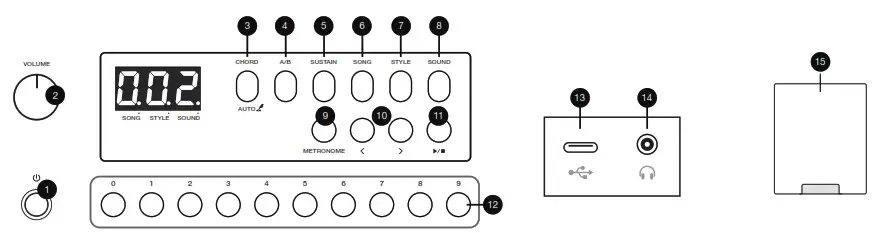
Operation
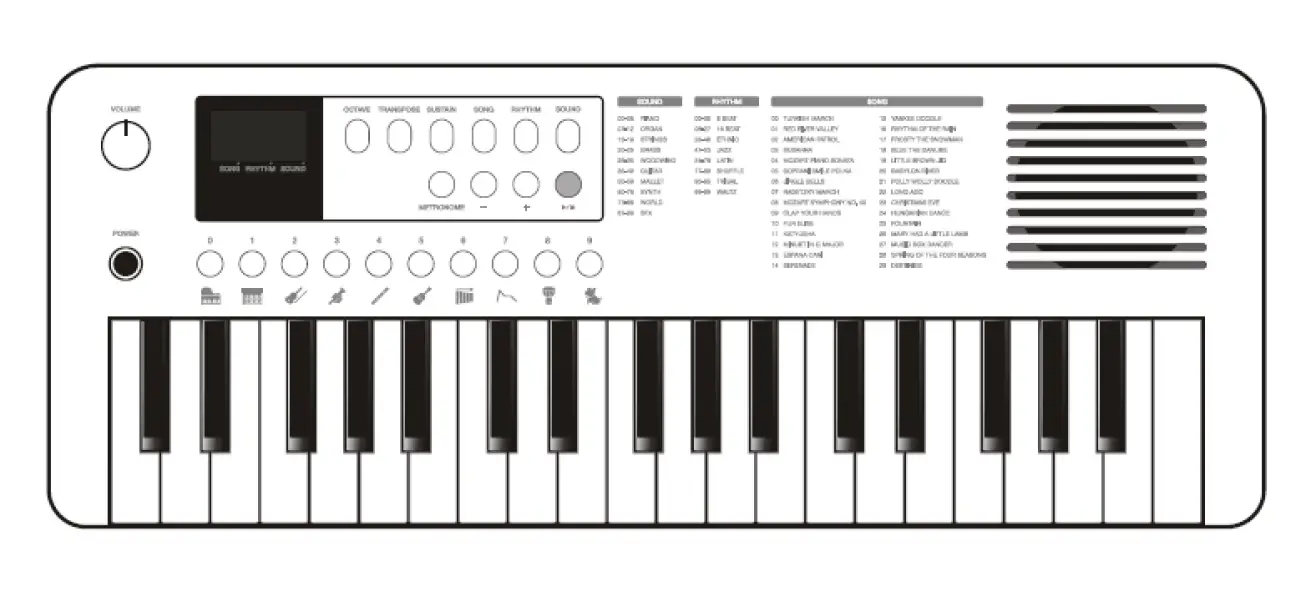
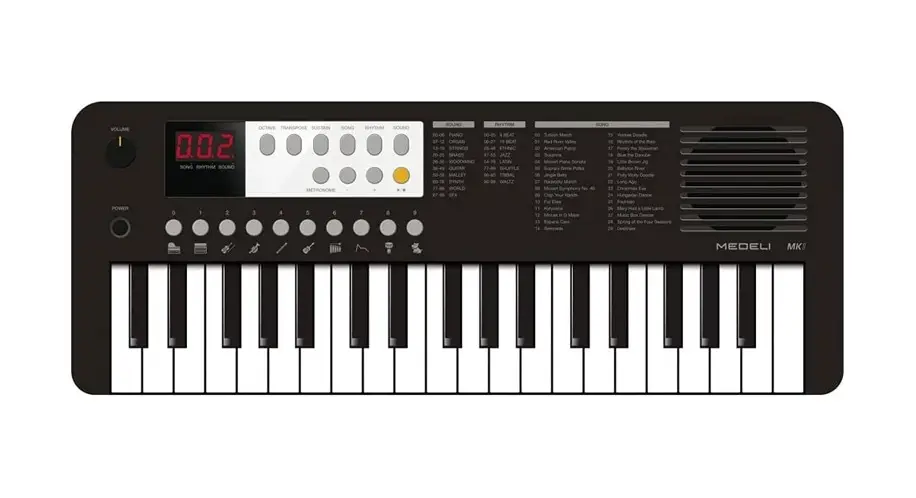
1. Press this button to turn the Power on or off.
Note: In order to save energy, the instrument will automatically shut down after 30 minutes of not being used. You can turn off the power protection by using a keyboard command.
2. Turn this knob clockwise to increase or counter-clockwise to decrease the output volume.
3. Press this button to engage music accompaniment on or off. Long-press this button to engage AutoChord, then press to exit.
4. In Style playing, switch between sections A and B.
5. Press this button to turn the sound Sustain on or off.
6. ~8. Press any of these buttons to enter the labeled model.
9. Press this button to start or stop Metronome.
10. Press either of these buttons to select the next or previous Sound, Style or Song content, depending on the currently selected mode. Combined with other buttons, these buttons also change various parameters.
11. Press this button to start or stop the current selected Style or Song.
Note: Under the default Sound mode, Style gets played back.
12. Enter a 3-digit number to access the desired content number, Sound, Style or Song depending on the currently selected mode.
Note: When inputting a 1-digit number or 2-digit, type the number and wait for a few seconds till it’s recognized by the keyboard.
Back & Bottom Panels
13. USB Power Input: For connecting a USB-C cable to power the keyboard.
14. Phones Output: For connecting headphones or earphones.
15. Battery Compartment: For installing 4 x AA batteries to power the keyboard.
SOUND Mode
This is the default mode on booting up. The display shows the currently selected Sound number. + & – buttons change the Sound to the next or previous ones. Number input buttons enter Sound numbers.
STYLE Mode
The display shows the currently selected Style number. + & – buttons change the Style to the next or previous ones. Number input buttons enter Style numbers. In this mode, you can play music with accompaniment.
CHORD
With the CHORD button engaged, you get full musical accompaniment. See Chord Detection to understand how to input chords.
Without CHORD, you get a Rhythm-only accompaniment.
AutoChord
With AutoChord engaged, you get full music accompaniment and chords change automatically. It is possible to change the chord change characters by keybed commands.
A/B Button
This button flips between two different song sections while a Style is playing.
Sync-Start
When engaged, the accompaniment can start right on your first hit on the key(s).
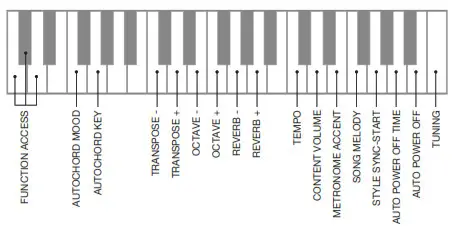
Function
Press and hold C1, C#1 and D1 keys at the same time to engage
Function parameter access. Release the keys to disengage Function.
SONG Mode
The display shows the currently selected Song number. + & – buttons change the Song to the next or previous ones. Number input buttons enter Song numbers.
Melody Cancellation
This keyboard has the ability to cancel the melody line from the onboard Songs, using a Function keybed command. This helps you practice the right hand playing.
Specifications
| Keyboard 37 Mini | Other Features Metronome, Sustain, Song Melody On/off, Style Sync-start, Octave, Transpose and Tuning adjustments |
| Display LED | Connectivity 1 x USB-C Power Input 1 x Stereo Mini Headphones Output |
| Max. Polyphony 64 | Speakers 1 x 8 cm |
| Sound 200 | Amplifier 2.5W |
| Style 120 | Power USB-C 5V or 4 x AA Batteries |
| Song 100 | Dimensions 490 x 186 x 60 mm |
| Tempo 5-320 | Weight 1.05kg |
* All specifications and appearances are subject to change without notice.
| No. | KEY | PARAMETER | RANGE | DESCRIPTION |
| 1 | C4 | TUNING | -50 ∼ +50 (cents) | Press this key and then use + & – buttons to change the keyboard tuning by a cent step. |
| 2 | B3 | AUTO POWER OFF | On, off | Press this key to engage and disengage the auto-power off alternately. |
| 3 | A3 | AUTO POWER OFF TIME | 5, 10, 15, 30, 60, 120 (mins) | Press this key to set the duration for which there is no input until the power turns off automatically. |
| 4 | G3 | STYLE SYNC-START | On, off | Press this key to turn Sync-start on and off alternately. |
| 5 | F3 | SONG MELODY | On, off | Press this key to turn the Song main melody track on and off alternately for practicing. |
| 6 | E3 | METRONOME ACCENT | 0 ∼ 16 | Press this key and then use + & – buttons to change the accent for Metronome. |
| 7 | D3 | CONTENT VOLUME | 0 ∼15 | Press this key and then use + & – buttons to adjust volume for Metronome, Style and Song. |
| 8 | C3 | TEMPO | 5 ∼320 (BPM) | Press this key and then use + & – buttons to adjust tempo for Metronome, Style and Song. |
| 9 | A2 & G2 | REVERB LEVEL | 0 ∼ 10 | Press A2 to increase or press G2 to decrease the global reverb level. |
| 10 | E2 & F2 | OCTAVE UP & DOWN | -2 ∼+2 | Press F2 to increase or press E2 to decrease the keyboard octave setting. |
| 11 | C2 & D2 | TRANSPOSE UP & DOWN | -12∼+12 | Press D2 to increase or press C2 to decrease the keyboard transposition setting. Press the two keys together to set back to default. |
| 12 | 1 | AUTO CHORD KEY | -5 (G) ∼ +6 (#F) | Press this key and then use + & – buttons to shift the AutoChord root key setting. Press the two keys together to set back to default. |
| 13 | Fl | AUTO CHORD MOOD | Normal, dark | Press this key to rotate through 2 different mood settings, the chords selected in the music change accordingly. |
Chord Detection
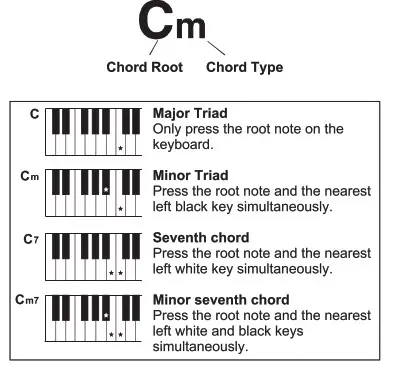
When CHORD is engaged, the keybed area from C1 to C2 becomes the chord input area. This keyboard can detect chords by one, two keys or three, offering major, minor, seventh, and minor seventh chords. Refer to the relevant image below for details.
| Sound List | |
| PIANO | |
| 1 | Acoustic Grand Piano |
| 2 | Piano Dark |
| 3 | Octave Piano |
| 4 | Octave Piano 2 |
| 5 | Piano & Choir |
| 6 | Grand Piano / W |
| 7 | Analog E.Piano |
| 8 | Bright Piano |
| 9 | Bright Piano 2 |
| 10 | Chorus Piano |
| 11 | Piano & Vibraphone |
| 12 | Electric Grand Piano |
| 13 | Electric Grand Piano / W |
| 14 | Honky-Tonk Piano |
| 15 | Honky-Tonk Dark |
| EPIANO | |
| 16 | E.Piano |
| 17 | Stereo E.Piano |
| 18 | 50’s E.Piano |
| 19 | E.Piano / W |
| 20 | E.Piano 2 / W |
| 21 | E.Piano 2 |
| 22 | E.Piano 3 |
| 23 | Detuned E.P. |
| 24 | Harpsichord |
| 25 | Harpsichord / W |
| 26 | Harpsichord Octave |
| 27 | Harpsichord Octave 2 |
| 28 | Digital E.Piano |
| 29 | Clavichord |
| 30 | Stereo Clavichord |
| CHROMATIC PERCUSSION | |
| 31 | Celesta |
| 32 | Celesta 2 |
| 33 | Reecho Bell |
| 34 | Glockenspiel |
| 35 | Children’s Song |
| 36 | Analog Bell |
| 37 | Music Box |
| 38 | Vibraphone |
| 39 | Vibraphone / W |
| 40 | Vibraphone & Bell |
| 41 | Marimba |
| 42 | Sine Marimba |
| 43 | Wood Drum |
| 44 | Rotating |
| 45 | Xylophone |
| 46 | Tubular Bells |
| 47 | Dulcimer |
| ORGAN | |
| 48 | Drawbar Organ |
| 49 | Stereo Drawbar Organ |
| 50 | Percussive Organ |
| 51 | Percussive Organ Detuned |
| 52 | Rock Organ |
| 53 | Church Organ |
| 54 | Octave Church Organ |
| 55 | Octave Church Organ 2 |
| 56 | Finale |
| 57 | Digital Organ |
| 58 | Analog Organ |
| 59 | Reed Organ |
| 60 | Stereo Reed Organ |
| ACCORDION | |
| 61 | Accordion |
| 62 | Accordion 2 |
| 63 | Stereo Accordion |
| 64 | Harmonica |
| 65 | Dark Harmonica |
| GUITAR | |
| 66 | Nylon Guitar |
| 67 | Chorus Nylon Guitar |
| 68 | Stereo Nylon Guitar |
| 69 | Steel Guitar |
| 70 | 12 String Guitar |
| 71 | Jazz. Guitar |
| 72 | Clean Guitar |
| 73 | Stereo Clean Guitar |
| 74 | Chord Clean Guitar |
| 75 | Muted Guitar |
| 76 | Overdrive Guitar |
| 77 | Distortion Guitar |
| 78 | 5Th Distortion |
| 79 | 5Th Distortion 2 |
| 80 | Analog Distortion |
| 81 | Analog Distortion Wah |
| 82 | Guitar Harmonics |
| BASS | |
| 83 | Acoustic Bass |
| 84 | Acoustic Bass 2 |
| 85 | Jazz Style |
| 86 | A.Bass & Mute G.T. |
| 87 | Finger Bass |
| 88 | Velocity Bass |
| 89 | Pick Bass |
| 90 | Mute Pick Bass |
| 91 | Fretless Bass |
| 92 | Slap Bass |
| 93 | Slap Bass 2 |
| 94 | Synth Bass |
| 95 | Synth Bass 2 |
| 96 | Synth Bass 3 |
| STRINGS & ORCHESTRAL | |
| 97 | Violin |
| 98 | Violin 2 |
| 99 | Viola |
| 100 | Cello |
| 101 | Contrabass |
| 102 | Tremolo Strings |
| 103 | Pizzicato Strings |
| 104 | Orchestral Harp |
| 105 | Timpani |
| 106 | Timpani 2 |
| 107 | Strings Ensemble |
| 108 | Strings Ensemble 2 |
| 109 | Stereo Strings |
| 110 | Synth Strings |
| 111 | Stereo Synth Strings |
| 112 | Stereo Synth Strings 2 |
| 113 | Analog String |
| 114 | Slow Strings |
| 115 | Slow Strings 2 |
| 116 | Choir Aahs |
| 117 | Stereo Aahs |
| 118 | Stereo Aahs 2 |
| 119 | Synth Voice |
| 120 | HK 80’s |
| 121 | Orchestra Hit |
| BRASS | |
| 122 | Trumpet |
| 123 | Dark Trumpet |
| 124 | Wah Trumpet |
| 125 | Trombone |
| 126 | Tuba |
| 127 | Muted Trumpet |
| 128 | Horn |
| 129 | Stereo Synth Brass |
| 130 | Brass Ensemble |
| 131 | Majestic Unison |
| 132 | Synth Brass |
| 133 | Synth Brass 2 |
| 134 | Analog Brass |
| 135 | Analog Brass 2 |
| 136 | Dynamics Analog Brass |
| 137 | Octave Synth Brass |
| WOODWIND | |
| 138 | Soprano Sax |
| 139 | Alto Sax |
| 140 | Tenor Sax |
| 141 | Baritone Sax |
| 142 | Oboe |
| 143 | English Horn |
| 144 | Bassoon |
| 145 | Clarinet |
| 146 | Piccolo |
| 147 | Flute |
| 148 | Flute 2 |
| 149 | Recorder |
| 150 | Pan Flute |
| 151 | Shakuhachi |
| 152 | Shakuhachi 2 |
| 153 | Whistle |
| 154 | Ocarina |
| SYNTH | |
| 155 | Square Lead |
| 156 | Analog Lead |
| 157 | Lead Sine |
| 158 | Analog Electric |
| 159 | Sine Solo |
| 160 | Sawtooth Lead |
| 161 | Stereo Sawtooth |
| 162 | 80’s Synth |
| 163 | Analog Signal |
| 164 | Calliope Lead |
| 165 | Grand |
| 166 | Chit’ Lead |
| 167 | Fruity Lead |
| 168 | Modulation Distortion |
| 169 | Analog Filter |
| 170 | Bass & Lead |
| 171 | New Age Pad |
| 172 | Praise |
| 173 | Dunhuang |
| 174 | Phase Shift |
| 175 | Warm Pad |
| 176 | Analog Pad |
| 177 | Electric Pad |
| 178 | Metallic Pad |
| 179 | Dream |
| 180 | Background |
| ETHNIC | |
| 181 | Sitar |
| 182 | Banjo |
| 183 | Shamisen |
| 184 | Koto |
| 185 | Kalimba |
| 186 | Bagpipe |
| 187 | Addle |
| 188 | Shania |
| SFX | |
| 189 | Reverse Cymbal |
| 190 | Breath Noise |
| 191 | Seashore |
| 192 | Bird Tweet |
| 193 | Telephone Ring |
| 194 | Helicopter |
| 195 | Applause |
| 196 | Gunshot |
| 197 | Fall |
| DRUMS | |
| 198 | Standard Drum Set |
| 199 | Rock Drum Set |
| 200 | Electronic Drum Set |
| Style list | |
| BEAT & POP | |
| 1 | 8 Beat 1 |
| 2 | 8 Beat 1-2 |
| 3 | 8 Beat2 |
| 4 | 60’s 8 Beat |
| 5 | 60’s 8 Beat-2 |
| 6 | 8 Beat Ballad |
| 7 | 8 Beat Ballad-2 |
| 8 | 8 Beat Rock |
| 9 | 8 Beat Rock-2 |
| 10 | 16 Beat |
| 11 | 16 Beat-2 |
| 12 | 16 Beat Pop |
| 13 | 16 Beat Pop-2 |
| 14 | 16 Beat Shuffle |
| 15 | 16 Beat Shuffle-2 |
| 16 | Ballad |
| 17 | Slow Ballad |
| 18 | Slow Ballad-2 |
| ROCK | |
| 19 | Rock |
| 20 | Rock-2 |
| 21 | Pop Rock |
| 22 | Pop Rock-2 |
| 23 | Fast Rock |
| 24 | Fast Rock-2 |
| 25 | Slow Rack |
| 26 | Slow Rock-2 |
| 27 | Rock & Roll |
| 28 | Rock & Roll-2 |
| 29 | Blues Boogie |
| 30 | Blues Boogie-2 |
| 31 | Blues |
| 32 | Blues-2 |
| 33 | Blues Shuffle |
| 34 | Blues Shuffle-2 |
| 35 | Rock Shuffle |
| 36 | Rock Shuffle-2 |
| 37 | Charleston |
| DANCE | |
| 38 | Disco |
| 39 | Disco-2 |
| 40 | Disco Funk |
| 41 | Disco Funk-2 |
| 42 | Dance |
| 43 | Dance-2 |
| 44 | House |
| 45 | House-2 |
| 46 | Rap |
| 47 | Rap-2 |
| 48 | Euro Beat |
| 49 | Euro Beat-2 |
| 50 | Hip Hop |
| 51 | Hip Hop-2 |
| 52 | Techno |
| 53 | Techno-2 |
| SOUL & FUNK | |
| 54 | Funky Pop |
| 55 | Funky Pop-2 |
| 56 | Jazz Funk |
| 57 | Jazz Funk-2 |
| 58 | Cool Funky |
| 59 | Soul |
| 60 | Soul Blues |
| 61 | R & B |
| 62 | 6/8 Gospel |
| 63 | 6/8 Gospel-2 |
| 64 | Pop Groove |
| JAZZ | |
| 65 | Swing |
| 66 | Swing-2 |
| 67 | Cool Jazz |
| 68 | Cool Jazz-2 |
| 69 | Pop Swinq |
| 70 | Pop Swing-2 |
| 71 | Swinq Fox |
| 72 | Swing Fox-2 |
| 73 | Biq Band |
| 74 | Big Band-2 |
| 75 | Ragtime |
| 76 | Ragtime-2 |
| 77 | Dixieland |
| 78 | Dixieland-2 |
| 79 | Quick Step |
| 80 | Quick Step-2 |
| COUNTRY | |
| 81 | Country |
| 82 | Pop Country |
| 83 | Country Rock |
| 84 | 3/4 Country |
| 85 | Country Shuffle |
| 86 | Country Quick-Step |
| LATIN | |
| 87 | Cha Cha |
| 88 | Cha Cha-2 |
| 89 | Pop Cha Cha |
| 90 | Pop Cha Cha-2 |
| 91 | Rhumba |
| 92 | Rhumba-2 |
| 93 | Pop Rhumba |
| 94 | Pop Rhumba-2 |
| 95 | Bossa Nova |
| 96 | Bossa Nova-2 |
| 97 | Tango |
| 98 | Tango-2 |
| 99 | Jazz Samba |
| 100 | Reggae |
| 101 | Reggae-2 |
| 102 | Pop Reggae |
| TRADITIONAL | |
| 103 | March |
| 104 | German March |
| 105 | 6/8 March |
| 106 | Polka |
| 107 | Pop Polka |
| 108 | Waltz |
| 109 | Slow Waltz |
| 110 | Vienna Waltz |
| 111 | Musette |
| PIANIST | |
| 112 | Piano 8 Beat |
| 113 | Piano Ballad |
| 114 | Piano Boogie |
| 115 | Piano Jazz |
| 116 | Piano Swinq |
| 117 | Piano Twist |
| 118 | Piano March |
| 119 | Piano 6/8 March |
| 120 | Piano Waltz |
| Song List | |
| CLASSIC | |
| 1 | Chanson Du Toreador |
| 2 | Meditation |
| 3 | Wiegenlied |
| 4 | A Lover’s Concerto |
| 5 | Whispering Hope |
| 6 | 0 Sole Mio |
| 7 | Auf Flugeln Des Gesanges |
| 8 | Santa Lucia |
| STANDARD | |
| 9 | Deck The Halls |
| 10 | Old Folks At Home |
| 11 | Ohl Susanna |
| 12 | Jeanie With The Light Brown Hair |
| 13 | Long Long Ago |
| 14 | My Old Kentucky Home |
| 15 | Turkey In The Straw |
| 16 | Carry Me Back To Old Virginny |
| 17 | The Blue-Bells Of Scotland |
| 18 | Jingle Bells |
| 19 | Battle Hymne Of The Republic |
| 20 | Ode To Joy |
| 21 | La Cucaracha |
| 22 | Yellow Rose Of Texas |
| 23 | The Wabash Cannon Ball |
| 24 | Dreaming Of Home And Mother |
| 25 | Ring Ring De Banjo |
| 26 | Die Forelle |
| FOLK | |
| 27 | When The Saints Go Marching In |
| 28 | Twinkle Twinkle Little Star |
| 29 | I’ve Been Working On The Railroad |
| 30 | With Games |
| 31 | Way Horn |
| 32 | Yankee Doodle |
| 33 | My Darling Clementine |
| 34 | The House Of The Rising Sun |
| 35 | El Condor Pasa |
| 36 | Wiegenlied 2 |
| 37 | Old Black Joe |
| 38 | The Quilting Party |
| 39 | The Colorado Trail |
| 40 | Shenandoah |
| 41 | Down In The Valley |
| 42 | Barbara Allen |
| 43 | Careless Love |
| 44 | Sweet Betsy From Pike |
| 45 | Jesse James |
| 46 | Skip To My Lou |
| 47 | London Bridge Is Falling Down |
| 48 | This Old Man |
| 49 | Polly Wolly Doodle |
| 50 | Sippin’ Cider Through A Straw |
| 51 | Mary Had A Little Lamb |
| 52 | Blue Bird Waltz |
| PIANO & KEYBOARD | |
| 53 | Kaiser Walzer |
| 54 | Hanon Piano Fingering 1 |
| 55 | Hanon Piano Fingering 2 |
| 56 | Hanon Piano Fingering 3 |
| 57 | Hanon Piano Fingering 4 |
| 58 | Hanon Piano Fingering 5 |
| 59 | Hanon Piano Fingering 6 |
| 60 | Hanon Piano Fingering 7 |
| 61 | Basic Tutorial Beyer Piano 8 |
| 62 | Basic Tutorial Beyer Piano 12 |
| 63 | Basic Tutorial Beyer Piano 13 |
| 64 | Basic Tutorial Beyer Piano 14 |
| 65 | Basic Tutorial Beyer Piano 15 |
| 66 | Basic Tutorial Beyer Piano 16 |
| 67 | Basic Tutorial Beyer Piano 18 |
| 68 | Basic Tutorial Beyer Piano 19 |
| 69 | Basic Tutorial Beyer Piano 20 |
| 70 | Christmas Eve |
| 71 | Beyer Eight Degrees Jump Etude |
| 72 | Old Folks At Home (Piano) |
| 73 | A Little Polish Dance |
| 74 | Larghetto |
| 75 | Minuet 2 |
| 76 | Prelude |
| 77 | Duke Ma From “The Rigoletto” |
| 78 | The Happy Farmer |
| 79 | Dance Of The Four Swans From “Swan Lake” |
| 80 | Jesus Saviour Pilot Me |
| 81 | Old Macdonald Had A Farm |
| 82 | 2-Part Invention No.13 In A Minor BWV 784 |
| 83 | Musette |
| 84 | Bourree |
| 85 | Carl Czerny 599 NO92 |
| 86 | Away In A Manger |
| 87 | Marriage Of Figaro |
| 88 | Angels We Have Heard On High |
| 89 | Waltz |
| 90 | Did You Ever See A Lassie |
| 91 | Old France |
| 92 | Santa Claus Is Coming To Town |
| 93 | Minuet 3 |
| 94 | In The Theatre |
| 95 | Alfredo And Violetta Column Tower Duet |
| 96 | Als Die ARe Mutter Mich Noch lehrte Singen |
| 97 | Menuett G Dur 3 |
| 98 | Knight |
| 99 | Gavotte |
| 100 | The Angels Singing |