Shenzhen Weikezhishang Technology
786 GPS Navigator User Manual
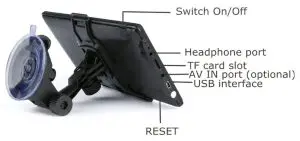
Switch On/Off
After connecting with power, the GPS navigator will be switched on automatically. After disconnecting power, there are 3 options, standby/turn off/Cancel. If you do not tap one, the GPS navigator will be turned off automatically within 10 seconds.
Headphone port
Support inserting 3.5 mm headset.
TF card slot
You can install maps files into a TF card slot to navigate. You can also install multimedia files to play. TF card supports 2gb-32GB. It is advised not to use as the maps are pre-installed in the device memory.
USB interface
Connect to a car USB charger or wall charger for charging or a Windows computer for data transfer.
Reset
If the device fails to boot or freeze, you can use a thin tip to plug into the RESET hole to restart the device.
AV IN port (optional)
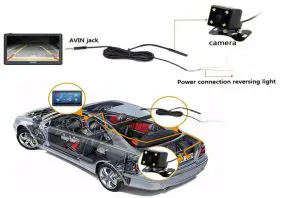
Connect a rear camera for watching your vehicle reversing view. When the vehicle is reversing, the GPS navigator will automatically switch to the rear image of the vehicle, which will help your reversing. Note: Reversing images require the installation of a reversing camera. It is recommended to install at the auto repair shop.
Reversing image installation diagram:
 | Tap to enable navigation. If the device does not boot up please check the path is correct in NaviConfig. Pathe should be \ResidentFlash|NAVI\Navi.exe or possibly\ResidentFlash|NAVI\Navi\Navi.exe  |
 | FM emission function can send your satellite navigator sound to car audio. Method: 1. Connect your satellite navigator with a car charger. 2. Adjust the car FM frequency to a frequency without the radio. 3. Tick √ “Use FM”, adjust the same frequency as the car’s, tap  to complete the pairing setting. to complete the pairing setting.If you do not use FM in the GPS device, do not tick FM. Otherwise, the device will be mute. |
 | Use the GPS navigator outdoors. Successful positioning requires at least 3 channels to turn green, for a total of 12 channels. After successful positioning, the right part will show the signal is valid. If positioning fails, please check if the default location is made in navigation. Method: Navigation->Destination>Find address, enter an address around your location. |
 | Tap to make the below setting: Volume,Backlight,Language,Date/Time,Calibrate, DeskTop, System Info,USB, Factory Reset, NaviConfig |
 | Adjust the volume from silent to maximum. Tick  enable sounds for taps. enable sounds for taps.Choose music. Tap to complete. |
 | Adjust the backlight from weak to strong. It is advised to increase the screen brightness if the display is too dark. Tap to complete. |
 | Choose a language, tap to complete. |
 | Adjust date, time,12H/24H, and time zone. Tap to complete. |
 | Make navigation path setting. Tap  , double-tap , double-tap , double-tap , double-tap , double-tap , double-tap , tap to complete. , tap to complete.Tick “Autorun navigation software on the start-up”. It is recommended not to tick. |
 | Show the information of hardware and software. |
FCC Warning Statement
Changes or modifications not expressly approved by the party responsible for compliance could void the user’s authority to operate the equipment. This equipment has been tested and found to comply with the limits for a Class B digital device, pursuant to Part 15 of the FCC Rules. These limits are designed to provide reasonable protection against harmful interference in a residential installation. This equipment generates uses and can radiate radio frequency energy and, if not installed and used in accordance with the instructions, may cause harmful interference to radio communications. However, there is no guarantee that interference will not occur in a particular installation. If this equipment does cause harmful interference to radio or television reception, which can be determined by turning the equipment off and on, the user is encouraged to try to correct the interference by one or more of the following measures:
- Reorient or relocate the receiving antenna.
- Increase the separation between the equipment and receiver.
- Connect the equipment into an outlet on a circuit different from that to which the receiver is connected.
- Consult the dealer or an experienced radio/TV technician for help.